Sponsored

Ford Officially Releases Sync 3 v3.4 Build 20282

UofMEngineer

Well-Known Member
Joined
Apr 19, 2019
Threads
1
Messages
516
Reaction score
334
Location
Michigan
Vehicle(s)
20' Escape Hybrid,18' Fusion Hybrid
Notes:
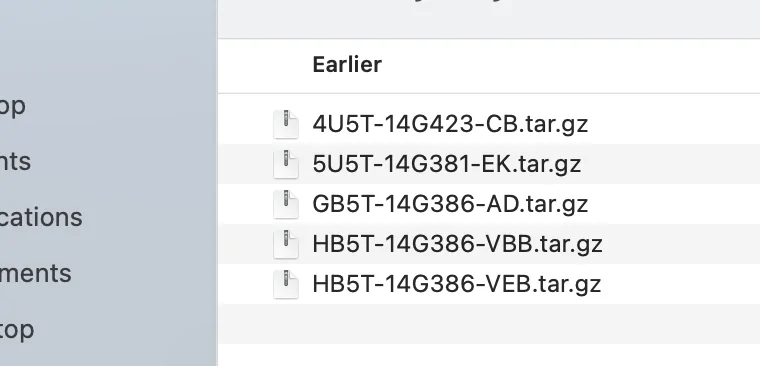
I noticed I didn’t have the ‘CM’ file as mentioned above as part of my install files, just the other 5 shown. If they are to do with the voice directions then it wouldn’t bother me as I have always muted them, but I’ll give it a try again to see if any difference.​
The -CM contains all of the data for TTS, prompts and voice commands. You don't want that to be out of sync, especially coming from something as ancient as 3.3, with the main application package. You can do what tmcolegr did and run another installer. I found a used car VIN for NA NAV that seems to pull the right files I can PM you.

Yes, it's good for putting random album art on my podcasts
I like when it decides my lesser known artists are actually someone else. I switch off Gracenotes management for my thumb drive. Main purpose of it for me is getting the artist and album phonetics in for voice commands.
 

SymChris

Well-Known Member
First Name
Chris
Joined
Apr 25, 2020
Threads
6
Messages
252
Reaction score
470
Location
Mississauga, ON, Canada
Vehicle(s)
2019 Ranger Lariat FX4 / 2017 Escape SE FWD
The -CM contains all of the data for TTS, prompts and voice commands. You don't want that to be out of sync, especially coming from something as ancient as 3.3, with the main application package. You can do what tmcolegr did and run another installer. I found a used car VIN for NA NAV that seems to pull the right files I can PM you.
Thank you! Back to work tomorrow though so probably won't be able to re-do until next Saturday when I can make sure I have the time/ability.
 

Washashore

Well-Known Member
First Name
JM
Joined
Apr 7, 2019
Threads
0
Messages
114
Reaction score
97
Location
Cape Cod, MA
Vehicle(s)
2019 SCab Lariat 4x4
The -CM contains all of the data for TTS, prompts and voice commands. You don't want that to be out of sync, especially coming from something as ancient as 3.3, with the main application package. You can do what tmcolegr did and run another installer. I found a used car VIN for NA NAV that seems to pull the right files I can PM you.


@UofMEngineer - Can you also PM me the VIN so I can obtain the -CM file? I downloaded the package for my VIN (2019 w/ Nav) and is was not included.

1609721598268.png


Thanks !

JM
 

Tra1969

Well-Known Member
Joined
Jan 30, 2018
Threads
4
Messages
198
Reaction score
280
Location
Michigan
Vehicle(s)
2022 Ford Ranger Lariat Tremor 501A and Tow
Occupation
Senior Manufacturing Supervisor
Vehicle Showcase
2
Yep, if they're both Nav, they're identical. You don't need to edit it, it'll effectively skip over the file that's already there and just update what needs it.
when I updated mine yesterday everything went well but was not sure about the file. I went back in the flash drive and the CM file is missing. Not even sure how to get it now. The 5U5T-14G391-CM.tar.gz is the only file missing from the above list. Is there a way to get the missing file and install it?


Tra1969

Well-Known Member
Joined
Jan 30, 2018
Threads
4
Messages
198
Reaction score
280
Location
Michigan
Vehicle(s)
2022 Ford Ranger Lariat Tremor 501A and Tow
Occupation
Senior Manufacturing Supervisor
Vehicle Showcase
2
when I updated mine yesterday everything went well but was not sure about the file. I went back in the flash drive and the CM file is missing. Not even sure how to get it now. The 5U5T-14G391-CM.tar.gz is the only file missing from the above list. Is there a way to get the missing file and install i
 

UofMEngineer

Well-Known Member
Joined
Apr 19, 2019
Threads
1
Messages
516
Reaction score
334
Location
Michigan
Vehicle(s)
20' Escape Hybrid,18' Fusion Hybrid
1FMCU9J90LUB09229 is one example for NA NAV. Basically, if you're missing a file or files, you can look up some used vehicle VINs for MY19/20 with the same system and pull a full package that way. Annoying, but it works.

FYI - A quick way to check if you got the new Voice file is just press the VR button. If all you get is short silence, then the beep to talk you're OK. If it still chimes, or worse, chimes and says "please say a command", you're using an old Voice pack. Gracenotes you can check from the About SYNC screen.
 
Last edited:

fordman89

Well-Known Member
First Name
Greg
Joined
Dec 23, 2018
Threads
0
Messages
56
Reaction score
99
Location
Cleveland, Ohio
Vehicle(s)
2019 Ford Ranger Lariat SuperCab, 2014 Ford Mustang GT
1FMCU9J90LUB09229 is one example for NA NAV. Basically, if you're missing a file or files, you can look up some used vehicle VINs for MY19/20 with the same system and pull a full package that way. Annoying, but it works.

FYI - A quick way to check if you got the new Voice file is just press the VR button. If all you get is short silence, then the beep to talk you're OK. If it still chimes, or worse, chimes and says "please say a command", you're using an old Voice pack. Gracenotes you can check from the About SYNC screen.
Is there a certain version of Gracenotes we should look for? Gracenotes does appear on my About SYNC screen after doing the update along with the version number. So I assume I'm good unless it's an old version. I haven't tested the voice file yet. Thanks!
 
OP
OP

tmcolegr

Well-Known Member
First Name
Todd
Joined
Dec 26, 2019
Threads
11
Messages
240
Reaction score
226
Location
Central FL
Vehicle(s)
2019 F150 Platinum 4x4 & 2019 Ranger XLT 4x4
1FMCU9J90LUB09229 is one example for NA NAV. Basically, if you're missing a file or files, you can look up some used vehicle VINs for MY19/20 with the same system and pull a full package that way. Annoying, but it works.

FYI - A quick way to check if you got the new Voice file is just press the VR button. If all you get is short silence, then the beep to talk you're OK. If it still chimes, or worse, chimes and says "please say a command", you're using an old Voice pack. Gracenotes you can check from the About SYNC screen.

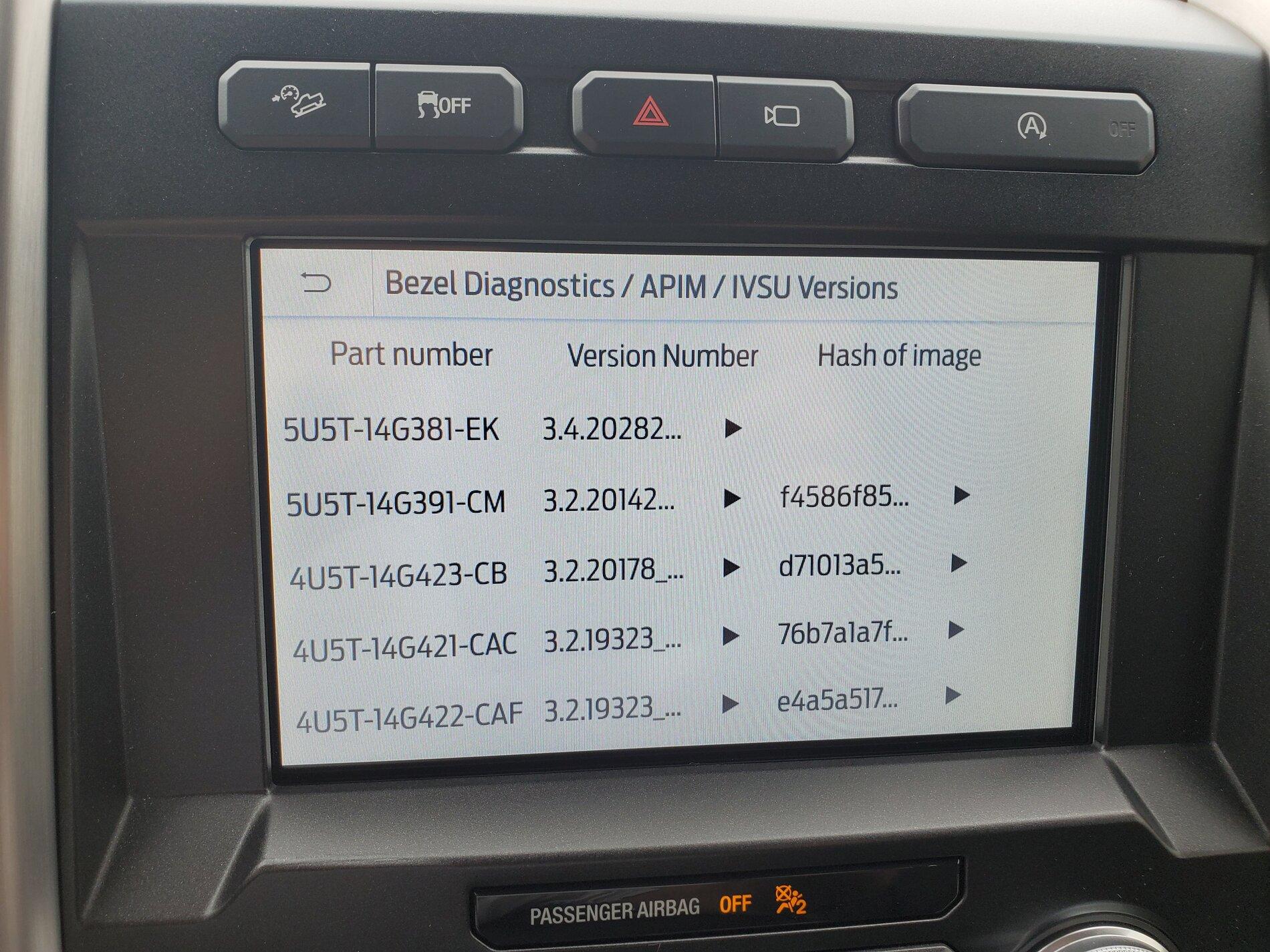
Another method is to check the IVSU files that are installed. In this case, you're looking for 5U5T-14G391-CM

For vehicles without a CD player integrated into the ACM, simultaneously press and hold the steering wheel SEEK UP and the FCIM SEEK UP buttons until the bezel diagnostics mode is entered. If supported, the Speaker Walk-Around Test begins and the display indicates each speaker as it is tested.

Once the Speaker Walk-Around Test (All Speaker Test) is complete, the following information is available:

APIM Diagnostics>IVSU Versions

20210103_125919.jpg
 

Rp930

Well-Known Member
First Name
Rick
Joined
Nov 19, 2018
Threads
20
Messages
1,794
Reaction score
3,514
Location
Denver
Vehicle(s)
‘19 Ford Ranger Lariat, ‘23 Macan,’21 Shelby GT500
Occupation
Retired
1FMCU9J90LUB09229 is one example for NA NAV. Basically, if you're missing a file or files, you can look up some used vehicle VINs for MY19/20 with the same system and pull a full package that way. Annoying, but it works.

FYI - A quick way to check if you got the new Voice file is just press the VR button. If all you get is short silence, then the beep to talk you're OK. If it still chimes, or worse, chimes and says "please say a command", you're using an old Voice pack. Gracenotes you can check from the About SYNC screen.
Did F150 install and now have CM file. Voice is much quicker. Thanks.

Took about 15 minutes.
 

Clump

Well-Known Member
First Name
Charlie
Joined
Mar 24, 2020
Threads
8
Messages
267
Reaction score
936
Location
Felton, DE
Vehicle(s)
2022 Explorer ST former 2021 Ranger Lariat Tremor
I found that formatting to NTFS and 4096k allocation size has helped this, actually almost eliminated it completely. Since most MP3s I have are between 3-4 mb, this will keep fragmentation down and make the read quicker, in theory, anyways.

You can use this PowerShell script to see your allocation size, w/your USB plugged in to your computer, of course. :)

Get-Volume | Format-List FileSystemType, AllocationUnitSize, FileSystemLabel

Took me a while to get to this. Re-formatted NTFS/4096 and re-loaded my flash drive. It still says "USB not available" on restarts and switches to Sirius.

It may be because -
I have nearly 8000 tracks, over 64GB
I'm using a 256GB flash drive

I need to check my version. Maybe 20282 will be an upgrade.

 

Dr. Zaius

Well-Known Member
First Name
Dennis
Joined
Dec 20, 2019
Threads
76
Messages
6,666
Reaction score
40,686
Location
Living The Dream
Vehicle(s)
2019 Ranger XLT FX4
I need to check my version. Maybe 20282 will be an upgrade.

It wasn't for me, as far as music goes anyway.

I set up a 16GB flash drive with 1000 tracks on it, formatted as specified.

Still slow as molasses to index and doesn't see several of my playlists, despite all playlists being formatted the same.

I'll just stick with CarPlay on my phone.
 

ryyck

Well-Known Member
Joined
Sep 1, 2019
Threads
14
Messages
403
Reaction score
512
Location
Charlotte NC
Vehicle(s)
2019 Ford Ranger
Got 'er done. I appreciate the help, guys. I reinserted the usb and drove a few minutes...the screen showed update completed and I had the missing file XML that had to be submitted to Ford. Thanks for the help.
 

txquailguy

Well-Known Member
First Name
Mark
Joined
Aug 14, 2020
Threads
20
Messages
892
Reaction score
2,241
Location
Colorado
Vehicle(s)
2019 Ford Ranger FX4 Lariat - 2020 Hyundai Kona Ultimate
Occupation
Biologist
Vehicle Showcase
1
I am so glad that I got the green light for the Sync 3.4_20282 build for my VIN today. I'm going in for service on my HVAC next week and I knew they would take me back to 3.3, especially working on the HVAC. I've still got the same problem I took it in for several months ago...not cooling on driver side now I'm not cooling or heating on the passenger side. Anyway, I'm doing the install on 20282 as we speak. After the install I will jump into FORScan and make my tweaks to get back to where I am now and add a few new things....stay tuned I'll let ya'll know how it goes....

Update.....I am so happy right now just because my Sync 3.4_20282 went so flawlessly, took about 20 minutes...and to my surprise, all my tweaks I made to my pirate version Sync 3.4_20136 came along with the new 20282 install. That would include my Ford Performance Cobra welcome screen and the fogs as corner lights....That was way too easy!
 
Last edited:

Racket

Well-Known Member
First Name
John
Joined
Jan 21, 2020
Threads
22
Messages
2,204
Reaction score
3,404
Location
Here and There
Vehicle(s)
2019 Lariat Supercrew 2WD
Occupation
Transient
Going from Sync 3.3 v 19052 now... (via USB) @6:40PM...
IMG_20210107_184434948~2.jpg


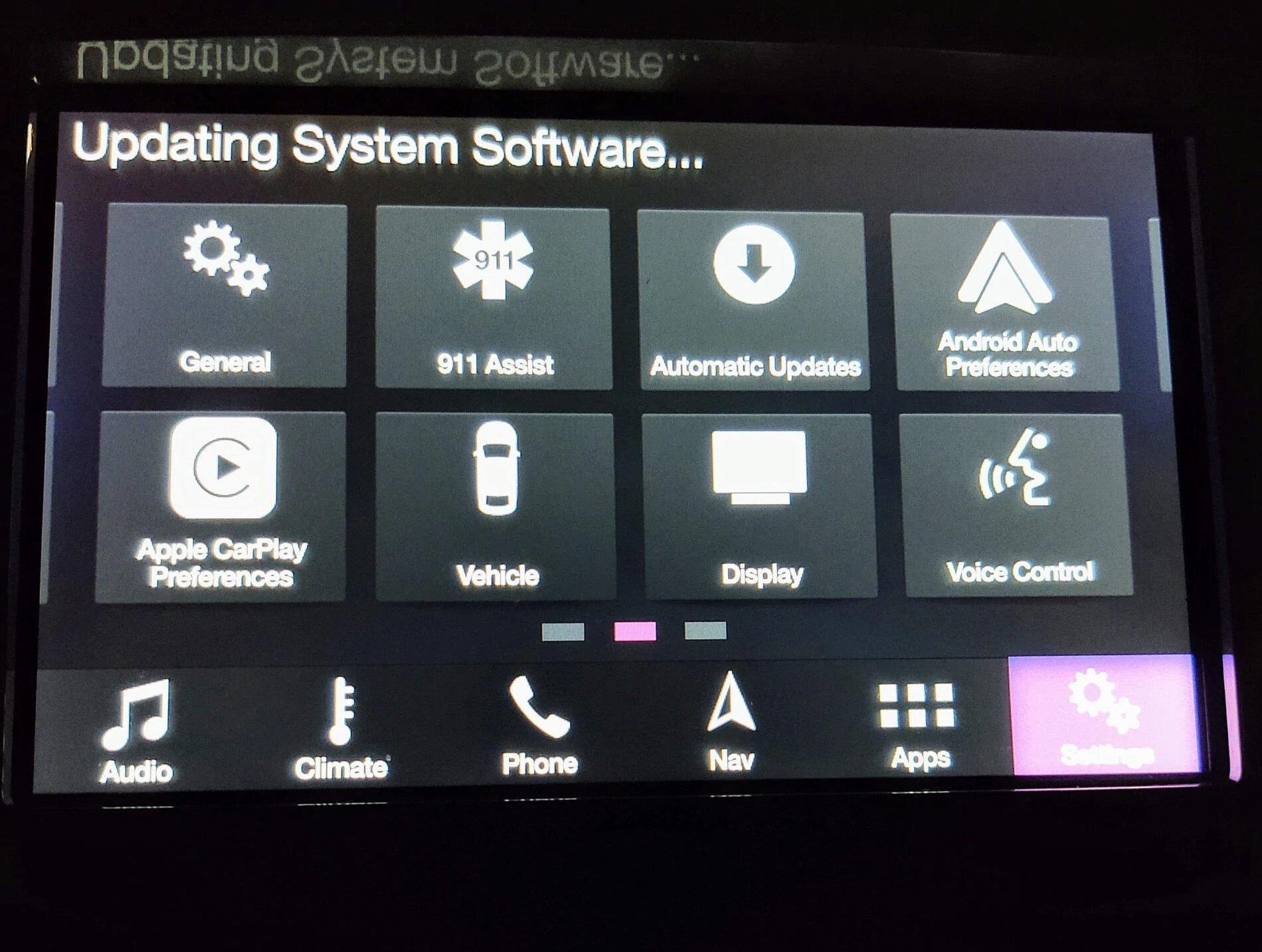
While I wait just a quick note: formated new USB to NTFS, extracted the downloaded update from my PC straight to the thumb drive. Fired up the truck and plugged in the drive, went into the menu under settings and for software updates set to automatic/check now...

Message went away at 7:05, restarted truck. Message back (still showing old software under General>About SYNC.

7:10, message 'Update complete, restarting...'

(Darkness for five minutes, so I cut off/restart truck)
USB still in and the Ford splash screen comes on so that's reassuring.. I notice the animation has changed subtly. But the display goes blank for five more minutes so I pull the USB and... one more restart and... Looks like we're good to go with the new version and it's not quite 7:20. v3.4 20282.

Thrilling.
Sponsored

 
Last edited:


Top