Sponsored

Sync 3 v3.4 Build 21020

Radioman

Well-Known Member
First Name
Kent
Joined
Sep 18, 2019
Threads
7
Messages
1,826
Reaction score
8,904
Location
Roseville, CA
Vehicle(s)
2017 Toyota Highlander, 2020 Ranger Lariat 4x2, 2025 JL Jeep Rubicon
Occupation
Retired RF Telecommications Manager
Your best bet is: [email protected] and/or the usual customer service routes.
I was just venting.

I know you have helped many people with the various upgrades and I thank you for that.

I have no faith that contacting Ford will result in any meaningful results. Sad huh?
Sponsored
 

UofMEngineer

Well-Known Member
Joined
Apr 19, 2019
Threads
1
Messages
516
Reaction score
334
Location
Michigan
Vehicle(s)
20' Escape Hybrid,18' Fusion Hybrid
I was just venting.

I know you have helped many people with the various upgrades and I thank you for that.

I have no faith that contacting Ford will result in any meaningful results. Sad huh?
No worries. That's the contact info they tell us to give out for issues like these. Working through the dealer can take ages, so perhaps these routes escalate more quickly?
 

EJH

Well-Known Member
First Name
Ed
Joined
Oct 7, 2020
Threads
17
Messages
932
Reaction score
1,832
Location
Oregon
Vehicle(s)
Subarus, 2021 Ranger
Occupation
Engineer
The same thing is now happening to me.

Ford: Are you listening????
Looks like Sync3 is still downloading other updates. I'll wait until they all update and install before escalating further. It sounds like this might resolve once all the bits are downloaded and applied. Crossing fingers anyway.
 

Radioman

Well-Known Member
First Name
Kent
Joined
Sep 18, 2019
Threads
7
Messages
1,826
Reaction score
8,904
Location
Roseville, CA
Vehicle(s)
2017 Toyota Highlander, 2020 Ranger Lariat 4x2, 2025 JL Jeep Rubicon
Occupation
Retired RF Telecommications Manager
Looks like Sync3 is still downloading other updates. I'll wait until they all update and install before escalating further. It sounds like this might resolve once all the bits are downloaded and applied. Crossing fingers anyway.
I thought so too. My Ranger has updated both the SYNC and the Nav update (SYNC by thumb drive and Nav update by OTA). For a few days, all seem well but yesterday, after stopping at a store, Sirius wouldn't work when I restarted the truck. At a stop light, I reached over and did a "soft" reboot and Sirius started working again.
 
Last edited:

Big Blue

Well-Known Member
First Name
Lee
Joined
May 5, 2020
Threads
16
Messages
3,927
Reaction score
9,352
Location
Wisconsin
Vehicle(s)
2019 Ford Ranger XLT FX4 Supercrew lighting blue
Occupation
Retired mechanical designer
Really glad I don't have factory NAV and don't listen to XM radio, with all these upgrade issues. My SYNC updated just fine in my driveway all by itself. I use AA for navigation and have 2000+ songs on my USB drive. Even use ODB2AA to display boost and temp gauges on my screen. Life is good. :like:


TORQUERULES

Well-Known Member
Joined
May 4, 2020
Threads
31
Messages
758
Reaction score
1,142
Location
US
Vehicle(s)
Ranger
Really glad I don't have factory NAV and don't listen to XM radio, with all these upgrade issues. My SYNC updated just fine in my driveway all by itself. I use AA for navigation and have 2000+ songs on my USB drive. Even use ODB2AA to display boost and temp gauges on my screen. Life is good. :like:
So what all did you need to get OBD2AA set-up?
 

Big Blue

Well-Known Member
First Name
Lee
Joined
May 5, 2020
Threads
16
Messages
3,927
Reaction score
9,352
Location
Wisconsin
Vehicle(s)
2019 Ford Ranger XLT FX4 Supercrew lighting blue
Occupation
Retired mechanical designer
So what all did you need to get OBD2AA set-up?
I have a Bluetooth ODB2 adapter and Torque Pro set up on my phone to read the guages. Then downloaded the ODB2AA app from XDA. You need to go into developer mode in AA and start the head unit server. Then when you plug in and start AA you select the OBD2AA app on the screen. The is a utube video on how to set it all up.
 

JoeC

Well-Known Member
First Name
Joe
Joined
Oct 29, 2019
Threads
2
Messages
241
Reaction score
625
Location
New England
Vehicle(s)
2019 Ranger Lariat
So what all did you need to get OBD2AA set-up?
Hummm...

What's all this 'OBD2AA' stuff got to do with updating our truck's SYNC/NAV on board software?
Are you guys hijacking this thread conversation for another subject?
Shame on you.
It's really easy to start another discussion about something else around here.

Meanwhile, I hope we'll get back to the success or not of the 'sync/nav' updates, eh?

Just sayin'
 

TORQUERULES

Well-Known Member
Joined
May 4, 2020
Threads
31
Messages
758
Reaction score
1,142
Location
US
Vehicle(s)
Ranger
I have a Bluetooth ODB2 adapter and Torque Pro set up on my phone to read the guages. Then downloaded the ODB2AA app from XDA. You need to go into developer mode in AA and start the head unit server. Then when you plug in and start AA you select the OBD2AA app on the screen. The is a utube video on how to set it all up.
Sweet! Thanks!
 

VAMike

Well-Known Member
First Name
Mike
Joined
Feb 22, 2019
Threads
1
Messages
3,390
Reaction score
4,408
Location
Virginia
Vehicle(s)
2019 Ranger Lariat SuperCab
Hummm...

What's all this 'OBD2AA' stuff got to do with updating our truck's SYNC/NAV on board software?
Are you guys hijacking this thread conversation for another subject?
Shame on you.
It's really easy to start another discussion about something else around here.
Yeah, it'll really piss people off when they read to page 22 and find this
 

Big Blue

Well-Known Member
First Name
Lee
Joined
May 5, 2020
Threads
16
Messages
3,927
Reaction score
9,352
Location
Wisconsin
Vehicle(s)
2019 Ford Ranger XLT FX4 Supercrew lighting blue
Occupation
Retired mechanical designer
Yeah, it'll really piss people off when they read to page 22 and find this
Like it hasn't happened to every thread on here. ?
 

EJH

Well-Known Member
First Name
Ed
Joined
Oct 7, 2020
Threads
17
Messages
932
Reaction score
1,832
Location
Oregon
Vehicle(s)
Subarus, 2021 Ranger
Occupation
Engineer
Looks like Sync3 is still downloading other updates. I'll wait until they all update and install before escalating further. It sounds like this might resolve once all the bits are downloaded and applied. Crossing fingers anyway.
My SXM seemed to work for about a week, around town, after all updates last week were complete. However, yesterday on a longer drive, the SXM went out when I started the truck up again. At that moment, there were no updates pending. Hopefully this gets fixed soon.


At least I learned how to do a soft reboot on the head unit, which seems to reset the SXM and get it working again, without shutting down the truck for a while.
 
Last edited:

SegFault

Well-Known Member
First Name
Jeff
Joined
Dec 24, 2020
Threads
2
Messages
75
Reaction score
266
Location
OK
Vehicle(s)
2020 Ranger Lariat
Occupation
Industrial Sanitation Engineer, Cloud DevOps
Same problem with the SXM here, happened today when I was out -- no audio output from SXM after starting the truck, but everything else (FM, AM, Bluetooth) worked fine -- and I couldn't switch back to SXM from the menu after switching to something else (Bluetooth or FM). When I checked the Sync version, it's the current 3.4 build, automatically updated yesterday afternoon.

As someone who deals with near total developer incompetence and general code fuckery on a daily basis, I absolutely knew better and really should've made sure that option was turned off, so that's on me. Trust me when I say this kind of shit is only going to get exponentially worse.

Thank you for coming to my Ted Talk.
 
Last edited:
  • Like
Reactions: EJH

EJH

Well-Known Member
First Name
Ed
Joined
Oct 7, 2020
Threads
17
Messages
932
Reaction score
1,832
Location
Oregon
Vehicle(s)
Subarus, 2021 Ranger
Occupation
Engineer
Same problem with the SXM here, happened today when I was out -- no audio output from SXM after starting the truck, but everything else (FM, AM, Bluetooth) works fine -- and I can't switch back to SXM from the menu after switching to something else (Bluetooth or FM). When I checked the Sync version, it's the current 3.4 build, automatically updated yesterday afternoon.

As someone who deals with near total developer incompetence and general code fuckery on a daily basis, I absolutely know better and really should've made sure that option was turned off, so that's on me. Trust me when I say this kind of shit is only going to get exponentially worse.

Thank you for coming to my Ted Talk.
If you haven't seen the post on how to do a soft reboot on the HU, here it is: Press and hold the volume button and next track button for 5-10 seconds. The HU will reboot and SXM should work. I have been able to do this while parked at a stop light, etc.

The rest of your editorial I agree with being in the tech industry myself.
 

TechnicallyReal

Well-Known Member
First Name
Ryan
Joined
Aug 20, 2020
Threads
6
Messages
460
Reaction score
609
Location
Eh?
Vehicle(s)
'19 Ranger Lariat 4x4
Occupation
Software Engineer / IT Admin
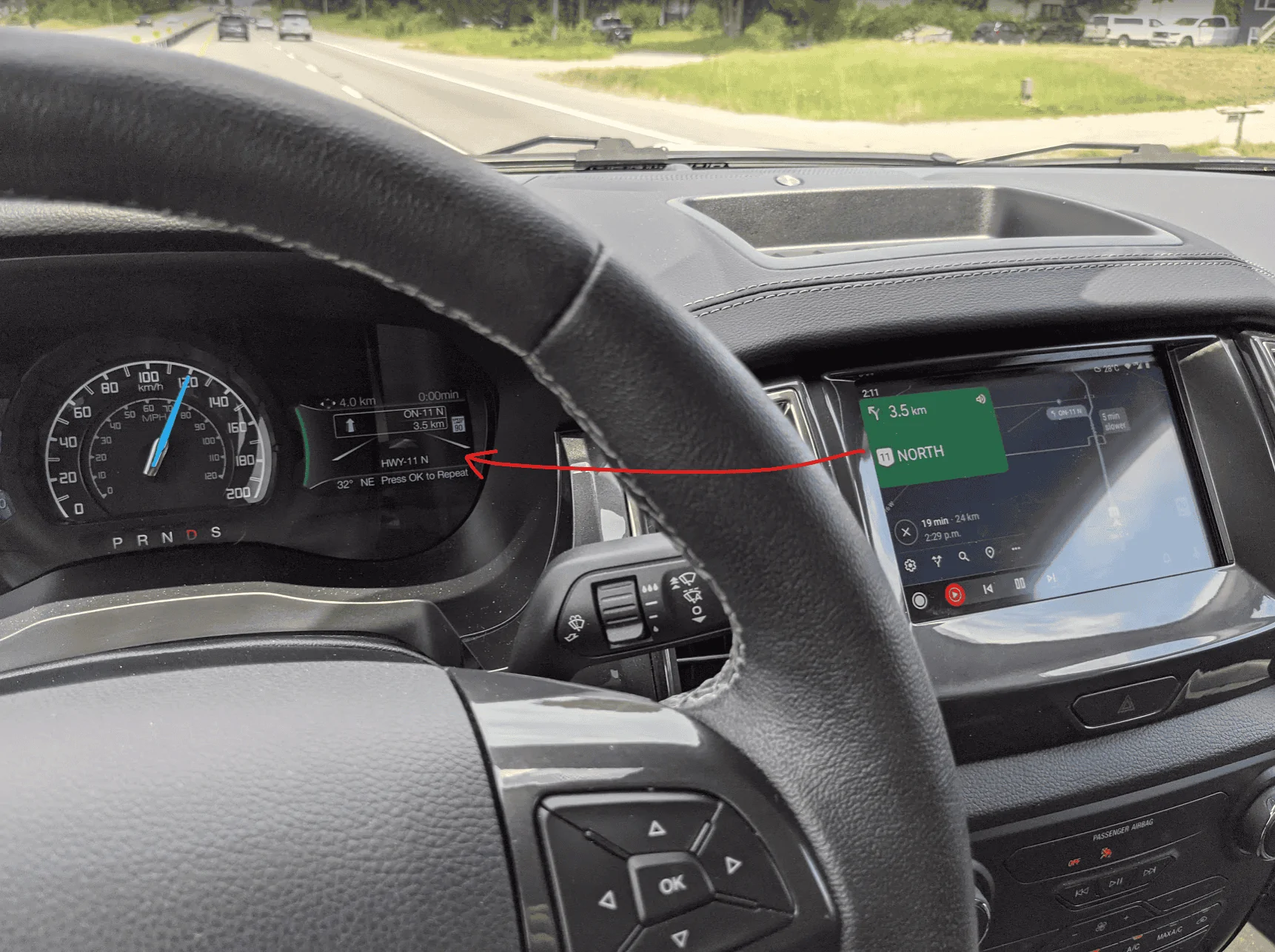
I noticed yesterday that the Navigation area of the Lariat dash cluster is getting fed info from Android Auto. Pretty sure it didn't do that when I bought the truck. Not sure which update would have changed that.

I can see the name of the road that I'm currently on, the name of the next turn, the distance to next turn, and the speed limit. The remaining trip time and distance are up top but either stick at 0 or 4 for some reason.

1622993367700.webp
Sponsored


Top