Sponsored

Ford Officially Releases Sync 3 v3.4 Build 20282

VAMike

Well-Known Member
First Name
Mike
Joined
Feb 22, 2019
Threads
1
Messages
3,390
Reaction score
4,408
Location
Virginia
Vehicle(s)
2019 Ranger Lariat SuperCab
I truly mean no offense guys, but folks here are just trying to get their damn trucks updated with the rather basic means Ford has given them.
I, also of computer engineering, agree with what you're saying....
But, does it really matter how it can be done, if the factory procedure doesn't seem to work for some folks, and they're just looking for help?
Just sayin', give them a hand if you can.
Well, that's sort of the point. If it doesn't work for someone and they aren't following the instructions, the first answer is "do it again, and follow the directions this time". If they did follow the instructions then you can move right on to stuff like "try a different USB drive". Sticking with the instructions saves everyone a bit of time.
Sponsored


txquailguy

Well-Known Member
First Name
Mark
Joined
Aug 14, 2020
Threads
20
Messages
892
Reaction score
2,241
Location
Colorado
Vehicle(s)
2019 Ford Ranger FX4 Lariat - 2020 Hyundai Kona Ultimate
Occupation
Biologist
Vehicle Showcase
1
SYNC is built on Microsoft's Windows Automotive, which in turn is based on Windows CE, so NTFS works fine, especially since the thumb drive was much larger than 8 gig.
The only reason I formatted my USB drive to exFAT is because Ford said to do that in the instructions....otherwise I would not have done that.
I want to know how many folks in here speak DOS.....lol. Back in the day if you wanted to do very much on a pc it was a command line thing...lol.
When I first started in IT in 1988 I had to learn 5 different OS in the first year for the different systems we were running just to do CAD process design for petrochemical engineering projects.

BTW...what a bummer that Apple Carplay still acts ridiculous with Amazon Music. I can't believe they can't get the bugs worked out of this Sync system...it's not like they haven't been working on it forever! Maybe it's time for some fresh programming (ers).....just sayin :curse:
 
Last edited:

alcohenusa

Well-Known Member
First Name
Alan
Joined
Jul 22, 2020
Threads
12
Messages
478
Reaction score
727
Location
CO
Vehicle(s)
2020 Ranger Lariat 4x4
Occupation
Retired
BTW...what a bummer that Apple Carplay still acts ridiculous with Amazon Music. I can't believe they can't get the bugs worked out of this Sync system...it's not like they haven't been working on it forever! Maybe it's time for some fresh programming (ers).....just sayin :curse:
Issues with Carplay and Amazon Music exist across multiple car companies. So it seems the resolution needs to come from Apple and Amazon.....
 
Last edited:

rparge

Well-Known Member
First Name
Rick
Joined
Jun 1, 2020
Threads
2
Messages
85
Reaction score
219
Location
Oregon
Vehicle(s)
2019 Lariat 4x4 Crew Cab
Occupation
Retired.
Took me a while to get to this. Re-formatted NTFS/4096 and re-loaded my flash drive. It still says "USB not available" on restarts and switches to Sirius.

It may be because -
I have nearly 8000 tracks, over 64GB
I'm using a 256GB flash drive

I need to check my version. Maybe 20282 will be an upgrade.
How far down the rabbit hole would you like to go with this?

I will say, as someone from the outside looking in, this may seem a bit convoluted, but as a computer geek, I really don't like these kinds of problems, and will keep banging on it until I get a resolution. :)

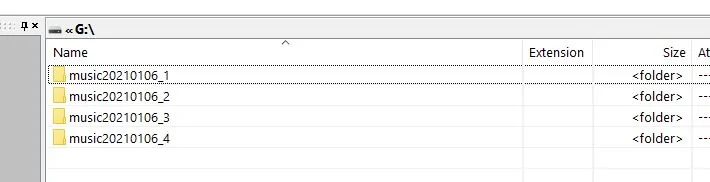
The wife's Escape with Sync 3 had the same issue, and after much pain, I came up with a PowerShell script that divides up all the MP3's into 4 sub directories, and from there, each artist has their own sub-directory. And from there, all the MP3's reside.

Such as:

1610155996900.webp


If interested, PM me, and we can delve into this in more detail.

One last (first) thing, be sure and clear out the cache, I have found that I need to do this every time I update the USB, and it takes about 15 minutes to reindex after doing this.

With the USB plugged in:

SETTINGS > MEDIA PLAYER > RESET MEDIA INDEX
 

Traneman

Well-Known Member
First Name
Jay
Joined
Aug 15, 2019
Threads
18
Messages
334
Reaction score
385
Location
Rochester MN
Vehicle(s)
2019 Ford Ranger STX 4x4
ok, I have the XL model, Non-Nav Screen.. Mypass says I am able to update. I downloaded the USB, and plugged it many times, and even for 2 hours the other day while I was out driving no update seen....

Are other XL owners able to update?


Clump

Well-Known Member
First Name
Charlie
Joined
Mar 24, 2020
Threads
8
Messages
267
Reaction score
936
Location
Felton, DE
Vehicle(s)
2022 Explorer ST former 2021 Ranger Lariat Tremor
How far down the rabbit hole would you like to go with this?

I will say, as someone from the outside looking in, this may seem a bit convoluted, but as a computer geek, I really don't like these kinds of problems, and will keep banging on it until I get a resolution. :)

The wife's Escape with Sync 3 had the same issue, and after much pain, I came up with a PowerShell script that divides up all the MP3's into 4 sub directories, and from there, each artist has their own sub-directory. And from there, all the MP3's reside.

Such as:

1610155996900.png


If interested, PM me, and we can delve into this in more detail.

One last (first) thing, be sure and clear out the cache, I have found that I need to do this every time I update the USB, and it takes about 15 minutes to reindex after doing this.

With the USB plugged in:

SETTINGS > MEDIA PLAYER > RESET MEDIA INDEX
Didn't think to re-index. Will try that next.

Do you think that having several top level folders helps?

I currently have 2 folders, each with subfolders by artist\album\song.

My id3 tags are all good.

It's really just an annoyance, but can't believe Ford let it out like this. Seems like a pretty reasonable assumption that someone listening to a flash drive might get out for a minute.
 
OP
OP

tmcolegr

Well-Known Member
First Name
Todd
Joined
Dec 26, 2019
Threads
11
Messages
240
Reaction score
226
Location
Central FL
Vehicle(s)
2019 F150 Platinum 4x4 & 2019 Ranger XLT 4x4
If you PM me with your VIN #s, I will be glad to look in Oasis for you.
 

THLONE

Well-Known Member
First Name
Thom
Joined
Feb 12, 2019
Threads
10
Messages
1,456
Reaction score
2,177
Location
Tucson,AZ
Vehicle(s)
68 Chev C-20, 2019 Ford Ranger XL 4X4
Occupation
internet wise guy
Vehicle Showcase
1
I am a XL person and I dont want the latest dowicky tv screen to watch while driving. The only irritating thing that I have is it says I am listening at too high of a volume when my phone connects. I hit OK &*()_%$#@. Kinda like the ass button. I dont intend to waste my time worrying about it, because most directions to fix tecki stuff is so tecki that only the tecki that invented the teck can understand the theck. And only the tecki people like to spout tecki stuff. Ford should just put the basics in their tv's and leave some room for the tecki owner to add apps of their own. And the screen should go blank when the truck is in gear. :giggle: ?
 

Lone Ranger

Active Member
First Name
Larry
Joined
Mar 7, 2019
Threads
1
Messages
28
Reaction score
19
Location
Warren, MI
Vehicle(s)
2019 Ford Ranger Lariat Super Crew, 2019 Ford Flex
I have a 2019 Ranger Lariat Supercrew. I just did a second Synch 3.4 update to Build 20282. I have attempted three times to get the XML log file and followed screen prompts exactly. I don't get the file and I am unable to report back to Ford I made the update. Also, gasoline prices are missing from the Fuel Price App.

Has anyone has this experience the XML Log file issue and been able to resolve it? I have read that some people are seeing missing fuel prices. Does anyone have a solution? Thank you.
 
OP
OP

tmcolegr

Well-Known Member
First Name
Todd
Joined
Dec 26, 2019
Threads
11
Messages
240
Reaction score
226
Location
Central FL
Vehicle(s)
2019 F150 Platinum 4x4 & 2019 Ranger XLT 4x4
I have a 2019 Ranger Lariat Supercrew. I just did a second Synch 3.4 update to Build 20282. I have attempted three times to get the XML log file and followed screen prompts exactly. I don't get the file and I am unable to report back to Ford I made the update. Also, gasoline prices are missing from the Fuel Price App.

Has anyone has this experience the XML Log file issue and been able to resolve it? I have read that some people are seeing missing fuel prices. Does anyone have a solution? Thank you.
I would confirm all of the updated files were installed - see post #209. There should have been 6 files in the SyncMyRide folder. Once you report back to Ford the update has been installed, the updated files will no longer be available for download for your VIN#.

If you connect to wifi and search for updates it will report back to Ford that the update has been installed.
 
Last edited:

RedlandRanger

Moderator
First Name
Rob
Joined
Nov 14, 2018
Threads
42
Messages
5,111
Reaction score
11,103
Location
Oregon
Vehicle(s)
2019 Ford Ranger Lariat FX4, 1973 Mercury Capri
Vehicle Showcase
1
I have a 2019 Ranger Lariat Supercrew. I just did a second Synch 3.4 update to Build 20282. I have attempted three times to get the XML log file and followed screen prompts exactly. I don't get the file and I am unable to report back to Ford I made the update. Also, gasoline prices are missing from the Fuel Price App.

Has anyone has this experience the XML Log file issue and been able to resolve it? I have read that some people are seeing missing fuel prices. Does anyone have a solution? Thank you.
I successfully updated to 20282 and got the XML file, uploaded it to Ford and go the "success" message after uploading it, but the Ford updater still says I need the upgrade - and it has been a week now. I think I'll give up.

Don't feel bad - you aren't alone.
 

royalnewjersey

Well-Known Member
First Name
Aaron
Joined
Nov 14, 2020
Threads
0
Messages
45
Reaction score
39
Location
San Jose, California
Vehicle(s)
2019 Ford Ranger XLT
Occupation
Marketing
I have a 2019 Ranger Lariat Supercrew. I just did a second Synch 3.4 update to Build 20282. I have attempted three times to get the XML log file and followed screen prompts exactly. I don't get the file and I am unable to report back to Ford I made the update. Also, gasoline prices are missing from the Fuel Price App.

Has anyone has this experience the XML Log file issue and been able to resolve it? I have read that some people are seeing missing fuel prices. Does anyone have a solution? Thank you.
I have a 2019 XLT Supercrew. I also updated to 3.4 build 20282 and also did NOT get the XML file. I tried unplugging the USB drive multiple times, restarting the truck, leaving the USB drive in for a long time, nothing worked. Every time the truck just re-ran the installation, I followed the prompts, system said the process was successful, I cycled the ignition, no XML file. I even contacted customer support who basically told me "the truck will send an update to Ford's system over-the-air without you needing to update the XML on the website manually". (See my post #163).

However, after several weeks and many miles of driving, the Ford owner website still has not updated, and still says I have an update available. At this point I don't know what can be done. And Ford can't force their system on their end. so... ?‍♂

I figure by the time there's another Sync update for our trucks it will be years down the road (if ever). So I'm not overly worried about it now.
 
Last edited:

ryyck

Well-Known Member
Joined
Sep 1, 2019
Threads
14
Messages
403
Reaction score
512
Location
Charlotte NC
Vehicle(s)
2019 Ford Ranger
I have a 2019 XLT Supercrew. I also updated to 3.4 build 20282 and also did NOT get the XML file. I tried unplugging the USB drive multiple times, restarting the truck, leaving the USB drive in for a long time, nothing worked. Every time the truck just re-ran the installation, I followed the prompts, system said the process was successful, I cycled the ignition, no XML file. I even contacted customer support who basically told me "the truck will send an update to Ford's system over-the-air without you needing to update the XML on the website manually". (See my post #163).

However, after several weeks and many miles of driving, the Ford owner website still has not updated, and still says I have an update available. At least point I don't know what can be done. And Ford can't force their system on their end. so... ?‍♂

I figure by the time there's another Sync update for our trucks it will be years down the road (if ever). So I'm not overly worried about it now.
And you know what....who cares what Ford knows. My file failed the first time I updated...I gave it a second and last throw. The failure is on Ford. The truck works and I can get to the store. I'm happy.
Sponsored


Top