Sponsored

Livernois Tuning released

AzScorpion

Moderator
First Name
Dave
Joined
Jul 25, 2019
Threads
342
Messages
27,112
Reaction score
137,224
Location
Back Home In AZ!
Vehicle(s)
2023 Ford Ranger Tremor
Occupation
Retired...Full Time Slacker
Got mine today and sent the stock tune in this afternoon. Why do fun things always get delivered on Friday?!
Worse is when it's a long holiday weekend! I've had that happen many times where I'm waiting for a package and it arrives at the Phoenix UPS hub late Friday and it's a 3 day weekend. ? One good thing is Livernois does work Saturdays and have been working late to get everyone taken care of. Hopefully you should have it early next week. It's worth he wait.
 

CO2Ranger

Well-Known Member
Joined
Apr 27, 2020
Threads
34
Messages
1,096
Reaction score
2,100
Location
Colorado
Vehicle(s)
2021 JLURD / Former: 2021 Ranger Lariat FX4
Have the Livernois tuner for sale in the Colorado Member Marketplace.

Please read full post for details.

Gonna miss this truck, especially with the tune!
 
  • Like
Reactions: Doc

toddyfunk

Well-Known Member
First Name
Todd
Joined
Aug 28, 2019
Threads
0
Messages
51
Reaction score
110
Location
Denver, CO USA
Vehicle(s)
2022 Lariat Ranger Tremor, Tech 501a, Tow
Occupation
IT Management
Ok I guess @Livernois Motorsports Anthony and the tuning gurus were looking out for me today! I just got the email that my tunes are ready! ??
Gotta say the service being talked about in this thread is spot on! Not even 24 hours after sending my stock file! I'll followup tomorrow with my first impressions...


Mustang2Ranger

Well-Known Member
First Name
Garrett
Joined
Mar 20, 2019
Threads
7
Messages
696
Reaction score
1,141
Location
Southern California
Vehicle(s)
19 Ranger Lariat,06 Escape Hybrid,01 Sienna,06 TSX
@Livernois Motorsports

What do you guys have to say about splash blending a gallon of E85 in a tank of 91 (CA E10) to avoid knock? Especially in hotter weather. 18.9 gal tank

Recommend? Stay away? Indifferent?

Would like to hear your thoughts ?

Edit: @Livernois Motorsports also thoughts on Boostane and Torco Accelerator please
 
Last edited:

P. A. Schilke

Well-Known Member
First Name
Phil
Joined
Apr 3, 2019
Threads
149
Messages
7,085
Reaction score
37,244
Location
GV Arizona
Vehicle(s)
2019 Ranger FX4 Lariat 4x4, 2020 Lincoln Nautilus, 2005 Alfa Motorhome
Occupation
Engineer Retired
Vehicle Showcase
1
@Livernois Motorsports

What do you guys have to say about splash blending a gallon of E85 in a tank of 91 (CA E10) to avoid knock? Especially in hotter weather. 18.9 gal tank

Recommend? Stay away? Indifferent?

Would like to hear your thoughts ?
Hi Garrett,

Likely not much affect even if the initial fill was 17.9. Why bother with the effort? Let the motor figure out what octane you are running. I use the term "picking the fly shit out of the pepper". At the drag strip...maybe a slight help...quantifiable...not likely...

Best,
Phil Schilke
Ranger Vehicle Engineering
Ford Motor Co. Retired
 

commbubba19

Well-Known Member
Joined
Nov 18, 2019
Threads
14
Messages
112
Reaction score
167
Location
Omaha
Vehicle(s)
2020 Ranger XLT FX4 - Gots mods
Occupation
Network Engineer
I wanted to ask if the standard soft shift 91-93 tune adapted to anything in tow haul mode?

i know a lot of truck tuners provide dedicated tow mode tunes for turbo charged applications where a performance tune would not do well.
 
  • Like
Reactions: Doc

landiscarrier

Well-Known Member
First Name
Landis
Joined
Jun 2, 2020
Threads
19
Messages
966
Reaction score
2,516
Location
Pocono Mtns Pa
Vehicle(s)
2025 Ranger Raptor
Occupation
Sales
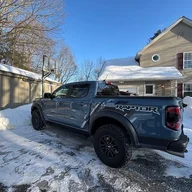
heres My unleashed tune..No mods

BC34FC68-D419-4EDC-BCD6-334476004E18.jpeg
I know it's a Livernois thread but Unleashed makes an awesome tune! I'd put it up against anyones for drivability and power.
 
  • Like
Reactions: Doc

Doc

Well-Known Member
First Name
Doc
Joined
Dec 24, 2018
Threads
94
Messages
5,845
Reaction score
23,545
Location
Live oak fla
Vehicle(s)
2026 5.0 Mustang GT, 2024 Ranger STX
Occupation
Retired
I know it's a Livernois thread but Unleashed makes an awesome tune! I'd put it up against anyones for drivability and power.
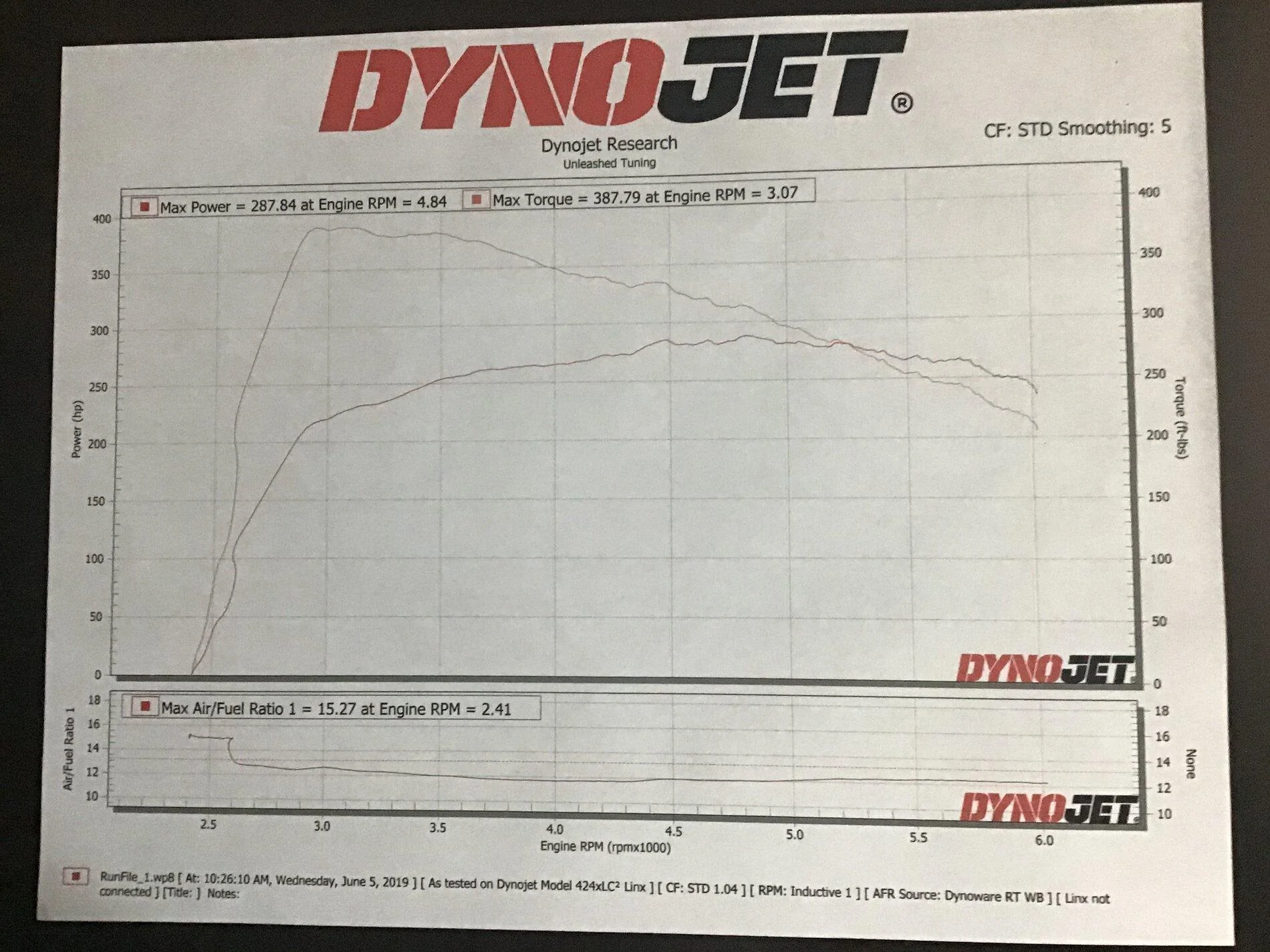
Will get a better Dyno when it’s cooler..this Dyno had a 110 degree temperature heat index..that’s why horsepower is reading is off...
but nothing wrong with Livernoise ..they been around for a long time...I just like Torrie’s tune on the 2.3 turbo ..he has a lot of experience with that motor ..
Regards
Doc
 

R_B

Well-Known Member
First Name
Robert
Joined
Aug 23, 2020
Threads
4
Messages
70
Reaction score
213
Location
Southern Nevada
Vehicle(s)
2019 Ford Ranger XLT 4WD
Occupation
Retired
TLDR If you have errors installing Livernois tuner software & Xfinity-Comcast router, this might help. Otherwise, skip to next post.

Big shout out to Anthony for helping with the installation of the MyCalibrator software.

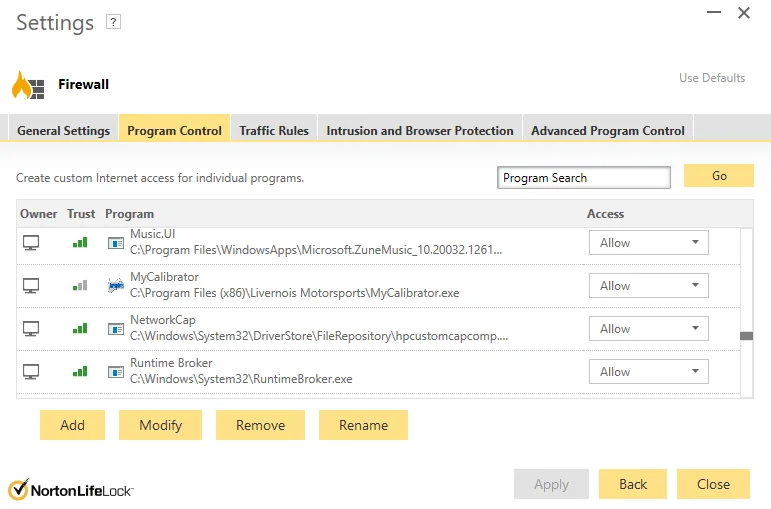
Great customer support! He remote connected to transfer the files since the software was being blocked. We did not find anything in the virus scanner or Windows 10 blocking it. Norton Security Online Software listed the software as Trusted.

I was getting a couple error messages when installing the software.

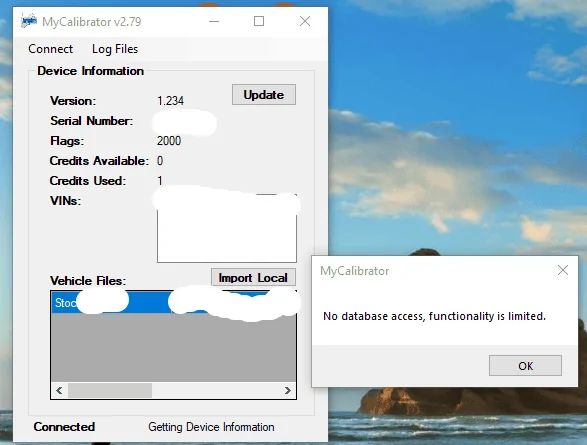
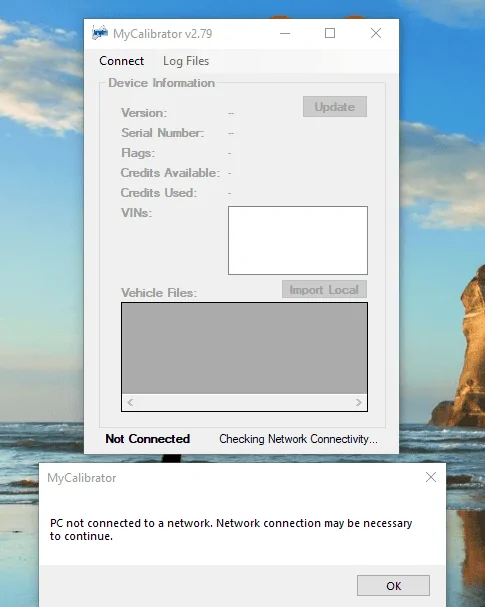
The errors were: click "Update" button: "PC not connected to a network." "Network connection may be necessary to continue message." (Though I was connected directly to the back of the router.)
Then click the "OK" button and receive an error: "No Database access, functionality limited error message."

This error involves a Xfinity-Comcast internet router.

Here's what I did to get it to work.
Basic Instructions:
1. Open Internet browser.
2. Type 10.0.0.1 in the address bar and press enter. (This is Xfinity-Comcast's default gateway number.)
You will be presented with a login screen.
3. Type in the default username "admin" and the password will be "password" (type in lowercase, it is case sensitive!
Also WITHOUT the quotation marks: example " ")
Then click LOGIN. You should go back later and change the default password afterwards too!!!
3. On the left side of the screen, click on Firewall.
It will drop down with more selections.
4. Click on IPv4.
5. Click to select Typical Security (Medium), then Save Settings. Mine was set on Maximum Security (High)
That's it!!!
FYI
My IPv6 was set to Typical Security (Default)

I was thinking I should end the message here but if you cannot see the router login window in the browser, you would need to find out the gateway IP Address.

**If the 10.0.0.1 address does not work!

1. Press Windows key. (It has 4 little squares, two spaces to the left of the space bar to get the box to pop up OR
Left click the Windows Start Key
; small Windows logo at the bottom left corner of the computer screen on most computers & laptops)
2. Type in cmd then press the "Enter" key. Command Prompt Window should open.
3. Type ipconfig then press the "Enter" key.
4. Look for the wording: Default Gateway.
Make note of the number. You want the numbers, not the really long address with letters!
5. You would then open a browser and use the gateway address to login to the router as described above.
6. On the left side of the screen, click Firewall. It will drop down with more selections.
7. Click on IPv4.
8. Then continue to change to Typical Security (Medium), click Save.

Of course now you would close and reopen the MyCalibrator program and hopefully watch it proceed to start the normal install prompts and upload-downloads.
Sorry this post is so long but I know if was was stuck out there and had very little computer knowledge, this might get me up & running. ?

Here's a link with the default passwords for many routers. Make sure to click the "Next" button to advance through the list or just Google search for your routers name to find it.

https://10-0-0-0-1.org/10-0-0-1/#:~:text=IETF and IANA.-,10.0.,multiple IP addresses like 192.168.

If I could just make this post a little longer...?

One thing to note is if the default password does not work on the router, you can ask if you know who set it up and if they wrote the password down. If no password is found, then you could load the files with remote connection like we did.
Otherwise you could reset the router to default settings. Not sure if that would create any issues or you want to go down that road but here are the instructions from the web:
To reset your router:
  1. Locate the Reset button on the back of your router.
  2. With the router powered on, use the pointed end of a paperclip or similar object to press and hold the Reset button for 15 seconds.
  3. Wait for the router to fully reset and power back on.
  4. Sometimes it might take holding the button 30 seconds
After it has rebooted and been on for several minutes, then you could open a browser, type 10.0.0.1 in the address bar, click enter. Then log in with the default name "admin" & password "password".

If that did not work, you might need the 30-30-30 reset method. From Lifewire.com:
How to Perform a 30-30-30 Router Reset
Although any given router's procedure may differ, in general, the following steps tend to work on most brands of routers.

1. With the router plugged in and powered on, depress the reset button for 30 seconds. This button is usually a tiny dot recessed into the back of the router. You may need a jeweler's screwdriver or a bent paperclip to access it.

2. While still holding down the button, unplug the router from its power source for another 30 seconds.

3. With the reset button still held down, turn the power back on and hold for another 30 seconds.

After this 90-second process is complete, your router is restored to its factory default state. Your particular router may not require the full 30-30-30 procedure. Some routers can be hard reset after only 10 seconds and without power cycling, but the 30-30-30 approach won't harm the router. Memorizing and following this 30-30-30 rule is recommended as a general guideline.

I'll finish with saying I installed the 91-93 Performance tune from Livernois Motorsports boy does it run great! Highly recommended! :like: I will be trying the other tunes when I get a chance. Thanks, Robert
Install error 2.png


Install error 1.png


Norton Program Control.png
 
Last edited:

StezenW

Well-Known Member
First Name
Stephen
Joined
Feb 10, 2020
Threads
20
Messages
352
Reaction score
1,011
Location
Atlanta
Vehicle(s)
2019 Ford Ranger Lariat Magnetic; 1998 Ford Ranger XLT 5-Speed Emerald
Vehicle Showcase
1
Big shout out to Anthony for helping with the installation of the MyCalibrator software.

Great customer support! He remote connected to transfer the files since the software was being blocked. We did not find anything in the virus scanner or Windows 10 blocking it. Norton Security Online Software listed the software as Trusted.

I was getting a couple error messages when installing the software.

The errors were: click "Update" button: "PC not connected to a network." "Network connection may be necessary to continue message." (Though I was connected directly to the back of the router.)
Then click the "OK" button and receive an error: "No Database access, functionality limited error message."

This error involves a Xfinity-Comcast internet router.

Here's what I did to get it to work.
Basic Instructions:
1. Open Internet browser.
2. Type 10.0.0.1 in the address bar and press enter. (This is Xfinity-Comcast's default gateway number.)
You will be presented with a login screen.
3. Type in the default username "admin" and the password will be "password" (type in lowercase, it is case sensitive!
Also WITHOUT the quotation marks: example " ")
Then click LOGIN. You should go back later and change the default password afterwards too!!!
3. On the left side of the screen, click on Firewall.
It will drop down with more selections.
4. Click on IPv4.
5. Click to select Typical Security (Medium), then Save Settings. Mine was set on Maximum Security (High)
That's it!!!
FYI
My IPv6 was set to Typical Security (Default)

I was thinking I should end the message here but if you cannot see the router login window in the browser, you would need to find out the gateway IP Address.

**If the 10.0.0.1 address does not work!

1. Press Windows key. (It has 4 little squares, two spaces to the left of the space bar to get the box to pop up OR
Left click the Windows Start Key
; small Windows logo at the bottom left corner of the computer screen on most computers & laptops)
2. Type in cmd then press the "Enter" key. Command Prompt Window should open.
3. Type ipconfig then press the "Enter" key.
4. Look for the wording: Default Gateway.
Make note of the number. You want the numbers, not the really long address with letters!
5. You would then open a browser and use the gateway address to login to the router as described above.
6. On the left side of the screen, click Firewall. It will drop down with more selections.
7. Click on IPv4.
8. Then continue to change to Typical Security (Medium), click Save.

Of course now you would close and reopen the MyCalibrator program and hopefully watch it proceed to start the normal install prompts and upload-downloads.
Sorry this post is so long but I know if was was stuck out there and had very little computer knowledge, this might get me up & running. ?

Here's a link with the default passwords for many routers. Make sure to click the "Next" button to advance through the list or just Google search for your routers name to find it.

https://10-0-0-0-1.org/10-0-0-1/#:~:text=IETF and IANA.-,10.0.,multiple IP addresses like 192.168.

If I could just make this post a little longer...?

One thing to note is if the default password does not work on the router, you can ask if you know who set it up and if they wrote the password down. If no password is found, then you could load the files with remote connection like we did.
Otherwise you could reset the router to default settings. Not sure if that would create any issues or you want to go down that road but here are the instructions from the web:
To reset your router:
  1. Locate the Reset button on the back of your router.
  2. With the router powered on, use the pointed end of a paperclip or similar object to press and hold the Reset button for 15 seconds.
  3. Wait for the router to fully reset and power back on.
  4. Sometimes it might take holding the button 30 seconds
After it has rebooted and been on for several minutes, then you could open a browser, type 10.0.0.1 in the address bar, click enter. Then log in with the default name "admin" & password "password".

If that did not work, you might need the 30-30-30 reset method. From Lifewire.com:
How to Perform a 30-30-30 Router Reset
Although any given router's procedure may differ, in general, the following steps tend to work on most brands of routers.

1. With the router plugged in and powered on, depress the reset button for 30 seconds. This button is usually a tiny dot recessed into the back of the router. You may need a jeweler's screwdriver or a bent paperclip to access it.

2. While still holding down the button, unplug the router from its power source for another 30 seconds.

3. With the reset button still held down, turn the power back on and hold for another 30 seconds.

After this 90-second process is complete, your router is restored to its factory default state. Your particular router may not require the full 30-30-30 procedure. Some routers can be hard reset after only 10 seconds and without power cycling, but the 30-30-30 approach won't harm the router. Memorizing and following this 30-30-30 rule is recommended as a general guideline.

I'll finish with saying I installed the 91-93 Performance tune from Livernois Motorsports boy does it run great! Highly recommended! :like: I will be trying the other tunes when I get a chance. Thanks, Robert
Install error 2.png


Install error 1.png


Norton Program Control.png


TL;DR - THE DANG INTERNET'S ALL FUDGED UP!
Sponsored


Top