Sponsored

Ford Officially Releases Sync 3 v3.4 Build 20282

PonyXpress

Well-Known Member
First Name
Steve
Joined
Feb 18, 2019
Threads
9
Messages
267
Reaction score
176
Location
Sacramento CA
Vehicle(s)
2019 Ford Ranger
I updated my 2019 Lariat and had the same issue with no log file. Mine took about 30 minutes and then a message popped and said Restarting...and then another message popped up and said the update was complete, remove usb....before I could even read the rest of the message, the screen went dark. It stayed there for about3 or 4 minutes and I turned off the truck. After the restart, it took a while (another few minutes), but the screen turned on and I was at SYNC3 v3.4.20282.

After a 3rd restart, I got a message that said the system has been updated. I can run the Check for Updates and it now says my system is up to date. It never said anything before. The ford site still thinks I need the update, but like others already said, who cares.

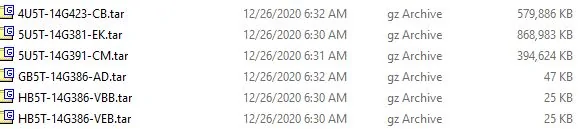
The file the website built for my update looks like this
1610498912699.png


I only have 5 files in the syncmyride folder,
1610497961347.png


Mine now shows Gracenote Ver 1.1.1.2218 (NA-0020)

It doesn't look like the nav maps were updated. Mine still shows NA 117. Perhaps that is still the most recent?

When I hit the VR button, I get the chime, and it says Say A Command. If others say that has changed for NA trucks, then perhaps I did miss something??

After the update, XM radio had to update and things were a little slow for a few minutes.

So did I miss something with a missing 6th file?
Sponsored


alcohenusa

Well-Known Member
First Name
Alan
Joined
Jul 22, 2020
Threads
12
Messages
478
Reaction score
727
Location
CO
Vehicle(s)
2020 Ranger Lariat 4x4
Occupation
Retired
I updated my 2019 Lariat and had the same issue with no log file. Mine took about 30 minutes and then a message popped and said Restarting...and then another message popped up and said the update was complete, remove usb....before I could even read the rest of the message, the screen went dark. It stayed there for about3 or 4 minutes and I turned off the truck. After the restart, it took a while (another few minutes), but the screen turned on and I was at SYNC3 v3.4.20282.

After a 3rd restart, I got a message that said the system has been updated. I can run the Check for Updates and it now says my system is up to date. It never said anything before. The ford site still thinks I need the update, but like others already said, who cares.

The file the website built for my update looks like this

1610498912699.png


I only have 5 files in the syncmyride folder,

1610497961347.png


Mine now shows Gracenote Ver 1.1.1.2218 (NA-0020)

It doesn't look like the nav maps were updated. Mine still shows NA 117. Perhaps that is still the most recent?

When I hit the VR button, I get the chime, and it says Say A Command. If others say that has changed for NA trucks, then perhaps I did miss something??

After the update, XM radio had to update and things were a little slow for a few minutes.

So did I miss something with a missing 6th file?
The latest maps are 119. You can go here to check:
https://syncnavigation.com/ford/home

A few things about this site and the map updates...
1. Be sure to use the Sync ESN and not the modem ESN.
2. If you download the maps, keep the order confirmation email in case you need to download again.
3. When you run the map update, ignore the complete messages until you get the one that stays on the screen and the system no longer restarts on its own. It should take about an hour (+/-) to update the maps.
 
OP
OP

tmcolegr

Well-Known Member
First Name
Todd
Joined
Dec 26, 2019
Threads
11
Messages
240
Reaction score
226
Location
Central FL
Vehicle(s)
2019 F150 Platinum 4x4 & 2019 Ranger XLT 4x4
I updated my 2019 Lariat and had the same issue with no log file. Mine took about 30 minutes and then a message popped and said Restarting...and then another message popped up and said the update was complete, remove usb....before I could even read the rest of the message, the screen went dark. It stayed there for about3 or 4 minutes and I turned off the truck. After the restart, it took a while (another few minutes), but the screen turned on and I was at SYNC3 v3.4.20282.

After a 3rd restart, I got a message that said the system has been updated. I can run the Check for Updates and it now says my system is up to date. It never said anything before. The ford site still thinks I need the update, but like others already said, who cares.

The file the website built for my update looks like this
1610498912699.png


I only have 5 files in the syncmyride folder,
1610497961347.png


Mine now shows Gracenote Ver 1.1.1.2218 (NA-0020)

It doesn't look like the nav maps were updated. Mine still shows NA 117. Perhaps that is still the most recent?

When I hit the VR button, I get the chime, and it says Say A Command. If others say that has changed for NA trucks, then perhaps I did miss something??

After the update, XM radio had to update and things were a little slow for a few minutes.

So did I miss something with a missing 6th file?
Yes - you are missing the updated NA Language Pack file 5U5T-14G391-CM

Capture.JPG


If you follow the procedure I posted in post # 209, you should be able to see the file name of the NA Language pack file you currently have installed. You most likely have CL or earlier. The CM file is a significant improvement over previous versions.

As UofMEngineer mentioned earlier, if you haven't reported to Ford the update has been installed, you should be able to re-download the update and the missing file "should" be included as Ford was correcting this error in the download. Then you can simply reinstall the update and only the missing file(s) will be installed. Another option would be to download the update for another VIN # that has all 6 files, then reinstall the update - refer to post # 206.

If using the VIN # from another vehicle to download the update, just be sure in your case, the vehicle is equipped with Navigation.
 
Last edited:

UofMEngineer

Well-Known Member
Joined
Apr 19, 2019
Threads
1
Messages
516
Reaction score
334
Location
Michigan
Vehicle(s)
20' Escape Hybrid,18' Fusion Hybrid
I updated my 2019 Lariat and had the same issue with no log file. Mine took about 30 minutes and then a message popped and said Restarting...and then another message popped up and said the update was complete, remove usb....before I could even read the rest of the message, the screen went dark. It stayed there for about3 or 4 minutes and I turned off the truck. After the restart, it took a while (another few minutes), but the screen turned on and I was at SYNC3 v3.4.20282.

After a 3rd restart, I got a message that said the system has been updated. I can run the Check for Updates and it now says my system is up to date. It never said anything before. The ford site still thinks I need the update, but like others already said, who cares.

The file the website built for my update looks like this
1610498912699.png


I only have 5 files in the syncmyride folder,
1610497961347.png


Mine now shows Gracenote Ver 1.1.1.2218 (NA-0020)

It doesn't look like the nav maps were updated. Mine still shows NA 117. Perhaps that is still the most recent?

When I hit the VR button, I get the chime, and it says Say A Command. If others say that has changed for NA trucks, then perhaps I did miss something??

After the update, XM radio had to update and things were a little slow for a few minutes.

So did I miss something with a missing 6th file?
Try re-downloading the update. I was told this had been fixed...


RedlandRanger

Moderator
First Name
Rob
Joined
Nov 14, 2018
Threads
42
Messages
5,111
Reaction score
11,103
Location
Oregon
Vehicle(s)
2019 Ford Ranger Lariat FX4, 1973 Mercury Capri
Vehicle Showcase
1
Try re-downloading the update. I was told this had been fixed...
I just re-downloaded it a few mins ago and I still only get 5 files. I'm missing the 5UST-14G391-CM.tar file
 

VAMike

Well-Known Member
First Name
Mike
Joined
Feb 22, 2019
Threads
1
Messages
3,390
Reaction score
4,408
Location
Virginia
Vehicle(s)
2019 Ranger Lariat SuperCab
As UofMEngineer mentioned earlier, if you haven't reported to Ford the update has been installed, you should be able to re-download the update and the missing file "should" be included as Ford was correcting this error in the download.
I just downloaded again, Ford has not corrected the problem.
 

Turborave

Well-Known Member
First Name
Calvin
Joined
Jun 14, 2020
Threads
22
Messages
207
Reaction score
335
Location
20871
Vehicle(s)
2019 ford ranger
Vehicle Showcase
1
does this not come in over automatic updates? i am connected to my home wifi, and i hit check for updates, but i get nothing. im still on 3.3.
 

RedlandRanger

Moderator
First Name
Rob
Joined
Nov 14, 2018
Threads
42
Messages
5,111
Reaction score
11,103
Location
Oregon
Vehicle(s)
2019 Ford Ranger Lariat FX4, 1973 Mercury Capri
Vehicle Showcase
1
I just downloaded for the VIN that @UofMEngineer posted earlier and got a new zip that included all 6 files. The other 5 are identical in size to what I got - it just includes the 5UST-14G391-CM.tar file in it.

@UofMEngineer - if I want to install this, do I need to update the autoinstall.lst file with this additional file? It does appear in the autoinstall.lst file in the new zip. I thought I had remembered you saying we just needed to add it to the SyncMyRide folder and it would get picked up but I wanted to confirm.

I'm wondering if this is why it keeps telling me there is an update available - because this file isn't updated?
 

UofMEngineer

Well-Known Member
Joined
Apr 19, 2019
Threads
1
Messages
516
Reaction score
334
Location
Michigan
Vehicle(s)
20' Escape Hybrid,18' Fusion Hybrid
I just downloaded for the VIN that @UofMEngineer posted earlier and got a new zip that included all 6 files. The other 5 are identical in size to what I got - it just includes the 5UST-14G391-CM.tar file in it.

@UofMEngineer - if I want to install this, do I need to update the autoinstall.lst file with this additional file? It does appear in the autoinstall.lst file in the new zip. I thought I had remembered you saying we just needed to add it to the SyncMyRide folder and it would get picked up but I wanted to confirm.

I'm wondering if this is why it keeps telling me there is an update available - because this file isn't updated?
If all files are the same, you can just use the other autointall.lst / entire package instead. Even quicker than editing. Put the -CM file in SyncMyRide, copy that, go. No idea why the system keeps saying one is available though.
 

mtbikernate

Well-Known Member
Joined
Apr 13, 2020
Threads
11
Messages
1,174
Reaction score
2,636
Location
NC
Vehicle(s)
2019 Ranger XLT 4x4
I just re-downloaded it a few mins ago and I still only get 5 files. I'm missing the 5UST-14G391-CM.tar file
Yeah, this is happening to me, too.

Not sure why I didn't get notifications about recent posts in this thread, so I missed the early talk about the CM file being missing. But mine definitely didn't include it. I re-downloaded today (Ford site still says I have an update available) and while there are some file size differences between the new download and what I installed before, I still got the same number of files and I'm still missing the CM file.
 

RedlandRanger

Moderator
First Name
Rob
Joined
Nov 14, 2018
Threads
42
Messages
5,111
Reaction score
11,103
Location
Oregon
Vehicle(s)
2019 Ford Ranger Lariat FX4, 1973 Mercury Capri
Vehicle Showcase
1
Yeah, this is happening to me, too.

Not sure why I didn't get notifications about recent posts in this thread, so I missed the early talk about the CM file being missing. But mine definitely didn't include it. I re-downloaded today (Ford site still says I have an update available) and while there are some file size differences between the new download and what I installed before, I still got the same number of files and I'm still missing the CM file.
For me, all the other files were exactly the same (names and sizes) as what I downloaded over a week ago. It was just missing the one file.

My theory on why it keeps telling me that there is an update available is that although I've updated MOST of the files, since I didn't get that one file, it still thinks I need an upgrade (which I do). So whatever is creating the download package is out of sync with whatever is figuring out if you are up to date. It will be interesting to see if I get a "you are up to date" once I apply this last file.
 

PonyXpress

Well-Known Member
First Name
Steve
Joined
Feb 18, 2019
Threads
9
Messages
267
Reaction score
176
Location
Sacramento CA
Vehicle(s)
2019 Ford Ranger
Thanks for the help. Ford needs to clean this process up, very sloppy.

For the Map update to 119, I went to that site and all it offers is for me to buy a $40. flash drive with the new map files. Is there no way to just download for free? Do we have to pay the $40. each time they update the maps? I do not see any option to download.

As for the missing file, I went back and downloaded the zip file again, and again it only contained 5 files. I used the VIN from post 206 and it contains all 6 files.

I think this question has been answered, but I want to confirm before proceeding. Can I use the files from the vin from post 206, the entire set of files and try updating again? Or do I need to take the missing file from the other VIN and add that file to my set of files for my VIN?

@UofMEngineer - I have sent you PM with my VIN. Can you please check to see why Ford is not including the 6th file?
Sponsored


Top