Sponsored

Sync 3 v3.4 Build 21020

WhyNot21

Well-Known Member
First Name
Mike
Joined
Apr 10, 2021
Threads
7
Messages
578
Reaction score
1,720
Location
IL
Vehicle(s)
2021 Ranger Lariat FX4 Screw 501A ...
Occupation
EE
I just did this yesterday, via OTA update. I had no problem connecting to my mesh network. The whole process was painless, except I had to go out every hour or so to restart the update, since I didn't leave it in ACCY mode for that long.
Sponsored

 

Leftcoast

Banned
Banned
Joined
Dec 11, 2019
Threads
1
Messages
517
Reaction score
1,011
Location
California
Vehicle(s)
2019 Ford Ranger Crewcab
Yep my screen color changed and my XM stopped working. I haven’t driven since yesterday afternoon. I went out for an early dinner and it didn’t help my digestion.
I knew this forum would have the info and it didn’t let me down. I’m now back in the garage downloading an update. We’ll see how this goes. :thumb up

update Sunday AM 5-9-21
This has to be the slowest software update I've seen since I installed MS Office from 16 discs decades ago. I go to the garage and wake up the screen. It says there has been an update and I'm up to date. I hit the check for update button and it finds another file in that chain of 13 and starts the process all over again. I'll let it cook a while longer before I need to go somewhere. I just hope my XM is working by then.
This is a minor inconvenience for me at this time. It would be a major issue if I was planning on going on a road trip today.

edit Sunday noon
I took the truck out for a drive and the XM works again. It’s now back in the garage whittling away on that 13 file nav update. It’s now listed as the **20 nav file.
 
Last edited:
OP
OP

tmcolegr

Well-Known Member
First Name
Todd
Joined
Dec 26, 2019
Threads
11
Messages
240
Reaction score
226
Location
Central FL
Vehicle(s)
2019 F150 Platinum 4x4 & 2019 Ranger XLT 4x4
Has anyone downloaded the complete Navigation NA 2 20 update - no files left for download. If so, could you please post a photo of the IVSU files?
 

fob63

Well-Known Member
First Name
bill
Joined
Jun 27, 2020
Threads
24
Messages
313
Reaction score
630
Location
Springdale Arkansas
Vehicle(s)
2019 ranger
Occupation
retired
All I know is I downloaded the update from Ford site, installed it via USB. Then over the next few days did updates via OTA WiFi at home. I have a battery charger/maintainer installed so on the first day left the key cycle ON and went through the installs cycling key off/on for several days. I thought it was finished. Third day checked again and noticed it was still updating and installing. Two more key cycles. It was a long process!!
 

Tom_C

Well-Known Member
First Name
Tom
Joined
Apr 17, 2021
Threads
35
Messages
1,972
Reaction score
4,389
Location
Virginia, USA
Vehicle(s)
2020 Ranger Lariat SuperCab FX4
Occupation
System Admin, Retired
At this point it seems the cyanlabs update will be the easier choice. Doing updates really should not be this hard, honestly.
So I just installed cyanlabs software and started through the process to download the nav 2.20 files. It would only let me select 'reformat' as the option, but then when I clicked to continue is warned me that if I have a 2020 car (I do) that using reformate would brick the sync3. But, as said, I couldn't change that option to not reformat. I guess I will just keep trying OTA for map update. :)

All I know is I downloaded the update from Ford site, installed it via USB. Then over the next few days did updates via OTA WiFi at home. I have a battery charger/maintainer installed so on the first day left the key cycle ON and went through the installs cycling key off/on for several days. I thought it was finished. Third day checked again and noticed it was still updating and installing. Two more key cycles. It was a long process!!
How does one leave a push button start in accessory mode? Should I just RTFM? I hate that darn manual, it is so much work to find information.
 
Last edited:


fob63

Well-Known Member
First Name
bill
Joined
Jun 27, 2020
Threads
24
Messages
313
Reaction score
630
Location
Springdale Arkansas
Vehicle(s)
2019 ranger
Occupation
retired
So I just installed cyanlabs software and started through the process to download the nav 2.20 files. It would only let me select 'reformat' as the option, but then when I clicked to continue is warned me that if I have a 2020 car (I do) that using reformate would brick the sync3. But, as said, I couldn't change that option to not reformat. I guess I will just keep trying OTA for map update. :)


How does one leave a push button start in accessory mode? Should I just RTFM? I hate that darn manual, it is so much work to find information.
On my wife's Ford have the FOB in close proximity press brake pedal and tap push button, not holding button down to start. Yes, the manual sucks!
 

TechnicallyReal

Well-Known Member
First Name
Ryan
Joined
Aug 20, 2020
Threads
6
Messages
460
Reaction score
609
Location
Eh?
Vehicle(s)
'19 Ranger Lariat 4x4
Occupation
Software Engineer / IT Admin
On my wife's Ford have the FOB in close proximity press brake pedal and tap push button, not holding button down to start. Yes, the manual sucks!
Don't press the brake pedal.

Button + Brake = start
Button alone = acc
 

Tom_C

Well-Known Member
First Name
Tom
Joined
Apr 17, 2021
Threads
35
Messages
1,972
Reaction score
4,389
Location
Virginia, USA
Vehicle(s)
2020 Ranger Lariat SuperCab FX4
Occupation
System Admin, Retired
All I know is I downloaded the update from Ford site, installed it via USB. Then over the next few days did updates via OTA WiFi at home. I have a battery charger/maintainer installed so on the first day left the key cycle ON and went through the installs cycling key off/on for several days. I thought it was finished. Third day checked again and noticed it was still updating and installing. Two more key cycles. It was a long process!!
Don't press the brake pedal.

Button + Brake = start
Button alone = acc
I played around with it, and if I just press the button without brake, the LED on the button blinks, a window in the dash says full accessory power mode, and all the dash idiot lights come on including the check engine light. I didn't like leaving it like that so I just punted.

I seem to have figured out the cyanlabs sync updater software and am downloading all the data now.

ADDED: Finished the download, set up USB and installed. I found in the settings of sync updater to switch to autoinstall instead of format. Then I followed the instructions to set up the USB for NAV 220 install. https://community.cyanlabs.net/t/no...nstallation-stand-alone-without-reformat/2965
 
Last edited:

ROBERTECOX

Well-Known Member
First Name
Bobby
Joined
Jun 13, 2019
Threads
4
Messages
315
Reaction score
1,567
Location
mississippi
Vehicle(s)
2019 ranger lariat 2wd sport pkg
Occupation
US ARMY (RETIRED)
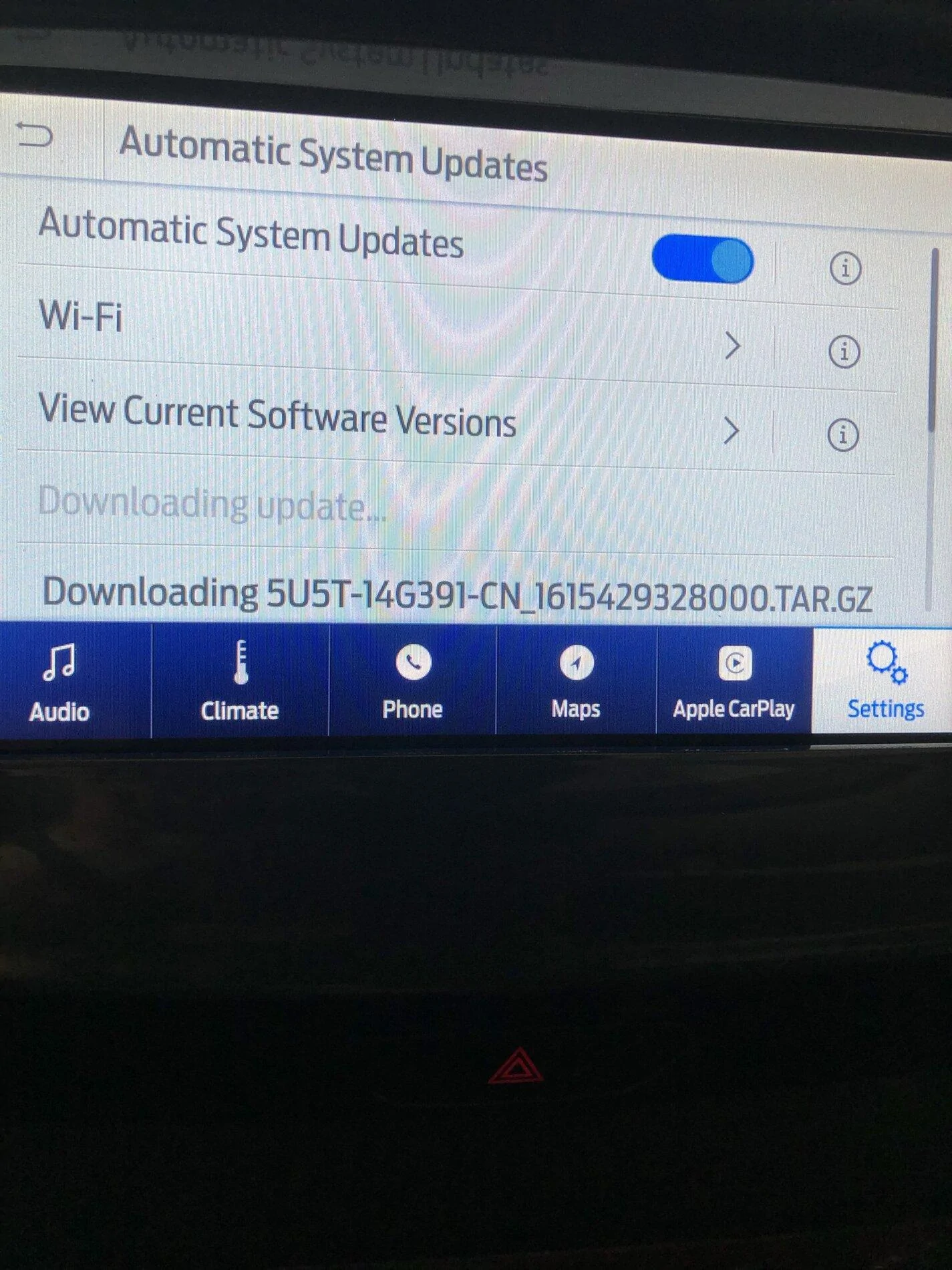
took a look at the sync today and have no idea what's going on...not using a usb stick prob coming over wifi.
IMG_1102.webp
 

Tra1969

Well-Known Member
Joined
Jan 30, 2018
Threads
4
Messages
198
Reaction score
280
Location
Michigan
Vehicle(s)
2022 Ford Ranger Lariat Tremor 501A and Tow
Occupation
Senior Manufacturing Supervisor
Vehicle Showcase
2
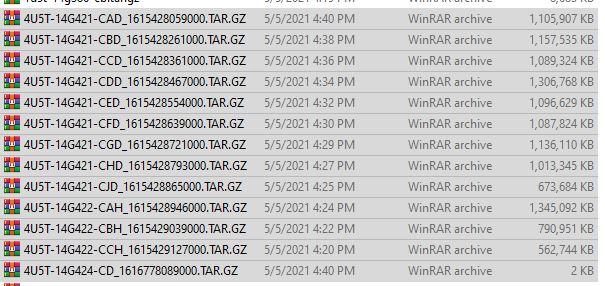
Updated to 3.4 Build 21020. Since then, I connected to WIFI and been updating the map. So far I am on the forth file download. After the forth file the Nav updated to NA 220. Thought maybe I was done then the forth one popped up. Here are the files so far:

4U5T-14G421-CED_1615428554000.TAR.GZ
4U5T-14G421-CDD_1515428467000.TAR.GZ
4U5T-14G422-CAH_1615428946000.TAR.GZ
4U5T-14G421-CAD_1615428059000.TAR.GZ
4U5T-14G421-CHD_1615428793000.TAR.GZ
 

Rp930

Well-Known Member
First Name
Rick
Joined
Nov 19, 2018
Threads
20
Messages
1,794
Reaction score
3,514
Location
Denver
Vehicle(s)
‘19 Ford Ranger Lariat, ‘23 Macan,’21 Shelby GT500
Occupation
Retired
Updated to 3.4 Build 21020. Since then, I connected to WIFI and been updating the map. So far I am on the forth file download. After the forth file the Nav updated to NA 220. Thought maybe I was done then the forth one popped up. Here are the files so far:

4U5T-14G421-CED_1615428554000.TAR.GZ
4U5T-14G421-CDD_1515428467000.TAR.GZ
4U5T-14G422-CAH_1615428946000.TAR.GZ
4U5T-14G421-CAD_1615428059000.TAR.GZ
4U5T-14G421-CHD_1615428793000.TAR.GZ
I think I read there are 9 of them.
 

Cabose-1

Well-Known Member
First Name
Eli
Joined
Jan 19, 2021
Threads
9
Messages
1,982
Reaction score
7,473
Location
Texas
Vehicle(s)
2024 Ranger XLT, 4x2, Advance Tow, E-Locker
Occupation
Student
Android auto isn't working anymore. Ill figure it out tomorrow. Smh
 

ryyck

Well-Known Member
Joined
Sep 1, 2019
Threads
14
Messages
403
Reaction score
512
Location
Charlotte NC
Vehicle(s)
2019 Ford Ranger
I can find a couple of files to update from, but the Ranger won't stay on long enough to finish the download. Is there a way to keep the Acc switch on without turning on the ignition?
Sponsored


Top