Sponsored

FORScan Crowdsourced Wiki

Trigganometry

Well-Known Member
First Name
Rick
Joined
Dec 4, 2020
Threads
153
Messages
5,833
Reaction score
25,359
Location
Massachusetts
Vehicle(s)
20 XLT scab 301A/tow 4X4 magnetic w/sport blackout
Occupation
Engineering
Probably one of the best software packages for not only maintaining your Ranger but tweaking it to fit your style perfectly. Well worth the lifetime license IMHO
Sponsored
 

Cabose-1

Well-Known Member
First Name
Eli
Joined
Jan 19, 2021
Threads
9
Messages
1,982
Reaction score
7,473
Location
Texas
Vehicle(s)
2024 Ranger XLT, 4x2, Advance Tow, E-Locker
Occupation
Student
Ok quick story. Forscan would not read my 22 ranger. Got the license got it plugged in......it just wouldnt read the 22. So now what. Deleted my 2020 ranger and it still wouldnt read my 22. Error, can not configure.

Solution, i uninstalled forscan, reinstalled, and now...magic! Just in case anyone else has issues with it. This is what worked for me.
 

onthejob

Active Member
First Name
John
Joined
May 15, 2020
Threads
4
Messages
38
Reaction score
137
Location
Bristol, NY
Vehicle(s)
2019 Lariat, 501A, Spt Appearance, Tow, Fox Shocks
Anyone in Western New York that has a Forscan set up willing to help me adjust the speedometer for slightly larger tires? (3%+/-) I'll come to you. I just don't trust myself with something like this. Zero computer abilities.
 

reidmefirst

Well-Known Member
First Name
Reid
Joined
Sep 18, 2022
Threads
6
Messages
95
Reaction score
215
Location
Des Moines, Iowa
Vehicle(s)
2021 Ranger
Occupation
Computer stuff
One thing I'd love to have, but can't figure out if it's possible: an audible chime when I've exceeded the speed limit by my settings, once I've enabled the speed limit sign recognition and set the alert limits. The flashing limit sign on the dash is nice but a chime telling me I'm speeding would be super nice for helping me avoid tickets...any idea if this is possible and if so where to hunt around for the setting?
 

Sariandan

Well-Known Member
First Name
Kevin
Joined
Sep 12, 2021
Threads
11
Messages
374
Reaction score
1,039
Location
The lowcountry of SC/GA
Vehicle(s)
2022 Ford Mustang EcoBoost
Occupation
Paramedic/Shift Supervisor
One thing I'd love to have, but can't figure out if it's possible: an audible chime when I've exceeded the speed limit by my settings, once I've enabled the speed limit sign recognition and set the alert limits. The flashing limit sign on the dash is nice but a chime telling me I'm speeding would be super nice for helping me avoid tickets...any idea if this is possible and if so where to hunt around for the setting?
I want to say I saw this in there when I briefly had the sign recognition enabled. I think the reason I didn't try it was that I wasn't sure if it would keep bugging me about it. But then, I disabled the sign recognition anyway.

Think about this... You're driving down the interstate. The truck sees a speed limit sign for 70. All is good. A half mile or so down the road is a minimum speed limit sign that says 40. The truck now thinks the speed limit is 40. If you are tooling along in a 55 mph zone and hit a school zone for 45, the truck recognizes the 45 mph zone. If your school zones are like ours, there is not a speed limit sign at the end, only a sign that says "End School Zone." So now I'm speeding again, according to the truck. These two scenarios aggravated me the most with the sign recognition enabled.

If I think about it, I'll try to take my laptop downstairs and poke around to see if I can remember where I saw the setting.


reidmefirst

Well-Known Member
First Name
Reid
Joined
Sep 18, 2022
Threads
6
Messages
95
Reaction score
215
Location
Des Moines, Iowa
Vehicle(s)
2021 Ranger
Occupation
Computer stuff
If your school zones are like ours, there is not a speed limit sign at the end, only a sign that says "End School Zone." So now I'm speeding again, according to the truck. These two scenarios aggravated me the most with the sign recognition enabled.
Yeah, so...my Miata does this (chimes for some scenarios when maybe it shouldn't). But it just does a "ding ding ding" (three chimes) and that's it. It's enough to get me to look at my instrument cluster and see the speed limit. I much prefer that. And if I'm driving through a school zone, there is almost always a new speed limit sign within a few minutes, or I'm going to make a turn and thus end the speed limit according to the car, etc.

Out here the interstate signs always have speed limit + truck minimum/maximum speed on the same signpost. So far all my vehicles pick up the actual speed limit from these.

Anyway thanks for looking into it. I should plug in forscan again and see if there's some super secret option in IPC/IPMA...
 

Sariandan

Well-Known Member
First Name
Kevin
Joined
Sep 12, 2021
Threads
11
Messages
374
Reaction score
1,039
Location
The lowcountry of SC/GA
Vehicle(s)
2022 Ford Mustang EcoBoost
Occupation
Paramedic/Shift Supervisor
IPC is a good place to start. I’m almost sure I saw it somewhere. OR… I may have simply thought it was a good idea and was looking for it. We’ll see after I get back from my ruck. Gonna load the laptop up with me, so I remember to look when I get home.
 

reidmefirst

Well-Known Member
First Name
Reid
Joined
Sep 18, 2022
Threads
6
Messages
95
Reaction score
215
Location
Des Moines, Iowa
Vehicle(s)
2021 Ranger
Occupation
Computer stuff
One thing I'd love to have, but can't figure out if it's possible: an audible chime when I've exceeded the speed limit by my settings...
I was hunting for this again and found some other vehicle forums which suggest a solution:

IPC 720-04-01, setting the value to xxxx-xx4x-xxxx, or xxxx-xxCx-xxxx should enable chimes for overspeed indication. Apparently the 'C' value opens up some menu options related to chime settings (possibly chime time, number of chimes, etc)

Source 1: Maverick forums
https://www.mavericktruckclub.com/f...ition-tsr-forscan-mod-confirmed-working.9399/

Source 2: Forscan forums (thread about Ford Focus models): https://forscan.org/forum/viewtopic.php?t=13385&start=30

I will give it a try the next time I think of it. If someone else is interested in this mod and is brave enough to try, have at it =). This is my first automatic transmission vehicle ever, so having it would be nice. I find myself zoning out regarding how fast I am actually going...in my manuals cars I always have some intuition about my speed because I know what gear I'm in and what my engine RPMs are...

For my next trick I would love to see if we can enable Intelligent Adaptive Cruise Control on the trims with the speed limit cameras and ACC. Or, figuring out how to reconfigure the useless right dash screen in the Lariat instrument cluster...
 

airline tech

Well-Known Member
Joined
Aug 24, 2022
Threads
28
Messages
4,467
Reaction score
8,543
Location
Midwest - KS
Vehicle(s)
2022 Ranger Lariat-Super Crew, Cactus Gray
Occupation
Aircraft Tech
Note: These are the ForScan Settings (My Findings) for those of you who are Upgrading from Factory Halo's to Factory (LED's) and Possibly (After Market LED)

I purchased a Complete Set of Factory Headlamps / Foglamps from Ford Dealer ($2700.00)
It would have cost me more to walk away from As Ordered truck that I waited 7 months to get than a Dealer Ordered Lariat (That Had Them)
I did not want (Ebay) broken tabs on a Brand New Truck

I have a 2022 Lariat - That was Downgraded to Halogen Headlamp / Foglamp at Factory

The Foglamps are on Back-Order, so those are not installed yet

So, I Corrected Ford's deletion of my LED Headlight Assemblies for a piddly $500 Credit.

Here is My Install Notes and Configuration Settings for ForScan:

1. This is on a 22 Lariat that had the misfortune of getting the LED Head/Fog deleted at factory, so it arrived with Halo's

2. In the Install video posted on here, the guy does a quick shot of the Bumper Skirting (outer bolts)
These are located with the head facing forward - if you look up (just in front of the tires) towards the front bumper (you will see them) - Took me a bit to find them

3. The video is correct; the Fender Skirts and Grille are very much a PITA to get loose without patience and finesse

4. Took about 5 hours to get them installed (not including ForScan & Allignment)

4. Now comes ForScan Settings to Make the Lariat LED's Work Correctly, I did some playing with some settings, due to CONFLICTING info on here, that's why I am bringing this to light on my findings to help others on this (upgrade)

I researched 3 Separate Lariat Trim Models - Using As-Built Data to Compare to My Lariat with Halo's

Here They Are:

My As-Built Data (Related to Headlight/DRL Settings - Lariat with Halo's Installed from Factory

BCM
726-26-02 - 0000-0002-0057
726-45-01 - 0A01-0200-0080
726-50-01 - 0280

Lariat As-Built Compare (From 3 Trucks) (All Match these settings) (With Factory LED's)

BCM
726-26-02 - 0000-0001-0056
726-45-01 - 0A01-1000-008E
726-50-01 - 108E

So, I used the 2 recommended GUI Settings at First and this is what I got

In BCM

Allowed DRL Options to (+ Dedicated DRL)
DRL Configuration to (Dedicated DRL)

DRL - Configuration - Changed To (Dedicated DRL) this automatically changes 2 of the Line Codes in the As-Built File Folder (BCM)

726-26-02 - 0000-0001-0056 (Matches my Lariat compare search-As-Built)
726-50-01 - 108E (Matches my Lariat compare search - As-Built)

Now for Allowed DRL Options in GUI, this GUI only adjusts one As-Built File and that is 726-45-01
I had set it to (+Dedicated DRL) but I double checked the (As Built) file and its Hex-Code Read

726-45-01 - 0A01-1F00-009D

So, the Allowed DRL Options (+Dedicated DRL) setting within the GUI, does not change the As-Built File to the correct Hex-Code according to my 3 Lariat comparison trucks.

So, I played with all of the options in GUI, and this is the outcome of each, I will note the changes
on the second set of numbers:

None: 0100
All Options: 7F00
Low Beam: 0300
Hi-Beam: 3F00
Ft Fog: 0700
Ft Turn: 0F00
Dedicated DRL: 1F00
**Incorect Value or Not Configured - 1000 (see below)

Noted: None of These Options gave me my Original as Built (0200), might be due to that I had the other DRL Configuration set to (Dedicated DRL) IDK

If you change the As Built file manually to the (Lariat Compare -Code)
726-45-01 -to - 0A01-1000-008E then look in the GUI (Easy Way) it's listed in a current status of:
Incorrect Value or Not Configured

I may go back in ForScan and Play with the GUI (Options) for DRL Configuration, and see if I can get the GUI format to read correctly (1000) instead of the Incorrect Value or Not Configured
(It's a Curiosity Thing) and I tend to be thorough and meticulous. I'm new to ForScan and Learning

So, I checked Headlight / DRL Operation with both 726-45-01 (1FOO) & ((1000) Hex-Codes
The Headlight's / DRL's work as they should: using both of these Hex-Codes
I decided to manually change and leave this Line Code at (1000) to match my compare trucks

I do not know what the difference between the (2) are (1F00) & (1000) but they both appear to work.

Any ForScan (Guru's) know the answer?

Operational Check:

1. LED Strip - On and Bright
a. With Headlight switch in Auto (Daylight) - So DRL Mode

2. LED Strip - On and Dim
a. Headlight switch in (Headlight) and (Auto - Nighttime)
b. Headlight Switch in Park Lights
c. Activation of Entry / Exit Lights along with Park Lights, Bed Lights, Puddle Lights, Door Locks Activation Etc.

With all that, I also upgraded the Turn Signals to LED as well, while I had it apart. I used the Oxilam 7440 Yellow LEDs from Amazon that others have used and recommended - Man they are BRIGHT
No - Hyper-Blink (at Turn Signals or Dash Indicators)

Before I started my swap, I set up truck at 25' from Garage Door, placed tape across the Top of the projected light source, this way I had a Ref: Line to Adjust them Too, made it so much easier.

Did some other ForScan Mods plus Map Update today as well, so it's been a long day

Sorry, for the LONG Post, but after spending a couple of hours researching the proper Forscan settings and getting conflicting info, I wanted to help others in clarifying the correct settings for swapping their headlights to LED (Factory)

I'm going to post my findings in the Forscan Wiki as well, as they are hidden all over this Forum.
Is it possible to get a Sticky on these settings

headlights-pic-jpg.jpg

EDIT: To Original Post

In BCM (Module) - Easy Way

I went back in and played with the DRL Configuration in GUI (Easy Way)
I attempted to change each of the selections, and it flagged me - not supported

Those Options Are:

0-Not Defined
2-Lo Beam
4- Fog Lamp
8-Turn Lamp
10-Dedicated DRL (The Only Selection That Worked)
32-High Beam
64-Low Beam and Dedicated

So, I'm leaving it alone and deduced it's a ForScan Programming Glitch. It works and that was the end game wanted outcome
I am wandering that since my Fog's is still Halo's has anything to do with it, though. We shall see after the LED Fog's get installed

Thanks
 
Last edited:

Bsthroop

Well-Known Member
First Name
Brian
Joined
Oct 4, 2022
Threads
6
Messages
479
Reaction score
2,263
Location
New Mexico
Vehicle(s)
2019 Lariat 4x2 Sport
Occupation
Broadband/ Microwave Engineer
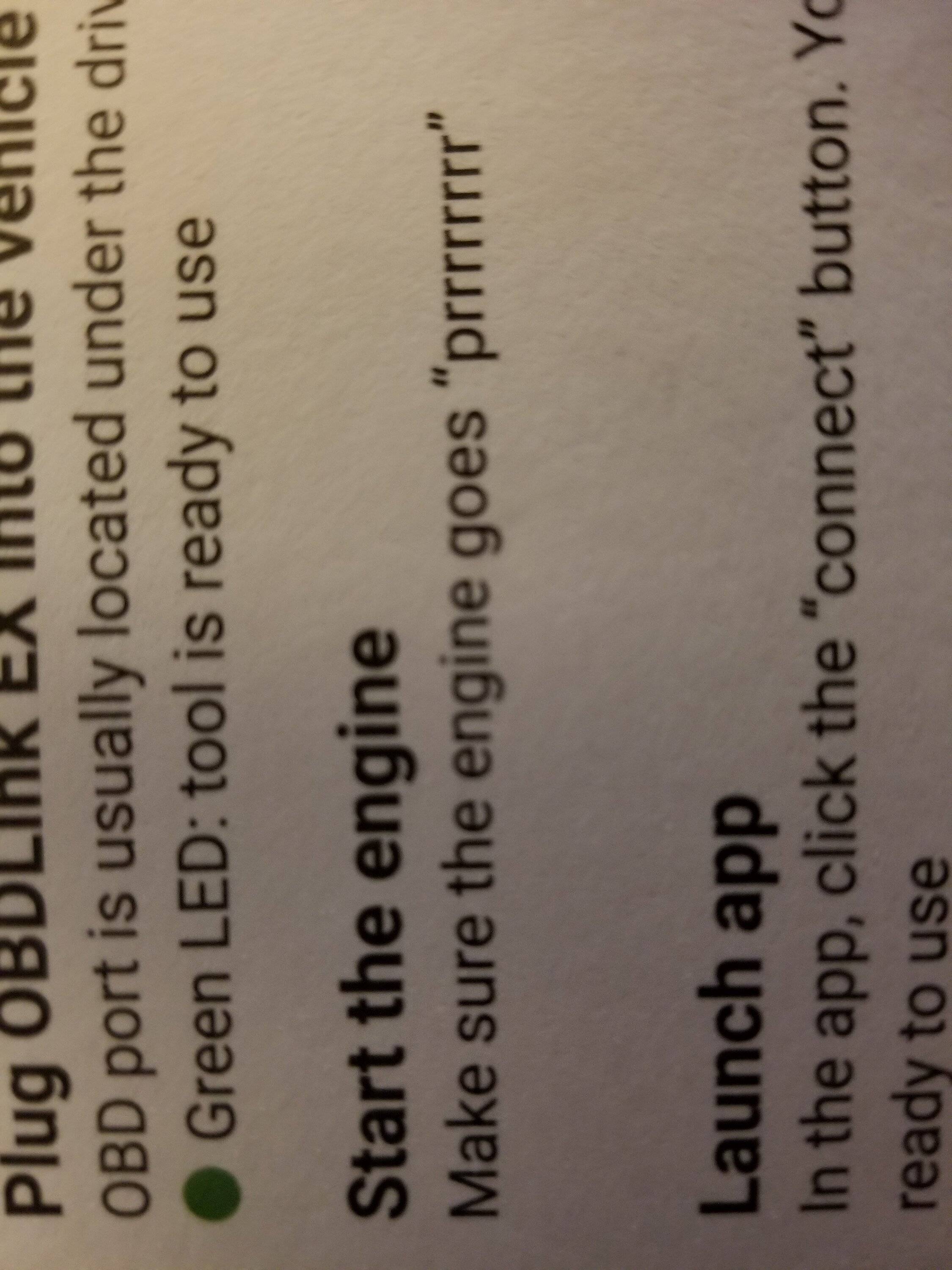
Got my Odblinkex today and understand from all the threads here that ignition should be on but not running. Instructions say this:

20221029_182514.jpg
 

Justin says...

Well-Known Member
First Name
Justin
Joined
Apr 14, 2022
Threads
16
Messages
246
Reaction score
731
Location
NC
Vehicle(s)
2024 Maverick XLT Lux
Occupation
IT System Analyst II
It would make my day if there was a way to enable transmission temp monitoring using Forscan.
 

Gizmokid2005

Well-Known Member
Joined
Dec 1, 2019
Threads
13
Messages
1,279
Reaction score
1,875
Location
GA
Website
gizmokid2005.com
Vehicle(s)
2019 Ford Ranger XLT 4X4 SCrew
Occupation
SQL Developer
Vehicle Showcase
1
It would make my day if there was a way to enable transmission temp monitoring using Forscan.
Keep dreaming. It's not exposed to the dash at all.

You can use Torque and an Android device with a BT OBDII adapter, but nothing in the truck will show it.
 

Sariandan

Well-Known Member
First Name
Kevin
Joined
Sep 12, 2021
Threads
11
Messages
374
Reaction score
1,039
Location
The lowcountry of SC/GA
Vehicle(s)
2022 Ford Mustang EcoBoost
Occupation
Paramedic/Shift Supervisor
Got my Odblinkex today and understand from all the threads here that ignition should be on but not running. Instructions say this:

20221029_182514.jpg
It might be referencing the fuel pump noise that happens when you initially hit the button once, or turn the key to run, but not all the way to start it.
 

Bsthroop

Well-Known Member
First Name
Brian
Joined
Oct 4, 2022
Threads
6
Messages
479
Reaction score
2,263
Location
New Mexico
Vehicle(s)
2019 Lariat 4x2 Sport
Occupation
Broadband/ Microwave Engineer
It might be referencing the fuel pump noise that happens when you initially hit the button once, or turn the key to run, but not all the way to start it.
Figured it was something odd like that since everyone's worked not running. Was able to make some changes with no problem. Great adaptor and easy process.
 

airline tech

Well-Known Member
Joined
Aug 24, 2022
Threads
28
Messages
4,467
Reaction score
8,543
Location
Midwest - KS
Vehicle(s)
2022 Ranger Lariat-Super Crew, Cactus Gray
Occupation
Aircraft Tech
Note: These are the ForScan Settings (My Findings) for those of you who are Upgrading from Factory Halo's to Factory (LED's) and Possibly (After Market LED)

I purchased a Complete Set of Factory Headlamps / Foglamps from Ford Dealer ($2700.00)
It would have cost me more to walk away from As Ordered truck that I waited 7 months to get than a Dealer Ordered Lariat (That Had Them)
I did not want (Ebay) broken tabs on a Brand New Truck

I have a 2022 Lariat - That was Downgraded to Halogen Headlamp / Foglamp at Factory

The Foglamps are on Back-Order, so those are not installed yet

So, I Corrected Ford's deletion of my LED Headlight Assemblies for a piddly $500 Credit.

Here is My Install Notes and Configuration Settings for ForScan:

1. This is on a 22 Lariat that had the misfortune of getting the LED Head/Fog deleted at factory, so it arrived with Halo's

2. In the Install video posted on here, the guy does a quick shot of the Bumper Skirting (outer bolts)
These are located with the head facing forward - if you look up (just in front of the tires) towards the front bumper (you will see them) - Took me a bit to find them

3. The video is correct; the Fender Skirts and Grille are very much a PITA to get loose without patience and finesse

4. Took about 5 hours to get them installed (not including ForScan & Allignment)

4. Now comes ForScan Settings to Make the Lariat LED's Work Correctly, I did some playing with some settings, due to CONFLICTING info on here, that's why I am bringing this to light on my findings to help others on this (upgrade)

I researched 3 Separate Lariat Trim Models - Using As-Built Data to Compare to My Lariat with Halo's

Here They Are:

My As-Built Data (Related to Headlight/DRL Settings - Lariat with Halo's Installed from Factory

BCM
726-26-02 - 0000-0002-0057
726-45-01 - 0A01-0200-0080
726-50-01 - 0280

Lariat As-Built Compare (From 3 Trucks) (All Match these settings) (With Factory LED's)

BCM
726-26-02 - 0000-0001-0056
726-45-01 - 0A01-1000-008E
726-50-01 - 108E

So, I used the 2 recommended GUI Settings at First and this is what I got

In BCM

Allowed DRL Options to (+ Dedicated DRL)
DRL Configuration to (Dedicated DRL)

DRL - Configuration - Changed To (Dedicated DRL) this automatically changes 2 of the Line Codes in the As-Built File Folder (BCM)

726-26-02 - 0000-0001-0056 (Matches my Lariat compare search-As-Built)
726-50-01 - 108E (Matches my Lariat compare search - As-Built)

Now for Allowed DRL Options in GUI, this GUI only adjusts one As-Built File and that is 726-45-01
I had set it to (+Dedicated DRL) but I double checked the (As Built) file and its Hex-Code Read

726-45-01 - 0A01-1F00-009D

So, the Allowed DRL Options (+Dedicated DRL) setting within the GUI, does not change the As-Built File to the correct Hex-Code according to my 3 Lariat comparison trucks.

So, I played with all of the options in GUI, and this is the outcome of each, I will note the changes
on the second set of numbers:

None: 0100
All Options: 7F00
Low Beam: 0300
Hi-Beam: 3F00
Ft Fog: 0700
Ft Turn: 0F00
Dedicated DRL: 1F00
**Incorect Value or Not Configured - 1000 (see below)

Noted: None of These Options gave me my Original as Built (0200), might be due to that I had the other DRL Configuration set to (Dedicated DRL) IDK

If you change the As Built file manually to the (Lariat Compare -Code)
726-45-01 -to - 0A01-1000-008E then look in the GUI (Easy Way) it's listed in a current status of:
Incorrect Value or Not Configured

I may go back in ForScan and Play with the GUI (Options) for DRL Configuration, and see if I can get the GUI format to read correctly (1000) instead of the Incorrect Value or Not Configured
(It's a Curiosity Thing) and I tend to be thorough and meticulous. I'm new to ForScan and Learning

So, I checked Headlight / DRL Operation with both 726-45-01 (1FOO) & ((1000) Hex-Codes
The Headlight's / DRL's work as they should: using both of these Hex-Codes
I decided to manually change and leave this Line Code at (1000) to match my compare trucks

I do not know what the difference between the (2) are (1F00) & (1000) but they both appear to work.

Any ForScan (Guru's) know the answer?

Operational Check:

1. LED Strip - On and Bright
a. With Headlight switch in Auto (Daylight) - So DRL Mode

2. LED Strip - On and Dim
a. Headlight switch in (Headlight) and (Auto - Nighttime)
b. Headlight Switch in Park Lights
c. Activation of Entry / Exit Lights along with Park Lights, Bed Lights, Puddle Lights, Door Locks Activation Etc.

With all that, I also upgraded the Turn Signals to LED as well, while I had it apart. I used the Oxilam 7440 Yellow LEDs from Amazon that others have used and recommended - Man they are BRIGHT
No - Hyper-Blink (at Turn Signals or Dash Indicators)

Before I started my swap, I set up truck at 25' from Garage Door, placed tape across the Top of the projected light source, this way I had a Ref: Line to Adjust them Too, made it so much easier.

Did some other ForScan Mods plus Map Update today as well, so it's been a long day

Sorry, for the LONG Post, but after spending a couple of hours researching the proper Forscan settings and getting conflicting info, I wanted to help others in clarifying the correct settings for swapping their headlights to LED (Factory)

I'm going to post my findings in the Forscan Wiki as well, as they are hidden all over this Forum.
Is it possible to get a Sticky on these settings

headlights-pic-jpg.jpg

EDIT: To Original Post

In BCM (Module) - Easy Way

I went back in and played with the DRL Configuration in GUI (Easy Way)
I attempted to change each of the selections, and it flagged me - not supported

Those Options Are:

0-Not Defined
2-Lo Beam
4- Fog Lamp
8-Turn Lamp
10-Dedicated DRL (The Only Selection That Worked)
32-High Beam
64-Low Beam and Dedicated

So, I'm leaving it alone and deduced it's a ForScan Programming Glitch. It works and that was the end game wanted outcome
I am wandering that since my Fog's is still Halo's has anything to do with it, though. We shall see after the LED Fog's get installed

Thanks
UPDATE
I figured it out and this ONLY applies to Factory LED or Aftermarkets that have a dedicated DRL and that is all you will be using.

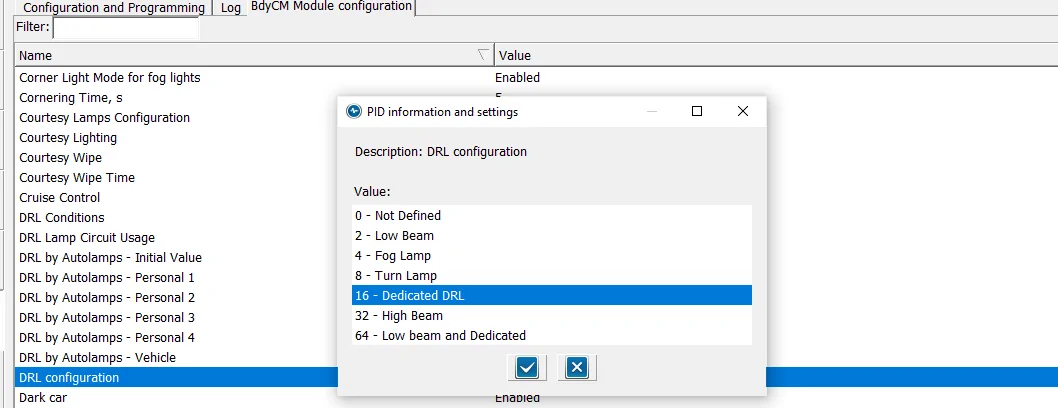
DRL Configuration to (Dedicated DRL)
DRL Config (2).webp


Set this option to (16) Dedicated DRL - this will automatically set 2-Lines of Hex Code for you.
NOTE: the (16) is a Binary code that is converted to HEX (Inside of the As-Built) Files

Here are the 2-Lines of Codes it sets

BCM
726-26-02 - 0000-0001-0056 (Matches my Lariat compare search-As-Built)
726-50-01 - 108E (Matches my Lariat compare search - As-Built)

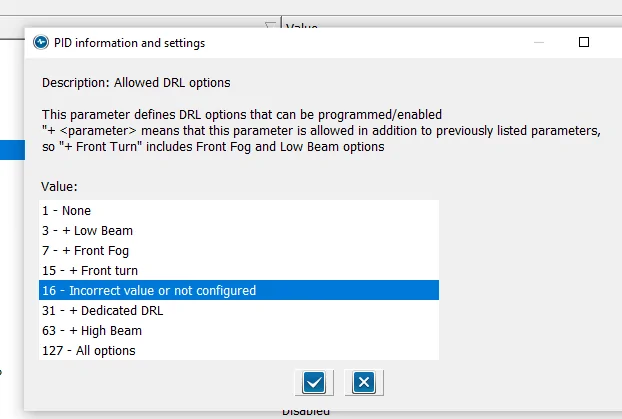
Now set Allowed DRL Options:

Alowed DRL Options.webp

NOTE: The Paragraph at the top
If you have only (1) option for DRL, such as Factory LED Headlights, this will show due to the fact that it matches the (16) Binary code you set in DRL Configuration PLUS
This option ONLY modifies (In addition) (Plus) the standard factory DRL.
So, this normal - As I have not added any special (extra) DRL options to the configuration

So, with this selected, here is the last Hex Line of code that is changed (Automatically)

726-45-01 - 0A01-1000-008E

If you do not see this option (highlighted) then go into the As-Built File and manually change it, then when you go back to the (Module) Easy way, this will be shown

I know there have been quite a few posts on this subject and I wanted to pass along my findings
to clear it up
These are the confirmed settings for the Lariat Factory LED Upgrade, now it should also clear it up for those who have installed the (aftermarket) options. With the attached pics, you can see it more clearly and visualize what changes you want to make

Hope this helps
Sponsored


Top