Sponsored

FORScan Crowdsourced Wiki

Hellrazor

Well-Known Member
First Name
Clement
Joined
Feb 24, 2021
Threads
9
Messages
112
Reaction score
138
Location
Richmond
Vehicle(s)
2021 ranger
Occupation
Baller
can somebody explain how to use this? I download it for scan to my laptop and I also registered. I was trying to get the two month free extended license. Do you have to wait to be accepted to login to proceed any further? How do you get a hardware ID? it says copy the hardware ID from the about chapter of forescan Where the hell is that at?
Sponsored

 
Last edited:

Clump

Well-Known Member
First Name
Charlie
Joined
Mar 24, 2020
Threads
8
Messages
267
Reaction score
936
Location
Felton, DE
Vehicle(s)
2022 Explorer ST former 2021 Ranger Lariat Tremor
can somebody explain how to use this? I download it for scan to my laptop and I also registered. I was trying to get the two month free extended license. Do you have to wait to be accepted to login to proceed any further? How do you get a hardware ID? it says copy the hardware ID from the about chapter of forescan Where the hell is that at?
I think you have to wait for approval before you can get a license. Mine only took a couple of hours.

I spent the $10 for a 1 year license.

I didn't have to do the hardware ID thing, just copied the activation code and pasted it in.

I turned off ASS, double honk and fake engine noise. Turned on Bambi mode and switched ot the Ford Performance splash screen. All were easy and seem to be working on a brief test drive.

I had a few codes to clear after the ABS bleed procedure. The ABS module codes didn't seem to clear, but when I started the truck they went away. It made a small, but noticeable change to the pedal feel.
 

Hellrazor

Well-Known Member
First Name
Clement
Joined
Feb 24, 2021
Threads
9
Messages
112
Reaction score
138
Location
Richmond
Vehicle(s)
2021 ranger
Occupation
Baller
I think you have to wait for approval before you can get a license. Mine only took a couple of hours.

I spent the $10 for a 1 year license.

I didn't have to do the hardware ID thing, just copied the activation code and pasted it in.

I turned off ASS, double honk and fake engine noise. Turned on Bambi mode and switched ot the Ford Performance splash screen. All were easy and seem to be working on a brief test drive.

I had a few codes to clear after the ABS bleed procedure. The ABS module codes didn't seem to clear, but when I started the truck they went away. It made a small, but noticeable change to the pedal feel.
I figured it out I bought the $10 license did the abs service bleed brakes work great now. I also disabled ass does that have anything to do with how the battery maintains a charge?
 
Last edited:

Clump

Well-Known Member
First Name
Charlie
Joined
Mar 24, 2020
Threads
8
Messages
267
Reaction score
936
Location
Felton, DE
Vehicle(s)
2022 Explorer ST former 2021 Ranger Lariat Tremor
I figured it out I bought the $10 license did the abs service bleed brakes work great now. I also disabled ass does that have anything to do with how the battery maintains a charge?
I'm wondering the same thing. Hopefully somebody that knows will respond.
 

micl9

Well-Known Member
First Name
Mike
Joined
Dec 21, 2019
Threads
31
Messages
1,369
Reaction score
1,959
Location
Apex, NC
Vehicle(s)
2019 Ranger XLT Fx4 302A
Vehicle Showcase
1
I'm wondering the same thing. Hopefully somebody that knows will respond.
No battery has separate settings. You cab change % charge and completely disability batt maintenance


Clump

Well-Known Member
First Name
Charlie
Joined
Mar 24, 2020
Threads
8
Messages
267
Reaction score
936
Location
Felton, DE
Vehicle(s)
2022 Explorer ST former 2021 Ranger Lariat Tremor
No battery has separate settings. You cab change % charge and completely disability batt maintenance
Thanks!

Just kind of odd the way it's listed as "BMS - Automatic Start/Stop" and the display shows ASS not working because it's charging. Makes me wonder if you're really turning off BMS.

Seems like plenty of people have the BMS lead disconnected without issue, but I still wonder about the long term effect on our expensive AGM battery.

I'm also a complete forscan noob.
 

Hellrazor

Well-Known Member
First Name
Clement
Joined
Feb 24, 2021
Threads
9
Messages
112
Reaction score
138
Location
Richmond
Vehicle(s)
2021 ranger
Occupation
Baller
Thanks!

Just kind of odd the way it's listed as "BMS - Automatic Start/Stop" and the display shows ASS not working because it's charging. Makes me wonder if you're really turning off BMS.

Seems like plenty of people have the BMS lead disconnected without issue, but I still wonder about the long term effect on our expensive AGM battery.

I'm also a complete forscan noob.
I was thinking the same thing
 

Allesky00

Active Member
First Name
Zachary
Joined
Aug 1, 2021
Threads
0
Messages
28
Reaction score
79
Location
Louisiana, USA
Vehicle(s)
2021 Ranger XLT
Occupation
I&E Tech
I was poking around FORScan the other day and noticed an option for an oil pressure display when poking around in one of the menus (I was changing the Avg MPG screen to numeric instead of a bar if that helps locate which one). I wonder if anyone has tried that option and knows what it does. I do like the idea of having such a readout, but I'm too skeptical to start changing things on the fly.

TIA!
 

jvm051

Active Member
Joined
May 30, 2021
Threads
7
Messages
37
Reaction score
19
Location
Phoenix
Vehicle(s)
2021 Ranger Sport
Is there a GUI for enabling the Variable Line Level audio? Or do you have to change the code in the As built module? Wanted to see if it was called something else.
 

Big Blue

Well-Known Member
First Name
Lee
Joined
May 5, 2020
Threads
16
Messages
3,944
Reaction score
9,429
Location
Wisconsin
Vehicle(s)
2019 Ford Ranger XLT FX4 Supercrew lighting blue
Occupation
Retired mechanical designer
I was poking around FORScan the other day and noticed an option for an oil pressure display when poking around in one of the menus (I was changing the Avg MPG screen to numeric instead of a bar if that helps locate which one). I wonder if anyone has tried that option and knows what it does. I do like the idea of having such a readout, but I'm too skeptical to start changing things on the fly.

TIA!
Won't do anything. Many things in Forscan are for other vehicles and do not work for our rangers. Unfortunately our Rangers only have a pressure switch for the oil and not a sender for pressure or temp.
 

Mirage775

Well-Known Member
First Name
Jason
Joined
Apr 24, 2021
Threads
51
Messages
974
Reaction score
2,183
Location
Huntsville, Alabama
Vehicle(s)
23 Bronco 2dr Badlands SAS, 24 Bronco 2dr Heritage Limited, 95 F-150 XLT SWB 4x4
Occupation
Water Meter Tech I
Vehicle Showcase
1
Won't do anything. Many things in Forscan are for other vehicles and do not work for our rangers. Unfortunately our Rangers only have a pressure switch for the oil and not a sender for pressure or temp.
Yep, I enabled a bunch of gauges and it did absolutely nothing... I'm going to go back in and remove them soon.
 

FoMoCoDave

Well-Known Member
First Name
Dave
Joined
Nov 15, 2020
Threads
4
Messages
61
Reaction score
96
Location
Blue Ridge Mtns VA
Vehicle(s)
2020 Ranger XLT
Is there a spreedsheet or google doc for Ranger forscan changes?

I was back again tonite after a few months to find some info on changing the battery charge level and I may have missed it in the on the page.

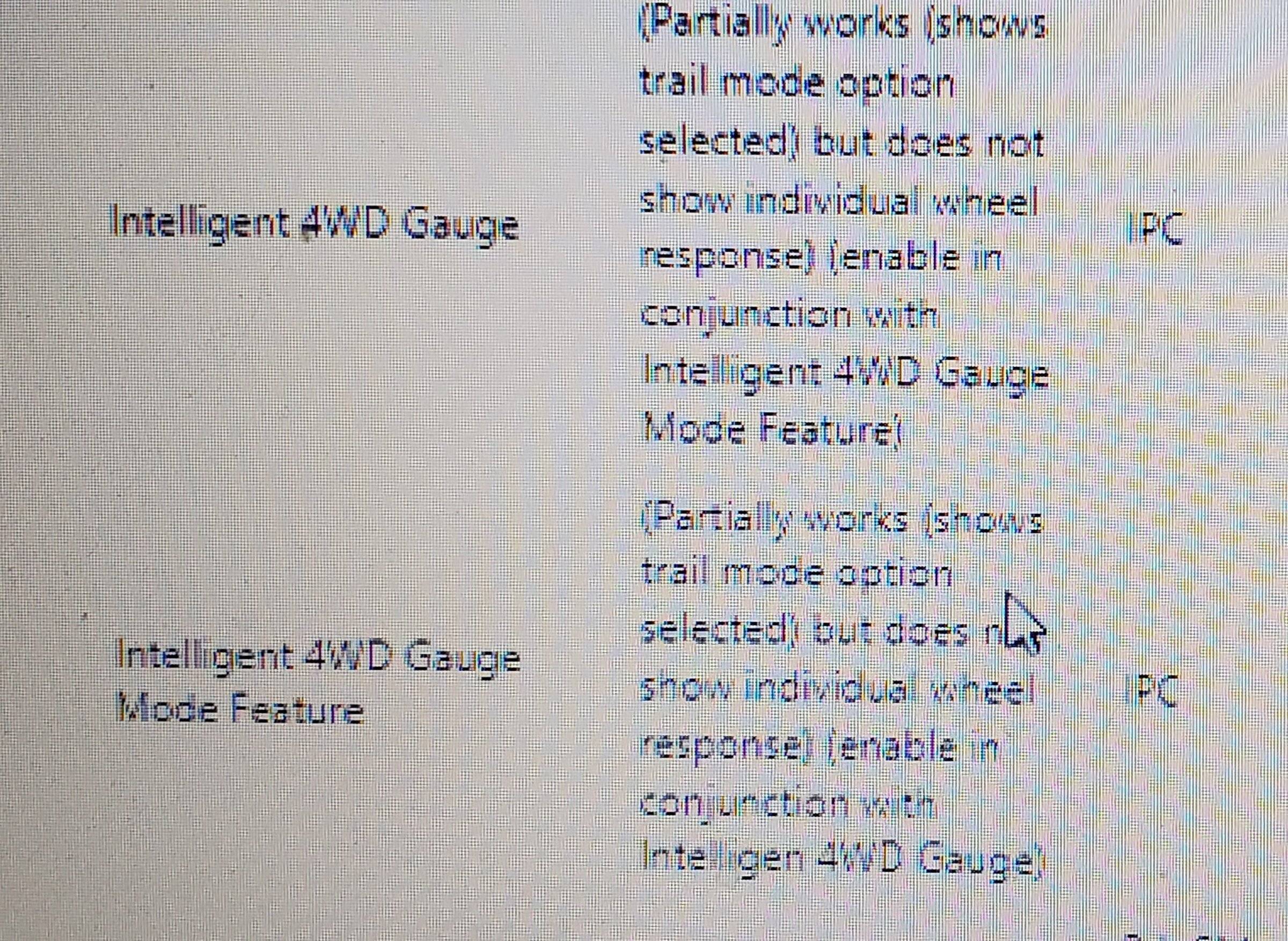
Found something about an offroad display that show something but doesn't show individual wheels, What is this for on an XLT?
I have had the power output display for 2 or 4wd.
plus I enabled trail management and its showing in the offroad display and gauges that I turned on awhile ago. Shows on dash with the incline and lean angles.

Checking the Bronco forscan page. There is a link to a google spreadsheet at the top of their page. They are pretty happy to be able to enable Sport mode on some models, not the same as Baja mode I've learned.
 
Last edited:

Mirage775

Well-Known Member
First Name
Jason
Joined
Apr 24, 2021
Threads
51
Messages
974
Reaction score
2,183
Location
Huntsville, Alabama
Vehicle(s)
23 Bronco 2dr Badlands SAS, 24 Bronco 2dr Heritage Limited, 95 F-150 XLT SWB 4x4
Occupation
Water Meter Tech I
Vehicle Showcase
1
Is there a spreedsheet or google doc for Ranger forscan changes?

I was back again tonite after a few months to find some info on changing the battery charge level and I may have missed it in the on the page.

I did find something about an offroad display that show something but doesn't show individual wheels, What is this for on an XLT?
I have had the power output display for 2 or 4wd.
plus I enabled trail management and its showing in the offroad display and gauges that I turned on awhile ago. Shows on dash with the incline and lean angles.

I was just checking the Bronco forscan page. There is a link to a google spreadsheet at the top of their page. They are pretty happy to be able to enable Sport mode on some models, not the same as Baja mode I've learned.
I changed the battery charge level to 90%, like I've seen others do.

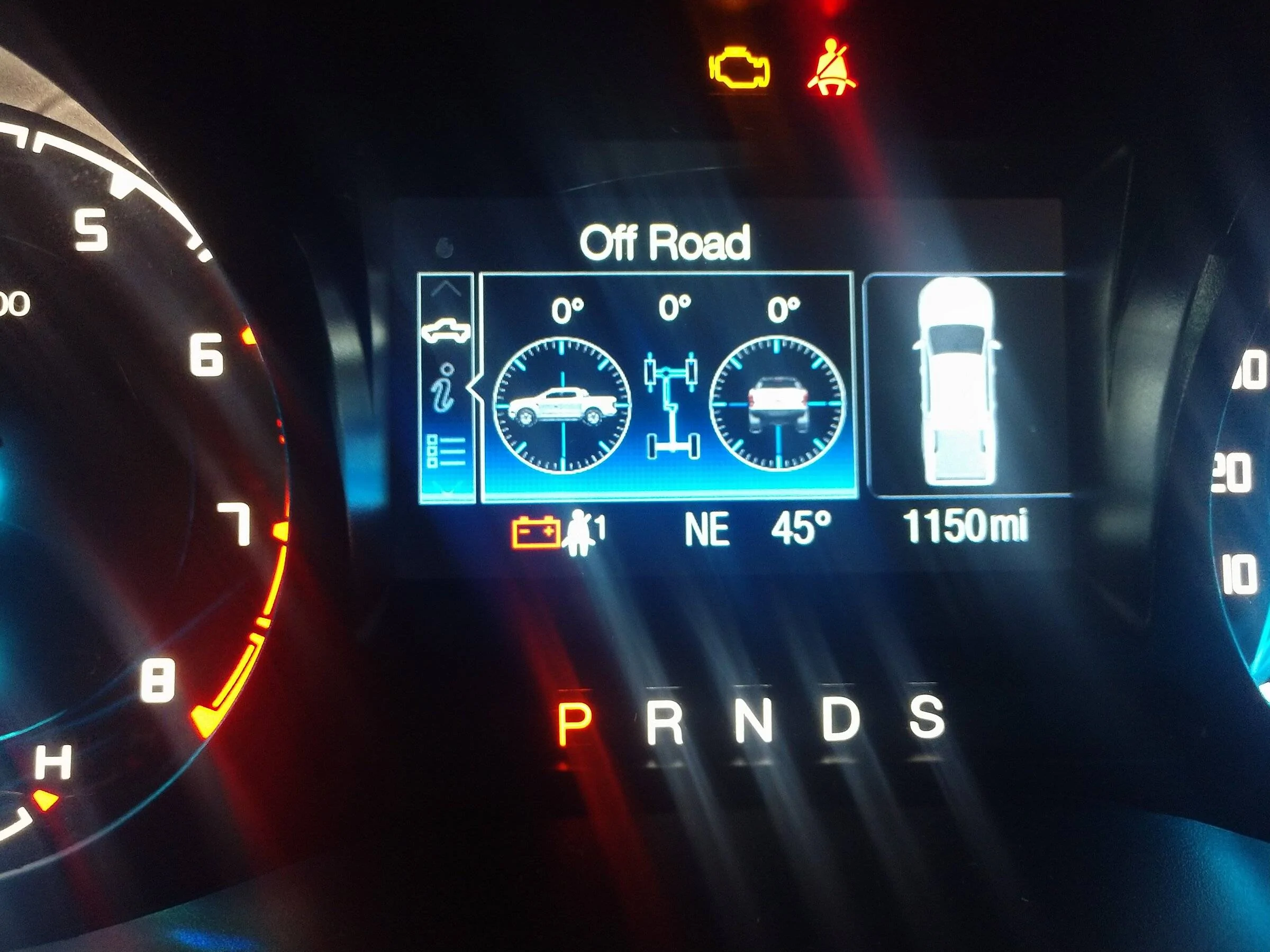
The Off-road gauges on my XLT 2wd look like this:
IMG_20220123_082715947.webp


I thought it was kinda neat and would only serve its' purpose for me, if I were racing on a road course.

That's the only Off-Road gauge that works for my '21.
 

FoMoCoDave

Well-Known Member
First Name
Dave
Joined
Nov 15, 2020
Threads
4
Messages
61
Reaction score
96
Location
Blue Ridge Mtns VA
Vehicle(s)
2020 Ranger XLT
Thanks Jason
I have that screen showing the angles also.

You helped me get out to look in my truck and see about the battery levels. The new non-beta software doesn't like my old plug thats all for today lol. I did take a look at the screens and found what I was asking about.

I'm was wondering about this, think I have the answer now.
20220130_134923.jpg

I pretty sure this above refers to the pic below
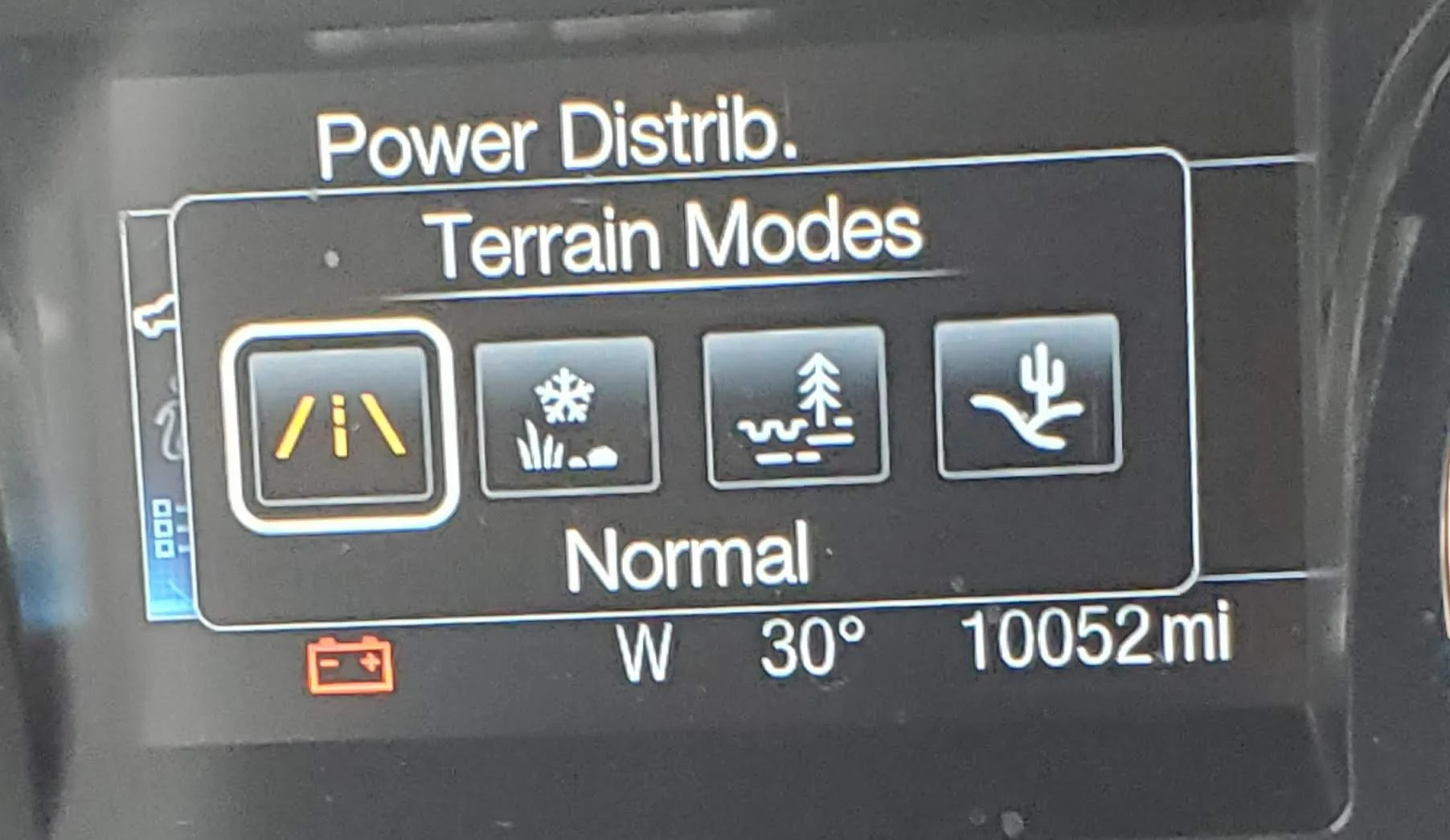
20220130_133509.jpg

This screen goes away after a few seconds.[/QUOTE]
 

Gizmokid2005

Well-Known Member
Joined
Dec 1, 2019
Threads
13
Messages
1,279
Reaction score
1,875
Location
GA
Website
gizmokid2005.com
Vehicle(s)
2019 Ford Ranger XLT 4X4 SCrew
Occupation
SQL Developer
Vehicle Showcase
1
Thanks Jason
I have that screen showing the angles also.

You helped me get out to look in my truck and see about the battery levels. The new non-beta software doesn't like my old plug thats all for today lol. I did take a look at the screens and found what I was asking about.

I'm was wondering about this, think I have the answer now.
20220130_134923.jpg

I pretty sure this above refers to the pic below
20220130_133509.webp

This screen goes away after a few seconds.
The terrain modes can only be added with the terrain management 4x4 switch, without it you'll never have access to them.
Sponsored


Top