Sponsored

Sync Map update with help of Ford Customer Service

Johnpenn

Well-Known Member
First Name
John
Joined
Mar 31, 2019
Threads
1
Messages
248
Reaction score
126
Location
Rockwood TN
Vehicle(s)
2019 Ranger Lariat FX4, 2004 Corvette, 2005 Ranger Edge
Occupation
Retired Quality and EHS Manager
Try Google maps. Also there is a map pocket behind the pass. seat. :shock::tumbleweed:
Thanks; that should help but my OCD requires that since I paid for NAV, I should get it to work and update properly.
Sponsored


JetEngr19

Well-Known Member
Joined
Jan 12, 2019
Threads
4
Messages
145
Reaction score
213
Location
Oklahoma City
Vehicle(s)
2019 Ford Ranger, 2016 Jeep Wranger
The voice control on my navigation stopped working after I did the update. It “successfully” completed after only 30 minutes, which I thought was oddly fast.
 

UofMEngineer

Well-Known Member
Joined
Apr 19, 2019
Threads
1
Messages
516
Reaction score
334
Location
Michigan
Vehicle(s)
20' Escape Hybrid,18' Fusion Hybrid
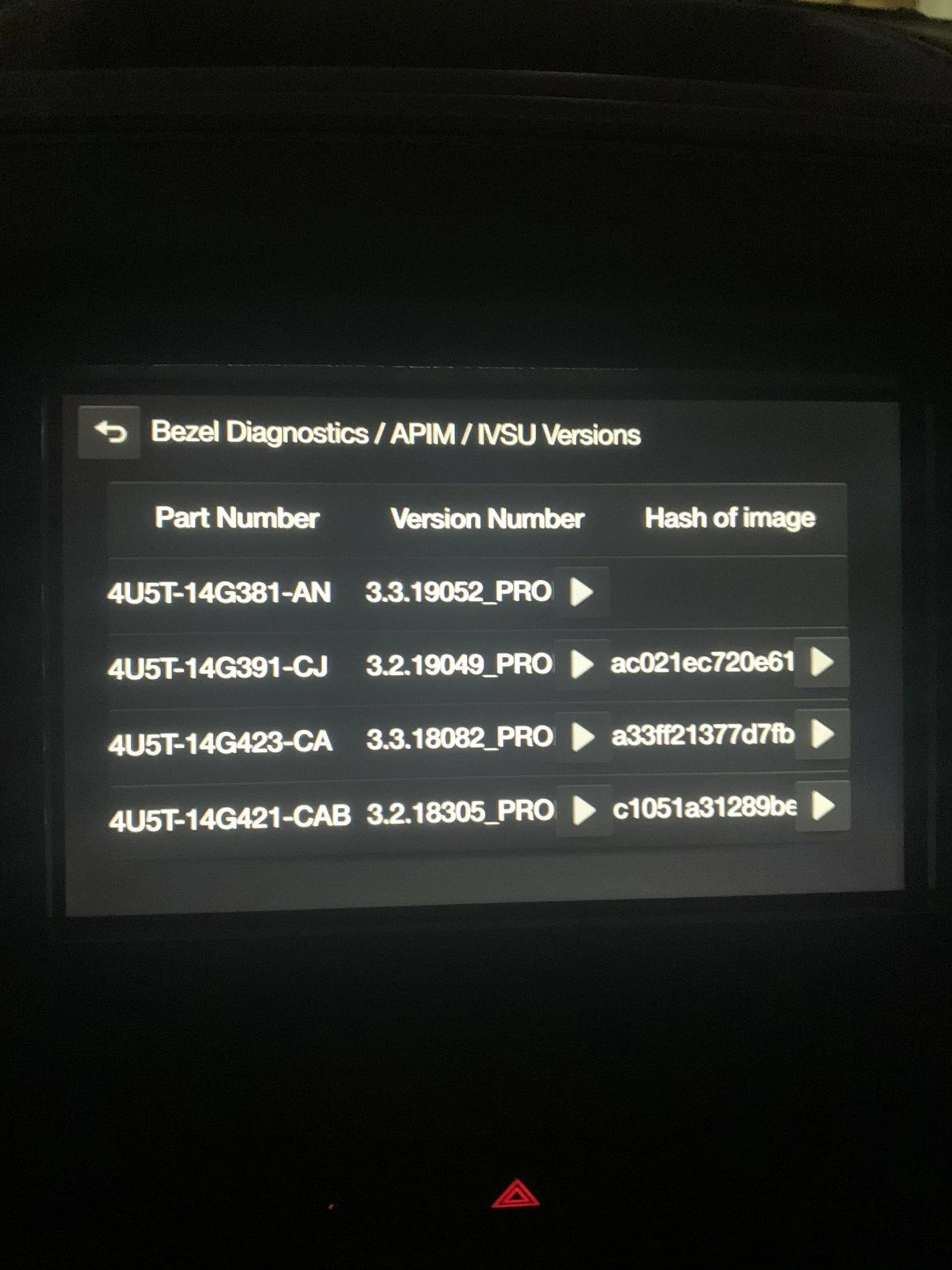
I really appreciate your insight into whats going on here. The strange thing is that my nav seems to be working normally and I'm getting voice prompts. Only 4 items show up on the TVSU screen:
AU5T-14G381-AN
AU5T-14G391-CJ
AU5T-14G423-CA
AU5T-14G421-CAB

This is the contents of the autoinstall.lst file. When the install completes, what should the TVSU screen look like? Can I edit the autoinstall.lst to fix the problem?:

[SYNCGen3.0_3.2312.18005_PRODUCT]
Item1 = version checker MY16
Open1 = SyncMyRide\HB5T-14G386-TAB.tar.gz
Item2 = version checker MY19
Open2 = SyncMyRide\HB5T-14G386-VGA.tar.gz
Item3 = Map-License
Open3 = SyncMyRide\4U5T-14G424-CB.tar.gz
Item4 = Map Chunk1
Open4 = SyncMyRide\4U5T-14G421-CAB.tar.gz
Item5 = Map Chunk2
Open5 = SyncMyRide\4U5T-14G421-CBB.tar.gz
Item6 = Map Chunk3
Open6 = SyncMyRide\4U5T-14G421-CCB.tar.gz
Item7 = Map Chunk4
Open7 = SyncMyRide\4U5T-14G421-CDB.tar.gz
Options = AutoInstall

[SYNCGen3.0_3.2312.18005]
Item1 = Map Chunk6
Open1 = SyncMyRide\4U5T-14G421-CFB.tar.gz
Item2 = Map Chunk7
Open2 = SyncMyRide\4U5T-14G421-CGB.tar.gz
Item3 = Map Chunk8
Open3 = SyncMyRide\4U5T-14G421-CHB.tar.gz
Item4 = Map Chunk9
Open4 = SyncMyRide\4U5T-14G421-CJB.tar.gz
Options = AutoInstall, Include, Transaction

[SYNCGen3.0_ALL]
Item1 = Map Chunk5
Open1 = SyncMyRide\4U5T-14G421-CEB.tar.gz
Item2 = Nav-Voice Chunk1
Open2 = SyncMyRide\4U5T-14G422-CAC.tar.gz
Item3 = Nav-Voice Chunk2
Open3 = SyncMyRide\4U5T-14G422-CBC.tar.gz
Item4 = Nav-Voice Chunk3
Open4 = SyncMyRide\4U5T-14G422-CCC.tar.gz
Options = Delay, Include ,Transaction
Looks like it didn't update. It deleted the voice part (that 14G422 is for voice search, nav itself will still work) but everything else does not appear to have updated. What message do you see when you plug it in? You may have a similar problem as P.A. above.
 

UofMEngineer

Well-Known Member
Joined
Apr 19, 2019
Threads
1
Messages
516
Reaction score
334
Location
Michigan
Vehicle(s)
20' Escape Hybrid,18' Fusion Hybrid
The voice control on my navigation stopped working after I did the update. It “successfully” completed after only 30 minutes, which I thought was oddly fast.
That may have been an earlier piece of the install. The full install, when I tested it, took about 55 minutes. Check your IVSU screen for the 14G422. If it isn't there, but the map itself is correct, you can install the English packages with this:

[SYNCGen3.0_ALL]
Item1 = Nav-Voice Chunk1
Open1 = SyncMyRide\4U5T-14G422-CAC.tar.gz
Item2 = Nav-Voice Chunk2
Open2 = SyncMyRide\4U5T-14G422-CBC.tar.gz
Item3 = Nav-Voice Chunk3
Open3 = SyncMyRide\4U5T-14G422-CCC.tar.gz
Options = Autoinstall[/QUOTE]

The Item1/Open1 package is English, so if you're not planning on using French or Spanish, you don't *need* the last two. Note, you may need to re-run the last section entirely if you interrupted the process after, say, step 2.
 

Johnpenn

Well-Known Member
First Name
John
Joined
Mar 31, 2019
Threads
1
Messages
248
Reaction score
126
Location
Rockwood TN
Vehicle(s)
2019 Ranger Lariat FX4, 2004 Corvette, 2005 Ranger Edge
Occupation
Retired Quality and EHS Manager
Looks like it didn't update. It deleted the voice part (that 14G422 is for voice search, nav itself will still work) but everything else does not appear to have updated. What message do you see when you plug it in? You may have a similar problem as P.A. above.
I get an error that the installation failed with an Error Code INSTL_ERR06


OP
OP
P. A. Schilke

P. A. Schilke

Well-Known Member
First Name
Phil
Joined
Apr 3, 2019
Threads
149
Messages
7,083
Reaction score
37,187
Location
GV Arizona
Vehicle(s)
2019 Ranger FX4 Lariat 4x4, 2020 Lincoln Nautilus, 2005 Alfa Motorhome
Occupation
Engineer Retired
Vehicle Showcase
1
I get an error that the installation failed with an Error Code INSTL_ERR06
Hi John,

Welcome to the club....same crap. It took a file to erase certain files including voice filed. Once done and auto off was disabled, it took about 2 hours of idling before I got a installation complete screen. About half way through there was an error screen but I was told to ignore it and let it keep updating...so I ignored and was successful. Good luck...the file I got from Sync customer service was especially taylored to my Sync ID. so I cannot sent it to you as it won't work as I understand it....Not real clear on why it has to be that way.

Best,
Phil Schilke
Ranger Vehicle Engineering
Ford Motor Co. Retired
 

UofMEngineer

Well-Known Member
Joined
Apr 19, 2019
Threads
1
Messages
516
Reaction score
334
Location
Michigan
Vehicle(s)
20' Escape Hybrid,18' Fusion Hybrid
I get an error that the installation failed with an Error Code INSTL_ERR06
Looked it up. It's an error that fires when it goes to transfer the new images from the temporary install location to the final location. Can't tell what exactly would cause it though. You can try a Master Reset for grins, not sure if that'll help. Else, you may be stuck with the dealer/customer service route.

Question - Did you do a ignition cycle during the update? It seems like one possibility is the process was interrupted somehow, then when you plug it in successive times to install it's trying to copy over "new" images that are already there. So, similar to P.A. you may need to get that map deletion tool from customer service to wipe it all away, then the map installer should work.
 
Last edited:

Johnpenn

Well-Known Member
First Name
John
Joined
Mar 31, 2019
Threads
1
Messages
248
Reaction score
126
Location
Rockwood TN
Vehicle(s)
2019 Ranger Lariat FX4, 2004 Corvette, 2005 Ranger Edge
Occupation
Retired Quality and EHS Manager
Hi John,

Welcome to the club....same crap. It took a file to erase certain files including voice filed. Once done and auto off was disabled, it took about 2 hours of idling before I got a installation complete screen. About half way through there was an error screen but I was told to ignore it and let it keep updating...so I ignored and was successful. Good luck...the file I got from Sync customer service was especially taylored to my Sync ID. so I cannot sent it to you as it won't work as I understand it....Not real clear on why it has to be that way.

Best,
Phil Schilke
Ranger Vehicle Engineering
Ford Motor Co. Retired
Hi Phil,

Your file might work for me if I substitute my license file in place of yours. Might be worth a try. Would you be willing to send it to me? I can message you my gmail address.
 
OP
OP
P. A. Schilke

P. A. Schilke

Well-Known Member
First Name
Phil
Joined
Apr 3, 2019
Threads
149
Messages
7,083
Reaction score
37,187
Location
GV Arizona
Vehicle(s)
2019 Ranger FX4 Lariat 4x4, 2020 Lincoln Nautilus, 2005 Alfa Motorhome
Occupation
Engineer Retired
Vehicle Showcase
1
Hi Phil,

Your file might work for me if I substitute my license file in place of yours. Might be worth a try. Would you be willing to send it to me? I can message you my gmail address.
Hi John,

You can not PM me as I turned this off but I pm'd you with my email address, so once I get your email address I can send you the file!

Best,
Phil Schilke
Ranger Vehicle Engineering
Ford Motor Co. Retired
 

UofMEngineer

Well-Known Member
Joined
Apr 19, 2019
Threads
1
Messages
516
Reaction score
334
Location
Michigan
Vehicle(s)
20' Escape Hybrid,18' Fusion Hybrid
Hi Phil,

Your file might work for me if I substitute my license file in place of yours. Might be worth a try. Would you be willing to send it to me? I can message you my gmail address.
Most likely they signed it to his ESN so you'll get an error.
 

Jerry Caldwell

Well-Known Member
First Name
Jerry
Joined
May 18, 2019
Threads
5
Messages
227
Reaction score
244
Location
Granbury, TX
Vehicle(s)
Ranger Lariat
Occupation
Retired Architect
Hi John,

Welcome to the club....same crap. It took a file to erase certain files including voice filed. Once done and auto off was disabled, it took about 2 hours of idling before I got a installation complete screen. About half way through there was an error screen but I was told to ignore it and let it keep updating...so I ignored and was successful. Good luck...the file I got from Sync customer service was especially taylored to my Sync ID. so I cannot sent it to you as it won't work as I understand it....Not real clear on why it has to be that way.

Best,
Phil Schilke
Ranger Vehicle Engineering
Ford Motor Co. Retired
I wish I could actually get Ford tech to respond to my ticket.
 

JetEngr19

Well-Known Member
Joined
Jan 12, 2019
Threads
4
Messages
145
Reaction score
213
Location
Oklahoma City
Vehicle(s)
2019 Ford Ranger, 2016 Jeep Wranger
That may have been an earlier piece of the install. The full install, when I tested it, took about 55 minutes. Check your IVSU screen for the 14G422. If it isn't there, but the map itself is correct, you can install the English packages with this:

[SYNCGen3.0_ALL]
Item1 = Nav-Voice Chunk1
Open1 = SyncMyRide\4U5T-14G422-CAC.tar.gz
Item2 = Nav-Voice Chunk2
Open2 = SyncMyRide\4U5T-14G422-CBC.tar.gz
Item3 = Nav-Voice Chunk3
Open3 = SyncMyRide\4U5T-14G422-CCC.tar.gz
Options = Autoinstall

The Item1/Open1 package is English, so if you're not planning on using French or Spanish, you don't *need* the last two. Note, you may need to re-run the last section entirely if you interrupted the process after, say, step 2.
This is my IVSU screen. Can you tell from this if my maps updated correctly?

F4DAD3D0-972C-4C7E-BA5A-0E47B59A022F.webp
 

UofMEngineer

Well-Known Member
Joined
Apr 19, 2019
Threads
1
Messages
516
Reaction score
334
Location
Michigan
Vehicle(s)
20' Escape Hybrid,18' Fusion Hybrid
This is my IVSU screen. Can you tell from this if my maps updated correctly?

F4DAD3D0-972C-4C7E-BA5A-0E47B59A022F.webp
The map chunk is correct for 18Q1. You are missing the voice pack though, at least the English one. Makes me wonder if the last section of the update didn't run.
 

JetEngr19

Well-Known Member
Joined
Jan 12, 2019
Threads
4
Messages
145
Reaction score
213
Location
Oklahoma City
Vehicle(s)
2019 Ford Ranger, 2016 Jeep Wranger
The map chunk is correct for 18Q1. You are missing the voice pack though, at least the English one. Makes me wonder if the last section of the update didn't run.
Okay, I will try loading the voice pack this weekend. Thank you very much for your help.
 

Fawnbuster

Well-Known Member
First Name
Mike
Joined
Jul 14, 2019
Threads
62
Messages
2,416
Reaction score
8,970
Location
Indiana
Vehicle(s)
2019 Ranger
Occupation
Retired 34 years as LEO
Vehicle Showcase
1
I tried to use a thumb drive for a non nav F150 sync update and it was FUBAR. I even bought a high dollar thumb drive and on 2nd try used the customer service 800 # and he tried to walk me thru it. Ended up telling me go to the dealer and they can do it fast with a computer. Next oil change I went and it was done and no extra cost. I plan to have my dealer do it, most times they don't charge us. My wife's Fusion was a free sync upgrade last spring.
Sponsored


Top