Sponsored

Just updated to Sync 3.4 on my Ranger 2019

d_ganggreen

Active Member
Joined
Jan 29, 2020
Threads
3
Messages
34
Reaction score
9
Location
Texas
Vehicle(s)
2019 Ranger Lariat
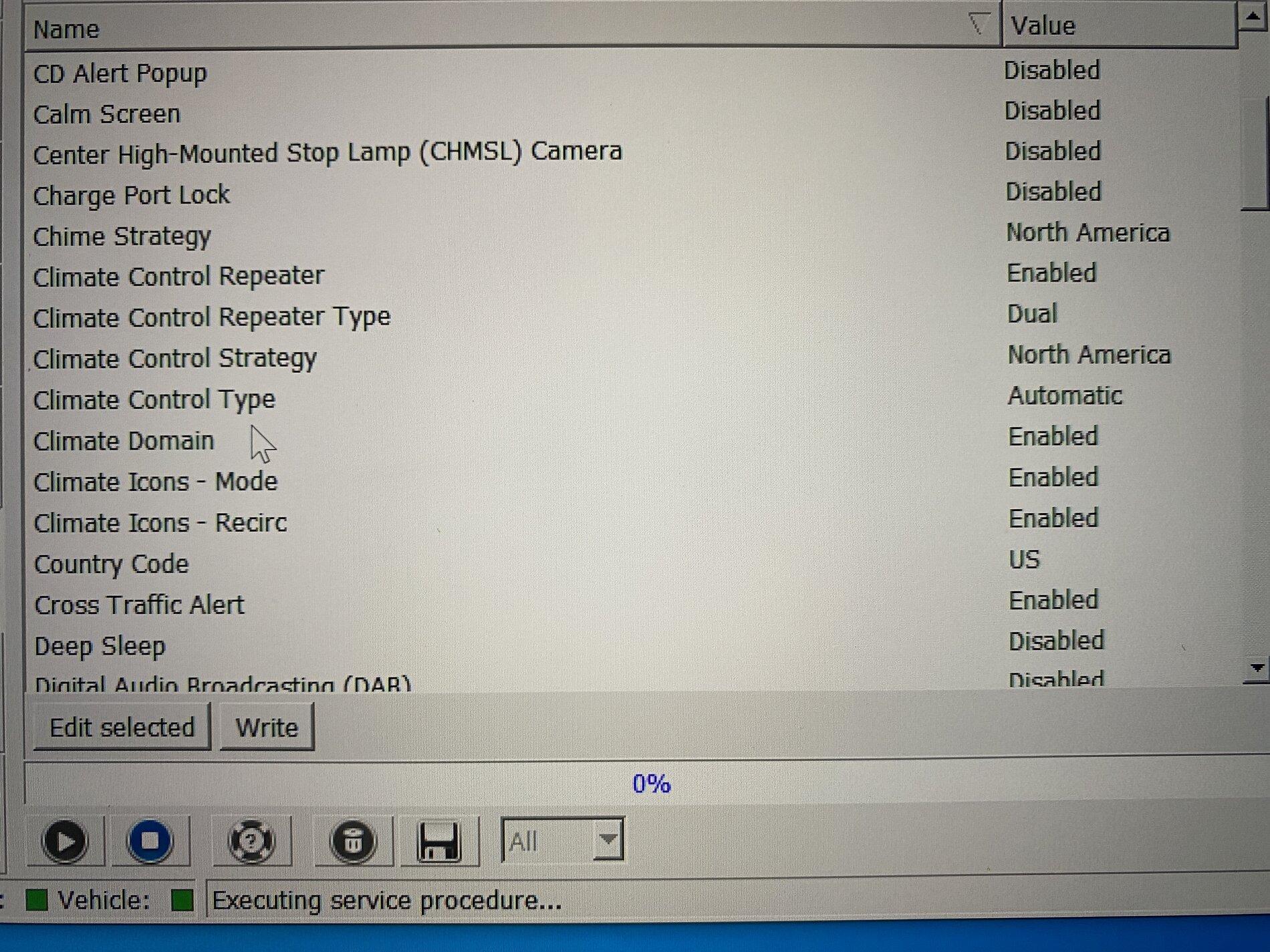
Go into the APIM module (not the asbuilt) one. Your dropdowns should look like mine (the climate section only). Im pretty sure it was climate control repeater, and both climate icons.
301F9A99-6395-426B-BBC3-093F13D1DDF8.jpeg
Here is what I used to get my climate back. Just used the dropdown menu for Forscan.
Sponsored


UofMEngineer

Well-Known Member
Joined
Apr 19, 2019
Threads
1
Messages
516
Reaction score
334
Location
Michigan
Vehicle(s)
20' Escape Hybrid,18' Fusion Hybrid
Here is what I used to get my climate back. Just used the dropdown menu for Forscan.
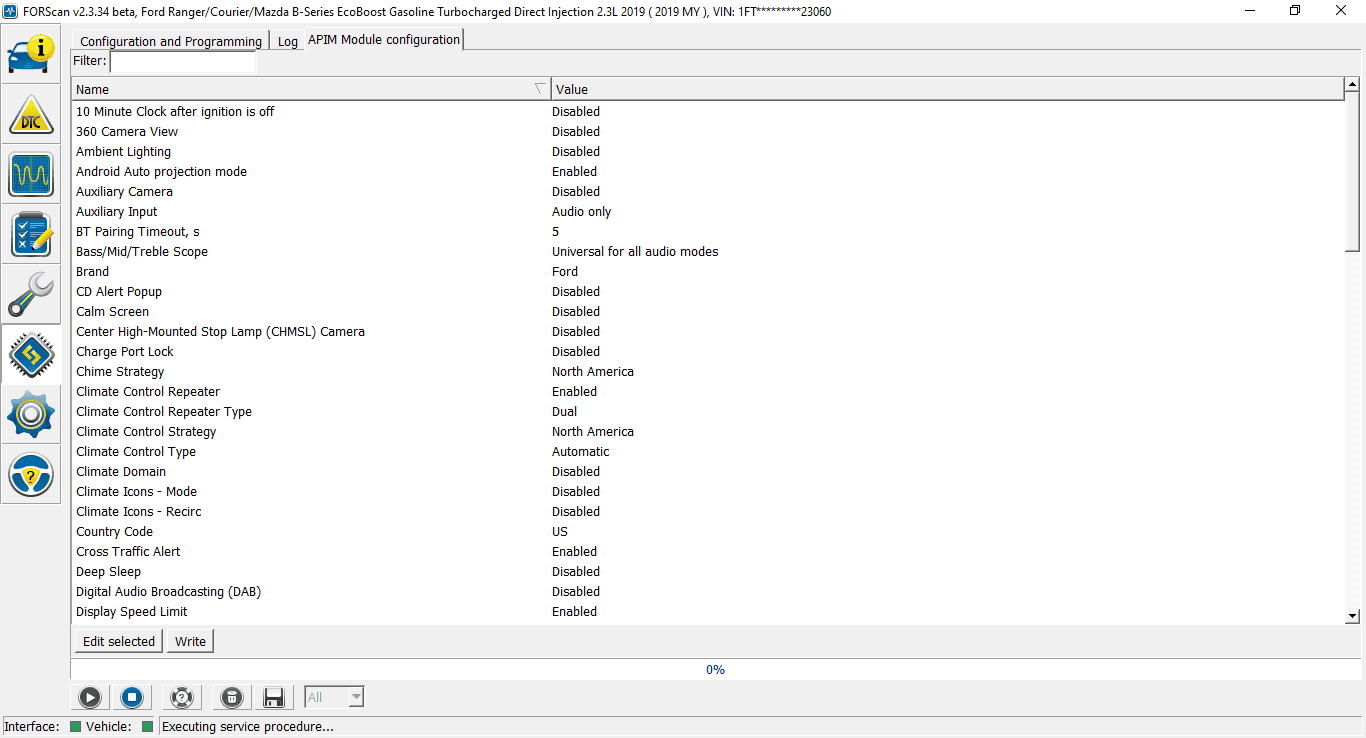
So, what it seems like so far is some of these configurations have the climate domain disabled, but climate type is Auto. The Auto setting also toggles on the voice commands for temperature. That's why the ones losing the climate UI still have voice commands. The ones that don't lose the climate UI have their climate domain enabled along with Auto type. Why that is the case...?
 

VAMike

Well-Known Member
First Name
Mike
Joined
Feb 22, 2019
Threads
1
Messages
3,390
Reaction score
4,408
Location
Virginia
Vehicle(s)
2019 Ranger Lariat SuperCab
so I installed 3.4. I got a message that everything was done and it was safe to remove the usb drive. then the display went black and I've never seen it again. not even the backup camera works anymore, so that IMO actually seems like a safety recall issue (aren't the camera requirements covered by extensive federal regs?) I'm so fed up with ford's ability to maintain electronics, and really skeptical that they're going to be able to compete in a world where cars are as much digital as analog.

I do have the xml file assuring me that the upgrade completed successfully. ?
 

demothus

Member
First Name
Brandon
Joined
Jul 29, 2020
Threads
0
Messages
9
Reaction score
2
Location
Why
Vehicle(s)
2019 Ford Ranger XLT
Occupation
Product Engineer
so I installed 3.4. I got a message that everything was done and it was safe to remove the usb drive. then the display went black and I've never seen it again. not even the backup camera works anymore, so that IMO actually seems like a safety recall issue (aren't the camera requirements covered by extensive federal regs?) I'm so fed up with ford's ability to maintain electronics, and really skeptical that they're going to be able to compete in a world where cars are as much digital as analog.

I do have the xml file assuring me that the upgrade completed successfully. ?
Have you tried a key cycle? Take the key out, open the door, lock the door with the remote, close the door and let it sit for 20 minutes, then try starting your vehicle again. I realize you have push-to-start but the process is essentially the same as if you had a physical key.

Otherwise you could try pulling the negative battery cable, let it sit for 10 minutes, then reinstall the cable and see if that brings the display back.
 
Last edited:

VAMike

Well-Known Member
First Name
Mike
Joined
Feb 22, 2019
Threads
1
Messages
3,390
Reaction score
4,408
Location
Virginia
Vehicle(s)
2019 Ranger Lariat SuperCab
Have you tried a key cycle? Take the key out, open the door, lock the door with the remote, close the door and let it sit for 20 minutes, then try starting your vehicle again. I realize you have push-to-start but the process is essentially the same as if you had a physical key.

Otherwise you could try pulling the negative battery cable, let it sit for 10 minutes, then reinstall the cable and see if that brings the display back.
I've let the car sit and later driven it a couple of times; it had plenty of time off. I'll take it to the dealer before I start crap like pulling the battery cable because Ford needs to clean up their own mess (with appropriate paper trail).


Rp930

Well-Known Member
First Name
Rick
Joined
Nov 19, 2018
Threads
20
Messages
1,794
Reaction score
3,514
Location
Denver
Vehicle(s)
‘19 Ford Ranger Lariat, ‘23 Macan,’21 Shelby GT500
Occupation
Retired
Is there any real reason to submit the .xml file back to Ford?
 

demothus

Member
First Name
Brandon
Joined
Jul 29, 2020
Threads
0
Messages
9
Reaction score
2
Location
Why
Vehicle(s)
2019 Ford Ranger XLT
Occupation
Product Engineer
So, what it seems like so far is some of these configurations have the climate domain disabled, but climate type is Auto. The Auto setting also toggles on the voice commands for temperature. That's why the ones losing the climate UI still have voice commands. The ones that don't lose the climate UI have their climate domain enabled along with Auto type. Why that is the case...?
Just to confirm your suspicions, here is my truck data pulled from FORscan.
Forscan.png
 

dan1431

Member
First Name
Dan
Joined
Dec 26, 2019
Threads
2
Messages
13
Reaction score
16
Location
usa
Vehicle(s)
2019 Ford Ranger Lariat
I just updated my 2019 Ranger Lariat and after the first reboot, climate was still there, after the second reboot, climate disappeared.

Will FORD fix this at some point or am I going to have to go the FORScan route (which I would prefer not to)?
 

Figarou

Well-Known Member
Joined
Mar 22, 2019
Threads
25
Messages
2,408
Reaction score
13,793
Location
Texas
Vehicle(s)
2022 Ford Edge ST, 2019 Ford Ranger Lariat
Is there any real reason to submit the .xml file back to Ford?
Submitting that file will let Ford know your Sync 3 is up to date. Otherwise you'll keep seeing the same update when you check online.
 

Geoff

Well-Known Member
Joined
Oct 17, 2018
Threads
5
Messages
705
Reaction score
497
Location
NYS
Vehicle(s)
'19 Ranger 1943 Willys Jeep
Occupation
Retired Engineer
You should expect 2 automatic restarts. On initial plug in, the voice data is deleted and the first set of map chunks goes in with the license. It will then auto restart. Then the second set of map chunks go in, again followed by an auto restart. Finally, the last map chunk and 3 nav voice chunks go in. This time, when the install complete pop up is shown it will stay on screen. The system will not automatically restart itself after a few seconds.
Got the map fully loaded and Voice control works! Thank-you!

A couple comments on the map load....
This is not your problem but I wish Ford 'Vehicle Instructions' would just come out and say do not pull the USB Drive during the first 2 automatic restarts - pul it out only when the system wants a 3rd restart that needs to be invoked manually. The verbiage I read in the vehicle instructions was inaccurate and confusing. To compound matters there are on screen messages that appear before the auto restart that I took to mean "pull the plug".

From here on out I'll wait until it won't restart.

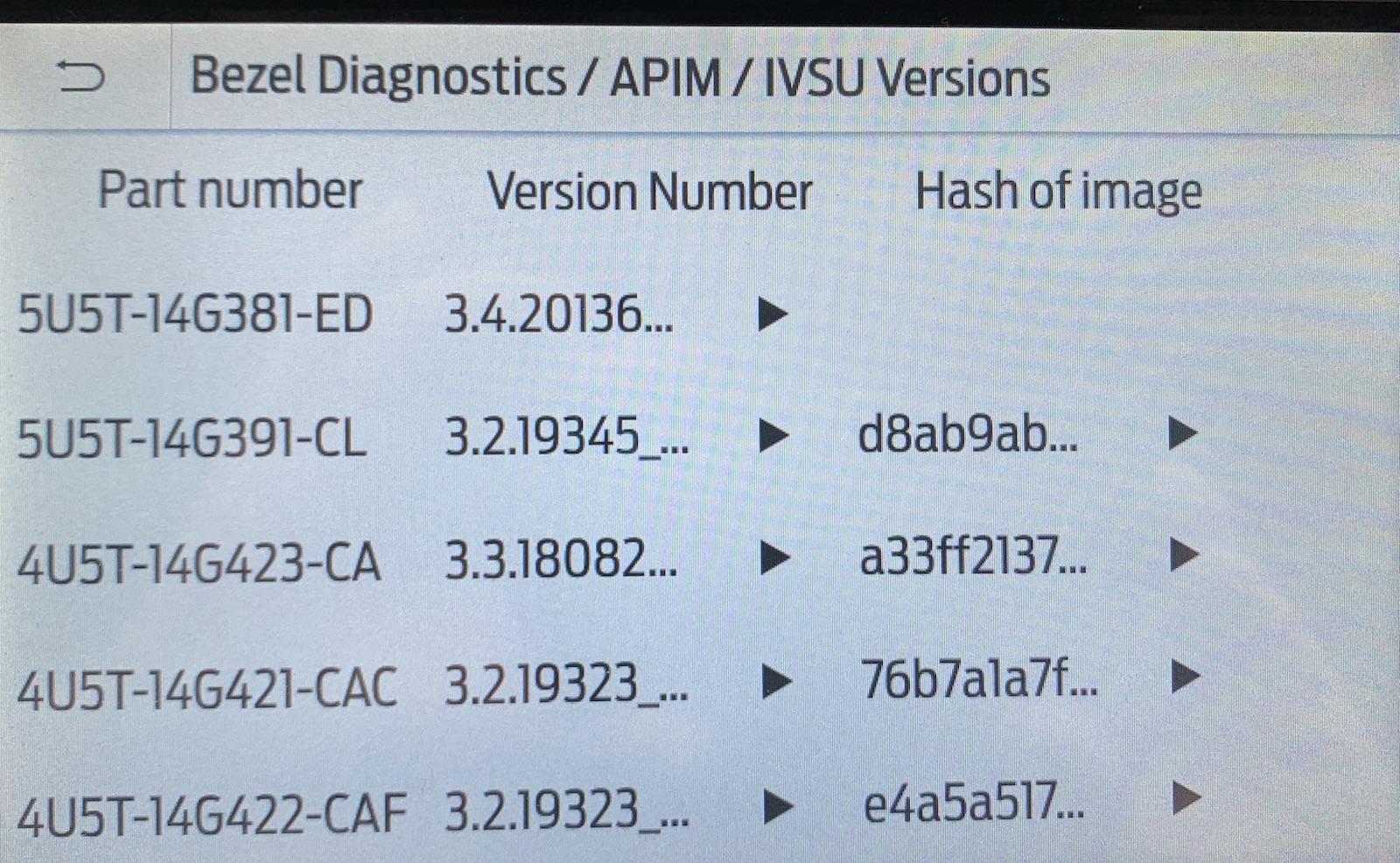
Sync 3.4 evidently does not necessarily start over if the map load procees is interrupted before it's completed...I shutdown the engine shortly after the first automatic restart yesterday. I went for a drive today and inserted the USB drive and it immediately began "Updating System Software" - It took about 45 minutes and it never did automatically reboot. But this time the message was clear: changes would take effect after the next vehicle start (or some such verbiage). Here is what my IVSU screen shows....I trust this is all correct.....

Thanks again for your help!!!!

IMG_1090.jpg
 
Last edited:

2.7EcoBoost

Well-Known Member
Joined
Feb 11, 2019
Threads
5
Messages
315
Reaction score
340
Location
NY
Vehicle(s)
2019 Ranger FX4 Screw
Is it possible that this update has not been activated for all 2019 VINs? I’ve been following this thread for weeks and weeks and have been officially waiting for the update for my 2019 Edge.
I just updated our 2019 Edge and it's an updated 3.3 version. On a side note, after spending 1.5 hours in the truck, the new version I would say is more intuitive, but I kinda feel the BLUE screen doesn't match anything in my instrument cluster or interior lighting. Wish they'd have given some more color options... :LOL: :LOL:
 
Last edited:

2.7EcoBoost

Well-Known Member
Joined
Feb 11, 2019
Threads
5
Messages
315
Reaction score
340
Location
NY
Vehicle(s)
2019 Ranger FX4 Screw
I've let the car sit and later driven it a couple of times; it had plenty of time off. I'll take it to the dealer before I start crap like pulling the battery cable because Ford needs to clean up their own mess (with appropriate paper trail).

Are the people having trouble using the Ford Sync site Ford Sync Update or are you guy's using the "perform at your own risk" method at beginning of the thread? Just curious....
 
Last edited:

Jon Olivier

Well-Known Member
First Name
Jon
Joined
Dec 7, 2019
Threads
2
Messages
234
Reaction score
996
Location
Bishop, CA
Vehicle(s)
2019 XLT 4x4 - Hot Pepper Red, 302A, Sport Appearance, FX4, Tow Package,
Occupation
IT Specialist - CA Dept of Transportation
Just updated mine. No issues so far. Need to get used to the different interface though.
 

Gizmokid2005

Well-Known Member
Joined
Dec 1, 2019
Threads
13
Messages
1,279
Reaction score
1,875
Location
GA
Website
gizmokid2005.com
Vehicle(s)
2019 Ford Ranger XLT 4X4 SCrew
Occupation
SQL Developer
Vehicle Showcase
1
Are the people having trouble using the Ford Sync site Ford Sync Update or are you guy's using the "perform at your own risk" method at beginning of the thread? Just curious....
I refused to do the "take a chance" method and only used the official Ford update. I didn't need the new shiny that bad.
Sponsored


Top