Sponsored

Sync Map update with help of Ford Customer Service

P. A. Schilke

Well-Known Member
First Name
Phil
Joined
Apr 3, 2019
Threads
149
Messages
7,083
Reaction score
37,187
Location
GV Arizona
Vehicle(s)
2019 Ranger FX4 Lariat 4x4, 2020 Lincoln Nautilus, 2005 Alfa Motorhome
Occupation
Engineer Retired
Vehicle Showcase
1
Hi Folks,

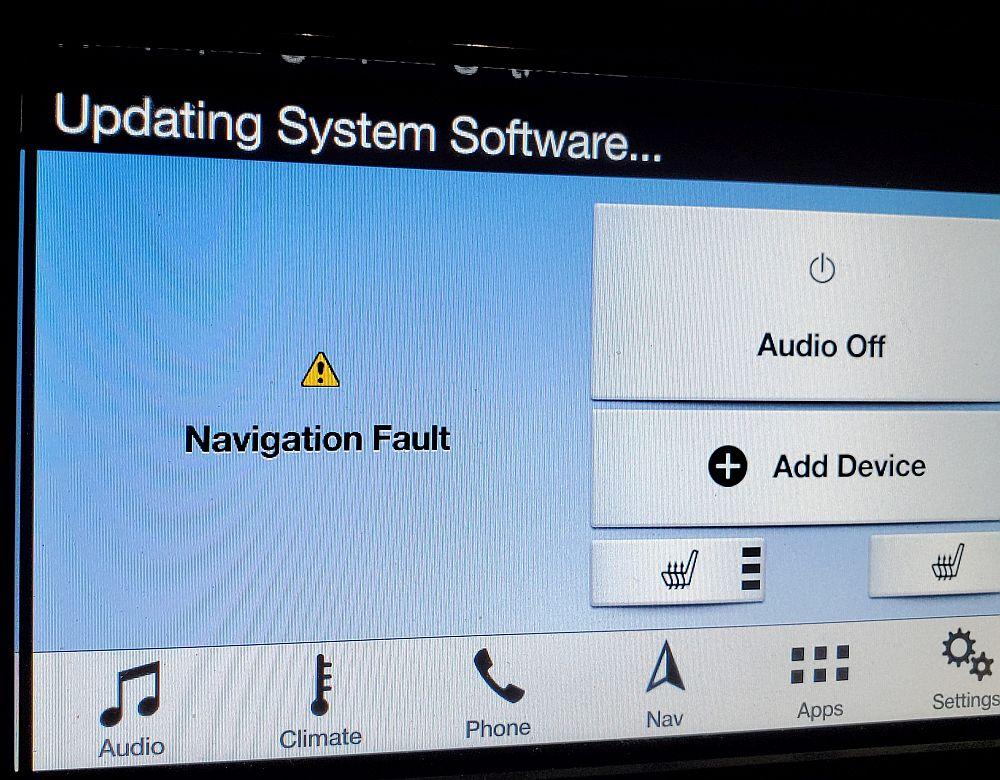
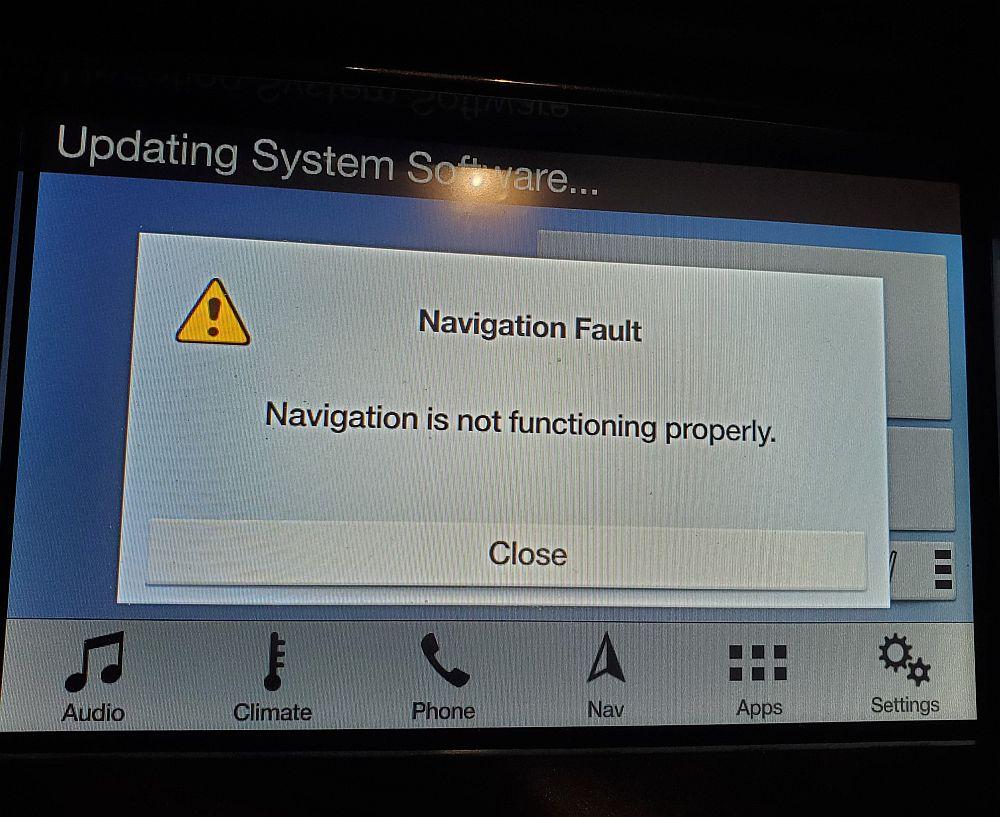
Well...after half a day and ¼ tank of gas trying to update my map following the Ford Sync Customer Service process. The lady sent me a zip file which removes some key files so the map update can run...or it was supposed to go.

Here are two pictures of where I am now....Furstrated beyond belief!!!:angry::angry::angry::curse::curse::curse:

navfault.jpg


navfault1.jpg

Best,
Phil Schilke
Ranger Vehicle Engineering
Ford Motor Co. Retiredd\
Sponsored

 

Gizmokid2005

Well-Known Member
Joined
Dec 1, 2019
Threads
13
Messages
1,279
Reaction score
1,875
Location
GA
Website
gizmokid2005.com
Vehicle(s)
2019 Ford Ranger XLT 4X4 SCrew
Occupation
SQL Developer
Vehicle Showcase
1
Best of luck getting it sorted. The navigation in my MFT system on my 2015 Mustang was enough to swear me off of ever using/trusting built-in nav ever again. Didn't come on my Ranger and I miss it 0%.
 

Dmax

Well-Known Member
Joined
Dec 26, 2019
Threads
24
Messages
508
Reaction score
586
Location
Denver, CO
Vehicle(s)
2019 Ford Ranger Lariat 4x4
Vehicle Showcase
1
Bummer. The screen says frustration.
 

Jerry Caldwell

Well-Known Member
First Name
Jerry
Joined
May 18, 2019
Threads
5
Messages
227
Reaction score
244
Location
Granbury, TX
Vehicle(s)
Ranger Lariat
Occupation
Retired Architect
Hi Folks,

Well...after half a day and ¼ tank of gas trying to update my map following the Ford Sync Customer Service process. The lady sent me a zip file which removes some key files so the map update can run...or it was supposed to go.

Here are two pictures of where I am now....Furstrated beyond belief!!!:angry::angry::angry::curse::curse::curse:

navfault.jpg


navfault1.jpg

Best,
Phil Schilke
Ranger Vehicle Engineering
Ford Motor Co. Retiredd\
That really stinks. I have been trying to get mine to update since late November, called customer support a number of times, they forward to tech support and I never hear back from tech support. Honestly your situation sucks even more. At lest mine still halfway works with some voice commands no longer available.

My plan now is to give my dealer a shot at figuring out why my voice commands no longer function when I have the tail lights checked, if they ever get the parts in and I receive the fabled letter.
 

UofMEngineer

Well-Known Member
Joined
Apr 19, 2019
Threads
1
Messages
516
Reaction score
334
Location
Michigan
Vehicle(s)
20' Escape Hybrid,18' Fusion Hybrid
What did they have you erase? What's actually installed (check the IVSU Version screen). My guess is this deleted the map data.


OP
OP
P. A. Schilke

P. A. Schilke

Well-Known Member
First Name
Phil
Joined
Apr 3, 2019
Threads
149
Messages
7,083
Reaction score
37,187
Location
GV Arizona
Vehicle(s)
2019 Ranger FX4 Lariat 4x4, 2020 Lincoln Nautilus, 2005 Alfa Motorhome
Occupation
Engineer Retired
Vehicle Showcase
1
What did they have you erase? What's actually installed (check the IVSU Version screen). My guess is this deleted the map data.
Hi UofM

It did delete the map data and also the voice data as I was told...

best,
Phil Schilke
Ranger Vehicle Engineering
Ford Motor Co. Retired
 

UofMEngineer

Well-Known Member
Joined
Apr 19, 2019
Threads
1
Messages
516
Reaction score
334
Location
Michigan
Vehicle(s)
20' Escape Hybrid,18' Fusion Hybrid
Hi UofM

It did delete the map data and also the voice data as I was told...

best,
Phil Schilke
Ranger Vehicle Engineering
Ford Motor Co. Retired
OK, that'd make sense. Does the map installer run now?
 
OP
OP
P. A. Schilke

P. A. Schilke

Well-Known Member
First Name
Phil
Joined
Apr 3, 2019
Threads
149
Messages
7,083
Reaction score
37,187
Location
GV Arizona
Vehicle(s)
2019 Ranger FX4 Lariat 4x4, 2020 Lincoln Nautilus, 2005 Alfa Motorhome
Occupation
Engineer Retired
Vehicle Showcase
1
OK, that'd make sense. Does the map installer run now?
Hi UofM,

The map installer won't run. Was going to try the software that the Customer Service Sync rep sent me and then try to install the map data again via the Purchased from Ford memory stick... If this does not work, I will have to book service with the Ford Dealer...since I have a claim number, it is a warranty repair according to the rep. Here is what she sent me as well as the file...

"
Thank you for contacting the In-Vehicle Technology Team of Ford Motor Company. We do apologize for the inconvenience you are experiencing with our Ford Product.

I have received your escalation regarding the Navigation Map Update Installation Process. The attached file will correct the concern you are having with installing the map update in the vehicle. Please follow the steps below.


1- Download/save attached zipped folder on your PC

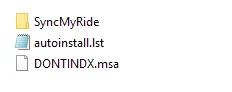
2- Extract zipped folder to root directory of empty USB (exFAT format). Normally you would find the download, right click, go to open with and select windows explorer. Extract All Files or Drag/Drop Files to USB Drive. The files should like look like this in the root directory of the USB drive. At least a 2GB USB drive is needed for this file.

upload_2020-2-6_8-27-46.webp


3- Start vehicle and Insert USB into USB port in vehicle

4- Within one minute, SYNC will display “Updating System Software…” transient message on the top left corner followed by a black screen where Map is displayed.

5- After about one minute, SYNC will display pop-up “Installation complete you may remove your USB device…”

6- Remove the USB from the USB port

7- Turn ignition off (open door if needed for power to completely shut down in the vehicle) and wait for 3 minutes to make sure SYNC go to full sleep

8- Turn ignition on, SYNC will display pop-up “Navigation Fault…” Please ignore this POPUP. Insert the original USB which contains the map data downloaded from Alom.COM and follow the user instructions. Please do not remove the USB drive or power the vehicle’s engine off while update is installing. The update should take 50-60 minutes. Around the 30-40 minute mark you can may see a “Installation Complete, remove USB” for 2-3 seconds and it disappears. The update is not complete at this point. Please leave USB drive in. At the end you will see this message again, but it will not disappear until you press the screen for it to."

The file she sent me was 1U5T-14G386-PA_VY14134D.zip... my Sync Id is the last 7 Alphanumeric digits... Do not know if this info helps at all...

Ford Customer Services has washed their hands of mess and tossed me at the Dealer....I am not a happy camper!

Best,
Phil Schilke
Ranger Vehicle Engineering
Ford Motor Co. Retired
Ranger Vehicle Engineering
 

Johnpenn

Well-Known Member
First Name
John
Joined
Mar 31, 2019
Threads
1
Messages
248
Reaction score
126
Location
Rockwood TN
Vehicle(s)
2019 Ranger Lariat FX4, 2004 Corvette, 2005 Ranger Edge
Occupation
Retired Quality and EHS Manager
Since the version number doesn't update in Sync 3.3, can anyone with a successful update tell me if there is a way to tell if the update worked? Maybe there is some new NAV feature or map function I haven't noticed.

A little history. About a month ago I received an email from Ford about the map update availability. The version number stayed at 1.17. I downloaded and installed several times but am not sure if the updated actually worked on the first install. I even re-downloaded and kept trying the install because I didn't know about the version update bug in Sync 3.3. When I retry the update, I get an error message that the install failed INSTL_ERR06. Ford support was no real help as expected.
 
Last edited:

UofMEngineer

Well-Known Member
Joined
Apr 19, 2019
Threads
1
Messages
516
Reaction score
334
Location
Michigan
Vehicle(s)
20' Escape Hybrid,18' Fusion Hybrid
Since the version number doesn't update in Sync 3.3, can anyone with a successful update tell me if there is a way to tell if the update worked? Maybe there is some new NAV feature or map function I haven't noticed.

A little history. About a month ago I received an email from Ford about the map update availability. The version number stayed at 1.17. I downloaded and installed several times but am not sure if the updated actually worked on the first install. I even re-downloaded and kept trying the install because I didn't know about the version update bug in Sync 3.3. When I retry the update, I get an error message that the install failed. Ford support was no real help as expected.
Go into the IVSU Versions diag screen. You'll see the list of packages installed. You can tell from the package names. The 14G422 and 14G421 are the ones to look for. Check those vs the files on the drive, or report here what they are.
 

Johnpenn

Well-Known Member
First Name
John
Joined
Mar 31, 2019
Threads
1
Messages
248
Reaction score
126
Location
Rockwood TN
Vehicle(s)
2019 Ranger Lariat FX4, 2004 Corvette, 2005 Ranger Edge
Occupation
Retired Quality and EHS Manager
Go into the IVSU Versions diag screen. You'll see the list of packages installed. You can tell from the package names. The 14G422 and 14G421 are the ones to look for. Check those vs the files on the drive, or report here what they are.
Thanks for responding. I have AU5T-14G421-CAB but no 14G422 in the diag screen. What does that mean?
 

Charley

Well-Known Member
Joined
Dec 21, 2019
Threads
7
Messages
235
Reaction score
591
Location
Next Door
Vehicle(s)
2024 Bronco Badlands Hot Pepper
Vehicle Showcase
1
Ford Customer, Services has washed their hands of mess and tossed me at the Dealer....I am not a happy camper!

Phil, as a Ford retiree, I believe there is an internal program for FordEmployeeFriendsFamily that may be able to help you to resolve your issues.

If you need more info shoot me a private message
 

UofMEngineer

Well-Known Member
Joined
Apr 19, 2019
Threads
1
Messages
516
Reaction score
334
Location
Michigan
Vehicle(s)
20' Escape Hybrid,18' Fusion Hybrid
Thanks for responding. I have AU5T-14G421-CAB but no 14G422 in the diag screen. What does that mean?
It likely deleted the 14G422 when you plugged it in to try to update. That's the voice package. It's deleted straight away to make space for the map update. If it's missing, it's not a hard fix, you'll just need to edit the installs script file autoinstall.lst. Check that the 14G421 matches what is on your drive. There will be multiple versions of it as it's broken up into chunks, but your chunk should match one of the file names. If that's good, then we can get your 14G422 back on there.
 

THLONE

Well-Known Member
First Name
Thom
Joined
Feb 12, 2019
Threads
10
Messages
1,456
Reaction score
2,177
Location
Tucson,AZ
Vehicle(s)
68 Chev C-20, 2019 Ford Ranger XL 4X4
Occupation
internet wise guy
Vehicle Showcase
1
Try Google maps. Also there is a map pocket behind the pass. seat. :shock::tumbleweed:
 

Johnpenn

Well-Known Member
First Name
John
Joined
Mar 31, 2019
Threads
1
Messages
248
Reaction score
126
Location
Rockwood TN
Vehicle(s)
2019 Ranger Lariat FX4, 2004 Corvette, 2005 Ranger Edge
Occupation
Retired Quality and EHS Manager
It likely deleted the 14G422 when you plugged it in to try to update. That's the voice package. It's deleted straight away to make space for the map update. If it's missing, it's not a hard fix, you'll just need to edit the installs script file autoinstall.lst. Check that the 14G421 matches what is on your drive. There will be multiple versions of it as it's broken up into chunks, but your chunk should match one of the file names. If that's good, then we can get your 14G422 back on there.
I really appreciate your insight into whats going on here. The strange thing is that my nav seems to be working normally and I'm getting voice prompts. Only 4 items show up on the TVSU screen:
4U5T-14G381-AN
4U5T-14G391-CJ
4U5T-14G423-CA
4U5T-14G421-CAB

This is the contents of the autoinstall.lst file. When the install completes, what should the TVSU screen look like? Can I edit the autoinstall.lst to fix the problem?:

[SYNCGen3.0_3.2312.18005_PRODUCT]
Item1 = version checker MY16
Open1 = SyncMyRide\HB5T-14G386-TAB.tar.gz
Item2 = version checker MY19
Open2 = SyncMyRide\HB5T-14G386-VGA.tar.gz
Item3 = Map-License
Open3 = SyncMyRide\4U5T-14G424-CB.tar.gz
Item4 = Map Chunk1
Open4 = SyncMyRide\4U5T-14G421-CAB.tar.gz
Item5 = Map Chunk2
Open5 = SyncMyRide\4U5T-14G421-CBB.tar.gz
Item6 = Map Chunk3
Open6 = SyncMyRide\4U5T-14G421-CCB.tar.gz
Item7 = Map Chunk4
Open7 = SyncMyRide\4U5T-14G421-CDB.tar.gz
Options = AutoInstall

[SYNCGen3.0_3.2312.18005]
Item1 = Map Chunk6
Open1 = SyncMyRide\4U5T-14G421-CFB.tar.gz
Item2 = Map Chunk7
Open2 = SyncMyRide\4U5T-14G421-CGB.tar.gz
Item3 = Map Chunk8
Open3 = SyncMyRide\4U5T-14G421-CHB.tar.gz
Item4 = Map Chunk9
Open4 = SyncMyRide\4U5T-14G421-CJB.tar.gz
Options = AutoInstall, Include, Transaction

[SYNCGen3.0_ALL]
Item1 = Map Chunk5
Open1 = SyncMyRide\4U5T-14G421-CEB.tar.gz
Item2 = Nav-Voice Chunk1
Open2 = SyncMyRide\4U5T-14G422-CAC.tar.gz
Item3 = Nav-Voice Chunk2
Open3 = SyncMyRide\4U5T-14G422-CBC.tar.gz
Item4 = Nav-Voice Chunk3
Open4 = SyncMyRide\4U5T-14G422-CCC.tar.gz
Options = Delay, Include ,Transaction
Sponsored

 
Last edited:


Top