Sponsored

Sync update.. again

NeilP

Well-Known Member
First Name
Neil
Joined
Aug 28, 2022
Threads
27
Messages
510
Reaction score
1,671
Location
Spearfish, South Dakota
Vehicle(s)
2022 Ranger Tremor (SOLD 12-14-2023)
Occupation
RETIRED!
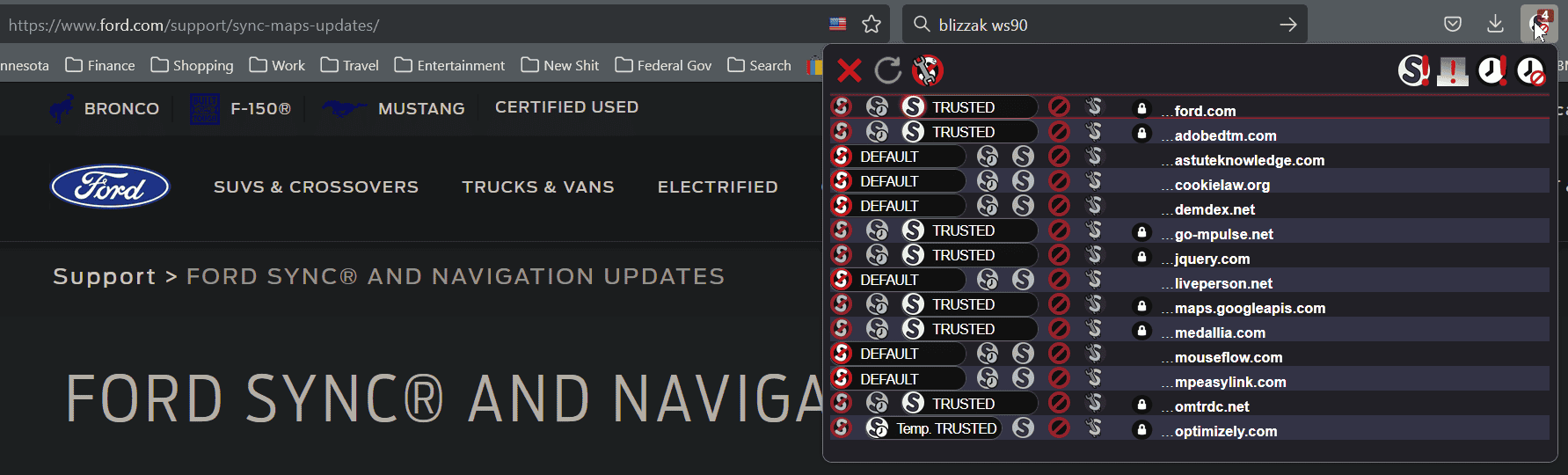
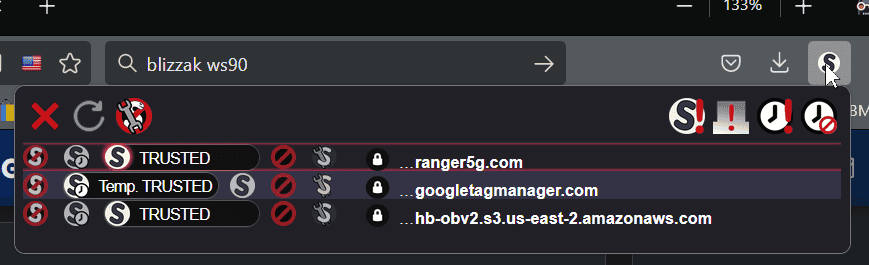
I use NoScript in Firefox and by default, it blocks all but the top domain of the website. Then I look at the drop down list of other sites that have been set to run scripts (doubleclick, amazonads, cooklaw, etc.) and either allow on a temp basis or permanently ( ranger5g.com, permanently; googletagmanger.com as temp and only on ranger5g.com site).

1671920454885.png


On the Ford site, there are a few more... but you only need to select some of them to get the site to work properly and still have some modest amount of privacy.

1671920670081.png


I am sure there are other add-ons of this type, but NoScript seems to be the most popular. Available for Firefox an Chrome, not sure about Edge.
I don't have that add-on. But as I mentioned earlier, I have all the ad-blockers & Malwarebytes turned off for ford.com. I've tried Firefox, Chrome & Edge, but get the same "upload failed, try again' message. Even tried Firefox in safe mode.

I called them about a month ago and I called again this afternoon. This time, they patched me over to Ford Pass. The asked a bunch of questions and gave me a case number & said to check the update site in about a month. In other words, they have no clue why I can't upload the xml file.
Sponsored
 

PltFX4

Well-Known Member
First Name
Richard
Joined
Jan 29, 2020
Threads
26
Messages
692
Reaction score
1,269
Location
Minneapolis, MN
Vehicle(s)
2019 Ranger Lariat FX4
I don't have that add-on. But as I mentioned earlier, I have all the ad-blockers & Malwarebytes turned off for ford.com. I've tried Firefox, Chrome & Edge, but get the same "upload failed, try again' message. Even tried Firefox in safe mode.

I called them about a month ago and I called again this afternoon. This time, they patched me over to Ford Pass. The asked a bunch of questions and gave me a case number & said to check the update site in about a month. In other words, they have no clue why I can't upload the xml file.
LOL... yep no clue... sounds like them... (even though I understand how complex this whole web thing is, it's still disappointing they can't do better).
 

OrangeStreak

Well-Known Member
First Name
Paul
Joined
Aug 18, 2020
Threads
32
Messages
3,195
Reaction score
13,997
Location
New Mexico
Vehicle(s)
2020 SCab STX 4X4 Towing Pkg. BFG K02's 265/70/17
Occupation
Retired. MTS. ANG veteran. 2nd Amendment supporter.
I hadn't updated mine either since I bought it in July 2019. I did it the other day and besides the blue screen accents I haven't noticed anything significantly different yet. If you do it just be patient as it does take a long time seeing as it's never been done. Mine took almost a full 24 hours before the new update popped up.

Just go into the main screen settings and look for Sync, updates.
Dave, I think your right about the longevity of the update time. Yesterday was my 5th sync update since owning the Ranger and it was finished in about 15 minutes. The prior ones took about 1/2 hour each. The update process has improved but because of the follow up problems I'm having, I'm thinking that the software team didn't do enough testing under actual driving and operating conditions.
 

Beez

Well-Known Member
First Name
Wayne
Joined
Dec 14, 2022
Threads
2
Messages
103
Reaction score
181
Location
Hawaii
Vehicle(s)
'19 Lariat, DIY BOV, 2.5 Leveler, MBRP 3" Exhaust
Occupation
Just another incredibly super average dude
Well, well, well... If it's not the consequences to my own actions. so we meet again.

I don't know why I do these things against my better judgement. I got my Lariat to finally upload the latest sync update from a thumb drive after nearly 25 minutes, but now (for whatever reason) it will NOT recognize my cell phone. I've tied everything short of doing a master reset. I deleted my phone from the Ranger and tried re-adding, but it seems like the bluetooth can't even find it. I've reset my phone and tried restarting it, but I get the same "Failed to connect" message. I know it's not my phone. Also tried to load up my wife's cell, but 'nada".. Still get the same gay message... It's maddening. I'm the dude that never has good experiences with "updates" and always has download remorse. After several hours of deleting, resetting, restarting, and repeated attempts to scan and link and wasting a 1/3 of a tank of fuel, I finally gave up... The only changes, aside from the glitcherrific Bluetooth connectivity, is the new lame, generic blue screen replacement that you get.

(I've seriously had thought of calling Ford and telling them, that I have a loaded 38 sitting on my lap... You've got 5 minutes to talk me out of it.)

61139280_420069532169142_2160610442446110720_n.webp


Beez

Well-Known Member
First Name
Wayne
Joined
Dec 14, 2022
Threads
2
Messages
103
Reaction score
181
Location
Hawaii
Vehicle(s)
'19 Lariat, DIY BOV, 2.5 Leveler, MBRP 3" Exhaust
Occupation
Just another incredibly super average dude
Frustrating. I’m sorry to read this.

Been putting off doing mine (and I do / did work in “Tech” for decades, maybe that’s why I dread it?). Will be this week.
(Cringing) Having the opportunity to do it all over again, or jam a dull stick in my eye... I'd opt for the stick.

At this point, I don't know what other options are available once you've pulled the trigger. If I could somehow drop back to the older sync version again, I'd take it in a heart beat. On a side note; I don't see what major advancements the update really offers us and quite frankly, I don't care for the new blue screen over the older versions display.

I don't want to discourage you, as others have obviously made it through the process unscathed, but for such little overall payoff, I don't think it's worth the risk.
 

OrangeStreak

Well-Known Member
First Name
Paul
Joined
Aug 18, 2020
Threads
32
Messages
3,195
Reaction score
13,997
Location
New Mexico
Vehicle(s)
2020 SCab STX 4X4 Towing Pkg. BFG K02's 265/70/17
Occupation
Retired. MTS. ANG veteran. 2nd Amendment supporter.
Well, well, well... If it's not the consequences to my own actions. so we meet again.

I don't know why I do these things against my better judgement. I got my Lariat to finally upload the latest sync update from a thumb drive after nearly 25 minutes, but now (for whatever reason) it will NOT recognize my cell phone. I've tied everything short of doing a master reset. I deleted my phone from the Ranger and tried re-adding, but it seems like the bluetooth can't even find it. I've reset my phone and tried restarting it, but I get the same "Failed to connect" message. I know it's not my phone. Also tried to load up my wife's cell, but 'nada".. Still get the same gay message... It's maddening. I'm the dude that never has good experiences with "updates" and always has download remorse. After several hours of deleting, resetting, restarting, and repeated attempts to scan and link and wasting a 1/3 of a tank of fuel, I finally gave up... The only changes, aside from the glitcherrific Bluetooth connectivity, is the new lame, generic blue screen replacement that you get.

(I've seriously had thought of calling Ford and telling them, that I have a loaded 38 sitting on my lap... You've got 5 minutes to talk me out of it.)

61139280_420069532169142_2160610442446110720_n.jpg
Wayne,
I know how you're feeling :frown: This update is the most problematic I experienced so far...this is what I had to go through to fix it :angry::

(2) Sync update.. again | Page 4 | 2019+ Ford Ranger and Raptor Forum (5th Generation) - Ranger5G.com
 

Beez

Well-Known Member
First Name
Wayne
Joined
Dec 14, 2022
Threads
2
Messages
103
Reaction score
181
Location
Hawaii
Vehicle(s)
'19 Lariat, DIY BOV, 2.5 Leveler, MBRP 3" Exhaust
Occupation
Just another incredibly super average dude
Did the sync update yesterday and it went smoothly and registered correctly on my system: 3.4.22200 :clap: Thought everything was OK but today the problems started...my galaxy would not permanently pair to it. The phone would constantly pair then unpair and could not get it to work properly :frown:
Finally, I called Ford support, and it took about 2.5 hours for them to fix it. The representative explained that sometimes these updates leave issues that create glitches with other sync modes and settings. They had to take sync back to factory settings several times to get the system completely clear of the issues the update caused. Then when they got the phone paired correctly, they had to transfer me to FordPass support to get FordPass re-installed because the update created a glitch in the FordPass re-install process. After FordPass was installed correctly it knocked the phone pairing process out of whack again, so they needed to do another system reset to get the phone paired back up.

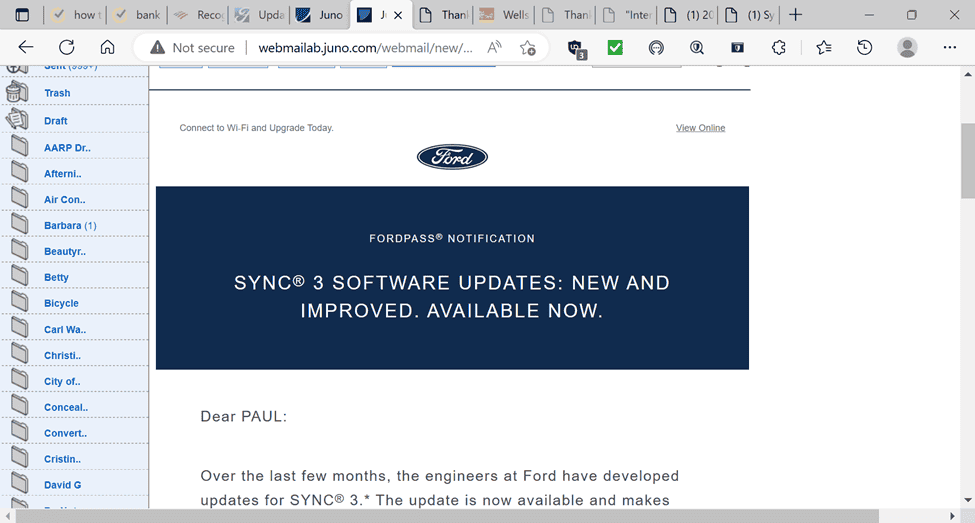
The email looked promising but It looks to me like the engineers got the update installation process working more smoothly but didn't do that much with fixing sync's interaction and installation with some of its other modes and processes.

1671907012862.png


A plus came of this though...I read somewhere on this site that the vehicle location system was going to be eliminated with this update, but it appeared afterwards and is working OK. The Rep. assured me that it would not be going away! My insurance gives a discount for having a locator system in case the truck ever gets stolen :)
Unfortunately, my situation goes beyond Sync not working properly to also include FordPass. I tried setting up my account over a year ago and I still have an "Activation Pending" screen that say's it waiting for to be completed by an "Authorized Active User".. Whatever the fart that means? I assumed that it was because my Lariat (for whatever odd reason) came without the coveted NAV option?

imagesNNJAZ3GU.jpg
 

Todd Chapin

Well-Known Member
First Name
Todd
Joined
Jul 17, 2019
Threads
3
Messages
650
Reaction score
1,863
Location
Alexandria
Vehicle(s)
2019 crewcab lariat fx4
Occupation
Chef
Guess I was lucky. Did my update via wifi not sure how long but it took several times reconnecting in my driveway to complete. Nope on nav files upgrade. Not sure why I expected that.

What it did do was fix my usb music so I could browes manually. Something I lost with my last upgrade. It also looks better too. Probably other things too but have only driven a few miles since upgrading.

Btw Ford Pass has never functioned correctly for me in my last 4 Fords. I get the awaiting user authorization...
 

JDV007

Member
First Name
Jim
Joined
Nov 21, 2022
Threads
3
Messages
10
Reaction score
23
Location
49685
Vehicle(s)
2003 Ford Ranger
Occupation
Retired
I just received an e-mail from Ford that I need to update Sync. Is this a new update, or am I just behind?
Anybody know what changes were made?
 

JDV007

Member
First Name
Jim
Joined
Nov 21, 2022
Threads
3
Messages
10
Reaction score
23
Location
49685
Vehicle(s)
2003 Ford Ranger
Occupation
Retired
I just installed the new SYNC 3 update in my 2019 Ford Ranger Lariat a few days ago. It is listed as Version 3.4 and Build 22200. Suggest that you pull into your garage and attempt to use your home wireless internet to download the new update. Its so much quicker! Not sure what all is changed in the new software because I just purchased the truck and used the previous version for only a few days. Also, this was my first experience using Android Auto. I struggled to make it work, and finally started to try different USB cables connected to the truck and my Samsung 22 Ultra cell phone running Android 13. Finally found a factory one that worked. Love the extra features that Android Auto provides.
 

scarchild35

Well-Known Member
First Name
Chris
Joined
May 16, 2022
Threads
5
Messages
339
Reaction score
930
Location
St. Louis
Vehicle(s)
2000 Ford Ranger
Occupation
Sales Engineer
This might be a dumb question but is this a trim specific thing for these updates?
I have an XL without the touch screen and the only time the truck updated was at the dealer when I was doing the paperwork. That was on October 7th of this year.
What do these updates do anyway? I've never had a vehicle this new.
Thanks in advance
 

moorejl57

Well-Known Member
First Name
Jamie
Joined
Jun 21, 2021
Threads
3
Messages
253
Reaction score
934
Location
Corvallis Oregon
Vehicle(s)
2021 Ranger Lariat FX4, 501A, fully damped
Occupation
Engineer
...I've tied everything short of doing a master reset.
Master reset fixed mine after a rocky USB update. I had my dash cam plugged into the other USB port and that caused all kinds of issues, I thought I had bricked it.
 

subquark

Well-Known Member
First Name
David
Joined
Jan 28, 2022
Threads
11
Messages
4,544
Reaction score
23,071
Location
Portsmouth, NH
Website
subQuark.com
Vehicle(s)
Soupie! Race Red '22 XL 101A Scab 4X2 w/steelies
Occupation
game publisher
The Ranger (with 108 miles) and my 23 yr old F250 (with 29,884 miles) are always on battery tenders. This time of year there is just to much salt on the roads. I can't make myself take them out so they can rust.

I use a crew cab Polaris for my run around vehicle this time of the year. It is 95% plastic so there's less metal to rot away.
Yes for the win with battery tenders! I use mine all the time.
 

subquark

Well-Known Member
First Name
David
Joined
Jan 28, 2022
Threads
11
Messages
4,544
Reaction score
23,071
Location
Portsmouth, NH
Website
subQuark.com
Vehicle(s)
Soupie! Race Red '22 XL 101A Scab 4X2 w/steelies
Occupation
game publisher
This might be a dumb question but is this a trim specific thing for these updates?
I have an XL without the touch screen and the only time the truck updated was at the dealer when I was doing the paperwork. That was on October 7th of this year.
What do these updates do anyway? I've never had a vehicle this new.
Thanks in advance
I also have an XL and did this update around Thanksgiving. I did it with a USB drive:

https://www.ranger5g.com/forum/threads/sync-3-4-21194-update.22165/post-491058
Sponsored


Top