Sponsored

Sync 3 v3.4 Build 21194

JoeC

Well-Known Member
First Name
Joe
Joined
Oct 29, 2019
Threads
2
Messages
241
Reaction score
625
Location
New England
Vehicle(s)
2019 Ranger Lariat
I re-ran the update using the new files dated 8/30/2021 and got the XML file. Uploaded it to Ford and now the website reports I am up to date!
I just did the same as you, with the same results.
Previously, I didn't get the xml file, or recognition of updated from Ford's site with a 'check for updates'.
Everything seems happy now.
But, we'll see, eh?
Sponsored
 

GregM

Well-Known Member
First Name
Greg
Joined
Sep 7, 2020
Threads
5
Messages
786
Reaction score
2,901
Location
Ohio
Vehicle(s)
2022 Lariat 4X4
Occupation
Retired
I received this email from Ford today which closes out my previous escalation of the Sirius/Travel Link issues.

Good afternoon,

Our software team advised that the software update fix for Sirius XM Travel Link
released today. You can update the software yourself by visiting help.ford.com or
connecting your vehicle to your home Wi-Fi network and clicking Search for
Updates from your vehicle’s radio display.

You can also visit your dealership to get the update installed. You can provide the
following code and they will know what to do. The code is TSB 21-2263.

Your vehicle will be updated to SYNC 3 Version 3.4.21194.
If you have any questions, please contact us via phone by calling 800-392-3673.
Thanks to you giving this TSB code my dealer was able to install the new update to my Ranger and my wife's Escape . No charge thank God. It's like 135 if your vehicle isn't affected by the TSB.
Again thanks for being up and up :like:
 

VegasP11

Well-Known Member
First Name
Ian
Joined
Dec 20, 2019
Threads
5
Messages
241
Reaction score
717
Location
Kansas
Vehicle(s)
2019 Lariat FX4
I did the install yesterday and everything is now working perfectly. I don't have the SXM issue with it not playing after shutting the truck off for a few minutes. Also the SXM services all show as subscribed again.
It was also the first time in the 3 updates I have done with a USB drive that actually wrote the XML file.
 

Dr. Zaius

Well-Known Member
First Name
Dennis
Joined
Dec 20, 2019
Threads
76
Messages
6,665
Reaction score
40,678
Location
Living The Dream
Vehicle(s)
2019 Ranger XLT FX4
This is the first one I've been able to do totally over the air.

I found the best Wifi signal in the driveway and parked the truck then let the update start.

Just checked it after getting home this evening and it now shows version 21194, though the Ford website still shows that I have the 21194 update available.
 

Turbo Tim

Well-Known Member
First Name
Tim
Joined
Jun 30, 2021
Threads
6
Messages
83
Reaction score
329
Location
Toronto
Vehicle(s)
2021 Ranger Lariat Tremor
Occupation
Sales
Did the update OTA, and it worked but took about 45 min. It has fixed the dreaded iPhone bug where the first call connected to Sync, rings at full volume and scares the crap out of you...and your passengers


OP
OP

tmcolegr

Well-Known Member
First Name
Todd
Joined
Dec 26, 2019
Threads
11
Messages
240
Reaction score
226
Location
Central FL
Vehicle(s)
2019 F150 Platinum 4x4 & 2019 Ranger XLT 4x4
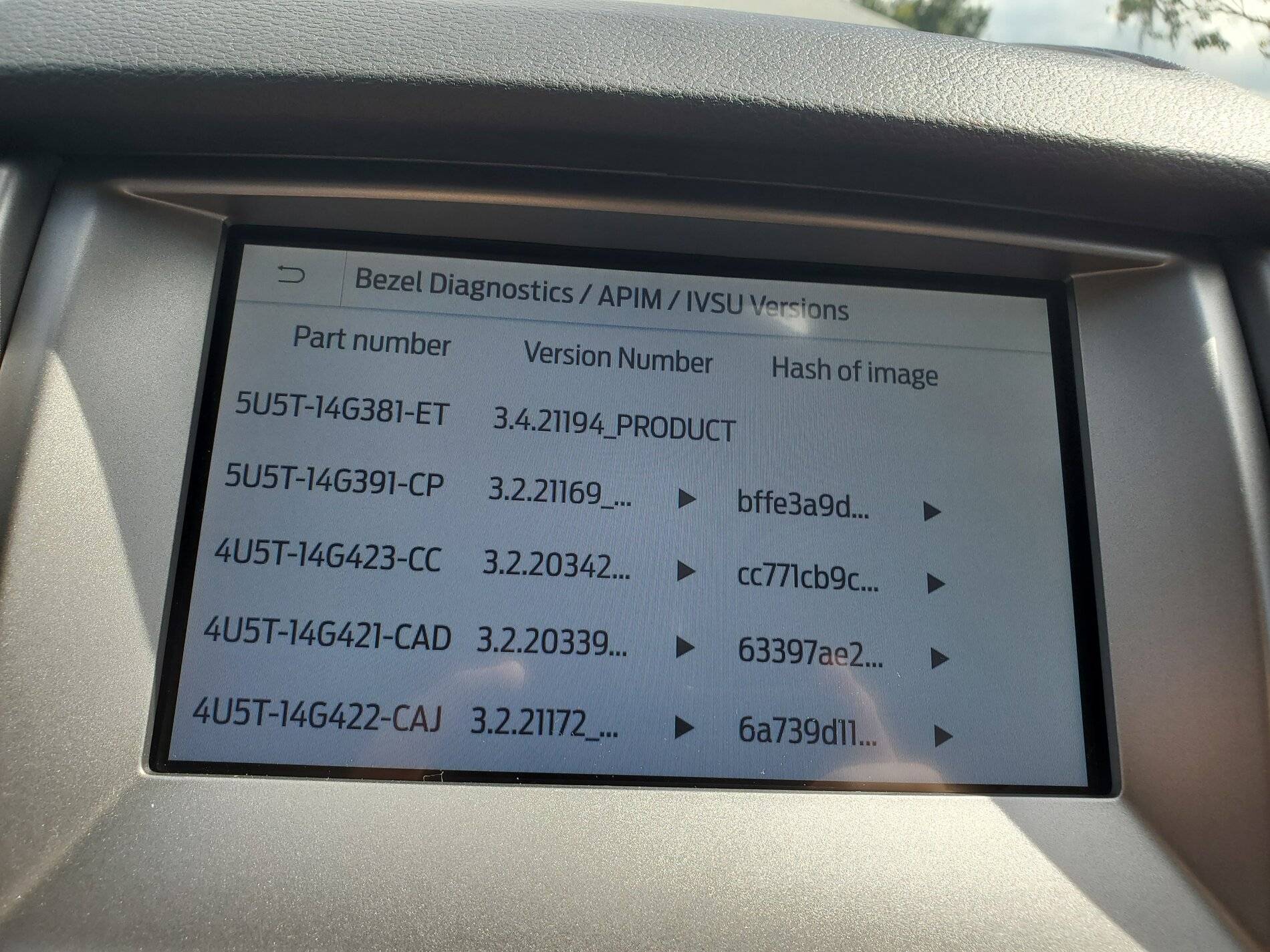
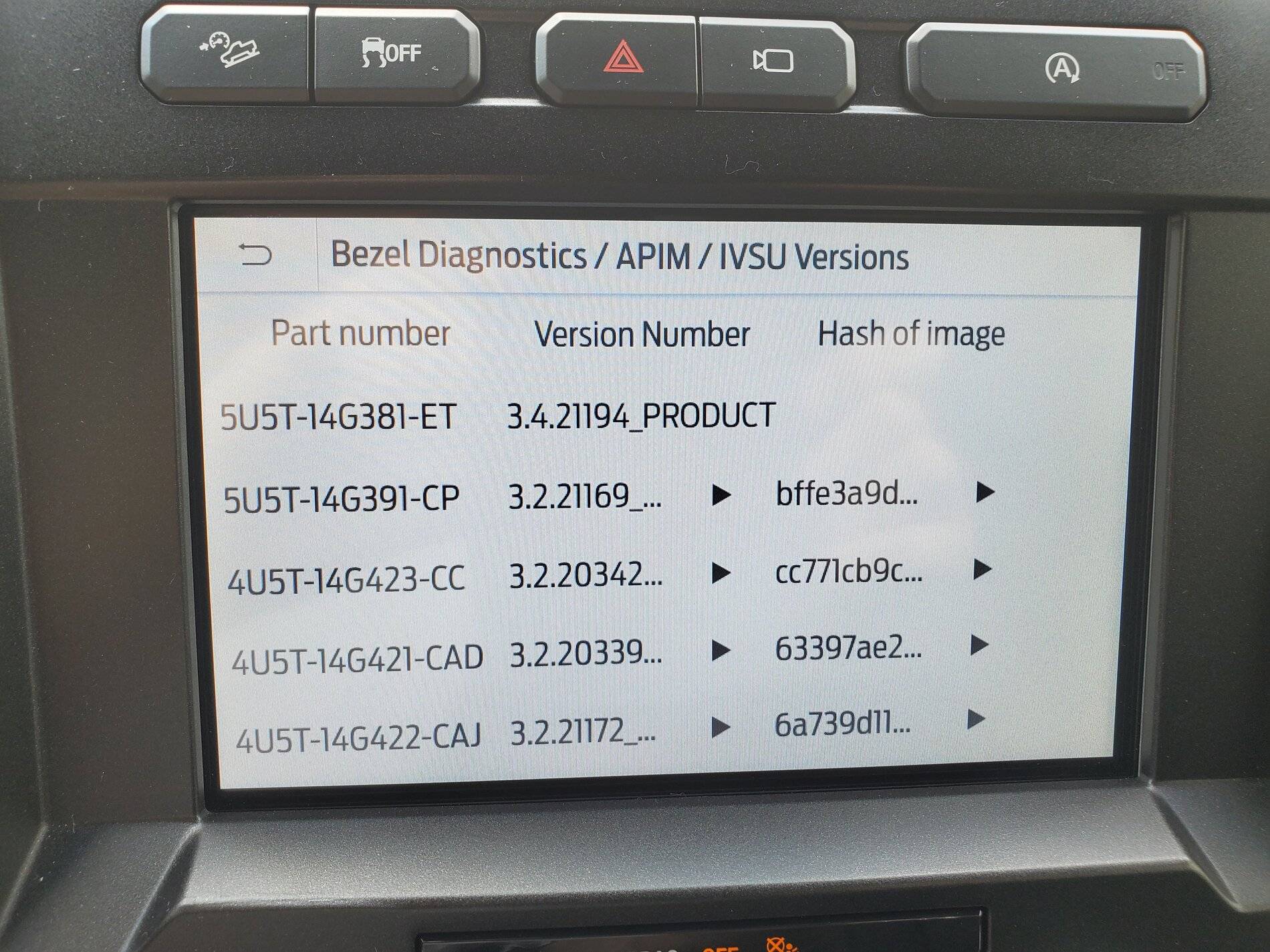
As I mentioned in one of my previous posts, on 8/29 I updated both my 2019 F150 and Ranger to the newly released Build 21194. I didn't receive an xml file for either vehicle. Normally that's not a problem as the first time I wirelessly scan for updates, Oasis would automatically recognize the latest software had been installed and update Ford's database. Not this time. Scanning for updates did not update Oasis, therefore the Ford Owner website didn't get updated.

Just wanted to follow up on this...

On 9/2/21 Oasis finally recognized the latest Sync 3 software had been installed in my 2019 F150 and today Oasis recognizes my 2019 Ranger has the latest Sync 3 software installed.

Unfortunately, Oasis has not recognized the latest Navigation voice file (4U5T-14G422- CAJ) that was released last week has also been installed.

When will Ford ever get this process right !!

20210829_160525.jpg


20210903_124742.jpg
 

Porpoise Hork

Well-Known Member
First Name
Bret
Joined
Apr 28, 2020
Threads
19
Messages
1,316
Reaction score
2,366
Location
Houston
Vehicle(s)
2022 F150 XLT Powerboost FX4 302A Oxford White
Occupation
IT
As I mentioned in one of my previous posts, on 8/29 I updated both my 2019 F150 and Ranger to the newly released Build 21194. I didn't receive an xml file for either vehicle. Normally that's not a problem as the first time I wirelessly scan for updates, Oasis would automatically recognize the latest software had been installed and update Ford's database. Not this time. Scanning for updates did not update Oasis, therefore the Ford Owner website didn't get updated.

Just wanted to follow up on this...

On 9/2/21 Oasis finally recognized the latest Sync 3 software had been installed in my 2019 F150 and today Oasis recognizes my 2019 Ranger has the latest Sync 3 software installed.

Unfortunately, Oasis has not recognized the latest Navigation voice file (4U5T-14G422- CAJ) that was released last week has also been installed.

When will Ford ever get this process right !!

20210829_160525.jpg


20210903_124742.jpg
This is one of the main reasons I started updating the Sync system with the CyanLabs Sync Updater tool. Since then Have not had an issue. With it I was able to update the Father in-law's 2016 F150 platinum from 3.0.19205 and NA 1 14 maps to 3.4.21194 and NA 2 20 maps last weekend without a hitch. Now he wants me to upgrade the USB port so he can use Car Play after showing it to him on the Ranger.
 

Waxthis

Well-Known Member
First Name
Eric
Joined
Aug 27, 2020
Threads
12
Messages
164
Reaction score
331
Location
Colorado
Vehicle(s)
2020 Ranger XLT FX4
Occupation
Controls Tech
For those that used the USB method to do the upgrade, did you have the truck running in park, or were you cruising down the road? Last update I went the USB route while driving on my way home from work, DL went smooth, no .Xml file afterwards though. However, reading through the directions on the FORD site it states vehicle must be on and in the "PARK" position. Seems this update has many methods and I'm seeing inconsistences all over, but none the less they work, or not....??
 

rparge

Well-Known Member
First Name
Rick
Joined
Jun 1, 2020
Threads
2
Messages
85
Reaction score
219
Location
Oregon
Vehicle(s)
2019 Lariat 4x4 Crew Cab
Occupation
Retired.
For those that used the USB method to do the upgrade, did you have the truck running in park, or were you cruising down the road? Last update I went the USB route while driving on my way home from work, DL went smooth, no .Xml file afterwards though. However, reading through the directions on the FORD site it states vehicle must be on and in the "PARK" position. Seems this update has many methods and I'm seeing inconsistences all over, but none the less they work, or not....??
I leave in neutral, parking brake on (D'oh!) key on, engine off. (am in a garage.)
Lights and heater off.
Seems to leave the radio on for a longer period.
Have used this procedure for the last three updates.
 

VegasP11

Well-Known Member
First Name
Ian
Joined
Dec 20, 2019
Threads
5
Messages
241
Reaction score
717
Location
Kansas
Vehicle(s)
2019 Lariat FX4
For those that used the USB method to do the upgrade, did you have the truck running in park, or were you cruising down the road? Last update I went the USB route while driving on my way home from work, DL went smooth, no .Xml file afterwards though. However, reading through the directions on the FORD site it states vehicle must be on and in the "PARK" position. Seems this update has many methods and I'm seeing inconsistences all over, but none the less they work, or not....??
I did my update while driving home from work. When I got to the house it wasn't quite finished, so I left it running in park. When it said it was complete and a key cycle was required to finish I did that with the USB drive still in. When I restarted the truck it took a few minutes but it said it was finished and it wrote the XML file.
 

Waxthis

Well-Known Member
First Name
Eric
Joined
Aug 27, 2020
Threads
12
Messages
164
Reaction score
331
Location
Colorado
Vehicle(s)
2020 Ranger XLT FX4
Occupation
Controls Tech
I did my update while driving home from work. When I got to the house it wasn't quite finished, so I left it running in park. When it said it was complete and a key cycle was required to finish I did that with the USB drive still in. When I restarted the truck it took a few minutes but it said it was finished and it wrote the XML file.
Drove home yesterday during install, all went well. However, NO xml file was provided.
 

alcohenusa

Well-Known Member
First Name
Alan
Joined
Jul 22, 2020
Threads
12
Messages
478
Reaction score
727
Location
CO
Vehicle(s)
2020 Ranger Lariat 4x4
Occupation
Retired
Drove home yesterday during install, all went well. However, NO xml file was provided.
@Waxthis
If you want to get the xml to report the update then continue on.
When did you download the files? There was a fix to the problem of no xml file after the first few days the update was available. Newer files are dated 8/30/2021. If you have the old files, you can re-download and get the new ones. Then rerun the update.

If that is not the problem, you may have removed the USB too soon. Did you wait for the complete message that sticks on the screen and the system no longer reboots on its own? Can rerun for this scenario as well.
 

Waxthis

Well-Known Member
First Name
Eric
Joined
Aug 27, 2020
Threads
12
Messages
164
Reaction score
331
Location
Colorado
Vehicle(s)
2020 Ranger XLT FX4
Occupation
Controls Tech
@Waxthis
If you want to get the xml to report the update then continue on.
When did you download the files? There was a fix to the problem of no xml file after the first few days the update was available. Newer files are dated 8/30/2021. If you have the old files, you can re-download and get the new ones. Then rerun the update.

If that is not the problem, you may have removed the USB too soon. Did you wait for the complete message that sticks on the screen and the system no longer reboots on its own? Can rerun for this scenario as well.
File from Ford was downloaded yesterday morning, 9/15/21, and installed on the way home. After about 40 min I received a message on the screen stating update was complete, you can remove USB at this time and restart to complete install.
 
OP
OP

tmcolegr

Well-Known Member
First Name
Todd
Joined
Dec 26, 2019
Threads
11
Messages
240
Reaction score
226
Location
Central FL
Vehicle(s)
2019 F150 Platinum 4x4 & 2019 Ranger XLT 4x4
File from Ford was downloaded yesterday morning, 9/15/21, and installed on the way home. After about 40 min I received a message on the screen stating update was complete, you can remove USB at this time and restart to complete install.
Have you connected to wifi and manually scanned for updates?

Many times this will update Ford's servers notifying them the latest Sync 3 software has been installed.
 

Waxthis

Well-Known Member
First Name
Eric
Joined
Aug 27, 2020
Threads
12
Messages
164
Reaction score
331
Location
Colorado
Vehicle(s)
2020 Ranger XLT FX4
Occupation
Controls Tech
Have you connected to wifi and manually scanned for updates?

Many times this will update Ford's servers notifying them the latest Sync 3 software has been installed.
On the list for today..Thanks
Sponsored


Top