Sponsored

Sync 3 v3.4.22251

PltFX4

Well-Known Member
First Name
Richard
Joined
Jan 29, 2020
Threads
26
Messages
692
Reaction score
1,269
Location
Minneapolis, MN
Vehicle(s)
2019 Ranger Lariat FX4
Were you able to successfully upload the XML file?
Yes, the upload worked fine. I do use NoScript extension in my Firefox browser and have set it to not block Java scripts on the Ford site... the first attempt to upload (a few months ago) showed me that was needed.
Sponsored


AzureRanger

Well-Known Member
First Name
Robert
Joined
Aug 25, 2022
Threads
11
Messages
556
Reaction score
1,225
Location
Virginia
Vehicle(s)
2006 Jeep TJ
Occupation
Retired
Yes, the upload worked fine. I do use NoScript extension in my Firefox browser and have set it to not block Java scripts on the Ford site... the first attempt to upload (a few months ago) showed me that was needed.
Can you explain to a Firefox rookie how to not block Java scripts on the Ford site? Thanks.
 

Jason B

Well-Known Member
First Name
Jason
Joined
May 19, 2021
Threads
9
Messages
3,009
Reaction score
8,318
Location
Louisiana
Vehicle(s)
2021 XL STX SE 4x2
Occupation
machinist
you literally do nothing. just turn the truck off, walk away. if you sit there watching it, nothing will happen.
Doesn't the WiFi connection stop once the truck is off and keys removed?
 

PltFX4

Well-Known Member
First Name
Richard
Joined
Jan 29, 2020
Threads
26
Messages
692
Reaction score
1,269
Location
Minneapolis, MN
Vehicle(s)
2019 Ranger Lariat FX4
Can you explain to a Firefox rookie how to not block Java scripts on the Ford site? Thanks.
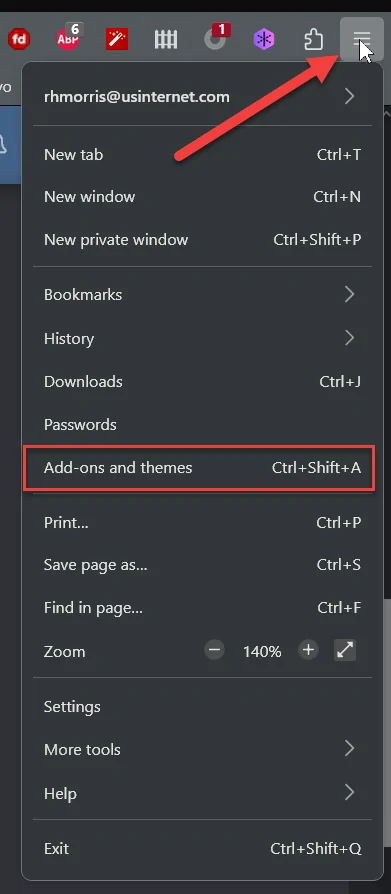
There is an Extension called NoScript (for FF, Chrome, Edge, etc.). Install it. How?? In the upper right corner of the window is the 3 bars; click it and then select "Add-ons and themes
1677525374422.png


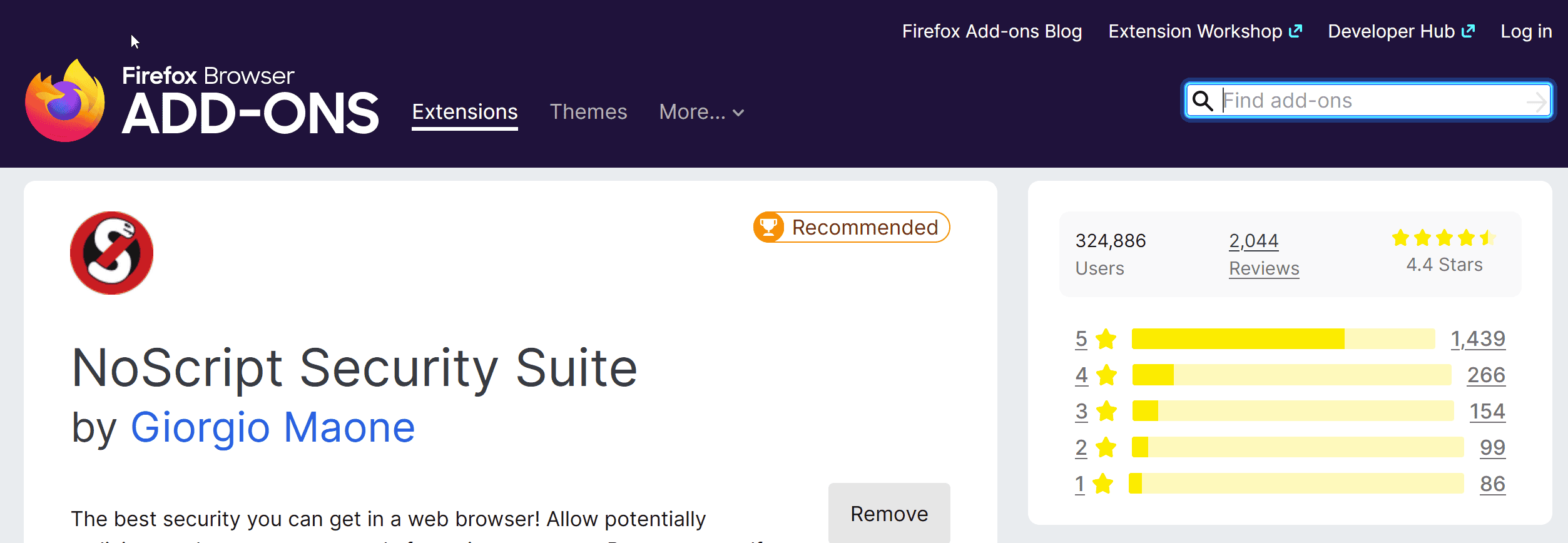
Get to here:
1677525626195.png


Type in "NoScript" as above and search.

Get to here:
1677525720605.png


Click install.

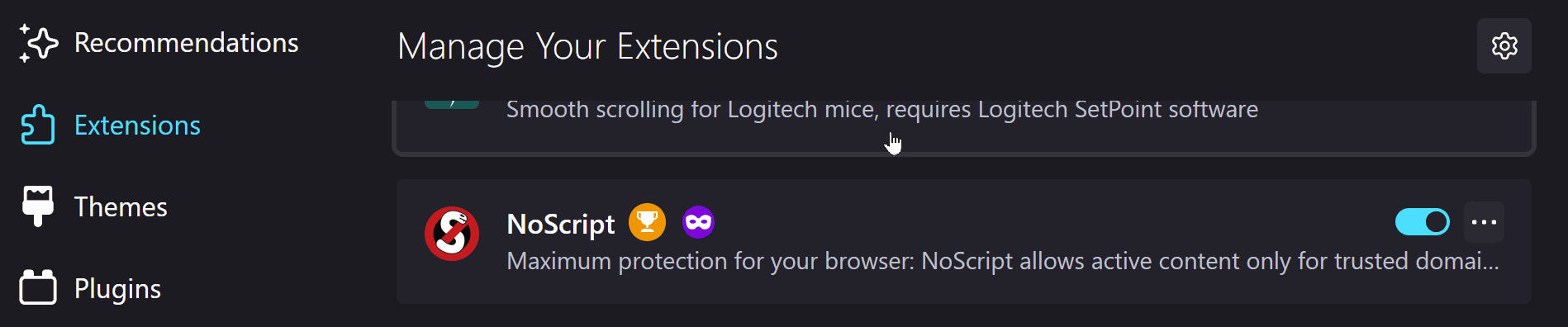
Now you have:
1677525775586.png


Click it and read through the options.

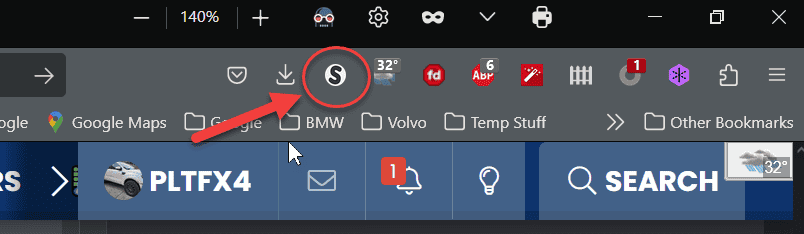
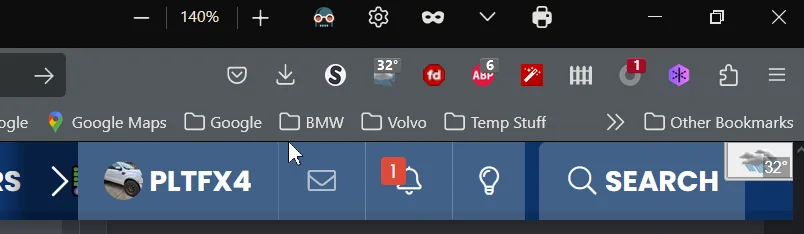
Once set, you should see it here :
1677525958069.png


On ANY site you visit, the default is "Block all scripts". One of the setting is o allow scripts from the top domain to be "temperately be allowed" to run.

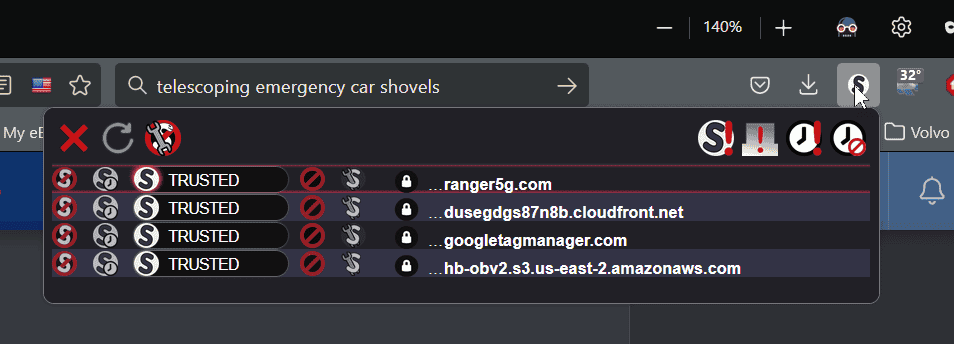
You can see which scripts are allowed or not by click the "S"...
1677526134348.png


You can, as I have here on Ranger5g.com, permanently allowed the scripts to run. Over time, you will learn which one are needed to run the site, and which are just "spy" scripts.
Note: some sites use only few... to start. Then select nearly anything on the page, and the list explodes to 15, 20 or more!!

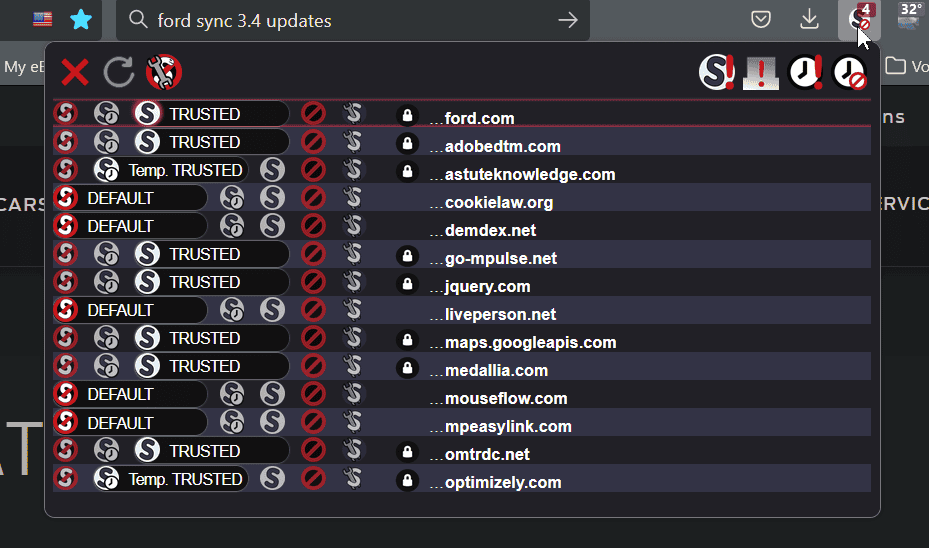
Here is what I use for the Ford Sync site (also note: NoScript remembers your choices on each site, so the next time you visit, you don't have to go through the selection process again):
1677526595018.png


That should do it.

1677525911923.webp
 
Last edited:

PltFX4

Well-Known Member
First Name
Richard
Joined
Jan 29, 2020
Threads
26
Messages
692
Reaction score
1,269
Location
Minneapolis, MN
Vehicle(s)
2019 Ranger Lariat FX4
FYI: Just read on the Ford site that with Sync 4 (which 5g won't get) USB updating will not be available... only via WiFi... hope it works.


AzureRanger

Well-Known Member
First Name
Robert
Joined
Aug 25, 2022
Threads
11
Messages
556
Reaction score
1,225
Location
Virginia
Vehicle(s)
2006 Jeep TJ
Occupation
Retired
There is an Extension called NoScript (for FF, Chrome, Edge, etc.). Install it. How?? In the upper right corner of the window is the 3 bars; click it and then select "Add-ons and themes
1677525374422.png


Get to here:
1677525626195.png


Type in "NoScript" as above and search.

Get to here:
1677525720605.png


Click install.

Now you have:
1677525775586.png


Click it and read through the options.

Once set, you should see it here :
1677525958069.png


On ANY site you visit, the default is "Block all scripts". One of the setting is o allow scripts from the top domain to be "temperately be allowed" to run.

You can see which scripts are allowed or not by click the "S"...
1677526134348.png


You can, as I have here on Ranger5g.com, permanently allowed the scripts to run. Over time, you will learn which one are needed to run the site, and which are just "spy" scripts.
Note: some sites use only few... to start. Then select nearly anything on the page, and the list explodes to 15, 20 or more!!

Here is what I use for the Ford Sync site (also note: NoScript remembers your choices on each site, so the next time you visit, you don't have to go through the selection process again):
1677526595018.png


That should do it.

1677525911923.png
Still failed to upload. Ugh. Makes no sense that some can upload and others can't. I keep hearing it's a problem at Ford's end, but if that were the case, shouldn't everyone be having the upload failures?
 

VAMike

Well-Known Member
First Name
Mike
Joined
Feb 22, 2019
Threads
1
Messages
3,390
Reaction score
4,408
Location
Virginia
Vehicle(s)
2019 Ranger Lariat SuperCab
Doesn't the WiFi connection stop once the truck is off and keys removed?
sooner or later, yes. but it resumes the next time you park. and the next time. it's ridiculously slow, and in my experience will never ever finish if you're just sitting there staring at it because it takes too long--but it will eventually get there, little by little. I have no idea why it's so slow--crappy wifi hardware? crappy network stack? who knows. But if you calibrate your expectations it'll get done with no need to stress over it.
 

Big Blue

Well-Known Member
First Name
Lee
Joined
May 5, 2020
Threads
16
Messages
3,927
Reaction score
9,352
Location
Wisconsin
Vehicle(s)
2019 Ford Ranger XLT FX4 Supercrew lighting blue
Occupation
Retired mechanical designer
Just for you network security novices out there, the add-in @PltFX4 is using is intended to block Java scrips from running. If you are not using it or have not heard of it, IT is probably not the reason the upload is not working.

It is an add-in for those people concerned about internet privacy and malitious web sites tracking them and possibly down loading things on to their computer.

Just wanted to inform people that installing this add-in may cause sites you have used before to stop working unless you go in and specifically set them to trusted status.

As far as uploading the file. I could care less if Ford knows what version of Sync I'm on. I've been using the Cyan Labs updater to create a USB stick and updating that way. Usually get the latest version quicker than waiting for Ford to push it via OTA anyway.
 

PltFX4

Well-Known Member
First Name
Richard
Joined
Jan 29, 2020
Threads
26
Messages
692
Reaction score
1,269
Location
Minneapolis, MN
Vehicle(s)
2019 Ranger Lariat FX4
Just for you network security novices out there, the add-in @PltFX4 is using is intended to block Java scrips from running. If you are not using it or have not heard of it, IT is probably not the reason the upload is not working.

It is an add-in for those people concerned about internet privacy and malitious web sites tracking them and possibly down loading things on to their computer.

Just wanted to inform people that installing this add-in may cause sites you have used before to stop working unless you go in and specifically set them to trusted status.

As far as uploading the file. I could care less if Ford knows what version of Sync I'm on. I've been using the Cyan Labs updater to create a USB stick and updating that way. Usually get the latest version quicker than waiting for Ford to push it via OTA anyway.
Absolutely regarding NoScript!! Thanks for the post.

I was (and have in the past) used Cyan Labs. However the currently require account to get access to their stuff... one more login.. :>( Given that the Ford site works OK, that's what I am using... also as you can search to see if you have/need an update, again for me, it's "convenient" for me to check there every so often... but without loading that update file, it will keep saying yes, until you tell Ford you have done so. If WiFi would behave better, I would not have to do this, but till then I will.
 

PltFX4

Well-Known Member
First Name
Richard
Joined
Jan 29, 2020
Threads
26
Messages
692
Reaction score
1,269
Location
Minneapolis, MN
Vehicle(s)
2019 Ranger Lariat FX4
FYI: AzureRanger was having trouble getting the .xml file to load on the Ford Sync website.
Don't know why (he uses a Mac for what it's worth) and his .xml has this in it where mine does not:
2023-02-27_16-21-51.jpg

That "VT" when loading the xml into a browser gives an error at Line 78 column 28. There are about 6 lines with that "VT" as part of the LineFeed sequence.

Once the "VT"s were removed, the file uploaded just fine on the Ford Sync site.

Edit: AzureRanger updated me that it appears not to be Mac related and he was using FAT32 as the format for the USB drive.
 
Last edited:

underwhelmed

Well-Known Member
Joined
Jan 29, 2023
Threads
27
Messages
1,094
Reaction score
6,142
Location
GSMs
Vehicle(s)
2019 Ranger SC XLT FX4, 1998 Jeep Cherokee XJ
Occupation
Retired Military
Vehicle Showcase
1
sooner or later, yes. but it resumes the next time you park. and the next time. it's ridiculously slow, and in my experience will never ever finish if you're just sitting there staring at it because it takes too long--but it will eventually get there, little by little. I have no idea why it's so slow--crappy wifi hardware? crappy network stack? who knows. But if you calibrate your expectations it'll get done with no need to stress over it.
You were spot on! Went to the truck this morning for a Loew’s run and noticed the screen was different. I checked and all software was up to date. Took about a week. Sped up after I changed to ATT fiber optic internet a few days ago. It is set to auto updates and I will never mess with it again! ??
 

AzScorpion

Moderator
First Name
Dave
Joined
Jul 25, 2019
Threads
335
Messages
26,221
Reaction score
132,007
Location
Back Home In AZ!
Vehicle(s)
2023 Ford Ranger Tremor
Occupation
Retired...Full Time Slacker
You were spot on! Went to the truck this morning for a Loew’s run and noticed the screen was different. I checked and all software was up to date. Took about a week. Sped up after I changed to ATT fiber optic internet a few days ago. It is set to auto updates and I will never mess with it again! ??
Glad it worked for you. Keep an eye on the heat settings as that's seems like the only area I'm having trouble with.
 

AzureRanger

Well-Known Member
First Name
Robert
Joined
Aug 25, 2022
Threads
11
Messages
556
Reaction score
1,225
Location
Virginia
Vehicle(s)
2006 Jeep TJ
Occupation
Retired
FYI: AzureRanger was having trouble getting the .xml file to load on the Ford Sync website.
Don't know why (he uses a Mac for what it's worth) and his .xml has this in it where mine does not:
2023-02-27_16-21-51.webp

That "VT" when loading the xml into a browser gives an error at Line 78 column 28. There are about 6 lines with that "VT" as part of the LineFeed sequence.

Once the "VT"s were removed, the file uploaded just fine on the Ford Sync site.

Edit: AzureRanger updated me that it appears not to be Mac related and he was using FAT32 as the format for the USB drive.
Correction.....my USB is formatted to ExFat, not Fat32. @PltFX4 (Rick) has been a HUGE help. By removing the VT's from my XML file, I was able to upload it. That's the good news.....the bad news is that XML file was from my 22000 update. The truck did not generate an XML file when I (successfully) updated to 22151. So, even though my 22000 XML file uploaded, it doesn't "stick"....we think because it is looking for a 22151 XML file. Hope that makes sense. At this point, I think I have to wait for the next update and hope that one generates an XML file.
 

LB'sTremor

Well-Known Member
First Name
Loren
Joined
Mar 17, 2022
Threads
19
Messages
552
Reaction score
1,492
Location
Tampa
Vehicle(s)
22 Iconic Lariat Tremor
Occupation
IT
I thought you guys were really on to something, I removed my VT's on my 22251 and it looks like it uploads (page refreshes with no errors) but no joy.

Thanks for the info!

LB
Sponsored


Top