Sponsored

Sync 3 v3.4.22251

AzScorpion

Moderator
First Name
Dave
Joined
Jul 25, 2019
Threads
335
Messages
26,221
Reaction score
132,007
Location
Back Home In AZ!
Vehicle(s)
2023 Ford Ranger Tremor
Occupation
Retired...Full Time Slacker
Dang it. I hope this works.
Good luck. I mean the update worked besides that glitch. But I really don't see anything worthwhile from the new update than the original back from 2019.
Sponsored


VAMike

Well-Known Member
First Name
Mike
Joined
Feb 22, 2019
Threads
1
Messages
3,390
Reaction score
4,408
Location
Virginia
Vehicle(s)
2019 Ranger Lariat SuperCab
Bought a used 2019. Trying to update via wifi. Looks like it hasn’t been updated since 2019. Is this going to take a while? Is my battery going to last ?
don't leave it running. make sure it's connected to wifi. eventually it will update. in the meantime, don't worry about it.
 

PltFX4

Well-Known Member
First Name
Richard
Joined
Jan 29, 2020
Threads
26
Messages
692
Reaction score
1,269
Location
Minneapolis, MN
Vehicle(s)
2019 Ranger Lariat FX4
I just did the v3.4.22251 on Wednesday but did it via USB. Tried doing the WiFi method and the down load was taking so freaking long I gave up.

Download the Sync file to the USB drive at my desktop (3 minutes... ~890 mgb); jumped in the truck and plug the drive in, 10 minutes later, all done.

I learned here on the forum about having to upload a "log" file that is put on the USB drive after the update is done... If you don't, when you check your VIN to is there is a update available on the Ford Sync website, it will continue to say yes. After uploading the log, the website and the Ford app all gets updates.

I am guessing that if you do it via WiFi, the process would upload the log file and update the app and website as to the current version on your truck.... that may not be working as well as it might.
 

subquark

Well-Known Member
First Name
David
Joined
Jan 28, 2022
Threads
11
Messages
4,544
Reaction score
23,071
Location
Portsmouth, NH
Website
subQuark.com
Vehicle(s)
Soupie! Race Red '22 XL 101A Scab 4X2 w/steelies
Occupation
game publisher
I believe so.

Use the USB method. And I think the engine needs to be running during the entire update.
Great advice and for my no-frills XL ( no nav, no BLIS) it took just under 10 minutes. I ran the engine and I'm not sure if you need to or can just turn on the ignition.

Once the USB is in, the screen will update you with what's going on.

But the confirmation file probably won't upload, via pc, after your done.

From what others say, that part of Ford's website doesn't work.

Good luck! =)
 

Figarou

Well-Known Member
Joined
Mar 22, 2019
Threads
25
Messages
2,408
Reaction score
13,793
Location
Texas
Vehicle(s)
2022 Ford Edge ST, 2019 Ford Ranger Lariat
Great advice and for my no-frills XL ( no nav, no BLIS) it took just under 10 minutes. I ran the engine and I'm not sure if you need to or can just turn on the ignition.

Once the USB is in, the screen will update you with what's going on.

But the confirmation file probably won't upload, via pc, after your done.

From what others say, that part of Ford's website doesn't work.

Good luck! =)

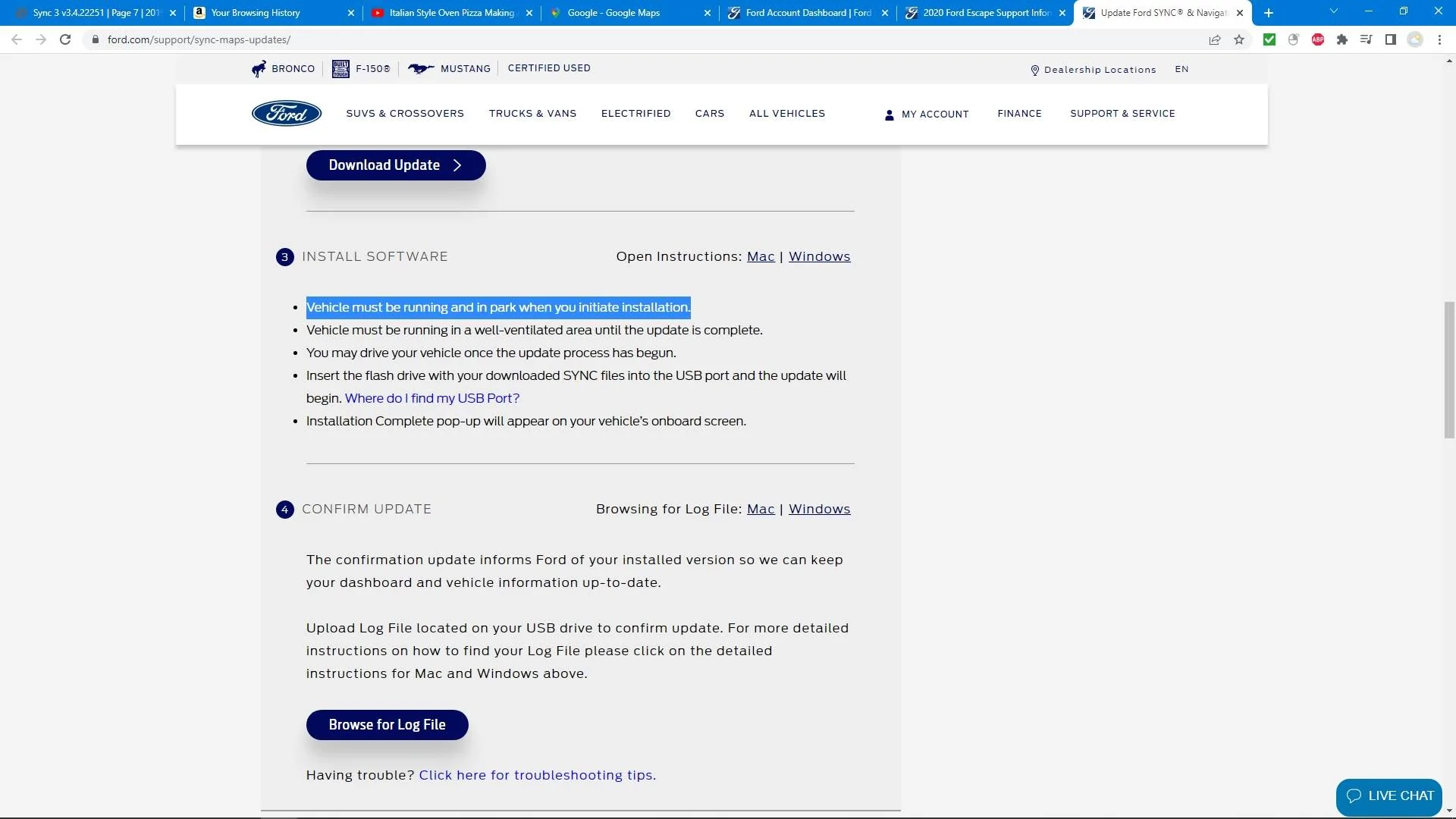
From the Ford Sync 3 website.

Untitled.webp


PltFX4

Well-Known Member
First Name
Richard
Joined
Jan 29, 2020
Threads
26
Messages
692
Reaction score
1,269
Location
Minneapolis, MN
Vehicle(s)
2019 Ranger Lariat FX4
But the confirmation file probably won't upload, via pc, after your done.

From what others say, that part of Ford's website doesn't work.

Good luck! =)
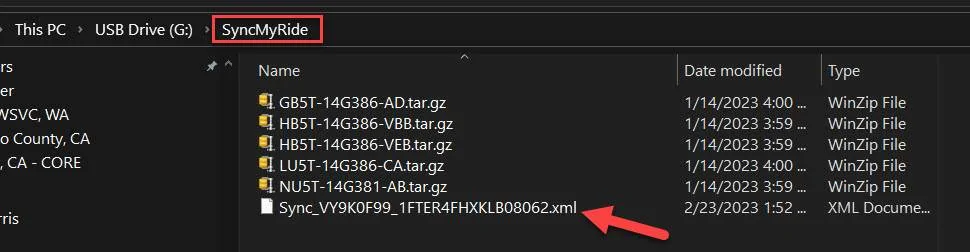
As of Wednesday, anyway, it worked fine. You have to plug the USB into the PC, click the link on the Sync update page for the upload; navigate to the USB drive, then the SyncMyRide folder and select the .xml file, and done.
2023-02-24_20-17-10.webp
 

subquark

Well-Known Member
First Name
David
Joined
Jan 28, 2022
Threads
11
Messages
4,544
Reaction score
23,071
Location
Portsmouth, NH
Website
subQuark.com
Vehicle(s)
Soupie! Race Red '22 XL 101A Scab 4X2 w/steelies
Occupation
game publisher
From the Ford Sync 3 website.

Untitled.jpg
My version of Sync is so minimal that the longest part for me is resetting that abacus!

Thanks for the screenshot and confirmation.
 

subquark

Well-Known Member
First Name
David
Joined
Jan 28, 2022
Threads
11
Messages
4,544
Reaction score
23,071
Location
Portsmouth, NH
Website
subQuark.com
Vehicle(s)
Soupie! Race Red '22 XL 101A Scab 4X2 w/steelies
Occupation
game publisher
As of Wednesday, anyway, it worked fine. You have to plug the USB into the PC, click the link on the Sync update page for the upload; navigate to the USB drive, then the SyncMyRide folder and select the .xml file, and done.
2023-02-24_20-17-10.jpg
Excellent, I'll give it a try. Thanks!
 

Figarou

Well-Known Member
Joined
Mar 22, 2019
Threads
25
Messages
2,408
Reaction score
13,793
Location
Texas
Vehicle(s)
2022 Ford Edge ST, 2019 Ford Ranger Lariat
Instead of running the engine, I put a 10 amp charger on the battery. I did this for the map upgrade, but haven't done the Sync upgrade yet. It worked fine for the map upgrade.

I tried that for Sync. Came back to find my vehicle turned off. I went into the menu and un-checked the auto shut off before I started. It still shut it down. Works when the engine is running.
 

RangerBill

Well-Known Member
First Name
Bob
Joined
Jun 8, 2022
Threads
3
Messages
1,601
Reaction score
2,122
Location
PA
Vehicle(s)
2019 Ford Ranger Lariat Super Crew FX4
Occupation
retired
I tried that for Sync. Came back to find my vehicle turned off. I went into the menu and un-checked the auto shut off before I started. It still shut it down. Works when the engine is running.
I had no trouble doing the map upgrade with a charger attached and the auto shut off turned off in the menu. The auto shut off turns itself back on if you turn the truck ignition off and back on.
 

VAMike

Well-Known Member
First Name
Mike
Joined
Feb 22, 2019
Threads
1
Messages
3,390
Reaction score
4,408
Location
Virginia
Vehicle(s)
2019 Ranger Lariat SuperCab
I just did the v3.4.22251 on Wednesday but did it via USB. Tried doing the WiFi method and the down load was taking so freaking long I gave up.
Here's the thing: you don't "do" anything to get the update over wifi, you just leave it alone, turn the truck off when you get home, walk away. Eventually it'll just happen. There's really no point putting effort into these updates, they don't add anything anyway.
 

AzureRanger

Well-Known Member
First Name
Robert
Joined
Aug 25, 2022
Threads
11
Messages
556
Reaction score
1,225
Location
Virginia
Vehicle(s)
2006 Jeep TJ
Occupation
Retired
I just did the v3.4.22251 on Wednesday but did it via USB. Tried doing the WiFi method and the down load was taking so freaking long I gave up.

Download the Sync file to the USB drive at my desktop (3 minutes... ~890 mgb); jumped in the truck and plug the drive in, 10 minutes later, all done.

I learned here on the forum about having to upload a "log" file that is put on the USB drive after the update is done... If you don't, when you check your VIN to is there is a update available on the Ford Sync website, it will continue to say yes. After uploading the log, the website and the Ford app all gets updates.

I am guessing that if you do it via WiFi, the process would upload the log file and update the app and website as to the current version on your truck.... that may not be working as well as it might.
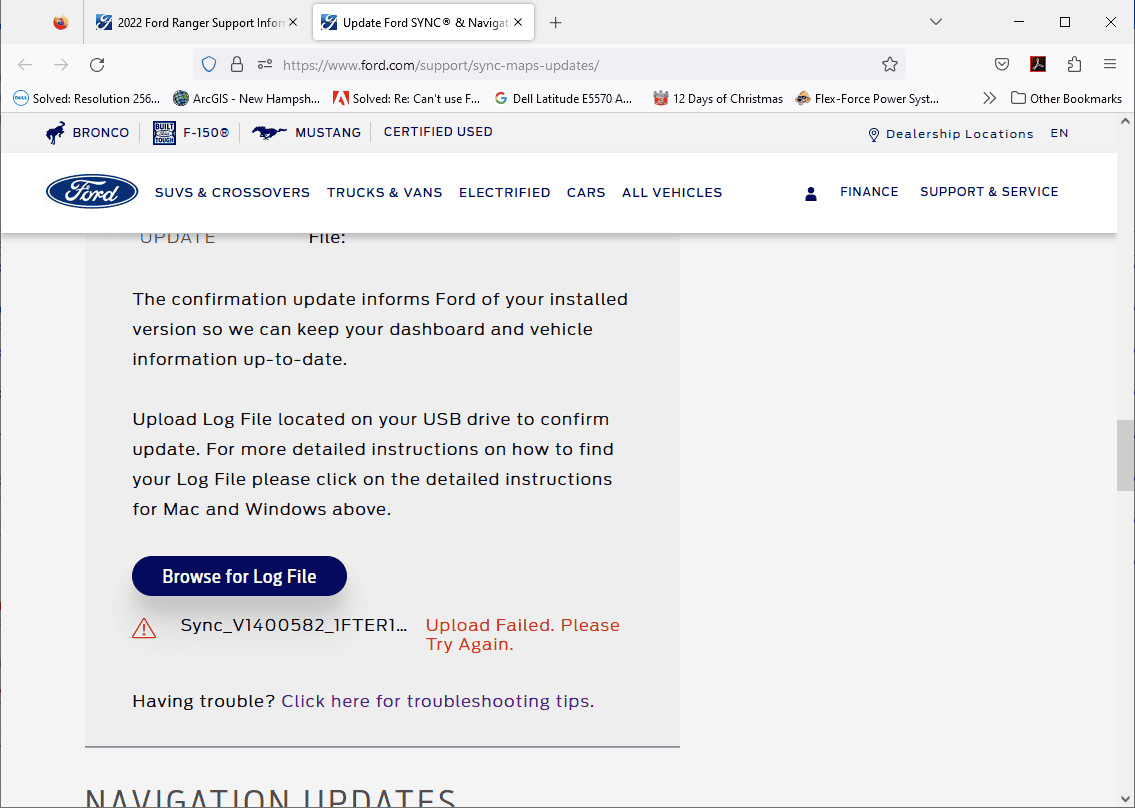
Many of us who have updated to v3.4.22251 (including me) via USB are not getting the XML when the update is complete. The update is successful, we just can't tell Ford.
 

subquark

Well-Known Member
First Name
David
Joined
Jan 28, 2022
Threads
11
Messages
4,544
Reaction score
23,071
Location
Portsmouth, NH
Website
subQuark.com
Vehicle(s)
Soupie! Race Red '22 XL 101A Scab 4X2 w/steelies
Occupation
game publisher
Here's the thing: you don't "do" anything to get the update over wifi, you just leave it alone, turn the truck off when you get home, walk away. Eventually it'll just happen. There's really no point putting effort into these updates, they don't add anything anyway.
Mine never did it via WiFi. I'm in range and the truck connects to the home router, but it never did it. Maybe if I waited another month but I did do the USB method roughly a month after the update came out. Maybe Sync doesn't like steel rims ...
Sponsored


Top