
Sponsored
Polar Bear
Well-Known Member
- First Name
- Aaron
- Joined
- Jun 11, 2019
- Threads
- 38
- Messages
- 297
- Reaction score
- 497
- Location
- Roanoke Texas
- Vehicle(s)
- 2021 Ford Ranger XLT FX2 SuperCrew Rapid Red
- Occupation
- Medical
- Vehicle Showcase
- 2
Thanks man!
egilbe
Well-Known Member
Today I did my first Forscan mods. I used a Microsoft Surface I rescued from my last job and an cheap BT ODBII reader I used to clear error codes on my Elantra and it works with ODB Fusion for Android. I don't think it has Can mode since I'm not seeing all the modules. But, I was able to disable the double honk and turn on Bambi mode. I have the adapter cable from Amazon that Gizmokid2005 used in the wiki on order. Should be here Saturday.
Last edited:

Big Blue
Well-Known Member
Join the club this has been a want almost longer than disabling the fake engine noise. If you figure it out many people will be forever grateful.This feature has bugged me too. But only because in my bride's Sonata I can configure it to chose between 3, 5 or 7 blinks. I like the 7 blinks ands wish I could configure my Ranger.

Gizmokid2005
Well-Known Member
- Joined
- Dec 1, 2019
- Threads
- 13
- Messages
- 1,279
- Reaction score
- 1,875
- Location
- GA
- Website
- gizmokid2005.com
- Vehicle(s)
- 2019 Ford Ranger XLT 4X4 SCrew
- Occupation
- SQL Developer
- Vehicle Showcase
- 1
At least the engine noise removal has already been found. It's been posted on the wikiJoin the club this has been a want almost longer than disabling the fake engine noise. If you figure it out many people will be forever grateful.

Look for "Software Engine Sound Enhancement" - just use the recent FORScan build and enjoy a quieter cabin.
RCMUSTANG
Well-Known Member
- First Name
- Ray
- Joined
- Jan 22, 2019
- Threads
- 22
- Messages
- 1,867
- Reaction score
- 2,191
- Location
- Los Angeles
- Vehicle(s)
- 2017 Fusion 1995 Ranger
Nope. They don't work. I've already tried all these and every digit in the SCCM. Nothing worked.
RCMUSTANG
Well-Known Member
- First Name
- Ray
- Joined
- Jan 22, 2019
- Threads
- 22
- Messages
- 1,867
- Reaction score
- 2,191
- Location
- Los Angeles
- Vehicle(s)
- 2017 Fusion 1995 Ranger
I've already mentioned the SCCM completely different than the rest of the world rangers. No one has figured it out and I went through every single hex in that module. It took me hours and nothing.
Last edited:
Turborave
Well-Known Member
i turned off my auto engine shut off and TOOT TOOT when you get out of the truck with it running and keys in pocket.. so nerve wracking! LOL! all the warnings..
apotocki
Well-Known Member
- First Name
- Alan
- Joined
- Dec 10, 2019
- Threads
- 19
- Messages
- 271
- Reaction score
- 657
- Location
- Rochester Hills, Michigan
- Vehicle(s)
- 2019 Ranger XLT
- Occupation
- Network Force Analyst
- Vehicle Showcase
- 1
Ok. I have a 2019 XLT. I attempted to add the speed sign recognition today. I had no issue with the IPC portion of this and have the menu choices now available - however the speed alert warning choices are above and below 65 KMPH.... not MPH.....and I see the two little circles now on my dash cluster.Took some time to figure out but... you need to enable the graphics and controls within the IPC configuration module first. This gives the the menu option to enable and disable the speed limit recognition and speed warning in the menu.
(I don’t have the specific points to modify as I’m at work but I can go back in and look if anyone has issues finding it.)
After that go to the IPMA module configuration and enable “Traffic Sign Recognition” and “Traffic Sign Recognition Mode”
The IPMA “Image Processing Module A” was the key to making this all work. It amazes me that ford has all of the hardware/software available to do this but doesn’t implement it.
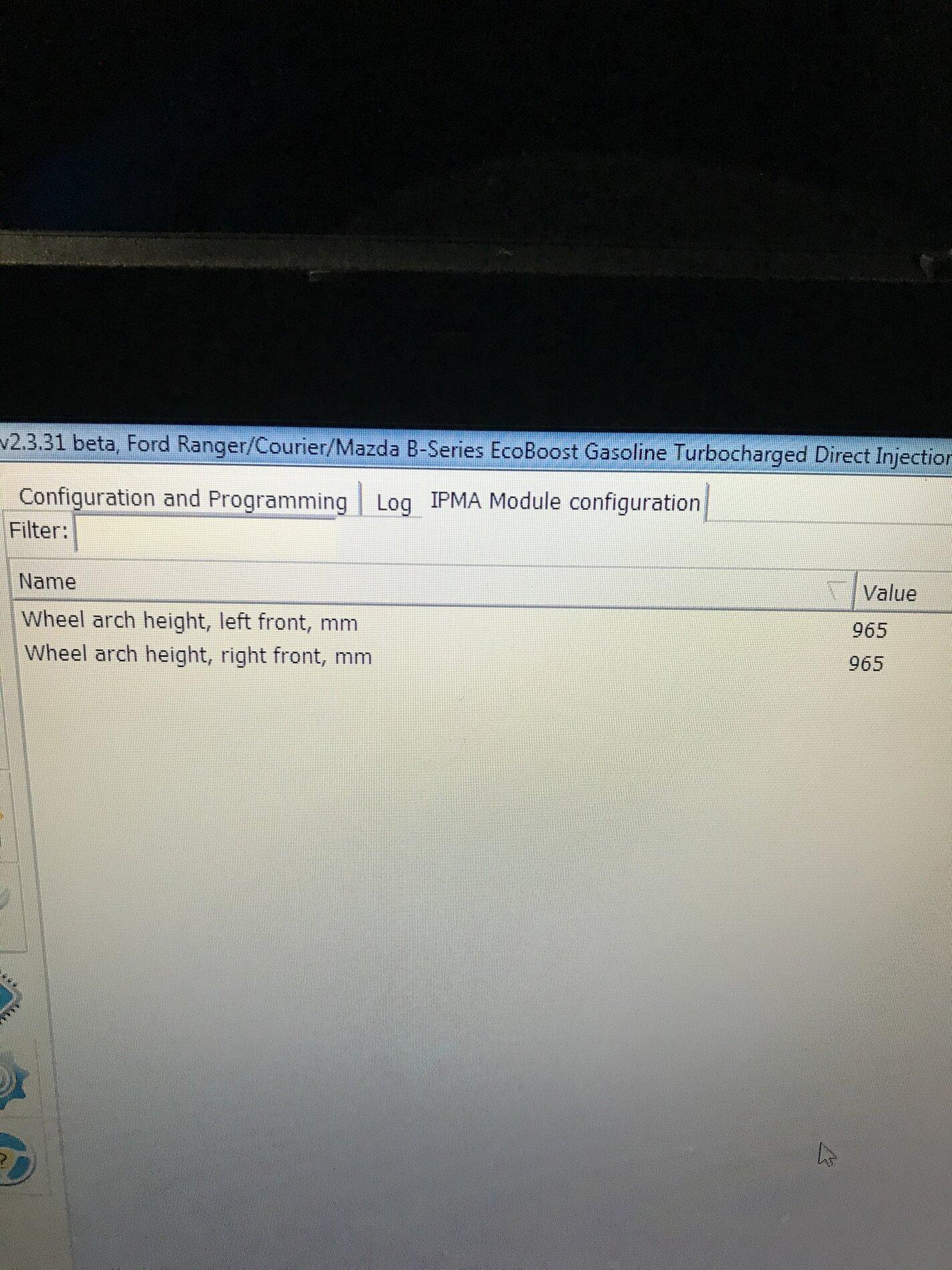
My issue though is that when I go into the IPMA MODULE I do not have ANY choices....it just lists the image below. I did try driving around to see if maybe it would work anyways - passed 6 speed signs and nothing. Any ideas?
t4thfavor
Well-Known Member
- Thread starter
- #746
Ok. I have a 2019 XLT. I attempted to add the speed sign recognition today. I had no issue with the IPC portion of this and have the menu choices now available - however the speed alert warning choices are above and below 65 KMPH.... not MPH.....and I see the two little circles now on my dash cluster.
My issue though is that when I go into the IPMA MODULE I do not have ANY choices....it just lists the image below. I did try driving around to see if maybe it would work anyways - passed 6 speed signs and nothing. Any ideas?

When you start Forscan, pick the option to not open an existing profile and then reload the vehicle modules. That should help.
apotocki
Well-Known Member
- First Name
- Alan
- Joined
- Dec 10, 2019
- Threads
- 19
- Messages
- 271
- Reaction score
- 657
- Location
- Rochester Hills, Michigan
- Vehicle(s)
- 2019 Ranger XLT
- Occupation
- Network Force Analyst
- Vehicle Showcase
- 1
I’ll take another try tomorrow. Interestingly I believe I tried that in one of my many attempts this afternoon.When you start Forscan, pick the option to not open an existing profile and then reload the vehicle modules. That should help.
It’s weird that this is all that is displayed for IPMA.
apotocki
Well-Known Member
- First Name
- Alan
- Joined
- Dec 10, 2019
- Threads
- 19
- Messages
- 271
- Reaction score
- 657
- Location
- Rochester Hills, Michigan
- Vehicle(s)
- 2019 Ranger XLT
- Occupation
- Network Force Analyst
- Vehicle Showcase
- 1
Ok. It worked. Not sure what the issue was yesterday with the IPMA but I started over today and all is good. I now have the speed limit signs displayed as they should. I also do not display the U.S. signs but thats fine with me.I’ll take another try tomorrow. Interestingly I believe I tried that in one of my many attempts this afternoon.
It’s weird that this is all that is displayed for IPMA.
micl9
Well-Known Member
Common thread is that 2019s have Euro signs and 2020s (on?) have US signs. On my list to try to figure out settings. I started and there are differences between the years, but I needed to take a step back and do a more methodical approach. Now I just don't have time.Ok. It worked. Not sure what the issue was yesterday with the IPMA but I started over today and all is good. I now have the speed limit signs displayed as they should. I also do not display the U.S. signs but thats fine with me.
Sponsored


