Sponsored

FORScan Crowdsourced Wiki

PonyXpress

Well-Known Member
First Name
Steve
Joined
Feb 18, 2019
Threads
9
Messages
267
Reaction score
176
Location
Sacramento CA
Vehicle(s)
2019 Ford Ranger
OK, just kind of spit balling here.

I have my XLT set to All Options because I run my fogs as my DRL along with my parking lights.

One other thing you didn't say if you have your switch in Auto or not. I leave mine there all the time but, gotten it back from the dealer with the lights turned off. DRLs only work in Auto.
Allowed DRL Options did the trick. I was able to confirm the front and side lights turn on when in Drive. My 3 front grill lights are also on. I will need to confirm, but I didn't see the rear lights on at all. It was a bright day so I'll check them again. Rears lights should be on, right?

I noticed a change, "I think". I recall that when the DRL were on, my dash showed the icon in the lower left side, telling me that they were on. The dash shows that no lights are on, yet the DRL are on. I keep my switch set to Auto and I see the dash icons light up at dusk along with my headlights. Is that a setting or maybe the dash icons never did come on with only DRL on.
Sponsored

 

airline tech

Well-Known Member
Joined
Aug 24, 2022
Threads
28
Messages
4,455
Reaction score
8,509
Location
Midwest - KS
Vehicle(s)
2022 Ranger Lariat-Super Crew, Cactus Gray
Occupation
Aircraft Tech
Okay i've come back to this. My config is aftermarkets with a DRL wire in the harness (that you can bypass if you have factory halogens and run off a tapped fuse, aka my fact pattern).

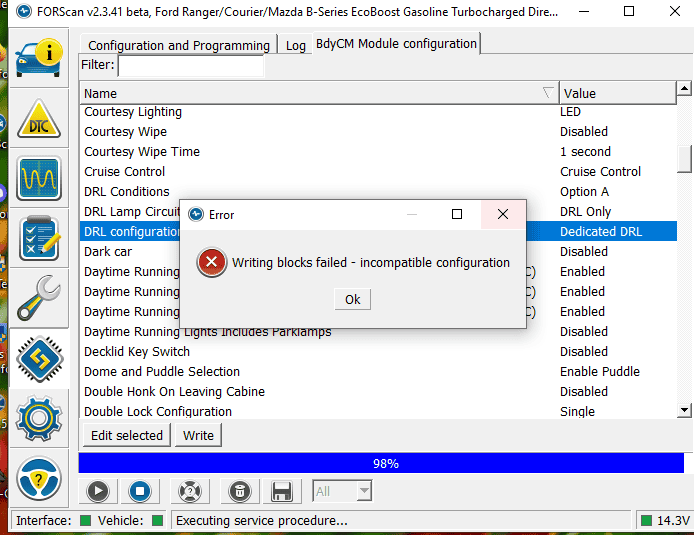
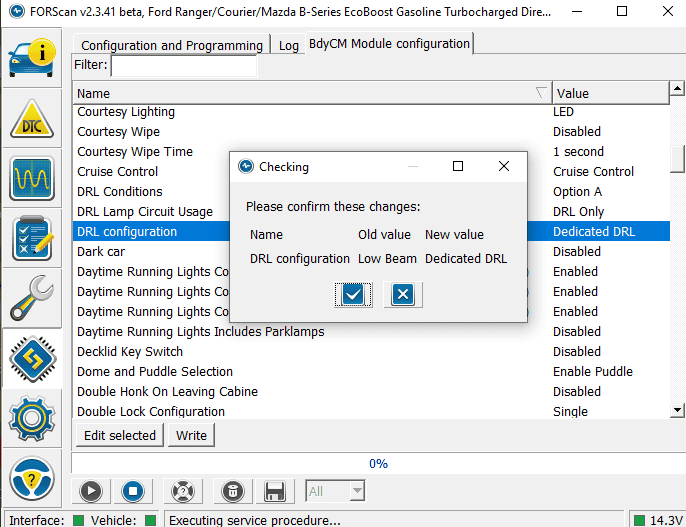
I load up forscan, and my DRLs and can't get past the first step without an error.

Oddly, the behavior is DRLs are on (but so are low beams) in the auto right now. It's unclear if the auto position thinks its dark enough for headlights (gloomy Cleveland winter day), or if it is using the low beams as DRLS. What am I missing? I feel like i'm struggling with basic reading comprehension.

DRL1.PNG


DRL2.PNG
What specific aftermarkets do you have installed? so, someone who has the same thing can chime in.
Plus, as another post suggested, try changing Allowed DRL options to None or All, to get it to accept the changes you want to make
Or
Go into the as built files and manually change it to the settings I posted. This is assuming the aftermarkets are LED

Edit:

Being that I played around with FORscan when I did my swap, you may have to change DRL Options (First) Try changing it to the (Incompatible or Not Configured) - If you see it as an option
If not go in the (As-Built) file (BCM) and manually change the codes to below.
These are the Correct As-Built Files for Factory LED Headlamps

726-45-01 - 0A01-1000-008E (Change this First) & (Write It)

726-26-02 - 0000-0001-0056 (Change this Second) & (Write it)

726-50-01 - 108E (This should change automatically with the above changes)

Your CURRENT as built files are most likely these:

BCM
726-45-01 - 0A01-0200-0080
726-26-02 - 0000-0002-0057
726-50-01 - 0280


Now, being you have Aftermarkets (Brand/Type?) appears to be a factor with a tapped (power) going to them. I think the tapped power is the issue (if the above settings won't work)
Hopefully, these will get you all set up
 
Last edited:

maxbottomtime

Well-Known Member
Joined
Jul 12, 2021
Threads
8
Messages
509
Reaction score
839
Location
NE OH
Vehicle(s)
2021 Ranger XLT SCAB 4x4
What specific aftermarkets do you have installed? so, someone who has the same thing can chime in.
Plus, as another post suggested, try changing Allowed DRL options to None or All, to get it to accept the changes you want to make
Or
Go into the as built files and manually change it to the settings I posted. This is assuming the aftermarkets are LED

Edit:

Being that I played around with FORscan when I did my swap, you may have to change DRL Options (First) Try changing it to the (Incompatible or Not Configured) - If you see it as an option
If not go in the (As-Built) file (BCM) and manually change the codes to below.
These are the Correct As-Built Files for Factory LED Headlamps

726-45-01 - 0A01-1000-008E (Change this First) & (Write It)

726-26-02 - 0000-0001-0056 (Change this Second) & (Write it)

726-50-01 - 108E (This should change automatically with the above changes)

Your CURRENT as built files are most likely these:

BCM
726-45-01 - 0A01-0200-0080
726-26-02 - 0000-0002-0057
726-50-01 - 0280


Now, being you have Aftermarkets (Brand/Type?) appears to be a factor with a tapped (power) going to them. I think the tapped power is the issue (if the above settings won't work)
Hopefully, these will get you all set up
Thanks, they are VLAND/GTR carbide.

They have a DRL pin that goes into the factory harness, or you can bypass the harness and run a separate fuse tap to an "always on" fuse. The tap is their recommendation for non LED rangers, and i don't think anyone in their right mind would downgrade from the lariats. They may be brighter but I think i'd rather have the OEM bulbs if price were equal.

I just changed my allowed DRL to all, and then i was able to set the DRL config to DRL only, and then to DRL + lowbeam (my preference). popping it in neutral, and lowbeam and the DRL light up.

It's interesting - i FEEL like the DRL is dimmer than on the tapped fuse, maybe the BCM sends less voltage? I'll put the harness back in and test one of each once ford replaces my dying battery - i'm trying to give them less to complaining about, as they will certainly take a moral objection to my 12v selector switch for my winch. I could be imagining this, because it's the first day in a week that is bright enough that my lowbeams didn't turn on at noon...

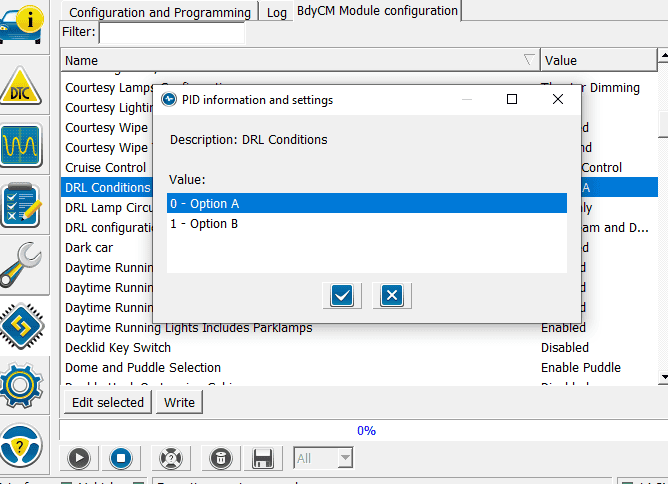
Behavior for DRL seems to be daytime (duh), and in neutral as you describe. I honestly think i'd prefer they run at night. I think that's option B here? will test this evening. Assuming brightness is on parity, seems like the best of both worlds. I can still turn off with the light switch, but always on otherwise.

1671560745569.png


https://forscan.org/forum/viewtopic.php?t=13865


Finally, i'm not sure what it was doing with the DRL when lowbeams were set, but the DRL ran when i remote started the car (and seemed to be on at night). Oh well.
 

airline tech

Well-Known Member
Joined
Aug 24, 2022
Threads
28
Messages
4,455
Reaction score
8,509
Location
Midwest - KS
Vehicle(s)
2022 Ranger Lariat-Super Crew, Cactus Gray
Occupation
Aircraft Tech
Thanks, they are VLAND/GTR carbide.

They have a DRL pin that goes into the factory harness, or you can bypass the harness and run a separate fuse tap to an "always on" fuse. The tap is their recommendation for non LED rangers, and i don't think anyone in their right mind would downgrade from the lariats. They may be brighter but I think i'd rather have the OEM bulbs if price were equal.

I just changed my allowed DRL to all, and then i was able to set the DRL config to DRL only, and then to DRL + lowbeam (my preference). popping it in neutral, and lowbeam and the DRL light up.

It's interesting - i FEEL like the DRL is dimmer than on the tapped fuse, maybe the BCM sends less voltage? I'll put the harness back in and test one of each once ford replaces my dying battery - i'm trying to give them less to complaining about, as they will certainly take a moral objection to my 12v selector switch for my winch. I could be imagining this, because it's the first day in a week that is bright enough that my lowbeams didn't turn on at noon...

Behavior for DRL seems to be daytime (duh), and in neutral as you describe. I honestly think i'd prefer they run at night. I think that's option B here? will test this evening. Assuming brightness is on parity, seems like the best of both worlds. I can still turn off with the light switch, but always on otherwise.

1671560745569.png


https://forscan.org/forum/viewtopic.php?t=13865


Finally, i'm not sure what it was doing with the DRL when lowbeams were set, but the DRL ran when i remote started the car (and seemed to be on at night). Oh well.
Good, you have at least tackled it.
Now, normal DRL ops, would be - On & Bright - with Headlights not triggered on by (Auto)
and On & Dim - with Headlights triggered on by (Auto) - so yes 50% brightness
and the DRL Conditions - Options makes DRL Full Time Bright, any switch position due to Canada Law requirements (Conventional DRL) and those of us in the USA have (Configurable DRL)

So, at least now it's working, but I think it order to get DRL - Bright, you would have to change the DRL Options off of the (+ Low Beams), BCM sees them on and forces 50% power to the DRL
So as of now you know it works, so set it up how you want it
I now understand the tapped wire to allow the DRL-Bright even with the Low-Beams on, so this may be another option, I don't know what the BCM will do though, might trip fault codes-(IDK)
 

maxbottomtime

Well-Known Member
Joined
Jul 12, 2021
Threads
8
Messages
509
Reaction score
839
Location
NE OH
Vehicle(s)
2021 Ranger XLT SCAB 4x4
Good, you have at least tackled it.
Now, normal DRL ops, would be - On & Bright - with Headlights not triggered on by (Auto)
and On & Dim - with Headlights triggered on by (Auto) - so yes 50% brightness
and the DRL Conditions - Options makes DRL Full Time Bright, any switch position due to Canada Law requirements (Conventional DRL) and those of us in the USA have (Configurable DRL)

So, at least now it's working, but I think it order to get DRL - Bright, you would have to change the DRL Options off of the (+ Low Beams), BCM sees them on and forces 50% power to the DRL
So as of now you know it works, so set it up how you want it
I now understand the tapped wire to allow the DRL-Bright even with the Low-Beams on, so this may be another option, I don't know what the BCM will do though, might trip fault codes-(IDK)
No fault codes with the separate DRL tap harness. Just to make sure i'm understanding, you've tested option B to simply run DRL in any switch position (even off)? I'll test that another evening, and also try turning low beam DRL off to see if that is brighter during the day


airline tech

Well-Known Member
Joined
Aug 24, 2022
Threads
28
Messages
4,455
Reaction score
8,509
Location
Midwest - KS
Vehicle(s)
2022 Ranger Lariat-Super Crew, Cactus Gray
Occupation
Aircraft Tech
No fault codes with the separate DRL tap harness. Just to make sure i'm understanding, you've tested option B to simply run DRL in any switch position (even off)? I'll test that another evening, and also try turning low beam DRL off to see if that is brighter during the day
No, I'm attaching the System Ops for you, it describes Conventional vs Configurable, and I just read it again - It may not force -Bright when in Auto and they won't work in Headlamp Position
But from here you can play with settings and see what it does
 

Attachments

maxbottomtime

Well-Known Member
Joined
Jul 12, 2021
Threads
8
Messages
509
Reaction score
839
Location
NE OH
Vehicle(s)
2021 Ranger XLT SCAB 4x4
No, I'm attaching the System Ops for you, it describes Conventional vs Configurable, and I just read it again - It may not force -Bright when in Auto and they won't work in Headlamp Position
But from here you can play with settings and see what it does
I guess my question is does option A correspond to configurable and B conventional in the setting above.
 

airline tech

Well-Known Member
Joined
Aug 24, 2022
Threads
28
Messages
4,455
Reaction score
8,509
Location
Midwest - KS
Vehicle(s)
2022 Ranger Lariat-Super Crew, Cactus Gray
Occupation
Aircraft Tech

MrBusses

Well-Known Member
Joined
Jan 5, 2023
Threads
10
Messages
133
Reaction score
492
Location
Florida
Vehicle(s)
2019 Ranger 4dr FX4
Occupation
Ford SMT
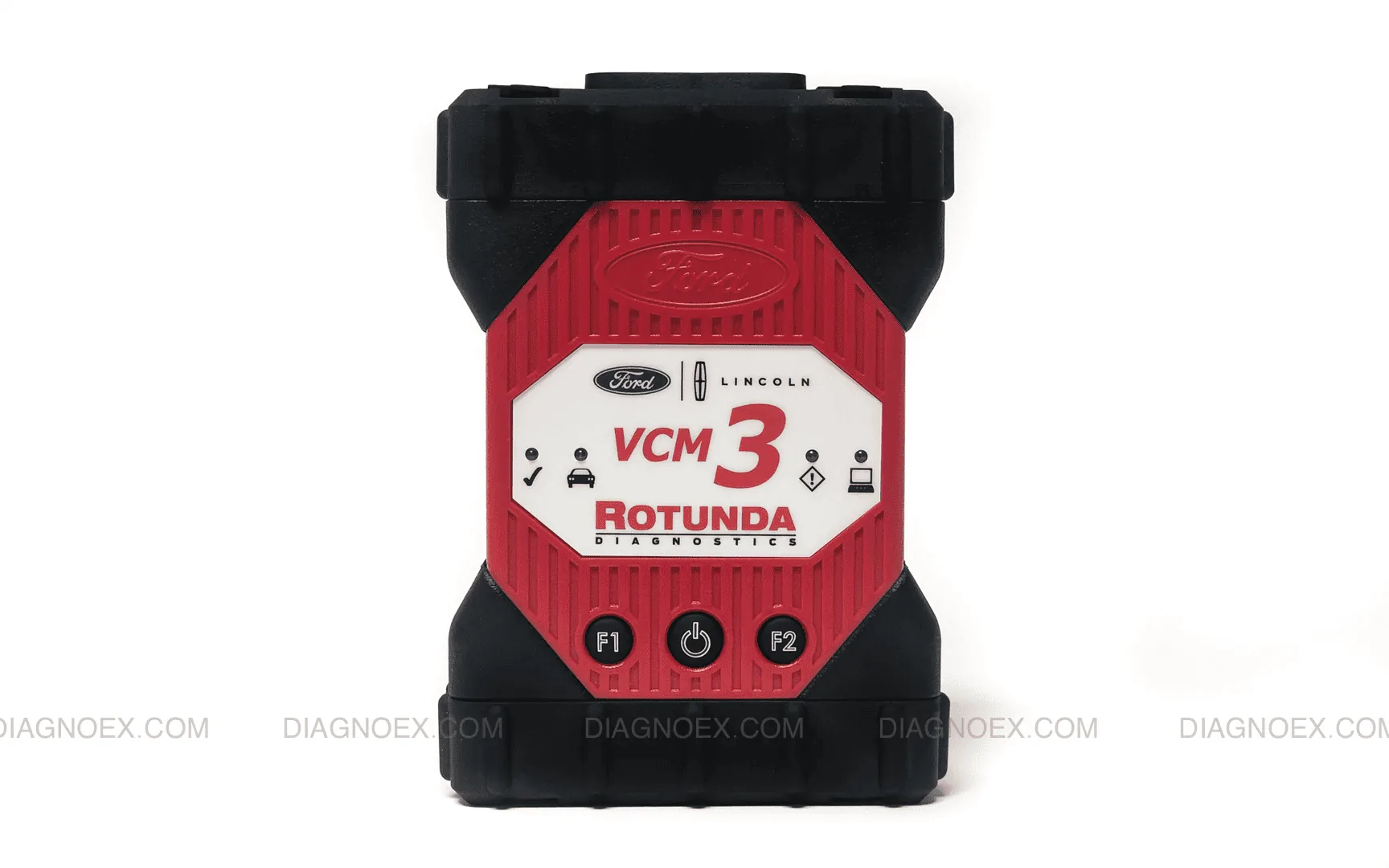
I am looking around with forscan I have the trial license and using my Ford VCM3 to connect. I was able to enable bambi mode but I do not see all modules listed. Is this a limitation of Forscan orthe license I am using?
 

DIGITAL_HATE

Member
First Name
Fred
Joined
Aug 17, 2021
Threads
0
Messages
14
Reaction score
23
Location
California
Vehicle(s)
1996 4.0 Ranger, 2021 cactus grey Ranger
Occupation
Energy
I am looking around with forscan I have the trial license and using my Ford VCM3 to connect. I was able to enable bambi mode but I do not see all modules listed. Is this a limitation of Forscan orthe license I am using?
No the 2 month trial and the purchase version should have the same stuff. Different modules are in different locations. What one you looking for
 

MrBusses

Well-Known Member
Joined
Jan 5, 2023
Threads
10
Messages
133
Reaction score
492
Location
Florida
Vehicle(s)
2019 Ranger 4dr FX4
Occupation
Ford SMT
No the 2 month trial and the purchase version should have the same stuff. Different modules are in different locations. What one you looking for
Going through the wiki I saw some stuff for the IPC but I do not have an IPC module in Forscan. Everything shows up just fine in FDRS.
 

RedlandRanger

Moderator
First Name
Rob
Joined
Nov 14, 2018
Threads
42
Messages
5,111
Reaction score
11,105
Location
Oregon
Vehicle(s)
2019 Ford Ranger Lariat FX4, 1973 Mercury Capri
Vehicle Showcase
1
Going through the wiki I saw some stuff for the IPC but I do not have an IPC module in Forscan. Everything shows up just fine in FDRS.
What adapter are you using?
 

RedlandRanger

Moderator
First Name
Rob
Joined
Nov 14, 2018
Threads
42
Messages
5,111
Reaction score
11,105
Location
Oregon
Vehicle(s)
2019 Ford Ranger Lariat FX4, 1973 Mercury Capri
Vehicle Showcase
1
1674349029903.png


Tried it with my OBDlink adapter also same options.
Is that wireless? Wireless adapters are not recommended (last I knew). What I was wondering is there is a high speed and low speed CAN bus - Wondering if some of the modules are on the bus your adapter isn't seeing? On the "old" adapters there was a switch to control which one you were reading - the newer wired adapters automatically adjust.
 

MrBusses

Well-Known Member
Joined
Jan 5, 2023
Threads
10
Messages
133
Reaction score
492
Location
Florida
Vehicle(s)
2019 Ranger 4dr FX4
Occupation
Ford SMT
Is that wireless? Wireless adapters are not recommended (last I knew). What I was wondering is there is a high speed and low speed CAN bus - Wondering if some of the modules are on the bus your adapter isn't seeing? On the "old" adapters there was a switch to control which one you were reading - the newer wired adapters automatically adjust.
I mean this the latest OEM scan tool that I use daily with FDRS and IDS it can see every network and module the truck has. Maybe forscan doesn't like that it is wireless but both the IPC and APIM are on the HS3 can network and I Can access the APIM through forscan.

I will venture over to the forscan forums and see if they have any info.
Sponsored


Top