Sponsored

FORScan Crowdsourced Wiki

D Fresh

Banned
Banned
First Name
Doug
Joined
Dec 10, 2020
Threads
20
Messages
6,272
Reaction score
13,576
Location
Colorado
Vehicle(s)
'20 Lariat FX4, '17 FiST, '16 CX-5, '95 YJ
Occupation
Milkman
Yes mine is the same, it's like being disabled is added to the list of reasons it doesn't activate. Every stop I get the no ass indicator.
Odd.

When it displays have you checked the economy screen to see if it tells you wether it's charging or not?

Could it be that your battery is on it's way out?
Sponsored
 

Bsthroop

Well-Known Member
First Name
Brian
Joined
Oct 4, 2022
Threads
6
Messages
479
Reaction score
2,261
Location
New Mexico
Vehicle(s)
2019 Lariat 4x2 Sport
Occupation
Broadband/ Microwave Engineer
Odd.

When it displays have you checked the economy screen to see if it tells you wether it's charging or not?

Could it be that your battery is on it's way out?
I'll have to find that screen, it never deactivated before I turned it off in Forscan. Battery Is new in the past month and the tender is plugged in every night.
 

D Fresh

Banned
Banned
First Name
Doug
Joined
Dec 10, 2020
Threads
20
Messages
6,272
Reaction score
13,576
Location
Colorado
Vehicle(s)
'20 Lariat FX4, '17 FiST, '16 CX-5, '95 YJ
Occupation
Milkman
I'll have to find that screen, it never deactivated before I turned it off in Forscan. Battery Is new in the past month and the tender is plugged in every night.
Hhhmm. I'm stumped.

IIRC there is something that needs to be done when changing the battery, basically telling the truck it's new. Does that sound familiar from when you changed the battery?
 

Bsthroop

Well-Known Member
First Name
Brian
Joined
Oct 4, 2022
Threads
6
Messages
479
Reaction score
2,261
Location
New Mexico
Vehicle(s)
2019 Lariat 4x2 Sport
Occupation
Broadband/ Microwave Engineer
Hhhmm. I'm stumped.

IIRC there is something that needs to be done when changing the battery, basically telling the truck it's new. Does that sound familiar from when you changed the battery?
Yes I did the reset when I replaced the battery, brake 5 times, horn 3 times, something like that. Said it was reset.
 

PonyXpress

Well-Known Member
First Name
Steve
Joined
Feb 18, 2019
Threads
9
Messages
267
Reaction score
176
Location
Sacramento CA
Vehicle(s)
2019 Ford Ranger
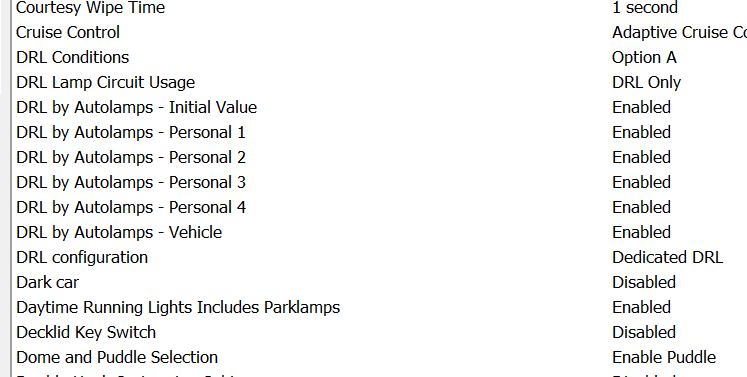
Hey friends, I'm having a issue with DRL on my 2019 Lariat. I upgraded to the latest ForScan v2.3.49.

Background: I performed 5 or 6 ForScan changes back in 2019 when I got my truck. Double honk, bambi, DRL, etc. A couple of weeks ago Ford had to replace my transmission valve body because my truck was shifting hard. They also had to reprogram my PCM. The result was double honk, DRL, bambi all reverted back to As Built.
Using the latest version of ForScan, I went and enabled the settings again. Everything is working except DRL. It shows it's enabled but they are not on. This worked fine before so I'm confused as to why it's not working now. Yes, I know the truck has to be in DRIVE, again this has worked for the past 3 years without issue.
Attaching a screenshot showing the DRL is enabled.

Any ideas?

Screenshot 2022-12-09 093508.png


Big Blue

Well-Known Member
First Name
Lee
Joined
May 5, 2020
Threads
16
Messages
3,944
Reaction score
9,429
Location
Wisconsin
Vehicle(s)
2019 Ford Ranger XLT FX4 Supercrew lighting blue
Occupation
Retired mechanical designer
Hey friends, I'm having a issue with DRL on my 2019 Lariat. I upgraded to the latest ForScan v2.3.49.

Background: I performed 5 or 6 ForScan changes back in 2019 when I got my truck. Double honk, bambi, DRL, etc. A couple of weeks ago Ford had to replace my transmission valve body because my truck was shifting hard. They also had to reprogram my PCM. The result was double honk, DRL, bambi all reverted back to As Built.
Using the latest version of ForScan, I went and enabled the settings again. Everything is working except DRL. It shows it's enabled but they are not on. This worked fine before so I'm confused as to why it's not working now. Yes, I know the truck has to be in DRIVE, again this has worked for the past 3 years without issue.
Attaching a screenshot showing the DRL is enabled.

Any ideas?

Screenshot 2022-12-09 093508.png
What is your Allowed DRL Options set at. For you I beleive it should be Dedicated DRL. You could also try All Options.

One other thing is the DRL setting in your dash menus turned on?
 

PonyXpress

Well-Known Member
First Name
Steve
Joined
Feb 18, 2019
Threads
9
Messages
267
Reaction score
176
Location
Sacramento CA
Vehicle(s)
2019 Ford Ranger
What is your Allowed DRL Options set at. For you I beleive it should be Dedicated DRL. You could also try All Options.

One other thing is the DRL setting in your dash menus turned on?
I don't see the Allowed DRL Options in the list, look at my screenshot. Are you sure that is how it's listed? I'll go back and double check.

I didn't have to change anything in the dash menus before, and I don't recall seeing that as an option. Again, will go check. Mine is a 2019, so maybe they added that to the newer models.

Thank you!

Update: I do have that option in the dash menu, but it defaults to on, box checked.
 
Last edited:

Big Blue

Well-Known Member
First Name
Lee
Joined
May 5, 2020
Threads
16
Messages
3,944
Reaction score
9,429
Location
Wisconsin
Vehicle(s)
2019 Ford Ranger XLT FX4 Supercrew lighting blue
Occupation
Retired mechanical designer
I don't see the Allowed DRL Options in the list, look at my screenshot. Are you sure that is how it's listed? I'll go back and double check.

I didn't have to change anything in the dash menus before, and I don't recall seeing that as an option. Again, will go check. Mine is a 2019, so maybe they added that to the newer models.

Thank you!
The Allowed DRL Options is early in the list than what you showed. They are listed alphabetically.

Can’t remember where it is in the dash. And don't have access to my truck rigjt now.
 

PonyXpress

Well-Known Member
First Name
Steve
Joined
Feb 18, 2019
Threads
9
Messages
267
Reaction score
176
Location
Sacramento CA
Vehicle(s)
2019 Ford Ranger
Ok, got it. I will go back into FORScan and check.

I found the dash menu settings, it's under Lighting and defaults to On or box checked.
 

Big Blue

Well-Known Member
First Name
Lee
Joined
May 5, 2020
Threads
16
Messages
3,944
Reaction score
9,429
Location
Wisconsin
Vehicle(s)
2019 Ford Ranger XLT FX4 Supercrew lighting blue
Occupation
Retired mechanical designer
Ok, got it. I will go back into FORScan and check.

I found the dash menu settings, it's under Lighting and defaults to On or box checked.
OK, just kind of spit balling here.

I have my XLT set to All Options because I run my fogs as my DRL along with my parking lights.

One other thing you didn't say if you have your switch in Auto or not. I leave mine there all the time but, gotten it back from the dealer with the lights turned off. DRLs only work in Auto.
 

maxbottomtime

Well-Known Member
Joined
Jul 12, 2021
Threads
8
Messages
517
Reaction score
842
Location
NE OH
Vehicle(s)
2021 Ranger XLT SCAB 4x4
UPDATE
I figured it out and this ONLY applies to Factory LED or Aftermarkets that have a dedicated DRL and that is all you will be using.

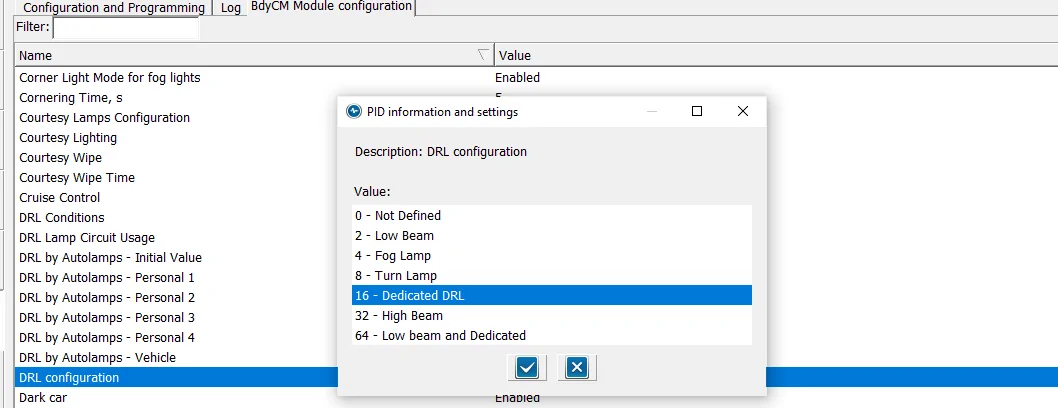
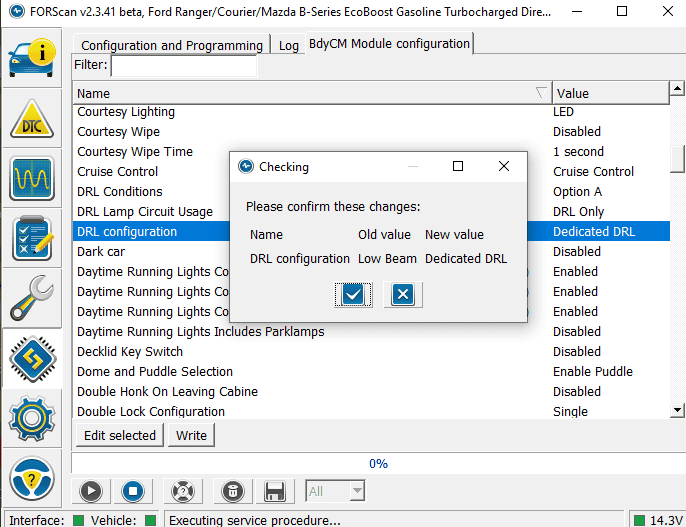
DRL Configuration to (Dedicated DRL)
DRL Config (2).webp


Set this option to (16) Dedicated DRL - this will automatically set 2-Lines of Hex Code for you.
NOTE: the (16) is a Binary code that is converted to HEX (Inside of the As-Built) Files

Here are the 2-Lines of Codes it sets

BCM
726-26-02 - 0000-0001-0056 (Matches my Lariat compare search-As-Built)
726-50-01 - 108E (Matches my Lariat compare search - As-Built)

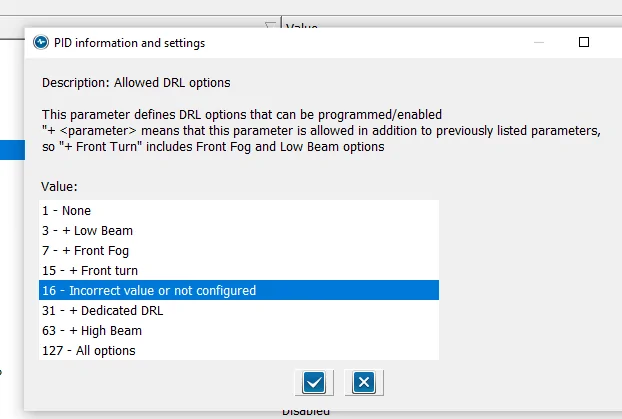
Now set Allowed DRL Options:

Alowed DRL Options.webp

NOTE: The Paragraph at the top
If you have only (1) option for DRL, such as Factory LED Headlights, this will show due to the fact that it matches the (16) Binary code you set in DRL Configuration PLUS
This option ONLY modifies (In addition) (Plus) the standard factory DRL.
So, this normal - As I have not added any special (extra) DRL options to the configuration

So, with this selected, here is the last Hex Line of code that is changed (Automatically)

726-45-01 - 0A01-1000-008E

If you do not see this option (highlighted) then go into the As-Built File and manually change it, then when you go back to the (Module) Easy way, this will be shown

I know there have been quite a few posts on this subject and I wanted to pass along my findings
to clear it up
These are the confirmed settings for the Lariat Factory LED Upgrade, now it should also clear it up for those who have installed the (aftermarket) options. With the attached pics, you can see it more clearly and visualize what changes you want to make

Hope this helps
Okay i've come back to this. My config is aftermarkets with a DRL wire in the harness (that you can bypass if you have factory halogens and run off a tapped fuse, aka my fact pattern).

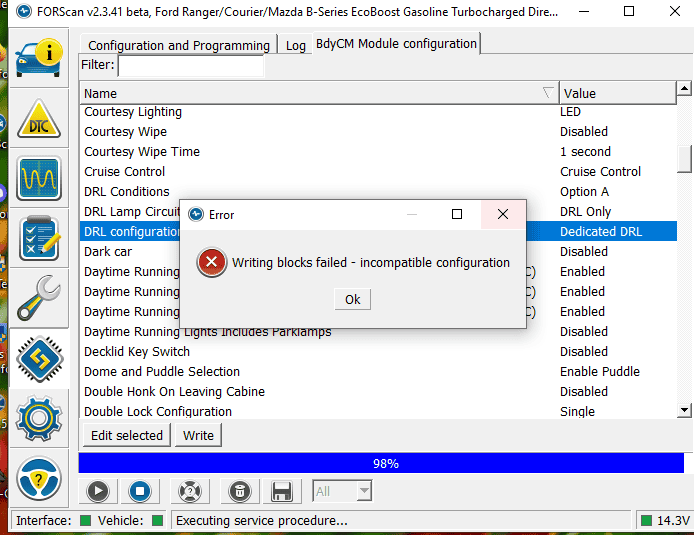
I load up forscan, and my DRLs and can't get past the first step without an error.

Oddly, the behavior is DRLs are on (but so are low beams) in the auto right now. It's unclear if the auto position thinks its dark enough for headlights (gloomy Cleveland winter day), or if it is using the low beams as DRLS. What am I missing? I feel like i'm struggling with basic reading comprehension.

DRL1.PNG


DRL2.PNG
 

Big Blue

Well-Known Member
First Name
Lee
Joined
May 5, 2020
Threads
16
Messages
3,944
Reaction score
9,429
Location
Wisconsin
Vehicle(s)
2019 Ford Ranger XLT FX4 Supercrew lighting blue
Occupation
Retired mechanical designer
Okay i've come back to this. My config is aftermarkets with a DRL wire in the harness (that you can bypass if you have factory halogens and run off a tapped fuse, aka my fact pattern).

I load up forscan, and my DRLs and can't get past the first step without an error.

Oddly, the behavior is DRLs are on (but so are low beams) in the auto right now. It's unclear if the auto position thinks its dark enough for headlights (gloomy Cleveland winter day), or if it is using the low beams as DRLS. What am I missing? I feel like i'm struggling with basic reading comprehension.

DRL1.PNG


DRL2.PNG
I believe you need to change the "Allowed DRL Options" line before it will let you change the "DRL Configuration" line. I have my "19 XLT with factory halogens set to "All Options" with my configuration set to "Fog Lights". I also run my parking lights with DRL. Works fine with no low beams.
 

PonyXpress

Well-Known Member
First Name
Steve
Joined
Feb 18, 2019
Threads
9
Messages
267
Reaction score
176
Location
Sacramento CA
Vehicle(s)
2019 Ford Ranger
OK, just kind of spit balling here.

I have my XLT set to All Options because I run my fogs as my DRL along with my parking lights.

One other thing you didn't say if you have your switch in Auto or not. I leave mine there all the time but, gotten it back from the dealer with the lights turned off. DRLs only work in Auto.
Allowed DRL Options did the trick. I was able to confirm the front and side lights turn on when in Drive. My 3 front grill lights are also on. I will need to confirm, but I didn't see the rear lights on at all. It was a bright day so I'll check them again. Rears lights should be on, right?

I noticed a change, "I think". I recall that when the DRL were on, my dash showed the icon in the lower left side, telling me that they were on. The dash shows that no lights are on, yet the DRL are on. I keep my switch set to Auto and I see the dash icons light up at dusk along with my headlights. Is that a setting or maybe the dash icons never did come on with only DRL on.
 

airline tech

Well-Known Member
Joined
Aug 24, 2022
Threads
28
Messages
4,681
Reaction score
8,972
Location
Midwest - KS
Vehicle(s)
2022 Ranger Lariat-Super Crew, Cactus Gray
Occupation
Aircraft Tech
Okay i've come back to this. My config is aftermarkets with a DRL wire in the harness (that you can bypass if you have factory halogens and run off a tapped fuse, aka my fact pattern).

I load up forscan, and my DRLs and can't get past the first step without an error.

Oddly, the behavior is DRLs are on (but so are low beams) in the auto right now. It's unclear if the auto position thinks its dark enough for headlights (gloomy Cleveland winter day), or if it is using the low beams as DRLS. What am I missing? I feel like i'm struggling with basic reading comprehension.

DRL1.PNG


DRL2.PNG
What specific aftermarkets do you have installed? so, someone who has the same thing can chime in.
Plus, as another post suggested, try changing Allowed DRL options to None or All, to get it to accept the changes you want to make
Or
Go into the as built files and manually change it to the settings I posted. This is assuming the aftermarkets are LED

Edit:

Being that I played around with FORscan when I did my swap, you may have to change DRL Options (First) Try changing it to the (Incompatible or Not Configured) - If you see it as an option
If not go in the (As-Built) file (BCM) and manually change the codes to below.
These are the Correct As-Built Files for Factory LED Headlamps

726-45-01 - 0A01-1000-008E (Change this First) & (Write It)

726-26-02 - 0000-0001-0056 (Change this Second) & (Write it)

726-50-01 - 108E (This should change automatically with the above changes)

Your CURRENT as built files are most likely these:

BCM
726-45-01 - 0A01-0200-0080
726-26-02 - 0000-0002-0057
726-50-01 - 0280


Now, being you have Aftermarkets (Brand/Type?) appears to be a factor with a tapped (power) going to them. I think the tapped power is the issue (if the above settings won't work)
Hopefully, these will get you all set up
 
Last edited:

maxbottomtime

Well-Known Member
Joined
Jul 12, 2021
Threads
8
Messages
517
Reaction score
842
Location
NE OH
Vehicle(s)
2021 Ranger XLT SCAB 4x4
What specific aftermarkets do you have installed? so, someone who has the same thing can chime in.
Plus, as another post suggested, try changing Allowed DRL options to None or All, to get it to accept the changes you want to make
Or
Go into the as built files and manually change it to the settings I posted. This is assuming the aftermarkets are LED

Edit:

Being that I played around with FORscan when I did my swap, you may have to change DRL Options (First) Try changing it to the (Incompatible or Not Configured) - If you see it as an option
If not go in the (As-Built) file (BCM) and manually change the codes to below.
These are the Correct As-Built Files for Factory LED Headlamps

726-45-01 - 0A01-1000-008E (Change this First) & (Write It)

726-26-02 - 0000-0001-0056 (Change this Second) & (Write it)

726-50-01 - 108E (This should change automatically with the above changes)

Your CURRENT as built files are most likely these:

BCM
726-45-01 - 0A01-0200-0080
726-26-02 - 0000-0002-0057
726-50-01 - 0280


Now, being you have Aftermarkets (Brand/Type?) appears to be a factor with a tapped (power) going to them. I think the tapped power is the issue (if the above settings won't work)
Hopefully, these will get you all set up
Thanks, they are VLAND/GTR carbide.

They have a DRL pin that goes into the factory harness, or you can bypass the harness and run a separate fuse tap to an "always on" fuse. The tap is their recommendation for non LED rangers, and i don't think anyone in their right mind would downgrade from the lariats. They may be brighter but I think i'd rather have the OEM bulbs if price were equal.

I just changed my allowed DRL to all, and then i was able to set the DRL config to DRL only, and then to DRL + lowbeam (my preference). popping it in neutral, and lowbeam and the DRL light up.

It's interesting - i FEEL like the DRL is dimmer than on the tapped fuse, maybe the BCM sends less voltage? I'll put the harness back in and test one of each once ford replaces my dying battery - i'm trying to give them less to complaining about, as they will certainly take a moral objection to my 12v selector switch for my winch. I could be imagining this, because it's the first day in a week that is bright enough that my lowbeams didn't turn on at noon...

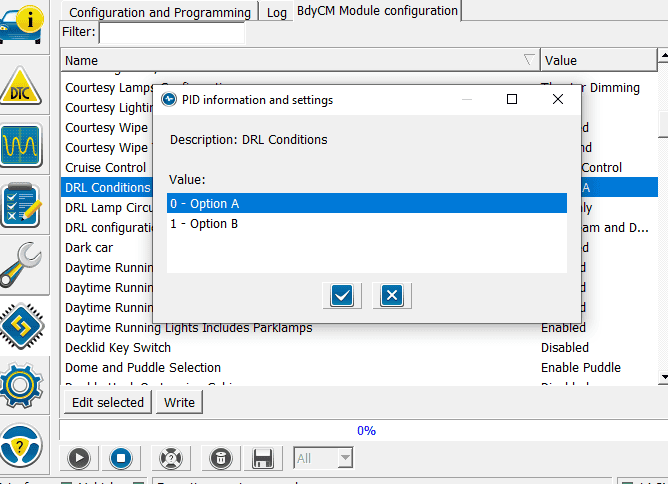
Behavior for DRL seems to be daytime (duh), and in neutral as you describe. I honestly think i'd prefer they run at night. I think that's option B here? will test this evening. Assuming brightness is on parity, seems like the best of both worlds. I can still turn off with the light switch, but always on otherwise.

1671560745569.png


https://forscan.org/forum/viewtopic.php?t=13865


Finally, i'm not sure what it was doing with the DRL when lowbeams were set, but the DRL ran when i remote started the car (and seemed to be on at night). Oh well.
Sponsored


Top