Sponsored

FORScan Crowdsourced Wiki

KJRR

Well-Known Member
First Name
KJ
Joined
Feb 1, 2020
Threads
14
Messages
2,022
Reaction score
10,473
Location
Cleveland, OH
Vehicle(s)
'19 Ford Ranger, '14 Ford Edge, '74 VW Type 181
Occupation
Professional Curmudgeon
I had mine towed in for dead battery. I had made several Forscan changes. Including disabling ASS, splash screen, changing DRL settings,etc. Dealer made no comments about changes. Tested battery found bad and replaced. No charge.
I think it was the replacement of the BMS that was the issue with my forescan changes.
As the video here says, there is a microprocessor in it and probably needs updated in one of the main systems.

I've had trouble with my truck always saying "Veh. Charging" as well. I recently replaced my battery and reset the BMS. It was fine for a couple of days, but then immediately went back to doing the same thing. I've only made a few minor alterations with Forscan. I wonder if I should try loading my AsBuilt file and resetting everything.
Probably wouldn't hurt. Especially if you take it to the dealer to have the bms checked out.
Not sure if you saw the new post with the video of the bms system.
Sponsored

 

moorejl57

Well-Known Member
First Name
Jamie
Joined
Jun 21, 2021
Threads
3
Messages
254
Reaction score
941
Location
Corvallis Oregon
Vehicle(s)
2021 Ranger Lariat FX4, 501A, fully damped
Occupation
Engineer
I finally got around to playing with FORScan, had to get the free extended licence first. I am using the ODBLink EX cable and it worked flawlessly.

1. Set SOC to 85%, was 75% as built ( I see people report theirs at 70%, maybe Ford adjusted for 2021)
2. Turned off the fake engine sound
3. Turned on Bambi mode
4. Changed to double press for the panic button. On my Oregon to Ohio trip this summer, I slept in the car at rest stops and managed to set off the panic alarm at 3 am in a packed rest stop. It took me several seconds to realize what was happening and get it to stop, very embarrassing!
5. Turned off the start/stop, but then turned it back on the next day after I realized it might disable the whole battery management system which I want to keep. Back to pressing the button.

After that, I decided to update my Sync to 3.4.22200 and maps to 2.21. Then I updated the firmware in my Viofo A1119 V3 dash cam lol, I was on a roll!
 

Langsy

Member
First Name
Mark
Joined
Sep 22, 2022
Threads
2
Messages
8
Reaction score
3
Location
Windsor, Ontario Canada
Vehicle(s)
2022 Tremor Ranger Lariat
Occupation
Warehouse Supervisor
Has anyone figured out how or if we can change how many blinks for the turning signal if just touched, default is 3 would like to change it to 5 like I did on my F150
 

Fx4ranger2019Larait

Well-Known Member
First Name
Ricky
Joined
Jun 12, 2021
Threads
0
Messages
224
Reaction score
732
Location
SoCal
Vehicle(s)
2019 Ranger FX4 Larait
Occupation
Sprinkler Fitter
Has anyone figured out how or if we can change how many blinks for the turning signal if just touched, default is 3 would like to change it to 5 like I did on my F150
I do remember reading somewhere that you can change as built code. Not sure if it was ever confirmed maybe search Forscan forums I think I read it there.
 

maxbottomtime

Well-Known Member
Joined
Jul 12, 2021
Threads
8
Messages
517
Reaction score
842
Location
NE OH
Vehicle(s)
2021 Ranger XLT SCAB 4x4
UPDATE
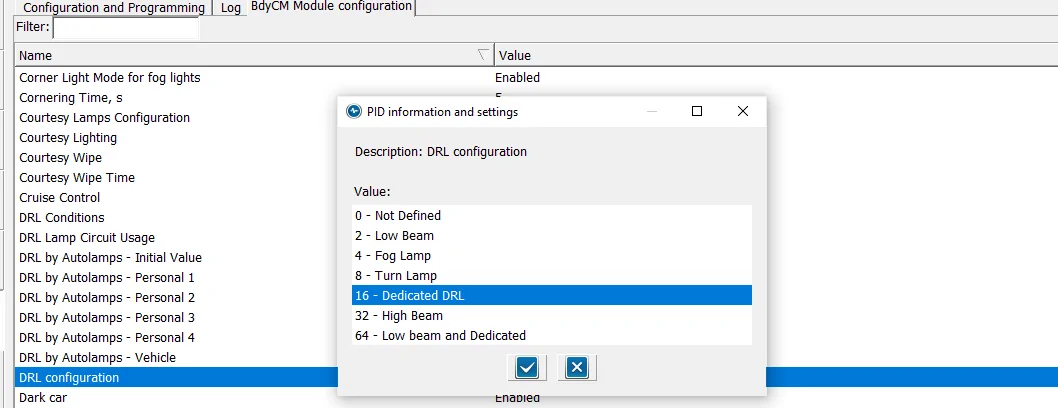
I figured it out and this ONLY applies to Factory LED or Aftermarkets that have a dedicated DRL and that is all you will be using.

DRL Configuration to (Dedicated DRL)
DRL Config (2).webp


Set this option to (16) Dedicated DRL - this will automatically set 2-Lines of Hex Code for you.
NOTE: the (16) is a Binary code that is converted to HEX (Inside of the As-Built) Files

Here are the 2-Lines of Codes it sets

BCM
726-26-02 - 0000-0001-0056 (Matches my Lariat compare search-As-Built)
726-50-01 - 108E (Matches my Lariat compare search - As-Built)

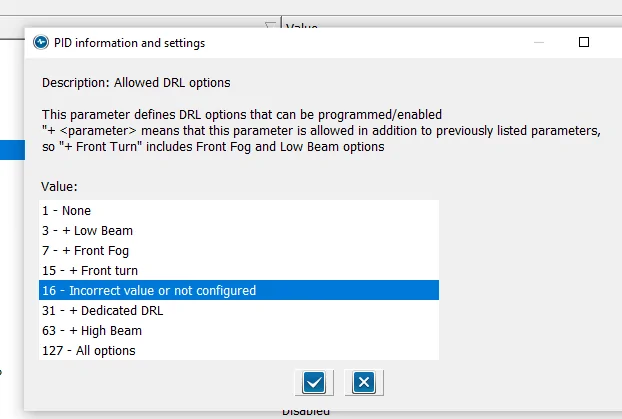
Now set Allowed DRL Options:

Alowed DRL Options.webp

NOTE: The Paragraph at the top
If you have only (1) option for DRL, such as Factory LED Headlights, this will show due to the fact that it matches the (16) Binary code you set in DRL Configuration PLUS
This option ONLY modifies (In addition) (Plus) the standard factory DRL.
So, this normal - As I have not added any special (extra) DRL options to the configuration

So, with this selected, here is the last Hex Line of code that is changed (Automatically)

726-45-01 - 0A01-1000-008E

If you do not see this option (highlighted) then go into the As-Built File and manually change it, then when you go back to the (Module) Easy way, this will be shown

I know there have been quite a few posts on this subject and I wanted to pass along my findings
to clear it up
These are the confirmed settings for the Lariat Factory LED Upgrade, now it should also clear it up for those who have installed the (aftermarket) options. With the attached pics, you can see it more clearly and visualize what changes you want to make

Hope this helps
DRL wiring is absent on non lariat rangers from my understanding - the set I bought instructed tapping a fuse at the box to get DRL working (believe harness lacks pin that lariat has). Going to be peeved if it just needed a seeing adjusted.


Gizmokid2005

Well-Known Member
Joined
Dec 1, 2019
Threads
13
Messages
1,279
Reaction score
1,875
Location
GA
Website
gizmokid2005.com
Vehicle(s)
2019 Ford Ranger XLT 4X4 SCrew
Occupation
SQL Developer
Vehicle Showcase
1
Has anyone figured out how or if we can change how many blinks for the turning signal if just touched, default is 3 would like to change it to 5 like I did on my F150
This has been covered a few times, none of the potential adjustments that exist work in our NA rangers.
 

airline tech

Well-Known Member
Joined
Aug 24, 2022
Threads
28
Messages
4,673
Reaction score
8,959
Location
Midwest - KS
Vehicle(s)
2022 Ranger Lariat-Super Crew, Cactus Gray
Occupation
Aircraft Tech
DRL wiring is absent on non lariat rangers from my understanding - the set I bought instructed tapping a fuse at the box to get DRL working (believe harness lacks pin that lariat has). Going to be peeved if it just needed a seeing adjusted.
I have Lariat, but it was my understanding the wiring harness itself to the headlamp assembly is the same for all Rangers. I had factory halo's installed at delivery, thanks to Ford deleting the LED's
Wiring harness to headlamp was the same, somewhere on this forum show the plug and pins difference. (On the headlamp assy itself) (Not the Harness)

Now internally withing the headlight assembly the wiring is different, moves the DRL from Lo Beam to the LED Strip, this is why ForScan is needed, to configure the BCM to send the power feed changes to the different power (pins) internally of the headlamp assembly
One main difference in the pins (internally) is that you no longer have (amber DRL/Park/Turn) you only have amber (Turn) and the DRL is moved from Lo-Beam and Park to the LED Strip)
All of this is internal (within) the headlamp assy, nothing to do with harness
Now this is true for the Factory Lariat Headlamp swap from Factory Halogens

Not sure what the 2 Aftermarket Options have as far as pinouts, I believe the issue with these was having to do with (DRL/Park/Turn) and using switchbacks

See attached LH Headlamp Connector, this connector shows in the wiring diagrams for all rangers, not specific to Lariats
 

Attachments

Last edited:

maxbottomtime

Well-Known Member
Joined
Jul 12, 2021
Threads
8
Messages
517
Reaction score
842
Location
NE OH
Vehicle(s)
2021 Ranger XLT SCAB 4x4
I have Lariat, but it was my understanding the wiring harness itself to the headlamp assembly is the same for all Rangers. I had factory halo's installed at delivery, thanks to Ford deleting the LED's
Wiring harness to headlamp was the same, somewhere on this forum show the plug and pins difference. (On the headlamp assy itself) (Not the Harness)

Now internally withing the headlight assembly the wiring is different, moves the DRL from Lo Beam to the LED Strip, this is why ForScan is needed, to configure the BCM to send the power feed changes to the different power (pins) internally of the headlamp assembly
One main difference in the pins (internally) is that you no longer have (amber DRL/Park/Turn) you only have amber (Turn) and the DRL is moved from Lo-Beam and Park to the LED Strip)
All of this is internal (within) the headlamp assy, nothing to do with harness
Now this is true for the Factory Lariat Headlamp swap from Factory Halogens

Not sure what the 2 Aftermarket Options have as far as pinouts, I believe the issue with these was having to do with (DRL/Park/Turn) and using switchbacks

See attached LH Headlamp Connector, this connector shows in the wiring diagrams for all rangers, not specific to Lariats
I guess I could test - just need to make those above changes and try the built in harness. Glad I hacked my fuse box hah.
 

airline tech

Well-Known Member
Joined
Aug 24, 2022
Threads
28
Messages
4,673
Reaction score
8,959
Location
Midwest - KS
Vehicle(s)
2022 Ranger Lariat-Super Crew, Cactus Gray
Occupation
Aircraft Tech
There's a video in this thread, and the description references Forscan; does anyone know if it really is Forscan what the tech is using?

https://www.ranger5g.com/forum/thre...nd-how-to-properly-charge-your-battery.22516/

thanks
I think he is using Ford's IDS (Intergrated Diagnostic Software)
I have only used ForScan for my mods, so I don't know if ForScan can view live data or not, if it can you can see same data he is viewing

I have an Autel Scanner that can show the exact data he has on the screen, what he has done is brought up Live Data and selected these PIDs (custom) screen to clear out clutter, plus when in custom screen you get a faster refresh rate (most accurate - live data)
 

Gizmokid2005

Well-Known Member
Joined
Dec 1, 2019
Threads
13
Messages
1,279
Reaction score
1,875
Location
GA
Website
gizmokid2005.com
Vehicle(s)
2019 Ford Ranger XLT 4X4 SCrew
Occupation
SQL Developer
Vehicle Showcase
1
I think he is using Ford's IDS (Intergrated Diagnostic Software)
I have only used ForScan for my mods, so I don't know if ForScan can view live data or not, if it can you can see same data he is viewing

I have an Autel Scanner that can show the exact data he has on the screen, what he has done is brought up Live Data and selected these PIDs (custom) screen to clear out clutter, plus when in custom screen you get a faster refresh rate (most accurate - live data)
@p3zz - I looked recently in FORScan, and you can see live data, but the data points he's looking at are not available currently for viewing. I went and checked not long after I saw this video.
 

Bsthroop

Well-Known Member
First Name
Brian
Joined
Oct 4, 2022
Threads
6
Messages
479
Reaction score
2,261
Location
New Mexico
Vehicle(s)
2019 Lariat 4x2 Sport
Occupation
Broadband/ Microwave Engineer

D Fresh

Banned
Banned
First Name
Doug
Joined
Dec 10, 2020
Threads
20
Messages
6,272
Reaction score
13,576
Location
Colorado
Vehicle(s)
'20 Lariat FX4, '17 FiST, '16 CX-5, '95 YJ
Occupation
Milkman
I experienced the same, not totally sure what the ipc does, it did disable the indicator at first, but then when I did the bcm disable the indicator came back.
I'm not sure if I only did it in the BCM or not.

But I can tell you that in my truck the "no ASS" indicator still works as normal.

For example if the truck is actively charging it displays "no ASS."
 

Bsthroop

Well-Known Member
First Name
Brian
Joined
Oct 4, 2022
Threads
6
Messages
479
Reaction score
2,261
Location
New Mexico
Vehicle(s)
2019 Lariat 4x2 Sport
Occupation
Broadband/ Microwave Engineer
I'm not sure if I only did it in the BCM or not.

But I can tell you that in my truck the "no ASS" indicator still works as normal.

For example if the truck is actively charging it displays "no ASS."
Yes mine is the same, it's like being disabled is added to the list of reasons it doesn't activate. Every stop I get the no ass indicator.
Sponsored


Top