RedlandRanger
Moderator
I have Bambi mode enabled and mine still work.....Has anyone noticed the auto high beams stop working when making the Bambi mode change?
Sponsored

I have Bambi mode enabled and mine still work.....Has anyone noticed the auto high beams stop working when making the Bambi mode change?

Good Post. Thanks!The last two digits in the third bank of numbers are a checksum, it's an addition of all of the numbers in the sequence, in hex, represented in hex (which is why sometimes it's an alphanumeric combination)
So your change would be added like this (top in hex and as seen in Forscan, bottom numerical equivalent)
726-48-02 0100 0000 0179
07 + 26 + 48 + 02 + 01 + 00 + 00 + 00 + 01 (and then the checksum are the last two)
07 + 38 + 72 + 02 + 01 + 00 + 00 + 00 + 00 = 121
The hexadecimal equivalent of 121 is 79. When you changed your value to 00, it makes the total 120, or 78 in hex.
Forscan will automatically correct the checksum for you (as it did) but it will first give you a warning to make sure you meant to change the values that you did. Alternately, you can convert all of the numbers and input the correct checksum yourself and it will not warn you as it shows no issue in the line.
Thanks Rob! I’ll keep checking to see what happened.I have Bambi mode enabled and mine still work.....
Possible dumb question, but have you checked the settings in the gauge menus? It may have been turned off during the re-program, you may just have to turn it back on.Thanks Rob! I’ll keep checking to see what happened.
No stupid questions! I did check that and it was set properly. Amazing how many times turning something off and on again or making sure it’s plugged in saves hundreds on a service call. Appreciate the question!Possible dumb question, but have you checked the settings in the gauge menus? It may have been turned off during the re-program, you may just have to turn it back on.

Nope, it’s locked out if it wasn’t a Nav apim.After playing with ForScan I like it!! I'm curious if there is a way to enable the Navigation without having to get another Apim. Anyone have any idea on this?
Non-Nav APIM is way too short on memory for the OEM maps.After playing with ForScan I like it!! I'm curious if there is a way to enable the Navigation without having to get another Apim. Anyone have any idea on this?
In the latest version of Forscan that is just a menu selection.Anyone know how I can add the side marker lights to the day time running lights? I can’t find it.
thank you so much!!!In the latest version of Forscan that is just a menu selection.
Gfitzge2
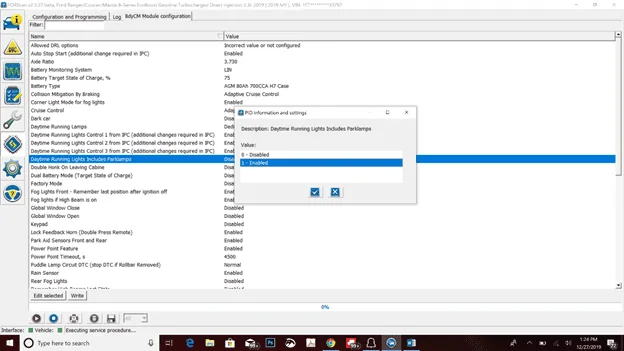
Daytime Running lights Includes Parklamps
In BdyCM module configuration

Or you can do it here.
Daytime running includes park lights
BCM - 726-41-02 xxx0 xxxx xxxx
Let’s post here useful FORScan modifications for the 2019+ Ranger
In case you forget what the original setting was... Lookup Module Build Data (As-built) by VIN: https://www.motorcraftservice.com/AsBuilt
As of 5/11/2019 Much of this (not all)} is built into Forscan as "Service Procedures". You should no longer have to manually edit the asbuilt data as there should be easy to use menu options available.
OBDII ADAPTER: This is recomended as it was developed with the team at Forscan. https://www.amazon.com/gp/product/B081VQVD3F/ref=ppx_yo_dt_b_search_asin_title?ie=UTF8&psc=1 (RCMUSTANG)
Disable Double Horn Honk - Cred j0shm1lls
Disable Front Turn Signal HyperBlink - Cred j0shm1lls
Disable Rear Turn Signal HyperBlink (XL Trim) - Cred j0shm1lls *unverified*
Bambi mode (AKA all forward lights or Six-High) - Cred RCMUSTANG
Dark Car Mode (Police Option) -Cred RCMUSTANG
RCMUSTANG
Sound Location for Vehicle Chimes
RCMUSTANG
Disable IPC Welcome Screen
RCMUSTANG
Disables three "doo-doo-doo" start-up chimes from cluster
Akshon
Disable auto start/stop
Specified Tire Pressure - Cred Arron
CHANGE XLT LIGHTS TO LARIAT LEDS
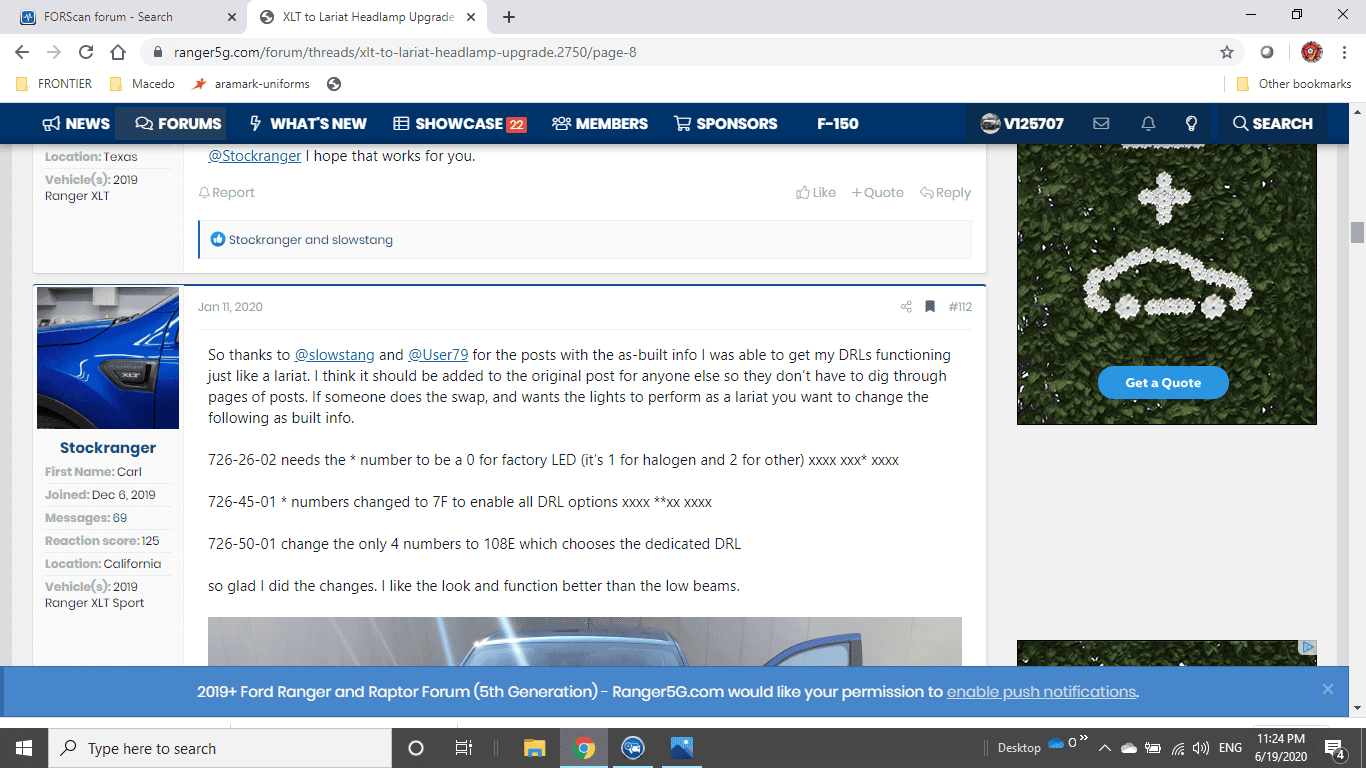
So thanks to @slowstang and @User79 for the posts with the as-built info I was able to get my DRLs functioning just like a lariat. I think it should be added to the original post for anyone else so they don’t have to dig through pages of posts. If someone does the swap, and wants the lights to perform as a lariat you want to change the following as built info.
726-26-02 needs the * number to be a 0 for factory LED (it’s 1 for halogen and 2 for other) xxxx xxx* xxxx
726-45-01 * numbers changed to 7F to enable all DRL options xxxx **xx xxxx
726-50-01 change the only 4 numbers to 108E which chooses the dedicated DRL
so glad I did the changes. I like the look and function better than the low beams.
John Galt's Mods
Seat Belt Reminder Charm
Climate View on Lariat right side instrument screen (You cannot change climate only view for when sync screen is off)
Changing Sync3 Boot Screen
Note:There are others in the spreadsheet linked but I did not try them.
Secure Start (To idle car with key not in vehicle, cannot remove from park)
Power Point 1 second time (This will turn off power points after 1 second of turning off truck)
Navigation in Motion! Thank God! (911 assist will be disabled)
Speed limit sign will look European and FM radio stations will have and extra number like 102.70 instead of 102.7
Note:I did these on my Lariat Build Date 17JAN19. Please backup your setting first and proceed ONE AT A TIME with caution.
This is a link to the F150 Excel spreadsheet with all of their mods, its very thorough and technical, I have tried some not all obviously. Proceed with caution if venturing into the unknown.
FX4 Off-Road Screen (Non-FX4 Models) - Cred WhiteLightning19
Note: the following options need forScan dated 5/11 or newer in order to get the non-as built options in the Configuration and Programming tab.
RCMUSTANG
Disabled AM/FM in Entertainment Screen
In IPC Module Configuration
RCMUSTANG
Enabled Parking Aid Front and Rear
In IPC Module Configuration
RCMUSTANG
Chimes Vehicle Running Door Open Disabled
In IPC Module Configuration
RCMUSTANG
Chimes-Primary Source IPC Speaker only
In IPC Module Configuration
Arron
Frost Telltale (Below 5C)
In IPC Module configuration
Arron
Instantaneous Fuel Economy Numerical Gauge
In IPC Module configuration
Arron
Silent Mode Control Menu (Dark Car)
In IPC Module configuration
Arron
DTE (Distance to Empty) Sensitivity Menu
In IPC Module configuration
Arron
Intelligent 4WD Gauge
Intelligent 4WD Gauge Mode Feature
In IPC Module configuration
(Partially works (shows trail mode option selected) but does not show individual wheel response)
Modify behavior of alarm button on fob
Gfitzge2
Daytime Running lights Includes Parklamps
In BdyCM module configuration
Gfitzge2
Corner Light Mode for fog lights
In BdyCM module configuration
RCMUSTANG
Enabled all the lamp outage on BCM configuration (Easy mode) IE Headlights (with or without fog lights), rear bulbs, LED Turn.
RCMUSTANG
Power Point Timeout: Adjustable by seconds. BCM configuration
RCMUSTANG
Enable Radio without Ignition Switch. BCM configuration
RCMUSTANG
Adjust Radio without Ignition Switch PlayTime by minutes. BCM configuration
RCMUSTANG
Enable Average Speed Display.IPC configuration
RCMUSTANG
Enable Average RPM Display. IPC configuration
RCMUSTANG
Can Change Instant MPG to Fuel Consumed Per Hour.IPC configuration
RCMUSTANG
Can Change Vehicle Cluster Image from Truck (Utility) to SUV Icon
RCMUSTANG
Enable or disable Seat Belt chimes for Driver, Mid Passenger, Passenger. IPC configuration
RCMUSTANG
Enable or disable Chimes_Vehicle running with door open. IPC configuration
Ed Venture
ACM 727-01-01 xx50 xxxx xxxx
Enables variable line level audio output on the non-B&O radio
NOTE: FOR INTERNATIONAL RANGER OWNERS. There are many differences with those models and what works with the North American version. This website can answer or has done many of the requests I've seen asked here. They are based on international Rangers. https://www.saeb.net/index.php
you can add them to the first post on this thread, it’s a wiki and editable by anyone.
Stockranger posted the Forscan codes to make DRL work when upgrading from XLT to Lariat headlights. This should be in here very helpful info