Sponsored

Android Auto and other forms of Mental Anguish..

OP
OP
Beez

Beez

Well-Known Member
First Name
Wayne
Joined
Dec 14, 2022
Threads
2
Messages
103
Reaction score
181
Location
Hawaii
Vehicle(s)
'19 Lariat, DIY BOV, 2.5 Leveler, MBRP 3" Exhaust
Occupation
Just another incredibly super average dude
I use Android Auto every single day without an issue.

Although I've used Waze I prefer Google Maps, and Pandora is my main music source.

Which app is crashing? Waze? What phone?
Hey Doug, Yeah, I don't get it. I have a newer Samsung S-21 Galaxy, so I would think I'd be G2G, but it just won't load. Although I have my doubts, I can try a cable swap to see if that changes anything, but it really seems like its either the phone, or the possibly the trucks infotainment system?
Sponsored

 
OP
OP
Beez

Beez

Well-Known Member
First Name
Wayne
Joined
Dec 14, 2022
Threads
2
Messages
103
Reaction score
181
Location
Hawaii
Vehicle(s)
'19 Lariat, DIY BOV, 2.5 Leveler, MBRP 3" Exhaust
Occupation
Just another incredibly super average dude
I had an LG phone that took some effort to get working well with AA. A better cable did the job.

Its replacement, a Samsung, doesn't like the combo of the wireless charging pad I have plus the AAWireless BT dongle. If I keep the phone in my pocket and off the charger, it works fine.

That said, I used Waze on a road trip recently and it was behaving oddly. I quickly switched back to Google Maps.
Agreed.. My Samsung behaves the same way with the combo USB port. I switched it to an adapter in the drivers side socket outlet, but in order to utilize Android Auto, or other apps (as I understand it), you must use the combo USB outlets.

I have to think that its likely a Samsung issue. I may have to see if their is a patch available for it..
 
OP
OP
Beez

Beez

Well-Known Member
First Name
Wayne
Joined
Dec 14, 2022
Threads
2
Messages
103
Reaction score
181
Location
Hawaii
Vehicle(s)
'19 Lariat, DIY BOV, 2.5 Leveler, MBRP 3" Exhaust
Occupation
Just another incredibly super average dude
You shouldn't have to download anything. You could also make sure your Sync is updated.
I didn't have Android Auto on my Samsung S-21, so I had to download the app. I do have the latest version of SYNC running, so I'm not super sure where the *hic up* is happening.
 

mtbikernate

Well-Known Member
Joined
Apr 13, 2020
Threads
11
Messages
1,174
Reaction score
2,636
Location
NC
Vehicle(s)
2019 Ranger XLT 4x4
Agreed.. My Samsung behaves the same way with the combo USB port. I switched it to an adapter in the drivers side socket outlet, but in order to utilize Android Auto, or other apps (as I understand it), you must use the combo USB outlets.

I have to think that its likely a Samsung issue. I may have to see if their is a patch available for it..
I have the charging pad in a dedicated USB PD port that I added to support the full wireless charging capacity of the pad and my phone. The AAWireless dongle is plugged into the combo port as required for data.
 

JasonTremor

Well-Known Member
First Name
Jason
Joined
Feb 1, 2022
Threads
9
Messages
869
Reaction score
1,917
Location
Tennessee
Vehicle(s)
2021 Ranger Tremor XLT
Only time I've ever encountered challenges was with Android auto on a prior vehicle. My phone was old and when i replaced it all was wonderful again. Check your version of android and share that with the group.


Dgc333

Well-Known Member
First Name
Dave
Joined
Aug 24, 2021
Threads
17
Messages
1,742
Reaction score
4,113
Location
Massachusetts
Vehicle(s)
21 Ranger Lariat
Occupation
Engineer
Make sure AA and Google Maps are up to date, and that AA is enabled in SYNC settings. And as others have said, cable quality is very important, and it has to stay plugged in to work. No wireless AA available for us, AFAIK.
Actually several companies are selling wireless adapters for AA. Some one posted that the Motorola unit was on sale in Amazon for $69.

These units plug into your USB in the truck and you connect your phone to the adapter via WiFi.
 
OP
OP
Beez

Beez

Well-Known Member
First Name
Wayne
Joined
Dec 14, 2022
Threads
2
Messages
103
Reaction score
181
Location
Hawaii
Vehicle(s)
'19 Lariat, DIY BOV, 2.5 Leveler, MBRP 3" Exhaust
Occupation
Just another incredibly super average dude
Actually several companies are selling wireless adapters for AA. Some one posted that the Motorola unit was on sale in Amazon for $69.

These units plug into your USB in the truck and you connect your phone to the adapter via WiFi.
......Interesting
 

_TraMor

Well-Known Member
First Name
TraMor
Joined
Aug 1, 2022
Threads
13
Messages
143
Reaction score
199
Location
Upstate NY
Vehicle(s)
22 Ranger Tremor, 17 Focus St, 97 Escort Wagon
Occupation
IT by day, shade tree Mechanic... also by day
I've had numerous phones with Android Auto since it's been a thing and every time, but once, it was the cable. Good USB-C cables are really difficult to source, I found Samsung OEM cables are best but aren't cheap. The only time it wasn't the cable the USB port on a Pixel 3 went bad which turned out to be a brick shortly thereafter.
 

Dr_Strangelove

Well-Known Member
First Name
Adam
Joined
Oct 14, 2022
Threads
13
Messages
1,142
Reaction score
5,239
Location
Henderson, NV
Vehicle(s)
'22 XLT Supercrew 4x4
Occupation
Art, Design, Photo & Video
@Beez - the cable 100% matters. It has to be a USB A->C Data cable for your phone. I have a similar phone and I use this cable.

Anker USB A-C

Another thing is, you do not necessarily have to launch Android Auto before you use it. You actually just plug the phone into a proper cable and that's it. The SYNC system auto launches everything including Android Auto. So it may be crashing because you are trying to open the Android Auto app first? Shot in the dark.

If you are questioning if the cable is correct at all - buy that Anker cable (Recommend 6 foot -edit scratch that get the 3 foot lol.) and I promise you it is correct. I use mine everyday flawlessly.

Edit - just adding this for clarity. It isn't the connection ends that make the cable correct - it's the thickness of the cable itself. There are USB A-C charging only cables and those are skinnier cables. That is why I mentioned it has to be a "data cable."
 
Last edited:

Jason B

Well-Known Member
First Name
Jason
Joined
May 19, 2021
Threads
9
Messages
3,021
Reaction score
8,364
Location
Louisiana
Vehicle(s)
2021 XL STX SE 4x2
Occupation
machinist
From the manual:


Android Auto (If Equipped)
  1. Connect your device to a USB port.
  1. Follow the instructions on the touchscreen.
Note: You might need to enable Android Auto from the settings menu. (in SYNC)
Note: Certain features of the system are not available when you are using Android Auto.

Switching Android Auto Off
Settings Icon
Select the settings option on the feature bar.
  1. Select Android Auto.
  1. Switch Android Auto off.

Symptom Possible Cause and Resolution
I cannot connect my device.​
  • Device malfunction.Disconnect your device. Switch your device off and on to reset it and try again.
  • Cable connection issue.Correctly connect the cable to your device and the vehicle USB port.
  • Incompatible cable.Use the cable recommended by the manufacturer of your device.
  • Incorrect device settings.Make sure that your device does not have an auto-install program or active security settings.Check that your device is not set only to charge.
  • Device lock screen enabled.Unlock your device before connecting it.
The system does not recognize my device.​
  • Device limitation.Do not leave your device in your vehicle during very hot or very cold weather conditions.
  • Cable connection issue.Correctly connect the cable to your device and the vehicle USB port.
  • Incompatible cable.Use the cable recommended by the manufacturer of your device.

I have a compatible device, it is correctly connected and my apps are running but the system still cannot find any apps.​
  • Apps failed to fully close.Restart the apps and try again.If you have an Android device with apps that have an exit or quit option, use this and then restart the apps. Alternatively, use the force stop option in the settings menu on your device.If you have an iOS device with iOS 8.0 or higher, tap the home button on your device twice and then swipe the app upward to close it.
I have an Android device that is correctly connected, I have restarted my apps and they are running but the system still cannot find them.​
  • An issue on some older versions of the Android operating system could result in apps not being found.Switch Bluetooth® off and on again to force the system to reconnect to your device.

I have an Android device running a media app which the system has found but I cannot hear the sound or the sound is very quiet.​
  • Device volume is low.Turn the volume up on your device.
I have an Android device running a number of compatible apps but the system cannot find all of them.​
  • Device limitation.If you have more apps running on your device than the number of available Bluetooth® links, the system cannot find all of them.Close some of the apps to allow the system to find those that you want to use.
 

Dgc333

Well-Known Member
First Name
Dave
Joined
Aug 24, 2021
Threads
17
Messages
1,742
Reaction score
4,113
Location
Massachusetts
Vehicle(s)
21 Ranger Lariat
Occupation
Engineer
If you are questioning if the cable is correct at all - buy that Anker cable (Recommend 6 foot.) and I promise you it is correct. I use mine everyday flawlessly.
Not sure why you would want 6' cable in your truck. I use a 1' Anker, perfect length to not be in the way with the phone in the cubby in the center stack.
 

D Fresh

Banned
Banned
First Name
Doug
Joined
Dec 10, 2020
Threads
20
Messages
6,272
Reaction score
13,570
Location
Colorado
Vehicle(s)
'20 Lariat FX4, '17 FiST, '16 CX-5, '95 YJ
Occupation
Milkman
Hey Doug, Yeah, I don't get it. I have a newer Samsung S-21 Galaxy, so I would think I'd be G2G, but it just won't load. Although I have my doubts, I can try a cable swap to see if that changes anything, but it really seems like its either the phone, or the possibly the trucks infotainment system?
I didn't have Android Auto on my Samsung S-21, so I had to download the app. I do have the latest version of SYNC running, so I'm not super sure where the *hic up* is happening.
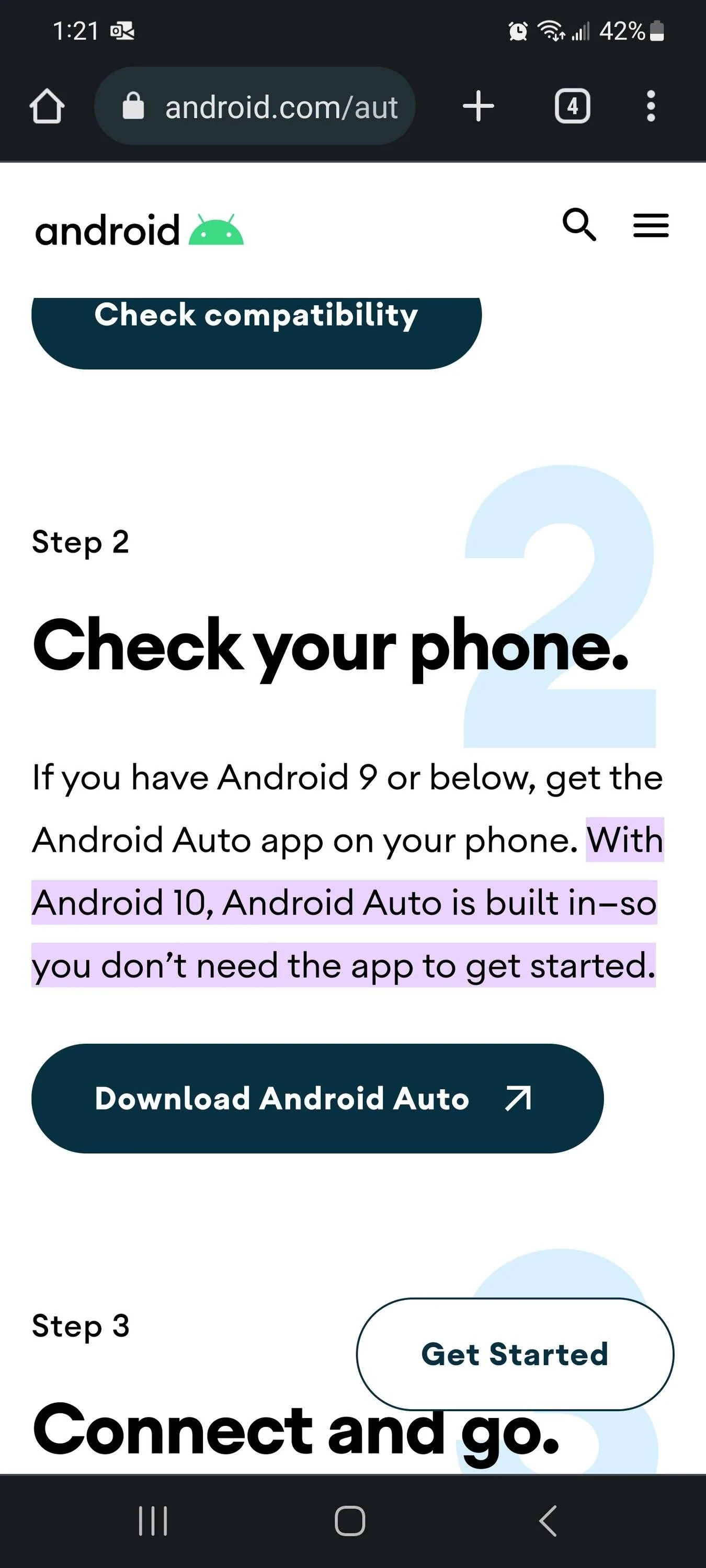
Delete that App. It's for older phones. Newer versions of Android have AA built in.

https://www.android.com/auto/#:~:text=With Android 10, Android Auto,the app to get started.

Screenshot_20230106_132127_Chrome.webp


If that doesn't do it I'm positive a new quality cable will.
 

Dr_Strangelove

Well-Known Member
First Name
Adam
Joined
Oct 14, 2022
Threads
13
Messages
1,142
Reaction score
5,239
Location
Henderson, NV
Vehicle(s)
'22 XLT Supercrew 4x4
Occupation
Art, Design, Photo & Video
Not sure why you would want 6' cable in your truck. I use a 1' Anker, perfect length to not be in the way with the phone in the cubby in the center stack.
Yeah I have a short backup in case I don't need to touch the phone but for some reason I always find myself needing to pick the phone up physically while it's plugged in and the 6' allows me to throw it in the passenger seat if I need. I like slack on things.

Edit - I also just realized my "long cable" is 3 feet not 6 feet lol. Brain fart moment.

So I don't recommend the 6 foot I recommend the 3 foot!
 

bRaptor

Well-Known Member
First Name
Ward
Joined
Jan 28, 2022
Threads
2
Messages
137
Reaction score
352
Location
USA
Vehicle(s)
2021 Ranger XLT tremor
I didn't have Android Auto on my Samsung S-21, so I had to download the app. I do have the latest version of SYNC running, so I'm not super sure where the *hic up* is happening.
I have the exact same phone. I did not download android auto. I also do not have the dedicated app on my phone. Pay attention when you plug it in, the vehicle asks you some questions the first time you plug in.
 

Jmarler

Well-Known Member
First Name
Jimmy
Joined
Jul 12, 2021
Threads
41
Messages
487
Reaction score
1,571
Location
San Antonio
Vehicle(s)
2021 ranger
Occupation
Certified Hacker. Retired Veteran
When I got my new samsung phone, i had issues too. One solution that i found was deleting the cache and data from Google play services under the system app settings. When I did that, it worked for me.
Sponsored


Top