Sponsored

Free Sync 3 Navigation Map Updates (NA 1 18)

Ammalone72

Member
First Name
Michelle
Joined
Jul 21, 2020
Threads
0
Messages
20
Reaction score
3
Location
Louisiana
Vehicle(s)
2019 Ford Ranger
Occupation
Med clerk
Same happened to me. Next morning I started the truck and it came up with 3.4. Guess the the truck has to off for a while before it will reboot with the new software.
Im not diggin the new look. Ha! Too late to switch back huh. LOL
Sponsored


Clump

Well-Known Member
First Name
Charlie
Joined
Mar 24, 2020
Threads
8
Messages
267
Reaction score
936
Location
Felton, DE
Vehicle(s)
2022 Explorer ST former 2021 Ranger Lariat Tremor
Updated maps today. It went without a hitch, took right at 1 hour.
 

rpeterson53

Well-Known Member
Joined
Sep 23, 2019
Threads
4
Messages
85
Reaction score
125
Location
Richland, WA
Vehicle(s)
2019 Ranger Lariat, 2019 Mazda MX-5 RF, 2016 Subaru Outback 3.6R
I downloaded the map update about a week ago. It was on my thumb drive but I thought for some reason it was the Synch 3.4 update so I erased the file on my Mac. Then I realized it was the navigation update.

I tried to download the map update again but I can now only purchased the update for $40 plus shipping. You only get one chance to download the file. That according to Ford Customer support.

This Ranger was my first Ford in 40 years ! I like the truck but between the missing cargo tiedowns, this update experience plus a few other issues, it will probably be another 40 years except I don't have that many left :)

So just keep this in mind if downloading the update. You only get one shot. I assume if there is a glitch with the downloading process of any kind, you move to the $40 window
 

rpeterson53

Well-Known Member
Joined
Sep 23, 2019
Threads
4
Messages
85
Reaction score
125
Location
Richland, WA
Vehicle(s)
2019 Ranger Lariat, 2019 Mazda MX-5 RF, 2016 Subaru Outback 3.6R
I downloaded the map update about a week ago. It was on my thumb drive but I thought for some reason it was the Synch 3.4 update so I erased the file on my Mac. Then I realized it was the navigation update.

I tried to download the map update again but I can now only purchased the update for $40 plus shipping. You only get one chance to download the file. That according to Ford Customer support.

This Ranger was my first Ford in 40 years ! I like the truck but between the missing cargo tiedowns, this update experience plus a few other issues, it will probably be another 40 years except I don't have that many left :)

So just keep this in mind if downloading the update. You only get one shot. I assume if there is a glitch with the downloading process of any kind, you move to the $40 window

So researching this forum, I learned that using the email confirmation I was sent for the free download, I can download it again.

WOULD HAVE BEEN GREAT IF FORD CUSTOMER NO-SERVICE HAD TOLD ME THAT RATHER THAN ASKING FOR ALL MY PERSONAL AND VEHICLE INFO, PUTTING ME ON HOLD AND THEN TELLING ME ITS $40 !!


alcohenusa

Well-Known Member
First Name
Alan
Joined
Jul 22, 2020
Threads
12
Messages
478
Reaction score
727
Location
CO
Vehicle(s)
2020 Ranger Lariat 4x4
Occupation
Retired
I downloaded the map update about a week ago. It was on my thumb drive but I thought for some reason it was the Synch 3.4 update so I erased the file on my Mac. Then I realized it was the navigation update.

I tried to download the map update again but I can now only purchased the update for $40 plus shipping. You only get one chance to download the file. That according to Ford Customer support.

This Ranger was my first Ford in 40 years ! I like the truck but between the missing cargo tiedowns, this update experience plus a few other issues, it will probably be another 40 years except I don't have that many left :)

So just keep this in mind if downloading the update. You only get one shot. I assume if there is a glitch with the downloading process of any kind, you move to the $40 window
if you have the order confirmation email, there is a link that takes you back to the download page So you can get download again.
 

rpeterson53

Well-Known Member
Joined
Sep 23, 2019
Threads
4
Messages
85
Reaction score
125
Location
Richland, WA
Vehicle(s)
2019 Ranger Lariat, 2019 Mazda MX-5 RF, 2016 Subaru Outback 3.6R
if you have the order confirmation email, there is a link that takes you back to the download page So you can get download again.

Thanks. I'm doing that now. Just wish the Customer Support Rep knew that. Save me a bunch of time and frustration
 

VAMike

Well-Known Member
First Name
Mike
Joined
Feb 22, 2019
Threads
1
Messages
3,390
Reaction score
4,408
Location
Virginia
Vehicle(s)
2019 Ranger Lariat SuperCab
Thanks. I'm doing that now. Just wish the Customer Support Rep knew that. Save me a bunch of time and frustration
but that's how they make their money! (there's absolutely no other reason to not let you repeat the process.)
 

Nipperchipper

Member
First Name
Lance
Joined
Jul 20, 2020
Threads
2
Messages
15
Reaction score
10
Location
Saskatchewan
Vehicle(s)
2019 ranger lariat
Occupation
Retired
Hey Guys,

While looking at the 'about sync' page in my Ranger, I noticed I was on map version 'NA117' and I know a 'NA118' is available. A quick search for 'sync map update' brought me to an official Ford Navigation Map update page here https://syncnavigation.com/ford/home. I put in my Ranger's VIN and Sync ESN and voila - a free map update is available!

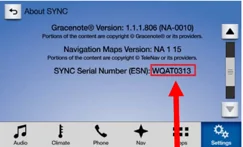
You can find your Sync ESN at the bottom of the 'About Sync' page:

esn-location.png


Place your order for the 'free download' and grab a 32gb (USB 3.0 fast read/write preferably) thumb drive and format it exFAT. Follow the instructions to create your own update thumb drive and about an hour later you'll be on NA 1 18! Install speed depends on the speeds of the thumb drive so if you have a slow one be prepared to take a drive while this is installing.

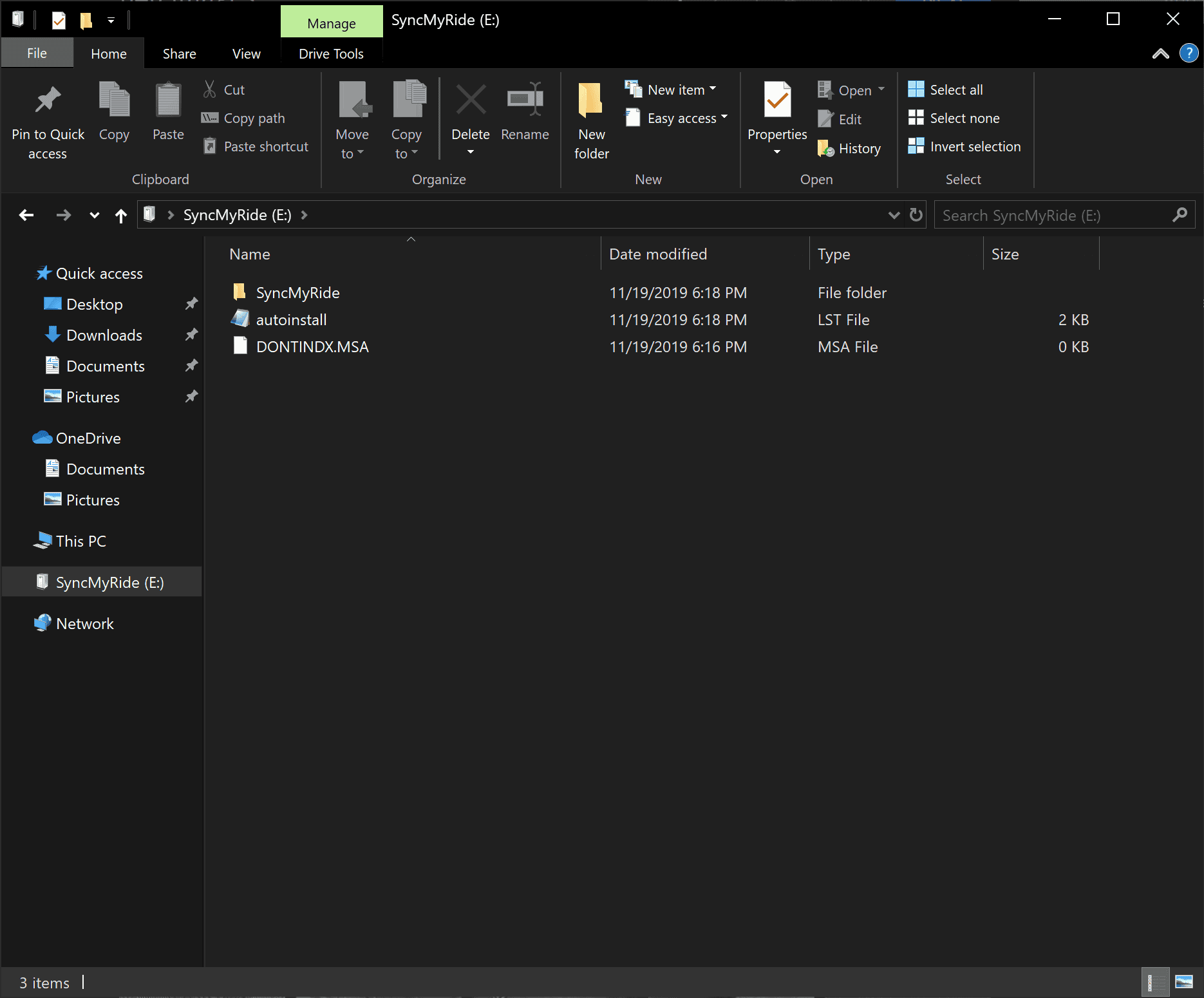
The root of your thumb drive should look like this:
qTPcV7r.png


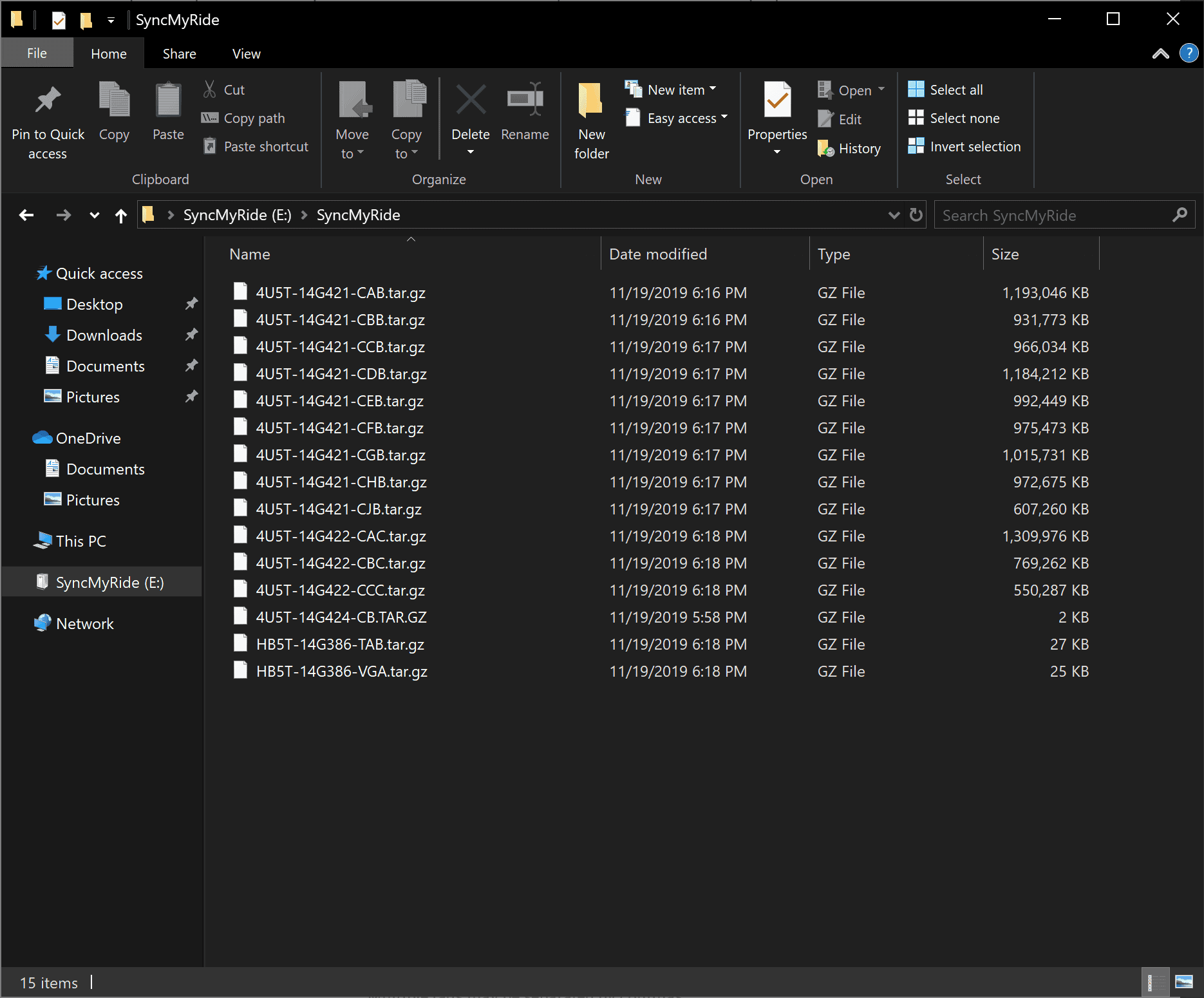
And the SyncMyRide folder should look like this:
8oeNemp.png


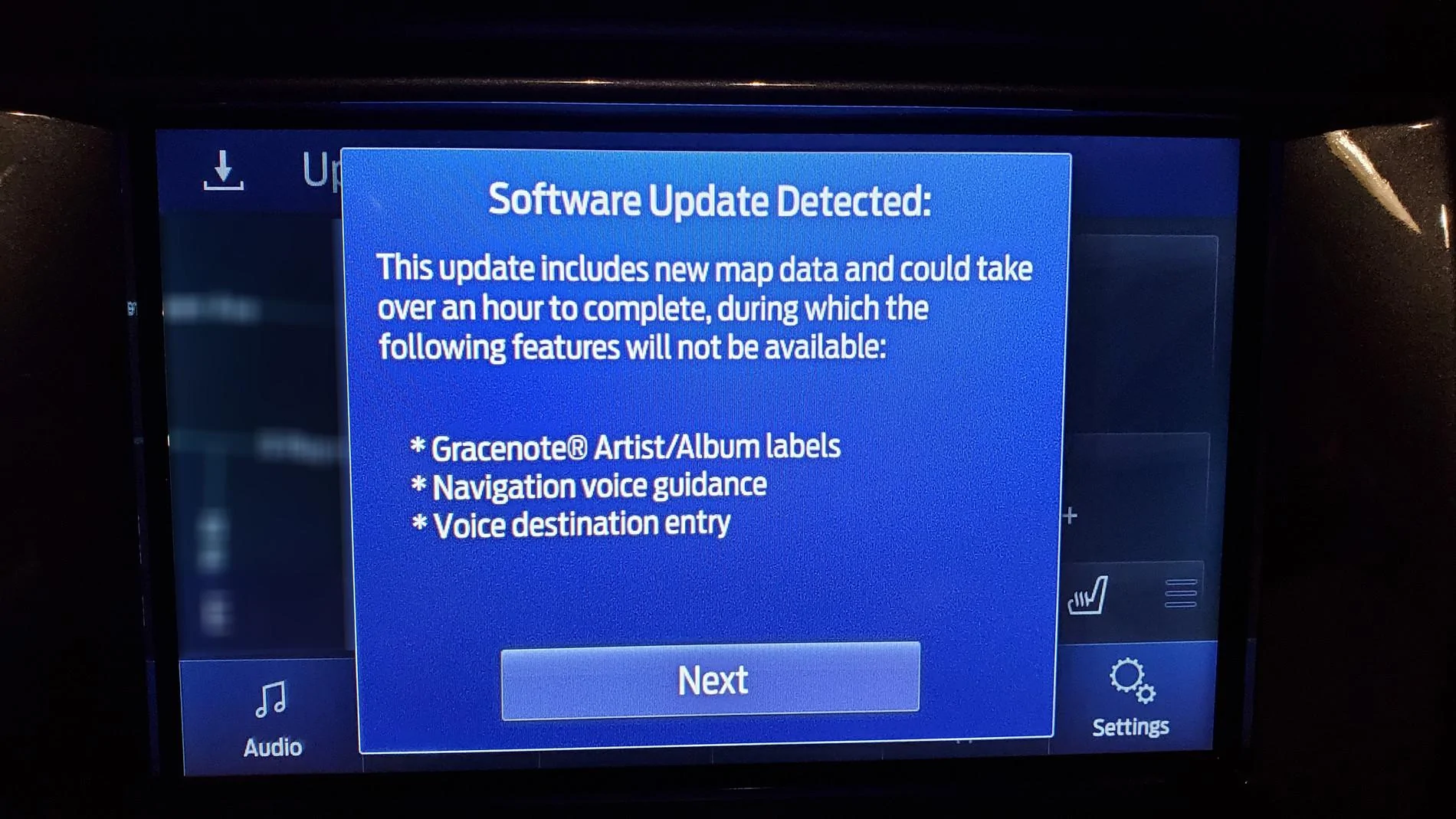
Update warning 1:
zVEve91.jpg


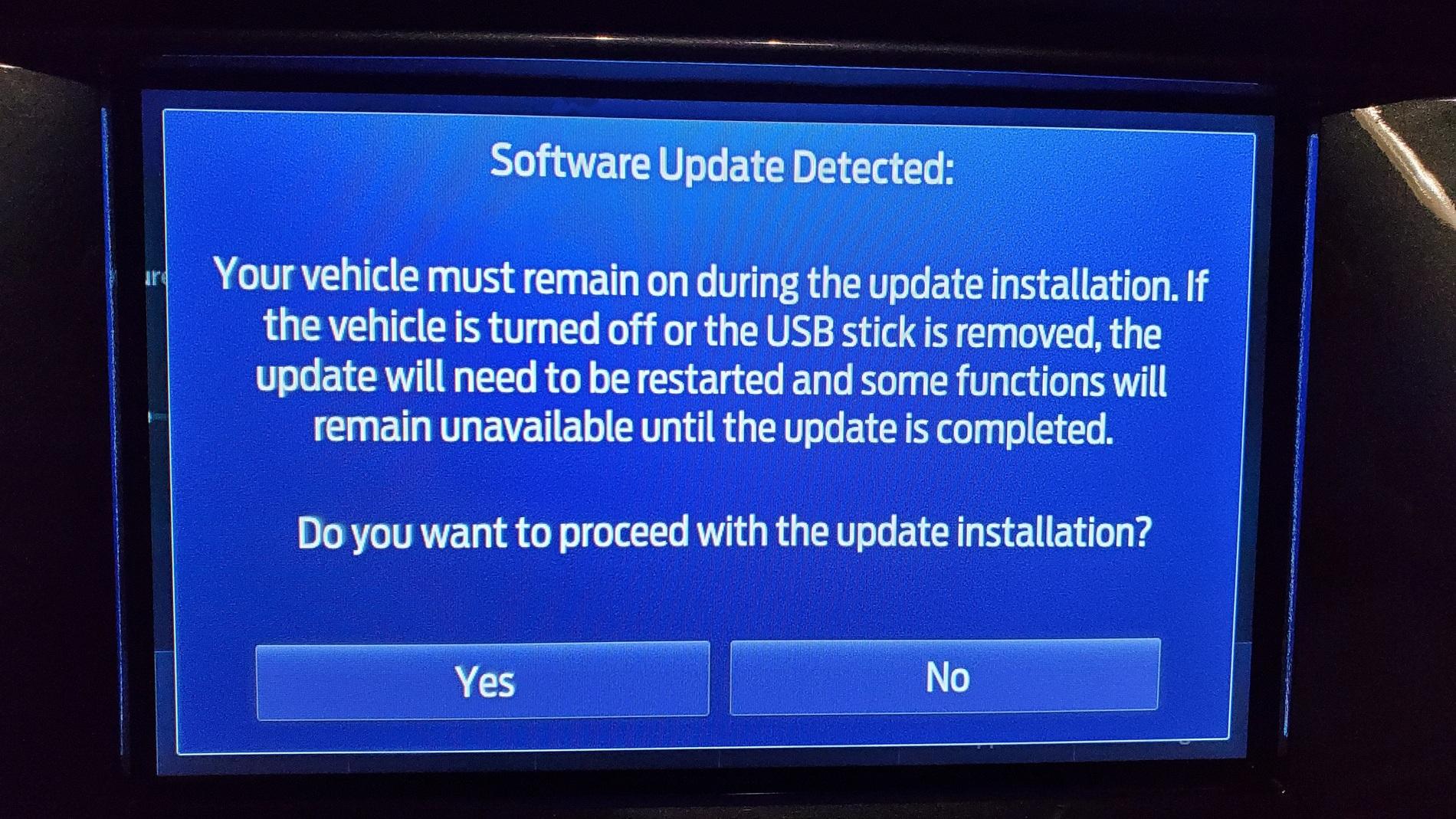
Update warning 2:
4Hj4Ni6.jpg


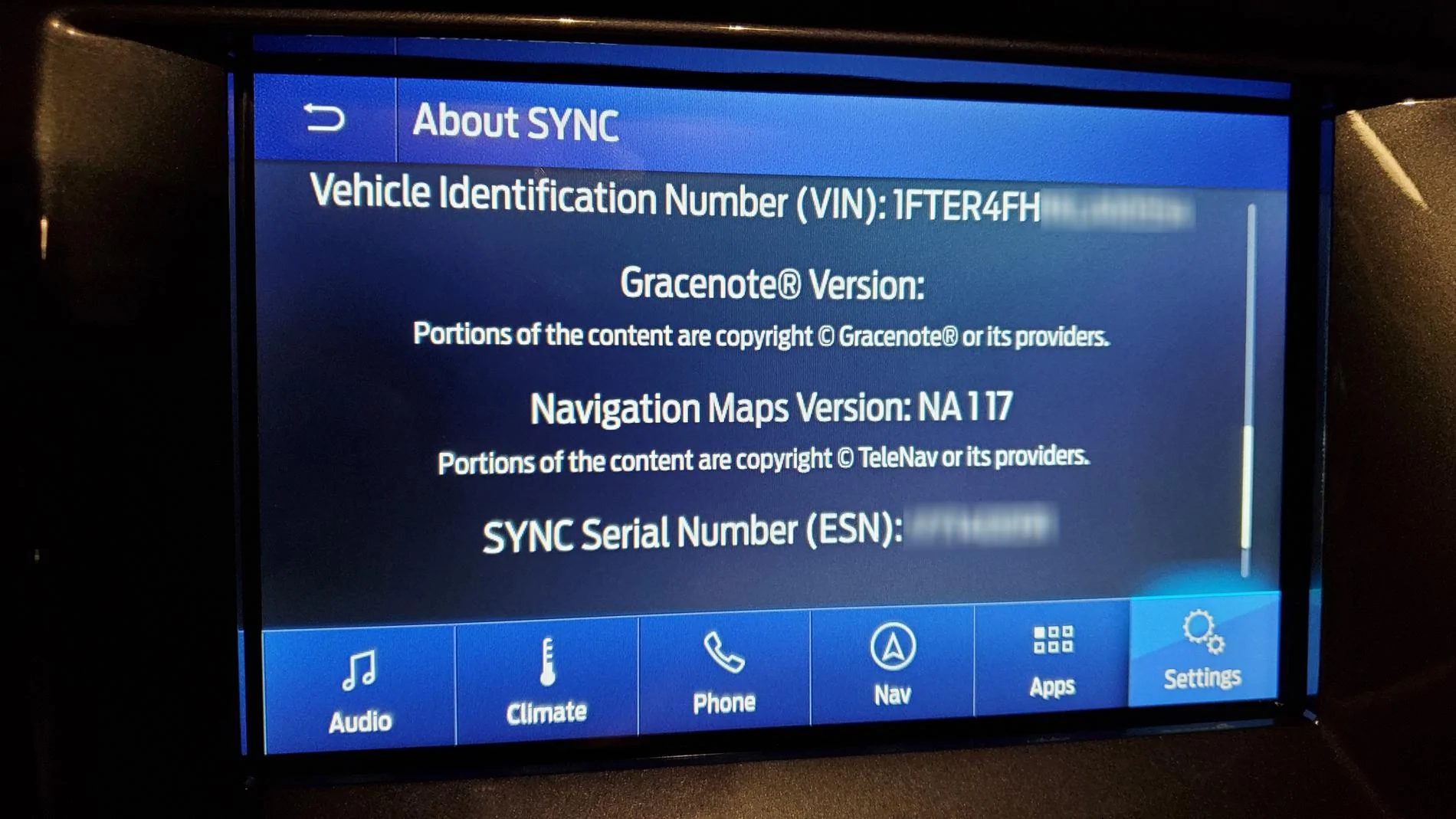
Here's my before:
uQpIDj7.jpg


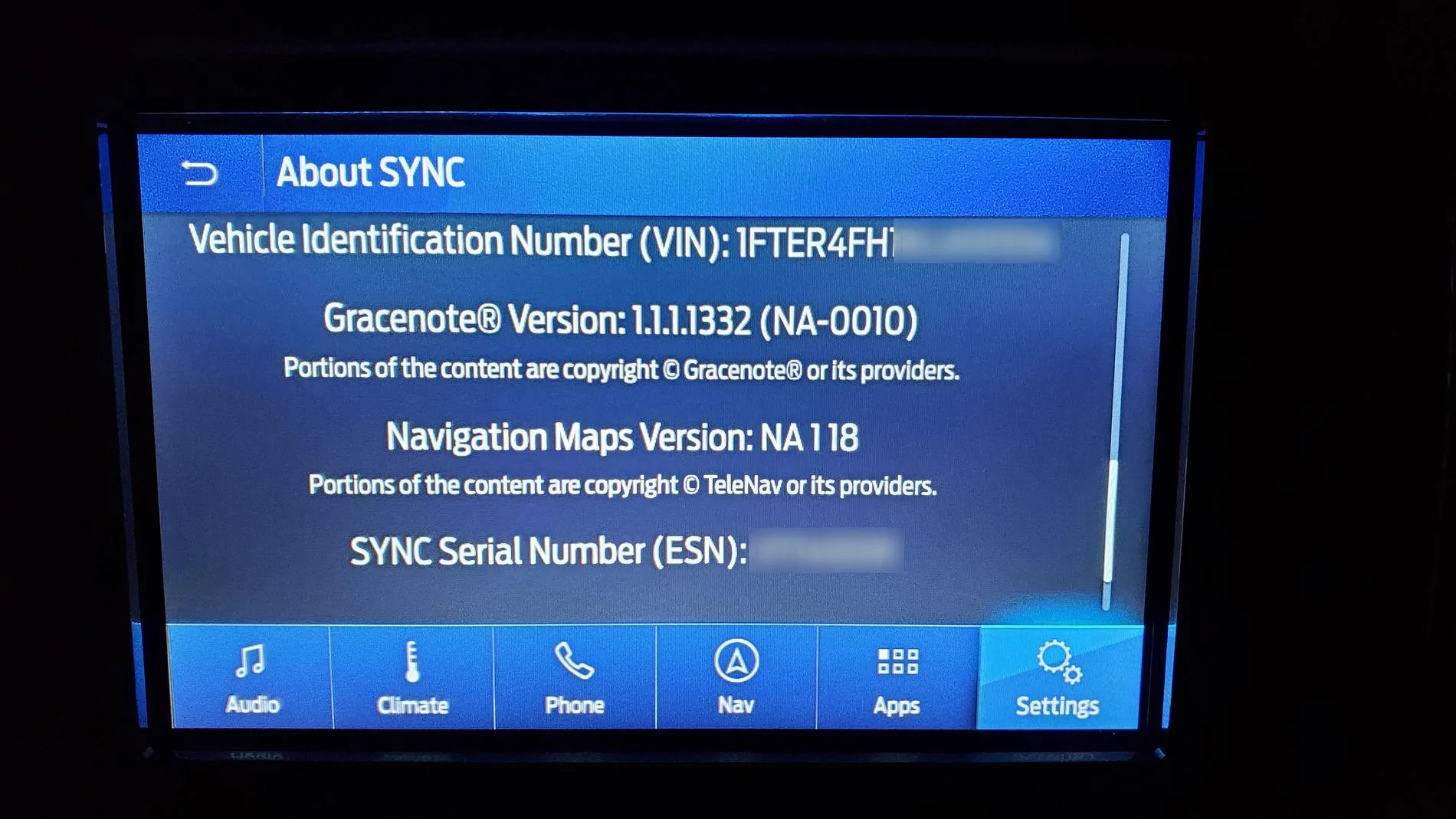
And after:
S3zu6Hd.jpg


Good luck and happy updating!

EDIT: This will also work for any other 2018 and newer Fords that are still on '17 maps. Doing the wife's '18 Edge next!
Thank you for the tip. I did mine yesterday it went to version NA119 Took about an hour and a half to do the update
 

rpeterson53

Well-Known Member
Joined
Sep 23, 2019
Threads
4
Messages
85
Reaction score
125
Location
Richland, WA
Vehicle(s)
2019 Ranger Lariat, 2019 Mazda MX-5 RF, 2016 Subaru Outback 3.6R
Thank you for the tip. I did mine yesterday it went to version NA119 Took about an hour and a half to do the update
I updated my map version NA119 several days ago on a road trip. Took close to 2 hours before I got the message ok to remove the thumb drive. What actually needs to be done is NOT reflected in the install instructions on the web site. I did wait for 2 Synch restarts per the install instructions but wasn’t sure it was done installing which it wasn’t. Just glad it was a long road trip !
 

PonyXpress

Well-Known Member
First Name
Steve
Joined
Feb 18, 2019
Threads
9
Messages
267
Reaction score
176
Location
Sacramento CA
Vehicle(s)
2019 Ford Ranger
Hey Guys,

While looking at the 'about sync' page in my Ranger, I noticed I was on map version 'NA117' and I know a 'NA118' is available. A quick search for 'sync map update' brought me to an official Ford Navigation Map update page here https://syncnavigation.com/ford/home. I put in my Ranger's VIN and Sync ESN and voila - a free map update is available!

You can find your Sync ESN at the bottom of the 'About Sync' page:

esn-location.webp


Place your order for the 'free download' and grab a 32gb (USB 3.0 fast read/write preferably) thumb drive and format it exFAT. Follow the instructions to create your own update thumb drive and about an hour later you'll be on NA 1 18! Install speed depends on the speeds of the thumb drive so if you have a slow one be prepared to take a drive while this is installing.

The root of your thumb drive should look like this:
qTPcV7r.png


And the SyncMyRide folder should look like this:
8oeNemp.png


Update warning 1:
zVEve91.webp


Update warning 2:
4Hj4Ni6.jpg


Here's my before:
uQpIDj7.webp


And after:
S3zu6Hd.webp


Good luck and happy updating!

EDIT: This will also work for any other 2018 and newer Fords that are still on '17 maps. Doing the wife's '18 Edge next!
I tried to update my maps yesterday to no avail. I was able to download the files and it went through the steps, prompts as shown here. I even got the last message that says update complete, remove usb drive. That said, I still show NA 117 maps. I show 1.1.1.1332 for Gracenote.

I cannot see that it updated anything. I also noticed there was no log file on the usb to confirm the update worked.

I went back to try again to download the files, and now it won't let me. It just says I'm update to date. It only offers that I can buy a flash drive with the same files on it, which I do not need.

I also noticed that the file I downloaded was name this, 19Q1_NA_Post-3.2_2ndRelease. I'm on Sync 3.3, so weird how they are naming the files 3.2

Any ideas?

Update: I was able to download the files again, but they are exactly the same as before, so that isn't the issue. I'll try updating again.

Does anyone know if Sync 3.4 is required to update the maps beyond NA 117?

When will my 2019 Ranger get the 3.4 Sync update? right now it says I'm up to date with 3.3 19052
 
Last edited:

PonyXpress

Well-Known Member
First Name
Steve
Joined
Feb 18, 2019
Threads
9
Messages
267
Reaction score
176
Location
Sacramento CA
Vehicle(s)
2019 Ford Ranger
ok, thanks. I will try the update again. That's interesting that your map update didn't show until the next day.

So do you have a NA truck and is your current version 3.3 19052? And your truck shows map NA 118 or were you able to get NA 119?

Any idea when we get Sync 3.4 update?
 

UofMEngineer

Well-Known Member
Joined
Apr 19, 2019
Threads
1
Messages
516
Reaction score
334
Location
Michigan
Vehicle(s)
20' Escape Hybrid,18' Fusion Hybrid
ok, thanks. I will try the update again. That's interesting that your map update didn't show until the next day.

So do you have a NA truck and is your current version 3.3 19052? And your truck shows map NA 118 or were you able to get NA 119?

Any idea when we get Sync 3.4 update?
They can all update the map, but the version string on screen won't update unless it's installed on v3.4. That's a bug in v3.3. If you update in v3.3., it'll be wrong still when you update to v3.4. The v3.4 update should hopefully be available in September again for MY19 Rangers.
 

PonyXpress

Well-Known Member
First Name
Steve
Joined
Feb 18, 2019
Threads
9
Messages
267
Reaction score
176
Location
Sacramento CA
Vehicle(s)
2019 Ford Ranger
Oh, that helps a lot. So perhaps my update did work, but it won't show the new map version until I update to Sync 3.4. So even though my naps show NA 117, I might have 118 or 119 I guess.
 

UofMEngineer

Well-Known Member
Joined
Apr 19, 2019
Threads
1
Messages
516
Reaction score
334
Location
Michigan
Vehicle(s)
20' Escape Hybrid,18' Fusion Hybrid
Ah, I recall this was posted earlier.

How can MY19 owners determine which map version they have ?
If you've run a map update, and it all works, you're likely on that version. You can look up the packages installed in the diag screen to check if it's the expected ones.
Sponsored


Top