Sponsored

Just updated to Sync 3.4 on my Ranger 2019

TORQUERULES

Well-Known Member
Joined
May 4, 2020
Threads
31
Messages
758
Reaction score
1,142
Location
US
Vehicle(s)
Ranger
An update: Appearently after making FORscan changes, the system needs some time to adapt or pull in changes. Kind of odd.

The splash screen change I made when also reenabling the climate controls was at first only on entry/start-up and the old Ford oval screen was on exit/shut-down. Now the new splash screen is on in both instances.
Sponsored

 

VAMike

Well-Known Member
First Name
Mike
Joined
Feb 22, 2019
Threads
1
Messages
3,390
Reaction score
4,408
Location
Virginia
Vehicle(s)
2019 Ranger Lariat SuperCab
Can you take a pic of how that looks like? I’m curious
Not easily, since it only works when the phone is connected and I use a short cable. If you have the built in nav it's mostly the exact same dash display (speed limit, upcoming turn, current road, but does not set eta or remaining distance).

And my song titles came back, must have been a temporary glitch.
 

BGDOGY

Well-Known Member
First Name
Tommy
Joined
Oct 5, 2019
Threads
4
Messages
113
Reaction score
216
Location
virginia
Vehicle(s)
2019 Ford Ranger Lariat 4x4 crew cab
I was hoping to update to SYNC 3.4 this morning, but apparently my Ranger is up to date. It's a 2019 Lariat 501A. Does anyone have an idea when SYNC 3.4 might be available again?
The update is live again for my 2019 Lariat 501A. It was live a couple of weeks ago, but I wanted to give it time to work any bugs out. Went to download it this weekend and it said my 3.3 was up to date, but tonight 3.4.20136 is available again.
 

treimche

Well-Known Member
First Name
Troy
Joined
Apr 8, 2019
Threads
39
Messages
723
Reaction score
889
Location
FORT MYERS, FL
Vehicle(s)
2019 Ranger SOLD. 2005 S2000
Occupation
Accountant
The update is live again for my 2019 Lariat 501A. It was live a couple of weeks ago, but I wanted to give it time to work any bugs out. Went to download it this weekend and it said my 3.3 was up to date, but tonight 3.4.20136 is available again.
Thanks for the heads up. Currently downloading the update now!
 

Timothy Farley

Active Member
First Name
Timothy
Joined
Jan 23, 2020
Threads
1
Messages
37
Reaction score
20
Location
California
Vehicle(s)
2019 Ford Ranger FX4 Lariat 4wd
The update is live again for my 2019 Lariat 501A. It was live a couple of weeks ago, but I wanted to give it time to work any bugs out. Went to download it this weekend and it said my 3.3 was up to date, but tonight 3.4.20136 is available again.

Wonder if it has the climate control fix. After I did my update a week ago, the website took it down and said 3.3 was the newest. Now it says 3.4 again. Hopefully with bug fixes. Downloading it now.


UofMEngineer

Well-Known Member
Joined
Apr 19, 2019
Threads
1
Messages
516
Reaction score
334
Location
Michigan
Vehicle(s)
20' Escape Hybrid,18' Fusion Hybrid
Wonder if it has the climate control fix. After I did my update a week ago, the website took it down and said 3.3 was the newest. Now it says 3.4 again. Hopefully with bug fixes. Downloading it now.
No. Same software as before. Hopefully this has the Delay option in the script to prevent a restart loop.
 

treimche

Well-Known Member
First Name
Troy
Joined
Apr 8, 2019
Threads
39
Messages
723
Reaction score
889
Location
FORT MYERS, FL
Vehicle(s)
2019 Ranger SOLD. 2005 S2000
Occupation
Accountant
Wonder if it has the climate control fix. After I did my update a week ago, the website took it down and said 3.3 was the newest. Now it says 3.4 again. Hopefully with bug fixes. Downloading it now.
I should know within 20 min or so if my climate controls disappear. Currently installing SYNC 3.4.
 

Benworks

Active Member
First Name
Scott
Joined
Oct 3, 2019
Threads
1
Messages
26
Reaction score
29
Location
Ontario, Canada
Vehicle(s)
2019 Ranger Lariat 501A Black Appearance Package
Downloaded the version that is once again available and it appears to be the same file. All file names, sizes and timestamps are identical. Strange that now it shows the version as v3.4.20136 instead of v3.4.43 on the website even though they are the same version. If for some very strange reason the new download fixes the climate for anyone is there a way to re-install the same version again? Will it ignore the USB or will it re-install anyways if inserted?

Also anyone with the B&O system notice the volume profile seems to be different or something off? I had everything tuned nicely for my tastes and it seems off..or I need to turn it louder to get the same volume as before with the same settings.
 

treimche

Well-Known Member
First Name
Troy
Joined
Apr 8, 2019
Threads
39
Messages
723
Reaction score
889
Location
FORT MYERS, FL
Vehicle(s)
2019 Ranger SOLD. 2005 S2000
Occupation
Accountant
Did the Climate Controls disappear or did Ford fix the Problem?
Very Curious.
Well, if the update would actually work I could tell you. The damn truck turned itself off during the update. I just had the ignition turned on instead of wasting gas while updating. Now the SYNC system won't even start the update process at all. I reformatted the USB drive and downloaded the files again, still won't start the update with the Ranger running or not.
 

DJRPM4131

Active Member
First Name
David
Joined
May 21, 2019
Threads
0
Messages
30
Reaction score
99
Location
Eugene, Oregon
Vehicle(s)
2019 Ranger XLT, 2016 Mazda CX-5
Well, if the update would actually work I could tell you. The damn truck turned itself off during the update. I just had the ignition turned on instead of wasting gas while updating. Now the SYNC system won't even start the update process at all. I reformatted the USB drive and downloaded the files again, still won't start the update with the Ranger running or not.
Maybe you should consider Master Reset: From the Sync Home Screen: Settings: General: Master Reset. Of course you'll loose any Customization, but it might get it going again.
 

Gizmokid2005

Well-Known Member
Joined
Dec 1, 2019
Threads
13
Messages
1,279
Reaction score
1,875
Location
GA
Website
gizmokid2005.com
Vehicle(s)
2019 Ford Ranger XLT 4X4 SCrew
Occupation
SQL Developer
Vehicle Showcase
1
Well, if the update would actually work I could tell you. The damn truck turned itself off during the update. I just had the ignition turned on instead of wasting gas while updating. Now the SYNC system won't even start the update process at all. I reformatted the USB drive and downloaded the files again, still won't start the update with the Ranger running or not.
That's why they say to keep it running, unless you're going to sit and watch it, the truck will automatically cut power at a low-power cutoff despite being in the run position in the key. I didn't run mine for most of my update, but I had to run it once in the second half of the update because I got the shutoff warning.
Maybe you should consider Master Reset: From the Sync Home Screen: Settings: General: Master Reset. Of course you'll loose any Customization, but it might get it going again.
A master reset is probably your best bet.
 

treimche

Well-Known Member
First Name
Troy
Joined
Apr 8, 2019
Threads
39
Messages
723
Reaction score
889
Location
FORT MYERS, FL
Vehicle(s)
2019 Ranger SOLD. 2005 S2000
Occupation
Accountant
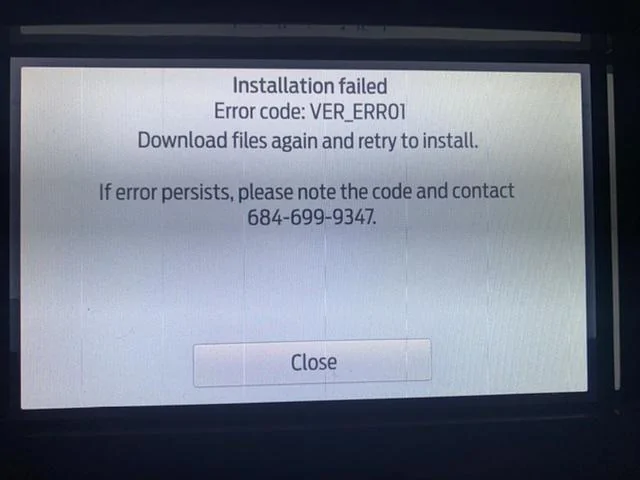
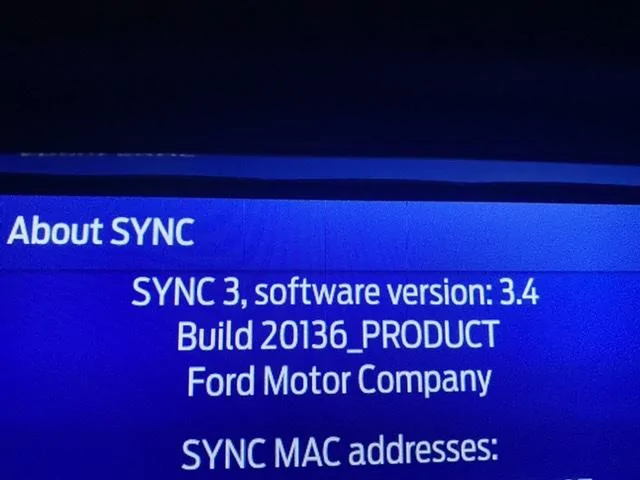
Master reset of the SYNC system was what it needed. The update was faster with the Ranger sitting idling too. It completed in about 20 min. It gave me an error saying the installation failed, but it actually did not fail. It worked, but I lost the climate controls just like many others. I’ll boot up FORSCAN tomorrow and add them back.

9744C34D-A8E9-4869-B8A1-4DB3B1F4EE4F.webp


7882F41B-0786-4878-809C-9DBDA8437C83.webp
 

MINI Ranger

Well-Known Member
First Name
Gene
Joined
May 17, 2019
Threads
0
Messages
68
Reaction score
65
Location
Texas
Vehicle(s)
2019 Ranger Lariat FX4, 2014 MINI Cooper S Clubman
Occupation
ASE Master Technician, MINI Technician, Retired
Vehicle Showcase
1
OK. Yeah, a simple reflash of the same software won't do anything. Did they escalate it at all back to Ford or anything?


You have everything needed to update if you choose to do so.
Well in a weak moment, I tried the update, it never finished as it cycled thru a brief notification that is was done, then would restart, screen would go black, system would come back on and begin updating. I got the impression that it would do this forever. I finally pulled USB..
One of the glitches I noticed was that I no longer have MPG info in the left screen of the instrument panel, it seems to think it's an auto start/stop function. My info screen acknowledges 3.4 20136 PRODUCT version, but maps are still NA 118. I'm still discovering other glitches
 

Geoff

Well-Known Member
Joined
Oct 17, 2018
Threads
5
Messages
705
Reaction score
497
Location
NYS
Vehicle(s)
'19 Ranger 1943 Willys Jeep
Occupation
Retired Engineer
Well in a weak moment, I tried the update, it never finished as it cycled thru a brief notification that is was done, then would restart, screen would go black, system would come back on and begin updating. I got the impression that it would do this forever. I finally pulled USB..
One of the glitches I noticed was that I no longer have MPG info in the left screen of the instrument panel, it seems to think it's an auto start/stop function. My info screen acknowledges 3.4 20136 PRODUCT version, but maps are still NA 118. I'm still discovering other glitches
Map version will be incorrect. Sync 3.3 has a bug which did not update the map version. Sync 3.4 fixed that bug but can only read what 3.3 reports for map version and since it didn't get updated due to the bug it may not report the correct map version.. Sync 3.4 will report the correct map version for any maps loaded under 3.4

EDIT: You can verify what map version is installed by looking at the IVSU screen in the diagnostic menu.
Sponsored


Top