Sponsored

Maximizing Battery Life

got3fords

Well-Known Member
First Name
James
Joined
Apr 12, 2021
Threads
131
Messages
5,319
Reaction score
13,809
Location
22973
Vehicle(s)
2026 Marsh Gray Ranger Raptor, 1995 Harley XLH1200
Occupation
Mom Joke Professional
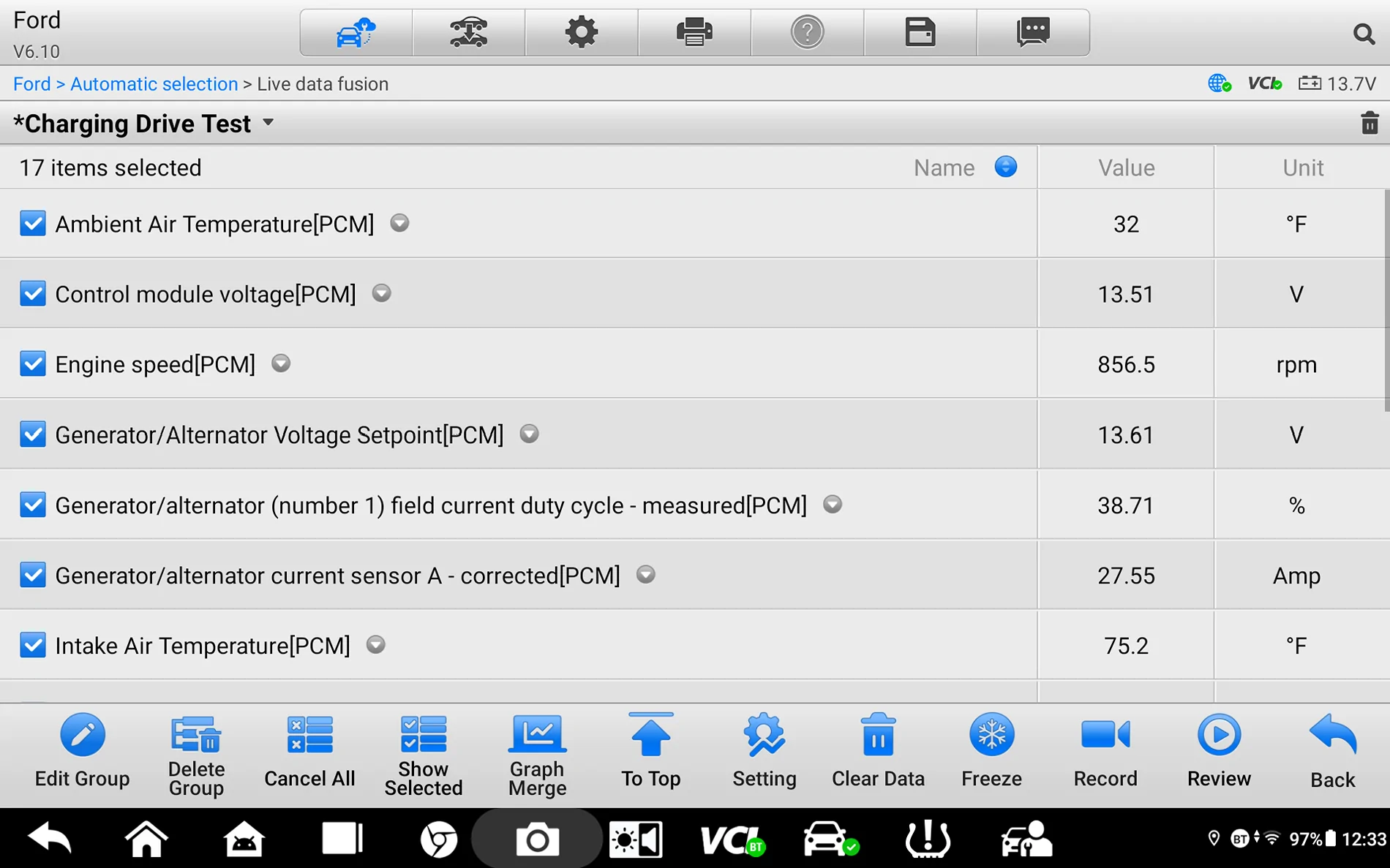
Since I have been monitoring the PIDs for a behind the scenes look at exactly how the system operates - I have found the following and also have taken a deeper dive into the system - online system ops vs actual operation (via Live Data-Monitoring) as a backup and confirmation of the information provided.

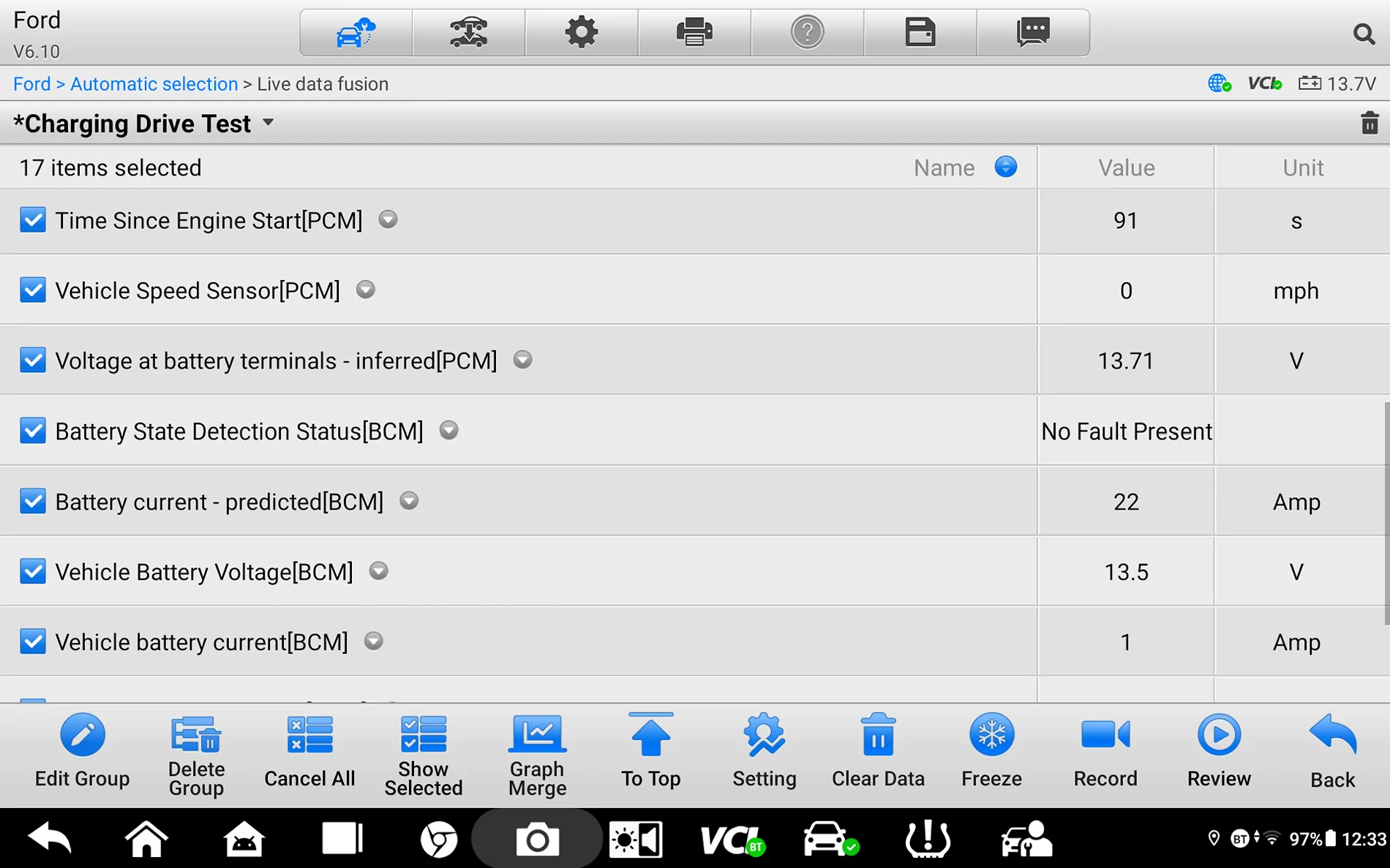
First: Here is the PIDs I have set up to monitor:
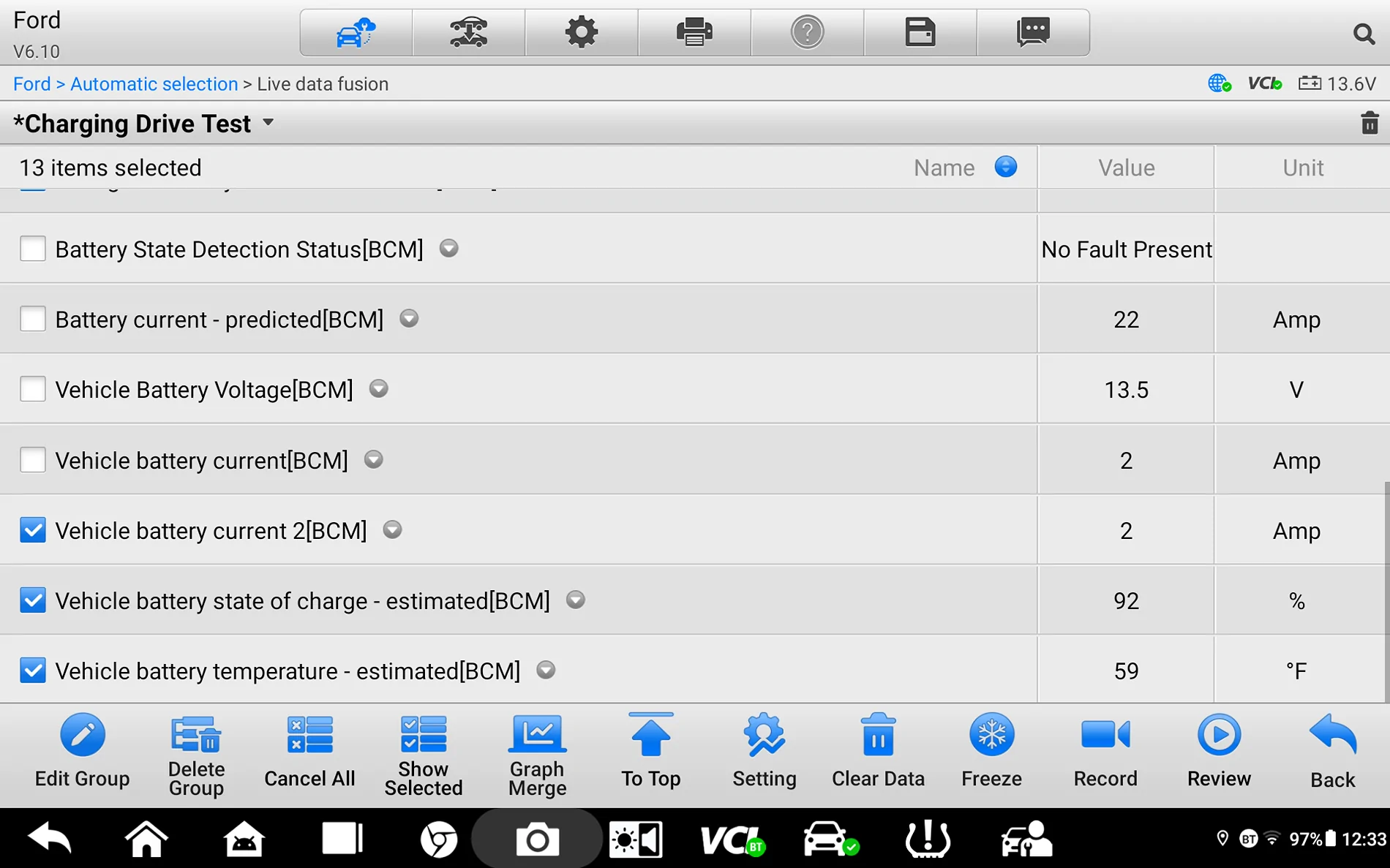
The MOST IMPORTANT PID = The Estimated SOC, this is the PID that is used by the BMS to determine the battery charge level and how it handles charging the battery - Dictated by the SOC Target (Level) so 75% Factory or (Forscan Adjusted)

C1.webp


C2.webp


Slight: Note - the Battey Current changed when I scrolled down and took the last screenshot- Live Data - so this is why the 2nd and last pic show different values.

C3.webp


First:
We need to think of the SOC (being) 100% charged as far as the BMS is concerned as this is what the factory setting of 75% does - with a 25% Headroom allowance for Regenerative Charging.
So as the BMS is concerned 75% SOC = 100% Charged if we are only looking at the basic charging operation.
So, if we bump that up to 90% - then we have a 10% Headroom Allowance and now 90% = 100% Charged.

My Live Data (Monitoring) proved that the SOC is slow to climb, and with longer drives it will continue to climb however (slowly) as the - Battery Current - PID shows it slowing down to a 1-to-2-amp charge or even drop off the charge to (0) as it nears the Target SOC.
For my monitoring (I am set to 90% SOC) and have noted that even at a SOC reading of 87 or 88 Percent - it still shuts off the voltage charge.
Then I thought about the Battery Temp (factor) and its now winter and colder.
So, I wanted to know how this affects my SOC readings I was seeing
and took a dive into the web.


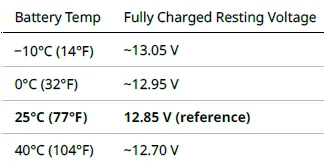
A Cold battery will read a higher resting voltage than a Hot Battery, so the system is taking this into account and the BMS uses these factors to determine the Estimated SOC

1. Battery Temp- used as a correction for SOC Readings, charge acceptance behavior- reduced (when cold) & IR expected to increase (when cold) - so it's also part of the (Gen Volt Desired) factor
2. Battery Voltage (Not actual voltage) just a ref (does the soc - plausibly match the voltage?)
3. Battery Current (In & Out) - How fast does it discharge and how fast does it charge - this is the way it measures the battery health & IR of the battery. This is a KEY POINT as this is a primary input for the SOC Calculation. (so not actually measuring the IR - just estimating the IR by the way it handles (Discharge & Charge)
4. The Battery Age - the BMS uses the theory that as the battery ages the IR will increase.

So, the above explains why - I can see the battery current drop to (0) when I have a SOC reading of 87 or 88 percent and my target is 90% but my resting voltage is reading 12.75 or Higher.
It's simply how the BMS works, the SOC is not a true factor of just Battery Voltage it's a compilation of many factors.

For the many owners who have varied issues with - Deep Sleep & Inop Functions and find that when their battery is tested and it tests - GOOD, and the real important factor is - What is the BMS - Actually BCM - reading of the Estimated SOC, as this is the MAIN driving factor on how the battery gets charged as well as - DEEP SLEEP Decisions and Load Shed Decisions.
The Downside of this IMPORTANT factor is that - Forscan will not display this specific needed PID, FDRS will along with other High End scan tools - but not Forscan.

The KEY is not the Battery Voltage but what the BMS reads as the SOC, the low SOC is the cause of the issues not the voltage. yes, they relate but as far as the BMS control and decision maker its only concerned with the SOC reading.

So, a battery that spends its life in the 75% SOC Range, will see an increased IR, this is the important factor here and the actual SOC reading.

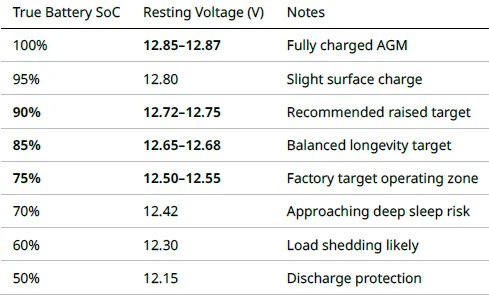
and using the following charts we can see what the Target SOC to Voltage is:
@ 77 Deg F

SOC Chart.webp


Temp vs Actual Voltage (Basic Chart)


Temp Correction.webp


So, with the above covered - we need to look at why the SOC is slow to climb and - it mainly gets slower as it nears the target SOC and this is highlighted by the Battery Current (In) as it drops down the charging amperage to 2 or 1 Amp and even (0)

As I can see this when set to 90%

(Example: 68–72% with 75% target, or 83–87% with 90% target)

Alternator output reduced - the desired voltage will drop slightly and set a desired to maintain - the system voltage as dictated by the (Battery Current Predicted - PID) this is telling the PCM what the total current (load) is - and this drives the Desired Gen Voltage (setting) - this PID is also looking at the (SOC) PID in its determining factor.

Battery current PID may show 0 A or a minimum charge of 1 to 2 amps.

Voltage is maintained but does not increase unless there has been a heavy current draw such as lights on & engine off and an initial replenish just after engine start.


Battery well below Target SOC:

(Example: 50% with 75% target, or 65% with 90% target)

Active charging resumes - so a higher Gen Voltage Desired to overcome the extra amperage charge on the battery plus maintain (system) current draw - The Predicted Current (Increases)

Current increases - the Battery Current (Charge) is higher roughly 8-10 amps
SoC climbs - faster than it does when it's near the target SOC

So Real World Testing:
If we reference my (Live Data) above - the battery was placed on an overnight charge recently.
It has had a few drives before this (PID) reference was pulled today.
I am set to 90% SOC - and throughout my testing I (on average) see the SOC reading in this range (87 to 94) Percent - however it has also been cold - the truck is parked in a garage and the average temp in the garage is maintained (heated) at about 45 Deg.
This (Ref) pull was after a trip to the store - so the battery temp is higher than a cold reading.

So now I have an understanding on what is actually happening behind the scenes with the Live Data Monitoring - and can understand why the SOC - is slow to climb and why it shuts off the (current) charge to the battery when it's close to the SOC Target.
It is slowing down the charge rate - to protect the battery and the temperature is a factor of the SOC Reading. I know that a overshoot of 94% is considered normal as well (if I am set to 90%)
also noted when set to 90% (In daylight) the system will sometimes still set the (Gen Voltage Desired) to a level where the battery will support the load - the same as the (75%) setting does, just not as often and I can still see the (regenerative charge) when coasting down a hill.

The 90% SOC bump - only moves the ceiling of the Target SOC up and it sets a higher (100%) charge (so the BMS thinks that the 90% SOC) is now 100% charged and it allows for some headroom cushion - greater than the factory 75% does.
Raising the SOC to 90%
Does not force constant charging, but it widens the threshold of the Deep Sleep and Load Shed parameters.
Lessens the IR (Increase) in the battery over time.

So, in short, the sweet spot is 85 to 90% SOC - if consistent short drives 90% and mixed highway and short drives 85%

Reasoning - the same as the factory 75% and sulphation and battery life in general.
At 75% - the battery stays at this level consistently and short trips (only)
Over Time:
This increases the IR of the Battery

The SOC slowly declines down to the (Deep Sleep and Load Shed) trigger points.

The SOC will drift low - due to Infrequent full charge events, so this prevents the BMS system from seeing a clean reference point of (True Full Charge) and the drift accumulates lower and will not recover on its own.

I actually have witnessed this - when I actually began my monitoring of the live data, I was stuck in the 83% SOC range - no issues with Deep Sleep etc, just a noted low SOC reading when I was set to 90%, granted it had been over a year since I performed any battery maintenance (external charging) but I do have a Batt Minder (On-Board) and have frequently tested the battery with a low IR test result.
But with my (Plug In) Voltmeter in the Power Point - I was seeing consistent voltage charge readings of 14.5 to 14.7 - never thought anything about it being (out of normal) since I was at 90% SOC setting - I thought this was a normal reading for that setting. It was not until I actually started the monitoring and wondered why I had such a high voltage charge and a normal battery voltage reading (resting) and a low IR but still had a low SOC reading, is when I realized the BMS sensor had drifted - and the generator was being overworked as the SOC did not match the true battery voltage. - Note: No DTC Codes were generated.

So YES - SOC Drift is Real as I saw it - even when set to 90% SOC, so I can imagine that a trck set to 75% SOC the (Deep Sleep etc) would have triggered - as I was above it, even with a drifted SOC reading.
The fix to bring it back into (normal) was a Battery Top Off - Charge & a few cycles of repair mode using my external charger. Genius 10 also just as an extra reset the BMS as it was a new battery installed (Only 3 years old) now new as far as the BMS knows.

So even at 90% - the battery still needs periodic help to maintain its health even with the on-board Batt Minder (Desulphator) the Batt Minder just helps keep the battery IR in the Low Range.

So, as you can see - my real-world findings at 90% SOC and imagine the same results with the SOC target set at 75% only puts the decision making (Deep Sleep Etc) in a (tighter window) of cushion - when it sees only short trip drives - bumping up the SOC Target increaes that window cushion.

Now for the BMS Disconnect:
Yes, this helps the system overall - eliminates the (BMS) control however the PCM still has control over the charging system - it's in a Fail-Safe Charging Mode.
Not entirely (Old School) as Old School had a fixed regulator, the PCM has a variable voltage regulator
So, there is no battery monitoring system involved, but the downside the (system now overcharges) the battery - not good for long term health - a trade off

Disconnected Long Term Trade Offs.

Battery spends more time at high voltage
Increased plate corrosion over time
Reduced fuel economy
Regenerative headroom lost
Battery lifespan can be shortened
ASS Disables (if you care) or use it

Benefits:
Eliminates the nuisance Deep Sleep & Load Shed - issues as it removes the SOC and related inputs the BMS system uses for its charging cycle.

To sum it up the factory 75% is not good for the battery and disconnecting the BMS sensor is not good for the battery (health wise)
the 75% SOC is worse as it creates 2 issues - battery health and the nuisance messages over time unless this is a fleet truck that spends a great amount of time - moving.

So, bumping the SOC to a better spot 85% to 90% - is a better solution, as anything above 90% SOC would be close to having the BMS disconnected, not good for battery health overall.

I also dug into - the TCU Health Checks and what is actually happening behind the scenes as this one has had me (shaking my head) on what actually happens and why we can hear the interaction when it occurs.
Coming Up - in my next post - Time for Dinner (when the wife says - diners ready) you say YES DEAR

Just a note - I have enjoyed this deep dive and gaining a full understanding on what's happening behind the scenes - the information that the manuals leave out (DETAILS) on how something actually works vs assuming they mean (this way or that way) and leaving more unanswered questions by their system operation notes. It wasn't until @TJC posted his findings that I actually hooked up and did my own monitoring - to see what was actually happening - use that data and dig from there. So much drama over a simple charging system makes your head spin, well that simple charging system proved to be not so simple after all with a lot of variables associated with it - Smart Charging System (as its officially known) has proven to be not entirely as smart as it is marketed to be or we would not have a need for this thread or the many pages of posted issues about it.
Information overload! Seriously though, quite impressed.
Sponsored


airline tech

Well-Known Member
Joined
Aug 24, 2022
Threads
28
Messages
4,448
Reaction score
8,507
Location
Midwest - KS
Vehicle(s)
2022 Ranger Lariat-Super Crew, Cactus Gray
Occupation
Aircraft Tech
Before I post the Ford - Health Check

Lets do an overview of what I have found:

Charging - Target SOC set to 75% (Factory)
Why does it create issues
First the Target SOC is not an actual hard target - it's a controlled band (Window)

Charge Current (Battery Current) Tapers down (Lowers) when it's near the Target SOC
Typical: to occur @ about or near

75% Target = 70 - 73%
90% Target = 85 - 88%

The closer the SOC gets to its target - the lower the charge current (1-2 Amps) Maint Charge

It's normal to overshoot the SOC:
If the Battery Temp is Low & Elec Load is High

So, let's look at the system taper (battery current) for a factory set 75% and what happens over a period of time.

1. Remember as far as the BCM (BMS) knows 75% SOC = 100% Charge (Controlled Target)
a. So, at 70-73% - the current tapers down to 1-3 amps, short trip drives will never let the system reach 75% or 100% charge (Controlled Target) as I have proven it's a SLOW Progression to get the SOC to rise (By my monitoring) so net gain or rise of the SOC Reading is minimal.

2. SOC Drift begins to develop due to #1 - (coulomb counting error accumulates) from:
a. Battery Discharges - Without Engine Running - BCM - Lights/Locks/Entry - Wakes
b. Incomplete Recharge - Cycles - to recover from (a) and the starter draw
c. Battery Temp (Estimation) Error

So, we need to look at these 2 important factors
First: Though Coulomb Counting (Current In & Out) of the battery - so basically, it's the charge and discharge events.
Second: We need to take into account and factor in (Sulfation) and (Increased IR of the Battery) that is enhanced with a 75% Target SOC

SOC Drift (High) - While Driving
a. The increased sulphation and iR of the battery - provides this action - due to the constant undercharged battery and never reaching full charge.
b. This makes the battery accept the charge (slowly) and at the same time (voltage) rises quickly - BMS falsely interprets this as battery is fully charged.
c. The Charge Current (Tapers Off) earlier than it should
d. This puts the BMS system in a continuous loop, as it thinks the battery is fully charged with a (Falsely High) SOC reading, thus not charging and this is only (Increasing the Sulphation & IR) in the battery.
e. The sulphation & increased IR creates this: The BMS believes the battery is actively accepting the charge - but it actually is not - on on the surface as it sees a rapid voltage rise, the short durations of the charge hitting (a fully charged assumption) the SOC Calculation cannot be accurately obtained.

SOC Drift (Low) - Truck Parked
a. The opposite occurs with the Truck (Parked)
b. The Rapid (Voltage Rise) when charging is active - actually degrades the available battery capacity.
c. At engine shut-down the surface charge drops quickly and the (active) current draws as you exit the truck and modules stay awake untill sleep - drags the SOC down quicker and eventually it enters the (Trigger Zones) for Deep Sleep Etc. and it then becomes a (Corrected True SOC) Reading.
d1. This explains - WHY you get the messages (Ford Pass) & at (Eng Start)
d2. Deep Sleep or whatever other messages come from Ford Pass as this usually means it's load shedding features - The TCU is Disabled - Therefore - Remote Start from the Phone Is also disabled.
d3. System Off to Save Battery (SYNC Screen)
d4. ASS Becomes (Inactive)
d5. The BCM - Limits current draw - This would be the (Passive Entry) system (Door Locks) issues that show up and cause erratic operation.
d6. The BCM / BMS System is Prioritizing - The Battery for Engine Starting
d7. The limits for the (Deep Sleep) etc are much higher than the approximate (35-40%) Minimum SOC (For Engine Starting)- This is why you can have issues with (the features) but not starting the truck, creating the ILLUSION - My battery is GOOD as it starts fine, but actually cranking will be (a bit slower) than the normal (fast crank & start)
d8. So now you have a true LOW (Accurate) SOC Reading after the overnight Rest and modules have gone to sleep.
d9. The process (REPEATS) again - The Low Initial SOC Reading will dictate (Aggressively Charge) the battery with a (High Amp) Current - The Battery Sees a (Rapid Volage Rise, thus the SOC will climb again - falsely reporting and then taper down the (Battery Current) and eventually shut off the current. (When in actuality - the battery is never actually accepting the charge)


There you have it - A Final Full (In-Depth) look with detail on what is happening behind the scenes on the Ranger Charging System and why the 75% Target SOC creates so many issues.

Note: This is where periodic battery maintenance helps - It helps the BMS sensor maintain correct SOC (Readings) and it also keeps the battery healthy by the (Repair) mode (De-Sulphation) and lowering the battery IR.

You can monitor the battery health: With Testers such as TopDon - not fully accurate as they are a resistance-based tester and the connections at the battery (Influence) the results.
So, for these tester - it's best to get a (Baseline) of normal - Test Results (Posted) average around 3.4. this appears to be an average of a normal IR reading you should see for a healthy battery.

Bumping the SOC to 90%, My Setting:
1. Allows more wiggle room - moves the (Minimum Target) that triggers the (Deep Sleep etc) farther away from the Target SOC (More space for overnight) current draws before it hits the (triggers)
2. Allows a better charging acceptance for the battery than the 75% Target, less chance of Sulphation & Increased IR - since it pushes the perceived battery 100% charge up and the available battery voltage has been increased.
3. Due to this simple (Increase) the nuisance messages are mostly nonexistent
4.Even at 90% - you still need to provide periodic battery maintenance as I have proved my SOC was stuck low (when i tested it) but this was before I knew the true internals and did not actively or deeply look into what it did over a few drives.
Anyway - I saw no operational or functional issues; the battery IR was good 3.4 and the battery voltage was good.
So, a Battery Charge + Repair Cycles and as a extra I also reset the BMS Sensor.
The SOC Reading returned to - Normal and after this action, I began actively monitoring if the SOC would drift back down to 83% (i think it was) so far it holds steady in the range of 87% to 94%, temperature dependent.

Testing:
1. The TopDon or similiar type tester that will test the IR of the battery
2. A simple Volt-Meter Test is not enough.
3. any old school (Load Tester) that will reveal (Fast) voltage drop

4. Live Data - Driving 15-20 Minutes - after an overnight rest and engine is started
a. Monitor the Battery Voltage
b. Monitor the SOC
c. Monitor the Battery Current
Did they rise (quickly) - if the SOC rises quickly and the Current is (Minimal) 1 to 2 Amps, the charge is being assumed but not delivered.
so, indicating a High IR or SOC Drift (High)

5. Live Data: same setup as 4: but
a. Monitor Battery Current
b. Monitor SOC
Is the (Taper Down) 1 to 2 Amps within the standard operation window (approximate)
75% Target - Taper Occurs (70-73%)
90% Target - Taper Occurs (85-88%)
Is the BMS system working normally and charging the way it's programmed to do.

6. The (Most Important) @ Engine Off and door was opened then closed and placed the truck in a (Go to Sleep) pattern
a. Monitor Battery Current (Draw)
b. Monitor Battery Voltage
c. Monitor Battery SOC
Do you see a small current draw with a fast-declining Battery Voltage & Dropping SOC or a small current draw and battery voltage & SOC are holding steady or (very slowly) dropping but a minimal drop.
You want to see a Holding Steady or Minimal Drop
d. You can also induce (a light draw) by hitting the door lock/unlock from the FOB - does it cause the Voltage to Drop or SOC to drop quickly.
This is basically performing a (Load Test) on the battery - not as heavy as a true load tester but effectively performing simulated test.
e. A failed test here will be SOC Drift (Low) and most likely Increased IR at the battery.
 
Last edited:
OP
OP

TJC

Well-Known Member
First Name
Tony
Joined
Aug 28, 2020
Threads
45
Messages
3,932
Reaction score
9,868
Location
North Carolina
Vehicle(s)
93 Miata, 05 Ranger 4x4, 20 Ranger 4x4, 23 CX-5
Before I post the Ford - Health Check

Lets do an overview of what I have found:

Charging - Target SOC set to 75% (Factory)
Why does it create issues
First the Target SOC is not an actual hard target - it's a controlled band (Window)

Charge Current (Battery Current) Tapers down (Lowers) when it's near the Target SOC
Typical: to occur @ about or near

75% Target = 70 - 73%
90% Target = 85 - 88%

The closer the SOC gets to its target - the lower the charge current (1-2 Amps) Maint Charge

It's normal to overshoot the SOC:
If the Battery Temp is Low & Elec Load is High

So, let's look at the system taper (battery current) for a factory set 75% and what happens over a period of time.

1. Remember as far as the BCM (BMS) knows 75% SOC = 100% Charge (Controlled Target)
a. So, at 70-73% - the current tapers down to 1-3 amps, short trip drives will never let the system reach 75% or 100% charge (Controlled Target) as I have proven it's a SLOW Progression to get the SOC to rise (By my monitoring) so net gain or rise of the SOC Reading is minimal.

2. SOC Drift begins to develop due to #1 - (coulomb counting error accumulates) from:
a. Battery Discharges - Without Engine Running - BCM - Lights/Locks/Entry - Wakes
b. Incomplete Recharge - Cycles - to recover from (a) and the starter draw
c. Battery Temp (Estimation) Error

So, we need to look at these 2 important factors
First: Though Coulomb Counting (Current In & Out) of the battery - so basically, it's the charge and discharge events.
Second: We need to take into account and factor in (Sulfation) and (Increased IR of the Battery) that is enhanced with a 75% Target SOC

SOC Drift (High) - While Driving
a. The increased sulphation and iR of the battery - provides this action - due to the constant undercharged battery and never reaching full charge.
b. This makes the battery accept the charge (slowly) and at the same time (voltage) rises quickly - BMS falsely interprets this as battery is fully charged.
c. The Charge Current (Tapers Off) earlier than it should
d. This puts the BMS system in a continuous loop, as it thinks the battery is fully charged with a (Falsely High) SOC reading, thus not charging and this is only (Increasing the Sulphation & IR) in the battery.
e. The sulphation & increased IR creates this: The BMS believes the battery is actively accepting the charge - but it actually is not - on on the surface as it sees a rapid voltage rise, the short durations of the charge hitting (a fully charged assumption) the SOC Calculation cannot be accurately obtained.

SOC Drift (Low) - Truck Parked
a. The opposite occurs with the Truck (Parked)
b. The Rapid (Voltage Rise) when charging is active - actually degrades the available battery capacity.
c. At engine shut-down the surface charge drops quickly and the (active) current draws as you exit the truck and modules stay awake untill sleep - drags the SOC down quicker and eventually it enters the (Trigger Zones) for Deep Sleep Etc. and it then becomes a (Corrected True SOC) Reading.
d1. This explains - WHY you get the messages (Ford Pass) & at (Eng Start)
d2. Deep Sleep or whatever other messages come from Ford Pass as this usually means it's load shedding features - The TCU is Disabled - Therefore - Remote Start from the Phone Is also disabled.
d3. System Off to Save Battery (SYNC Screen)
d4. ASS Becomes (Inactive)
d5. The BCM - Limits current draw - This would be the (Passive Entry) system (Door Locks) issues that show up and cause erratic operation.
d6. The BCM / BMS System is Prioritizing - The Battery for Engine Starting
d7. The limits for the (Deep Sleep) etc are much higher than the approximate (35-40%) Minimum SOC (For Engine Starting)- This is why you can have issues with (the features) but not starting the truck, creating the ILLUSION - My battery is GOOD as it starts fine, but actually cranking will be (a bit slower) than the normal (fast crank & start)
d8. So now you have a true LOW (Accurate) SOC Reading after the overnight Rest and modules have gone to sleep.
d9. The process (REPEATS) again - The Low Initial SOC Reading will dictate (Aggressively Charge) the battery with a (High Amp) Current - The Battery Sees a (Rapid Volage Rise, thus the SOC will climb again - falsely reporting and then taper down the (Battery Current) and eventually shut off the current. (When in actuality - the battery is never actually accepting the charge)


There you have it - A Final Full (In-Depth) look with detail on what is happening behind the scenes on the Ranger Charging System and why the 75% Target SOC creates so many issues.

Note: This is where periodic battery maintenance helps - It helps the BMS sensor maintain correct SOC (Readings) and it also keeps the battery healthy by the (Repair) mode (De-Sulphation) and lowering the battery IR.

You can monitor the battery health: With Testers such as TopDon - not fully accurate as they are a resistance-based tester and the connections at the battery (Influence) the results.
So, for these tester - it's best to get a (Baseline) of normal - Test Results (Posted) average around 3.4. this appears to be an average of a normal IR reading you should see for a healthy battery.

Bumping the SOC to 90%, My Setting:
1. Allows more wiggle room - moves the (Minimum Target) that triggers the (Deep Sleep etc) farther away from the Target SOC (More space for overnight) current draws before it hits the (triggers)
2. Allows a better charging acceptance for the battery than the 75% Target, less chance of Sulphation & Increased IR - since it pushes the perceived battery 100% charge up and the available battery voltage has been increased.
3. Due to this simple (Increase) the nuisance messages are mostly nonexistent
4.Even at 90% - you still need to provide periodic battery maintenance as I have proved my SOC was stuck low (when i tested it) but this was before I knew the true internals and did not actively or deeply look into what it did over a few drives.
Anyway - I saw no operational or functional issues; the battery IR was good 3.4 and the battery voltage was good.
So, a Battery Charge + Repair Cycles and as a extra I also reset the BMS Sensor.
The SOC Reading returned to - Normal and after this action, I began actively monitoring if the SOC would drift back down to 83% (i think it was) so far it holds steady in the range of 87% to 94%, temperature dependent.

Testing:
1. The TopDon or similiar type tester that will test the IR of the battery
2. A simple Volt-Meter Test is not enough.
3. any old school (Load Tester) that will reveal (Fast) voltage drop

4. Live Data - Driving 15-20 Minutes - after an overnight rest and engine is started
a. Monitor the Battery Voltage
b. Monitor the SOC
c. Monitor the Battery Current
Did they rise (quickly) - if the SOC rises quickly and the Current is (Minimal) 1 to 2 Amps, the charge is being assumed but not delivered.
so, indicating a High IR or SOC Drift (High)

5. Live Data: same setup as 4: but
a. Monitor Battery Current
b. Monitor SOC
Is the (Taper Down) 1 to 2 Amps within the standard operation window (approximate)
75% Target - Taper Occurs (70-73%)
90% Target - Taper Occurs (85-88%)
Is the BMS system working normally and charging the way it's programmed to do.

6. The (Most Important) @ Engine Off and door was opened then closed and placed the truck in a (Go to Sleep) pattern
a. Monitor Battery Current (Draw)
b. Monitor Battery Voltage
c. Monitor Battery SOC
Do you see a small current draw with a fast-declining Battery Voltage & Dropping SOC or a small current draw and battery voltage & SOC are holding steady or (very slowly) dropping but a minimal drop.
You want to see a Holding Steady or Minimal Drop
d. You can also induce (a light draw) by hitting the door lock/unlock from the FOB - does it cause the Voltage to Drop or SOC to drop quickly.
This is basically performing a (Load Test) on the battery - not as heavy as a true load tester but effectively performing simulated test.
e. A failed test here will be SOC Drift (Low) and most likely Increased IR at the battery.
I have observed the exact behavior in my testing.

You stated it better than I.

I honestly believe just enabling ASS will shorten battery life by at least 2 years.

An onboard desulfator helps enormously.

You still need to supplemental charge the battery on a regular basis, but much less often than you will need to do so if ASS and SOC stay at stock settings. maybe monthly.

I've actually installed my chargers on the wall in my garage and on my lift in my workshop. And both are in use at this moment - in desulfation / maintenance mode.
 

airline tech

Well-Known Member
Joined
Aug 24, 2022
Threads
28
Messages
4,448
Reaction score
8,507
Location
Midwest - KS
Vehicle(s)
2022 Ranger Lariat-Super Crew, Cactus Gray
Occupation
Aircraft Tech
Now let's tackle the Ford App Health Check (formerly known as Ford Pass)
I have always been curious - on what this is and how often it occurs?
I have also been curious about the level of depth it goes electrically as I never could grasp exactly how the TCU can generate the PCM Power Relay to Close and get the Waste Gate Actuator to cycle.
I looked at these multiple ways, and nothing made sense.

I am referring to the - Health Check event that occurs at random when you are in the garage or simply just in proximity of the truck (with Phone or FOB) on you.
To be more specific - The Waste Gate Actuator (Cycling) the same as it does when you open the Driver's Door - Powering the Wake circuit to prep for engine start.
It occurs all by itself without any user interaction.

Up until now I always thought this was the (Wake Circuit) itself triggering and using that to get power on the circuits (to provide and send the - Health Report to the Ford Servers.

Well, the Health Report has some operational limitations.

First: Let's cover a normal - While driving and (you get a Check Eng or Check 4WD) message or any failure light on the IPC - this generates an Immediate message to the Ford Servers which then send you a message to the Ford App, from what I understand this immediate message only applies to (Warning Messages + Lights) on the IPC.

Normal - Roughly (once) every 8-12 Hours the Ford Servers (Ping) the TCU for an updated health status (Timing not confirmed) as this is not a published document.

The Truck is in sleep mode with minimal modules monitoring for communication.
Since the TCU always powered by (Hot Battery) power the TCU is in sleep mode except for a very small current draw - the Modem & Antenna can be woken up enough to (Transmit) Data

1. The TCU is always monitoring for any High-Level DTC's as well as its always tracking the information found on the Ford App, so when the truck is shutdown, it holds the (Last Known) data in its memory cache.

2. The Ford Servers - (ping) the Modem for an updated status (periodic event) if the truck is in sleep mode - The TCU Antennas and minimal can bus power is provided as well as the Gateway Module (GWM) - The TCU sends the (cached data) to the Ford Servers and the servers report back to the (Ford App) if ANY problems are found - This is where the DEEP SLEEP messages come from and it's from the Last Known - Status - the truck is not trying to wake like it does in the garage scenario.

2a. If the Load Shedding has been triggered by the BCM/BMS you will get a similar message in the Ford App. about Deep Sleep or Functions Shut Down to save the battery as the TCU has been included in the Load Shed and the Servers cannot communicate to it, therefore Remote Start also becomes unavailable.

EDIT: I need to clarify something here:
The TCU Never shuts down (Load Sheds) reason Crash Reporting & Stole Vehicle Locating Etc.
However, it can see the BCM/BMS - Load Shed Requests and generate the - Deep Sleep Messages to the servers and also (disable) the Remote Start due to the Low SOC Reporting
However, for the Cached Data Reports
The TCU is only verifying:
Am I allowed to wake the vehicle?
Can I transmit without battery risk?
So, for this instance, you may see something along the lines of -Data Not Available


Remote Start Notes:
1. Ford App - If the response feedback is immediate after a remote start attempt - then the TCU is reporting a Load Shed event is active.
So, message sent to servers - servers try to wake TCU - TCU denies the request (No Wake Allowed) immediate response.


2. If the request makes it to the TCU - a remote start is initiated but when the PCM Power Relay closes and the truck begins to wake, and it sees a low SOC from this power draw - the TCU can cancel the request - This would be noted as a - Long Delay in the Ford App and returning with Remote Start - Not Available or Remote Start - Failed.


Ok let's cover what we actually witness and that is the (Wastegate Actuator) cycling when we are in proximity of the Truck with the FOB or Phone near the truck.

First, let's cover why this Health Check - differs from the other Health Check, the other health check (when the truck is asleep) and the FOB or Phone are not in proximity the TCU relies on Cached data only as the TCU has not authorized the BCM to wake up.

When you have the FOB (The RTM) antennas activate as well as partial wake of the BCM from the Door Handle Antennas and Phone (The TCU) antennas activate - the Can Busses also become partially active - in anticipation of a door entry (a pre-wake) to prepare for a door unlock or door open (and full wake event)
So, in short, the BCM is now partially awake due to proximity of the FOB and Phone around the truck.
And the Ford Servers sees this as an opportunity to dump the (Last Known-Cached Data) and get a more updated status - Hey there's a human presence lets wake the system now we have the authority (Valid FOB or Valid Phone) in close proximity to authorize a new Live Polling of module data.

If the Ford Servers just happen to (Ping) the TCU at the same time you are in proximity a deeper level of Health Check is requested - (Live Polling)
This is when the modules go from sleep to fully awake and it occurs by the BCM sending a (authorized) wake signal specifically for this (Live Polling) this just happens to let the BCM provide the Ground to the PCM Power Relay - and when the PCM Power Relay closes the Wastegate Actuator is (programed) to run self-test the same way it does when you open the door.

The Drawback of this (programmed) Live Polling and why we sometimes see a continued (Retry) of the Health Check it's not actually (retrying) as all we hear is the Wastegate Actuator cycle repeatably (in a timed sequence) sometimes 2 or 3 times before it stops.

The Cause of this:
The (Live Polling) when it's done - sends a BCM (Enter Sleep) data message, the BCM follows the command and dumps the ground from the PCM Power Relay, thus the PCM also enter sleep mode.
The BCM then sees the (FOB or Phone) proximity and remains partially awake, thus not completing the commanded request from the TCU - BCM -Enter Sleep,
So, a SINGLE Heath Status Update Request - Live Polling gets stuck in a loop and when the TCU notices the BCM is partially awake - it cycles through the Live Polling it just performed again. The updated data has already been sent to the Ford Servers, but since the TCU cannot get the BCM to follow the Request to sleep - the request continues until the BCM has enough time to enter sleep mode without the (FOB or Phone) movement (I THINK) or close proximity to the door handles.
The TCU eventually releases the (Request) as completed and the (PCM Wake stops) along with the Wastegate Actuator movement.

So, this ties into - Battery Life

Cached Data - Health Check - TCU Only = 25-70 mA for about 3 seconds
Live Polling Health Check - Modules Awaken = 800 - 1500 mA total peak current and total duration for all modules (powered) about 15 seconds

So, there is a baseline of what is happening behind the scenes for the Health Check Updates, key finding the (truck) does not wake (fully) as previously thought unless the (FOB or Phone) are in proximity to authorize a (wake) on the circuits.

EDIT: Added Information

Health checks are triggered by the TCU via
Internal TCU timer (periodic)
Ford server request (status freshness)
App open / background refresh (indirect request via server)

The Phone (Ford App) Never Talks directly to the Truck it only plays a role in the communication


Live Polling: and the Re-Triggers (Proximity)

Phone (Ford App)

Continuous Phone Antenna presence
Background app refresh (Ford App)
Signal strength between the Phone & Modem

FOB:
Passive Entry Antennas - Picking up FOB Presence & FOB Motion
Keeps BCM awake
Allows live polling -Can keep the loop cycle (Retries) since the BCM cannot re-enter Sleep

However: Retrigger's
FOB alone is Les Likely to trigger the TCU retries
Phone is the more common (Reported) cause of continuous cycling due to the (Ford App) Refresh
 
Last edited:
OP
OP

TJC

Well-Known Member
First Name
Tony
Joined
Aug 28, 2020
Threads
45
Messages
3,932
Reaction score
9,868
Location
North Carolina
Vehicle(s)
93 Miata, 05 Ranger 4x4, 20 Ranger 4x4, 23 CX-5
Does Blue tooth ever enter into the equation? maybe pairing with your phone?

I'm at a bit of a disadvantage today, my primary computer Power Supply failed 36 hours ago. I diagnosed the failure and ordered a replacement which is due to arrive this afternoon. Updating GPU at the same time.

I'm still running a quad core q6600(unlocked) from circa 2007 on this desktop. It has been rock solid for 19 years! running the latest Linux Mint on it (with Boxes for VM support of DOS / Win98, WinXP, Win 7 & Win 10 (for all the old games that I love).

I have a Thinkpad touchscreen laptop configured similarly, except Boxes VMs are Win 7 for Forscan, and 2 different Win10 VMs, as the Official Ford and Mazda Diagnostics don't play well together on the same computer.

Add in Ventoy and all your OS install ISO files can live on a single bootable USB flash drive selectable from a menu at boot time.

Sorry for the detour off topic, but I love elegant HW/SW solutions that simply work with a minimal fuss.

I wish my Ranger was such an example!


Ohwell

Well-Known Member
Joined
Jul 19, 2023
Threads
2
Messages
75
Reaction score
93
Location
Minnesota
Vehicle(s)
2023 Ford Ranger XLT FX4
Occupation
Retired
Before I post the Ford - Health Check

Lets do an overview of what I have found:

Charging - Target SOC set to 75% (Factory)
Why does it create issues
First the Target SOC is not an actual hard target - it's a controlled band (Window)

Charge Current (Battery Current) Tapers down (Lowers) when it's near the Target SOC
Typical: to occur @ about or near

75% Target = 70 - 73%
90% Target = 85 - 88%

The closer the SOC gets to its target - the lower the charge current (1-2 Amps) Maint Charge

It's normal to overshoot the SOC:
If the Battery Temp is Low & Elec Load is High

So, let's look at the system taper (battery current) for a factory set 75% and what happens over a period of time.

1. Remember as far as the BCM (BMS) knows 75% SOC = 100% Charge (Controlled Target)
a. So, at 70-73% - the current tapers down to 1-3 amps, short trip drives will never let the system reach 75% or 100% charge (Controlled Target) as I have proven it's a SLOW Progression to get the SOC to rise (By my monitoring) so net gain or rise of the SOC Reading is minimal.

2. SOC Drift begins to develop due to #1 - (coulomb counting error accumulates) from:
a. Battery Discharges - Without Engine Running - BCM - Lights/Locks/Entry - Wakes
b. Incomplete Recharge - Cycles - to recover from (a) and the starter draw
c. Battery Temp (Estimation) Error

So, we need to look at these 2 important factors
First: Though Coulomb Counting (Current In & Out) of the battery - so basically, it's the charge and discharge events.
Second: We need to take into account and factor in (Sulfation) and (Increased IR of the Battery) that is enhanced with a 75% Target SOC

SOC Drift (High) - While Driving
a. The increased sulphation and iR of the battery - provides this action - due to the constant undercharged battery and never reaching full charge.
b. This makes the battery accept the charge (slowly) and at the same time (voltage) rises quickly - BMS falsely interprets this as battery is fully charged.
c. The Charge Current (Tapers Off) earlier than it should
d. This puts the BMS system in a continuous loop, as it thinks the battery is fully charged with a (Falsely High) SOC reading, thus not charging and this is only (Increasing the Sulphation & IR) in the battery.
e. The sulphation & increased IR creates this: The BMS believes the battery is actively accepting the charge - but it actually is not - on on the surface as it sees a rapid voltage rise, the short durations of the charge hitting (a fully charged assumption) the SOC Calculation cannot be accurately obtained.

SOC Drift (Low) - Truck Parked
a. The opposite occurs with the Truck (Parked)
b. The Rapid (Voltage Rise) when charging is active - actually degrades the available battery capacity.
c. At engine shut-down the surface charge drops quickly and the (active) current draws as you exit the truck and modules stay awake untill sleep - drags the SOC down quicker and eventually it enters the (Trigger Zones) for Deep Sleep Etc. and it then becomes a (Corrected True SOC) Reading.
d1. This explains - WHY you get the messages (Ford Pass) & at (Eng Start)
d2. Deep Sleep or whatever other messages come from Ford Pass as this usually means it's load shedding features - The TCU is Disabled - Therefore - Remote Start from the Phone Is also disabled.
d3. System Off to Save Battery (SYNC Screen)
d4. ASS Becomes (Inactive)
d5. The BCM - Limits current draw - This would be the (Passive Entry) system (Door Locks) issues that show up and cause erratic operation.
d6. The BCM / BMS System is Prioritizing - The Battery for Engine Starting
d7. The limits for the (Deep Sleep) etc are much higher than the approximate (35-40%) Minimum SOC (For Engine Starting)- This is why you can have issues with (the features) but not starting the truck, creating the ILLUSION - My battery is GOOD as it starts fine, but actually cranking will be (a bit slower) than the normal (fast crank & start)
d8. So now you have a true LOW (Accurate) SOC Reading after the overnight Rest and modules have gone to sleep.
d9. The process (REPEATS) again - The Low Initial SOC Reading will dictate (Aggressively Charge) the battery with a (High Amp) Current - The Battery Sees a (Rapid Volage Rise, thus the SOC will climb again - falsely reporting and then taper down the (Battery Current) and eventually shut off the current. (When in actuality - the battery is never actually accepting the charge)


There you have it - A Final Full (In-Depth) look with detail on what is happening behind the scenes on the Ranger Charging System and why the 75% Target SOC creates so many issues.

Note: This is where periodic battery maintenance helps - It helps the BMS sensor maintain correct SOC (Readings) and it also keeps the battery healthy by the (Repair) mode (De-Sulphation) and lowering the battery IR.

You can monitor the battery health: With Testers such as TopDon - not fully accurate as they are a resistance-based tester and the connections at the battery (Influence) the results.
So, for these tester - it's best to get a (Baseline) of normal - Test Results (Posted) average around 3.4. this appears to be an average of a normal IR reading you should see for a healthy battery.

Bumping the SOC to 90%, My Setting:
1. Allows more wiggle room - moves the (Minimum Target) that triggers the (Deep Sleep etc) farther away from the Target SOC (More space for overnight) current draws before it hits the (triggers)
2. Allows a better charging acceptance for the battery than the 75% Target, less chance of Sulphation & Increased IR - since it pushes the perceived battery 100% charge up and the available battery voltage has been increased.
3. Due to this simple (Increase) the nuisance messages are mostly nonexistent
4.Even at 90% - you still need to provide periodic battery maintenance as I have proved my SOC was stuck low (when i tested it) but this was before I knew the true internals and did not actively or deeply look into what it did over a few drives.
Anyway - I saw no operational or functional issues; the battery IR was good 3.4 and the battery voltage was good.
So, a Battery Charge + Repair Cycles and as a extra I also reset the BMS Sensor.
The SOC Reading returned to - Normal and after this action, I began actively monitoring if the SOC would drift back down to 83% (i think it was) so far it holds steady in the range of 87% to 94%, temperature dependent.

Testing:
1. The TopDon or similiar type tester that will test the IR of the battery
2. A simple Volt-Meter Test is not enough.
3. any old school (Load Tester) that will reveal (Fast) voltage drop

4. Live Data - Driving 15-20 Minutes - after an overnight rest and engine is started
a. Monitor the Battery Voltage
b. Monitor the SOC
c. Monitor the Battery Current
Did they rise (quickly) - if the SOC rises quickly and the Current is (Minimal) 1 to 2 Amps, the charge is being assumed but not delivered.
so, indicating a High IR or SOC Drift (High)

5. Live Data: same setup as 4: but
a. Monitor Battery Current
b. Monitor SOC
Is the (Taper Down) 1 to 2 Amps within the standard operation window (approximate)
75% Target - Taper Occurs (70-73%)
90% Target - Taper Occurs (85-88%)
Is the BMS system working normally and charging the way it's programmed to do.

6. The (Most Important) @ Engine Off and door was opened then closed and placed the truck in a (Go to Sleep) pattern
a. Monitor Battery Current (Draw)
b. Monitor Battery Voltage
c. Monitor Battery SOC
Do you see a small current draw with a fast-declining Battery Voltage & Dropping SOC or a small current draw and battery voltage & SOC are holding steady or (very slowly) dropping but a minimal drop.
You want to see a Holding Steady or Minimal Drop
d. You can also induce (a light draw) by hitting the door lock/unlock from the FOB - does it cause the Voltage to Drop or SOC to drop quickly.
This is basically performing a (Load Test) on the battery - not as heavy as a true load tester but effectively performing simulated test.
e. A failed test here will be SOC Drift (Low) and most likely Increased IR at the battery.
When you run the Noco repair option on your battery, are you disconnecting the battery?
 

airline tech

Well-Known Member
Joined
Aug 24, 2022
Threads
28
Messages
4,448
Reaction score
8,507
Location
Midwest - KS
Vehicle(s)
2022 Ranger Lariat-Super Crew, Cactus Gray
Occupation
Aircraft Tech
Does Blue tooth ever enter into the equation? maybe pairing with your phone?

I'm at a bit of a disadvantage today, my primary computer Power Supply failed 36 hours ago. I diagnosed the failure and ordered a replacement which is due to arrive this afternoon. Updating GPU at the same time.

I'm still running a quad core q6600(unlocked) from circa 2007 on this desktop. It has been rock solid for 19 years! running the latest Linux Mint on it (with Boxes for VM support of DOS / Win98, WinXP, Win 7 & Win 10 (for all the old games that I love).

I have a Thinkpad touchscreen laptop configured similarly, except Boxes VMs are Win 7 for Forscan, and 2 different Win10 VMs, as the Official Ford and Mazda Diagnostics don't play well together on the same computer.

Add in Ventoy and all your OS install ISO files can live on a single bootable USB flash drive selectable from a menu at boot time.

Sorry for the detour off topic, but I love elegant HW/SW solutions that simply work with a minimal fuss.

I wish my Ranger was such an example!
Negative - Bluetooth has nothing to do with the - Health Checks
It's strictly the (Cellular) antenna (TCU) that actually is involved with the actual communication between the (Phone-App) - (Servers) - TCU -- and -- TCU - Servers - (Phone-App)

then (Proximity) Door Handles + Rear Antenna - nudging the BCM to prepare for a possible full wake - so a slight BCM wake.
And (IF) the Health Check Request (Just Happens to Be) timed perfectly when you are near the truck and it is not running - the Live Polling Request is granted, and it runs it as the BCM is allowed to be woken (Proximity) of a valid FOB and / or Phone that are linked to the truck.
 

airline tech

Well-Known Member
Joined
Aug 24, 2022
Threads
28
Messages
4,448
Reaction score
8,507
Location
Midwest - KS
Vehicle(s)
2022 Ranger Lariat-Super Crew, Cactus Gray
Occupation
Aircraft Tech
When you run the Noco repair option on your battery, are you disconnecting the battery?
No, the battery is still installed - and the (Neg) Lead is on the (Fender-Ground Point) so the BMS Sensor can see the (Current) Flow.
 
OP
OP

TJC

Well-Known Member
First Name
Tony
Joined
Aug 28, 2020
Threads
45
Messages
3,932
Reaction score
9,868
Location
North Carolina
Vehicle(s)
93 Miata, 05 Ranger 4x4, 20 Ranger 4x4, 23 CX-5
Negative - Bluetooth has nothing to do with the - Health Checks
It's strictly the (Cellular) antenna (TCU) that actually is involved with the actual communication between the (Phone-App) - (Servers) - TCU -- and -- TCU - Servers - (Phone-App)

then (Proximity) Door Handles + Rear Antenna - nudging the BCM to prepare for a possible full wake - so a slight BCM wake.
And (IF) the Health Check Request (Just Happens to Be) timed perfectly when you are near the truck and it is not running - the Live Polling Request is granted, and it runs it as the BCM is allowed to be woken (Proximity) of a valid FOB and / or Phone that are linked to the truck.
I wanted to cover all the bases, but I suspected it was only for pairing phones.

Thanks for the hard work and effort. It is appreciated.
 
Last edited:
OP
OP

TJC

Well-Known Member
First Name
Tony
Joined
Aug 28, 2020
Threads
45
Messages
3,932
Reaction score
9,868
Location
North Carolina
Vehicle(s)
93 Miata, 05 Ranger 4x4, 20 Ranger 4x4, 23 CX-5
I am starting work on my transmission cooling project next. I've looked though the documents and pictures, and know it is feasible... and looks like it is going to relatively easy to accomplish.

My goal is fluid temps stable in the 150F-160F target range. If it bumps to 170F and drops into the 160's I'll consider the project a great success.

My transmission is at its best when the fluid temps stay below 170F. I've got all the necessary parts, now it is simply a matter of fabricating a mounting point up front for the cooler. This looks like it is going to be pretty straightforward upgrade.

I'm past the point of wanting a stock Ford replacement transmission. If it blows up early I'm going with a rebuilt unit with 3rd party proven parts. The next transmission will last. In the meantime I'm going to get the most out of the stock unit.

I'll start a new thread on this project shortly. Hope to have the new system installed this winter.
 

dtech

Well-Known Member
Joined
May 10, 2020
Threads
37
Messages
3,135
Reaction score
7,577
Location
colorado
Vehicle(s)
Ranger Lariat FX4, chromed and forever damperless
I have observed the exact behavior in my testing.

You stated it better than I.

I honestly believe just enabling ASS will shorten battery life by at least 2 years.

An onboard desulfator helps enormously.

You still need to supplemental charge the battery on a regular basis, but much less often than you will need to do so if ASS and SOC stay at stock settings. maybe monthly.

I've actually installed my chargers on the wall in my garage and on my lift in my workshop. And both are in use at this moment - in desulfation / maintenance mode.
old school battery tester proves it's worth

https://www.facebook.com/reel/2028017024723136
 
OP
OP

TJC

Well-Known Member
First Name
Tony
Joined
Aug 28, 2020
Threads
45
Messages
3,932
Reaction score
9,868
Location
North Carolina
Vehicle(s)
93 Miata, 05 Ranger 4x4, 20 Ranger 4x4, 23 CX-5
old school battery tester proves it's worth

https://www.facebook.com/reel/2028017024723136
Load testers are still very much needed. I still use mine when warranted. There is a strong correlation between battery internal resistance levels and load testing results. Load testing is another way to see the ramifications of a marginal battery with high IR. I start seeing it when IR reaches 4mOhm, and the load tester proves it.

Once internal resistance becomes a problem it takes higher voltage to charge the battery, and even once successfully charged the battery will rapidly discharge with any major power draw. And the load tester proves that too! (I've seen it before)

Once the battery gets above 5 mOhm resistance levels, it is a quick down hill slide. And enabled ASS, and SOC targets at 70-75% are killing batteries prematurely.

I monitor my battery health regularly. Recently noticed a slight climb in IR, still in the mid 3 mOhm range, but up a tad. I put my CTEK 5amp 8 stage charger on it.

As soon as the charger started doing it's thing, the onboard BatteryMinder Desulfator activated.

It took 3 weeks to go from stage 7 to stage 8 of the charger! It reached stage 7 within a couple of hours. Once it reached Stage 8, the charge voltage dropped below 13V and the onboard desulfator turned off. The CTEK still monitored and maintained the battery at full battery charge level ~12.85v with its desulfator doing its thing.

I'll check the battery IR the next time I start the truck. I'm sure it will be lower.

TIP: You really want to let the truck go dormant before charging. That means no opening doors, etc. Throw the hood latch too (with hood up), just remember to pull the yellow hood lever to reset the latch to open before closing the hood.

You'll be surprised by the current draw (9-11 Amps!) of the Ranger with key on engine off. You'll need a powerful charger to make up that ~10 amps. It is less than that with the key off, but it is still significant draw for a little while.
 

airline tech

Well-Known Member
Joined
Aug 24, 2022
Threads
28
Messages
4,448
Reaction score
8,507
Location
Midwest - KS
Vehicle(s)
2022 Ranger Lariat-Super Crew, Cactus Gray
Occupation
Aircraft Tech
Small Update:

I have been periodically monitoring the Live Data and set at 90% Target SOC, at least now (Winter Months) I am staying in the 88 to 94 Percent - Range (Estimated SOC) being that I see it mostly hovering on the 88% mark, I am thinking about bumping the target up to 92% and see if my theory would be correct in the low end moving up to 90%. (so, it would shift to my range to (90-96 Percent) - I may just try it and see if I am correct to give me a TRUE 90% average.
 
OP
OP

TJC

Well-Known Member
First Name
Tony
Joined
Aug 28, 2020
Threads
45
Messages
3,932
Reaction score
9,868
Location
North Carolina
Vehicle(s)
93 Miata, 05 Ranger 4x4, 20 Ranger 4x4, 23 CX-5
Small Update:

I have been periodically monitoring the Live Data and set at 90% Target SOC, at least now (Winter Months) I am staying in the 88 to 94 Percent - Range (Estimated SOC) being that I see it mostly hovering on the 88% mark, I am thinking about bumping the target up to 92% and see if my theory would be correct in the low end moving up to 90%. (so, it would shift to my range to (90-96 Percent) - I may just try it and see if I am correct to give me a TRUE 90% average.
I think that an actual 90% charge is safe.

I set my SOC target to 100% and could only muster 84% - 88% actual, then reset the BMS, and attached my 8 Stage 5 amp CTEK charger, charging through the BatteryMinder Desulftator.

The CTEK quickly ran through the first 7 stages, but took 3 weeks to reach stage 8. I was beginning to wonder if the charger was defective, or battery was left too long in an under charged state. Anyway once I hit stage 8, the BatteryMinder Desulfator became inactive, so charge voltage dropped below 13.5V, as it should on the 8th stage (a true maintenance state). The CTEK's desulfator has kept working even at the lower maintenace voltage.

I'll pull the charger off in the next few days and remove the surface charge, then check the battery's health. I had noticed my IR rising slightly lately, and wanted to get ahead of it. I'll know soon enough if I succeeded. Desulfating takes time, one must be patient to gain positive results.
 

2021Ranger

Well-Known Member
First Name
Barry
Joined
Jan 29, 2023
Threads
46
Messages
453
Reaction score
669
Location
NJ
Vehicle(s)
2021 Ranger
So after reading threw these 53 pages the last couple days and a few advel. I decided to get a meter and a de charger from Norco..
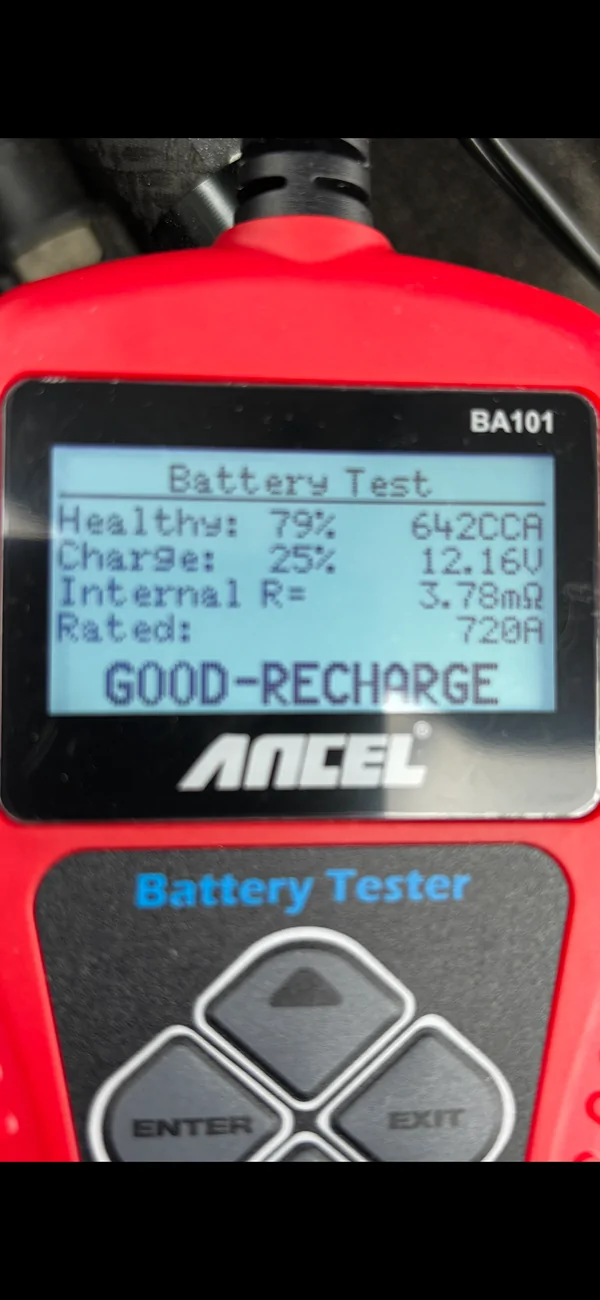
so my truck sat for 3 days and here’s my meter reading this morning (18* here this morning) now I upped the SOC to, can’t remember to what I did (can find my notes) so this may have something to do with its condition..what do you guys think?
IMG_7505.webp
Sponsored

 
Last edited:


Top