Sponsored

Can we solve this, finally? Ambient light and USB hub issues

TannerVoss1231

Well-Known Member
First Name
Tanner
Joined
Jun 15, 2021
Threads
24
Messages
125
Reaction score
133
Location
Colorado, United States
Vehicle(s)
2020 Ranger Lariat
Occupation
Web Developer
So my USB hub stopped working completely last week.
I've seen many posts like this, this is a widespread issue.
I ordered a new one but after reading about the tie in with bient lighting... I turned ambient lighting back on and suddenly my Android Auto works again, with drop outs.
Now I have to continually change ambient light settings
What's going on??

I've heard it can be a sign of a battery about to go out.

I disconnected my battery for an hour and reset everything. Havent had issues with Android Auto but now my auto up and down feature on the driver's window doesn't work.

Is there a software issue? Any way to do a full reset and update to the most current? What do we do?
Sponsored

 
Last edited:

DukeCanBuildit

Well-Known Member
First Name
Duke
Joined
Jul 27, 2020
Threads
66
Messages
9,668
Reaction score
46,254
Location
Kitchener, Ontario
Vehicle(s)
2019 XLT SuperCab - FTW!
Occupation
Retired (P/T) Caregiver (F/T)
Vehicle Showcase
1

Big Blue

Well-Known Member
First Name
Lee
Joined
May 5, 2020
Threads
16
Messages
3,930
Reaction score
9,374
Location
Wisconsin
Vehicle(s)
2019 Ford Ranger XLT FX4 Supercrew lighting blue
Occupation
Retired mechanical designer
There is a procedure to reset the driver window auto up/down that needs to be done anytime you disconnect the battery. I beleive it's in the owners manual.

Glad I don't have the ambient lighting on my XLT. I have no issues with my USBs.
 

airline tech

Well-Known Member
Joined
Aug 24, 2022
Threads
28
Messages
4,468
Reaction score
8,544
Location
Midwest - KS
Vehicle(s)
2022 Ranger Lariat-Super Crew, Cactus Gray
Occupation
Aircraft Tech
I have been trying to figure this out and since I do not have an issue with mine, it's strictly guess work.

EDIT:
When I first posted this, I had the OP's issue backwards, as I was thinking the issue arose with Ambient Lighting (ON) the Hub was inop, then realized that the hub was inop and he turned ambient lighting on, and it works. (But drops off)
Either scenario, though points to a ground issue in my opinion or a power loss at the APIM itself
which can be checked - see below


The manuals do give a specific failure (Pinpoint-Test) for this specific issue and how it ties into (Ambient Lighting)

The Ambient Lighting (itself) is separate from the Sync System and has NOTHING to do with the light on the USB Hub or USB Power.

However, and this is a GUESS since there is NO direction for troubleshooting this issue.

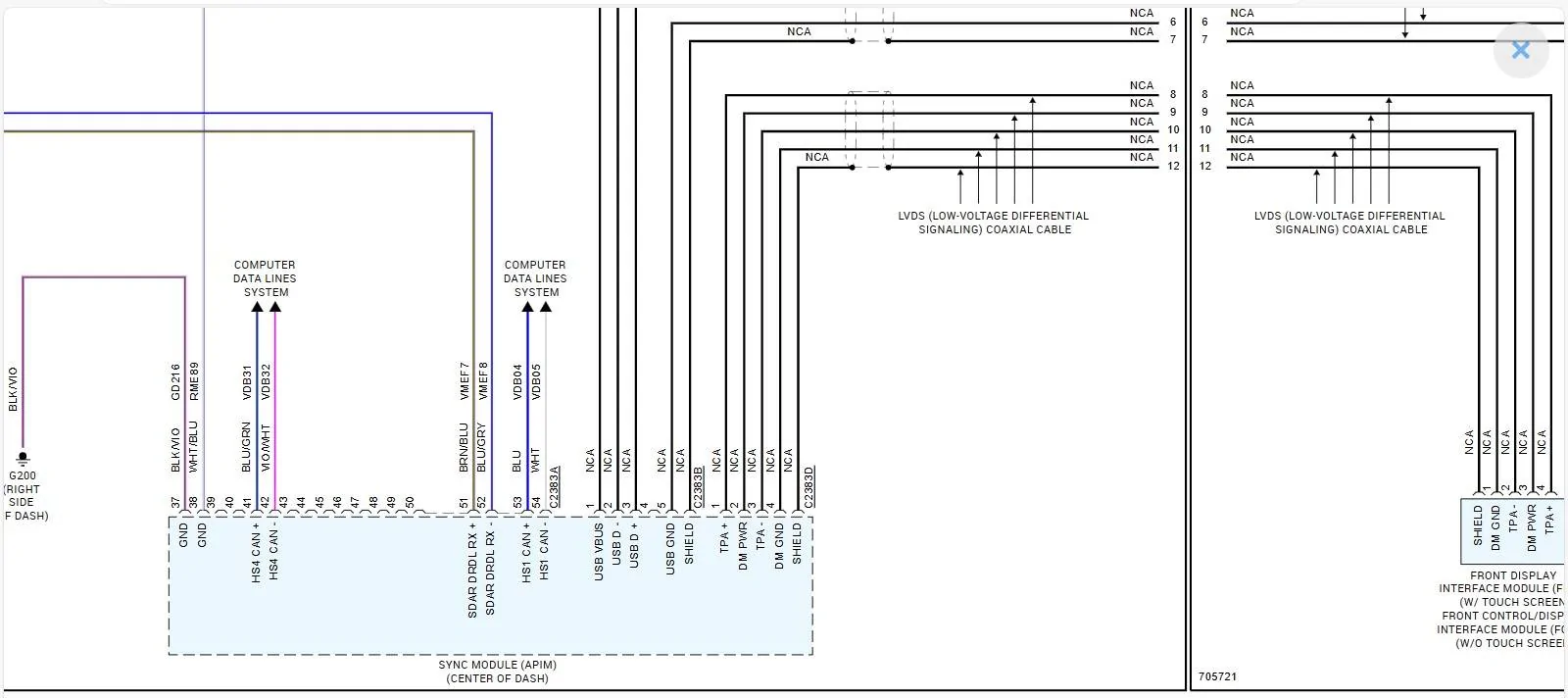
So, the best that I can tell, is that the HS1-CAN input here is the direct control for the Ambient Lighting, and when it is turned on - it is generating a circuit disruption within the APIM.

EDIT:
The actual input (Ambient) Lighting (Change-Adjustment) on the display (control inputs) is communicated via HS3-CAN to the GWM, the GWM then provides the change request via HS1-CAN to the BCM (which provides the actual - color and intensity change) on the circuit.


So, some possibilities here are:

1. Ambient Lighting Circuit (Issue) bleeding over into the APIM (Sync Module) via HS1-CAN Bus
Think of it this way, I am not 100% certain that the HS1-CAN is actually the control, but if it is, it is an Intergrated switch vs a physical button and rotary dial. (Rheostat)

The Ambient Lighting itself - is self-contained Power & Ground and a LIN Circuit - controlled by the BCM.

The Lin Circuit is the (adjustable control) for color / brightness.

There is no direct connection for the LIN Circuit to the APIM to control it, the BCM receives communication via the HS1-CAN Bus for control. (IF I AM CORRECT) in this assessment.

There is a Direct Connection between the BCM & APIM (noted below) Pins 53 & 54 HS1-CAN

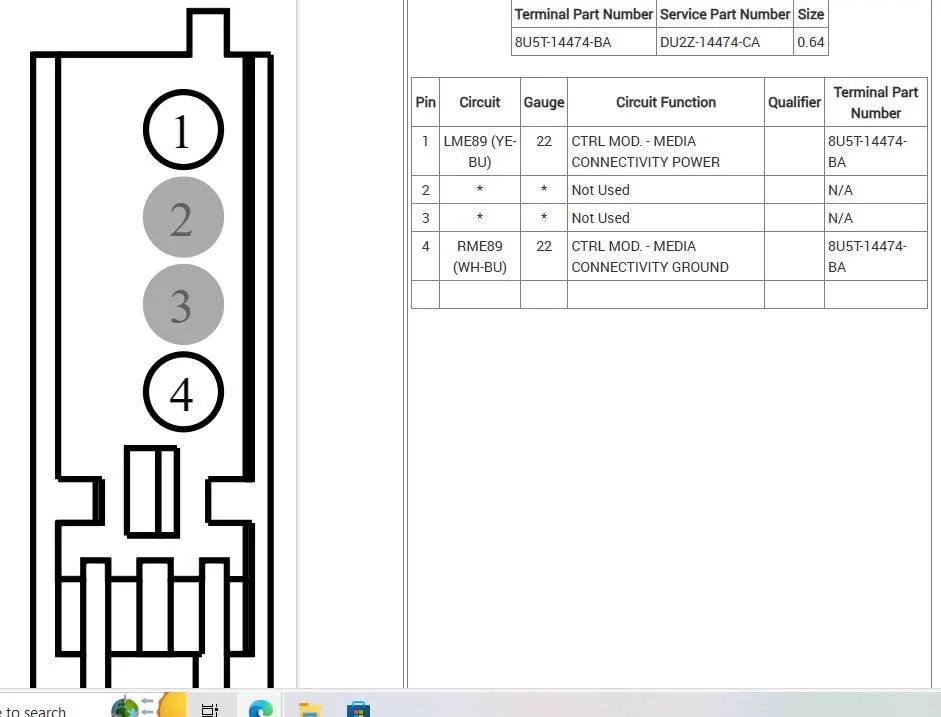
Note: Not Pictured but the (Input) into the APIM Pin #38 is the Ground for the USB Hub, note this is not a physical ground. The ground is internal of the APIM, which is grounded by another pin which is grounded at G200.

There is another possible source of voltage anomaly and that is from the short harness cable from the FCIM to the APIM, this I believe is for the display (separate) dimming features.
RH Side of the Pic - Shows this cable connection.

2. Bad Ground for the APIM
Adding voltage to the circuit with a bad ground, could cause the HUB to drop off when the Ambient Lighting is turned on and the display input brightness would possibly be affected as well.

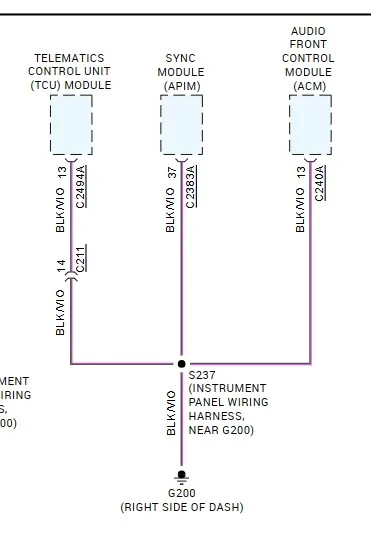
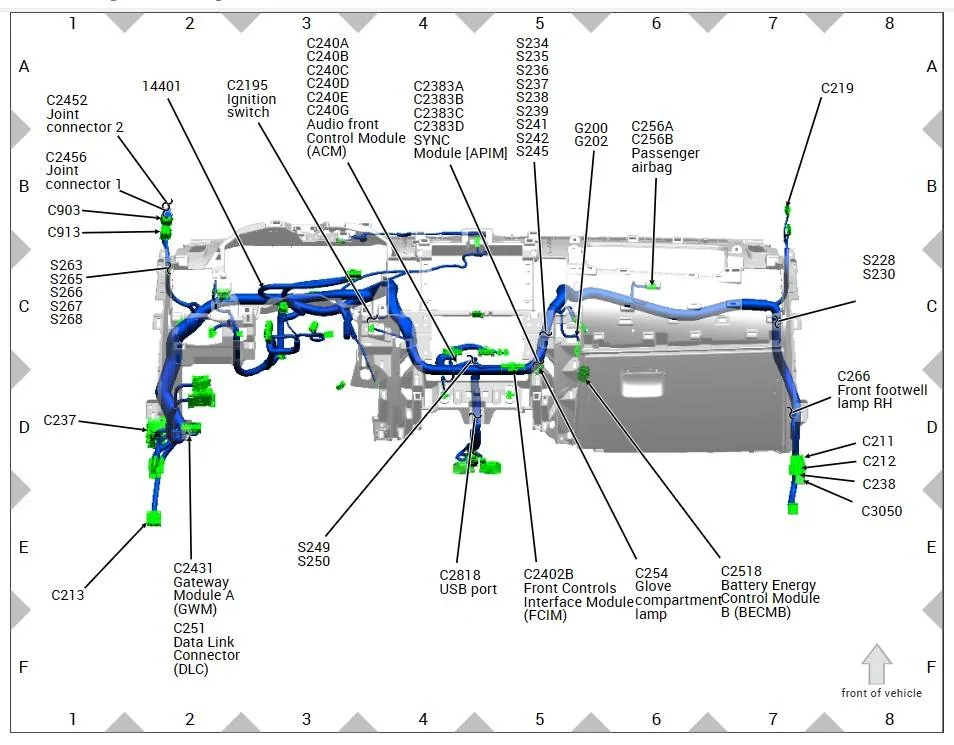
So, with that, my thoughts go to a bad ground for the APIM @ G200
If not an Ambient Lighting circuit issue

Sync Hub Ground.jpeg


A easy way to check the Ground, without pulling the APIM out is to check the Ground at the USB Hub connector.
Using Ohms scale
I would check it (3) ways - Pin #4 to Ground and then Check Pin #4 to the Ground Point G200
see if you have a resistance difference between the 2 readings. Should be about 3 Ohms.
To ensure you have a verified ground check, disconnect ground point G200 and direct wire check the ground wire G200 to Pin #4
If all 3 show 3 Ohms, its good, possibly give the wire harness a few light tugs and shakes to ensure wire integrity of the ground and make sure your Ohm reading remains constant.

With the Hub Connector, disconnected it would be a good idea to check voltage at Pin #1
Ignition On (should be reading your current battery voltage)
Between Pins 1 & 4

Switch Ambient Lighting (ON) and (OFF) see if the voltage changes. (It should not alter)

Note: Pin #4 goes to the APIM Pin # 38, the (unseen in the diagram) as I I stated.
This should be a direct feed to ground via Pin # 37

C2809a.jpeg


Note it has a splice, so the G200 point may be good, but bad at the splice.

G200 -Wire.jpeg


G200 Location (By Glovebox)

G200 Location.jpeg
 
Last edited:

Msfitoy

Well-Known Member
First Name
Sid
Joined
Mar 5, 2019
Threads
67
Messages
9,198
Reaction score
28,381
Location
North Carolina
Vehicle(s)
2019 Ranger, 2003 MINI Cooper S, 2021 Honda CT125
Occupation
NWO Robot Polisher
Vehicle Showcase
1
There is a procedure to reset the driver window auto up/down that needs to be done anytime you disconnect the battery. I beleive it's in the owners manual.

Glad I don't have the ambient lighting on my XLT. I have no issues with my USBs.
I don't have ambient on my XLT but have occasional USB power outage or power and signal...no rhyme or reason...


OP
OP
TannerVoss1231

TannerVoss1231

Well-Known Member
First Name
Tanner
Joined
Jun 15, 2021
Threads
24
Messages
125
Reaction score
133
Location
Colorado, United States
Vehicle(s)
2020 Ranger Lariat
Occupation
Web Developer
@airline tech Thank you for all that info!

I did a factory reset followed by some software updates yesterday. I had no issues during a quick run to the grocery store following this. New USB hub shows up today (i'll install this regardless, I got one with a USB-C port in it), hopefully I'll be able to go drive around a bit soon to test
 
OP
OP
TannerVoss1231

TannerVoss1231

Well-Known Member
First Name
Tanner
Joined
Jun 15, 2021
Threads
24
Messages
125
Reaction score
133
Location
Colorado, United States
Vehicle(s)
2020 Ranger Lariat
Occupation
Web Developer
*UPDATE*

Well this could be good news.
I just took two 45+ minute trips to pick up a new desk and never had a single USB connection drop out.
Still have the new hub coming today that I'll just consider an upgrade and not a repair part.

***IF YOU ARE HAVING THIS ISSUE***
-Do a factory reset from your Sync screen. Settings --> General --> Master Reset
-Update anything it wants to update. I have used CyanLabs but this time I just let the truck scan and update over Wi-Fi
Sponsored


Top