Sponsored

Update on Updating Sync

Mark W

Well-Known Member
First Name
Mark
Joined
Dec 11, 2018
Threads
34
Messages
199
Reaction score
177
Location
Woodbury Mn
Vehicle(s)
2012 Jeep Grand Cherokee
I am beyond frustrated on updating my sync. For those who did not read my prior post, I have been having the same issues as everyone else on the older sync version. Was recommended by everyone to just update to latest version. I'm no tech genius on this stuff and I knew I would have issues but I've done it before and knew I could do it again. Or so I thought. HEre is what I ahve done and where I'm at. I need your help again to get this fixed.

1. Used a known good 32GB USB stick. Formatted to the proper format (xFAT32 or something like that). Formatted bth quick formatting and long formatting.
2. Went to Ford site and followed their instructions to a "T" on downloading files onto computuer, using Windows Explorer to ind the files and them transfer them to my USB. Everything fineup to here.
3. WEnt to truck and conducted 2 soft resets. No issues
4. Tried to do a Master Reset and when I hit continue, nothing happened except the screen froze. Tried multiple times same result
5. Did a couple more soft resets.
6. Inserted USB into USB drive and got the following error below.
7. Repeated process with same results a couple of times.
8. Went to cyan labs and tried their method. Followed directions to a "T" again. First time I downloaded both the map and other updates. Took forever.
9. WEnt to truck and did soft and master reset with same results.
10. Inserted USB stick in USB drive and got the same error code.
11. WEnt back to Cyan Labs and just downloaded software update with no maps.
12. Repeated same process with same error code.

Really need help. My sync is geting worse and I use it everyday. All suggestions are welcome as always. Thank you

IMG_7352.webp
Sponsored


alcohenusa

Well-Known Member
First Name
Alan
Joined
Jul 22, 2020
Threads
12
Messages
480
Reaction score
728
Location
CO
Vehicle(s)
2020 Ranger Lariat 4x4
Occupation
Retired
I am beyond frustrated on updating my sync. For those who did not read my prior post, I have been having the same issues as everyone else on the older sync version. Was recommended by everyone to just update to latest version. I'm no tech genius on this stuff and I knew I would have issues but I've done it before and knew I could do it again. Or so I thought. HEre is what I ahve done and where I'm at. I need your help again to get this fixed.

1. Used a known good 32GB USB stick. Formatted to the proper format (xFAT32 or something like that). Formatted bth quick formatting and long formatting.
2. Went to Ford site and followed their instructions to a "T" on downloading files onto computuer, using Windows Explorer to ind the files and them transfer them to my USB. Everything fineup to here.
3. WEnt to truck and conducted 2 soft resets. No issues
4. Tried to do a Master Reset and when I hit continue, nothing happened except the screen froze. Tried multiple times same result
5. Did a couple more soft resets.
6. Inserted USB into USB drive and got the following error below.
7. Repeated process with same results a couple of times.
8. Went to cyan labs and tried their method. Followed directions to a "T" again. First time I downloaded both the map and other updates. Took forever.
9. WEnt to truck and did soft and master reset with same results.
10. Inserted USB stick in USB drive and got the same error code.
11. WEnt back to Cyan Labs and just downloaded software update with no maps.
12. Repeated same process with same error code.

Really need help. My sync is geting worse and I use it everyday. All suggestions are welcome as always. Thank you
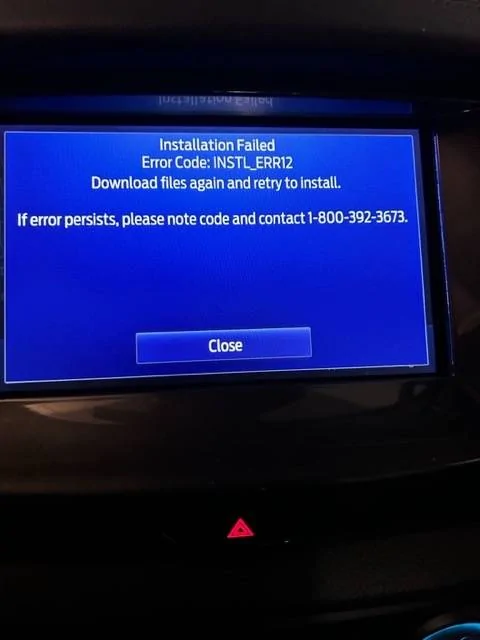
IMG_7352.jpg
Unfortunately, the only fix I can find online for your error code involved having the APIM replaced. If you have any warranty, then I would go to a dealer with this issue.

The only other thing I can suggest would be to try using the Cyan Labs tool to create a USB for the RWDATA cleaner tool and then try a Master Reset again, then the upgrade. (Have not used Cyan Labs myself).
 

Trigganometry

Well-Known Member
First Name
Rick
Joined
Dec 4, 2020
Threads
153
Messages
5,833
Reaction score
25,359
Location
Massachusetts
Vehicle(s)
20 XLT scab 301A/tow 4X4 magnetic w/sport blackout
Occupation
Engineering
For me the Ford method was always a fail, period. The cyan labs route has always worked for me. Try a different USB stick with more memory. Might be the issue
 

alcohenusa

Well-Known Member
First Name
Alan
Joined
Jul 22, 2020
Threads
12
Messages
480
Reaction score
728
Location
CO
Vehicle(s)
2020 Ranger Lariat 4x4
Occupation
Retired
Found this on F150 Forum:

NAVVOICE_ERR01 - Error is NAV_VOICE_ERROR
BGMAP_ERR01 - Error is BGMAP_ERROR

LIC_ERR01 - Error is MAP_LICENSE_MISMATCH_ERROR
LIC_ERR02 - Error is LICENSE_READING_ERROR

INSTL_ERR03 - Error is SCRIPT_PERMISSION_CHANGE_ERROR
INSTL_ERR04 - Error is SCRIPT_FILE_NOT_PRESENT_ERROR
INSTL_ERR05 - Error is POPUP_UTILITY_EXECUTION_ERROR
INSTL_ERR06 - Error is IMAGE_MOVING_ERROR
INSTL_ERR07 - Error is WRITING_NAV_LICENSE_TO_DPS_ERROR
INSTL_ERR08 - Error is APPS_TOGGLE_ERROR
INSTL_ERR09 - Error is IMAGE_TOGGLE_ERROR
INSTL_ERR10 - Error is APPS_UPDATE_BOOT_ERROR
INSTL_ERR11 - Error is APPS_UPDATE_PART_ERROR
INSTL_ERR12 - Error is DIR_CREATION_ERROR
INSTL_ERR13 - Error is UNMOUNT_ERROR
INSTL_ERR14 - Error is ACTIVATION_PENDING_ERROR
INSTL_ERR15 - Error is UNABLE_TO_FIND_PASSIVE_PARTITION_ERROR

LST_ERR03 - Error is LST_ERR_NO_APPROPRIATE_SECTION
LST_ERR04 - Error is LST_ERR_NO_SECTION
LST_ERR05 - Error is LST_PKG_FILE_NOT_FOUND
LST_ERR06 - Error is LST_ERR_MALICIOUS_CHAR
LST_ERR07 - Error is LST_ERR_NO_OPEN1_PARAM
LST_ERR08 - Error is LST_ERR_OPEN_LIMIT_EXCEEDED

VER_ERR01 - Error is VER_UNABLE_TO_FIND_VER_FILE
VER_ERR02 - Error is VER_FPN_EMPTY
VER_ERR03 - Error is VER_ERR_PARSE_VER_INF
VER_ERR04 - Error is VER_FILENAME_EMPTY
VER_ERR05 - Error is VER_VIN_MISMATCH
VER_ERR06 - Error is VER_ESN_MISMATCH
VER_ERR07 - Error is VER_TIME_LIMIT_EXCEED
VER_ERR08 - Error is VER_SETTING_VER_INFO_ERROR
VER_ERR09 - Error is VER_SAVE_LOCATION_EMPTY_INVALID_ERROR
VER_ERR10 - Error is VER_FPN_VERSION_MOVING_IN_TMP_ERROR
VER_ERR11 - Error is VER_FPN_IMAGE_FILE_NOT_PRESENT
VER_ERR12 - Error is VER_FILE_HASH_VALUE_NOT_PRESENT
VER_ERR13 - Error is VER_FILE_SIZE_NOT_PRESENT
VER_ERR14 - Error is VER_PKG_TYPE_NOT_PRESENT
VER_ERR15 - Error is VER_FILE_NOT_PRESENT_TO_CALC_HASH

MEM_ERR01 - Error is MEM_NOSPACE_TO_COPY
MEM_ERR03 - Error is MEM_NOSPACE_TO_EXTRACT

PKG_ERR02 - Error is PKG_DWNLD_PKG_NOT_FOUND
PKG_ERR03 - Error is PKG_UNTAR_FAILURE
PKG_ERR04 - Error is PKG_REVOKED

SIGN_ERR01 - Error is UNSIGN_ERROR
SIGN_ERR02 - Error is SIGN_HASH_VALUE_MISMATCH
SIGN_ERR03 - Error is SIGN_CERTS_NOT_PRESENT_ON_SYNC
SIGN_ERR04 - Error is INSTALL_ERROR
SIGN_ERR05 - Error is SCRIPT_INSTALL_ERROR
 

SigOris

Well-Known Member
First Name
John
Joined
May 18, 2022
Threads
47
Messages
1,243
Reaction score
4,089
Location
Greenwood Maine
Vehicle(s)
MY23 F150 CC Lariat PB & MY25 Mustang GT Convertible 60th #0807
Occupation
Retired DoD EE
I found i had to unzip/extract the files on the usb stick then move things around so the file structure matched the ford site


egilbe

Well-Known Member
First Name
Earl
Joined
Jul 10, 2019
Threads
10
Messages
613
Reaction score
1,386
Location
Somewhere between ME and AZ, depends on the season
Vehicle(s)
2020 Ford Ranger Lariat with BAP, Tow and FX4
Occupation
Semi-retired, lazy bum/tramp, formerly Sys admin in a toxic work environment
I just did this today to fix my navigation and radio issues. I was planning on replacing the APIM module since its the exact same symptoms. Happy I tried the sync update instead. It was pretty flawless.

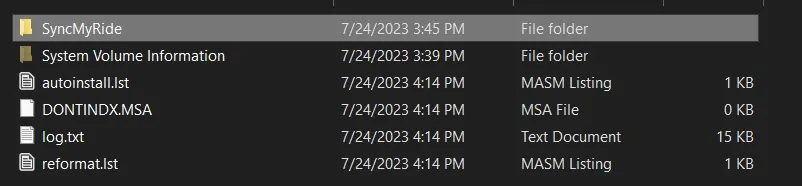
It doesn't sound like the drive is allowing a write to happen. Can you take a screenshot of your files in the flash drive you are using to install sync update?
 

PltFX4

Well-Known Member
First Name
Richard
Joined
Jan 29, 2020
Threads
26
Messages
692
Reaction score
1,270
Location
Minneapolis, MN
Vehicle(s)
2019 Ranger Lariat FX4
Don't know if this will help but here goes...

I used the Cyan Labs method. So, does your jump drive look like this?? The below worked perfectly. This was for the Sync 3.4.23088 update of Sync and Maps

This what my 32gb jump drive looks like at the root directory:
2023-09-11_21-08-33.jpg


This is whats in the SyncMyRide folder...

2023-09-11_21-08-56.jpg
 
First Name
Michael
Joined
Apr 16, 2023
Threads
2
Messages
18
Reaction score
16
Location
Palm Springs, California
Vehicle(s)
2019 Ranger XL SuperCrew STX
Unfortunately, the only fix I can find online for your error code involved having the APIM replaced. If you have any warranty, then I would go to a dealer with this issue.

The only other thing I can suggest would be to try using the Cyan Labs tool to create a USB for the RWDATA cleaner tool and then try a Master Reset again, then the upgrade. (Have not used Cyan Labs myself).
Another way to fix this is to use FDRS to load the original software to Sync then once it’s working, use FDRS or other means to upgrade the software. I prefer to use CyanLabs.
 

donsmith

Well-Known Member
First Name
Don
Joined
Feb 26, 2022
Threads
7
Messages
62
Reaction score
117
Location
Dallas, TX
Vehicle(s)
2022 Ranger Lariat
Occupation
Television cameraman and video editor
I am beyond frustrated on updating my sync. For those who did not read my prior post, I have been having the same issues as everyone else on the older sync version. Was recommended by everyone to just update to latest version. I'm no tech genius on this stuff and I knew I would have issues but I've done it before and knew I could do it again. Or so I thought. HEre is what I ahve done and where I'm at. I need your help again to get this fixed.

1. Used a known good 32GB USB stick. Formatted to the proper format (xFAT32 or something like that). Formatted bth quick formatting and long formatting.
2. Went to Ford site and followed their instructions to a "T" on downloading files onto computuer, using Windows Explorer to ind the files and them transfer them to my USB. Everything fineup to here.
3. WEnt to truck and conducted 2 soft resets. No issues
4. Tried to do a Master Reset and when I hit continue, nothing happened except the screen froze. Tried multiple times same result
5. Did a couple more soft resets.
6. Inserted USB into USB drive and got the following error below.
7. Repeated process with same results a couple of times.
8. Went to cyan labs and tried their method. Followed directions to a "T" again. First time I downloaded both the map and other updates. Took forever.
9. WEnt to truck and did soft and master reset with same results.
10. Inserted USB stick in USB drive and got the same error code.
11. WEnt back to Cyan Labs and just downloaded software update with no maps.
12. Repeated same process with same error code.

Really need help. My sync is geting worse and I use it everyday. All suggestions are welcome as always. Thank you

IMG_7352.jpg
When I last worked at a Ford dealership six months ago, the factory Nav was the worst! It didn’t know about our three year old dealership even on new cars just off the truck, for example. OK, just get the location coordinates and save it, right? Nope! Can’t save lat-long locations! For me, I always have my phone GPS on the screen which worked WAY better! Also, I connected my phone to the truck using a dongle to create a wireless Air Play connection. Ah… perfection.
 

alcohenusa

Well-Known Member
First Name
Alan
Joined
Jul 22, 2020
Threads
12
Messages
480
Reaction score
728
Location
CO
Vehicle(s)
2020 Ranger Lariat 4x4
Occupation
Retired
When I last worked at a Ford dealership six months ago, the factory Nav was the worst! It didn’t know about our three year old dealership even on new cars just off the truck, for example. OK, just get the location coordinates and save it, right? Nope! Can’t save lat-long locations! For me, I always have my phone GPS on the screen which worked WAY better! Also, I connected my phone to the truck using a dongle to create a wireless Air Play connection. Ah… perfection.
You can save lat-long locations. My new house was not in the original maps when we got the truck so I added in the location using lat-long.

Here’s a video on how to do it. It has the older Sync 3 so it looks a little different but it works the same.


Ohwell

Well-Known Member
Joined
Jul 19, 2023
Threads
2
Messages
76
Reaction score
94
Location
Minnesota
Vehicle(s)
2023 Ford Ranger XLT FX4
Occupation
Retired
I am beyond frustrated on updating my sync. For those who did not read my prior post, I have been having the same issues as everyone else on the older sync version. Was recommended by everyone to just update to latest version. I'm no tech genius on this stuff and I knew I would have issues but I've done it before and knew I could do it again. Or so I thought. HEre is what I ahve done and where I'm at. I need your help again to get this fixed.

1. Used a known good 32GB USB stick. Formatted to the proper format (xFAT32 or something like that). Formatted bth quick formatting and long formatting.
2. Went to Ford site and followed their instructions to a "T" on downloading files onto computuer, using Windows Explorer to ind the files and them transfer them to my USB. Everything fineup to here.
3. WEnt to truck and conducted 2 soft resets. No issues
4. Tried to do a Master Reset and when I hit continue, nothing happened except the screen froze. Tried multiple times same result
5. Did a couple more soft resets.
6. Inserted USB into USB drive and got the following error below.
7. Repeated process with same results a couple of times.
8. Went to cyan labs and tried their method. Followed directions to a "T" again. First time I downloaded both the map and other updates. Took forever.
9. WEnt to truck and did soft and master reset with same results.
10. Inserted USB stick in USB drive and got the same error code.
11. WEnt back to Cyan Labs and just downloaded software update with no maps.
12. Repeated same process with same error code.

Really need help. My sync is geting worse and I use it everyday. All suggestions are welcome as always. Thank you

IMG_7352.jpg
If you are dead set on updating using Ford's updater, I would still go to Cyanlabs and use the Syn3updater to download the rw data cleaner utility to a USB stick and run that first, then go back and try to update again with Ford's updater. But again using any non-Ford items is at your own risk.
 

donsmith

Well-Known Member
First Name
Don
Joined
Feb 26, 2022
Threads
7
Messages
62
Reaction score
117
Location
Dallas, TX
Vehicle(s)
2022 Ranger Lariat
Occupation
Television cameraman and video editor
You can save lat-long locations. My new house was not in the original maps when we got the truck so I added in the location using lat-long.

Here’s a video on how to do it. It has the older Sync 3 so it looks a little different but it works the same.

Thank you for the video. I see the ‘Save’ button but the location wasn’t saved in the video. For me, I could not make the system save my lat-long location. Maybe it was because I did not know to put in a space before the comma. Will test on my ‘22 Ranger Lariat later.
 

hookem57

Well-Known Member
First Name
Don
Joined
Sep 2, 2022
Threads
7
Messages
191
Reaction score
356
Location
Fort Worth
Vehicle(s)
2021 Ranger Tremor
Occupation
Driver
I am beyond frustrated on updating my sync. For those who did not read my prior post, I have been having the same issues as everyone else on the older sync version. Was recommended by everyone to just update to latest version. I'm no tech genius on this stuff and I knew I would have issues but I've done it before and knew I could do it again. Or so I thought. HEre is what I ahve done and where I'm at. I need your help again to get this fixed.

1. Used a known good 32GB USB stick. Formatted to the proper format (xFAT32 or something like that). Formatted bth quick formatting and long formatting.
2. Went to Ford site and followed their instructions to a "T" on downloading files onto computuer, using Windows Explorer to ind the files and them transfer them to my USB. Everything fineup to here.
3. WEnt to truck and conducted 2 soft resets. No issues
4. Tried to do a Master Reset and when I hit continue, nothing happened except the screen froze. Tried multiple times same result
5. Did a couple more soft resets.
6. Inserted USB into USB drive and got the following error below.
7. Repeated process with same results a couple of times.
8. Went to cyan labs and tried their method. Followed directions to a "T" again. First time I downloaded both the map and other updates. Took forever.
9. WEnt to truck and did soft and master reset with same results.
10. Inserted USB stick in USB drive and got the same error code.
11. WEnt back to Cyan Labs and just downloaded software update with no maps.
12. Repeated same process with same error code.

Really need help. My sync is geting worse and I use it everyday. All suggestions are welcome as always. Thank you

IMG_7352.webp
I just did mine. Both updates actually. Have a '21 Tremor Lariat. I paired mine to wifi and did something else for awhile. It took "Awhile" too. Hope maybe you can do this?
 

Bkfore

Member
First Name
Bob
Joined
Sep 11, 2020
Threads
0
Messages
16
Reaction score
33
Location
Savannah
Vehicle(s)
2019 Lariat 2wd magnetic
Occupation
Retired
Took 2hrs and 12 min to update maps withe the factory ford usb. Didn't read the fine print when bought vs. download. Not worth the $$$..
 
OP
OP

Mark W

Well-Known Member
First Name
Mark
Joined
Dec 11, 2018
Threads
34
Messages
199
Reaction score
177
Location
Woodbury Mn
Vehicle(s)
2012 Jeep Grand Cherokee
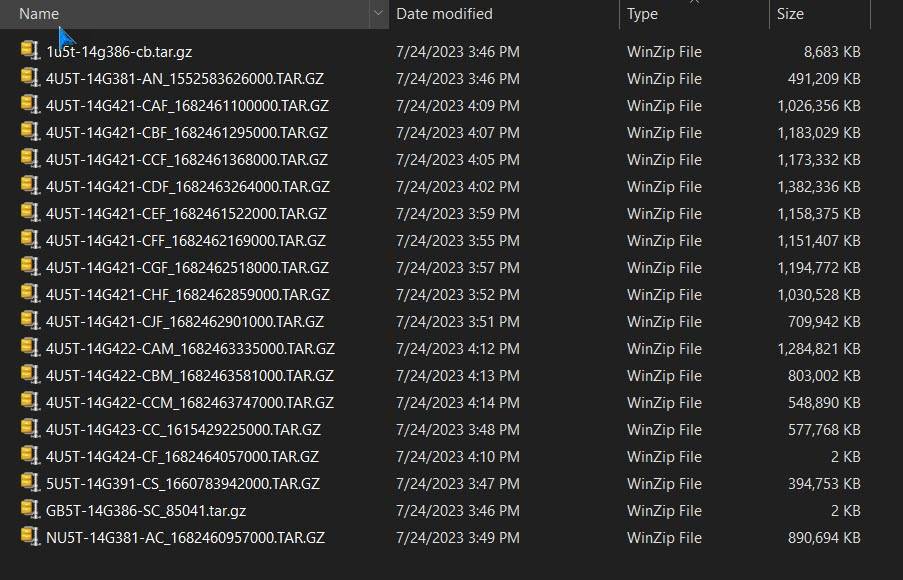
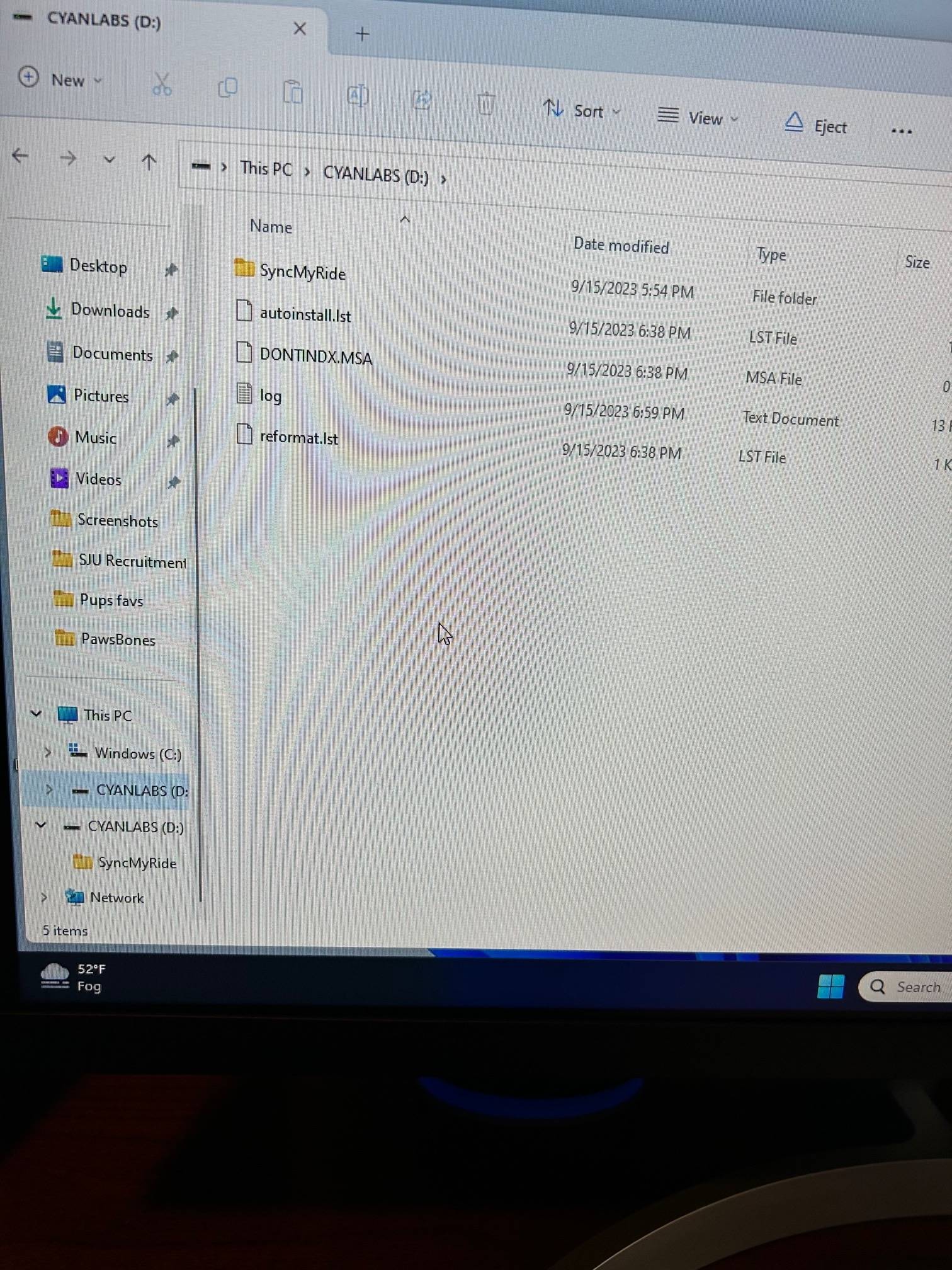
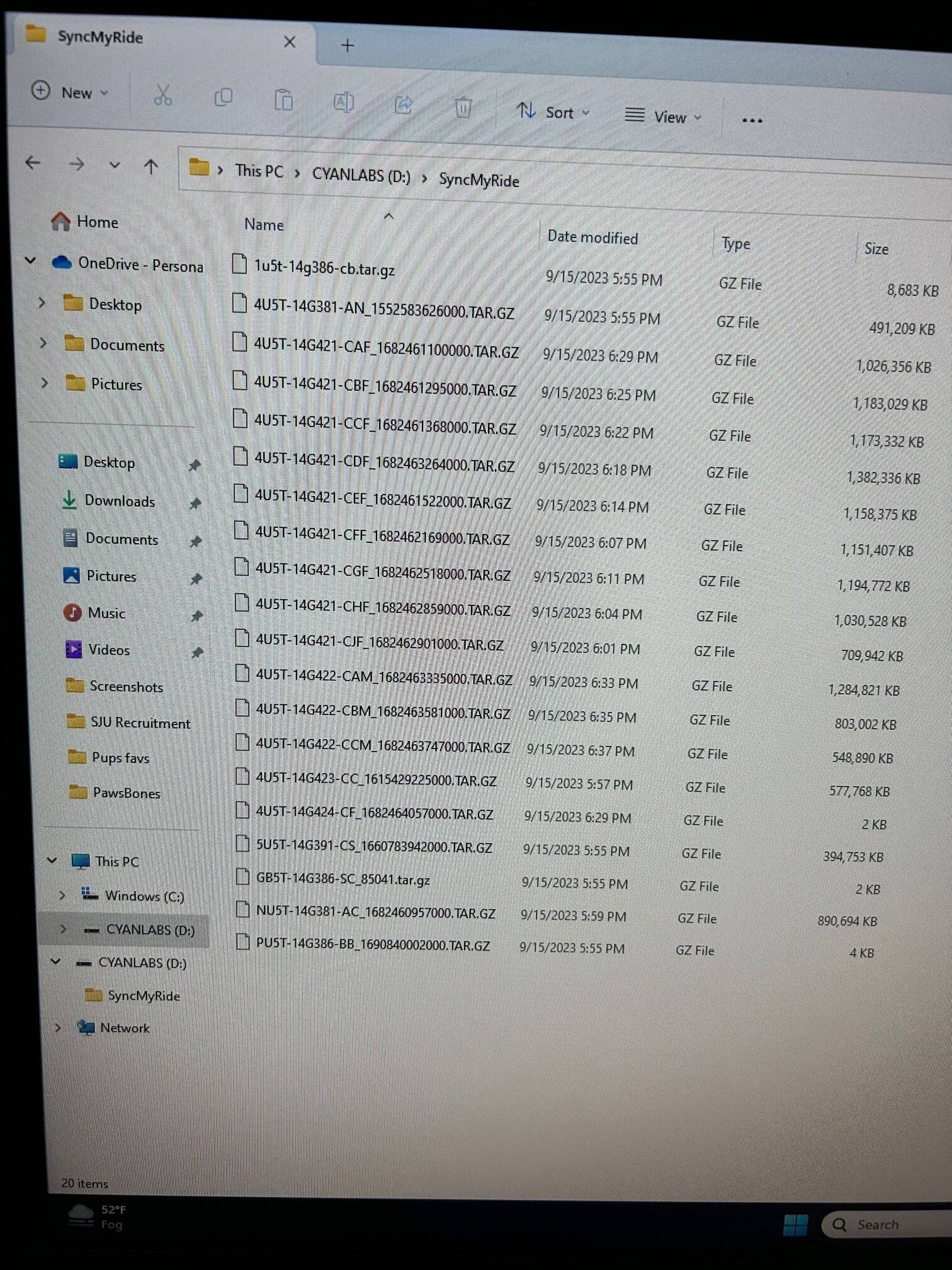
Here are the files as downloaded from CyanLabs. Please note, I did not choose the most recent Sync software verion this time but one up from the crap I have now. Thoughts? And I really appreciate the help on this. Thanks -

IMG_7357.jpg


IMG_7358.jpg
Sponsored


Top