airline tech
Well-Known Member
- Joined
- Aug 24, 2022
- Threads
- 28
- Messages
- 4,473
- Reaction score
- 8,545
- Location
- Midwest - KS
- Vehicle(s)
- 2022 Ranger Lariat-Super Crew, Cactus Gray
- Occupation
- Aircraft Tech
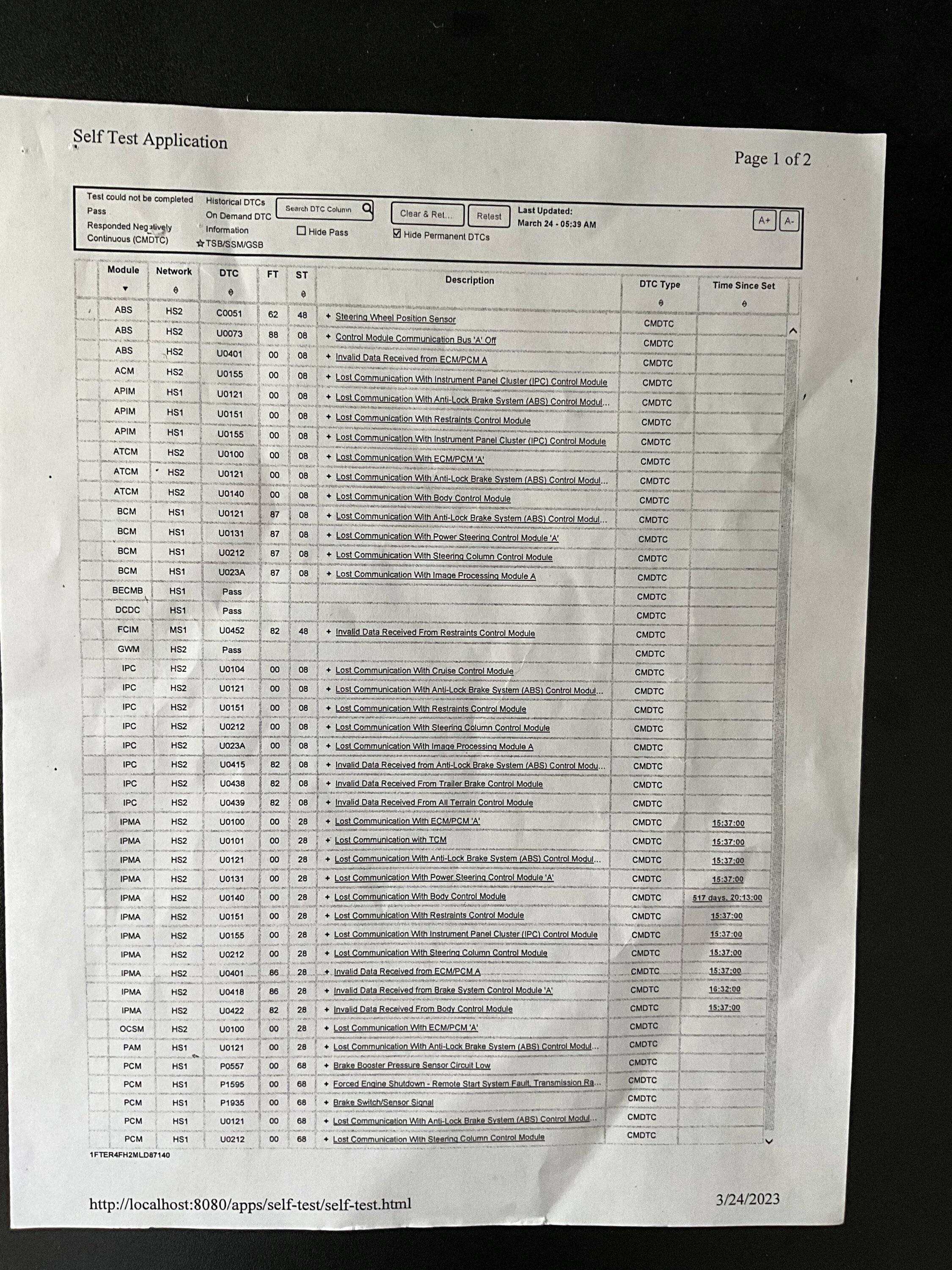
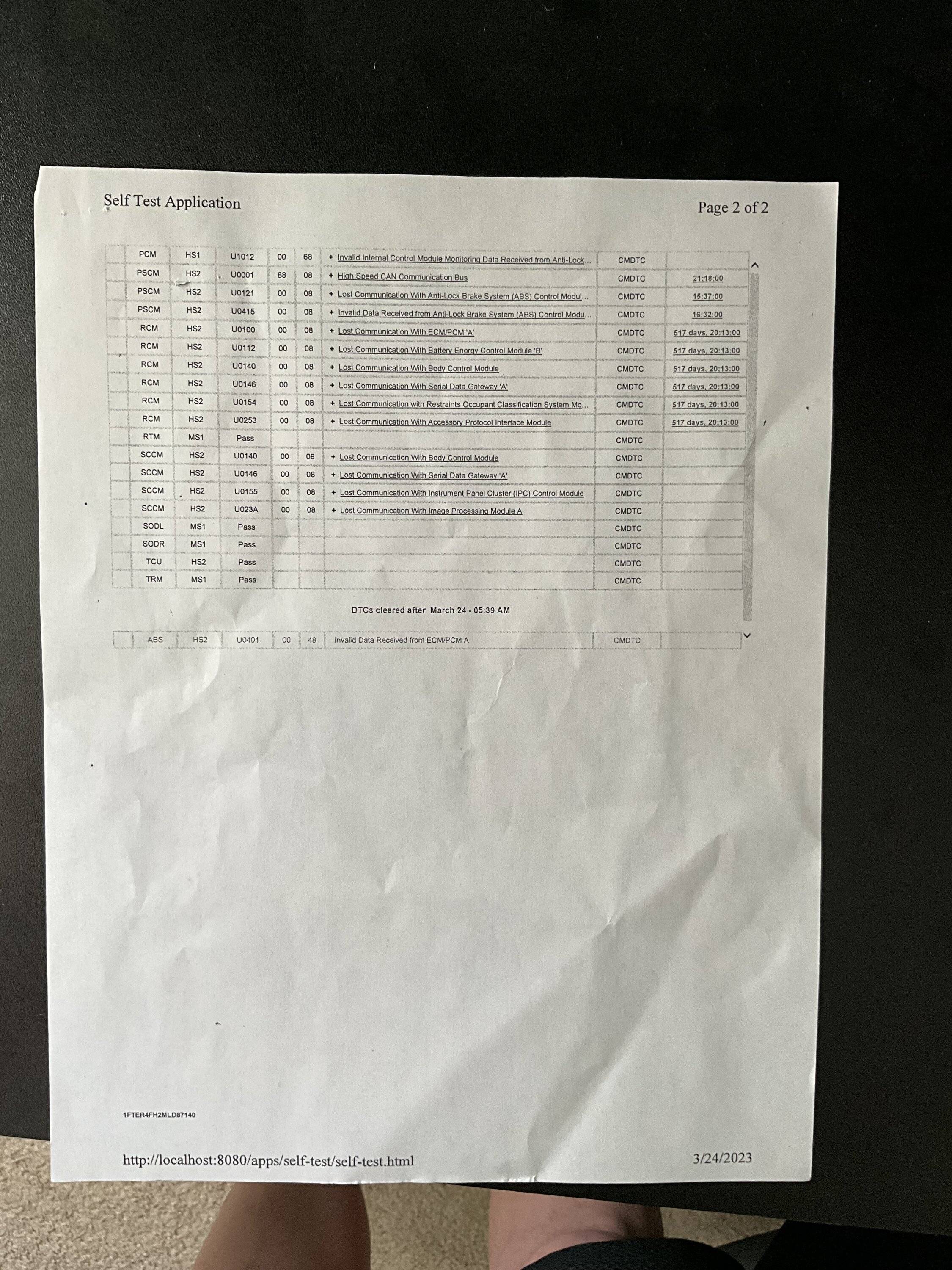
I still think the problem lies on that HSCAN 2 Bus, any module or wiring along that Bus can cause this. The Modules include - GWM-Gateway Module, this module is the main brain that sees all communication between the modules, other Modules are the Front Camera Imaging Module, ABS, Power Steering Control Module, Steering Wheel Control Module, Heads Up Display. There are multiple (Joint Connectors) along the Bus as well.
So its either on the HSCAN2 (Communication Bus) or on the (Power/Ground Side of the Modules)
if it is on the Power/Ground side, the defective module is communicating via the (Com) bus that it is not powered and sending that information along the bus telling the other modules to disable due to loss of input from the defective module, this I believe is what is happening and as I stated earlier this is a needle in a haystack to find, one of the best options would be to have the scanner hooked up and monitor the (Vpwr) inputs to the modules and hopefully it will show itself at the time of your Fault Tree of Doom, there is also a Freeze Frame (Snap-Shot) on the scanner that should trigger when the fault occurred, this will show some troubleshooting information as well.
I agree with Phil, take it to another dealer that has a Avionics (Electrical Troubleshooting) strength, otherwise you are dealing (shot gun troubleshooting) Throw a Part at it and hopefully it fixes it which works most of the time, but since this involves multiple faults and multiple possibilities its going to need the entire system split apart and separated and wiring checks for each separate module It could be as simple as reseating (1) connector will fix the issues.
Another thing to do is run multiple module tests with the scanner on each module, as by your descriptions it only faults at start up and not while actually driving.
At every start, the modules perform a power up (self-test), with the scanner you can force the self-test to perform,
if this does not show any faults (As you need to pin-point what is actually creating the fault)
The Following you can do yourself to Aid and or eliminate the possible
1. Start Truck -multiple times with door closed, (Monitor Faults)
2. Open and Close - (Any Door-that gets (normally opened) on your daily routine, separately.
Start Truck Multiple times (Monitor Faults)
3. Move Steering Wheel to different positions (Clockwise/Counterclockwise) , Start Truck Multiple Times (Monitor Faults)
4. If you have a keyed ignition (jiggle key) in the switch and start multiple times (Monitor Faults)
Doing this will possibly eliminate any issues with these items, hopefully you can find a possible (Duplicate it every time I do this) the faults show up
So its either on the HSCAN2 (Communication Bus) or on the (Power/Ground Side of the Modules)
if it is on the Power/Ground side, the defective module is communicating via the (Com) bus that it is not powered and sending that information along the bus telling the other modules to disable due to loss of input from the defective module, this I believe is what is happening and as I stated earlier this is a needle in a haystack to find, one of the best options would be to have the scanner hooked up and monitor the (Vpwr) inputs to the modules and hopefully it will show itself at the time of your Fault Tree of Doom, there is also a Freeze Frame (Snap-Shot) on the scanner that should trigger when the fault occurred, this will show some troubleshooting information as well.
I agree with Phil, take it to another dealer that has a Avionics (Electrical Troubleshooting) strength, otherwise you are dealing (shot gun troubleshooting) Throw a Part at it and hopefully it fixes it which works most of the time, but since this involves multiple faults and multiple possibilities its going to need the entire system split apart and separated and wiring checks for each separate module It could be as simple as reseating (1) connector will fix the issues.
Another thing to do is run multiple module tests with the scanner on each module, as by your descriptions it only faults at start up and not while actually driving.
At every start, the modules perform a power up (self-test), with the scanner you can force the self-test to perform,
if this does not show any faults (As you need to pin-point what is actually creating the fault)
The Following you can do yourself to Aid and or eliminate the possible
1. Start Truck -multiple times with door closed, (Monitor Faults)
2. Open and Close - (Any Door-that gets (normally opened) on your daily routine, separately.
Start Truck Multiple times (Monitor Faults)
3. Move Steering Wheel to different positions (Clockwise/Counterclockwise) , Start Truck Multiple Times (Monitor Faults)
4. If you have a keyed ignition (jiggle key) in the switch and start multiple times (Monitor Faults)
Doing this will possibly eliminate any issues with these items, hopefully you can find a possible (Duplicate it every time I do this) the faults show up
Sponsored
Last edited: