Sponsored

SYNC 3.4 UPDATES like craaaazy ?

  • Thread starter Deleted member 15965
  • Start date
  • Watchers 7

Deleted member 15965

I have sync 3.4 build 22200_ PRODUCT
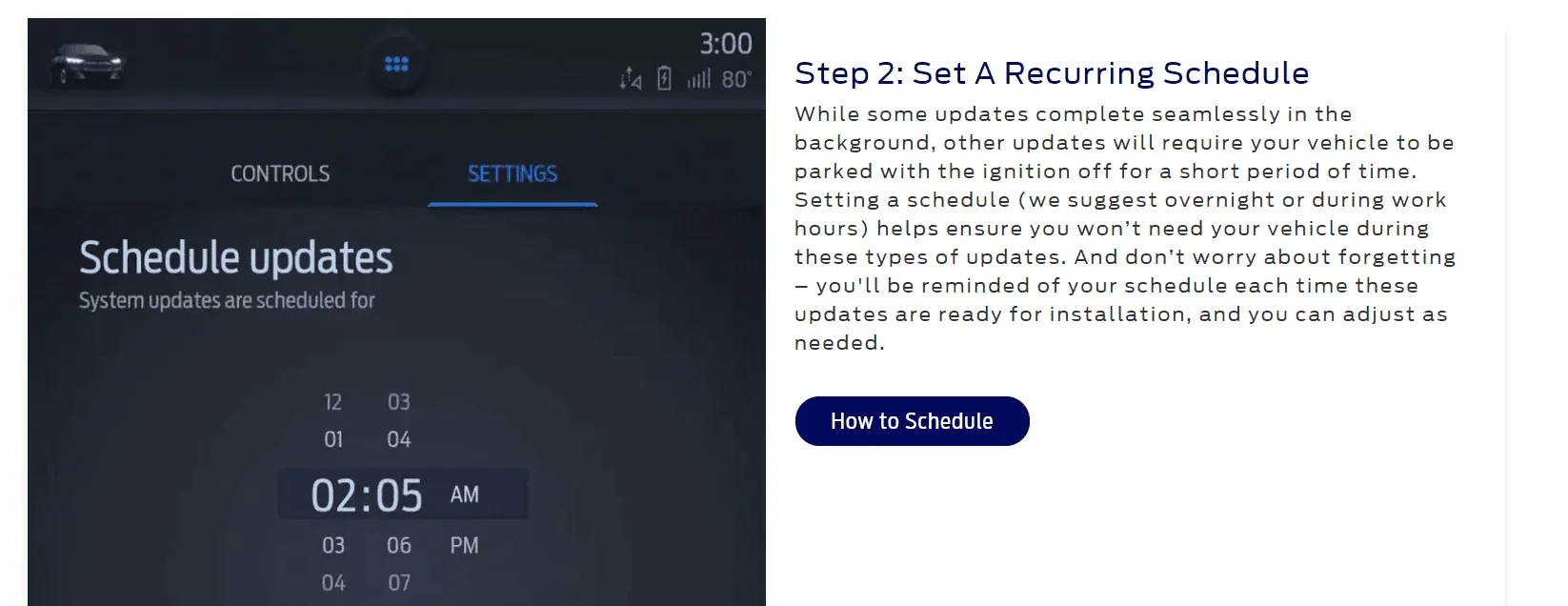
And literally have been doing wifi updates(through my phone's 5/5ghz mobile hotspot wifi) and literally each update is around 1 GB and it's update after update after updatei take pics of screen to make sure they're all different and it's not just fucking up and redoing the same ones and I'm at the 9th update now, i haven't been checking or doing them for about a year but now I'm doing them daily and they never stop what the actual fuck does Ford not understand how to roll up all previous non major version changes into one update like the rest of the tech industry mainly does?
Also i never see any changes in function or features so it must be security and or bugs, but i haven't had any bugs or issues... Makes me wonder how bad the ecu must be in our trucks because we can't update those yet apparently they can't get a simple infotainment system to be proper and needs a 90s hard drive worth of data every God damn update

Fucking useless

Anyone have any idea about any of this?
Is there a way to get all previous non version changes updates in one package
Sponsored

 

Dgc333

Well-Known Member
First Name
Dave
Joined
Aug 24, 2021
Threads
17
Messages
1,742
Reaction score
4,112
Location
Massachusetts
Vehicle(s)
21 Ranger Lariat
Occupation
Engineer
IMHO, Ford issues very few updates. When I got my Ranger in Aug 21 there was an update that Ford pushed out to my truck that fixed an issue with Travel Link not communicating with the nav system correctly and just recently they pushed out 3.4.22200. Two updates in a year is not a lot.

My Android phone gets an update about every other month, my smart watch every three months and it seems like Widows gets an update weekly.
 

JesseS

Well-Known Member
First Name
Jesse
Joined
May 26, 2021
Threads
19
Messages
1,755
Reaction score
4,824
Location
NorCal (Roseville)
Vehicle(s)
2021 Ranger XLT FX4, Jayco 26' Class A
Occupation
Retired, work is a four letter word.
I haven't had any updates since 3.4.22200 first rolled out, but I am on the trucks hotspot still so might not notice, or it updates via my home wifi while sitting in the garage. My truck is sitting in the garage on battery tender and I still got the going to sleep notice, so that is on a timed cycle and not actually based on battery state, stupid low tech Ford.
 

LoneRNGR

Well-Known Member
First Name
John
Joined
May 8, 2020
Threads
11
Messages
470
Reaction score
862
Location
Lubbock, Texas
Vehicle(s)
2020 Ford Ranger XLT
Occupation
Systems Engineer
My truck is sitting in the garage on battery tender and I still got the going to sleep notice, so that is on a timed cycle and not actually based on battery state, stupid low tech Ford.
When you connect your battery tender, the negative wire (black) needs to be connected to the vehicle ground, not the negative post on the battery, otherwise you are bypassing the Battery Monitoring Sensor. Stupid high-tech Ford!
 
OP
OP

Deleted member 15965

I haven't had any updates since 3.4.22200 first rolled out, but I am on the trucks hotspot still so might not notice, or it updates via my home wifi while sitting in the garage. My truck is sitting in the garage on battery tender and I still got the going to sleep notice, so that is on a timed cycle and not actually based on battery state, stupid low tech Ford.
First with your battery tender which side of the negative sensor are you on? See there is a little black square on negative post if you connected straight to the battery after that box then the bms isn't seeing the charging you need to go before it, id suggest you connect the negative charger terminal to a solid ground on the engine block or to one of the many grounded cables bolted onto the inner engine bay then see what happens, I'm certain that's what's going on

Also you can't do sync updates through the trucks wifi hotspot, for some dumb reason i don't know why but Ford should have it so if you're using data through the trucks modem and data sim etc you should be able to toggle updates via that on or off ,,, mostly cause if you have a low data plan it'll suck up a lot of data, and in the garage it'll only update when you have either key in accessory mode or turned on and even then it takes for fucking ever

I could post the pics of my sync screen to show the update file names if anyone wants to see them

Im just getting sick of the electronics tech side of this truck, i also get that battery sleep message occasionally but hasn't happened as frequently as the first 6 months of ownership brand new


JesseS

Well-Known Member
First Name
Jesse
Joined
May 26, 2021
Threads
19
Messages
1,755
Reaction score
4,824
Location
NorCal (Roseville)
Vehicle(s)
2021 Ranger XLT FX4, Jayco 26' Class A
Occupation
Retired, work is a four letter word.
When you connect your battery tender, the negative wire (black) needs to be connected to the vehicle ground, not the negative post on the battery, otherwise you are bypassing the Battery Monitoring Sensor. Stupid high-tech Ford!
My battery tender is hardwired, and the neg IS connected to ground, and as a past F&E tech I am well aware of the function of a BMS.
 
OP
OP

Deleted member 15965

IMHO, Ford issues very few updates. When I got my Ranger in Aug 21 there was an update that Ford pushed out to my truck that fixed an issue with Travel Link not communicating with the nav system correctly and just recently they pushed out 3.4.22200. Two updates in a year is not a lot.

My Android phone gets an update about every other month, my smart watch every three months and it seems like Widows gets an update weekly.
Ya but those aren't a truck they're always connected and don't take an hour to do a700mb update file and even you if pay for the mobile hotspot in the truck you can't use that to do these updates and like i said it's tons actually did yet another one this morning after posting,,, wondering if it's ever going to end and they don't give any details as to what it's updating and unless it's a revision change checking current software version only reports the same it's just stupid
 

airline tech

Well-Known Member
Joined
Aug 24, 2022
Threads
28
Messages
4,456
Reaction score
8,517
Location
Midwest - KS
Vehicle(s)
2022 Ranger Lariat-Super Crew, Cactus Gray
Occupation
Aircraft Tech
I did mine via USB, inserted USB, started truck, got system updating note at top of home screen after about 2 minutes, then got pop up message system restarting and once it restarted it said to cycle ign, cycled ignition - got system updating again, ran about 5 minutes and got update complete, update will take effect after restart, shut-off and restarted truck, system updated to 22200.
Whole Process about 10 minutes, when I tried over Wi-Fi it stated system was up to date at the older version, so I tried the USB method and it worked
I think its file size is due to the fact that is the total file size for the software, when you update it only, changes (updates) the files that need updating, it's not actually deleting and installing the whole 1 gb file, if it was to do this, you would lose all sync functionality, during the update process, plus it is built in to cover skipped updates from factory settings, unlike other MFG like Jeep, if you skip an update, it will not perform update until you install skipped update first, and if you wait too long, good luck finding that update online for download, it is a dealer only access now. I currently have this issue with wife's Jeep, so I know this well

If you are updating over Wi-Fi, you are downloading the 1 GB file, but it is only using that file as a reference file to scan the software on the truck, and it actually installs what is needed. The downloading time is what takes the longest and depending on your network speed, files may get corrupted, so for updates to sync, it's easier and better to use USB, cleaner install and hopefully no issues. At least this is my experience since I have Wi-Fi coverage in the garage but it's not close to the router it is rather weak signal, but it does connect but very slow

Note: I have noticed that the Ford Website, lags as far as available updates go, if you're at 22200 you are fully updated to current version, so the Ford Pass app or whatever is leading you down the road to update needed, is not communicating to the truck that it is updated, or you are having corrupt file with the Mobile (OTA) download and it's not registering it is fully updated (Complete) , stuck in the cycle - this is where the USB version should fix the issue

Like I said, mine took 10 minutes or so, with Zero issues via USB
 
Last edited:

Muddy Fenders

Banned
Banned
First Name
Judd
Joined
May 27, 2022
Threads
5
Messages
282
Reaction score
852
Location
Canada
Vehicle(s)
2019 Ranger
Occupation
Retired
I haven't had any updates since 3.4.22200 first rolled out, but I am on the trucks hotspot still so might not notice, or it updates via my home wifi while sitting in the garage. My truck is sitting in the garage on battery tender and I still got the going to sleep notice, so that is on a timed cycle and not actually based on battery state, stupid low tech Ford.
Its an assumption that after 2 weeks your battery may be in a low enough state, so thats why the timed cycle and notification. Some batteries may be in worse shape prior to that, others may not be, but none the less the system takes your battery offline to conserve whatever is there.
 

jblc

Well-Known Member
First Name
JB
Joined
Nov 15, 2020
Threads
75
Messages
749
Reaction score
644
Location
USA
Vehicle(s)
2021 XLT FX2 supercab
For those who updated to 3.4.22200, is it worth updating to the latest sync? I'm still on early 2021, with no sync problems, so not sure what i'd gain by updating (given the issues ppl were seeing when updating...so i held off).
Usually product updates = more intrusion/less privacy (vs new features)
 

Dgc333

Well-Known Member
First Name
Dave
Joined
Aug 24, 2021
Threads
17
Messages
1,742
Reaction score
4,112
Location
Massachusetts
Vehicle(s)
21 Ranger Lariat
Occupation
Engineer
Ya but those aren't a truck they're always connected and don't take an hour to do a700mb update file and even you if pay for the mobile hotspot in the truck you can't use that to do these updates and like i said it's tons actually did yet another one this morning after posting,,, wondering if it's ever going to end and they don't give any details as to what it's updating and unless it's a revision change checking current software version only reports the same it's just stupid
Something is wrong with your Sync system. Last year 3.4.20194 was released and in the past month or so 3.4.22200 was released. There has not been any other updates released from Ford. If you are on 3.4.22200 there is nothing to update.

i would guess that it is trying to down load the same update over and over. I would do a master reset which fixes a lot of glitches and if that doesn't work turn automatic updates off. Updates from Ford are few and far between and they typically only fix bugs that you may or may not ever experience.
When they went from 3.2 to 3.4 was the last time any features were added. Plus you will here about any updates that do come out on the forum and can decide to install or not.
 

Highlander

Well-Known Member
First Name
Frank
Joined
Feb 3, 2022
Threads
11
Messages
566
Reaction score
2,595
Location
Nova Scotia, Canada
Vehicle(s)
2021 Ford Ranger Shadow Black Lariat 501A TREMOR
Occupation
Private
Vehicle Showcase
1

airline tech

Well-Known Member
Joined
Aug 24, 2022
Threads
28
Messages
4,456
Reaction score
8,517
Location
Midwest - KS
Vehicle(s)
2022 Ranger Lariat-Super Crew, Cactus Gray
Occupation
Aircraft Tech
Vs 21194 was the last update vs prior to 22200
Sponsored


Top