Sponsored

Official map update coming soon…. (Sep, 2022)

VAMike

Well-Known Member
First Name
Mike
Joined
Feb 22, 2019
Threads
1
Messages
3,390
Reaction score
4,408
Location
Virginia
Vehicle(s)
2019 Ranger Lariat SuperCab
The nav system will work indefinitely. Ford may charge for map updates but in the big scheme of things the updates are mostly for points of interest. I have a couple of TomTom units that I purchased in the early 2000s that have not been updated in 15 or so years and still will get me where I need to go.
must be nice. my nav doesn't know about road reroutes and new bridges built several years ago, which leads to some...interesting route guidance.

of course, the update just gives me MEM_ERR01 so I have no idea whether it's any better. I'm torn between saying "screw it" because I always use waze anyway, and wanting ford to fix it just because it's their fault their update process sucks.
Sponsored

 

Progeny2021

Banned
Banned
First Name
Joe
Joined
Oct 20, 2021
Threads
24
Messages
1,211
Reaction score
2,692
Location
Charlotte, NC
Vehicle(s)
2019 Ranger Lariat Super Crew Cab
Occupation
Retired
must be nice. my nav doesn't know about road reroutes and new bridges built several years ago, which leads to some...interesting route guidance.

of course, the update just gives me MEM_ERR01 so I have no idea whether it's any better. I'm torn between saying "screw it" because I always use waze anyway, and wanting ford to fix it just because it's their fault their update process sucks.
Is your SYNC3 unit turned off for the entire process? It should be - you should only be seeing the default screen of the available functions and a mini map. I just performed my 2nd update - prompts were clear - went without a hitch.

The blinking blue LED on the end of the USB stick will turn off at the end of the process when a prompt will advise the process is completed.
 

VAMike

Well-Known Member
First Name
Mike
Joined
Feb 22, 2019
Threads
1
Messages
3,390
Reaction score
4,408
Location
Virginia
Vehicle(s)
2019 Ranger Lariat SuperCab
Is your SYNC3 unit turned off for the entire process? It should be - you should only be seeing the default screen of the available functions and a mini map. I just performed my 2nd update - prompts were clear - went without a hitch.

The blinking blue LED on the end of the USB stick will turn off at the end of the process when a prompt will advise the process is completed.
ERR_MEM01 is a fairly common problem that seems to indicate that the sync 3 unit has decided there isn't enough space internally for the update. AFAIK once it's gotten into that state it can't be fixed with any kind of wishful thinking involving different ways of playing with the installer, and requires something from ford to fix whatever went wrong in the past (by removing stuff to free up space internally). The thought of dealing with ford support is why I'm leaning toward saying "screw it".
 

UofMEngineer

Well-Known Member
Joined
Apr 19, 2019
Threads
1
Messages
516
Reaction score
334
Location
Michigan
Vehicle(s)
20' Escape Hybrid,18' Fusion Hybrid
ERR_MEM01 is a fairly common problem that seems to indicate that the sync 3 unit has decided there isn't enough space internally for the update. AFAIK once it's gotten into that state it can't be fixed with any kind of wishful thinking involving different ways of playing with the installer, and requires something from ford to fix whatever went wrong in the past (by removing stuff to free up space internally). The thought of dealing with ford support is why I'm leaning toward saying "screw it".
Yeah they’d need to send you a special update to run that just deletes the existing Nav files so you can then re-run the map update.
 

JimJ

Well-Known Member
First Name
Jim
Joined
Aug 26, 2021
Threads
1
Messages
228
Reaction score
372
Location
Twisp Washington
Vehicle(s)
07 FX4. Level2. 2022 SC FX4 on order
Occupation
Retired
My22 Ranger Owners:

Any 22 owners able to update, map update does not register that my Vin # is valid - I get error code, it thinks that the Vin belongs to something (<2010) and not eligible for update.

My truck was built in Aug 2022, and anything I do that wants Vin # (Ford Parts/Map Update etc) their systems do not register VIN # as valid. Too New I guess

I have Map vs NA20 and fully updated Sync - Installed Now, looking to get updated to NA21.

What is average time for Vin #'s to be Valid in Fords system?

On that note as dealer was not clear:

I know that Sirus XM is good for 3 months (Trial)
But what about Navigation? and it's yearly updates
Same here I received a message on my Ford Pass app. Went and entered my Vin and it said vehicle not covered


VAMike

Well-Known Member
First Name
Mike
Joined
Feb 22, 2019
Threads
1
Messages
3,390
Reaction score
4,408
Location
Virginia
Vehicle(s)
2019 Ranger Lariat SuperCab
Yeah they’d need to send you a special update to run that just deletes the existing Nav files so you can then re-run the map update.
I really don't understand why there isn't a (hidden?) option that just does that rather than this BS with special one-off update templates that need a support call.
 
OP
OP
alcohenusa

alcohenusa

Well-Known Member
First Name
Alan
Joined
Jul 22, 2020
Threads
12
Messages
478
Reaction score
727
Location
CO
Vehicle(s)
2020 Ranger Lariat 4x4
Occupation
Retired
Same here I received a message on my Ford Pass app. Went and entered my Vin and it said vehicle not covered
You might try contacting ALOM directly and see if they can figure out why your VIN isn’t working. I have have good luck by emailing them at [email protected].

Include the ESN along with your VIN. Be sure to give them the Sync ESN and not the Sirius ESN.
 

Fordup

Well-Known Member
First Name
Ed
Joined
Jun 3, 2022
Threads
17
Messages
1,924
Reaction score
9,497
Location
NY
Website
youtube.com
Vehicle(s)
2022 Black Lariat Crew , 1966 Chevrolet Biscayne
Occupation
Retired YouTube Creator
Same here I received a message on my Ford Pass app. Went and entered my Vin and it said vehicle not covered
Same with mine. Just went to update and entered the vin. Got a message that it's older then 2010 and not eligible for update. Something is wrong with fords vin numbers.
 

SigOris

Well-Known Member
First Name
John
Joined
May 18, 2022
Threads
47
Messages
1,242
Reaction score
4,088
Location
Greenwood Maine
Vehicle(s)
MY23 F150 CC Lariat PB & MY25 Mustang GT Convertible 60th #0807
Occupation
Retired DoD EE
Same with mine. Just went to update and entered the vin. Got a message that it's older then 2010 and not eligible for update. Something is wrong with fords vin numbers.
Same here and I’m tired of playing IT for two Ford vehicles
 

Progeny2021

Banned
Banned
First Name
Joe
Joined
Oct 20, 2021
Threads
24
Messages
1,211
Reaction score
2,692
Location
Charlotte, NC
Vehicle(s)
2019 Ranger Lariat Super Crew Cab
Occupation
Retired
I clicked on the link to download the map update, the webpage changed and there was no longer a link to download the license file. I had to pay for the USB stick. Do they need to make this process so convoluted ?

Install worked.

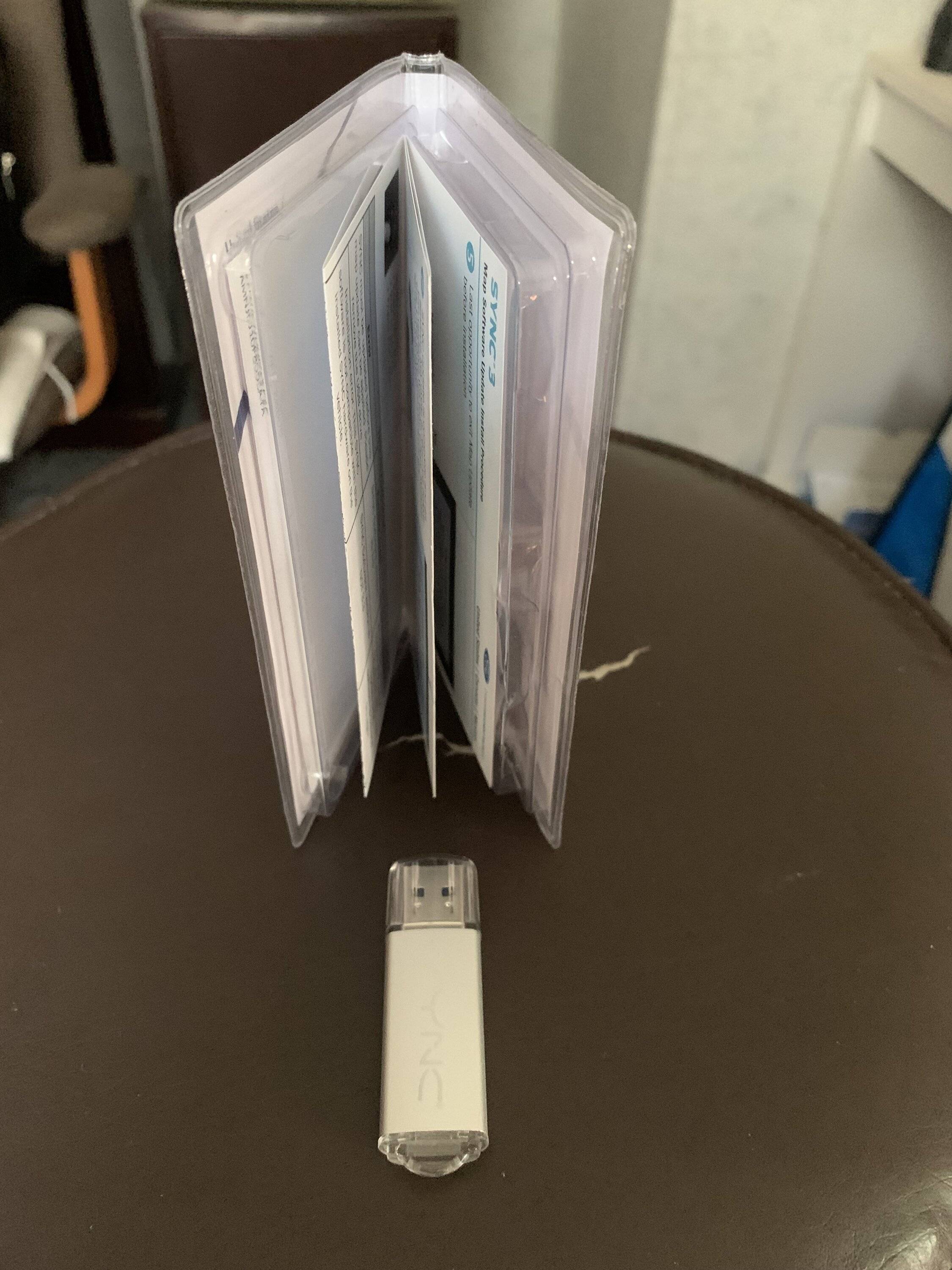
Anyone know how to format and reuse the Sync Map USB stick they send out by mail ?

Windows doesn't seem to recognize it.
I'm thinking the same thing but haven't tried it. Mac OS/Intel at home. Have accumulated two Ford Map Update USB update sticks so far - the 'blue light' is too cool!?!?

IMG_1716.JPG
 

JoeC

Well-Known Member
First Name
Joe
Joined
Oct 29, 2019
Threads
2
Messages
241
Reaction score
625
Location
New England
Vehicle(s)
2019 Ranger Lariat
I clicked on the link to download the map update, the webpage changed and there was no longer a link to download the license file. I had to pay for the USB stick. Do they need to make this process so convoluted ?

Install worked.

Anyone know how to format and reuse the Sync Map USB stick they send out by mail ?

Windows doesn't seem to recognize it.
I'm not sure what you mean that Windows 'doesn't recognize it'.
Yes, it's formatted exFat, which is special, but it should still 'recognize it'.
To turn it into a 'normal' USB, format it Fat32.
Is that what you mean?
 
OP
OP
alcohenusa

alcohenusa

Well-Known Member
First Name
Alan
Joined
Jul 22, 2020
Threads
12
Messages
478
Reaction score
727
Location
CO
Vehicle(s)
2020 Ranger Lariat 4x4
Occupation
Retired
I clicked on the link to download the map update, the webpage changed and there was no longer a link to download the license file. I had to pay for the USB stick. Do they need to make this process so convoluted ?

Install worked.

Anyone know how to format and reuse the Sync Map USB stick they send out by mail ?

Windows doesn't seem to recognize it.
The web site only lets you download the files one time so it must have thought that you already downloaded the update. However, you can download it again (free) if you kept the original email confirmation from the first download by using the link in that email.
 

Figarou

Well-Known Member
Joined
Mar 22, 2019
Threads
25
Messages
2,408
Reaction score
13,793
Location
Texas
Vehicle(s)
2022 Ford Edge ST, 2019 Ford Ranger Lariat
Blue light comes on, but the stick does not appear in File Explorer or Disk Management.

Would that be "not recognized" ?

If Windoze can't find it, then how to format ?


Use Diskpart

Windows 10
Open a command prompt as administrator

Windows 11
Open Terminal (Admin)

Type diskpart

In diskpart.... rescan

in diskpart... list disk

You should see a list of disks and drives on your PC. The USB stick is usually the smallest in size.

in diskpart... select disk and the number of the usb drive in the list. It could be 3 {select disk 3} Again look for the small size in the list. Don't confuse it with your recovery portion

In diskpart.... list partition

here you should see the partitions on that USB stick. If there's more than 1, then you have to delete it one by one. Let's say you have just one.

in diskpart.... select partition 1

in diskpart.... delete partition override.

Do that to each partition. You must select the partition 1st, then delete.

Finally
in diskpart..... create partition primary

USB should work in windows after that. Format it to your liking.
 

JoeC

Well-Known Member
First Name
Joe
Joined
Oct 29, 2019
Threads
2
Messages
241
Reaction score
625
Location
New England
Vehicle(s)
2019 Ranger Lariat
Use Diskpart

Windows 10
Open a command prompt as administrator

Windows 11
Open Terminal (Admin)

Type diskpart

In diskpart.... rescan

in diskpart... list disk

You should see a list of disks and drives on your PC. The USB stick is usually the smallest in size.

in diskpart... select disk and the number of the usb drive in the list. It could be 3 {select disk 3} Again look for the small size in the list. Don't confuse it with your recovery portion

In diskpart.... list partition

here you should see the partitions on that USB stick. If there's more than 1, then you have to delete it one by one. Let's say you have just one.

in diskpart.... select partition 1

in diskpart.... delete partition override.

Do that to each partition. You must select the partition 1st, then delete.

Finally
in diskpart..... create partition primary

USB should work in windows after that. Format it to your liking.
Well, I'll be darned!
MY computer was fooling me.
I also wanted to use one of my old $40 MAP update usbs for this update.
Everything looked good in file manager, BUT it just wouldn't write to the usb!
(It gave an error saying the device didn't exist.)
Sooo, with nothing to lose, I did as you said using diskpart.
And poof, everything now works!
THANKS for your help.
 

Figarou

Well-Known Member
Joined
Mar 22, 2019
Threads
25
Messages
2,408
Reaction score
13,793
Location
Texas
Vehicle(s)
2022 Ford Edge ST, 2019 Ford Ranger Lariat
Well, I'll be darned!
MY computer was fooling me.
I also wanted to use one of my old $40 MAP update usbs for this update.
Everything looked good in file manager, BUT it just wouldn't write to the usb!
(It gave an error saying the device didn't exist.)
Sooo, with nothing to lose, I did as you said using diskpart.
And poof, everything now works!
THANKS for your help.

I'm glad it worked for you. I forgot to put "enter" after each command. But you figured it out. ?
Sponsored


Top