Sponsored

Additional "Software Gauges" Available?

RAYJAY

Well-Known Member
First Name
Jeff
Joined
Aug 3, 2020
Threads
22
Messages
411
Reaction score
628
Location
UNION DALE PA
Vehicle(s)
2020 ranger pickup 2019 subaru

micl9

Well-Known Member
First Name
Mike
Joined
Dec 21, 2019
Threads
31
Messages
1,368
Reaction score
1,949
Location
Apex, NC
Vehicle(s)
2019 Ranger XLT Fx4 302A
Vehicle Showcase
1
Man - I have been hacking Android phones with XDA for ~10 yrs now. And love the developers over there. But this Stable version is not very stable.
Is anyone using the beta releases?

Need to go spend some time and read thru the entire development thread...
 

Big Blue

Well-Known Member
First Name
Lee
Joined
May 5, 2020
Threads
16
Messages
3,927
Reaction score
9,352
Location
Wisconsin
Vehicle(s)
2019 Ford Ranger XLT FX4 Supercrew lighting blue
Occupation
Retired mechanical designer
Anyone happen to know if this is compatible with Apple?
Unfortunately no, it is for Android Auto and Torque Pro. Both are Android only. Some people have bought an old Android phone to use it. It doesn't need a plan or phone access, just the ability to connect to your home WI-FI to download programs.
 

Gizmokid2005

Well-Known Member
Joined
Dec 1, 2019
Threads
13
Messages
1,279
Reaction score
1,875
Location
GA
Website
gizmokid2005.com
Vehicle(s)
2019 Ford Ranger XLT 4X4 SCrew
Occupation
SQL Developer
Vehicle Showcase
1
I've been using this since my last reply (though I haven't driven much) and so far have run into two issues.
  1. OBD2AA launches Torque, but it won't connect to my OBDII adapter unless I actually *open* Torque itself which is weird.
  2. Often the OBD2AA app won't pick up the Trans Temp PID from Torque and just sit at 0 as an idle gauge on the screen, and a majority of the time, I suspect because of this issue, it'll just lock up OBD2AA, crashing it, until I unplug and replug my phone back into my Ranger.
Other than that, this works really well. I definitely appreciate the DPI changes it allows to get more information on the screens (I've always hated how *big* everything is in AA).
 

micl9

Well-Known Member
First Name
Mike
Joined
Dec 21, 2019
Threads
31
Messages
1,368
Reaction score
1,949
Location
Apex, NC
Vehicle(s)
2019 Ranger XLT Fx4 302A
Vehicle Showcase
1
I have also had OBD2AA not start, but I may have a wonky cable.

What are you guys using for turbo boost?
Also has anyone nailed the blue color to match our stock gauges?


Big Blue

Well-Known Member
First Name
Lee
Joined
May 5, 2020
Threads
16
Messages
3,927
Reaction score
9,352
Location
Wisconsin
Vehicle(s)
2019 Ford Ranger XLT FX4 Supercrew lighting blue
Occupation
Retired mechanical designer
I have also had OBD2AA not start, but I may have a wonky cable.

What are you guys using for turbo boost?
Also has anyone nailed the blue color to match our stock gauges?
If your phone. Has been restarted or had an update your need to be sure and restart the head unit server, although a bad cable still could be the issue. Not all USB cables are data rated.

I'm just using the Standard Torque vacuum/boost PID. If you connect to your truck and fire up Torque, don't need to be plugged in. It will show you which PIDs are getting an output by highlighting them in green and showing the output value. That way you know which ones are available for our trucks.

For the blue I'm using 0 red, 145 green and 255 blue. Close enough for me, you can play with green setting if you want to tweak it.

Hope this helps, just my thoughts.
 

micl9

Well-Known Member
First Name
Mike
Joined
Dec 21, 2019
Threads
31
Messages
1,368
Reaction score
1,949
Location
Apex, NC
Vehicle(s)
2019 Ranger XLT Fx4 302A
Vehicle Showcase
1
If your phone. Has been restarted or had an update your need to be sure and restart the head unit server, although a bad cable still could be the issue. Not all USB cables are data rated.
Yup, learned that one! I needed a coil cable anyway, need to go try it.
I'm just using the Standard Torque vacuum/boost PID. If you connect to your truck and fire up Torque, don't need to be plugged in. It will show you which PIDs are getting an output by highlighting them in green and showing the output value. That way you know which ones are available for our trucks.
Awesome info I did not know that about Torque (and have been using it for years!)
For the blue I'm using 0 red, 145 green and 255 blue. Close enough for me, you can play with green setting if you want to tweak it.

Hope this helps, just my thoughts.
I will give that a try. I hate color matching! Old job history

and Thanks!
 

Gizmokid2005

Well-Known Member
Joined
Dec 1, 2019
Threads
13
Messages
1,279
Reaction score
1,875
Location
GA
Website
gizmokid2005.com
Vehicle(s)
2019 Ford Ranger XLT 4X4 SCrew
Occupation
SQL Developer
Vehicle Showcase
1
I've been using this since my last reply (though I haven't driven much) and so far have run into two issues.
  1. OBD2AA launches Torque, but it won't connect to my OBDII adapter unless I actually *open* Torque itself which is weird.
  2. Often the OBD2AA app won't pick up the Trans Temp PID from Torque and just sit at 0 as an idle gauge on the screen, and a majority of the time, I suspect because of this issue, it'll just lock up OBD2AA, crashing it, until I unplug and replug my phone back into my Ranger.
Other than that, this works really well. I definitely appreciate the DPI changes it allows to get more information on the screens (I've always hated how *big* everything is in AA).
I've at least solved #2, it appears that if I open torque before I plug-in to the truck, everything is fine, it's worked that way consistently for the past few trips. Still a weird one and I'm not at all sure about #1.
 

micl9

Well-Known Member
First Name
Mike
Joined
Dec 21, 2019
Threads
31
Messages
1,368
Reaction score
1,949
Location
Apex, NC
Vehicle(s)
2019 Ranger XLT Fx4 302A
Vehicle Showcase
1
Anyone have PID for Oil Pressure?
 

Big Blue

Well-Known Member
First Name
Lee
Joined
May 5, 2020
Threads
16
Messages
3,927
Reaction score
9,352
Location
Wisconsin
Vehicle(s)
2019 Ford Ranger XLT FX4 Supercrew lighting blue
Occupation
Retired mechanical designer

Mr.Scary

Well-Known Member
First Name
Joe
Joined
Oct 12, 2020
Threads
4
Messages
52
Reaction score
47
Location
Ontario
Vehicle(s)
2019 Ranger sport 4x4
Occupation
Heavy equipment operator
Yeah, I've used Torque for a long time, and I remember that. I just forgot to add them again since I switched phones. Thanks again for the help!

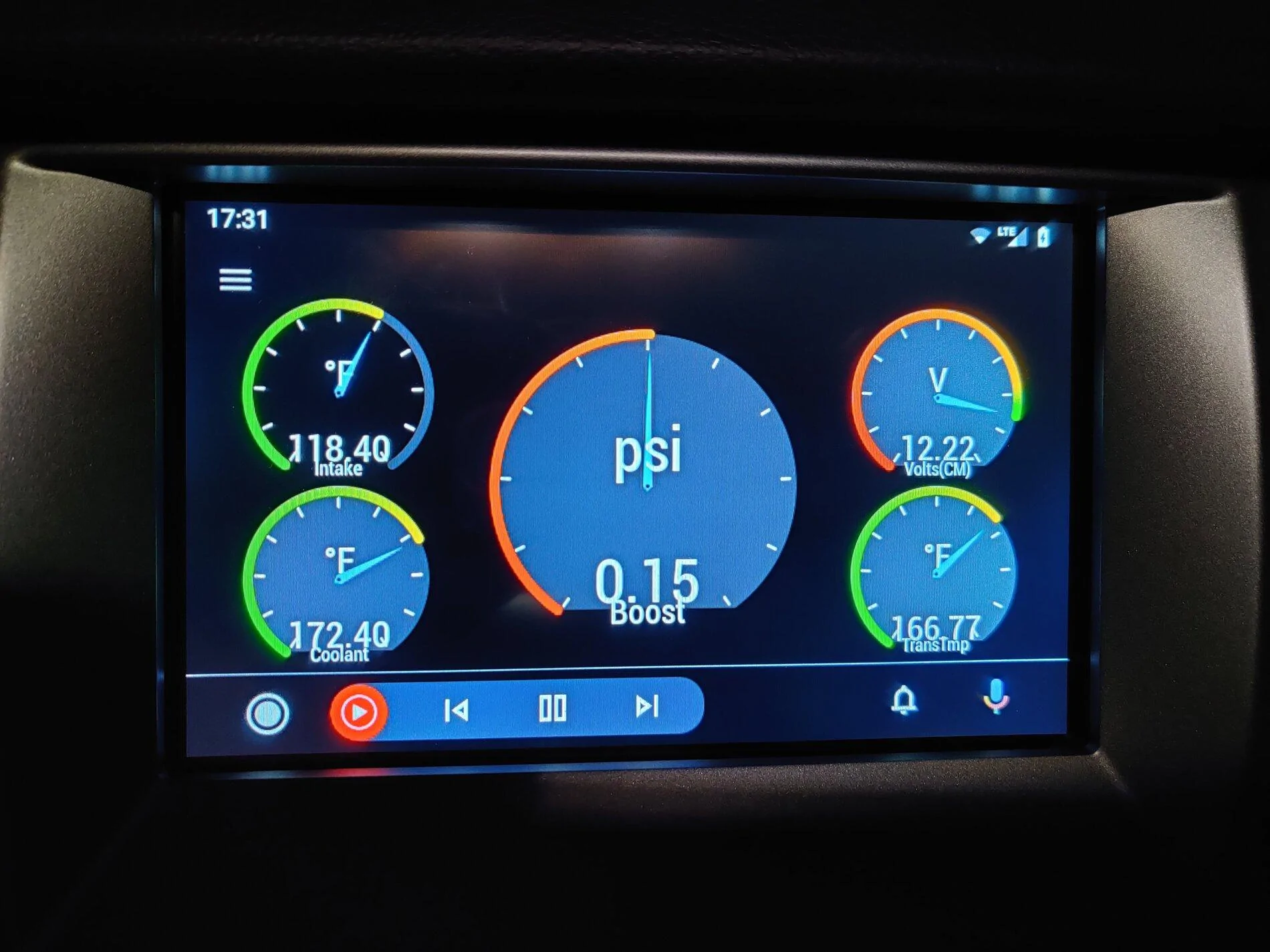
Looks like using the *FORD* transmission temp stops OBD2AA from crashing/locking up.

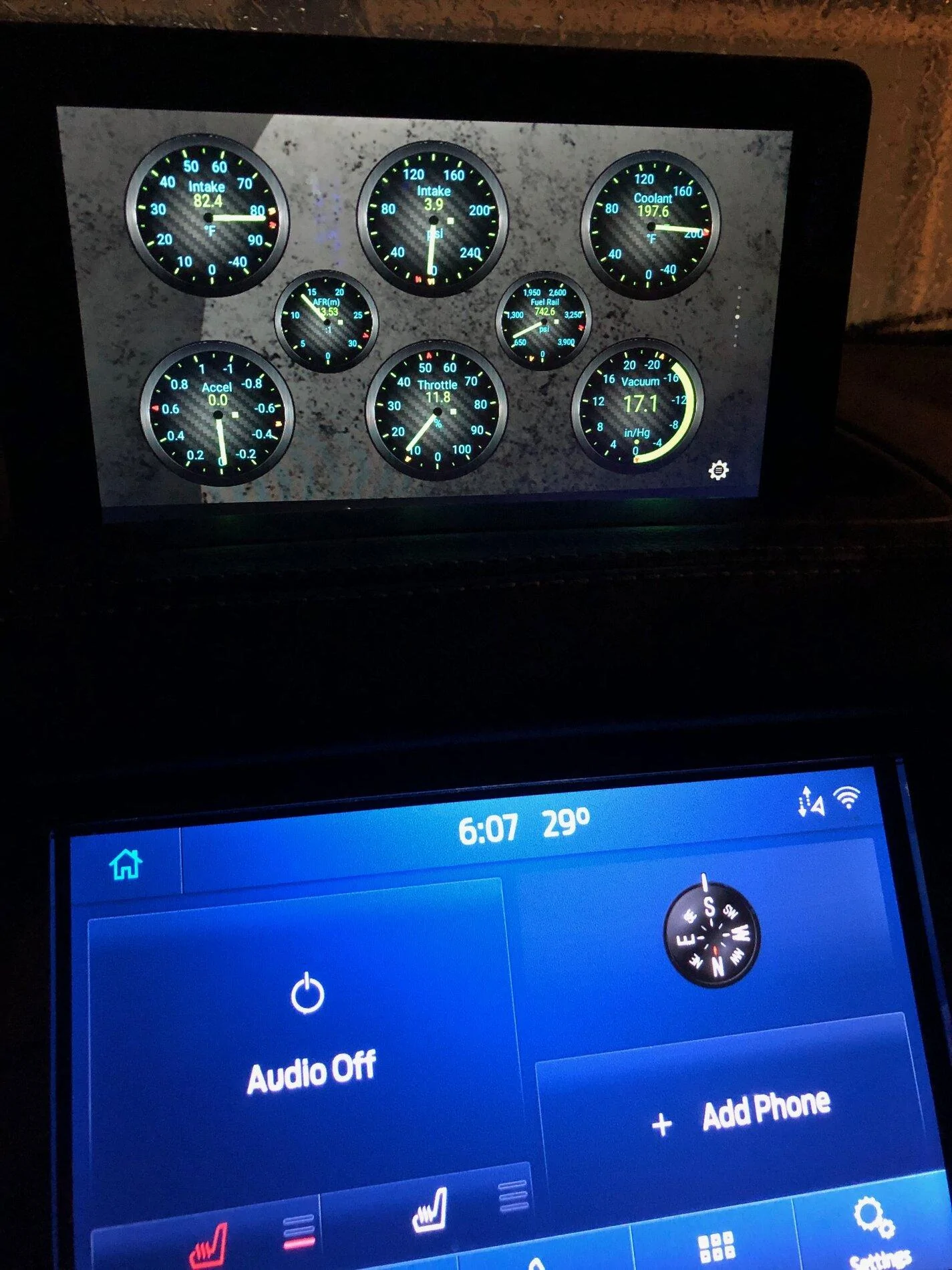
Here's my current layout:
IMG_20201106_173113.jpg


Yep, I forgot too, you're not alone.
how are you guys getting the gauges to come up on your sync screens?
 

Gizmokid2005

Well-Known Member
Joined
Dec 1, 2019
Threads
13
Messages
1,279
Reaction score
1,875
Location
GA
Website
gizmokid2005.com
Vehicle(s)
2019 Ford Ranger XLT 4X4 SCrew
Occupation
SQL Developer
Vehicle Showcase
1
how are you guys getting the gauges to come up on your sync screens?
By using OBD2AA on Android using Torque:

I use ODB2AA from XDA Labs. Here is a link to a video that explains how to get and use the app. costs like $2.00


If the link doesn't work just Google ODB2AA and scroll down till you see the Youtube links.
If I get a chance today I'll try and get a picture of my display.
 

thewhiteranger

Well-Known Member
First Name
andrew
Joined
Apr 3, 2020
Threads
2
Messages
377
Reaction score
418
Location
dallas tx
Vehicle(s)
2020 Ford Ranger fx2 and a 2019 Subaru Outback
Occupation
medical
If I have any serious disappointment with my Ranger, its with how inadequate the displays are and how the gauges & twin screens on the Lariat work. I have to take my eyes off the road and thumb around the menus too much to see what I want to know. And it's surprising that a truck that has such a high-tech, high-performance engine lacks a display for such traditional parameters as oil pressure, voltage, amperage. It's like we've taken a step back to the '60s when "idiot lights" replaced gauges, where you only get do discover a problem after it's already "game over".

On one screen, I'd like to see:
Tachometer
Current Gear
Water Temp
Fuel Level
Oil Pressure
Turbo Boost
Voltage
Amps Charging or Discharging
MPG
Distance to Empty

The knowledge that the ECM already knows all of this information and could easily share any of it inexpensively via digital gauges just makes it even more annoying.

On the Lariat, the right screen is largely wasted space. (What radio station you're currently on or what your phone is doing) I'd move the space-wasting lane-assist over there to open up more space on the left for more performance information.

I'd love to see a software upgrade from Ford to enhance this, and would possibly even be willing to pay for it. But I doubt that will ever happen.
I agree, the truck has the information and an after market HU can display it so why not enable it on ours???? If it was an option, Id also be willing to pay for it --- the GM line has it and ford COULD --so why not?
 

txquailguy

Well-Known Member
First Name
Mark
Joined
Aug 14, 2020
Threads
20
Messages
892
Reaction score
2,241
Location
Colorado
Vehicle(s)
2019 Ford Ranger FX4 Lariat - 2020 Hyundai Kona Ultimate
Occupation
Biologist
Vehicle Showcase
1
Simple setup with an old Fire 7 tablet, Torque Pro, a $21 OBDII Wireless Adapter + extension cable and magnetic mount. What I've been looking for is any PID's specific to our Rangers to unlock sensor data I can't get too with the standard Torque Pro PID file.....
This is an old screen shot...
The gauges I now run are....Boost, Fuel Rail Pressure, Coolant Temp, Tachometer, Timing Advance, Wideband Air/Fuel Ratio.
I'm definitely going to check out the sho PID's to see what I can drum up....wish we had that oil pressure sensor!

IMG_1363.webp


Top