Sponsored

Free Sync 3 Navigation Map Updates (NA 1 18)

UofMEngineer

Well-Known Member
Joined
Apr 19, 2019
Threads
1
Messages
516
Reaction score
334
Location
Michigan
Vehicle(s)
20' Escape Hybrid,18' Fusion Hybrid
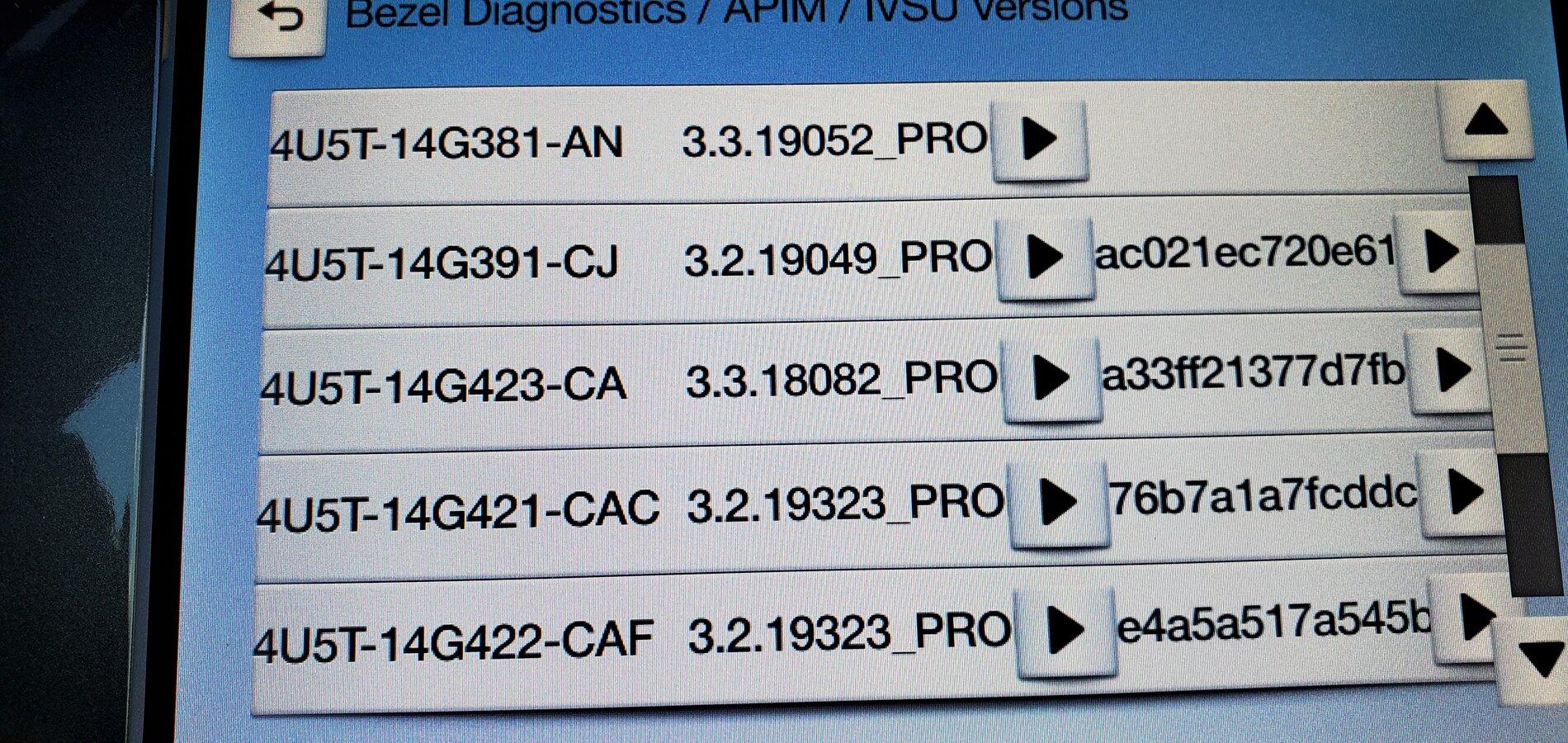
Please remind me as to how to access the Diagnostic Menu and what I'm looking for?
It sounds familiar but I haven't found the Diagnostic Menu.
Hold down the seek forward buttons on the wheel and the IP for 10 seconds. Make sure the radio is on prior. You’ll end the speaker walk around and you’ll be in the diag menu. Select the APIM item then the IVSU Versions.
Sponsored


Richard Conley

Well-Known Member
First Name
Rich
Joined
Jan 24, 2019
Threads
10
Messages
335
Reaction score
306
Location
Geneseo, IL
Vehicle(s)
2019 Ranger Lariat, 2016 Honda Accord Touring
So it took me almost 4 hours to download - then warned by the instructions that it could take an hour to install and having a 30 min trip, I started mine and let it run for 30 min before my trip only to come out and find that the truck had shut itself off. When I started it the screen said installation failed and had some error code, but I took off and then it started to download again and within about 25 minutes it successfully installed...now if I only knew what was added and updated :) My question would be is the file I downloaded somehow tied to my VIN and Sync code??? If not I could give the thumb drive to my buddy who has a new F-150??
 

UofMEngineer

Well-Known Member
Joined
Apr 19, 2019
Threads
1
Messages
516
Reaction score
334
Location
Michigan
Vehicle(s)
20' Escape Hybrid,18' Fusion Hybrid
So it took me almost 4 hours to download - then warned by the instructions that it could take an hour to install and having a 30 min trip, I started mine and let it run for 30 min before my trip only to come out and find that the truck had shut itself off. When I started it the screen said installation failed and had some error code, but I took off and then it started to download again and within about 25 minutes it successfully installed...now if I only knew what was added and updated :) My question would be is the file I downloaded somehow tied to my VIN and Sync code??? If not I could give the thumb drive to my buddy who has a new F-150??
Check your packages to make sure it actually did finish and not only the first part like some of the others have run into. No, you can’t share the drive. It’s linked to your APIM.
 

MINI Ranger

Well-Known Member
First Name
Gene
Joined
May 17, 2019
Threads
0
Messages
68
Reaction score
65
Location
Texas
Vehicle(s)
2019 Ranger Lariat FX4, 2014 MINI Cooper S Clubman
Occupation
ASE Master Technician, MINI Technician, Retired
Vehicle Showcase
1
Hold down the seek forward buttons on the wheel and the IP for 10 seconds. Make sure the radio is on prior. You’ll end the speaker walk around and you’ll be in the diag menu. Select the APIM item then the IVSU Versions.
I seem to be missing the hash image of the upper file. Is that the problem?

15957197637673493215505567598402.jpg
 

UofMEngineer

Well-Known Member
Joined
Apr 19, 2019
Threads
1
Messages
516
Reaction score
334
Location
Michigan
Vehicle(s)
20' Escape Hybrid,18' Fusion Hybrid
I seem to be missing the hash image of the upper file. Is that the problem?

15957197637673493215505567598402.jpg
No that’s no problem. Looks like you have everything installed. If the nav voice stuff still isn’t working, run that master reset. That *should* clear it up.


rparge

Well-Known Member
First Name
Rick
Joined
Jun 1, 2020
Threads
2
Messages
85
Reaction score
219
Location
Oregon
Vehicle(s)
2019 Lariat 4x4 Crew Cab
Occupation
Retired.
Did you ever get this figured out? I have the same problem. It's recognizes the USB Drive asks if I want to update, etc then there is a brief notice (1-2 seconds) that it's 'Installing System Update' then that disappears and nothing apparently happens. I see no indications that anything is happening (tho I have not waited one hour to find out). No restarts in 25-30 minutes before I aborted the "loading".

Is there some indication that it's actually loading software? Or are we mushrooms in the dark?

As far as I can tell my USB Flash file structure conforms to the requirements and my license file appears to be fine. I used this flash drive to load 118 (my truck came with 117) so I can rule that out.
I noticed quite by accident that my USB had a little light on it, and while the message did disappear, but only because the NAV was running and had to do a recalc, I did notice that the little light on the USB was going crazy most of the time.
 

Richard Conley

Well-Known Member
First Name
Rich
Joined
Jan 24, 2019
Threads
10
Messages
335
Reaction score
306
Location
Geneseo, IL
Vehicle(s)
2019 Ranger Lariat, 2016 Honda Accord Touring
Check your packages to make sure it actually did finish and not only the first part like some of the others have run into. No, you can’t share the drive. It’s linked to your APIM.
Thought so. Thanks. Not sure about package check - don''t use voice and if I'm using nav it's probably Waze so not sure if it all finished other than it said it had :)
 

Geoff

Well-Known Member
Joined
Oct 17, 2018
Threads
5
Messages
705
Reaction score
497
Location
NYS
Vehicle(s)
'19 Ranger 1943 Willys Jeep
Occupation
Retired Engineer
I noticed quite by accident that my USB had a little light on it, and while the message did disappear, but only because the NAV was running and had to do a recalc, I did notice that the little light on the USB was going crazy most of the time.
Thanks for the reply. My USB drive has no LED but the Sync system wasn't acting slow like it does when it is updating SW. I'm pretty sure it was not loading SW.

I remade the USB drive - quick format (again) then loaded the files onto the USB drive using drag and drop. The first time thru I used copy and paste commands (after a quick format). I'm not sure what made the difference here but the first time trying to load the "Updating system software" came and went but this second time through it stayed on. That said, I have no voice navigation files so I tried this:

Will this work? I don't really need the Mexican Spanish or Canadian French.

[SYNCGen3.0_ALL]
Item1 = 4U5T-14G422-CAF
Open1 = SyncMyRide\4U5T-14G422-CAF.tar.gz
Options = Autoinstall
The odd thing here is the system said it was successfully updated but there is still no CAF file installed according to the diagnostic menu.

Bottom line is this is becoming a bad joke. Almost 2 hours of engine run time and I still have an incomplete install to show for it.

I'm giving the full install one last shot.....
 

Geoff

Well-Known Member
Joined
Oct 17, 2018
Threads
5
Messages
705
Reaction score
497
Location
NYS
Vehicle(s)
'19 Ranger 1943 Willys Jeep
Occupation
Retired Engineer
Thanks for the reply. My USB drive has no LED but the Sync system wasn't acting slow like it does when it is updating SW. I'm pretty sure it was not loading SW.

I remade the USB drive - quick format (again) then loaded the files onto the USB drive using drag and drop. The first time thru I used copy and paste commands (after a quick format). I'm not sure what made the difference here but the first time trying to load the "Updating system software" came and went but this second time through it stayed on. That said, I have no voice navigation files so I tried this:


The odd thing here is the system said it was successfully updated but there is still no CAF file installed according to the diagnostic menu.

Bottom line is this is becoming a bad joke. Almost 2 hours of engine run time and I still have an incomplete install to show for it.

I'm giving the full install one last shot.....
FAILED - AGAIN
Nothing I've tried has been successful in getting the CAF file loaded.
 

UofMEngineer

Well-Known Member
Joined
Apr 19, 2019
Threads
1
Messages
516
Reaction score
334
Location
Michigan
Vehicle(s)
20' Escape Hybrid,18' Fusion Hybrid
Thought so. Thanks. Not sure about package check - don''t use voice and if I'm using nav it's probably Waze so not sure if it all finished other than it said it had :)
In that case, if it was missing it shouldn't impact you. :)

FAILED - AGAIN
Nothing I've tried has been successful in getting the CAF file loaded.
How long did it run while installing the one file? Should take ~10 minutes.
 

Geoff

Well-Known Member
Joined
Oct 17, 2018
Threads
5
Messages
705
Reaction score
497
Location
NYS
Vehicle(s)
'19 Ranger 1943 Willys Jeep
Occupation
Retired Engineer
In that case, if it was missing it shouldn't impact you. :)


How long did it run while installing the one file? Should take ~10 minutes.
I'd guess it took closer to 15 minutes to complete.
Nothing seemed abnormal and the message indicated the software loaded okay before it rebooted itself. I do not understand why that file did not load....
 

UofMEngineer

Well-Known Member
Joined
Apr 19, 2019
Threads
1
Messages
516
Reaction score
334
Location
Michigan
Vehicle(s)
20' Escape Hybrid,18' Fusion Hybrid
I'd guess it took closer to 15 minutes to complete.
Nothing seemed abnormal and the message indicated the software loaded okay before it rebooted itself. I do not understand why that file did not load....
OK, that sounds like it should have installed correctly then. Doesn't show in the IVSU Versions and nav voice is still down? Have you gone the master reset route post-installing the CAF? I've not run across a case of the file not showing post install before.
 

Geoff

Well-Known Member
Joined
Oct 17, 2018
Threads
5
Messages
705
Reaction score
497
Location
NYS
Vehicle(s)
'19 Ranger 1943 Willys Jeep
Occupation
Retired Engineer
OK, that sounds like it should have installed correctly then. Doesn't show in the IVSU Versions and nav voice is still down? Have you gone the master reset route post-installing the CAF? I've not run across a case of the file not showing post install before.
Yes, I tried the master reset and it's still not showing up in the IVSU menu.

I wonder if I should try reverting back to 118 (I have those files saved if that is even possible). Or will the voice commands get loaded when I update to 3.4?
 

MINI Ranger

Well-Known Member
First Name
Gene
Joined
May 17, 2019
Threads
0
Messages
68
Reaction score
65
Location
Texas
Vehicle(s)
2019 Ranger Lariat FX4, 2014 MINI Cooper S Clubman
Occupation
ASE Master Technician, MINI Technician, Retired
Vehicle Showcase
1
Hold down the seek forward buttons on the wheel and the IP for 10 seconds. Make sure the radio is on prior. You’ll end the speaker walk around and you’ll be in the diag menu. Select the APIM item then the IVSU Versions.
Thank you for all your help with this.
I have succeeded in getting the map update installed and have verified via a known missing POI from the original version to it being there. The voice recognition returned after accessing the Diagnostic menu and poking around a bit. I made no changes in that menu but when I exited, the voice command was functioning.
I also verified that the Speed Limit ID part still is not accurate. I understand that while the camera sees the speed limit signs, it's the map that knows the speed limit on said sign. Any ideas?
 

UofMEngineer

Well-Known Member
Joined
Apr 19, 2019
Threads
1
Messages
516
Reaction score
334
Location
Michigan
Vehicle(s)
20' Escape Hybrid,18' Fusion Hybrid
Yes, I tried the master reset and it's still not showing up in the IVSU menu.

I wonder if I should try reverting back to 118 (I have those files saved if that is even possible). Or will the voice commands get loaded when I update to 3.4?
3.4 wouldn't do anything as it won't touch those particular files. Then again, I've never heard of this case of an install showing complete, but the image not appearing to be there either. You can try rolling back to 18 maps to see if that recovers it.

Thank you for all your help with this.
I have succeeded in getting the map update installed and have verified via a known missing POI from the original version to it being there. The voice recognition returned after accessing the Diagnostic menu and poking around a bit. I made no changes in that menu but when I exited, the voice command was functioning.
I also verified that the Speed Limit ID part still is not accurate. I understand that while the camera sees the speed limit signs, it's the map that knows the speed limit on said sign. Any ideas?
Good to hear. Not sure how the camera item works to be honest. Haven't been in a vehicle with it to try out. The map data will have speed limit info where it was in HERE's data at the time.
Sponsored


Top