Sponsored

Free Sync 3 Navigation Map Updates (NA 1 18)

chasvs

Well-Known Member
Joined
Feb 6, 2019
Threads
18
Messages
1,017
Reaction score
1,488
Location
Tampa
Vehicle(s)
2019 Ranger Lariat
Vehicle Showcase
1
Did you ever get this figured out? I have the same problem. It's recognizes the USB Drive asks if I want to update, etc then there is a brief notice (1-2 seconds) that it's 'Installing System Update' then that disappears and nothing apparently happens. I see no indications that anything is happening (tho I have not waited one hour to find out). No restarts in 25-30 minutes before I aborted the "loading".

Is there some indication that it's actually loading software? Or are we mushrooms in the dark?

As far as I can tell my USB Flash file structure conforms to the requirements and my license file appears to be fine. I used this flash drive to load 118 (my truck came with 117) so I can rule that out.
No, haven't figured it out and don't figure I'll waste any more time on it! When I use the Map I switch to CarPlay and use the Google Maps off my iPhone. Don't need the map data on my Sync system.
Sponsored


Richard Conley

Well-Known Member
First Name
Rich
Joined
Jan 24, 2019
Threads
10
Messages
335
Reaction score
306
Location
Geneseo, IL
Vehicle(s)
2019 Ranger Lariat, 2016 Honda Accord Touring
No, haven't figured it out and don't figure I'll waste any more time on it! When I use the Map I switch to CarPlay and use the Google Maps off my iPhone. Don't need the map data on my Sync system.
Tried Waze? Can use it with CarPlay. Been using it for several years before I got my Ranger. I like it a lot.
 

Geoff

Well-Known Member
Joined
Oct 17, 2018
Threads
5
Messages
705
Reaction score
497
Location
NYS
Vehicle(s)
'19 Ranger 1943 Willys Jeep
Occupation
Retired Engineer
No, haven't figured it out and don't figure I'll waste any more time on it! When I use the Map I switch to CarPlay and use the Google Maps off my iPhone. Don't need the map data on my Sync system.
Loading new Maps does not seem as robust as it could be (should be). Some folks getting voice commands others not. My system has responded several different ways which is probably indicative of the system not starting out (or restarting out) from point "A" consistently. I'm going to perform a master reset before I attempt my next update.

Rant
Ford, please give us a way to save Favorites and Previous Destinations !!
/rant
 

Richard Conley

Well-Known Member
First Name
Rich
Joined
Jan 24, 2019
Threads
10
Messages
335
Reaction score
306
Location
Geneseo, IL
Vehicle(s)
2019 Ranger Lariat, 2016 Honda Accord Touring
Loading new Maps does not seem as robust as it could be (should be). Some folks getting voice commands others not. My system has responded several different ways which is probably indicative of the system not starting out (or restarting out) from point "A" consistently. I'm going to perform a master reset before I attempt my next update.

Rant
Ford, please give us a way to save Favorites and Previous Destinations !!
/rant
you know...being old and near sighted and remembering having to try to look at paper maps, I both appreciate that what it could be isn't what it ought to be and am glad I don't have to try to keep those f'ers in order...I guess you have to be old to appreciate it for what it is...and I use Waze anyway :)
 

MINI Ranger

Well-Known Member
First Name
Gene
Joined
May 17, 2019
Threads
0
Messages
68
Reaction score
65
Location
Texas
Vehicle(s)
2019 Ranger Lariat FX4, 2014 MINI Cooper S Clubman
Occupation
ASE Master Technician, MINI Technician, Retired
Vehicle Showcase
1
3.4 wouldn't do anything as it won't touch those particular files. Then again, I've never heard of this case of an install showing complete, but the image not appearing to be there either. You can try rolling back to 18 maps to see if that recovers it.


Good to hear. Not sure how the camera item works to be honest. Haven't been in a vehicle with it to try out. The map data will have speed limit info where it was in HERE's data at the time.
I am a curious person and I assume that camera is used to recognize speed signs as speed changes in Navigation system is noted just as I pass a speed limit sign. It does not recognize the numbers because some signs are incorrect. I’ve also noticed some signs are not seen.


Dan Keil

Well-Known Member
First Name
Dan
Joined
May 22, 2020
Threads
1
Messages
59
Reaction score
52
Location
Decatur,Il
Vehicle(s)
2019 Ford Ranger XLT 4X4
Occupation
Walmart Associate
Hey Guys,

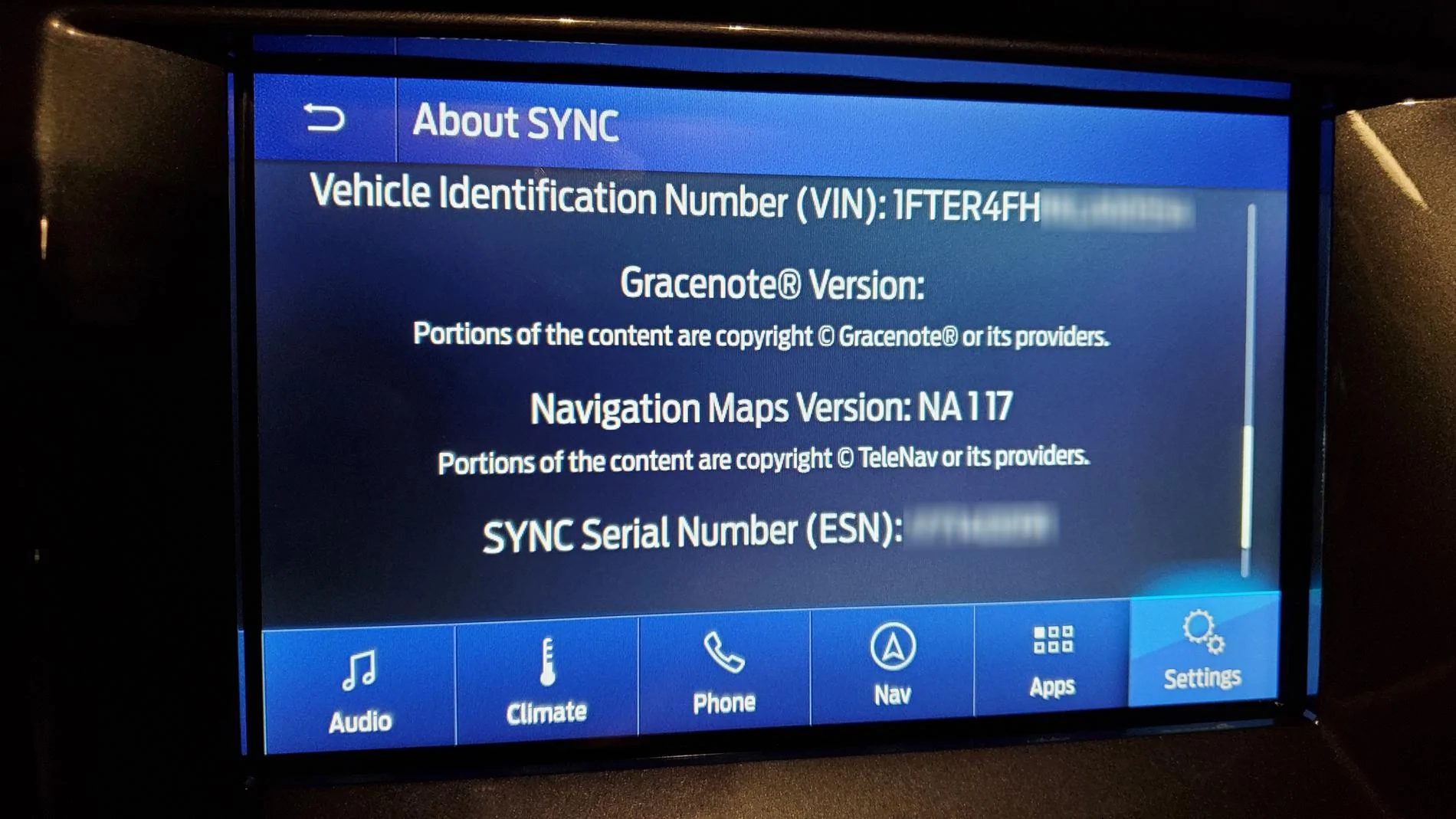
While looking at the 'about sync' page in my Ranger, I noticed I was on map version 'NA117' and I know a 'NA118' is available. A quick search for 'sync map update' brought me to an official Ford Navigation Map update page here https://syncnavigation.com/ford/home. I put in my Ranger's VIN and Sync ESN and voila - a free map update is available!

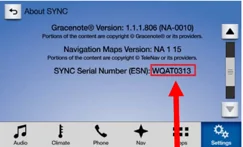
You can find your Sync ESN at the bottom of the 'About Sync' page:

esn-location.png


Place your order for the 'free download' and grab a 32gb (USB 3.0 fast read/write preferably) thumb drive and format it exFAT. Follow the instructions to create your own update thumb drive and about an hour later you'll be on NA 1 18! Install speed depends on the speeds of the thumb drive so if you have a slow one be prepared to take a drive while this is installing.

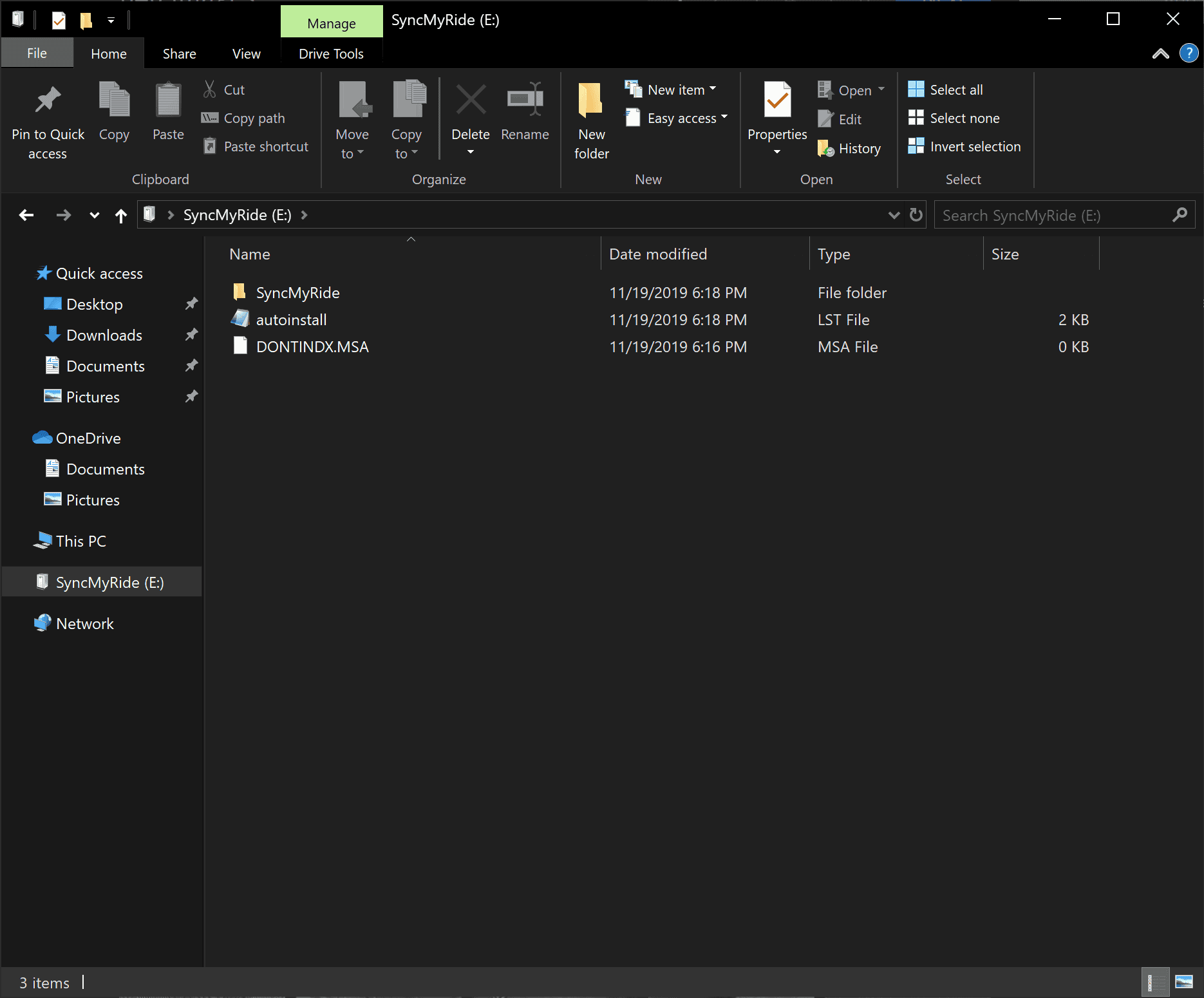
The root of your thumb drive should look like this:
qTPcV7r.png


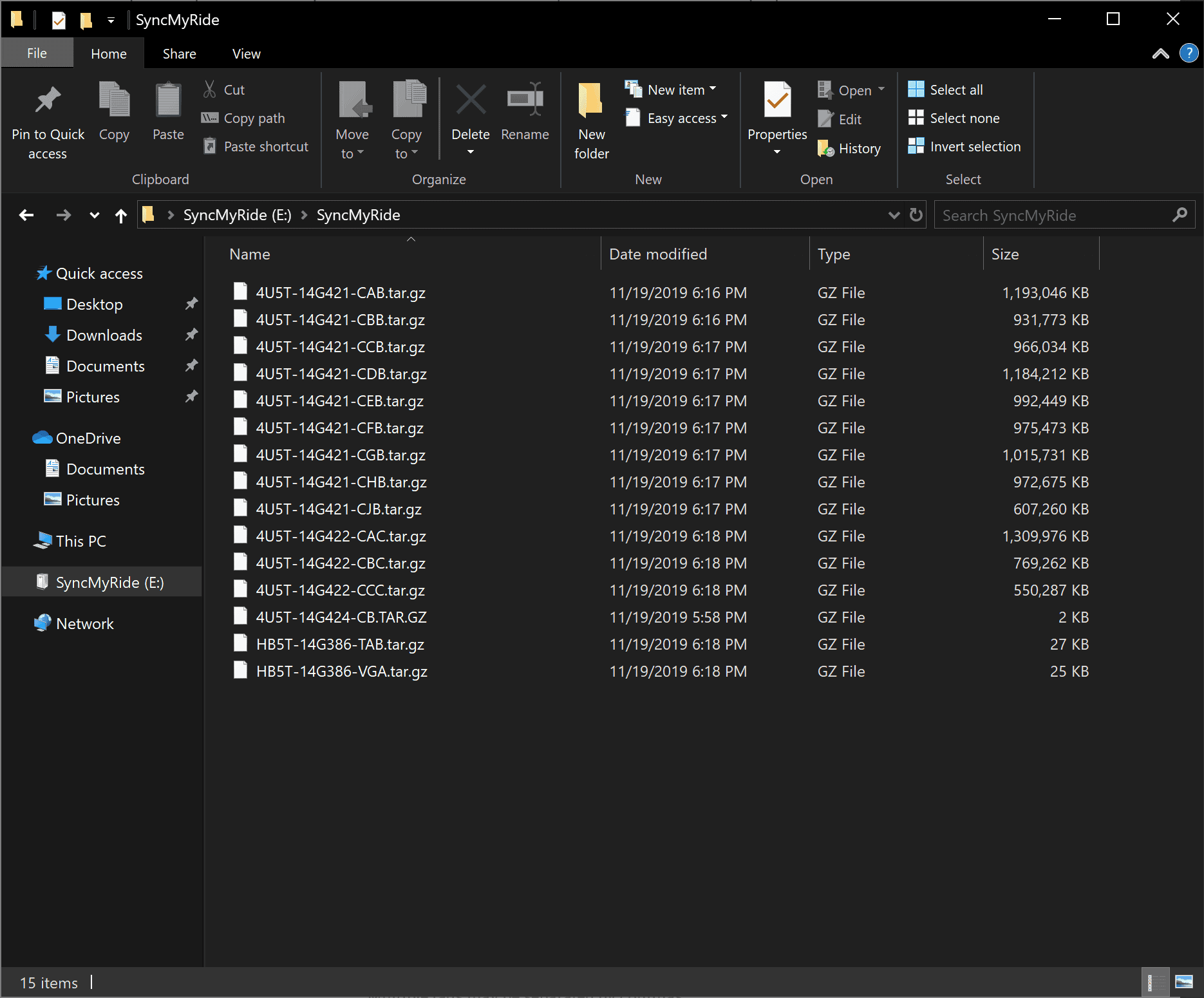
And the SyncMyRide folder should look like this:
8oeNemp.png


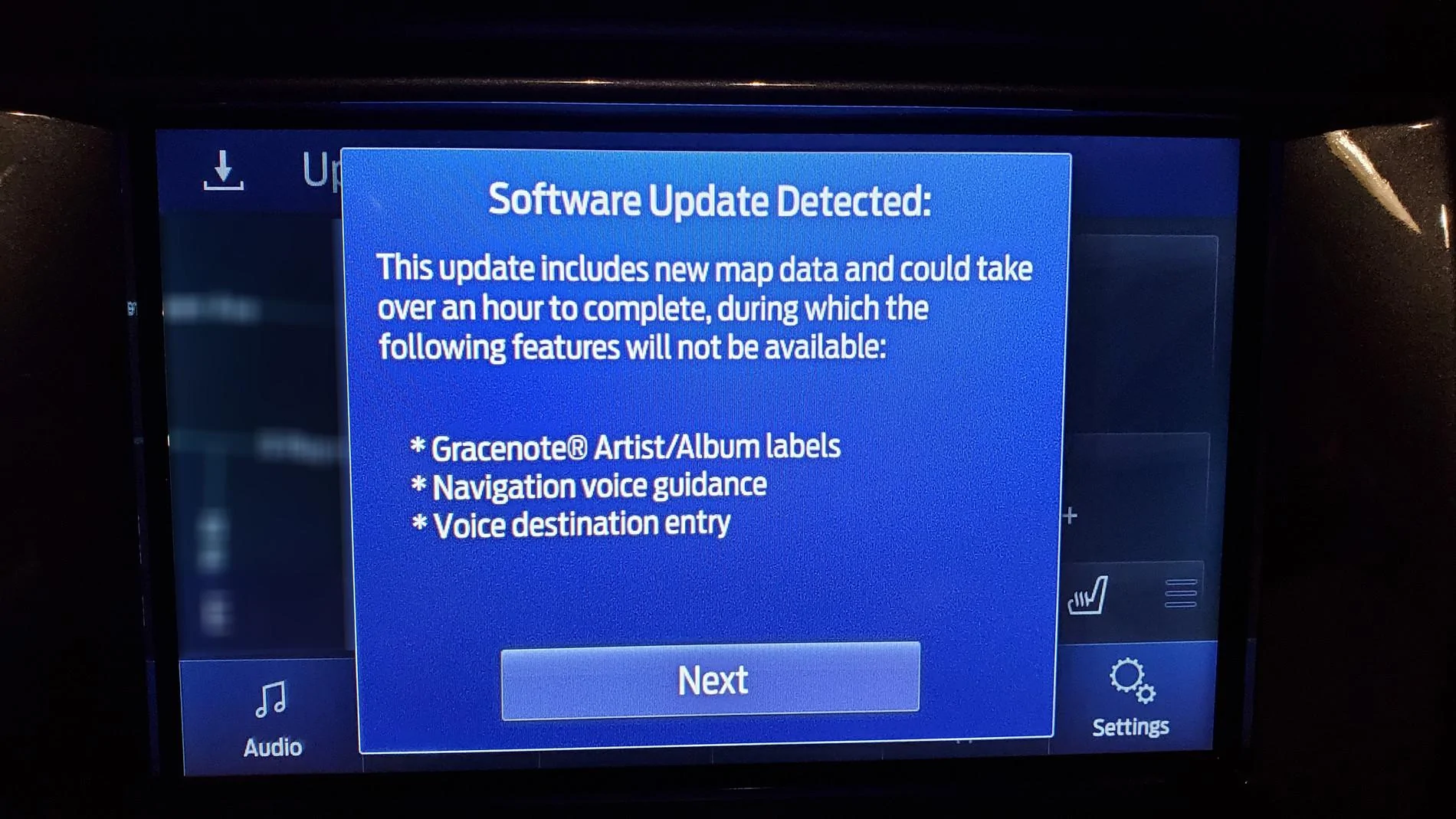
Update warning 1:
zVEve91.jpg


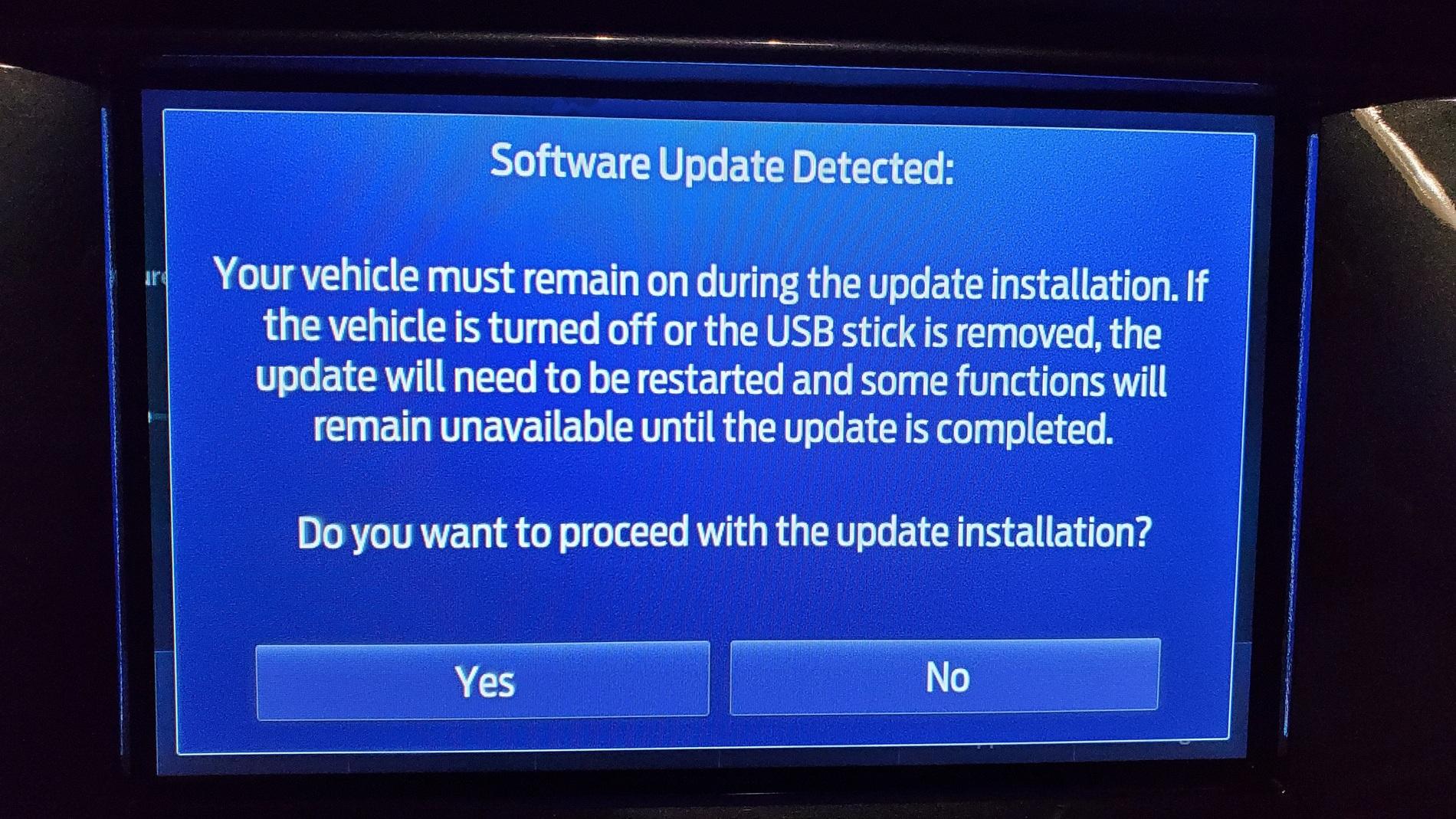
Update warning 2:
4Hj4Ni6.jpg


Here's my before:
uQpIDj7.jpg


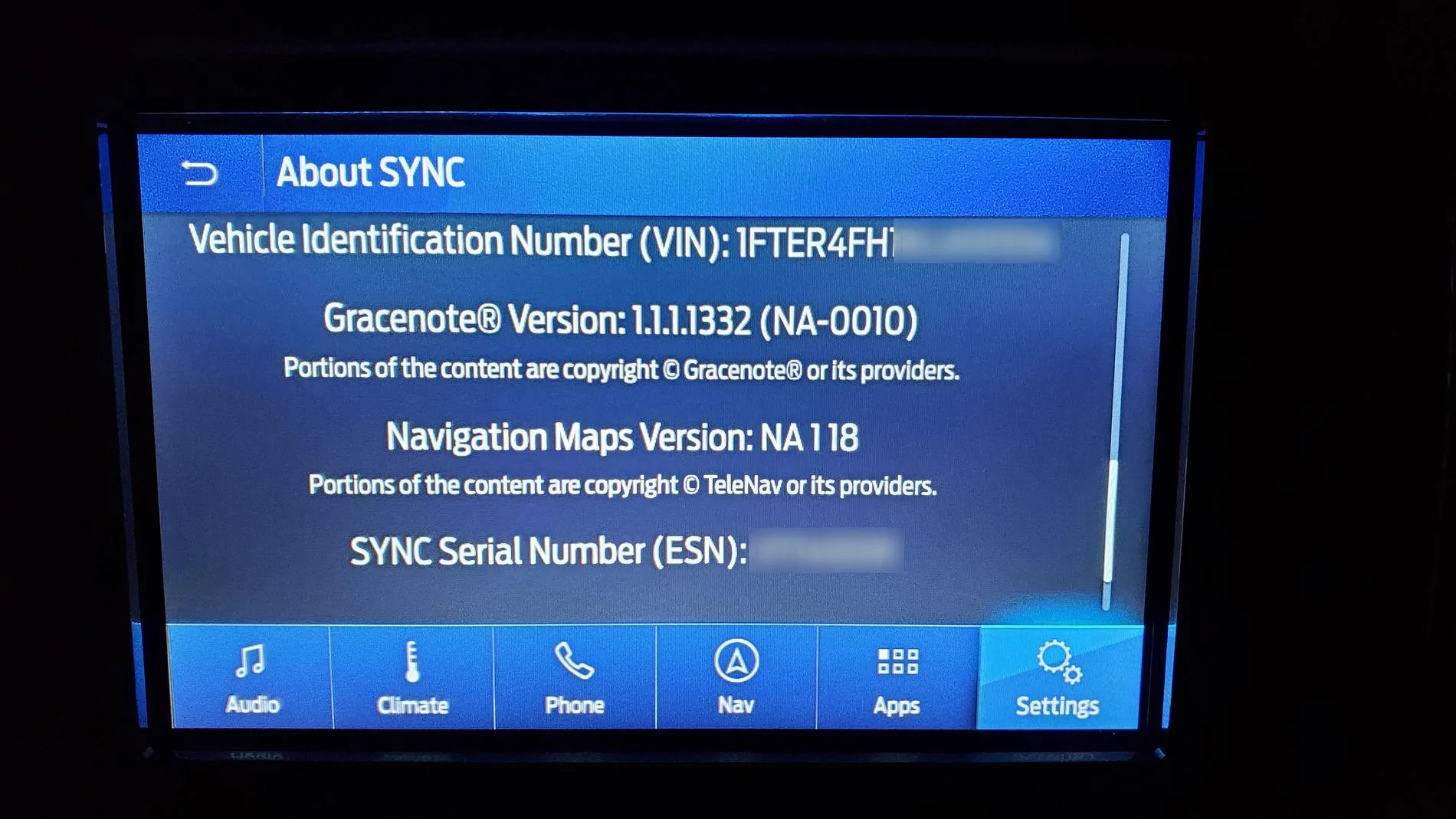
And after:
S3zu6Hd.jpg


Good luck and happy updating!

EDIT: This will also work for any other 2018 and newer Fords that are still on '17 maps. Doing the wife's '18 Edge next!
I cannot get the auto update to get to the blue color. It is white so It is not available to open
Trying to upload it again and extract the files
 

Dan Keil

Well-Known Member
First Name
Dan
Joined
May 22, 2020
Threads
1
Messages
59
Reaction score
52
Location
Decatur,Il
Vehicle(s)
2019 Ford Ranger XLT 4X4
Occupation
Walmart Associate
Forget calling Ford. I spent an hour and a half getting the runaround. I was told to call this number then another and another. No one had an answer for me. My download doesn't show an active license.
 

Dan Keil

Well-Known Member
First Name
Dan
Joined
May 22, 2020
Threads
1
Messages
59
Reaction score
52
Location
Decatur,Il
Vehicle(s)
2019 Ford Ranger XLT 4X4
Occupation
Walmart Associate
Updated mine yesterday. Screens were white as shown above.

Perhaps his blue screens are with Night mode ?
Those were on my thumb drive. My truck will not respond to my thumb drive, so something is not active
 

Geoff

Well-Known Member
Joined
Oct 17, 2018
Threads
5
Messages
705
Reaction score
497
Location
NYS
Vehicle(s)
'19 Ranger 1943 Willys Jeep
Occupation
Retired Engineer
you know...being old and near sighted and remembering having to try to look at paper maps, I both appreciate that what it could be isn't what it ought to be and am glad I don't have to try to keep those f'ers in order...I guess you have to be old to appreciate it for what it is...and I use Waze anyway :)
Yep, I remember paper maps. I still prefer them in some cases. But I paid for the Nav system in my Ranger with the intention of, you know, actually using it. Yes, there are other options like Waze, or Apple Maps, or Google Maps but all those rely on downloading map data whereas the GPS needs no such download to work. And I have no real complaints on the usability of the Ford Nav system but Ford needs to work on improving the robustness of updating maps and it would be nice if they had an option to save and restore favorites and previous destinations (a Master Reset erases those waypoints).
 

Richard Conley

Well-Known Member
First Name
Rich
Joined
Jan 24, 2019
Threads
10
Messages
335
Reaction score
306
Location
Geneseo, IL
Vehicle(s)
2019 Ranger Lariat, 2016 Honda Accord Touring
Yep, I remember paper maps. I still prefer them in some cases. But I paid for the Nav system in my Ranger with the intention of, you know, actually using it. Yes, there are other options like Waze, or Apple Maps, or Google Maps but all those rely on downloading map data whereas the GPS needs no such download to work. And I have no real complaints on the usability of the Ford Nav system but Ford needs to work on improving the robustness of updating maps and it would be nice if they had an option to save and restore favorites and previous destinations (a Master Reset erases those waypoints).
I have been using Waze for so long all of my destinations are available from my phone to the app in CarPlay and I just like the layout better and of course the warnings for police, stalled cars, construction and other delays, etc. , so resets on the Ford Nav aren't an issue. It would be hard to imagine going back to no Nav at all :)
 

Richard Conley

Well-Known Member
First Name
Rich
Joined
Jan 24, 2019
Threads
10
Messages
335
Reaction score
306
Location
Geneseo, IL
Vehicle(s)
2019 Ranger Lariat, 2016 Honda Accord Touring
Updated mine yesterday. Screens were white as shown above.

Perhaps his blue screens are with Night mode ?
Mine were white and I'm pretty sure I never saw the first one and eve n though I got a screen saying the update was successful the Version still shows 3.3...I repeat my (personal) initial assessment - needlessly complex. Don't use or care about voice, use Waze for nav so may not try again.
 

aslusers

Well-Known Member
First Name
David
Joined
Mar 22, 2020
Threads
6
Messages
137
Reaction score
258
Location
Indianapolis
Vehicle(s)
2019 Ford Ranger XLT Orange SuperCrew FX4 Trailer Tow 302A
Vehicle Showcase
2
Have anyone ever order $40 for USB stick and upload it? Any issue? I have tried to upload with my personal USB stick and failed 5 times with a variety of methods. A common error is the map license file is missing. Frustrated. So, I end up ordering the Ford USB stick. It should arrive sometime next week or so.
 

aslusers

Well-Known Member
First Name
David
Joined
Mar 22, 2020
Threads
6
Messages
137
Reaction score
258
Location
Indianapolis
Vehicle(s)
2019 Ford Ranger XLT Orange SuperCrew FX4 Trailer Tow 302A
Vehicle Showcase
2
The entire process is overly complicated for what it does.

Some reported problems with 16GB USB sticks, even though the files only take up 11.5GB

I used an older 32GB Sandisk Cruzer USB stick without a glitch.

Did you label your USB stick SyncMyRide ?

Did you copy your license file to folder SyncMyRide ?

Have you tried downloading your license file again ?
Yes to all of your questions: label it SyncMyRide and downloading license file. Not only that, I reformatted it several times with xFatbit and downloaded software and licenses. When it does not work, I reformat the USB and do it again. Not only that, I also cleaned my download folder so that I can download the license file accurately. My USB stick is 16 GB and it has 3.3 gb left on it. So the size is not an issue. Just that stars does not aligned that day. Smile. I will wait and see if Ford USB would make a difference. Crossing my fingers. Thank you for your suggestions. Truly appreciate that.
 

SafetyDan

Well-Known Member
First Name
Dan
Joined
Apr 28, 2019
Threads
36
Messages
388
Reaction score
473
Location
Oxnard, CA
Vehicle(s)
2019 V2 - Ranger Lariat, FX4, 501A, Trailer Tow (Lightning Blue), V1- Lariat, FX4, 500A, Trailer Tow (Ingot Silver) <Epic Fail - Lemon>
Vehicle Showcase
1
Yes to all of your questions: label it SyncMyRide and downloading license file. Not only that, I reformatted it several times with xFatbit and downloaded software and licenses. When it does not work, I reformat the USB and do it again. Not only that, I also cleaned my download folder so that I can download the license file accurately. My USB stick is 16 GB and it has 3.3 gb left on it. So the size is not an issue. Just that stars does not aligned that day. Smile. I will wait and see if Ford USB would make a difference. Crossing my fingers. Thank you for your suggestions. Truly appreciate that.
I ordered the Ford USB, and when through all the steps, but my about SYNC still shows NA 1 18. I call customer care they said it is a Sync glitch. This is supposed to upgrade to NA 1 19 right?
 

Dan Keil

Well-Known Member
First Name
Dan
Joined
May 22, 2020
Threads
1
Messages
59
Reaction score
52
Location
Decatur,Il
Vehicle(s)
2019 Ford Ranger XLT 4X4
Occupation
Walmart Associate
The entire process is overly complicated for what it does.

Some reported problems with 16GB USB sticks, even though the files only take up 11.5GB

I used an older 32GB Sandisk Cruzer USB stick without a glitch.

Did you label your USB stick SyncMyRide ?

Did you copy your license file to folder SyncMyRide ?

Have you tried downloading your license file again ?
I have done it 5 times. The license file doesn't show it is live
Sponsored


Top