Sponsored

Radio not Working

Dan H

Member
First Name
Dan
Joined
Dec 30, 2025
Threads
2
Messages
7
Reaction score
3
Location
Flagler Beach, Florida
Vehicle(s)
2022 Ford Ranger XL
Occupation
Engineer
So we were coming back from a trip yesterday and stopped to get some coffees. I made the mistake of temporarily setting mine on the dash and as I pulled out of the Starbucks, the coffee fell over and spilled a couple of ounces down the control panel (we have the XL version of the Ranger -2022, so smaller panel). Electronics started going crazy and then after totally blacking out all the instruments and display, it came back on. Only problem is the radio doesn’t come back on. Before I start digging into the dash and removing things so I can try to dry out any residual wetness, I thought I’d see if anyone has had a similar issue. Thanks!
Sponsored
 

DukeCanBuildit

Well-Known Member
First Name
Duke
Joined
Jul 27, 2020
Threads
66
Messages
9,636
Reaction score
46,095
Location
Kitchener, Ontario
Vehicle(s)
2019 XLT SuperCab - FTW!
Occupation
Retired (P/T) Caregiver (F/T)
Vehicle Showcase
1
Sucks that this happened. Besides drying out, it might need cleaning if there was anything sticky in the coffee. It might be preventing the “on” button from making proper contact, especially if our Rangers use carbon contacts, like in a TV remote, because it doesn’t take much to gum them up.

Getting to them might be an issue. :(

Good luck.
 

got3fords

Well-Known Member
First Name
James
Joined
Apr 12, 2021
Threads
131
Messages
5,320
Reaction score
13,817
Location
22973
Vehicle(s)
2026 Marsh Gray Ranger Raptor, 1995 Harley XLH1200
Occupation
Mom Joke Professional
Last year I spilled an entire pint of beer on my laptop. Surprisingly, the only setback was sticky keys for a while.
 

AzScorpion

Moderator
First Name
Dave
Joined
Jul 25, 2019
Threads
335
Messages
26,263
Reaction score
132,267
Location
Back Home In AZ!
Vehicle(s)
2023 Ford Ranger Tremor
Occupation
Retired...Full Time Slacker
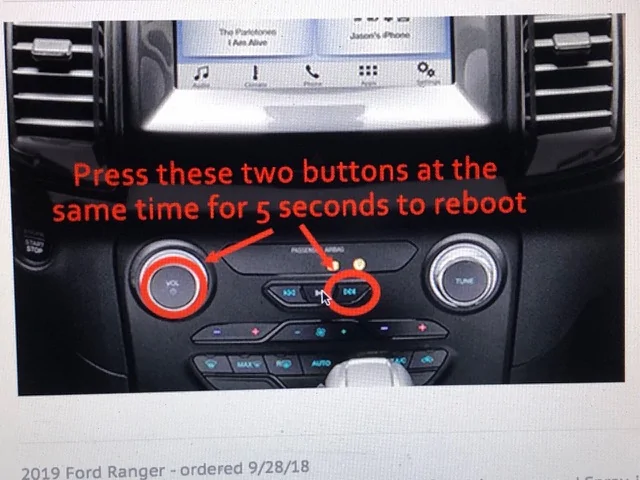
What he said. For squeaks and giggles you can try a reset. Don't remember the exact process, something like power button and fast forward button. Someone wiser than me will remember.
Not sure if it'll work under these circumstances but worth a try. It's always my go to when there's a glitch in the center screen. Disconnecting the battery is my second.

1767203477264-5q.webp


airline tech

Well-Known Member
Joined
Aug 24, 2022
Threads
28
Messages
4,456
Reaction score
8,517
Location
Midwest - KS
Vehicle(s)
2022 Ranger Lariat-Super Crew, Cactus Gray
Occupation
Aircraft Tech
Pull Fuse 31 & 33 - for 5-Minutes (BCM-Fuse Box) also check them for blown.
Fuse 31 = APIM & Fuse 33 = ACM
You may also check for any codes and reset them - as this would have generated a (Hard Fault) and it possibly disabled the circuit.
The Best thing to do, is remove the panel and clean it out the best you can, hopefully it can be saved.
 

ScarzRanger21(2.0)

Well-Known Member
First Name
Eric
Joined
Dec 9, 2025
Threads
9
Messages
208
Reaction score
706
Location
Auberry, CA
Vehicle(s)
2021 Ranger 4x4, 2019 Ranger Fx4
Occupation
Electrician
Sounds like you might have shorted something out. If the power/skip button reset doesn’t work, I’d suggest checking fuses. Worst case scenario, you might have to pull the dash apart to see if there’s any residue left after drying. As we all know, liquids and electronics don’t mix well lol
 

DukeCanBuildit

Well-Known Member
First Name
Duke
Joined
Jul 27, 2020
Threads
66
Messages
9,636
Reaction score
46,095
Location
Kitchener, Ontario
Vehicle(s)
2019 XLT SuperCab - FTW!
Occupation
Retired (P/T) Caregiver (F/T)
Vehicle Showcase
1
Not sure if it'll work under these circumstances but worth a try. It's always my go to when there's a glitch in the center screen. Disconnecting the battery is my second.

1767203477264-5q.webp
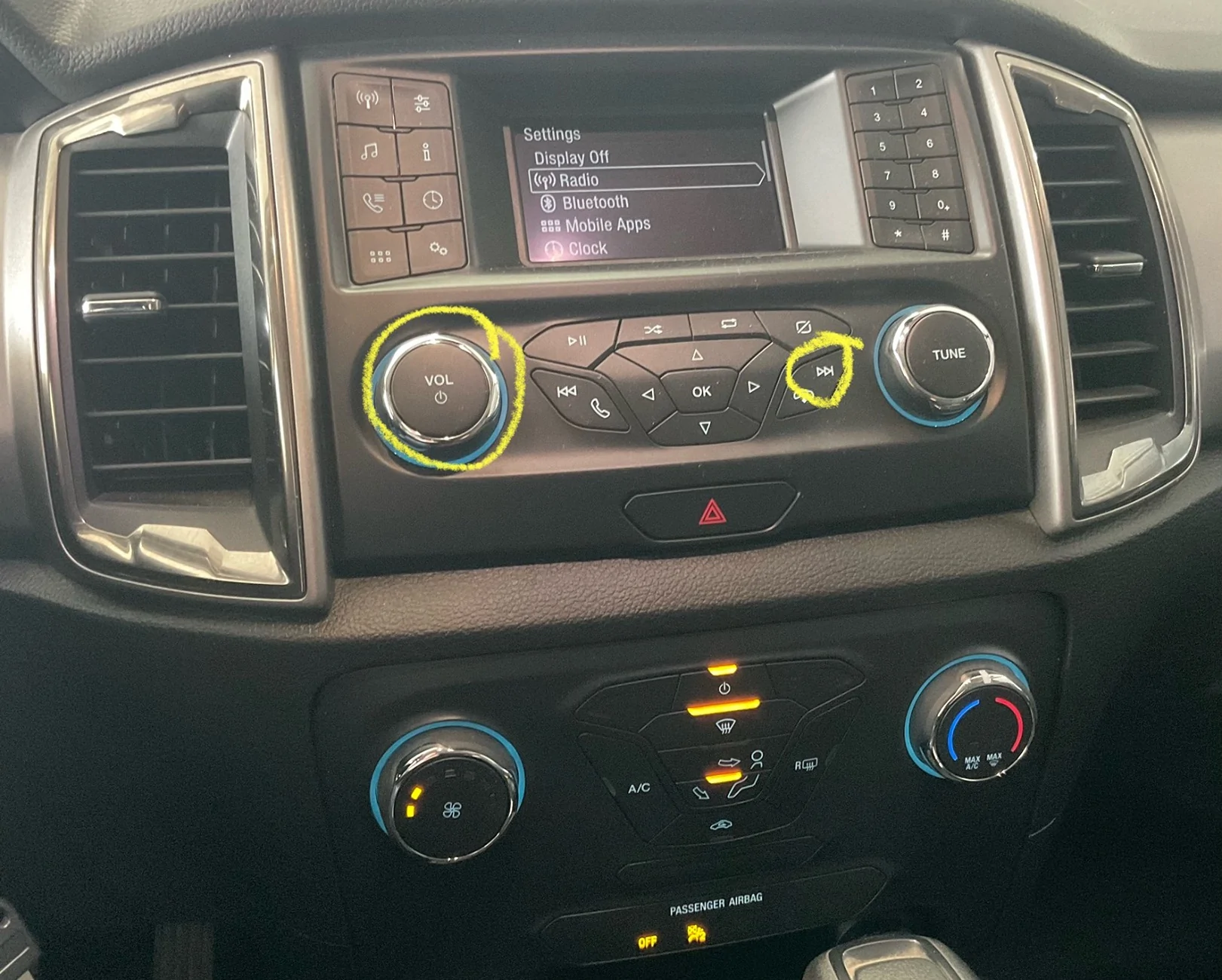
The XL infotainment setup is a bit different…

IMG_4692.webp


….but likely the same sequence. Good luck OP.
 

AzScorpion

Moderator
First Name
Dave
Joined
Jul 25, 2019
Threads
335
Messages
26,263
Reaction score
132,267
Location
Back Home In AZ!
Vehicle(s)
2023 Ford Ranger Tremor
Occupation
Retired...Full Time Slacker
The XL infotainment setup is a bit different…

IMG_4692.webp


….but likely the same sequence. Good luck OP.
It doesn't it matter that they're different. It's still the same process, press the power and forward buttons. All Ford Vehicles are like this.

One quick search shows this. :wink:

https://knowvehicles.com/ford-touch-screen-not-responding-to-touch/

1. Perform a Hard Reset
A hard reset clears temporary glitches and restarts your SYNC system fresh. Press and hold the power button and the seek right button simultaneously for about 10 seconds. Your screen will go black, then reboot with the Ford logo.

This reset doesn’t delete your saved settings, paired phones, or presets. It simply restarts the system like rebooting your computer. Try this first because it’s quick and solves many software-related freezes.
 
OP
OP

Dan H

Member
First Name
Dan
Joined
Dec 30, 2025
Threads
2
Messages
7
Reaction score
3
Location
Flagler Beach, Florida
Vehicle(s)
2022 Ford Ranger XL
Occupation
Engineer
Pull Fuse 31 & 33 - for 5-Minutes (BCM-Fuse Box) also check them for blown.
Fuse 31 = APIM & Fuse 33 = ACM
You may also check for any codes and reset them - as this would have generated a (Hard Fault) and it possibly disabled the circuit.
The Best thing to do, is remove the panel and clean it out the best you can, hopefully it can be saved.
I tried that, and I also tried disconnecting the negative terminal on the battery. I took the panel apart, cleaned a few things with alcohol, got the sticky buttons to work. Noticed some dried coffee stains on top of the actual radio box; cleaned them off and put a hair dryer on it for a minute to make sure there was no residual water. No fuses blown. Still no sound. Could it be the radio is the problem? Thanks
Pull Fuse 31 & 33 - for 5-Minutes (BCM-Fuse Box) also check them for blown.
Fuse 31 = APIM & Fuse 33 = ACM
You may also check for any codes and reset them - as this would have generated a (Hard Fault) and it possibly disabled the circuit.
The Best thing to do, is remove the panel and clean it out the best you can, hopefully it can be saved.
I tried that, and I also tried disconnecting the negative terminal on the battery. I took the panel apart, cleaned a few things with alcohol, got the sticky buttons to work. Noticed some dried coffee stains on top of the actual radio box; cleaned them off and put a hair dryer on it for a minute to make sure there was no residual water. No fuses blown. Still no sound. Could it be the radio is the problem? Also, where would I find any codes? Thanks
 

airline tech

Well-Known Member
Joined
Aug 24, 2022
Threads
28
Messages
4,456
Reaction score
8,517
Location
Midwest - KS
Vehicle(s)
2022 Ranger Lariat-Super Crew, Cactus Gray
Occupation
Aircraft Tech
Using a scan tool - like Forscan or similar that can communicate with ALL modules on the truck, it's going to be coded in the ACM - (Audio Control Module) - most likely or the FCIM - Front Control Interface Module
 
OP
OP

Dan H

Member
First Name
Dan
Joined
Dec 30, 2025
Threads
2
Messages
7
Reaction score
3
Location
Flagler Beach, Florida
Vehicle(s)
2022 Ford Ranger XL
Occupation
Engineer
Using a scan tool - like Forscan or similar that can communicate with ALL modules on the truck, it's going to be coded in the ACM - (Audio Control Module) - most likely or the FCIM - Front Control Interface Module
Good information; thanks
 

Cabose-1

Well-Known Member
First Name
Eli
Joined
Jan 19, 2021
Threads
9
Messages
1,982
Reaction score
7,473
Location
Texas
Vehicle(s)
2024 Ranger XLT, 4x2, Advance Tow, E-Locker
Occupation
Student
Not to be a karen, but when cleaning eletronics, use rubbing alcohol. The 97% if not mistaken. It can be used liberally and does not damage eletronics.
Use it to clean old playstations and xboxes and stuff
 

airline tech

Well-Known Member
Joined
Aug 24, 2022
Threads
28
Messages
4,456
Reaction score
8,517
Location
Midwest - KS
Vehicle(s)
2022 Ranger Lariat-Super Crew, Cactus Gray
Occupation
Aircraft Tech
since this is most likely a - Hard Code (Locked) - It Requires a - Scan Tool Reset, battery or power (fuse) is not going to clear it.
Now it boils down to (ACM-Fried) or just locked out
When you connect the scan tool and absolutely cannot communicate to it or if using Forscan and it will not (LOAD) up into the module list - is a good indicator it (electrically shorted)
I am thinking its (OK) but has been locked out (From Powering -UP) for operation - so if you can see it in the (module list) just get into the ACM and FCIM and read the codes - document what they are for future reference (if the issue returns) and then clear the codes and then run (ACM & FCIM Self Tests) to see if it pick up the same codes or give them a (PASS) rating then perform operation checks using (ALL) the buttons on the FCIM to ensure it will not generate another failure - while you are driving and using the system
The Most important thing here is - What Code is stored? Preventing the Power-Up and Operation.
It's going to be: Lost Communication or Sticking Button (lock Out) or Internal Failure (Electronically)

As far as cleaning - I prefer (Spray Electronics Cleaner), and it's used in aviation frequently and with this issue it's - Plastic Safe - Dries almost instantly- and its non-conductive and - The spray force can get into places (Alcohol & Brush) cannot reach.
 
OP
OP

Dan H

Member
First Name
Dan
Joined
Dec 30, 2025
Threads
2
Messages
7
Reaction score
3
Location
Flagler Beach, Florida
Vehicle(s)
2022 Ford Ranger XL
Occupation
Engineer
Ok, I was thinking I’d roll the dice on getting a replacement ACM off eBay, but it sounds like it might be worth getting a scanner in case it’s just a fault that needs cleared. Appreciate your input.
Sponsored


Top