OP
OP

airline tech
Well-Known Member
- Joined
- Aug 24, 2022
- Threads
- 28
- Messages
- 4,454
- Reaction score
- 8,508
- Location
- Midwest - KS
- Vehicle(s)
- 2022 Ranger Lariat-Super Crew, Cactus Gray
- Occupation
- Aircraft Tech
- Thread starter
- #46
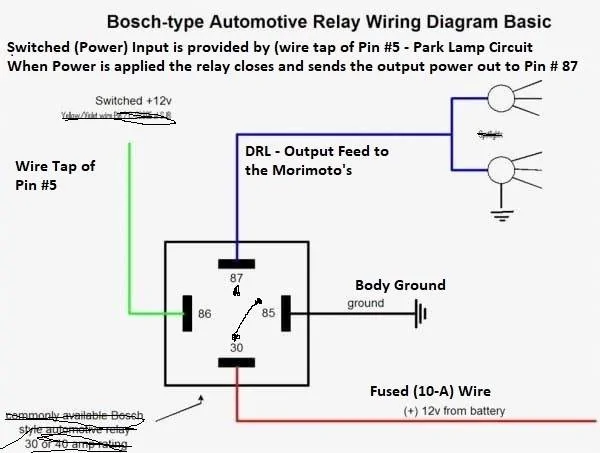
You know - sometimes you can look so deep into an issue and overlook a SIMPLE way to pinpoint down - what specific circuit is triggering the (Start=Up) sequence to NOT WORK.OK, I just verified a theory I had. I went out and pulled the tapped power from fuse #19 and switch in auto ignition off, connected it to the positive battery post. I got a startup sequence both sides, headlights out after sequence and DRLs on bright. So the tapped power powers the headlight sequence and the DRLs on bright.
Did same test, with switch in park ignition off, DRLs come on in dim (parking mode). Got same results, when connecting tapped lead to battery, except, DRLs stayed on dim (parking mode).
It appears that when there is power on the parking wire it keeps the DRLs in the dim parking mode. This would make sense, as anytime the lights are on the parking lights are also. Also, because I have my parking lights on as part of my DRL setting, when I take my truck out of park my DRLs dim down.


So, you have a simple way to play with Switch Position and Forscan.
1. We know that with you setting - Forscan to (Dedicated DRL)
This moves the DRL circuit to (Dedicated DRL - which changes the circuit from)
Low Beams (Bi-Powered) - DRL (Dim) & (Low Beam - Bright) when Low Beam is activated the Park Lights are also triggered (ON)
to
Park Light (Bi-Powered) - (DRL-Bright) and all other lights (OFF)
When you transition (OUT of Park) - The DRL-Dims and your Fogs trigger (ON) as your (DRL Light) Option.
In a (Normal) set-up the initial (DRL-Bright) In Park is (Not-Normal) and when transitioning out of (Park) should be the trigger for the DRL to come on & Bright
The DRL - Bright @ Truck Start and still in (Park) is due to the Tapped Power, By-Passing the BCM Control, when you transition out of park - the BCM takes over control (of the park lamp circuit)
and since you have (+Fogs) as DRL's - it considers this the same as (Low Beams) being on and changes the Light Output from DRL Bright - To DRL Dim (Park Lights) or it caused by the (Setting - (Include Park Lights) as DRL's
The main question is:
With that - TEST, and you place the (Headlamp Switch) in (Headlamps) and then touch the (Battery) source - Does the Start-Up - Sequence - Trigger?
as If I understand - The Start-Up sequence will (Trigger) with the Headlamp Switch in (AUTO) and (Park Lamps) --- Correct?
If this is CORRECT, then we can (isolate) it to the (Headlamp- Low Beam) circuit causing the Morimoto to pick up (They have already been powered) so the Start-Up sequence has already been completed (even though) they have not.
If this is the case, then we just need to (Wiretap) Pin #6 in the harness and then reset the Forscan (Settings) up as they would be set for (Lariat) LED's and then play with the Forscan settings from there and it may possibly be a scenario to set them up as the - Canadian Trucks.
I have the complete list of (As-Built) data relating to the exterior lights for:
US Version (Halo to LED) Change (Factory Lighting)
based on that
I have all the (As-Built) changes for a 22 US Version to a 22 Canada Version (Lariat)
So, I can see (all changes) that were made for the (Sept 2021) Canada Mandate change to the DRL (Laws)
The UNKNOWN is for this LAW CHANGE - and a Canadian Owner will need to chime in here.
I know that the law made it so:
1. The DRL Lights are to be (ON) in any switch position and they must include the Park Lights (Meaning the Tail Lamps)
Any switch position (Includes) OFF - Park Lamps - Auto
The Auto Headlamps (Will Still Function) normally and the DRL Lighting will (DIM) as the Headlights will be (ON)
2. The Canada Version - also DISABLES the IPC selection inputs in the (BCM)
This is for DRL Lighting - In the IPC Menu
So, all this is doing within the BCM is telling the BCM - DRL's are always active outside of (Auto) position. Where the US Version - they are only active in (AUTO) and you have the option to (Turn-Off) the (Auto-DRL)
There are others but I wanted to see (As-Built) data and wanted to know what was being changed when you - De-Select - DRL Lighting in the IPC Menu
BCM:
726-16-02: Feature Configuration - DRL By Auto-Lamp Person 1-4
726-16-02: Feature Configuration - DRL by Auto-Lamp Vehicle
726-16-02 - 0101-0101-014A - (US Version)
726-16-02 - 0202-0202-024F - (Canada Version)
For the Person 1-4 Setting - x2x2-x2x2-xxxx
0=Disabled - 1=Enabled 2=Inop
For the DRL by Vehicle Setting - xxxx-xxxx-x2xx
0=Disabled - 1=Enabled 2=Inop
My Test Results:
With the IPC Selection (DRL-Lighting) Selected this line reads -- 0101-0101-014A
With the IPC Selection (DRL-Lighting) DE-Selected this line reads - 0101-0101-0049
So, by having the IPC screen - this is exactly how you are telling the BCM to turn the function (OFF or Disable)
Note the by Person - Does Not Change as this is still a (ALLOWED) by person change to change it back to (Enabled)
So, Canada version sets this as (INOP)
and they take it a step further and completely (Disable) the IPC selection screen from even showing in the menu.
Plus: They change (1) other setting regarding (DRL-Auto-Lamps) Control in the BCM
and that is:
721-21-01 - Feature List to BCM (DRL) By Auto-Lamp Initial Value
721-21-01 - 1401-0001-0166 - (US Version)
721-21-01 - 1401-0001-0267 - (Canada Version)
xxxx-xxxx-x2xx
0=Disabled - 1=Enabled 2=Inop
It is not (CLEAR) for this line, but I believe that this line is the (Primary Line) that allows control (By-Person) for the 726-16-02 (Line) as it allows that line to be (Customized) by the IPC Menu.
and the IPC (DRL-Lighting) option in the IPC Menu is Disabled for the Canada Trucks
IPC: 720-02-01
720-02-01 - 4DE5-343D-1EEB - (US Version)
720-02-01 - 4DA5-345D-1ECB - (Canada Version)
IPC Menu: xxAx-xxxx-xxxx
E=Enabled A=Disabled
IPC Menu: xxxx-xx5x-xxxx
5=Canada 3=USA
I do not know what (Specific) change it would make by changing the (Country Code) as to what programming it actually does, but the other to Enable or Disable setting will alter if the screen is viewable.
Again, there are some other changes made (Between US & Canada) I will be posting those shortly.
But I can see the changes, but I have (1) unanswered question and that is for a Canada Truck and the Factory Settings on all 2022 and 2023 (after the Law Change) and these settings changed between a 2019 compare & 2022 to comply with that Law Chage.
Do the Canada Trucks have the DRL Lights (ON) at engine start and in (PARK) or is the (DRL- Still Activated) out of Park, as I am unclear on this, as I know they have taken away the DRL only on in (Auto) and also the ability for customer control.
This is a very important (question) as this would take away the need for a (Tapped Power) source and give full control over to the BCM as @ engine start the (DRL Lighting) circuit would trigger (ON) and give you the start-up sequence- just like the (Tapped Power) Source is.
but with the Canada trucks having a Factory LED installed, and the DRL being triggered (ON) at engine start - (In the Dark) would the - Start-Up Sequence (always work) or would it provide the same result as you currently have.
So, the other half of this question - relies on the outcome of the test results of @Big Blue
With the Headlamps (ON) and you touch the power to the battery - how does the Start-Up sequence function.
and a secondary test would be (In the Dark) in (Auto) and the BCM has already turned on the Low Beams - and then touch battery with that tapped power - do you get the same results
Inoperative - Start-Up Sequence or Partially Working (Left Side-Only) Start-Up Sequence.
As, if I am clear on your test results thus far - In (AUTO) & (Park Lamps) the Start-Up Sequence will trigger every time when you touch the battery with the tapped source.
Sponsored
Last edited: