Sponsored

FORScan Modifications

mlarma

Well-Known Member
First Name
Mark
Joined
Nov 18, 2020
Threads
12
Messages
217
Reaction score
471
Location
North Carolina
Vehicle(s)
2020 Ranger XLT 4x2
Occupation
Computers/Networks
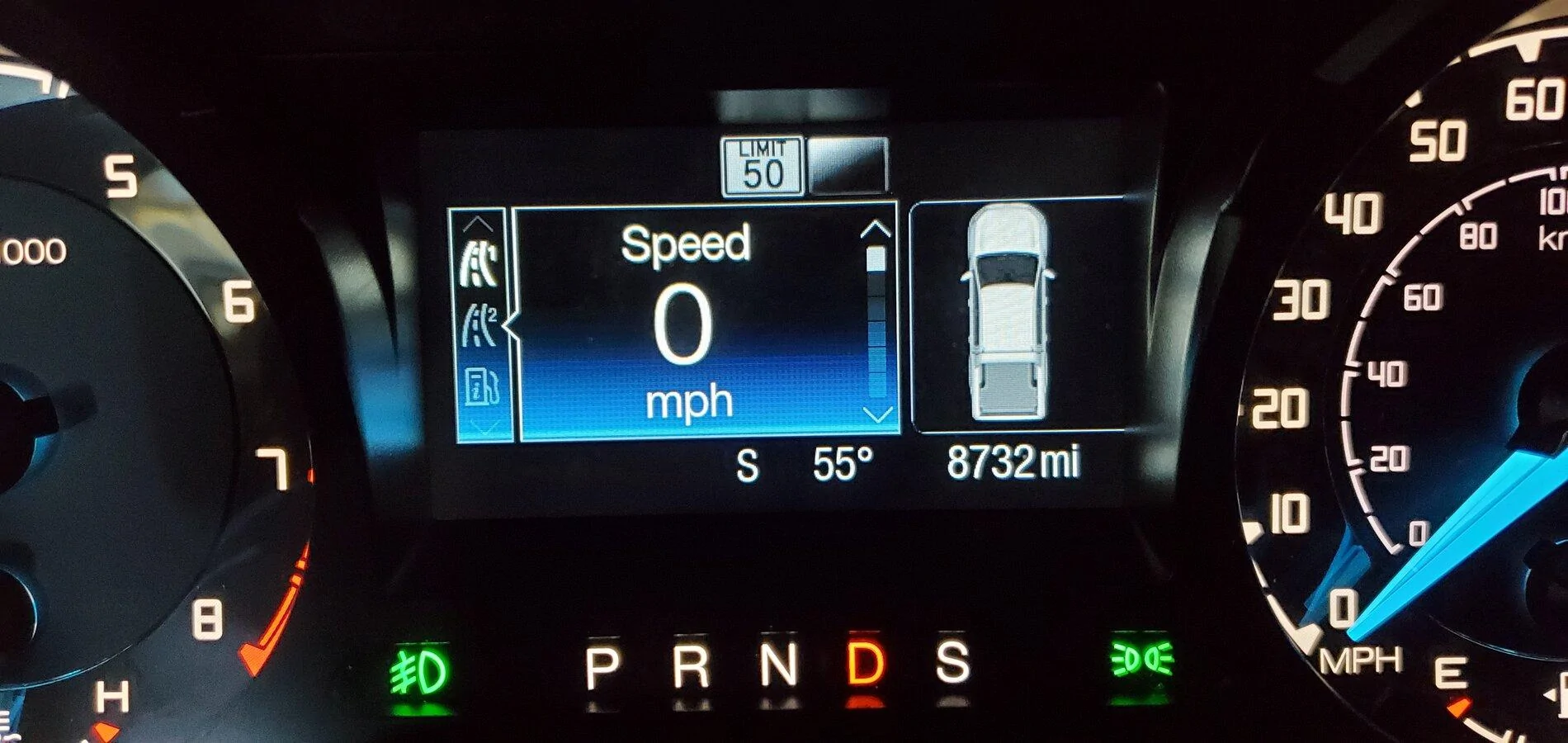
Setup it up this morning and I have the NA signs. Yes it does flash when you go over your tolerance setting. I have a 2020 XLT Sport with the 301A package.

20201223_113053.jpg
I will have to check this out. The build date for mine is 9/16/2020 so maybe I’ll get NA signs.
 

gaby1963

New Member
First Name
gabriel
Joined
Dec 8, 2020
Threads
2
Messages
4
Reaction score
9
Location
argentina
Vehicle(s)
Fordd Ranger LTD TDCI 3.2 4x4
Occupation
employ
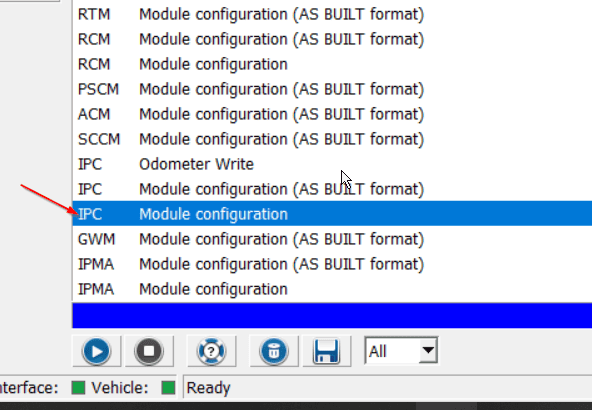
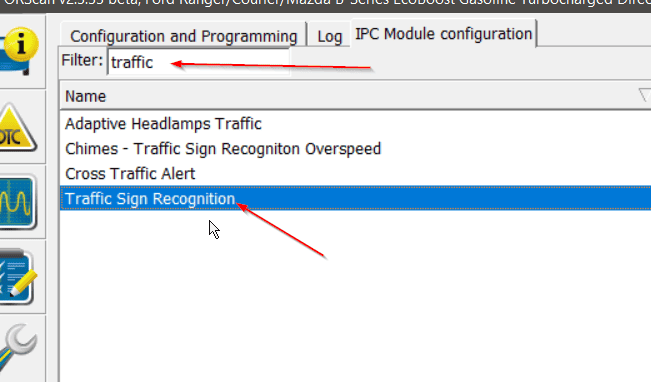
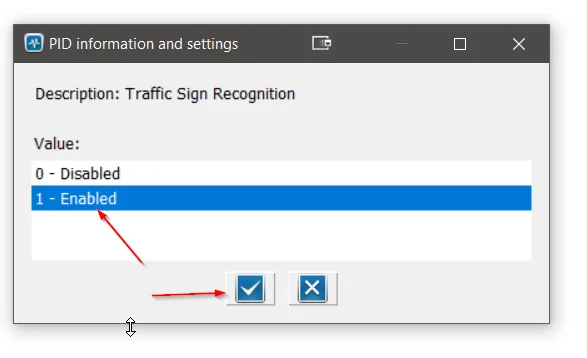
Here's the modules that need changed in order to get the full Speed Limit Sign reading to work:

IPC > Traffic Sign Recognition = Enabled
2020-06-24 18_00_59-.png

2020-06-24 18_02_06-FORScan v2.3.33 beta, Ford Ranger_Courier_Mazda B-Series EcoBoost Gasoline...png

2020-06-24 18_02_33-FORScan v2.3.33 beta, Ford Ranger_Courier_Mazda B-Series EcoBoost Gasoline...png


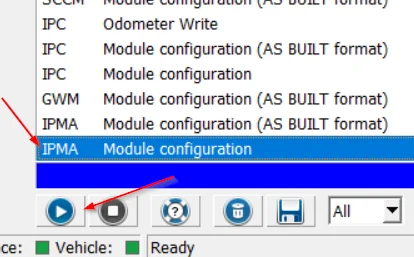
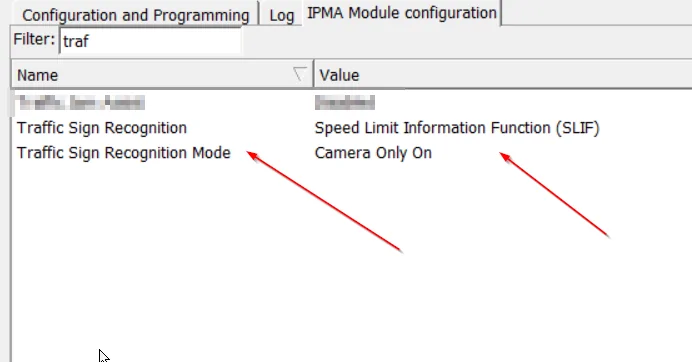
IPMA > Traffic Sign Recognition = Speed Limit Information Function (SLIF) AND Traffic Sign Recognition Mode = Camera Only On (other modes cause errors).
2020-06-24 18_03_24-Microsoft Store.png


2020-06-24 18_03_59-FORScan v2.3.33 beta, Ford Ranger_Courier_Mazda B-Series EcoBoost Gasoline...png


This all add the options that need to be enabled in the dash menu:

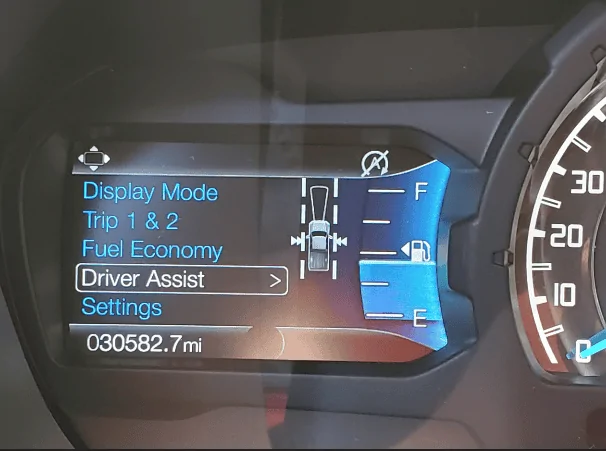
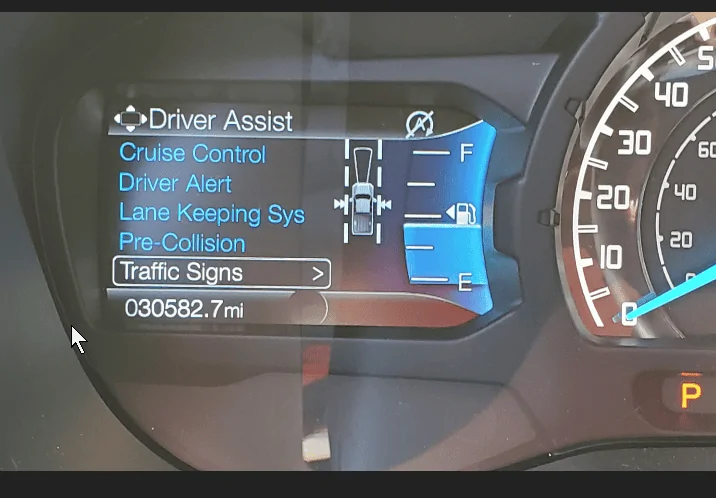
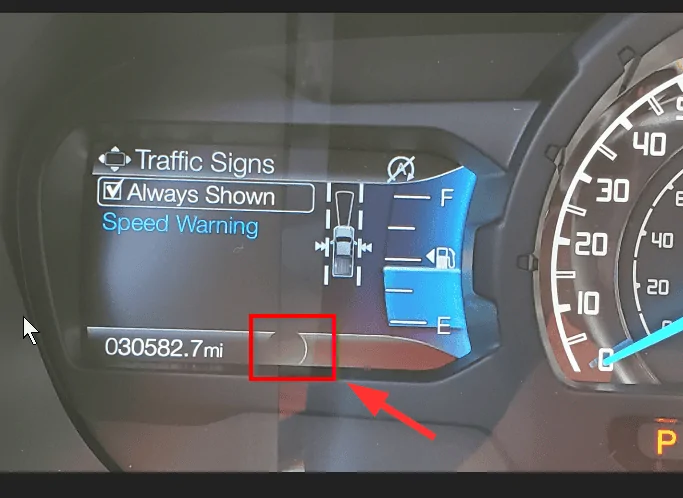
Driver Assist > Traffic Signs > Always On (It will show up in the area highlighted when it detects a speed limit sign. It will time go blank when you slow down and stop/turn a corner of speed up a lot).

2020-06-24 18_10_38-Photos.png

2020-06-24 18_10_47-20200624_175944.jpg ‎- Photos.png

2020-06-24 18_10_57-20200624_175950.jpg ‎- Photos.png
Hi friends, I need you help, I see only MODE TO ipma module "AS BUILT FORMAT" I cant found the line to change to "camera only on", , gabriel
 

WLFPIR8

Well-Known Member
First Name
Ethan
Joined
Jun 25, 2019
Threads
7
Messages
175
Reaction score
394
Location
Central Ohio
Website
whor.us
Vehicle(s)
2019 Ranger Lariat FX4/Sport in Saber Orange
Occupation
Systems engineer by day, maker and multimedia guru by night.
Vehicle Showcase
1
Hi friends, I need you help, I see only MODE TO ipma module "AS BUILT FORMAT" I cant found the line to change to "camera only on", , gabriel
The Forscan mods listed here ONLY work on North American 2019+ Ford Rangers. You may have better luck in the Forscan forums (via their site).
 

Big Blue

Well-Known Member
First Name
Lee
Joined
May 5, 2020
Threads
16
Messages
3,927
Reaction score
9,352
Location
Wisconsin
Vehicle(s)
2019 Ford Ranger XLT FX4 Supercrew lighting blue
Occupation
Retired mechanical designer
Hi friends, I need you help, I see only MODE TO ipma module "AS BUILT FORMAT" I cant found the line to change to "camera only on", , gabriel
Are you running the latest Forscan version?


RedlandRanger

Moderator
First Name
Rob
Joined
Nov 14, 2018
Threads
42
Messages
5,111
Reaction score
11,104
Location
Oregon
Vehicle(s)
2019 Ford Ranger Lariat FX4, 1973 Mercury Capri
Vehicle Showcase
1
Just a word of advice on FORScan mods. Make sure your battery is in good shape. My son got new tires on his F-150 and I tried several times to update to fix his speedo. It kept giving me a weird "unable to write" kind of error (I forgot the exact wording). Anyway, after some googling, it looked like it might be due to a low battery or something. I hooked his truck up to my trickle charger and the update took the first time. There was nothing obviously wrong with his battery but it was 5 years old and apparently it was just enough to make FORScan have fits.

I guess what I'm trying to say is that if you get weird errors when trying to update, put a trickle charger on your battery and see if that fixes the problem.
 

RAYJAY

Well-Known Member
First Name
Jeff
Joined
Aug 3, 2020
Threads
22
Messages
411
Reaction score
628
Location
UNION DALE PA
Vehicle(s)
2020 ranger pickup 2019 subaru
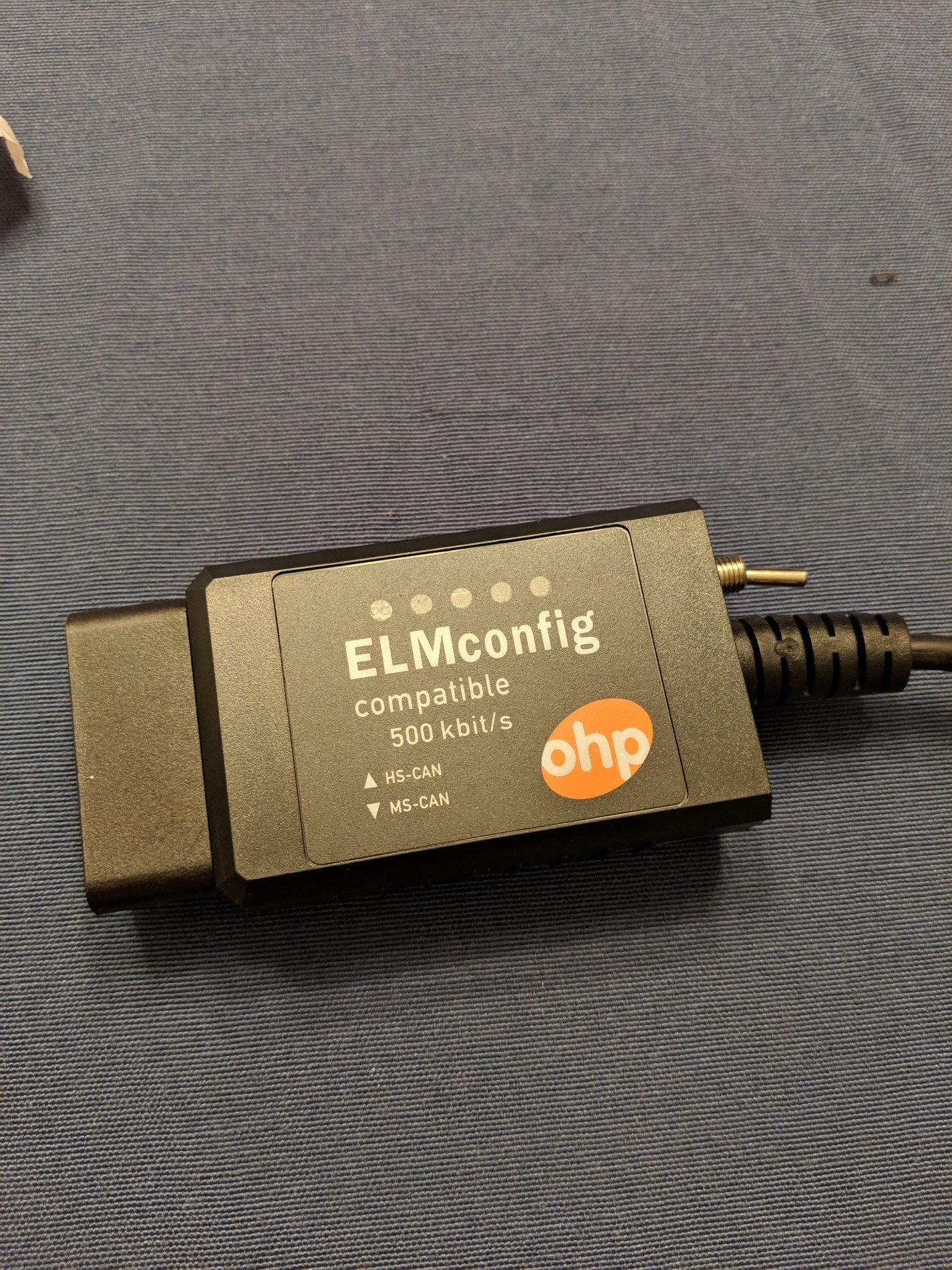
This came today... Now I just need the truck.
IMG_20190220_182812.jpg

all ready have this interface , is there any problem with this one ? or do i need the up dated version ?

and how many years is everyone buying for the software ??
 

immersion

Member
Joined
Dec 27, 2020
Threads
1
Messages
8
Reaction score
3
Location
SLC, Utah
Vehicle(s)
Ford Ranger 2019 Lariat 4x4
Hey all,

I recently got a 2019 Ranger and I am new to FORScan. I am planning on doing some of the FORScan mods (i.e. Offroad display, TM mode) but have some questions regarding warranty. I understand that any modifications could void the warranty if the dealer can prove it was a direct result from that mod. I have couple of questions regarding that:

1. Are there any logs of FORScan accessing the system? Even if I revert values would the dealer be able to see that it was modded at some point?
2. If there are any software updates (i.e. Sync 3 ) do I have to revert back to the default config before installing the update? If I don't, would the software update overwrite the FORScan values to default?

Thanks in advance!
 

Gizmokid2005

Well-Known Member
Joined
Dec 1, 2019
Threads
13
Messages
1,279
Reaction score
1,875
Location
GA
Website
gizmokid2005.com
Vehicle(s)
2019 Ford Ranger XLT 4X4 SCrew
Occupation
SQL Developer
Vehicle Showcase
1
Hey all,

I recently got a 2019 Ranger and I am new to FORScan. I am planning on doing some of the FORScan mods (i.e. Offroad display, TM mode) but have some questions regarding warranty. I understand that any modifications could void the warranty if the dealer can prove it was a direct result from that mod. I have couple of questions regarding that:

1. Are there any logs of FORScan accessing the system? Even if I revert values would the dealer be able to see that it was modded at some point?
2. If there are any software updates (i.e. Sync 3 ) do I have to revert back to the default config before installing the update? If I don't, would the software update overwrite the FORScan values to default?

Thanks in advance!
You'll be fine with FORScan, since it's only modifying config values to your modules. It's not actually flashing anything that could be harmful to the vehicle. Just make sure you take backups of your modules before making any changes with FORscan and you should be 100% fine.
 

micl9

Well-Known Member
First Name
Mike
Joined
Dec 21, 2019
Threads
31
Messages
1,368
Reaction score
1,949
Location
Apex, NC
Vehicle(s)
2019 Ranger XLT Fx4 302A
Vehicle Showcase
1
Here's the modules that need changed in order to get the full Speed Limit Sign reading to work:

IPC > Traffic Sign Recognition = Enabled
2020-06-24 18_00_59-.png

2020-06-24 18_02_06-FORScan v2.3.33 beta, Ford Ranger_Courier_Mazda B-Series EcoBoost Gasoline...png

2020-06-24 18_02_33-FORScan v2.3.33 beta, Ford Ranger_Courier_Mazda B-Series EcoBoost Gasolin...webp


IPMA > Traffic Sign Recognition = Speed Limit Information Function (SLIF) AND Traffic Sign Recognition Mode = Camera Only On (other modes cause errors).
2020-06-24 18_03_24-Microsoft Store.webp


2020-06-24 18_03_59-FORScan v2.3.33 beta, Ford Ranger_Courier_Mazda B-Series EcoBoost Gasolin...webp


This all add the options that need to be enabled in the dash menu:

Driver Assist > Traffic Signs > Always On (It will show up in the area highlighted when it detects a speed limit sign. It will time go blank when you slow down and stop/turn a corner of speed up a lot).

2020-06-24 18_10_38-Photos.webp

2020-06-24 18_10_47-20200624_175944.jpg ‎- Photos.webp

2020-06-24 18_10_57-20200624_175950.jpg ‎- Photos.webp
Make sure you follow the instructions! I missed one of the changes in the IPMA and my truck blew up!
JK ?
Wasn't displaying the speed and went back and re-read Ethan's direction, fixed it and it works!
Another XLT w/302a. No adaptive cruise so I guess it uses the lane assist camera.

One question, anyone know why some of us have US style speed limit sign icon and other (like me) have Euro circles?
 
Last edited:

micl9

Well-Known Member
First Name
Mike
Joined
Dec 21, 2019
Threads
31
Messages
1,368
Reaction score
1,949
Location
Apex, NC
Vehicle(s)
2019 Ranger XLT Fx4 302A
Vehicle Showcase
1
Setup it up this morning and I have the NA signs. Yes it does flash when you go over your tolerance setting. I have a 2020 XLT Sport with the 301A package.

20201223_113053.jpg
Hey Chris - could you post or send me a backup file of you IPC and IPMA As builts? Maybe I can compare the changes at the Hex level and see whats different to enable NA signs.
 

Big Blue

Well-Known Member
First Name
Lee
Joined
May 5, 2020
Threads
16
Messages
3,927
Reaction score
9,352
Location
Wisconsin
Vehicle(s)
2019 Ford Ranger XLT FX4 Supercrew lighting blue
Occupation
Retired mechanical designer
Hey Chris - could you post or send me a backup file of you IPC and IPMA As builts? Maybe I can compare the changes at the Hex level and see whats different to enable NA signs.
Good thought Mike, if you find something please post. I'd like the US signs on my MY2019 instead of the EU signs. Hoping it's not a firmware difference between model years. The camera does recognize the US speed signs so it is probably in the IPC module.
 

immersion

Member
Joined
Dec 27, 2020
Threads
1
Messages
8
Reaction score
3
Location
SLC, Utah
Vehicle(s)
Ford Ranger 2019 Lariat 4x4
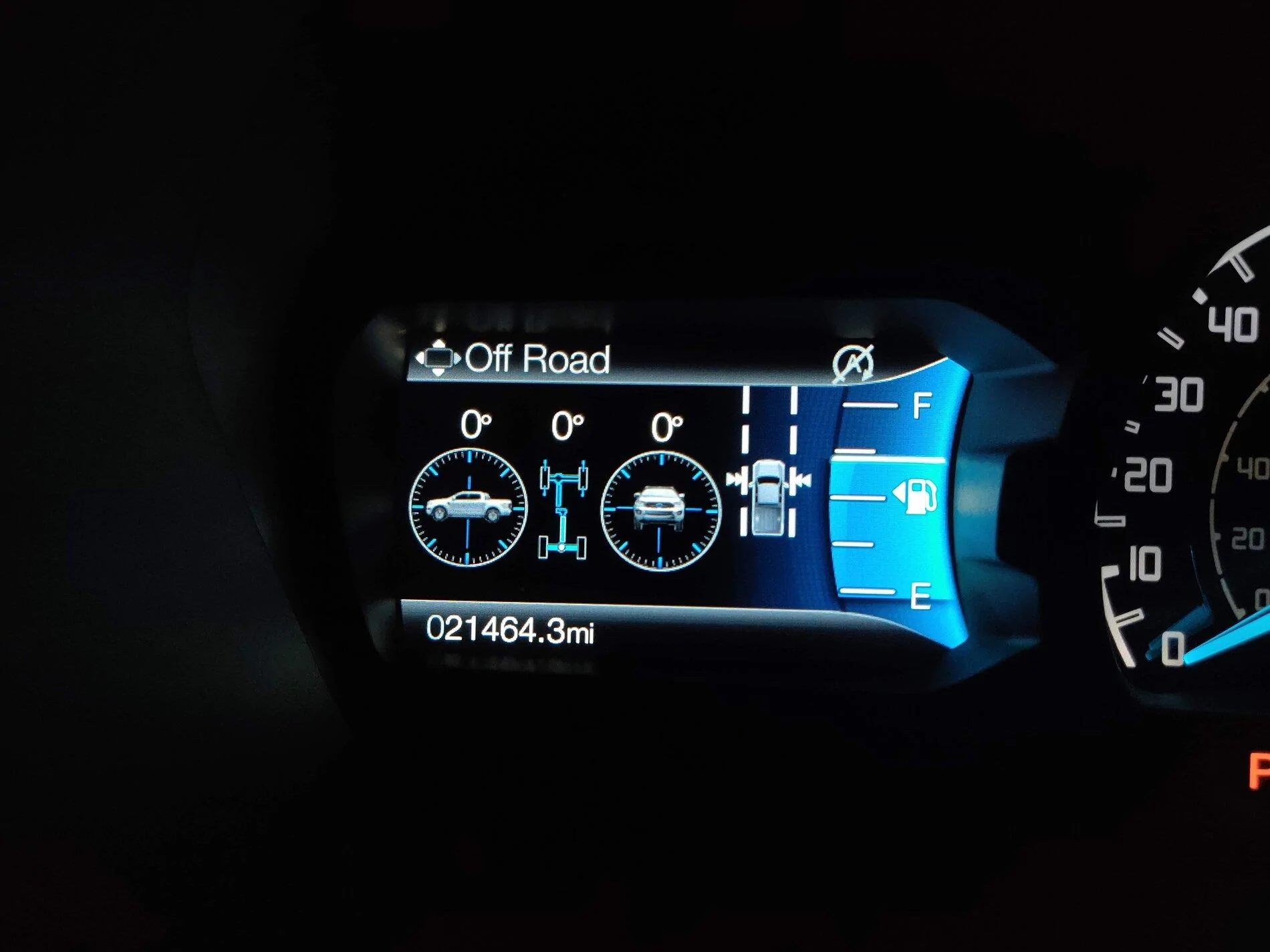
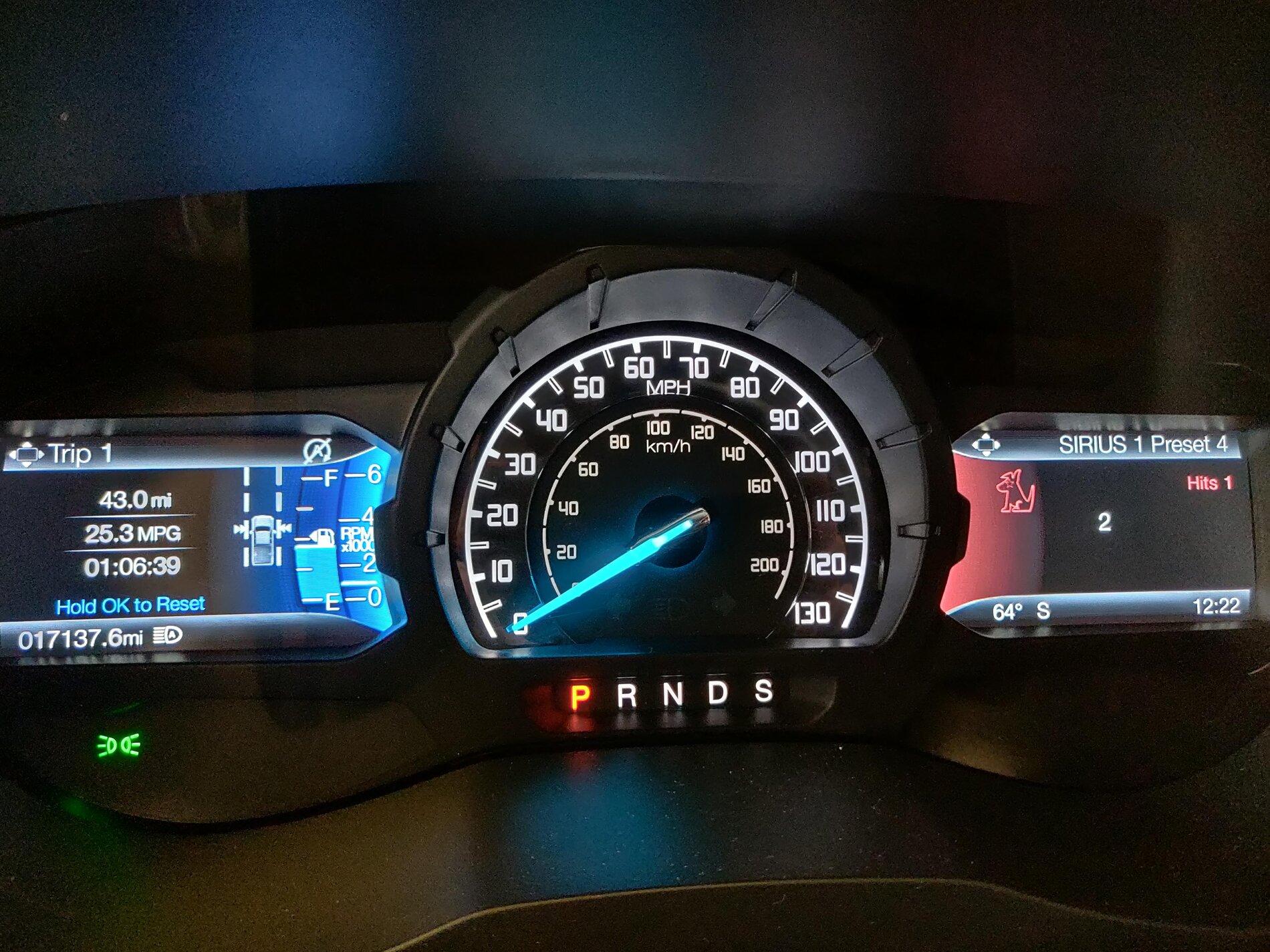
I just did my first FORScan modification to enable the Offroad gauge. It worked beautifully. However, I noticed that the RPM meter next to the fuel level disappeared. I still see the analog view, but it no longer shows next to the fuel. Does anyone know why that happened?

IMG_20201229_171920.jpg


Edit: I reverted back the change but the RPM meter still does not appear.

Edit 2: Added a reference image of what it should look like.
IMG_20200522_122202.jpg
 
Last edited:

immersion

Member
Joined
Dec 27, 2020
Threads
1
Messages
8
Reaction score
3
Location
SLC, Utah
Vehicle(s)
Ford Ranger 2019 Lariat 4x4
I just did my first FORScan modification to enable the Offroad gauge. It worked beautifully. However, I noticed that the RPM meter next to the fuel level disappeared. I still see the analog view, but it no longer shows next to the fuel. Does anyone know why that happened?

IMG_20201229_171920.jpg


Edit: I reverted back the change but the RPM meter still does not appear.

Edit 2: Added a reference image of what it should look like.
IMG_20200522_122202.jpg
I just remembered that I can configure that through Settings -> Display Setup -> Gauge Display. It seems FORScan updated the value to Fuel Gauge only. My bad!
 

SBCSD

Well-Known Member
First Name
Chris
Joined
Dec 18, 2020
Threads
6
Messages
49
Reaction score
104
Location
VictimVille, Ca
Vehicle(s)
2020 XLT Sport
Occupation
Areospace
Hey Chris - could you post or send me a backup file of you IPC and IPMA As builts? Maybe I can compare the changes at the Hex level and see whats different to enable NA signs.
Unfortunately I like to live dangerously and did not make a back up! Sorry
Sponsored


Top