Al_S
Member
Official Forscan USB adapter OBDLink EX on Amazon listed at $49.95 seems to be on sale for $33.96 today. Since this was on my watch list, I pulled the trigger. Now to get my list of changes together.
Sponsored


So here is a page from the instructions on the Pro Cal 4. Most likely similar for the Livernois my touch calibrator. With that software on your computer you should beable to refresh your Pro Cal 4 and beable to revert back to stock with no problems.Been trying that since September but Ford can't figure out how to get my info from where I uploaded my stock brain(Ford cloud) back onto my tuner! They can't seem to figure out how to resign my info to the new programmer they sent!
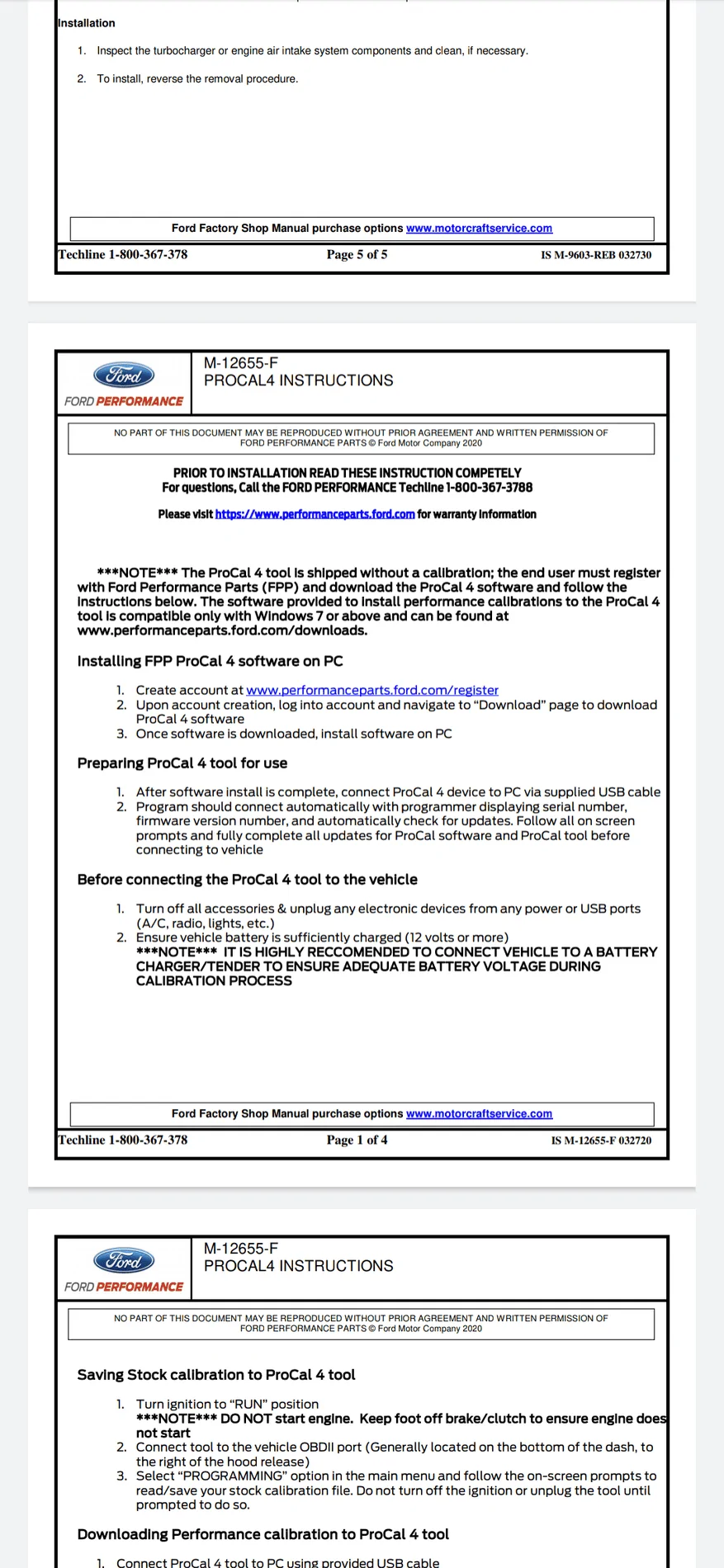
Again been trying all this for months and the problem is on Ford's end! They can't figure out how to resign all my original files to the new pro Cal they sent!So here is a page from the instructions on the Pro Cal 4. Most likely similar for the Livernois my touch calibrator. With that software on your computer you should beable to refresh your Pro Cal 4 and beable to revert back to stock with no problems.

I want my climate controls back LOLAgain been trying all this for months and the problem is on Ford's end! They can't figure out how to resign all my original files to the new pro Cal they sent!
Try all this every weekend and they've still got no files for me to download!
Just gotta wait till they figure it out!
Wish they would've used Cobb accessport as it was zero problems on my RS!
This was email from Ford 3 months ago!
Second, our engineers are working on getting the stock calibration “assigned” to your new tool. They are experiencing some difficulty at the moment, because the original stock file was already assigned to your stock tool, and they have never had to “re-assign” a calibration before, so they are having a bit of difficulty. They will get it accomplished, and it will be all set for you.
All this is going to do is refresh your Pro Cal 4. The stock tune is on your profile for as we speak. If you can connect your profile for to the computer just to refresh it it should allow you to use the touch screen with no problems and then you can go right back to stock with no problems. The file should be on your Pro Cal 4.Again been trying all this for months and the problem is on Ford's end! They can't figure out how to resign all my original files to the new pro Cal they sent!
Try all this every weekend and they've still got no files for me to download!
Just gotta wait till they figure it out!
Wish they would've used Cobb accessport as it was zero problems on my RS!
This was email from Ford 3 months ago!
Second, our engineers are working on getting the stock calibration “assigned” to your new tool. They are experiencing some difficulty at the moment, because the original stock file was already assigned to your stock tool, and they have never had to “re-assign” a calibration before, so they are having a bit of difficulty. They will get it accomplished, and it will be all set for you.
Will try yet again this weekend when I get home. My trucks 2 hours away all week and only see it on weekends. LOLAll this is going to do is refresh your Pro Cal 4. The stock tune is on your profile for as we speak. If you can connect your profile for to the computer just to refresh it it should allow you to use the touch screen with no problems and then you can go right back to stock with no problems. The file should be on your Pro Cal 4.
well yet another month with NO tune to download!Will try yet again this weekend when I get home. My trucks 2 hours away all week and only see it on weekends. LOL
At this point it was in Ford's hands.

You can do this without editing the HEX values directly.Having an issue finding the right values to put my climate controls back on the Sync 3 8" screen. They have disappeared and I bought forscan to put it back, but the values I have seen on YT are not working. Searched here and see where people have successfully restored climate controls, but not with the exact values to change. I appreciate any help. 2019 Ranger Sport. Thanks

Make sure you do the "initialization" or whatever it is after you make the changes, it "writes" things to a more permanent state and should do it. I used to get something similar until I did that and a key cycle a few times.Quick question for you guys, I did some forscan modifications. Everything went great, but something new has popped up. When I start my 2020 XLT 4x4 now, a little seatbelt screen pops up on my center screen on the cluster telling me what seatbelts are belted and I have to hit OK to make it go away.
I'm assuming I did this in the IPC config.
IPC changes:
Offroad screen / gauge enabled
Frost warning enabled
3 do do do's disabled
Terrain selection for TM enabled
I do not recall making any other changes. I took a backup and reverted just the IPC module which made it go away. I made the changes again and I notice the popup is there again. I was much more careful about my changes on the second go-round, and I know for a fact I did not enable any additional changes.
Any idea what IPC value might have turned this on?
Interesting. You're referencing after you make a "write" the cycling of the ignition on and off correct? I made sure to do that each time. Wonder if I missed it once?Make sure you do the "initialization" or whatever it is after you make the changes, it "writes" things to a more permanent state and should do it. I used to get something similar until I did that and a key cycle a few times.
No, there's one more "special" instruction to do that writes the configuration values to the PCM so they're "constant" and not "out of sync" with what is expected. I can't remember what it's called offhand though. It's something along the lines of "re-initialize" or something.Interesting. You're referencing after you make a "write" the cycling of the ignition on and off correct? I made sure to do that each time. Wonder if I missed it once?


