NNayak
Well-Known Member
- First Name
- Neel
- Joined
- Oct 31, 2020
- Threads
- 4
- Messages
- 53
- Reaction score
- 175
- Location
- Los Angeles
- Vehicle(s)
- 2019 Ranger Lariat RTR
- Occupation
- Aerospace Engineer
- Thread starter
- #1
Hello,
I'm having some trouble getting my 19Q1 map pack to install properly. The install process does not seem to be going as described by the Ford Install instructions, and the process ends with nav voice commands inoperable (the remainder of voice commands work). I'm hoping I can get some guidance from some of the more technical members on this forum.
Vehicle details:
2019 Ranger Lariat, Sync Version 3.3.19052
Map pack to be installed: 19Q1_NA_Post-3.2_2ndRelease -- downloaded from Ford and prepared per Ford instructions using 32GB flash drive incl. license file
The saga so far:
The first time I attempted to install the map update, I got the two prompt screens on the head unit asking if I wanted to proceed with the install, which I confirmed. The 'Updating System' banner became visible on the top of the screen, so I drove around for a little under an hour (with no system restarts) until an 'Install Complete' window popped up on screen. Before I could reach over and hit the 'close' button, the head unit restarted once, for the first time. When the unit rebooted I got a 'system updated' banner. At this point, I thought that the install was complete since an hour had passed and the unit had rebooted, and so continued driving with the USB key in (with the vehicle running, didn't power cycle the key).
However, after like 5 minutes, the 'System Updating' banner became visible again, this time without displaying the two prompt screens. I figured I should have taken the USB key out and figured the system update had restarted again from the top. I kept driving for almost another hour with the 'System Updating' banner until the same 'Install Complete' window popped up. The system restarted again before I could hit 'close,' but this time I pulled the USB key when the system powered off, after having let the update run for now nearly one hour and 45 minutes in total.
After power cycling the key, I noticed that nav was working, but nav voice command was not. I was unable to choose a destination using voice commands. As soon as I say "find an address," the voice command prompt disappears without the system switching to nav. I figured it might take a bit longer of a power cycle to get the update to stick, so I tried again the next morning -- no dice, the nav voice command function was still inoperable.
I re-formatted the USB stick and re-copied the files over, and tried to install a 2nd time. This time, again, the update started automatically without the two prompt screens that popped up at the beginning of the first install. The update progressed again for just under an hour with no reboots, and then the 'install complete' screen came up again. This time, I hit the 'close' button, and the system restarted. While the system was off, I pulled the USB key. I power cycled the key again, and the nav voice function was still broken.
At this point, I tried to master reset the system. After the master reset, the nav voice function is still inoperable.
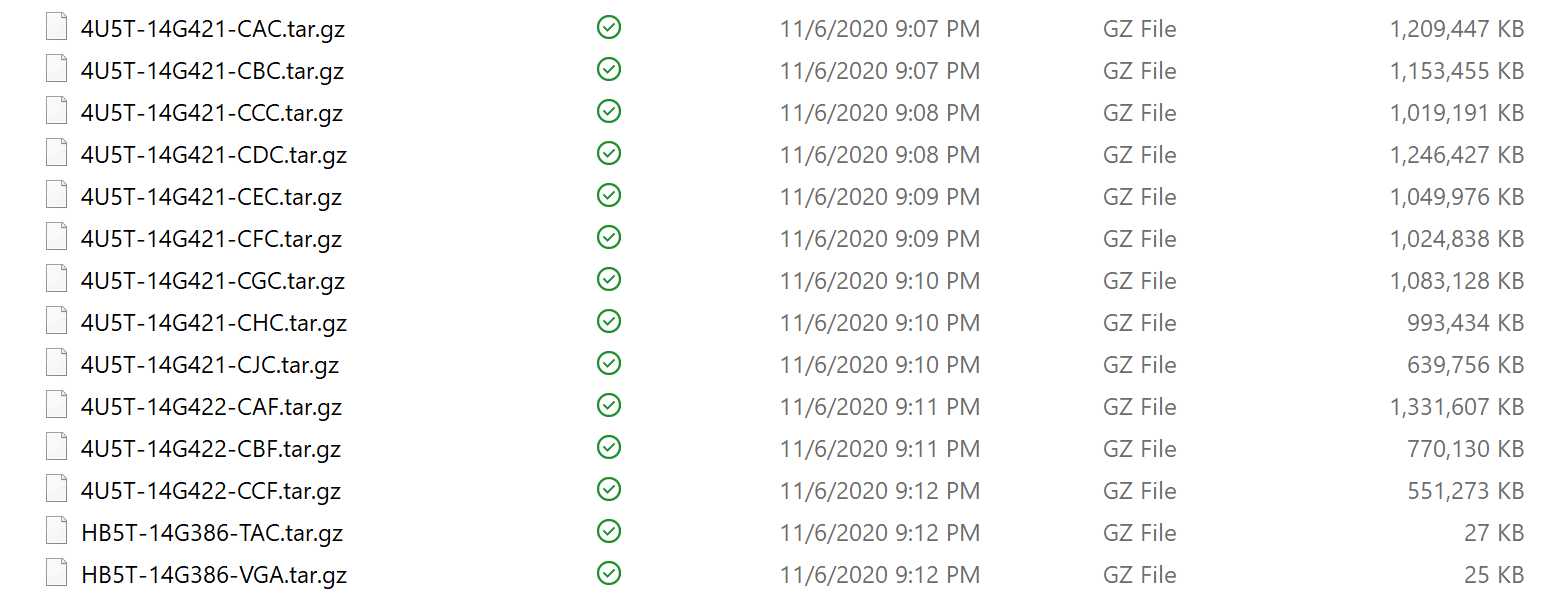
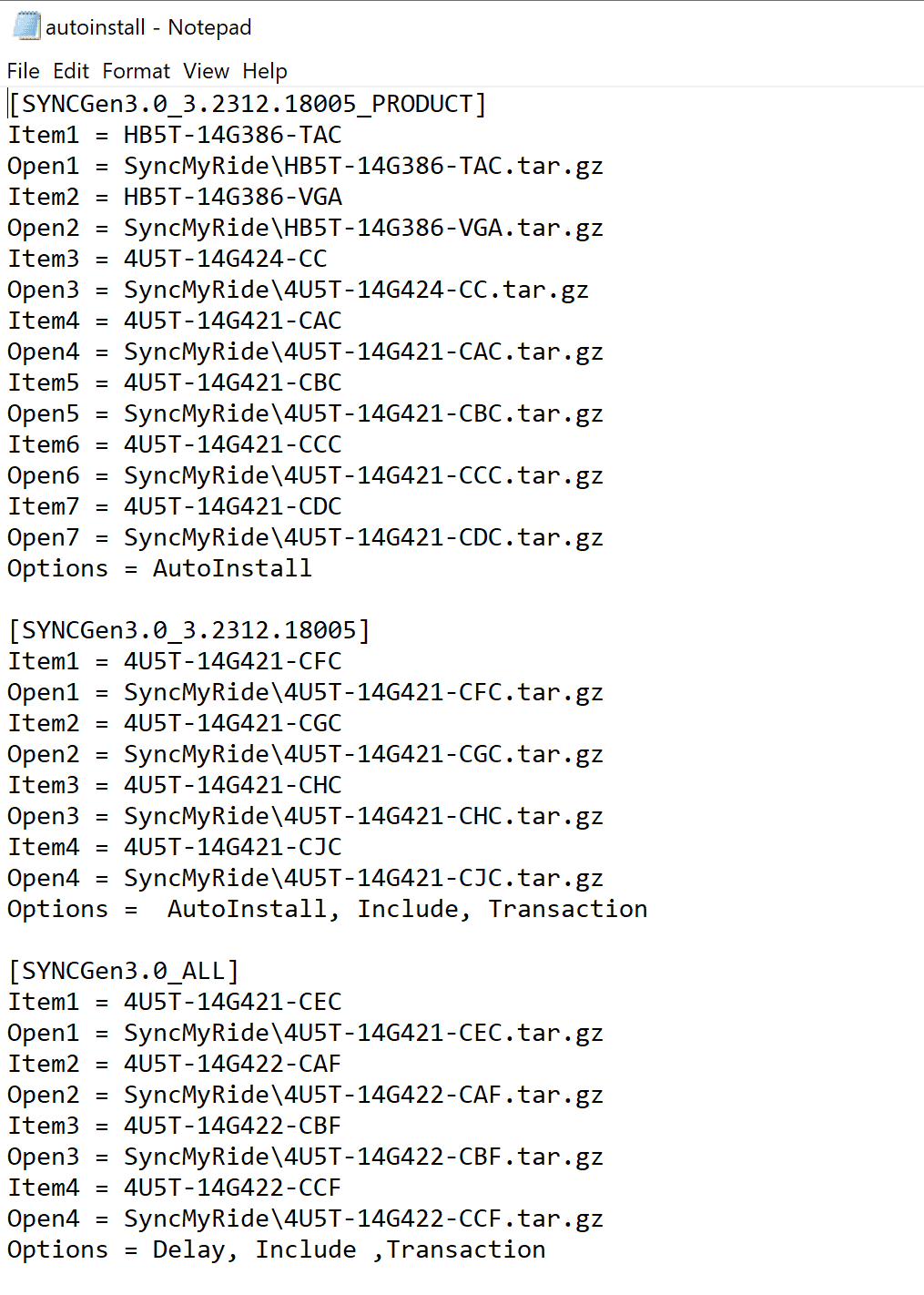
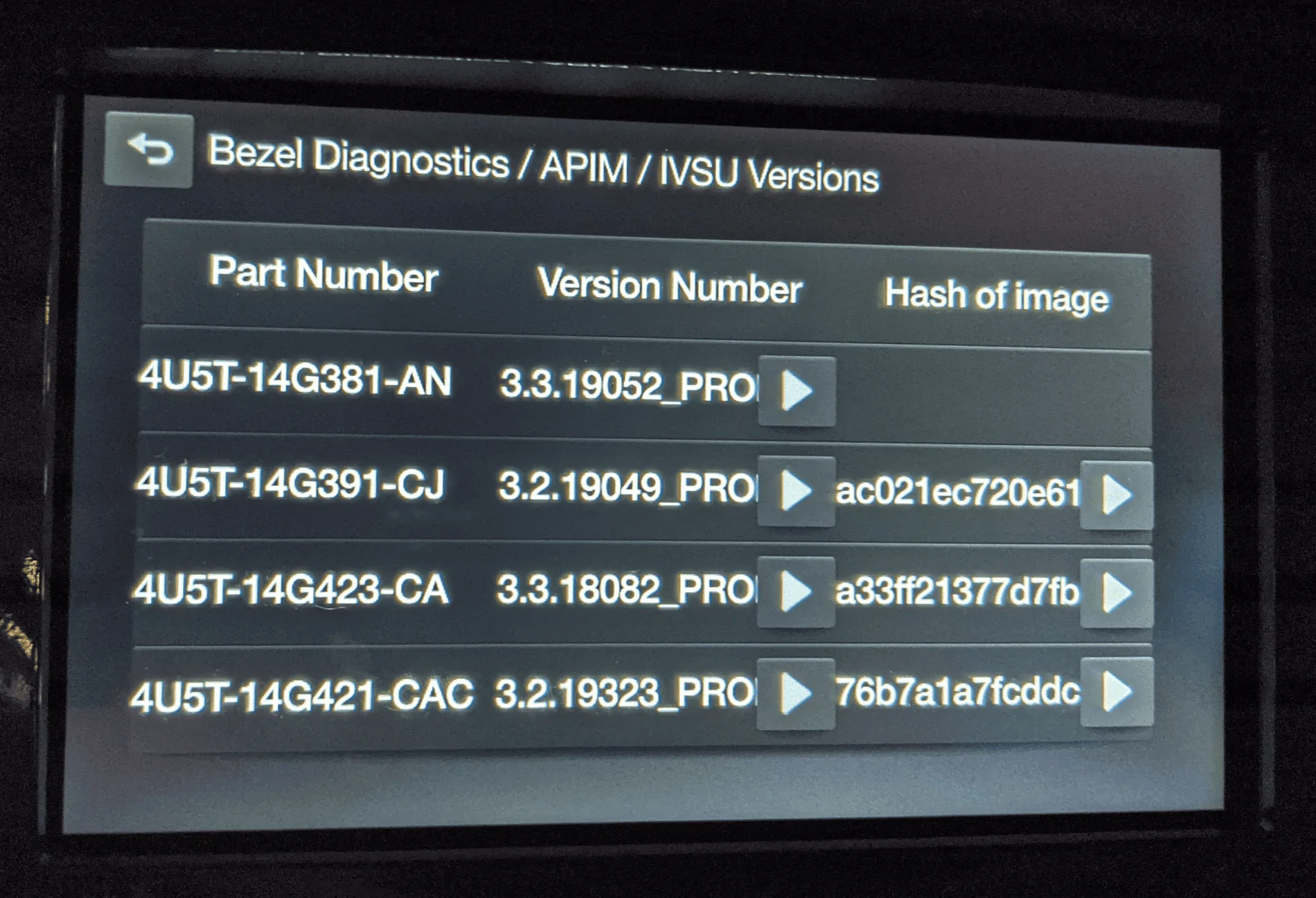
I've included screenshots of the contents of my SyncMyRide folder, my autoinstall.lst file, and a photo of the currently installed IVSU versions from diagnostic mode.
What strikes me as odd is that the total install time is about right, but the number of reboots is wrong. As far as I can tell, I've followed the Ford instructions to the letter. The only deviation from the instructions (that I just now realized) is that I did not set the volume label as 'SyncMyRide' when formatting the USB key.
Does anyone have any advice or input on getting this install to execute properly?


I'm having some trouble getting my 19Q1 map pack to install properly. The install process does not seem to be going as described by the Ford Install instructions, and the process ends with nav voice commands inoperable (the remainder of voice commands work). I'm hoping I can get some guidance from some of the more technical members on this forum.
Vehicle details:
2019 Ranger Lariat, Sync Version 3.3.19052
Map pack to be installed: 19Q1_NA_Post-3.2_2ndRelease -- downloaded from Ford and prepared per Ford instructions using 32GB flash drive incl. license file
The saga so far:
The first time I attempted to install the map update, I got the two prompt screens on the head unit asking if I wanted to proceed with the install, which I confirmed. The 'Updating System' banner became visible on the top of the screen, so I drove around for a little under an hour (with no system restarts) until an 'Install Complete' window popped up on screen. Before I could reach over and hit the 'close' button, the head unit restarted once, for the first time. When the unit rebooted I got a 'system updated' banner. At this point, I thought that the install was complete since an hour had passed and the unit had rebooted, and so continued driving with the USB key in (with the vehicle running, didn't power cycle the key).
However, after like 5 minutes, the 'System Updating' banner became visible again, this time without displaying the two prompt screens. I figured I should have taken the USB key out and figured the system update had restarted again from the top. I kept driving for almost another hour with the 'System Updating' banner until the same 'Install Complete' window popped up. The system restarted again before I could hit 'close,' but this time I pulled the USB key when the system powered off, after having let the update run for now nearly one hour and 45 minutes in total.
After power cycling the key, I noticed that nav was working, but nav voice command was not. I was unable to choose a destination using voice commands. As soon as I say "find an address," the voice command prompt disappears without the system switching to nav. I figured it might take a bit longer of a power cycle to get the update to stick, so I tried again the next morning -- no dice, the nav voice command function was still inoperable.
I re-formatted the USB stick and re-copied the files over, and tried to install a 2nd time. This time, again, the update started automatically without the two prompt screens that popped up at the beginning of the first install. The update progressed again for just under an hour with no reboots, and then the 'install complete' screen came up again. This time, I hit the 'close' button, and the system restarted. While the system was off, I pulled the USB key. I power cycled the key again, and the nav voice function was still broken.
At this point, I tried to master reset the system. After the master reset, the nav voice function is still inoperable.
I've included screenshots of the contents of my SyncMyRide folder, my autoinstall.lst file, and a photo of the currently installed IVSU versions from diagnostic mode.
What strikes me as odd is that the total install time is about right, but the number of reboots is wrong. As far as I can tell, I've followed the Ford instructions to the letter. The only deviation from the instructions (that I just now realized) is that I did not set the volume label as 'SyncMyRide' when formatting the USB key.
Does anyone have any advice or input on getting this install to execute properly?
Sponsored