Sponsored

Sync 3 v3.4.22251

Tra1969

Well-Known Member
Joined
Jan 30, 2018
Threads
4
Messages
198
Reaction score
280
Location
Michigan
Vehicle(s)
2022 Ford Ranger Lariat Tremor 501A and Tow
Occupation
Senior Manufacturing Supervisor
Vehicle Showcase
2
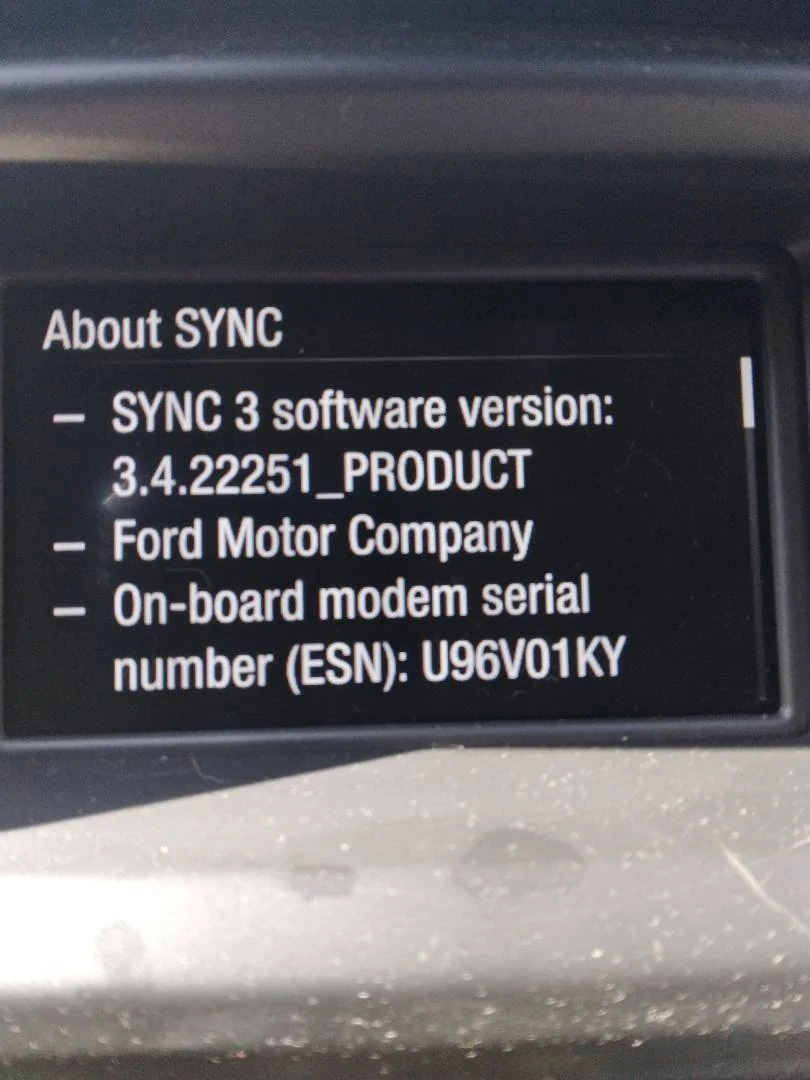
I got notification again I have a update available. Not sure what is going on with Ford, but truck is on 3.4.22251 and truck says it is up to date. The ford site still says 3.4.22200 is my current revision. When I updated it would never let me upload the .xml file. Even though I have been connected to WiFi the Ford site still does not update. After seeing the post above I guess it is best to leave it alone.
Sponsored

 

Tra1969

Well-Known Member
Joined
Jan 30, 2018
Threads
4
Messages
198
Reaction score
280
Location
Michigan
Vehicle(s)
2022 Ford Ranger Lariat Tremor 501A and Tow
Occupation
Senior Manufacturing Supervisor
Vehicle Showcase
2
Looked at the web site and got the same error as the other two and haven't even done anything and wasn't there before. Downloaded the update it says I have and will try one more time to see if it helps.
 

Tra1969

Well-Known Member
Joined
Jan 30, 2018
Threads
4
Messages
198
Reaction score
280
Location
Michigan
Vehicle(s)
2022 Ford Ranger Lariat Tremor 501A and Tow
Occupation
Senior Manufacturing Supervisor
Vehicle Showcase
2
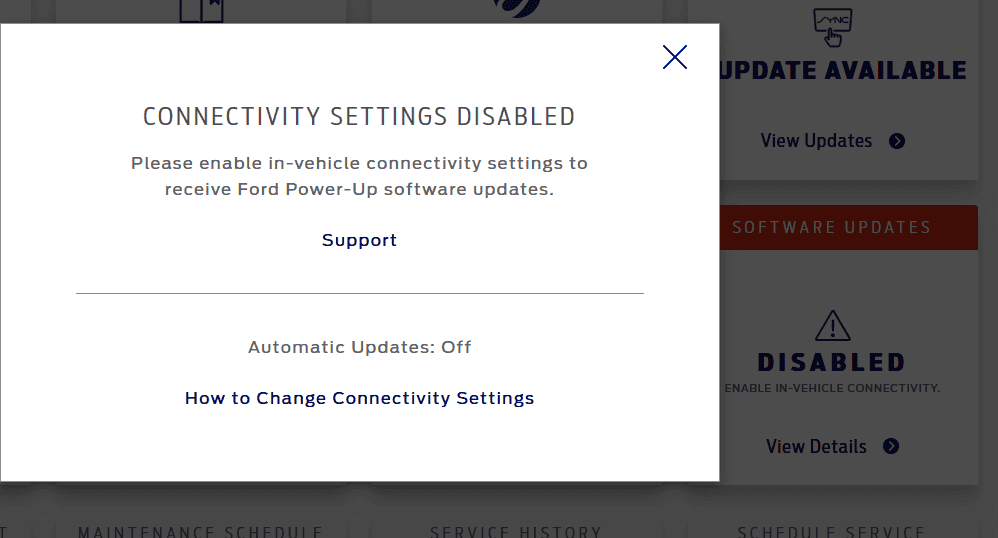
Did master reset and tried update again. No luck still on 3.4.22251 and web site still says 3.4.22200 is what it is on. Also had the error for the power up software update as being disabled. But did a little searching and that is only for Sync 4 & 4A So I guess it is disabled because we are on Sync 3. A few snapshots below. Not sure why ford would show it disabled when it does not apply to us. But I did get everything back to normal on the truck, so I'm good for now - - - until the next update :)


1676340886943.png


1676340832015.webp
 

AzScorpion

Moderator
First Name
Dave
Joined
Jul 25, 2019
Threads
335
Messages
26,221
Reaction score
132,006
Location
Back Home In AZ!
Vehicle(s)
2023 Ford Ranger Tremor
Occupation
Retired...Full Time Slacker
I started the update this afternoon using WIFI it took about 30-40 minutes at first it was slow so i moved my truck closer to the house, it confirmed the new update version 3.4.22251 .
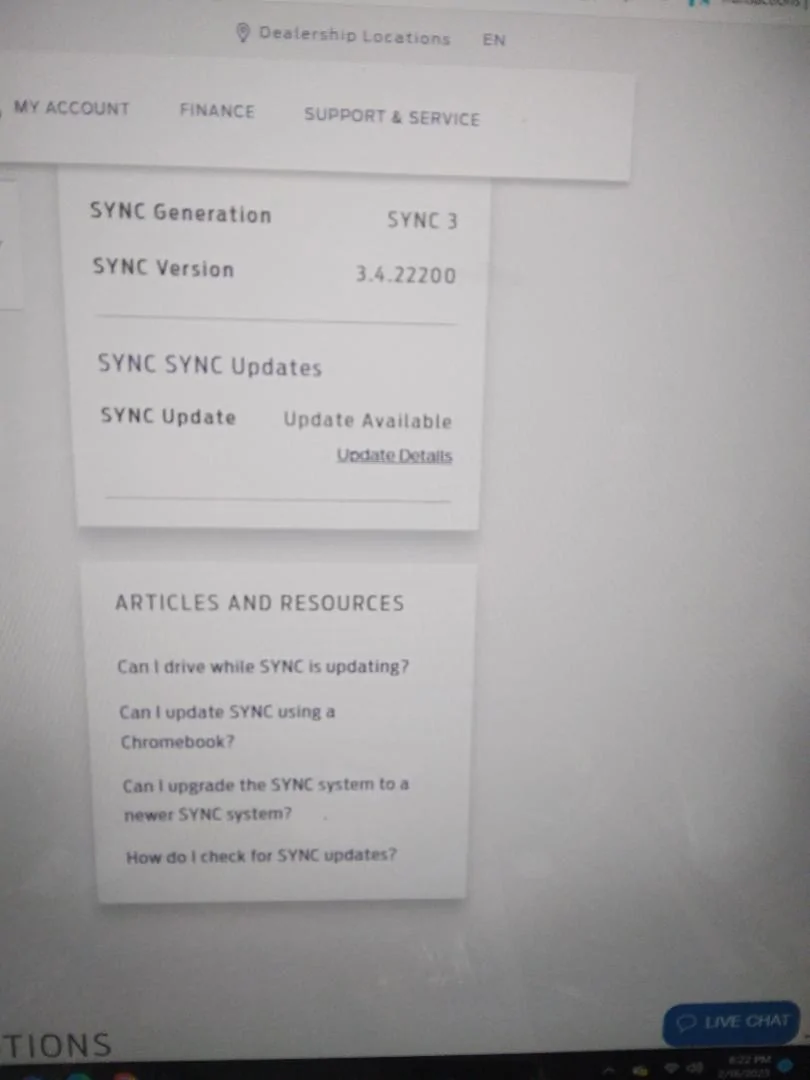
On Fords website it still shows the old version 3.4.22200 .
Mine is showing the same and I updated it a few days ago. It must take the Ford site some time to update.
Rob did yours ever update on the website? I just looked again tonight and it's finally updated to 3.4.22251. I'm not sure when it finally did because I got sick of looking every day. lol
 

Muffin1

Well-Known Member
First Name
Rob
Joined
Sep 24, 2019
Threads
37
Messages
673
Reaction score
1,258
Location
NJ
Vehicle(s)
2019 Silver STX 4X4 SC / 2024 XLT 4X4 Cactus Gray
It still shows SYNC Version 3.4.22200 on the my vehicle page, and on a side note the vehicle health report page says my WW fluid is low and i need to check it, that it knows but the update is missing haha.


AzScorpion

Moderator
First Name
Dave
Joined
Jul 25, 2019
Threads
335
Messages
26,221
Reaction score
132,006
Location
Back Home In AZ!
Vehicle(s)
2023 Ford Ranger Tremor
Occupation
Retired...Full Time Slacker
It still shows SYNC Version 3.4.22200 on the my vehicle page, and on a side note the vehicle health report page says my WW fluid is low and i need to check it, that it knows but the update is missing haha.
Safety first. lol ?
 

Jason B

Well-Known Member
First Name
Jason
Joined
May 19, 2021
Threads
9
Messages
3,009
Reaction score
8,318
Location
Louisiana
Vehicle(s)
2021 XL STX SE 4x2
Occupation
machinist
I probably said this before, but I updated with the USB, but had no XML file to upload to Ford.
So, when I was connected to WiFi, I went into settings, did a check for updates, SYNC said I had latest updates at 3.4.22251. Then when I got home, I logged into Ford, and it showed my SYNC is up to date.
So, try that. Have auto update on, then when connected to WiFi, force a check for update, see if that updates the website. Also note, that the WiFi connection for updates won't work if connected to WiFi on a phone.
 

Tra1969

Well-Known Member
Joined
Jan 30, 2018
Threads
4
Messages
198
Reaction score
280
Location
Michigan
Vehicle(s)
2022 Ford Ranger Lariat Tremor 501A and Tow
Occupation
Senior Manufacturing Supervisor
Vehicle Showcase
2
I probably said this before, but I updated with the USB, but had no XML file to upload to Ford.
So, when I was connected to WiFi, I went into settings, did a check for updates, SYNC said I had latest updates at 3.4.22251. Then when I got home, I logged into Ford, and it showed my SYNC is up to date.
So, try that. Have auto update on, then when connected to WiFi, force a check for update, see if that updates the website. Also note, that the WiFi connection for updates won't work if connected to WiFi on a phone.
I tried that several time over the last few month and had no luck.
 

Muffin1

Well-Known Member
First Name
Rob
Joined
Sep 24, 2019
Threads
37
Messages
673
Reaction score
1,258
Location
NJ
Vehicle(s)
2019 Silver STX 4X4 SC / 2024 XLT 4X4 Cactus Gray
I probably said this before, but I updated with the USB, but had no XML file to upload to Ford.
So, when I was connected to WiFi, I went into settings, did a check for updates, SYNC said I had latest updates at 3.4.22251. Then when I got home, I logged into Ford, and it showed my SYNC is up to date.
So, try that. Have auto update on, then when connected to WiFi, force a check for update, see if that updates the website. Also note, that the WiFi connection for updates won't work if connected to WiFi on a phone.
Yea I'm pretty sure my auto update was turned on but will go back and check, i had taken this pic of the radio update status & my account page.
It really doesn't bother me cause i still get emails from Ford Corporate telling me there still trying on getting me my ordered '21 Ranger XLT a year after they cancelled the order so there F' up' in more than one way:crackup:


Sync update.webp
radio update sync.webp


Sun, Jan 1 at 7:23 PM
Another update on your Ford order
ca-01dc-ed76-1c3a-9e0019010000&sig=auFtaOszgSW9.qi.webp
Dear ROB XXXXXXXX,
Thank you again for your Ranger XLT order. We wanted to let you know that we are still up against supply chain challenges, which are causing delays with getting your vehicle into production. While we understand how frustrated you may be (we are too), rest assured, our team is working diligently and aggressively to get you behind the wheel.
We know how much anticipation there is when it comes to getting a new Ford, so we will continue to keep you updated. In the meantime, we apologize for any inconvenience and remain grateful for your patience and understanding.​
ca-01dc-ed76-1c3a-9e0019010000&sig=auFtaOszgSW9.qi.webp
Ford Motor Company
Customer Relationship Center (CRC)
P.O. Box 6248
Dearborn, MI 48126
© 2023 Ford Motor Company. All Rights Reserved.
Follow Ford​
.com%2Fres%2Fford_mid_prod1%2FFord-Social-Facebook.webp
ymreqid=3ea4bcca-01dc-ed76-1c3a-9e0019010000&sig=1.webp
n.com%2Fres%2Fford_mid_prod1%2FFord-Social-Youtube.webp
eqid=3ea4bcca-01dc-ed76-1c3a-9e0019010000&sig=Xpdv.webp
 

Deleted member 7828

Decided to do the USB update today. Approx 10 minutes for the update, no issues.

Confirmation file uploaded as well!
Did usb upgrade stop the screen from flipping when phone is plugged into it? Sometimes radio just shuts down and goes black. Also audio One playing Pandora the audio turns off and goes back to the home screen. Also says USB not supported, unplug It usb. Very wierd. Any suggestions would be greatly appreciated. Thanks
 
OP
OP
alcohenusa

alcohenusa

Well-Known Member
First Name
Alan
Joined
Jul 22, 2020
Threads
12
Messages
478
Reaction score
727
Location
CO
Vehicle(s)
2020 Ranger Lariat 4x4
Occupation
Retired
Did usb upgrade stop the screen from flipping when phone is plugged into it? Sometimes radio just shuts down and goes black. Also audio One playing Pandora the audio turns off and goes back to the home screen. Also says USB not supported, unplug It usb. Very wierd. Any suggestions would be greatly appreciated. Thanks
I never had any of those issues so I cannot say the upgrade will help you.

Barring any issues with your phone and/or the cables you are using, I would do the upgrade and then do a master reset. You may also consider disconnecting the battery/pull the sync fuses to let the hardware completely reset.
 

underwhelmed

Well-Known Member
Joined
Jan 29, 2023
Threads
27
Messages
1,094
Reaction score
6,142
Location
GSMs
Vehicle(s)
2019 Ranger SC XLT FX4, 1998 Jeep Cherokee XJ
Occupation
Retired Military
Vehicle Showcase
1
Bought a used 2019. Trying to update via wifi. Looks like it hasn’t been updated since 2019. Is this going to take a while? Is my battery going to last ?
 

Figarou

Well-Known Member
Joined
Mar 22, 2019
Threads
25
Messages
2,408
Reaction score
13,793
Location
Texas
Vehicle(s)
2022 Ford Edge ST, 2019 Ford Ranger Lariat
Bought a used 2019. Trying to update via wifi. Looks like it hasn’t been updated since 2019. Is this going to take a while? Is my battery going to last ?
I believe so.

Use the USB method. And I think the engine needs to be running during the entire update.
 

AzScorpion

Moderator
First Name
Dave
Joined
Jul 25, 2019
Threads
335
Messages
26,221
Reaction score
132,006
Location
Back Home In AZ!
Vehicle(s)
2023 Ford Ranger Tremor
Occupation
Retired...Full Time Slacker
Bought a used 2019. Trying to update via wifi. Looks like it hasn’t been updated since 2019. Is this going to take a while? Is my battery going to last ?
I just did mine for the first time since I bought it back in 2019. :oops: I did it over wifi and IIRC it took about 1.5 days to complete to download. Honestly I hate it and have more glitches now with my HVAC setting not staying as they were when I turn the truck back on. Now every time I get in I have to reset my heat and head, foot settings. I do have "Last Setting" or whatever it is checked off on the main menu. I wish I never updated and left it alone!
 

underwhelmed

Well-Known Member
Joined
Jan 29, 2023
Threads
27
Messages
1,094
Reaction score
6,142
Location
GSMs
Vehicle(s)
2019 Ranger SC XLT FX4, 1998 Jeep Cherokee XJ
Occupation
Retired Military
Vehicle Showcase
1
I just did mine for the first time since I bought it back in 2019. :oops: I did it over wifi and IIRC it took about 1.5 days to complete to download. Honestly I hate it and have more glitches now with my HVAC setting not staying as they were when I turn the truck back on. Now every time I get in I have to reset my heat and head, foot settings. I do have "Last Setting" or whatever it is checked off on the main menu. I wish I never updated and left it alone!
Dang it. I hope this works.
Sponsored


Top