Rp930
Well-Known Member
Ok so I downloaded onto a new 64 3.0 flash drive and installed. Took 3 times but it finally worked and said update completed. Still says 18 in version though. I have no way of knowing if it made it.
Sponsored

Highly likely it did. v3.3 has a bug where the nav data version string isn't updating. You can check what's actually installed in the diagnostics menu real quick just to confirm.Ok so I downloaded onto a new 64 3.0 flash drive and installed. Took 3 times but it finally worked and said update completed. Still says 18 in version though. I have no way of knowing if it made it.
Did it restart even once? Have you tried a different thumb drive?Tried twice so far and everything is OK, but after 2 hours NOTHING! WTF?

Says 3.3.19052Highly likely it did. v3.3 has a bug where the nav data version string isn't updating. You can check what's actually installed in the diagnostics menu real quick just to confirm.
Did it restart even once? Have you tried a different thumb drive?
Did you dump the new license file in /SyncMyRide folder? How soon is it throwing that error? Can't think of anything off hand that should throw a signing error.I got the LST_ERR05, went back to the download page and found a new license file available. Tried installing with that, now I have a SIGN_ERR01. This is such a sh*t show.
Yep, so it has that bug. When you update to 3.4, hopefully soon, it'll clear up and show the right version number.Says 3.3.19052
It comes up immediately. I can certainly think of something--a bad signature. :-DDid you dump the new license file in /SyncMyRide folder? How soon is it throwing that error? Can't think of anything off hand that should throw a signing error.
Hah, indeed. Try re-downloading the license file as well just for grins.It comes up immediately. I can certainly think of something--a bad signature. :-D
I'll probably try rewriting everything again, but my excitement level is pretty low by now.
I did, same hash on the old download, the new download, and the one on the thumbdrive. ?Hah, indeed. Try re-downloading the license file as well just for grins.
Dang. Not sure then why it'd be throwing that error. ?I did, same hash on the old download, the new download, and the one on the thumbdrive. ?
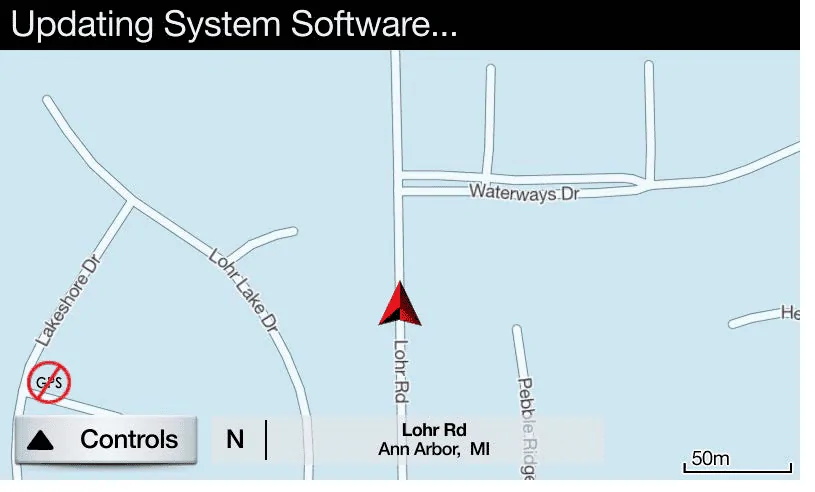
You do not have the file structure correct in the USB. The software is very intolerant of any structure errors such as duplicate files, extra files or misplaced files. If done correctly the updating system software will remain on for the duration of the install, which takes ~ 57-60 minutes. Others here stated just under an hour but someone stated 90 minutes.Quick question. When it's updating the software, it should say "Updating System Software" up top the whole time, correct? (See example picture)
I see it for a brief moment on my display and then it goes back to displaying the time.
The USB became very hot to the touch after a while. It's a Sandisk Extreme pro 3.0
I used it before on my last update.

2. File structure-The root of the USB drive should contain 2 files and one folder named SyncMyRide. The files are named autoinstal,lst and dontindex.msaYou do not have the file structure correct in the USB. The software is very intolerant of any structure errors such as duplicate files, extra files or misplaced files and it will abort like you experienced. If done correctly the updating system software will remain on for the duration of the install, which takes ~ 57-60 minutes. Others here stated just under an hour but someone stated 90 minutes.
1. File structure- USB 3.0 drive, formatted exfat, labeled SyncMyRide

Sync 3.3 has an issue where it reports the map as being 118 even though it may have been updated to 119. I updated my map earlier this year as well and I'm sure it was 119. You may have as well.I have NA 118 and used the website to see if a new version was available. It said it was and I followed the instructions exactly and ensured I had the correct file structure. Other than the system saying for a brief moment it was doing an update, nothing happened. I let the engine run for over an hour. Finally, I decided I spent enough of the Ranger's life doing a map update and turned off the engine and checked the version screen - no changes. I tried again and the same result. The message appeared an update was in progress, and then nothing happened. I did not wait this second time. I turned off the vehicle. I looked on the Website to see if could tell what version should be loaded, and the site is down for maintenance. Does anyone know what map version is displayed after this latest update? Maybe my issue is that no update is required since I did one in January this year ?