Sponsored

FORScan Modifications

Jamesb

Well-Known Member
First Name
James
Joined
Sep 3, 2020
Threads
2
Messages
128
Reaction score
293
Location
Vancouver, Canada
Vehicle(s)
2020 Ford Ranger Lariat, 501A, Build Date 12/19
Occupation
Engineering
Hi Guys..

I"m in Canada and when making some forscan mods on w/e I noticed my vehicle is set up from factory as right hand drive? Anyone else notice this? I changed to Left hand drive but am questioning as to why it was set up that way from Ford? Should I change it back? Effects? Climate? ???

Cheers,
James
Sponsored
 

Sariandan

Well-Known Member
First Name
Kevin
Joined
Sep 12, 2021
Threads
11
Messages
374
Reaction score
1,039
Location
The lowcountry of SC/GA
Vehicle(s)
2022 Ford Mustang EcoBoost
Occupation
Paramedic/Shift Supervisor
My search skills may just not be sufficient for this.... But, is there a way to have the truck remember that the cruise control was on and have it on the next time you start the truck? I don't mean set to a speed, just on so that all you have to do is hit Set.

My work truck (2020 Suburban) has always on cruise control. Anytime I start it up and go, I can just hit Set and it picks right up. I am so used to doing that, it's a pain in the ass to have to actually turn it on in the Ranger, before hitting set. I know, first world problems.

Regarding the speed limit sign recognition. It works, It's square, not round, and it is displayed in MPH. All good. However, I've noticed a few issues. First is that it will read a speed limit sign at the beginning of a school zone and display that speed limit. That's good, until you hit the end of the school zone. Most of our school zones simply have a sign that says, "end school zone," but no speed limit sign showing the speed limit going back to normal. So, the speed limit displayed and the warnings are based on the 25 or 35mph school zone a mile or more ago and not the actual 55 or 65mph speed limit.

The same thing happens on any roadway that has a "minimum speed limit" sign. I'll be on the interstate, speed limit 70mph, the truck sees it and displays it. Then, 1/2 mile later it sees a minimum speed limit sign showing 40mph and starts displaying and warning for a 40mph speed limit, until a normal speed limit sign is seen again.

So, the question regarding this is regarding map integration. I have just now set it to pull the speed limit from both the camera and the map. I wish there was an option for map only. I am unable to test this until tomorrow. But, when does it pull from the map and when from the camera? If they conflict, will it decide that the camera is right, even though it's not? If nobody knows, I'll be testing it tomorrow anyway and will let you know what I find.
 

Sariandan

Well-Known Member
First Name
Kevin
Joined
Sep 12, 2021
Threads
11
Messages
374
Reaction score
1,039
Location
The lowcountry of SC/GA
Vehicle(s)
2022 Ford Mustang EcoBoost
Occupation
Paramedic/Shift Supervisor
To follow up, asking it to integrate the speed from the map doesn't seem to do anything. Except now I have a reduced functionality message if I go to the traffic sign settings in the driver assist menu. Not sure what that's all about. To me, it's not an accurate system because of the issues in my previous post. I'll just be restoring the original settings and not have it.
 

Waltztj

Well-Known Member
First Name
Walt
Joined
Oct 8, 2021
Threads
3
Messages
71
Reaction score
80
Location
19053
Vehicle(s)
2021 Ranger Xl
Occupation
Retired
You can just save your as "as built" data before you do any mods and then revert back to stock before you take it into the dealer.
Won't matter, as soon as you write the edit to the car, the car will flag it and you can't undo the flag, when Ford hooks up to the car they will see the flag. My son works for Ford.
 

Gizmokid2005

Well-Known Member
Joined
Dec 1, 2019
Threads
13
Messages
1,279
Reaction score
1,875
Location
GA
Website
gizmokid2005.com
Vehicle(s)
2019 Ford Ranger XLT 4X4 SCrew
Occupation
SQL Developer
Vehicle Showcase
1
Won't matter, as soon as you write the edit to the car, the car will flag it and you can't undo the flag, when Ford hooks up to the car they will see the flag. My son works for Ford.
This is true for the ECU, nothing you're doing in FORScan will trip that flash flag.


AdamHarris

Well-Known Member
First Name
Adam
Joined
Feb 26, 2021
Threads
32
Messages
1,740
Reaction score
4,919
Location
Blue Oval City, TN
Vehicle(s)
2020 Ford Ranger XLT FX4 Black Supercrew
Occupation
Collision Repair Instructor
Vehicle Showcase
1
This is true for the ECU, nothing you're doing in FORScan will trip that flash flag.
But his son works at Ford so Do Not try to correct him..
 

Fx4ranger2019Larait

Well-Known Member
First Name
Ricky
Joined
Jun 12, 2021
Threads
0
Messages
224
Reaction score
731
Location
SoCal
Vehicle(s)
2019 Ranger FX4 Larait
Occupation
Sprinkler Fitter
Not that I could ever find. Finally just pulled the bulbs out of the cargo lamps, as I never used them any way. Got sick of them lighting up every time I opened the door.
I think if you turn on police car or dark car it adds an option in the vehicle menu in Instrument cluster where you can turn silent car on or off. On turns off all cargo lamps and flood lights. Also horn will not honk when you push the lock button twice also the headlights will not turn on when unlocking or locking with key fob.
 

kieefer

Well-Known Member
First Name
keith
Joined
Dec 26, 2017
Threads
25
Messages
1,059
Reaction score
1,961
Location
Tennessee
Vehicle(s)
2025 F150 King Ranch - 97 BMW M3
Occupation
Retired
Hoping someone can help me figure this one out. Im trying to change the DRL's to the turn signals. Ive opens the Bdycm section, clicked on the daytime running lights, changed it to turn signals, click write and it runs through loading then hits 52% and says "Writing Block Failed - Incompatible Configuration".

This is my first experience with Forscan so Im not sure if Ive missed a set of instructions or if something is actually wrong.

Edit: During the initial connection it asked me to chose between "My 2020" and "My 2019". It didn't show options for "Sync 3.3". Not sure if that matters but I chose "My 2019"
That means the change is not available for your vehicle.
My first experience using FORScan, after saving everything, was a pretty calm educational experience.

I recently made 6 changes and decided to "WRITE" when I got through and received the "Writing Block Failed" message.
I've learned from my mistake by "writing" each change, otherwise if you attempt to write several you'll have to delete the ones you think that aren't compatible.

I'm guessing this might help someone else if I understand it correctly.

I am curious if anyone has found the link to extending the timer on the auto blinker switch, if there is one.
 

Big Blue

Well-Known Member
First Name
Lee
Joined
May 5, 2020
Threads
16
Messages
3,927
Reaction score
9,352
Location
Wisconsin
Vehicle(s)
2019 Ford Ranger XLT FX4 Supercrew lighting blue
Occupation
Retired mechanical designer
I am curious if anyone has found the link to extending the timer on the auto blinker switch, if there is one.
I assume you are referring to the number of flashes for a lane change. That is the current holy grail of Forscan quests. And the answer is NO. I would be happy if it just added two flashes when a trailer was attached like the F-150.
 

UncleBob

Well-Known Member
First Name
Bob
Joined
May 3, 2019
Threads
2
Messages
215
Reaction score
286
Location
Fullerton, CA
Vehicle(s)
2019 Ford Ranger Lariat SuperCrew 2WD in Magnetic
Occupation
Retired
I assume you are referring to the number of flashes for a lane change. That is the current holy grail of Forscan quests. And the answer is NO. I would be happy if it just added two flashes when a trailer was attached like the F-150.
I wish there was an option to change the number of blinks. I like that my brides Sonata can choose between 3, 5 or 7 blinks thru the regular user setup interface.
 

JimH

Well-Known Member
First Name
Jim
Joined
Jan 15, 2020
Threads
16
Messages
288
Reaction score
463
Location
Palm Coast, FL
Vehicle(s)
2020 Ford Ranger XLT SuperCrew
Occupation
Retired
I wish there was an option to change the number of blinks. I like that my brides Sonata can choose between 3, 5 or 7 blinks thru the regular user setup interface.
This is on the F150 Forscan page. I haven't tried it on my Ranger yet..


Turn Signal Flashes (# of)SCCM724-01-01xxxxx*xxxx0=1 flash, 4=2 flashes, 6=3 flashes, 8=4 flashes, A=5 flashes, C=6 flashes, E=7 flashes ** see SCCM spreadsheet for more options **
** when trailer is connected the truck will add 2 flashes to the above values *

Jim
 

Colo_Ranger

Well-Known Member
Joined
Apr 19, 2021
Threads
49
Messages
3,795
Reaction score
12,890
Location
Colorado
Vehicle(s)
2021 Ford Ranger XLT FX4
Vehicle Showcase
1
I wish there was an option to change the number of blinks. I like that my brides Sonata can choose between 3, 5 or 7 blinks thru the regular user setup interface.
My Kia allowed 3, 5, and 7. I found 5 to be perfect.

This is on the F150 Forscan page. I haven't tried it on my Ranger yet..


Turn Signal Flashes (# of)SCCM724-01-01xxxxx*xxxx0=1 flash, 4=2 flashes, 6=3 flashes, 8=4 flashes, A=5 flashes, C=6 flashes, E=7 flashes ** see SCCM spreadsheet for more options **
** when trailer is connected the truck will add 2 flashes to the above values *

Jim
Thanks for this! I will be trying this out.
 

Gizmokid2005

Well-Known Member
Joined
Dec 1, 2019
Threads
13
Messages
1,279
Reaction score
1,875
Location
GA
Website
gizmokid2005.com
Vehicle(s)
2019 Ford Ranger XLT 4X4 SCrew
Occupation
SQL Developer
Vehicle Showcase
1
This is on the F150 Forscan page. I haven't tried it on my Ranger yet..


Turn Signal Flashes (# of)SCCM724-01-01xxxxx*xxxx0=1 flash, 4=2 flashes, 6=3 flashes, 8=4 flashes, A=5 flashes, C=6 flashes, E=7 flashes ** see SCCM spreadsheet for more options **
** when trailer is connected the truck will add 2 flashes to the above values *

Jim
This doesn't work in the ranger. A lot of the stuff from the F-150 does not translate.
 

kieefer

Well-Known Member
First Name
keith
Joined
Dec 26, 2017
Threads
25
Messages
1,059
Reaction score
1,961
Location
Tennessee
Vehicle(s)
2025 F150 King Ranch - 97 BMW M3
Occupation
Retired
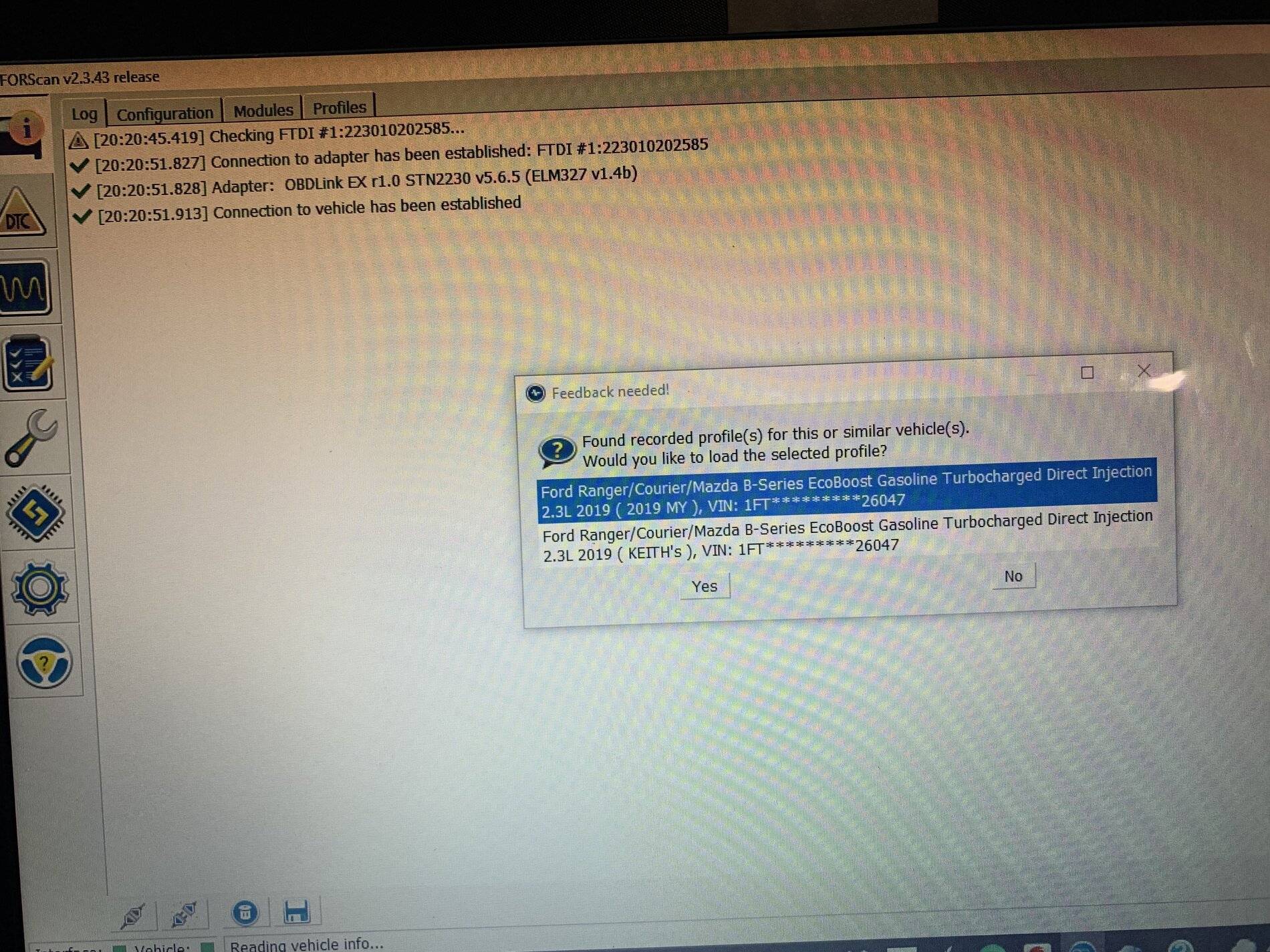
Can someone ease my mind about this screen shot.
If I load by checking yes does it save my previous changes or revert back to stock configurations?

I saved it as KEITH’s (below) and carried on with more change's but this has been bugging me.

I have saved all modules prior to making any changes and the changes were still obviously saved but I didn’t see any prompts after
”writing” to save them.

F0EE4EFD-B1DE-4628-A4F5-3969C8DA45D6.jpeg
 

Big Blue

Well-Known Member
First Name
Lee
Joined
May 5, 2020
Threads
16
Messages
3,927
Reaction score
9,352
Location
Wisconsin
Vehicle(s)
2019 Ford Ranger XLT FX4 Supercrew lighting blue
Occupation
Retired mechanical designer
Can someone ease my mind about this screen shot.
If I load by checking yes does it save my previous changes or revert back to stock configurations?

I saved it as KEITH’s (below) and carried on with more change's but this has been bugging me.

I have saved all modules prior to making any changes and the changes were still obviously saved but I didn’t see any prompts after
”writing” to save them.

F0EE4EFD-B1DE-4628-A4F5-3969C8DA45D6.jpeg
That screen is simply saving your trucks profile. Forscan uses this file to know your trucks vin and basic setup like whatodules it has. It is for when you use the computer on multiple vehicles. It has nothing to do with saving the module changes. You need to or should have SAVED each of the module as-built files as a backup before you made any changes, using a file name like "my truck APIM Original" These will be you original backups so you can return the modules back to stock. After that you can edit the module as-built file or make changes to the configuration file for the module. Then you need to WRITE the module back to the truck for the changes to take affect. After doing this and testing your changes you should the SAVE the module to a file using like "my truck APIM todays date". This will be a backup of your changes.

The reason for this because of how Forscan works. When you select a module to edit, Forscan logs into memory from the truck. Then you edit it. Next, you have to WRITE the changes back to the truck for them to take affect. If the changes work and you like them, you can/should make a backup file SAVED to your computer. If the changes didn’t work or you don’t like the change you can load up your last saved backup file and WRITE it to the truck and be back to where you started. Or, you can load up your Original backup and go back to stock.

Sorry for getting long winded, and I hope this all makes sense. Making those original backups is very important, because getting back to stock with out them is very hard unless you keep very good written records of the changes you make.

Have fun tweaking you Ranger.
Sponsored


Top