Sponsored

Enabling Terrain Management/Elocker (Retrofit)

Gen5RangerPegasus

New Member
First Name
Chaz
Joined
Jul 28, 2026
Threads
1
Messages
3
Reaction score
0
Location
IL
Vehicle(s)
2020 Ford Ranger XLT Sport
Terrain Management.

I do not believe this is a straight forward mod that some claim it is. I have read that if you buy a Terrain Management Switch, install in it your Ranger, and toggle the "Selectable Drive Mode" to "Enable" in the IPC module using Forscan that you suddenly have Terrain Management. I believe there are further steps that need to be taken in order for this to truly work. Sadly, I think many Ranger Enthusiasts are selecting drive modes with no real change to driving behavior.

Toggles I believe need to be switched:

ABS Module:
- Brake Control
(*Needs to be switched to, "ABS/ESP/RSC/TERRAIN" to handle the braking calibration while using different driving modes)

PCM Module:
- Terrain Mode Management
(Needs to be switched to "All Terrain Control Module" to recognize the module commands)

IPC Module:
- Terrain Management/Selectable Drive Mode
(Needs to be Enabled to recieve prompts from the Terrain Management System)

Further toggles In the IPC I believe need to be turned on:

"Terrain Management Type" (will need to be selected to "Type 1,2, or 3") and finally "AdvanceTrac Control" to "Enabled".

I am not certain that Terrain Management Type needs to be toggled or AdvancedTrac Control as it may pertain to trail control, which cannot be activated using Forscan because of hardcoded firmware in the ABS module from the factory. It may be the same for Terrain Management which would instantly kill this mod.


The only way to truly know is to compare module toggles/As-Built Data. Is anyone willing to share their configurations from a truck equipped from the factory with Terrain Management?

On a side quest I am also looking for the BCM toggle for the elocker. If anyone can see the toggle in that module please let me know as I cannot find it in mine. I only found the toggle in my ABS module and my ICP module.

Let's Talk.
Sponsored
 

airline tech

Well-Known Member
Joined
Aug 24, 2022
Threads
28
Messages
4,523
Reaction score
8,620
Location
Midwest - KS
Vehicle(s)
2022 Ranger Lariat-Super Crew, Cactus Gray
Occupation
Aircraft Tech
Terrain Management.

I do not believe this is a straight forward mod that some claim it is. I have read that if you buy a Terrain Management Switch, install in it your Ranger, and toggle the "Selectable Drive Mode" to "Enable" in the IPC module using Forscan that you suddenly have Terrain Management. I believe there are further steps that need to be taken in order for this to truly work. Sadly, I think many Ranger Enthusiasts are selecting drive modes with no real change to driving behavior.

Toggles I believe need to be switched:

ABS Module:
- Brake Control
(*Needs to be switched to, "ABS/ESP/RSC/TERRAIN" to handle the braking calibration while using different driving modes)

PCM Module:
- Terrain Mode Management
(Needs to be switched to "All Terrain Control Module" to recognize the module commands)

IPC Module:
- Terrain Management/Selectable Drive Mode
(Needs to be Enabled to recieve prompts from the Terrain Management System)

Further toggles In the IPC I believe need to be turned on:

"Terrain Management Type" (will need to be selected to "Type 1,2, or 3") and finally "AdvanceTrac Control" to "Enabled".

I am not certain that Terrain Management Type needs to be toggled or AdvancedTrac Control as it may pertain to trail control, which cannot be activated using Forscan because of hardcoded firmware in the ABS module from the factory. It may be the same for Terrain Management which would instantly kill this mod.


The only way to truly know is to compare module toggles/As-Built Data. Is anyone willing to share their configurations from a truck equipped from the factory with Terrain Management?

On a side quest I am also looking for the BCM toggle for the elocker. If anyone can see the toggle in that module please let me know as I cannot find it in mine. I only found the toggle in my ABS module and my ICP module.

Let's Talk.

What are you referencing for (Toggles) - Keep in mind Forscan (Settings) are not Ranger Specific - (If you are viewing) the module list
I spent alot of time (As-Built) Compares between the trims.

1. Download your (As-Built)
2. Locate (Online) Sales and get a VIN# and then download those As-Builts, this will show as you go line by line (Every Different) hex line of data
3. To simplify (if there is a change in the line) look at the very last (2) character's on the line (these are the check sum) of that data line
4. A very good ref is use (Cyan Labs) As- Built database - it breaks down the hex lines .
Caution - This is an ad based site - do not click open (on anything) when the pop up shows - click close or (X) - then it will let you view the module data - its a very good site , just takes a learning curve to know which module the (Ranger) uses and I have referenced this site quite a bit for T-shooting

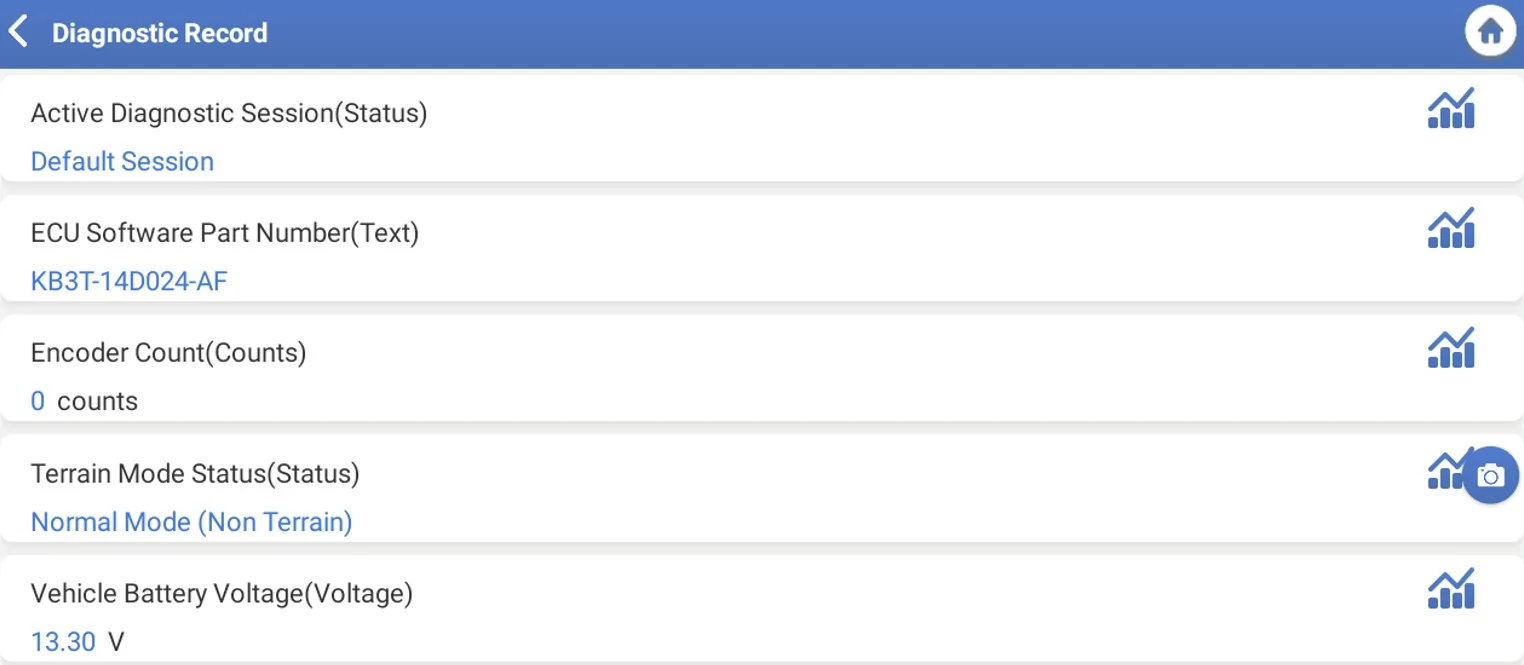
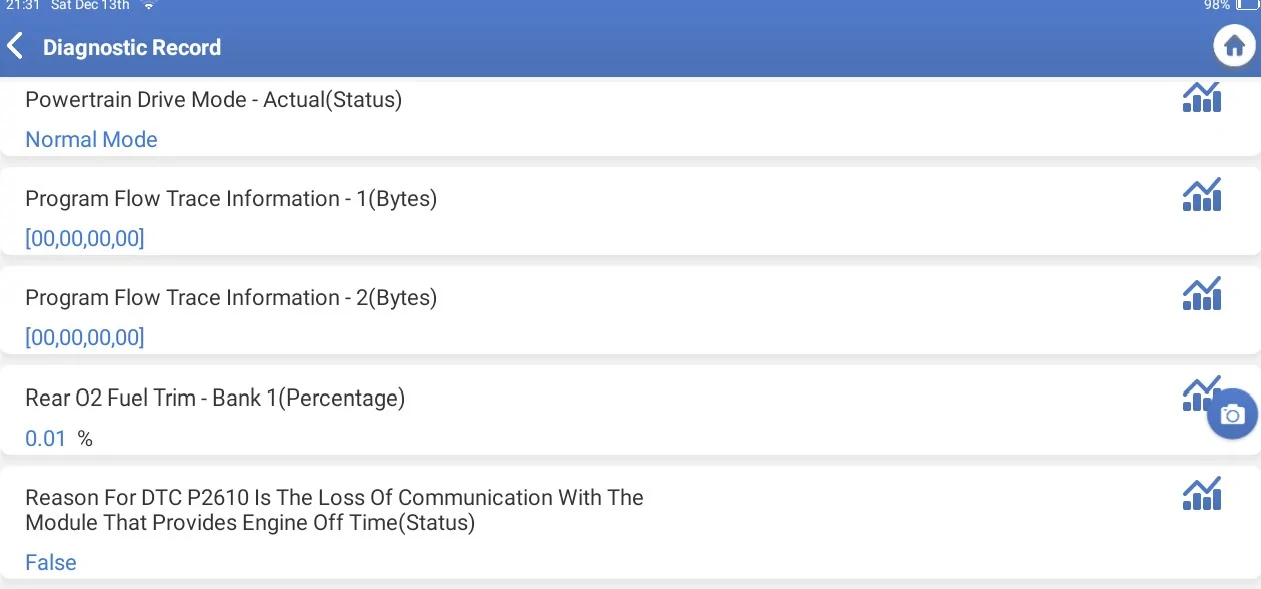
I did this mod - and added the Terrain Management- since it does not throw faults and I can watch the PID data with my scan tools - its registering the events, now you bring a valid point though but I would have to dig some to validate your thinking, basically revisit the mod basically this truck is (Can Bus) driven - and if the IPC is picking up a switch has made a selection the PCM and ABS etc will see that data request - so it would fault (Invalid data) if it saw a mismatch.

Mainly curious - what you are using for a (Toggle) reference - so we can look at the actual data line and compare to the (with and without) from factory trims.
I think we locked in - Trail Management and E-Locker was a no go but the selectable drive mode (Terrain Management) works (as if we factor - simple)
 
OP
OP

Gen5RangerPegasus

New Member
First Name
Chaz
Joined
Jul 28, 2026
Threads
1
Messages
3
Reaction score
0
Location
IL
Vehicle(s)
2020 Ford Ranger XLT Sport
Forscan will pickup whatever modules your truck has in it and whatever factory data your truck came with from the factory. That is if you are using the "Extended License" from Forscan. I believe it may not pick up everything with a "Trial License". If I am not mistaken even Ford Diagnostic and Repair system (FDRS) will pick up all factory As-Built-Data as well.

Too GregCTs point (above), it looks simpler than it is but is that without all the data? My IPC module has well over two dozen configurations.

To your comment airline tech, there are "Non-As-Built" standard/plain text menu configurations where you can see exactly what functions your module uses without using hex code and checksum data. Mind you, the ABS module might be checksum specific if your ABS does not allow specific configurations, as I mentioned with Trail Control and as some have already found out. This is done from the factory and hardcoded for safety reasons.

I realize I can go line-by-line but this isnt that simple because of the different configurations I mentioned above for the ABS/IPC/PCM modules. My hope is to see the plain text version.

I think you misunderstood my comment about retrofitting a locking rear differntial. I am not looking to use Terrain Management with the Elocker. I am looking to enable and toggle the feature in the BCM if it even exists. I have scoured multiple As-Built-Data from multiple donor VIN#s looking for differences and have mapped out a few with no real confidence.

Let's Talk.
 
OP
OP

Gen5RangerPegasus

New Member
First Name
Chaz
Joined
Jul 28, 2026
Threads
1
Messages
3
Reaction score
0
Location
IL
Vehicle(s)
2020 Ford Ranger XLT Sport
What are you referencing for (Toggles) - Keep in mind Forscan (Settings) are not Ranger Specific - (If you are viewing) the module list
I spent alot of time (As-Built) Compares between the trims.

1. Download your (As-Built)
2. Locate (Online) Sales and get a VIN# and then download those As-Builts, this will show as you go line by line (Every Different) hex line of data
3. To simplify (if there is a change in the line) look at the very last (2) character's on the line (these are the check sum) of that data line
4. A very good ref is use (Cyan Labs) As- Built database - it breaks down the hex lines .
Caution - This is an ad based site - do not click open (on anything) when the pop up shows - click close or (X) - then it will let you view the module data - its a very good site , just takes a learning curve to know which module the (Ranger) uses and I have referenced this site quite a bit for T-shooting

I did this mod - and added the Terrain Management- since it does not throw faults and I can watch the PID data with my scan tools - its registering the events, now you bring a valid point though but I would have to dig some to validate your thinking, basically revisit the mod basically this truck is (Can Bus) driven - and if the IPC is picking up a switch has made a selection the PCM and ABS etc will see that data request - so it would fault (Invalid data) if it saw a mismatch.

Mainly curious - what you are using for a (Toggle) reference - so we can look at the actual data line and compare to the (with and without) from factory trims.
I think we locked in - Trail Management and E-Locker was a no go but the selectable drive mode (Terrain Management) works (as if we factor - simple)
Please See my next post to this thread. It is possible you are creating ghost flags by enabling features that are not actually getting commands from the PCM/ABS modules. This looks simple because the IPC is bringing up the menu for the Selectable Drive Mode feature once enabled and everyone thinks that means the system is operating. The system uses commands from the PCM/ABS modules to activate and operate specific parameters under whatever drive mode you might be using Normal, Grass/Gravel/Snow, Mud/Ruts, and Sand. Changing the menu option does not prove anything to me, hence the whole point of this thread.
Sponsored


Top