Sponsored

Just updated to Sync 3.4 on my Ranger 2019

Mellow

Well-Known Member
First Name
Joe
Joined
Mar 11, 2019
Threads
22
Messages
578
Reaction score
1,525
Location
DFW, TX
Vehicle(s)
19 Sport Lariat 2WD Plat. White
Downloaded the update via flash drive. Seemed to load correctly, but no XLM file...

Maybe I should do the update till it works correctly?
Leave the flash drive it. It will write the xml file. I actually took mine out and a few hours later just put the thumbdrive back in and turned on the truck and a few seconds later it said update was successful and the xml file was there.
Sponsored


ryyck

Well-Known Member
Joined
Sep 1, 2019
Threads
14
Messages
403
Reaction score
512
Location
Charlotte NC
Vehicle(s)
2019 Ford Ranger
Leave the flash drive it. It will write the xml file. I actually took mine out and a few hours later just put the thumbdrive back in and turned on the truck and a few seconds later it said update was successful and the xml file was there.
Thanks. I'll give it a try.
 

RedlandRanger

Moderator
First Name
Rob
Joined
Nov 14, 2018
Threads
42
Messages
5,113
Reaction score
11,110
Location
Oregon
Vehicle(s)
2019 Ford Ranger Lariat FX4, 1973 Mercury Capri
Vehicle Showcase
1
We did it boys! Back in action!
IMG_2730.JPG


EDIT: Just wanted to add that I got the XML, uploaded it, got a success message, and it still tells me that I have an update available. So for everyone posting about that, it has to do with Ford's server processing that XML. It might only run that batch once per day, or week, who knows. Either way, it'll show up correctly eventually. Most definitely before the next update a year and a half from now ;)
I also successfully updated to 3.4.20282 yesterday. Took about 20 mins. It feels a bit snappier to respond to inputs now, but I really didn't have a problem with it before. I also got the XML file and uploaded it and got the "success" message but if I check it still tells me there is an update available. I will try again tomorrow and see what it says then.
 

Big Blue

Well-Known Member
First Name
Lee
Joined
May 5, 2020
Threads
16
Messages
3,927
Reaction score
9,352
Location
Wisconsin
Vehicle(s)
2019 Ford Ranger XLT FX4 Supercrew lighting blue
Occupation
Retired mechanical designer
I also successfully updated to 3.4.20282 yesterday. Took about 20 mins. It feels a bit snappier to respond to inputs now, but I really didn't have a problem with it before. I also got the XML file and uploaded it and got the "success" message but if I check it still tells me there is an update available. I will try again tomorrow and see what it says then.
Don't lose sleep over it!:yawn:
 

VAMike

Well-Known Member
First Name
Mike
Joined
Feb 22, 2019
Threads
1
Messages
3,390
Reaction score
4,408
Location
Virginia
Vehicle(s)
2019 Ranger Lariat SuperCab
I also successfully updated to 3.4.20282 yesterday. Took about 20 mins. It feels a bit snappier to respond to inputs now, but I really didn't have a problem with it before. I also got the XML file and uploaded it and got the "success" message but if I check it still tells me there is an update available. I will try again tomorrow and see what it says then.
mines been like a week, still says I haven't done the update


Al Gordon

Active Member
First Name
Al
Joined
Jan 23, 2019
Threads
2
Messages
42
Reaction score
43
Location
Herndon, VA (formerly Issaquah, WA)
Vehicle(s)
2019 Ford Ranger Lariat FX4
I just updated to 3.4 (v3.4.20282) via USB, and did not get an XML file written to the USB drive following the update. However, after re-checking for updates online, Ford seems to already know that I have the new version installed, so I'm not going to sweat being unable to upload an XML file for verification.

My normal mode of operation is to plug my iPhone into the USB port, so that I can recharge the phone while taking advantage of Apple CarPlay, which seems to be superior to Sync in just about every way other than listening to SiriusXM. I'm not sure that I'm even going to notice anything useful about this update, but It is a little annoying that the Gracenote box shows up with a generic and useless "music notes" image on non-music stations (I mostly use SiriusXM to listen to news; I get music from streaming Pandora or Amazon Music from my phone). I mean, it shows an icon/logo for the news stations in the music presets, it seems like someone was just lazy about updating the UI. Of course, for all I know, it might just be a matter of time, and at some point in the future, there will magically be actual logos/graphics for the news stations in that little area of an already too-busy screen.
 

ryyck

Well-Known Member
Joined
Sep 1, 2019
Threads
14
Messages
403
Reaction score
512
Location
Charlotte NC
Vehicle(s)
2019 Ford Ranger
I just updated to 3.4 (v3.4.20282) via USB, and did not get an XML file written to the USB drive following the update. However, after re-checking for updates online, Ford seems to already know that I have the new version installed, so I'm not going to sweat being unable to upload an XML file for verification.

My normal mode of operation is to plug my iPhone into the USB port, so that I can recharge the phone while taking advantage of Apple CarPlay, which seems to be superior to Sync in just about every way other than listening to SiriusXM. I'm not sure that I'm even going to notice anything useful about this update, but It is a little annoying that the Gracenote box shows up with a generic and useless "music notes" image on non-music stations (I mostly use SiriusXM to listen to news; I get music from streaming Pandora or Amazon Music from my phone). I mean, it shows an icon/logo for the news stations in the music presets, it seems like someone was just lazy about updating the UI. Of course, for all I know, it might just be a matter of time, and at some point in the future, there will magically be actual logos/graphics for the news stations in that little area of an already too-busy screen.
The next time you drive the ranger...plug in the drive. It'll capture that missing file. Worked for me....
 

Benworks

Active Member
First Name
Scott
Joined
Oct 3, 2019
Threads
1
Messages
26
Reaction score
29
Location
Ontario, Canada
Vehicle(s)
2019 Ranger Lariat 501A Black Appearance Package
I updated from v3.4.20136 to 282 and I gotta say either something was wrong with my 136 install or Ford has done some huge improvements to the sound of my B&O system with this update. On 136 the bass was very anemic and mid bass was muddy and distorted...passed it off the to the small sub. Sound was ok..just not great. After this update the bass response is so much better being quite punchy and mid bass very clean. Other than rear biasing the fader a bit the sound settings have been left at default this time and the sound is great all the way to max. Either Ford adjusted some of the crossover or dsp settings or perhaps my sub was not functioning well or at all on 136?

Anyone else notice anything different in their sound quality?

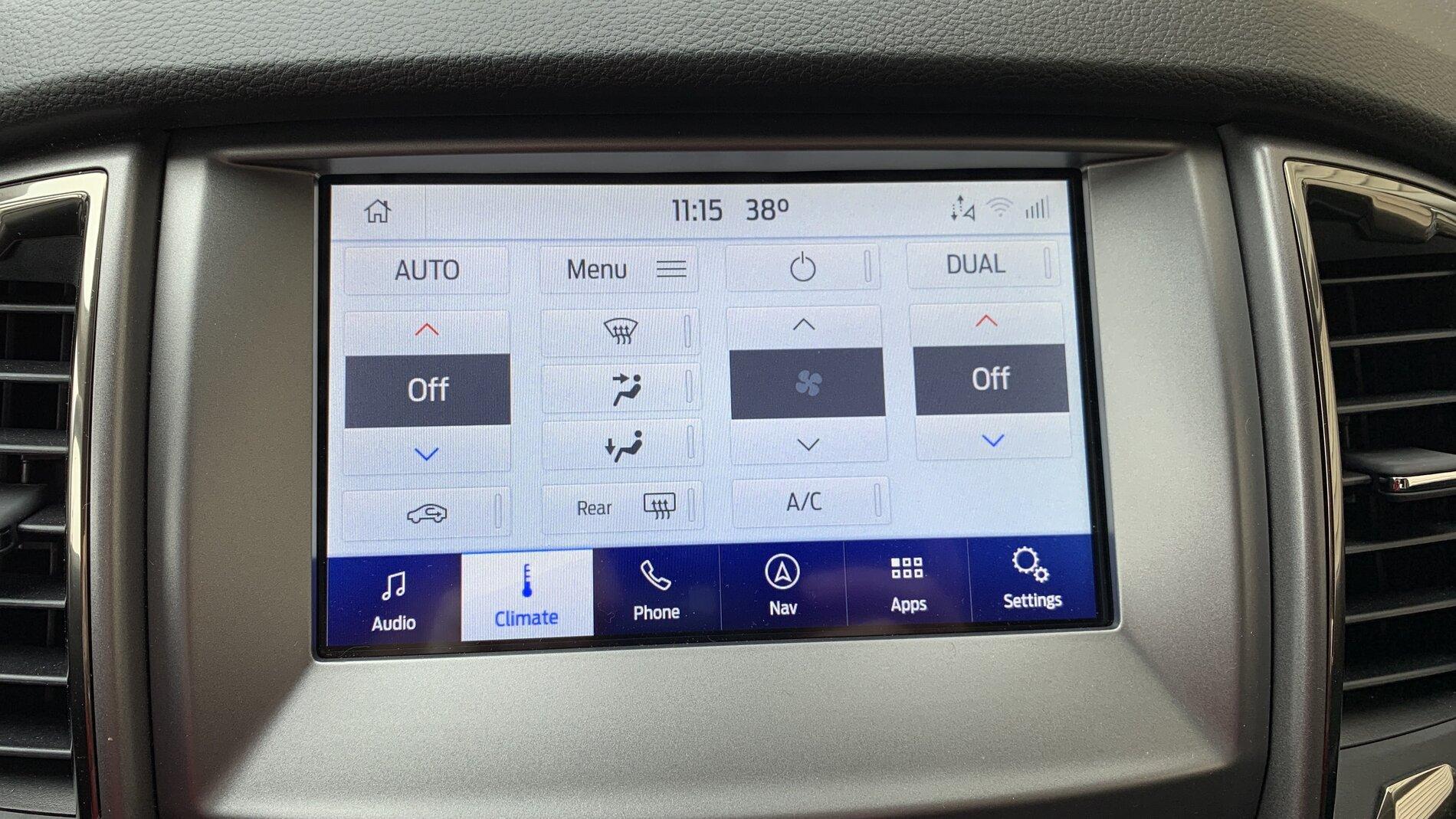
I got my climate back which is nice...still no heated seat icons though.

Also of note for those struggling with getting their USB's to work. It seems that USB3 (blue connector) drives are not supported all that well or even at all. I tried 3 different ones and none were supported. USB2 drive worked right away.
 

VAMike

Well-Known Member
First Name
Mike
Joined
Feb 22, 2019
Threads
1
Messages
3,390
Reaction score
4,408
Location
Virginia
Vehicle(s)
2019 Ranger Lariat SuperCab
Also of note for those struggling with getting their USB's to work. It seems that USB3 (blue connector) drives are not supported all that well or even at all. I tried 3 different ones and none were supported. USB2 drive worked right away.
I've never used anything but USB 3 drives, and they've all been fine.
 

709rInThe905

New Member
First Name
Ted
Joined
Jun 27, 2019
Threads
0
Messages
4
Reaction score
7
Location
GTA, Ontario, Canada
Vehicle(s)
2019 Ranger Lariat SuperCrew FX4, Saber
Occupation
SysAdmin
Also updated from 3.4.20136 to 3.4.20282. Didn't have my radio on so I didn't notice anything different with the sound.

Like many others, I also lost the on-screen climate controls on 20136 and got them back on 20282. So a thumbs-up there!

Like @Benworks the heated seat controls remain missing. Not a crippling deficiency of course, the physical buttons are within easy reach. Posting more from a "was this intentional or a remaining bug^H^H^Hfeature?" POV...
 

Gixxers

Well-Known Member
First Name
Joshua
Joined
Nov 21, 2020
Threads
23
Messages
124
Reaction score
74
Location
15644
Vehicle(s)
2020 ranger
Occupation
Steelworkers
When with this be available for download via wifi?
 

ryyck

Well-Known Member
Joined
Sep 1, 2019
Threads
14
Messages
403
Reaction score
512
Location
Charlotte NC
Vehicle(s)
2019 Ford Ranger
I would guess that you need to stay WIFI connected...and not driving to the mall..
 

Benworks

Active Member
First Name
Scott
Joined
Oct 3, 2019
Threads
1
Messages
26
Reaction score
29
Location
Ontario, Canada
Vehicle(s)
2019 Ranger Lariat 501A Black Appearance Package
I've never used anything but USB 3 drives, and they've all been fine.
hmmm...perhaps the brand or size would make a difference? I tried an OCZ 32GB, Adata 32GB, and Kinston 16GB USB3 all diskpart cleaned, then partitioned and formatted the same with ex-fat. When plugging in it would popup this device is not supported immediately. Tried both USB ports as well.

I did the exact process with a Kingston 8GB USB2 and the update started instantly. I cannot recall what drive I used last time...may have been this same 8GB one.
 

VAMike

Well-Known Member
First Name
Mike
Joined
Feb 22, 2019
Threads
1
Messages
3,390
Reaction score
4,408
Location
Virginia
Vehicle(s)
2019 Ranger Lariat SuperCab
hmmm...perhaps the brand or size would make a difference? I tried an OCZ 32GB, Adata 32GB, and Kinston 16GB USB3 all diskpart cleaned, then partitioned and formatted the same with ex-fat. When plugging in it would popup this device is not supported immediately. Tried both USB ports as well.

I did the exact process with a Kingston 8GB USB2 and the update started instantly. I cannot recall what drive I used last time...may have been this same 8GB one.
I used 16 & 32G USB 3 drives. I don't even have any non-USB3 drives these days. :) In general this update process seems to have all sorts of gremlins, and I don't think you can get rid of them all by just assuming something like "all USB2 drives will work". I don't disbelieve that you had issues with some USB3 drives, I just suspect that someone else could have issues with some USB2 drives. If you manage to get it to work just enjoy a sigh of relief. :)
Sponsored


Top