Sponsored

Just updated to Sync 3.4 on my Ranger 2019

VegasP11

Well-Known Member
First Name
Ian
Joined
Dec 20, 2019
Threads
5
Messages
241
Reaction score
717
Location
Kansas
Vehicle(s)
2019 Lariat FX4
Yeah, v3.3 -> v3.4, especially with updated maps, is quite different under the hood. Nav generally gets some form of tweaks every release given it's the most complex domain. FYI, you don't need to dive into that destination menu first, you can just say "Destination POI" if that's the lingo you're comfortable with.
Well thanks to you and your team for the new update. I really like the VR much better than 3.3 and the VR in my 2011 Escape.
Now go down the hall and kick some butts to get my Climate Controls back.
Sponsored

 

UofMEngineer

Well-Known Member
Joined
Apr 19, 2019
Threads
1
Messages
516
Reaction score
334
Location
Michigan
Vehicle(s)
20' Escape Hybrid,18' Fusion Hybrid
Is this upgrade to 3.4 worth doing ? I have 3.3 with FORScan ability to modify a configuration. I just can’t believe what I read about the experiences on this upgrade. My other vehicles allow updating the software without running the engine, just having the car powered and having a power source powering the car. Mazda map updates are on an SD card cones on the computer. I just can’t believe Ford can’t get this right after all the grief reported here.

What changes will I note going to 3.4 ?
I know of many that have just hooked it up to power and done the map updates that way. I just cycled the vehicle on every half hour or so to keep it alive if it doesn't have the option to disable the auto shut down. The SD cards are nice, but my bet is they went this route to prevent thefts. I know from a prior job that was a big problem.

As far as if the upgrade is worth it, you mileage may vary. Totally depends on what you do / use. If you listen to AM radio and do nothing else, then you may not see an advantage. if you're a heavier user of the features, like VR for example, then there would be some advantages.
 

Hirnlego

Well-Known Member
First Name
Jason
Joined
Jan 24, 2020
Threads
1
Messages
82
Reaction score
50
Location
SC
Vehicle(s)
2019 Ford Ranger XLT 302A
Prior to the update to Sync3.4 I enabled the three climate features with FORScan, as my APMI was defaulted to DISABLE which would have resulted in loss of climate controls.

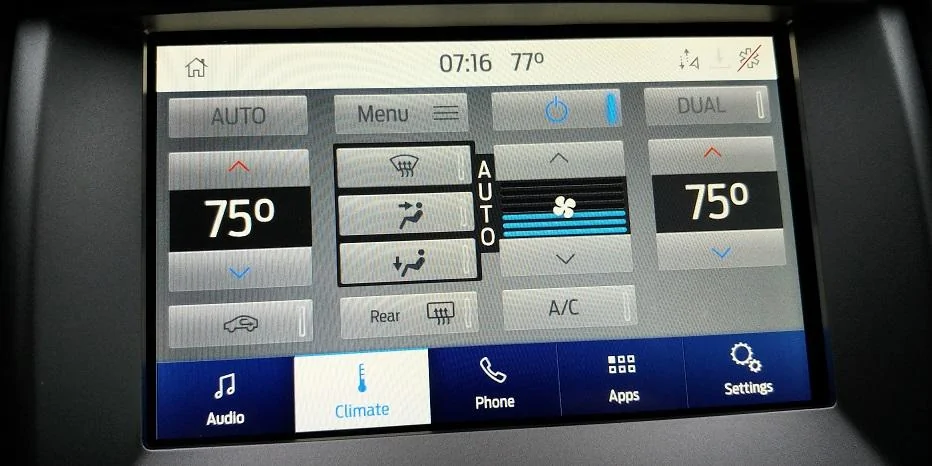
Ford needs to hire a graphic designer as the appearance of all the displays looks like a kid's first attempt at a PowerPoint presentation.


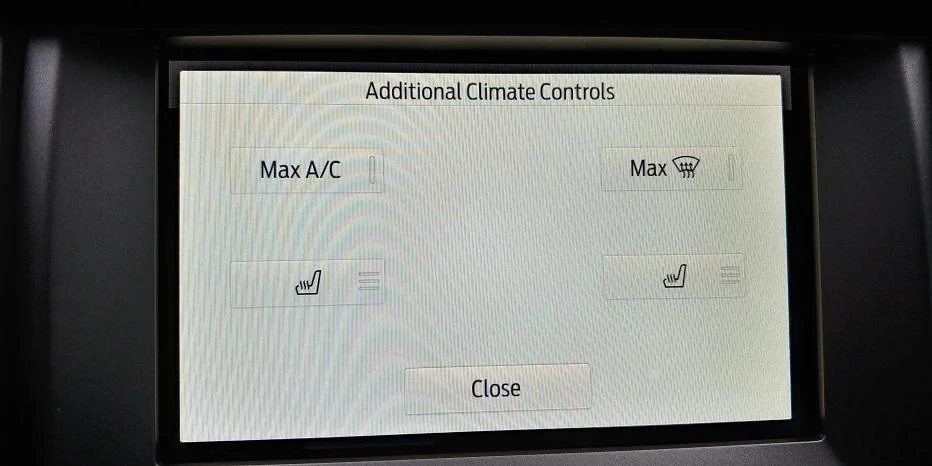
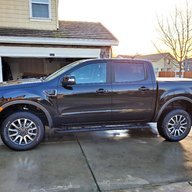
0814200716.jpg
0814200716_HDR.jpg


New design from Sync3.4. Under MENU - Additional Climate Controls it appears there are less controls in the new menu than the older 3.3 controls. Is this normal or is something missing again due to the glitch like Climate Controls?

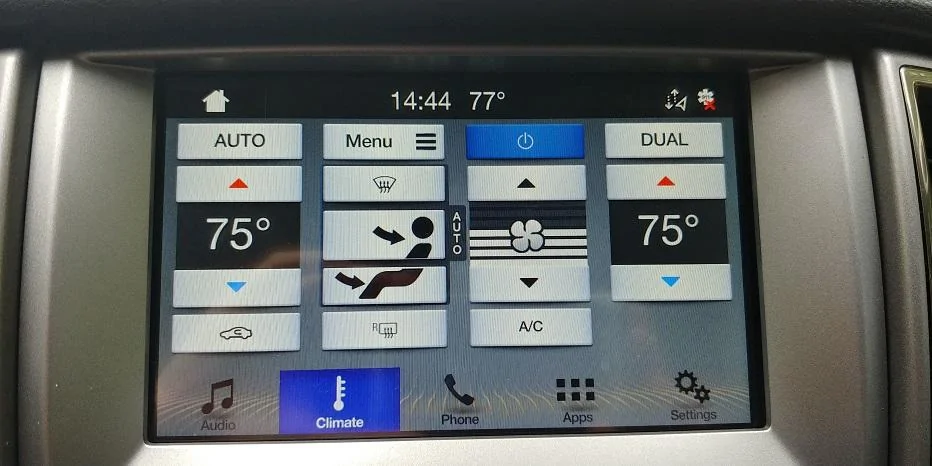
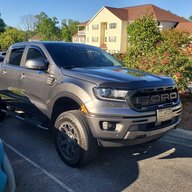
0805201444_HDR.jpg
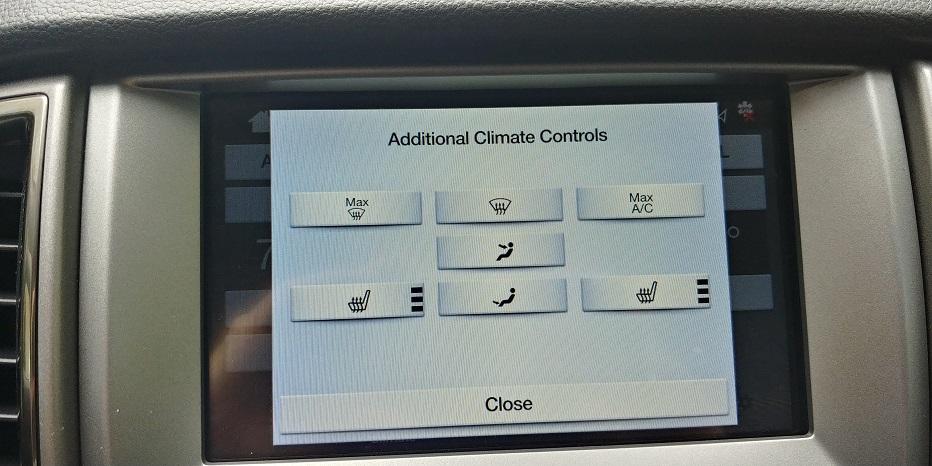
0805201444a_HDR.jpg


Sync 3.3 views and Additional Climate Controls menu. The missing controls under this menu in 3.4 are actually on the main display, so no big deal, however, under 3.4 the design and layout of this sub menu is horrible. Will have to play with the design and see if I can get the Ford Classic and Lincoln Timeless mix back. As result of another glitch in the system.
 

tmcolegr

Well-Known Member
First Name
Todd
Joined
Dec 26, 2019
Threads
11
Messages
240
Reaction score
226
Location
Central FL
Vehicle(s)
2019 F150 Platinum 4x4 & 2019 Ranger XLT 4x4
Prior to the update to Sync3.4 I enabled the three climate features with FORScan, as my APMI was defaulted to DISABLE which would have resulted in loss of climate controls.

Ford needs to hire a graphic designer as the appearance of all the displays looks like a kid's first attempt at a PowerPoint presentation.


0814200716.webp
0814200716_HDR.webp


New design from Sync3.4. Under MENU - Additional Climate Controls it appears there are less controls in the new menu than the older 3.3 controls. Is this normal or is something missing again due to the glitch like Climate Controls?

0805201444_HDR.webp
0805201444a_HDR.jpg


Sync 3.3 views and Additional Climate Controls menu. The missing controls under this menu in 3.4 are actually on the main display, so no big deal, however, under 3.4 the design and layout of this sub menu is horrible. Will have to play with the design and see if I can get the Ford Classic and Lincoln Timeless mix back. As result of another glitch in the system.
Perhaps you can answer a couple questions of mine.

You stated you Enabled all 3 Climate settings (Climate Domain, Climate Icons - both Mode and Recirculation) prior to updating to v3.4 as were all previously defaulted to Disabled. What trim level do you have? Ex: XLT 301A, XLT 302A?

Also by doing this, when you updated to v3.4, you didn't lose your climate controls?
 
Last edited:


Hirnlego

Well-Known Member
First Name
Jason
Joined
Jan 24, 2020
Threads
1
Messages
82
Reaction score
50
Location
SC
Vehicle(s)
2019 Ford Ranger XLT 302A
I have an XLT 302a package non NAV. Following the Ford instructions it only took about 25 min, and it maintained Climate Controls.

I believe the credit goes to UofMEngineer who said that there was a glitch in the system that allowed the climate controls to appear and function even though the Hexcode was wrong. Someone else did post the code and change needed to Enable the Climate Domain, or do it the easy way and just Enable it under the menu option in FORScan.

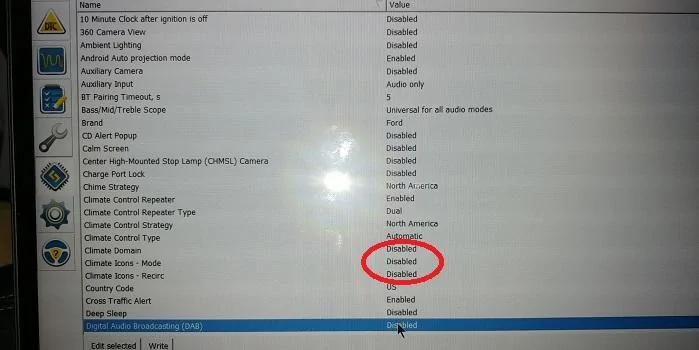
Below was my original settings. I Enabled these first then updated with the Ford Factory files to v3.4

APMI_1of4.jpg
 

tmcolegr

Well-Known Member
First Name
Todd
Joined
Dec 26, 2019
Threads
11
Messages
240
Reaction score
226
Location
Central FL
Vehicle(s)
2019 F150 Platinum 4x4 & 2019 Ranger XLT 4x4
I have an XLT 302a package non NAV. Following the Ford instructions it only took about 25 min, and it maintained Climate Controls.

I believe the credit goes to UofMEngineer who said that there was a glitch in the system that allowed the climate controls to appear and function even though the Hexcode was wrong. Someone else did post the code and change needed to Enable the Climate Domain, or do it the easy way and just Enable it under the menu option in FORScan.

Below was my original settings. I Enabled these first then updated with the Ford Factory files to v3.4

APMI_1of4.webp
Excellent !!

I know my XLT 302A APIM at 7D0-04-01 was set to xxxx-xx8x-xxxx. Trucks with later build dates at this same module address are set to xxxx-xx0x-xxxx. It would appear all those set to 8 lost the climate icon. Those that were set to 0 did not.

Capture.webp
 
Last edited:

Hirnlego

Well-Known Member
First Name
Jason
Joined
Jan 24, 2020
Threads
1
Messages
82
Reaction score
50
Location
SC
Vehicle(s)
2019 Ford Ranger XLT 302A
What is the build data of your truck? Mine was July2019 set to 7D0-04-01 xxxx-xx8x-xxxx

Is there an actual date in which Ford corrected this code? This may help those who do not have FORScan and are about to update.
 
Last edited:

RedlandRanger

Moderator
First Name
Rob
Joined
Nov 14, 2018
Threads
42
Messages
5,111
Reaction score
11,105
Location
Oregon
Vehicle(s)
2019 Ford Ranger Lariat FX4, 1973 Mercury Capri
Vehicle Showcase
1
What is the build data of your truck? Mine was July2019 set to 7D0-04-01 xxxx-xx0x-xxxx

Is there an actual date in which Ford corrected this code? This may help those who do not have FORScan and are about to update.
It is easy enough to see if you have the code by downloading the as built data from Ford as has been described here many times. No need for Forscan if you just want to know how yours is set.
 

Timothy Farley

Active Member
First Name
Timothy
Joined
Jan 23, 2020
Threads
1
Messages
37
Reaction score
20
Location
California
Vehicle(s)
2019 Ford Ranger FX4 Lariat 4wd
Ok fixed Climate control with Forscan. Everything is there now except under Additional Climate Controls , power seats is missing. Can someone tell me where to enable that. Thanks.
 

PalmettoRanger

Active Member
Joined
Jun 11, 2020
Threads
2
Messages
40
Reaction score
44
Location
Upstate South Carolina
Vehicle(s)
2019 4x4 Magnetic Ranger XLT SuperCrew with STX package
Excellent !!

I know my XLT 302A APIM at 7D0-04-01 was set to xxxx-xx8x-xxxx. Trucks with later build dates at this same module address are set to xxxx-xx0x-xxxx. It would appear all those set to 8 lost the climate icon. Those that were set to 0 did not.
I am curious what your build date is. Mine is 11/12/19 and I have the dreaded 8 in my code.
 

Bproctor

Well-Known Member
First Name
Bruce
Joined
Mar 8, 2020
Threads
24
Messages
213
Reaction score
265
Location
Hickory, NC
Vehicle(s)
2019 Ford Ranger Lariat 2WD
Occupation
NC National Guard
So... Funny story on all these climate control problems. Not long after I got my truck earlier this year I found the unofficial update and ran it. At that time I lost my climate control. Read through these forums, got me some forscan and fixed it. Ford released their next update, which looks like I only received the map files, not sure, but that's what it looks like. I ran that update and it didn't affect my climate. However, I was still on 20021. Downloaded and installed the unofficial update for 20136 and everything stayed good also. Now... While playing in forscan after loosing my climate the first time I downloaded and changed settings back to match the as built. Guess what, when I did that I lost climate control. So, why did I have climate control and no seat controls on the APIM when I bought the truck, then my as built takes away my climate control? Regardless, I have butt warming settings and fully functioning climate control on my screen thanks to all the forscan advise. I think it cost me 15 for the adapter, and I bought the lifetime license just to support them in giving this benefit. I love that I can use forscan on other Ford's as well. Does it work on non-fords? Have researched or checked yet.
 

tmcolegr

Well-Known Member
First Name
Todd
Joined
Dec 26, 2019
Threads
11
Messages
240
Reaction score
226
Location
Central FL
Vehicle(s)
2019 F150 Platinum 4x4 & 2019 Ranger XLT 4x4
What is the build data of your truck? Mine was July2019 set to 7D0-04-01 xxxx-xx0x-xxxx

Is there an actual date in which Ford corrected this code? This may help those who do not have FORScan and are about to update.

1597417264062.png


1597417216333.webp
 

geophb

Well-Known Member
Joined
Aug 3, 2020
Threads
4
Messages
530
Reaction score
750
Location
Wisconsin
Vehicle(s)
2019 Ranger
Occupation
Mechanical Engineer
Just did sync 3.4 update. No climate either.

Enabled the 3 forscan climate items in the apim, and didn't show up immediatly.
Did a soft reboot and it was there. All fine now.
Sync 3.3 looked better IMO.

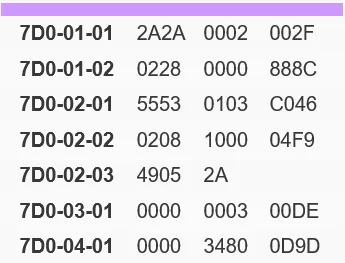
My build date is 11/19. Heres my 7D0-04-01

7D0-04-01 0000 3480 0D9D
 

Apples

Well-Known Member
First Name
Alan
Joined
Jun 14, 2020
Threads
20
Messages
687
Reaction score
1,318
Location
Roswell, NM
Vehicle(s)
2019 Ranger XLT
Occupation
Retired
I'm not going to plow through 65 pages of files....

This said, in the last three days, I've spent more time talking to Ford and their Sync supplier, than I would like. But, I finally spoke with a really knowledgable Ford Rep, with a sweet voice and disposition. Only to find out, she uses an iMac at home! Great!

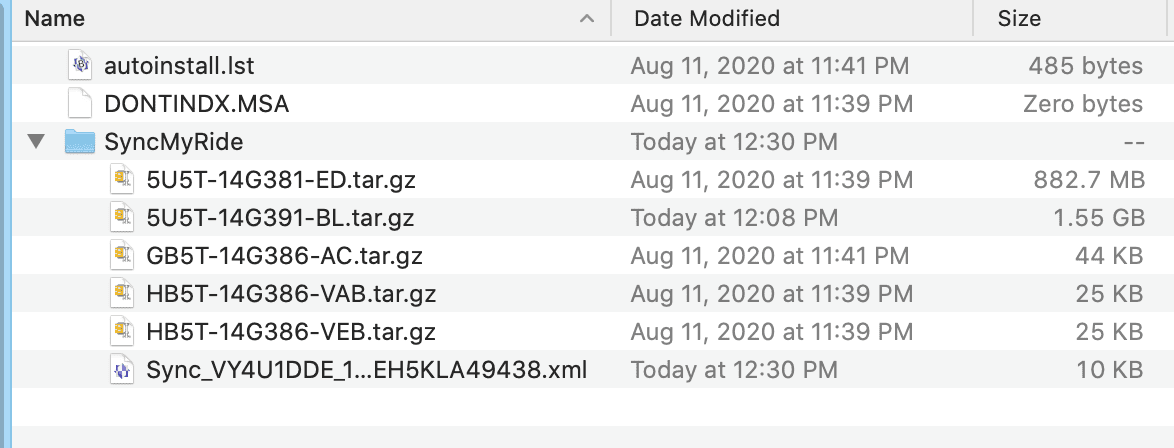
The reason the down loaded files don't work when using Apple's iMac software, is that it doesn't organize them correctly. Considering what base operating system Ford's Sync operates on, I down loaded the free version of Win-Zip for iMac. Further, from talking to the young lady, even Window's built-in, zip application, doesn't do it correctly most of the time.

The photo below is what the unzipped file should look like on a Mac or PC. If it doesn't, download some other app and try it.

I'll agree with one or two comments from above. Apparently, not everything works until you reboot the program after the update. All this reminds me of the old adage about try, try, again!

Screen Shot 2020-08-14 at 12.34.09 PM.png
Sponsored


Top