Sponsored

Just updated to Sync 3.4 on my Ranger 2019

Texas Scout

Well-Known Member
First Name
Pablo
Joined
Oct 22, 2019
Threads
0
Messages
48
Reaction score
44
Location
Merritt Island
Vehicle(s)
2019 Ford Ranger Lariat, White Platinum
Maybe I should have gone 20021
So, I just posted the results of my "testing" yesterday of downgrading to 19101, building a "new" USB Drive with the manual method documented in my new post, and then successfully updating back to Sync 3.4.20021 with NA 119 maps without losing the Climate controls on the display. I also did not lose the climate controls when I downgraded to 19101.

Of course, UofM Engineer just posted the long awaited release will be next month for sure I guess.

For your consideration:

If you would like to attempt to upgrade from your current version to 3.4.20021 it is possible.

Since your current version is below the 3.4.19274, you could use the USB drive you created for your Sync 3.4.19200 update, delete ALL existing files on the drive (do not format unless you know how to format with ExFat format), and then follow the manual method steps as I mentioned in my post to build a USB Drive to execute the Sync 3.4.20012 upgrade.

It would be an interesting exercise to see if the Climate controls return to the display after the upgrade to Build 20021 after losing them on the 19200 upgrade
Sponsored


Mandelbloom

Well-Known Member
First Name
Adam
Joined
Apr 21, 2020
Threads
3
Messages
48
Reaction score
30
Location
North Carolina
Vehicle(s)
2019 Ranger XLT
Going to 20012 did not bring the climate controls back for me unfortunately. Not sure if there is a way to go back to 3.3 and get them then back to 20012. I’ll have my forscan Tommorow :) Anyone have version 2.4 I think it is to upgrade the APIM ?

 

Texas Scout

Well-Known Member
First Name
Pablo
Joined
Oct 22, 2019
Threads
0
Messages
48
Reaction score
44
Location
Merritt Island
Vehicle(s)
2019 Ford Ranger Lariat, White Platinum
FYI. The official build / updater that should roll out next month is 20136. That's the one meant for the MY19 vehicles that can go from v3.3 to v3.4.
Thanks for the update!

I just posted my recent observations and success with the updated Cyanlab tutorials (about 20 minutes after your post) where I was able to downgrade from 20021 to 19200 to be able to use the manual method to create the USB drive to install the NA 119 maps when I upgraded back to 20021.

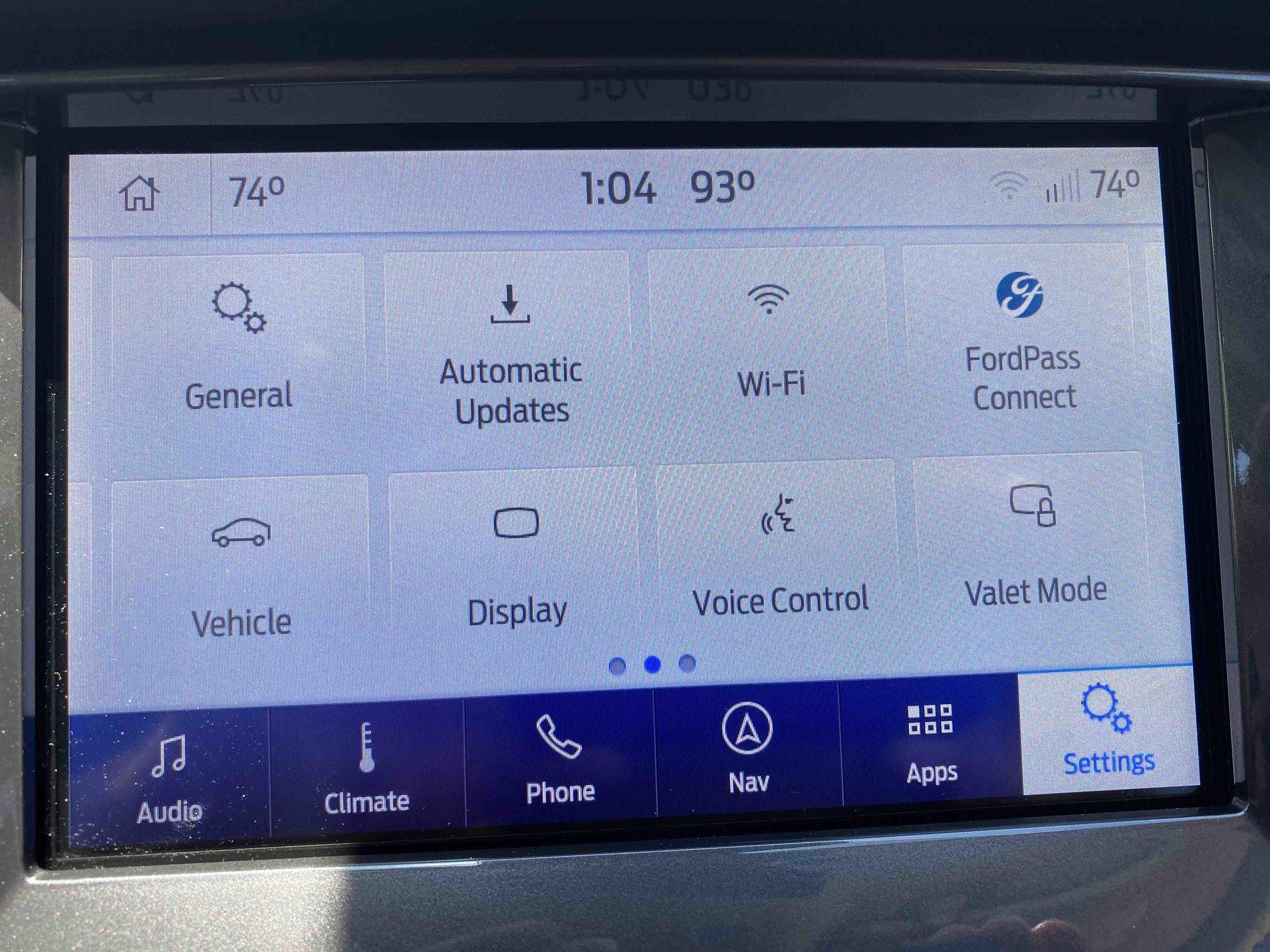
I noticed on the "new" 20021 Build Settings panel a "new" icon labeled Automatic Updates with an arrow pointing down.

20021 Settings page.jpg


I truly hope since my current Sync 3.4.20021 Build level is less than the proposed Build level of 20136 I will be able to update my 20021 Build level without any problems or issues.

And, I am curious if at the 20021 Build level the software upgrade would in fact be automatic?

Thanks again for your posts in this forum.
 

Big Blue

Well-Known Member
First Name
Lee
Joined
May 5, 2020
Threads
16
Messages
3,927
Reaction score
9,352
Location
Wisconsin
Vehicle(s)
2019 Ford Ranger XLT FX4 Supercrew lighting blue
Occupation
Retired mechanical designer
Another experience with the FordSyncDownloader tool:
I initially upgraded to to version 3.4.19274 because of the USB Issues flag on the tool. By the way I have a non-NAV SYNC unit. Upgrade took less than 8 minutes. I lost my climate screen by doing this.

I then downgraded to version 3.4.19101 again using the tool to create the USB stick.

I then created an upgrade USB to 3.4.20021 using the tool again with no issues, the stick was not blank. I upgraded my unit. again it took less than 8 minutes. Still no climate screen, I had to use Forscan to get it back. after a little struggle with FordPass every thing is working fine.

New Observation:
If you go into the special settings menu there is a whole list of themes you can try. Only thing is, all the ford based themes seem to be the same and all the Lincoln based themes are the same also.
What gives?? Are they just place holders for the future, maybe with the official release? I'm pretty sure I know which number to change in Forscan to change the theme permanently, just need to figure out what to change it to for each theme. I'll work on that and report back.


Texas Scout

Well-Known Member
First Name
Pablo
Joined
Oct 22, 2019
Threads
0
Messages
48
Reaction score
44
Location
Merritt Island
Vehicle(s)
2019 Ford Ranger Lariat, White Platinum
Another experience with the FordSyncDownloader tool:
I initially upgraded to to version 3.4.19274 because of the USB Issues flag on the tool. By the way I have a non-NAV SYNC unit. Upgrade took less than 8 minutes. I lost my climate screen by doing this.

I then downgraded to version 3.4.19101 again using the tool to create the USB stick.

I then created an upgrade USB to 3.4.20021 using the tool again with no issues, the stick was not blank. I upgraded my unit. again it took less than 8 minutes. Still no climate screen, I had to use Forscan to get it back. after a little struggle with FordPass every thing is working fine.

New Observation:
If you go into the special settings menu there is a whole list of themes you can try. Only thing is, all the ford based themes seem to be the same and all the Lincoln based themes are the same also.
What gives?? Are they just place holders for the future, maybe with the official release? I'm pretty sure I know which number to change in Forscan to change the theme permanently, just need to figure out what to change it to for each theme. I'll work on that and report back.
It would appear one key difference is you selected non-NAV sync, so the tool was able to automate your 3.4.20021 selection. Good to know, but I am not sure how many folks will continue to be Beta testers now that the 20136 Build on on the horizon....
But we have been here before ;-)
 

Big Blue

Well-Known Member
First Name
Lee
Joined
May 5, 2020
Threads
16
Messages
3,927
Reaction score
9,352
Location
Wisconsin
Vehicle(s)
2019 Ford Ranger XLT FX4 Supercrew lighting blue
Occupation
Retired mechanical designer
Going to 20012 did not bring the climate controls back for me unfortunately. Not sure if there is a way to go back to 3.3 and get them then back to 20012. I’ll have my forscan Tommorow :) Anyone have version 2.4 I think it is to upgrade the APIM ?

Once you get your Forscan up and your account activated, Make sure you backup all your as-built modules, as is mentioned multiple places in this forum. Then, go into the APIM as-built and edit
7D0-04-01 xxxx-xx0x-xxxx
Mine was an 8 in that position and changing to 0 brought my climate screen back. Don't worry about the last two places in the 3rd quartet. They are a checksum and will update automatically.
 

Mandelbloom

Well-Known Member
First Name
Adam
Joined
Apr 21, 2020
Threads
3
Messages
48
Reaction score
30
Location
North Carolina
Vehicle(s)
2019 Ranger XLT
Once you get your Forscan up and your account activated, Make sure you backup all your as-built modules, as is mentioned multiple places in this forum. Then, go into the APIM as-built and edit
7D0-04-01 xxxx-xx0x-xxxx
Mine was an 8 in that position and changing to 0 brought my climate screen back. Don't worry about the last two places in the 3rd quartet. They are a checksum and will update automatically.

Yep
Will do ! Only other thing I have is some but not all of my Sirius XM channels are missing logos.

I also read something about having the car on a charger ? Seems unnecessary ?
 

Texas Scout

Well-Known Member
First Name
Pablo
Joined
Oct 22, 2019
Threads
0
Messages
48
Reaction score
44
Location
Merritt Island
Vehicle(s)
2019 Ford Ranger Lariat, White Platinum
Yep
Will do ! Only other thing I have is some but not all of my Sirius XM channels are missing logos.

I also read something about having the car on a charger ? Seems unnecessary ?
Hmmm, did you do a master reset after the update?

I know it is recommended, not sure if it is necessary, but the master reset does remove all bluetooth pairing, saved Nav locations, and resets your SiriusXM where it has to reacativate (auto reactivates, just takes a few minutes), and then resets FordPass
 

Gizmokid2005

Well-Known Member
Joined
Dec 1, 2019
Threads
13
Messages
1,279
Reaction score
1,875
Location
GA
Website
gizmokid2005.com
Vehicle(s)
2019 Ford Ranger XLT 4X4 SCrew
Occupation
SQL Developer
Vehicle Showcase
1
I also read something about having the car on a charger ? Seems unnecessary ?
It doesn't need to be on the charger, but it needs to have some electrical input, driving or charger, as the update is a 30+ minute process.
 

Big Blue

Well-Known Member
First Name
Lee
Joined
May 5, 2020
Threads
16
Messages
3,927
Reaction score
9,352
Location
Wisconsin
Vehicle(s)
2019 Ford Ranger XLT FX4 Supercrew lighting blue
Occupation
Retired mechanical designer
Yep
Will do ! Only other thing I have is some but not all of my Sirius XM channels are missing logos.

I also read something about having the car on a charger ? Seems unnecessary ?
I left mine idle while doing the update, less than 8 minutes it didn't seem like a big deal. I've also seen where people still had the truck shut off if the charger wasn't high enough amps.
Hmmm, did you do a master reset after the update?
I did do a master reset as recommended. Yes i had to re-pair my phone and setup my WIFI connetion and re-activate Fordpass. With Fordpass make sure you do your WIFI and enable connectivity before you try to activate. Otherwise Fordpass will hang on activation and you will need to do a master reset again to clear it. It also seems to want the truck outside so it can use GPS to locate the truck.
 

Big Blue

Well-Known Member
First Name
Lee
Joined
May 5, 2020
Threads
16
Messages
3,927
Reaction score
9,352
Location
Wisconsin
Vehicle(s)
2019 Ford Ranger XLT FX4 Supercrew lighting blue
Occupation
Retired mechanical designer
It doesn't need to be on the charger, but it needs to have some electrical input, driving or charger, as the update is a 30+ minute process.
If you are doing a non-NAV upgrade the process is much shorter. Mine was less than 8 minutes.
 

BHunted

Well-Known Member
First Name
John
Joined
Sep 26, 2019
Threads
13
Messages
615
Reaction score
858
Location
Sumner County, TN
Vehicle(s)
2019 Ford Ranger Lariat, 2019 Ford Mustang
Occupation
Retired
Vehicle Showcase
1
Already have 3.4 20021 from Cyan weeks ago... but the maps are NA 1.19 yet. Anyone know when and it it will have the 1st quarter maps for 2020?
 

Nick Barber

Well-Known Member
First Name
Nick
Joined
Jun 29, 2019
Threads
5
Messages
116
Reaction score
130
Location
Richland, WA
Vehicle(s)
2019 Lariat, FX4, White Platinum, Chrome, Tow
Occupation
Program Manager
Vehicle Showcase
1
Unfortunately, currently the Automated Method does not successfully create a 3.4.20021 USB drive, so the Manual Method must be used to create the USB drive for the Sync 3.4.20021 version update.
My USB was not blank, worked fine with the automated tool.

What I read in other forums and got an answer from in Discord was that the USB issues was related to mp3 playback problems.
 

Texas Scout

Well-Known Member
First Name
Pablo
Joined
Oct 22, 2019
Threads
0
Messages
48
Reaction score
44
Location
Merritt Island
Vehicle(s)
2019 Ford Ranger Lariat, White Platinum
My USB was not blank, worked fine with the automated tool.

What I read in other forums and got an answer from in Discord was that the USB issues was related to mp3 playback problems.
I am a long time macOS person, all computers in the house are macOS, but I use VMware Fusion running a Windows 7 Pro virtual machine when I "need" Windows to run an application like the FordSyncDownload tool.

Highly possible my virtual Windows 7 environment impacted my USB results in running the tool where it did not write to the USB drive.

Hopefully folks read through all of this post activity before they decide to do a Sync upgrade.

Now that we have new info based on an official release, I expect most folks will just wait for the announced Build 20136 in July.

Cyanlab upgrade activity will resume in August if the July 3.4 upgrade release is rescheduled once again.
Waiting for 2019 Ranger Sync 34.png
Sponsored


Top