Sponsored

Sync3 Issues

Voltune

Well-Known Member
Joined
Sep 12, 2019
Threads
7
Messages
47
Reaction score
22
Location
Washington State USA
Vehicle(s)
Ranger 2019 XLT 4x4 Supercab (302A)
If you are not having any problems with Sync with your current version, I would not update. My Sync was problem free untill I loaded 22251. I loaded 23088 and seems to have solved all problems then the screen background changing returned so I am thinking about loading previous version. Cyanlabs has them.
On 3.4.21294 (no nav) I experience the following sporadic issues (maybe once or twice a month) that all occur at the same time as if it does master reset on its own:
  1. On power on, SiriusXM radio acts as if I don’t have a subscription. My presets stations are still there, but they all have an advertisement to subscribe (like what you hear on channel 1). After a few minutes, my SiriusXM channels start to broadcast the relevant channel content.
  2. The clock resets to the default time zone (I think central).
  3. The background reverts to the default blue color and daytime mode.
  4. The touchscreen beep reverts to on.
  5. When connecting my phone, I have to setup CarPlay again.
  6. I have to setup the 911 call assist again.
I was hoping that maybe this issue was fixed in 3.4.23088 as I have not updated since 3.4.21294.
Sponsored

 
Last edited:

petulantskeptic

Well-Known Member
Joined
May 26, 2019
Threads
1
Messages
48
Reaction score
42
Location
Washington
Vehicle(s)
2019 Ranger Super Crew Lariat
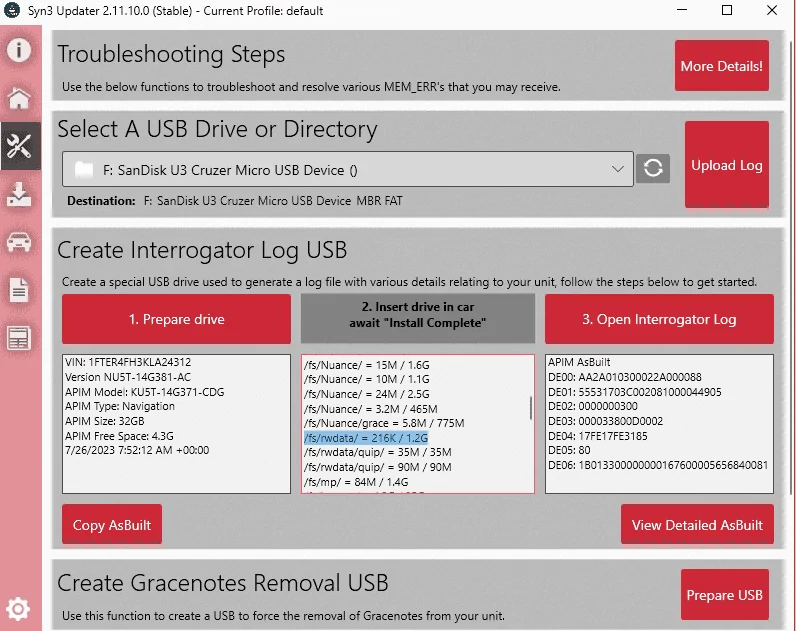
For those of you having the problems with Sync not remembering your day/night/auto settings, or what your last audio source was, and soforth (as many have reported for the past few pages) there's a lengthy thread on an F150 forum that eventually led me to the writeup on Cyanlabs that explains the problem as well as the potential solutions.

I can't get Cyanlabs' Syn3 Loader to work on my old Mac running Windows via BootCamp so I did the jailbreak solution since I've already got FORScan working and a so on. It was shockingly easy. One thing that doesn't seem well explained is that you don't actually have to install the mods_tools in order to install the rwdata Cleaner.

Depending on your MY, Sync version, familiarity with Syn3 Loader, etc these may or may not be viable options but it seems like Ford is a crapshoot as to whether you get someone familiar with the problem and they're either replacing APIMs ($$$) or just telling people to wait it out.

Deeply unimpressed with Ford's Sync QA… first they deleted my climate control module access button, now we have runaway log files.
 

samsd

Well-Known Member
First Name
Dan
Joined
May 2, 2019
Threads
0
Messages
351
Reaction score
1,499
Location
62401
Vehicle(s)
2019 Ranger Lariat 4x4 HPR, 2016 Town and Country, 2004 Road King Custom
Occupation
Retired
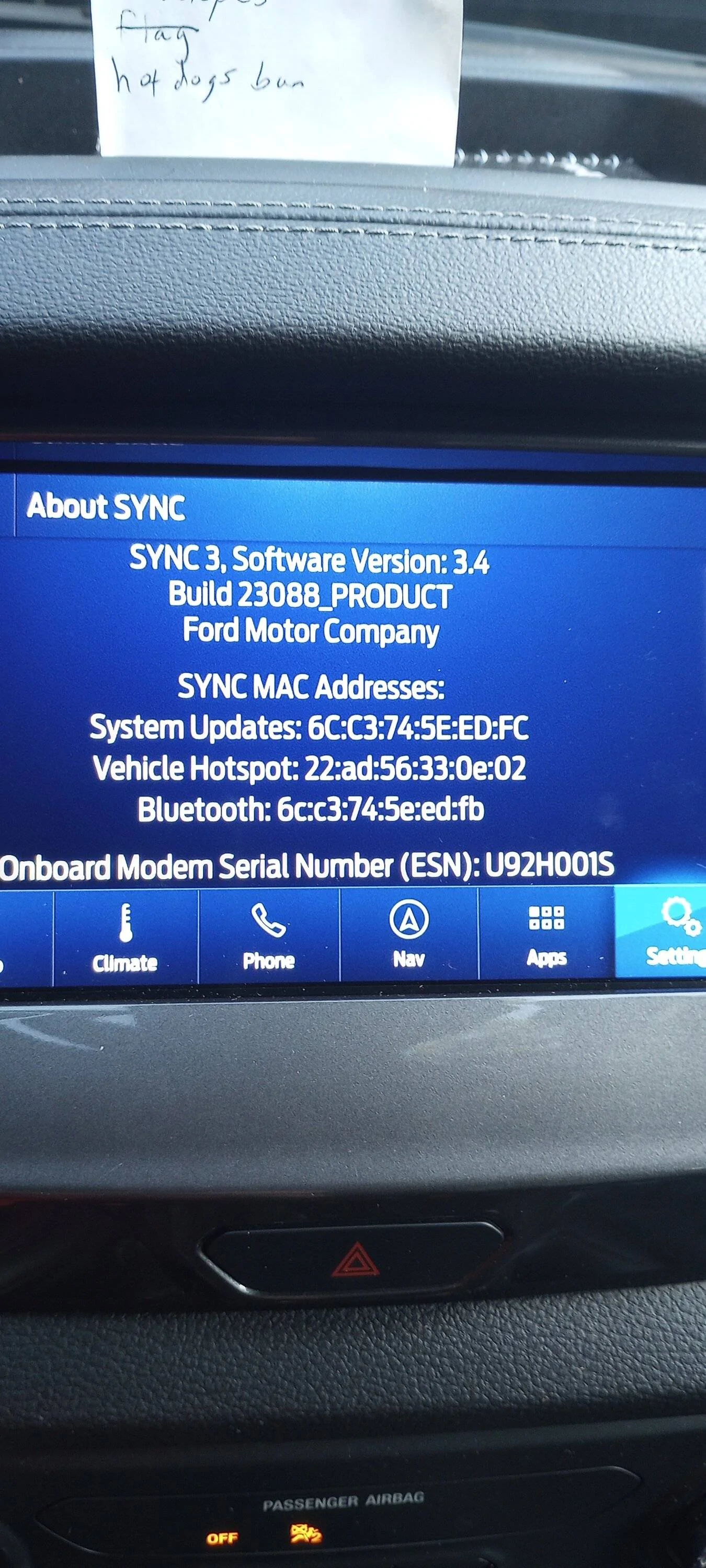
I was getting the same error message but after several attempts at a master reset I was able to do a reset and install 23088 sucessfully. So far my screen is staying in dark mode and the radio is not reverting back to whatever AM or FM station I was listening to prior to XM. So, if I was listening to XM it comes on to XM at startup now but does go to the ID screen.
I do wonder what factor a weak cell signal plays in all this reset stuff as I was in town taking a class and went out to my truck on break and was able to do the reset.
PS, disregard my shopping list, if I don't have a visual on my dash, I forget what I went to town for and wind up at the tavern.

SYNC.jpg
Update,
Old problems returned except for Sync locking up or blacking out. I was having to do the soft reset almost every time I started the truck.
However, I have performed the master reset more times then I can count in the last 4 days, reset it 4 times today and it is now letting me select the Ford Pass App connectivity settings, still can't connect but making progress. I am either going to blow it up or fix it one way or the other. Did chat with Ford last night and they said the telematics unit needed updated even though they could see what my truck was doing data wise. I call BS.
 

SymChris

Well-Known Member
First Name
Chris
Joined
Apr 25, 2020
Threads
6
Messages
252
Reaction score
470
Location
Mississauga, ON, Canada
Vehicle(s)
2019 Ranger Lariat FX4 / 2017 Escape SE FWD
Deeply unimpressed with Ford's Sync QA… first they deleted my climate control module access button, now we have runaway log files.
I got lucky and didn’t update with that one that messed up the climate control. That was a prime candidate for a QA miss, quite badly unfortunately.

This new one (with version 22251) with the log file filling up/whatever I would actually give the QA team somewhat of a pass because this is obviously not something caught early.

It sucks but everything, eventually, works. I’m anxiously awaiting the fixed version, but hopes are not high since they’ve moved on from Sync 3.x I thought. We’ll all find out eventually…
 

petulantskeptic

Well-Known Member
Joined
May 26, 2019
Threads
1
Messages
48
Reaction score
42
Location
Washington
Vehicle(s)
2019 Ranger Super Crew Lariat
The most perplexing thing is that the "fix" in 23088 seems to be compressing the log files rather than rotating them / deleting them. Which will probably make the problem really unlikely, but it definitely doesn't solve the root cause of filling empty space with log files.


OregonRanger

Active Member
First Name
Bob
Joined
Dec 29, 2019
Threads
5
Messages
43
Reaction score
74
Location
Oregon
Vehicle(s)
2019 Ford Ranger Lariat FX4
Occupation
MAK Grills
I tried the master reset and it has been an hour on a black screen, how long should it take?
 

Tom_C

Well-Known Member
First Name
Tom
Joined
Apr 17, 2021
Threads
35
Messages
1,972
Reaction score
4,389
Location
Virginia, USA
Vehicle(s)
2020 Ranger Lariat SuperCab FX4
Occupation
System Admin, Retired
Is 23088 an official release, or did Cyanlabs make it?

I'm not having any symptoms, EXCEPT I get a message sometimes about auto updates or whatever.
 

Phantomfixer

Well-Known Member
Joined
Jan 15, 2023
Threads
7
Messages
101
Reaction score
177
Location
Florida
Vehicle(s)
2021 Ranger Lariat FX 4
Update,
Old problems returned except for Sync locking up or blacking out. I was having to do the soft reset almost every time I started the truck.
However, I have performed the master reset more times then I can count in the last 4 days, reset it 4 times today and it is now letting me select the Ford Pass App connectivity settings, still can't connect but making progress. I am either going to blow it up or fix it one way or the other. Did chat with Ford last night and they said the telematics unit needed updated even though they could see what my truck was doing data wise. I call BS.
I've had issues with the connectivity options not being available relating to the Ford Pass app.I found a solution to that on YouTube.Are you using iOS ?
 

samsd

Well-Known Member
First Name
Dan
Joined
May 2, 2019
Threads
0
Messages
351
Reaction score
1,499
Location
62401
Vehicle(s)
2019 Ranger Lariat 4x4 HPR, 2016 Town and Country, 2004 Road King Custom
Occupation
Retired
I've had issues with the connectivity options not being available relating to the Ford Pass app.I found a solution to that on YouTube.Are you using iOS ?
Android and just reconncted this morning after another master reset. 6 resets in 2 days and too many to count since last Saturday.
 

samsd

Well-Known Member
First Name
Dan
Joined
May 2, 2019
Threads
0
Messages
351
Reaction score
1,499
Location
62401
Vehicle(s)
2019 Ranger Lariat 4x4 HPR, 2016 Town and Country, 2004 Road King Custom
Occupation
Retired
I tried the master reset and it has been an hour on a black screen, how long should it take?
A couple of my resets never came back so I shut off the truck, opened the door, locked the door and shut the door. Started the reset again, locking the door while it is open is apparently a very important part of the key cycle.
 
Last edited:

_N8_

Well-Known Member
Joined
Mar 9, 2020
Threads
2
Messages
45
Reaction score
53
Location
Lancaster, PA
Vehicle(s)
2019 Ford Ranger XLT Sport
A couple of my resets never came back so I shut off the truck, opened the door, locked the door and shut the door. Started the rest again, locking the door while it is open is apparently a very important part of the key cycle.
I think that time mine wouldn't come back up a soft reboot helped too:


  1. Press and hold the Seek Up (>>|) button while pressing and holding the Radio Power button.
 

OregonRanger

Active Member
First Name
Bob
Joined
Dec 29, 2019
Threads
5
Messages
43
Reaction score
74
Location
Oregon
Vehicle(s)
2019 Ford Ranger Lariat FX4
Occupation
MAK Grills
A couple of my resets never came back so I shut off the truck, opened the door, locked the door and shut the door. Started the reset again, locking the door while it is open is apparently a very important part of the key cycle.
Well I might have done that by accident just getting out of the truck at the store but who knows.

It took 6hrs for the first reset to complete and have the screen come back to life. I had the truck on for the first hour then off for 2 then drove for an hour, off for 2 more then drove for an hour, then off for 10 min at the store, when I started it up it was black then about a minute unto the drive it came to life.

Second rest took about an hour.

All that being said it appears that has fixed the issues so far! I have started the truck 4 times now and all my settings are staying, I will give it a few days then report back, fingers crossed.

FYI, I didn't update any versions just did the master reset twice. (I'm still on build 22251).
 

Dr. Zaius

Well-Known Member
First Name
Dennis
Joined
Dec 20, 2019
Threads
76
Messages
6,664
Reaction score
40,642
Location
Living The Dream
Vehicle(s)
2019 Ranger XLT FX4
Does version 23088 still allow you to scroll playlists while the vehicle is moving?

Or has the "Safety Lock" returned?
Sponsored


Top