Sponsored

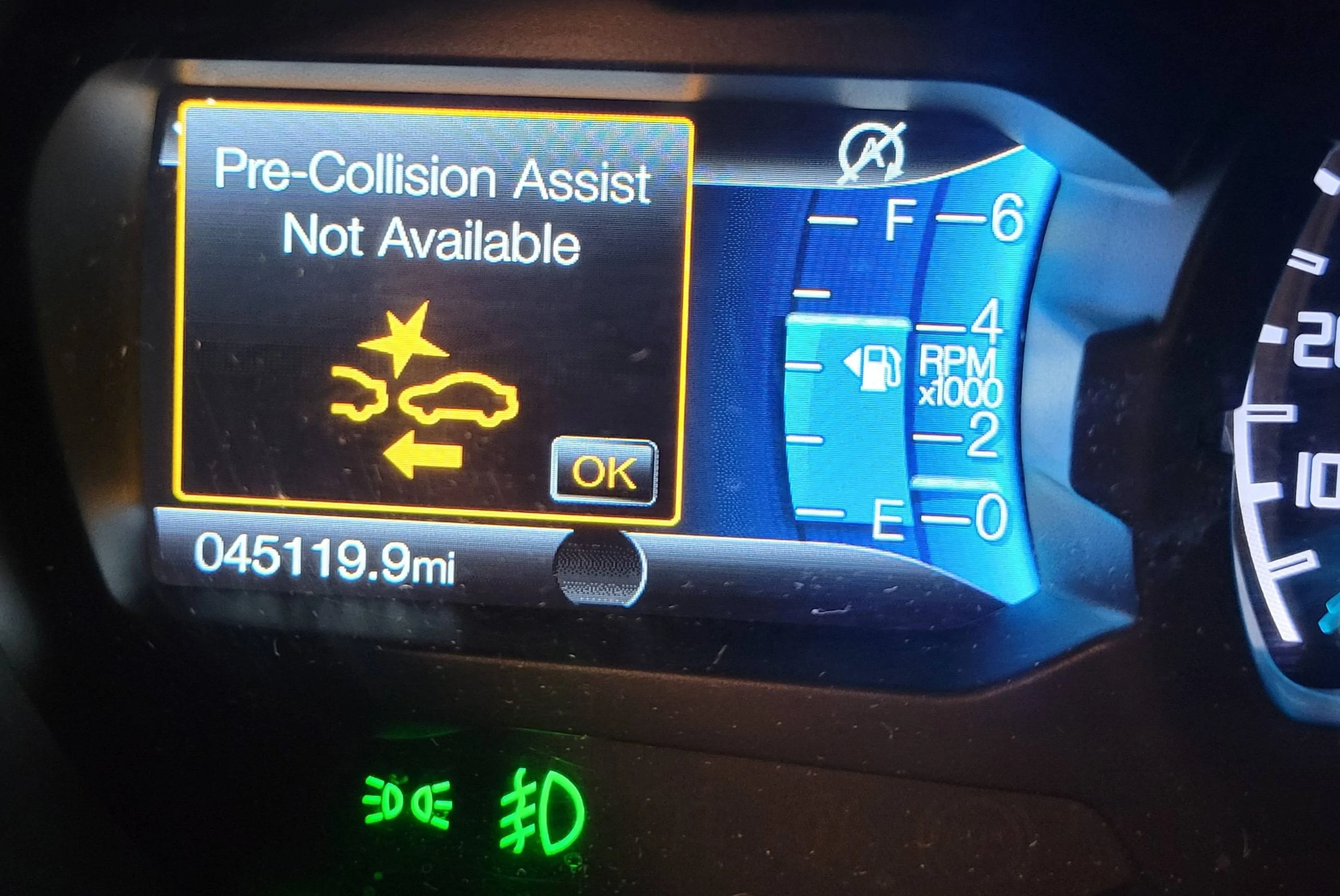
Pre-Collision Assist not availabl

canyonslicker

Well-Known Member
First Name
Andy
Joined
Jun 13, 2021
Threads
43
Messages
1,437
Reaction score
5,294
Location
California
Vehicle(s)
2021 Ranger Lariat
Occupation
65 YO Juvenile Delinquent
It’s just RP. He‘s Canadian and they get a little cranky this time of year when the maple syrup starts to freeze. I enjoy most of his bitching on here but just ignore it if I don’t. FWIW, I found this discussion interesting, I haven’t really spent much energy thinking about the camera in the windshield.
Yeah RP is like that friend points out the obvious and maybe a little obnoxiously. He has his moments when he actually helps too, opinionated absolutely but hey that’s what makes him RP. ?‍♀
Sponsored


Racket

Well-Known Member
First Name
John
Joined
Jan 21, 2020
Threads
22
Messages
2,203
Reaction score
3,402
Location
Here and There
Vehicle(s)
2019 Lariat Supercrew 2WD
Occupation
Transient
From the manual possible causes for unavailability:
Pre-Collision Assist not availabl | 2019+ Ford Ranger and Raptor Forum (5th Generation) - Ranger5G.com

If a message regarding a blocked sensor or camera appears in the information display, the radar signals or camera images are obstructed. The radar sensor is located behind a fascia cover near the driver side of the lower grille. With an obstructed radar, the Pre-Collision Assist system does not function and cannot detect a vehicle ahead. With the front camera obstructed, the Pre-Collision Assist system does not respond to pedestrians or stationary vehicles and the system performance on moving vehicles reduces. The following table lists possible causes and actions for when this message displays.

Cause​
Action​
The surface of the radar in the grille is dirty or obstructed in some way.​
Clean the grille surface in front of the radar or remove the object causing the obstruction.​
The surface of the radar in the grille is clean but the message remains in the display.​
Wait a short time. It may take several minutes for the radar to detect that there is no obstruction.​
Heavy rain, spray, snow, or fog is interfering with the radar signals.​
The Pre-Collision Assist system is temporarily disabled. Pre-Collision Assist should automatically reactivate a short time after the weather conditions improve.​
Swirling water, or snow or ice on the surface of the road may interfere with the radar signals.​
The Pre-Collision Assist system is temporarily disabled. Pre-Collision Assist should automatically reactivate a short time after the weather conditions improve.​
Radar is out of alignment due to a front end impact.​
Contact an authorized dealer to have the radar checked for proper coverage and operation.​
The windshield in front of the camera is dirty or obstructed in some way.​
Clean the outside of the windshield in front of the camera.​
The windshield in front of the camera is clean but the message remains in the display.​
Wait a short time. It may take several minutes for the camera to detect that there is no obstruction.​

Note: Proper system operation requires a clear view of the road by the camera. Have any windshield damage in the area of the camera's field of view repaired.
Mine doesn't work more than it does. Must be the ACC sensor out of alignment. Wonder if my 1.5 inch front lift did it.

Edit to add: I remember at least once or twice I found the plastic cover flipped forward on the radar and had to snap it back in place. Wonder if there are spiders living in there now.
 
Last edited:

Jason B

Well-Known Member
First Name
Jason
Joined
May 19, 2021
Threads
9
Messages
3,008
Reaction score
8,315
Location
Louisiana
Vehicle(s)
2021 XL STX SE 4x2
Occupation
machinist
I don't know that it uses the ACC sensors, as I don't have ACC on my truck, but I do have Pre-collision and AEB. It uses the camera on the windshield, at least on trucks without ACC.
 

Big Blue

Well-Known Member
First Name
Lee
Joined
May 5, 2020
Threads
16
Messages
3,927
Reaction score
9,352
Location
Wisconsin
Vehicle(s)
2019 Ford Ranger XLT FX4 Supercrew lighting blue
Occupation
Retired mechanical designer
I don't know that it uses the ACC sensors, as I don't have ACC on my truck, but I do have Pre-collision and AEB. It uses the camera on the windshield, at least on trucks without ACC.
On vehicles with ACC, the AEB uses both the radar and the camera. On vehicles without ACC the AEB uses just the camera. The manual is a bit off on the location of the radar sensor (suprise!). On the Ranger it is located in the center of the lower grille not to the drive side. The camers in the windshield is used for AEB, lane keeping and traffic sign recognition.
 

Racket

Well-Known Member
First Name
John
Joined
Jan 21, 2020
Threads
22
Messages
2,203
Reaction score
3,402
Location
Here and There
Vehicle(s)
2019 Lariat Supercrew 2WD
Occupation
Transient
Odd thing I've noticed: I only get the 'unavailable' message after five miles or five minutes of driving (or so) at night. It in the daytime - the ACC works until it doesn't.


...like today in the rain
 
Last edited:


Beez

Well-Known Member
First Name
Wayne
Joined
Dec 14, 2022
Threads
2
Messages
103
Reaction score
181
Location
Hawaii
Vehicle(s)
'19 Lariat, DIY BOV, 2.5 Leveler, MBRP 3" Exhaust
Occupation
Just another incredibly super average dude
Hey All - Hoping for a bit of clarity and instruction. I was recently in FORScan again, adjusting the mm circumference of my larger tires and decided to make a few more tweaks. I stopped in at each tab to take a look around and spent some time studying the options available. Regrettably, I do not specifically recall what I may have tweaked beyond that, but now I have a persistent "Pre-Collision Assistant Not Available" error that routinely appears and can only be cleared with the steering wheel "OK" button. I've repeatedly gone back into the FORScan program and tried making multiple adjustments, then removing them to try to isolate the culprit, but have been completely unsuccessful. The error only arrived since my poking around in the program and has nothing to do with an obstructed sensor.

I've read countless other Pre-Collision posts and (unfortunately) NONE of them apply to my specific situation. Any ideas in helping me correct this error is greatly appreciated.

Pre-Collision Assist Not Available.webp
 

Big Blue

Well-Known Member
First Name
Lee
Joined
May 5, 2020
Threads
16
Messages
3,927
Reaction score
9,352
Location
Wisconsin
Vehicle(s)
2019 Ford Ranger XLT FX4 Supercrew lighting blue
Occupation
Retired mechanical designer
This why I preach backing up your asbuilt files before making any changes. That way if something like this happens it is simple to reload the backup file and undo the changes. Writing down changes also help. I keep my original asbuilts and even copies of my current files once I know they work. Keeps me from undoing all my changes. But that's just the OCD in me. :shock:
 

UnregistredHypercam2

Well-Known Member
First Name
Jon
Joined
Aug 15, 2021
Threads
22
Messages
282
Reaction score
907
Location
Denver, Colorado
Vehicle(s)
1997 Toyota Land Cruiser VX Limited, 2013 Chevrolet Suburban LT
Occupation
Cybersecurity
Hey All - Hoping for a bit of clarity and instruction. I was recently in FORScan again, adjusting the mm circumference of my larger tires and decided to make a few more tweaks. I stopped in at each tab to take a look around and spent some time studying the options available. Regrettably, I do not specifically recall what I may have tweaked beyond that, but now I have a persistent "Pre-Collision Assistant Not Available" error that routinely appears and can only be cleared with the steering wheel "OK" button. I've repeatedly gone back into the FORScan program and tried making multiple adjustments, then removing them to try to isolate the culprit, but have been completely unsuccessful. The error only arrived since my poking around in the program and has nothing to do with an obstructed sensor.

I've read countless other Pre-Collision posts and (unfortunately) NONE of them apply to my specific situation. Any ideas in helping me correct this error is greatly appreciated.

Pre-Collision Assist Not Available.jpg
Did you do this at the same time as new tires? When I went with larger tires, I still had this issue after adjusting the tire size in forscan. To my knowledge, the tire size does not change the calibration of the safety system. In short, recalibrate your radar/lane keeping system and see if the issue persists. Once I recalibrated, the issue went away.
 

Beez

Well-Known Member
First Name
Wayne
Joined
Dec 14, 2022
Threads
2
Messages
103
Reaction score
181
Location
Hawaii
Vehicle(s)
'19 Lariat, DIY BOV, 2.5 Leveler, MBRP 3" Exhaust
Occupation
Just another incredibly super average dude
Did you do this at the same time as new tires? When I went with larger tires, I still had this issue after adjusting the tire size in forscan. To my knowledge, the tire size does not change the calibration of the safety system. In short, recalibrate your radar/lane keeping system and see if the issue persists. Once I recalibrated, the issue went away.
Hi Jon, I actually adjusted the tire size a few days earlier, which did not trip any codes. While having the adapter out, I thought I'd jump back in on the weekend to view some other options. I did make some other, (what I thought) were minor changes a few days later. Typically, if the system doesn't like the change, it blocks it. Unfortunately, (for whatever reason in this case), it apparently allowed me to modify something that now produced the Pre-Collision error. - I found a video on YouTube that seemed promising. It pointed to the truck height adjustment, and the how-to in correcting these values, then re-calibrating the lane assist through FORScan. I was able to correct these numbers and re-calibrate, but again, no affect in clearing the error message :(
 

Beez

Well-Known Member
First Name
Wayne
Joined
Dec 14, 2022
Threads
2
Messages
103
Reaction score
181
Location
Hawaii
Vehicle(s)
'19 Lariat, DIY BOV, 2.5 Leveler, MBRP 3" Exhaust
Occupation
Just another incredibly super average dude
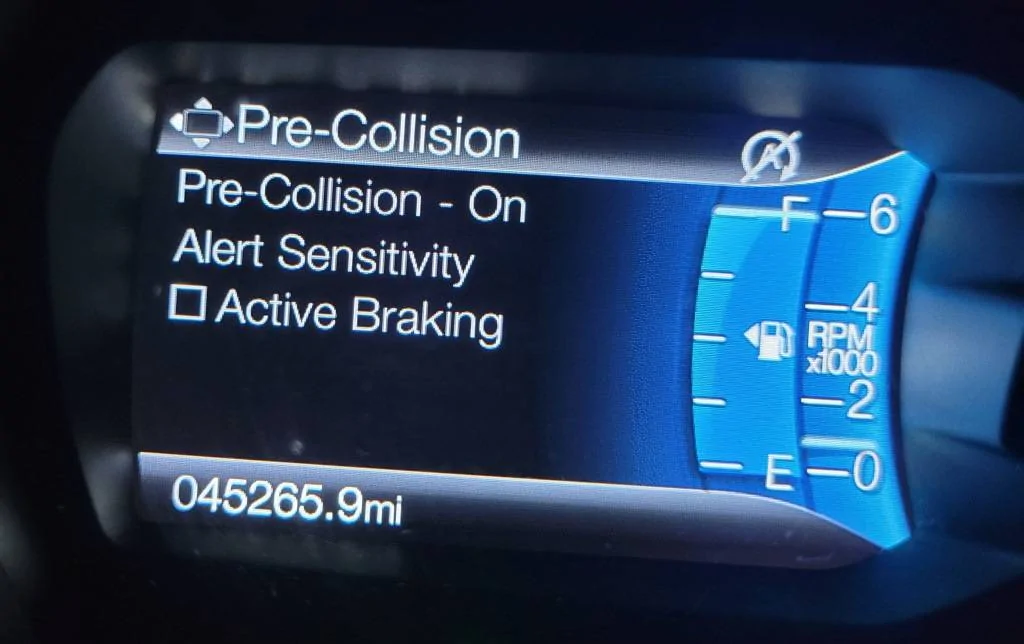
Another clue to the puzzle.. I discovered within the steering wheel menu, that the "Active Braking" is unchecked. I can access it, but cannot activate it. Not sure of this is the issue, but it makes sense that this could be the problem. Any one know how to initiate the Active Braking option?

Active Braking Unchecked.webp
 

Jason B

Well-Known Member
First Name
Jason
Joined
May 19, 2021
Threads
9
Messages
3,008
Reaction score
8,315
Location
Louisiana
Vehicle(s)
2021 XL STX SE 4x2
Occupation
machinist
Another clue to the puzzle.. I discovered within the steering wheel menu, that the "Active Braking" is unchecked. I can access it, but cannot activate it. Not sure of this is the issue, but it makes sense that this could be the problem. Any one know how to initiate the Active Braking option?

Active Braking Unchecked.jpg
That sounds like the chicken/egg thing.
I may be that you can't select Active Braking because Pre-Collision is unavailable.
 

Beez

Well-Known Member
First Name
Wayne
Joined
Dec 14, 2022
Threads
2
Messages
103
Reaction score
181
Location
Hawaii
Vehicle(s)
'19 Lariat, DIY BOV, 2.5 Leveler, MBRP 3" Exhaust
Occupation
Just another incredibly super average dude
That sounds like the chicken/egg thing.
I may be that you can't select Active Braking because Pre-Collision is unavailable.
I hate to say it, but I think you're right.

I've wasted a few weekends attempting to figure it out, going through each tab again and again trying to identify anything that might play into it, but keep falling flat. It was a fun challenge at first, but I've hit a wall and exhausted all of my options. I even tried posting my issue on a number of other sites and did my best to research it out on Youtube University, but apparently I'm the first person in all of creation to experience this condition under my specific circumstances? That said, I'm afraid I'm going to have to tap out. I've re-downloaded my default settings to reset everything to factory in FORScan.. The official White Flag of Surrender will be hoisted this weekend and we'll just have to try doing everything over again from the beginning.

Surrender.jpg
Sponsored

 
Last edited:


Top