Sponsored

Just updated to Sync 3.4 on my Ranger 2019

Big Blue

Well-Known Member
First Name
Lee
Joined
May 5, 2020
Threads
16
Messages
3,932
Reaction score
9,376
Location
Wisconsin
Vehicle(s)
2019 Ford Ranger XLT FX4 Supercrew lighting blue
Occupation
Retired mechanical designer
Meant to say I haven't used Forscan before.
As @viperwolf said check out the videos, with the configuration menus it is not real hard. Biggest thing that cannot be stressed enough! Backup all you module as-built files before making any changes. That way if something doesn't work you can restore your changes back to the way it was before the change. Backups are your friend.
Sponsored


Ugly_Betty

Well-Known Member
Joined
Jan 17, 2021
Threads
5
Messages
145
Reaction score
626
Location
PNW
Vehicle(s)
2019 Ford Ranger Lariat FX4
Running 3.3 19052. Followed all the instructions to update via USB. Plugged in the drive, it recognizes it.....then nothing. What am I doing wrong?
 

VAMike

Well-Known Member
First Name
Mike
Joined
Feb 22, 2019
Threads
1
Messages
3,390
Reaction score
4,408
Location
Virginia
Vehicle(s)
2019 Ranger Lariat SuperCab
Running 3.3 19052. Followed all the instructions to update via USB. Plugged in the drive, it recognizes it.....then nothing. What am I doing wrong?
how long have you left it in? mine can sometimes take a few minutes before it seems to notice and do something. unlike some, I suggest just taking a nice long drive in the country with updating happening as a side project rather than sitting and staring at it and driving yourself nuts--even if the update doesn't happen, at least you had a nice drive!
 

Ugly_Betty

Well-Known Member
Joined
Jan 17, 2021
Threads
5
Messages
145
Reaction score
626
Location
PNW
Vehicle(s)
2019 Ford Ranger Lariat FX4
how long have you left it in? mine can sometimes take a few minutes before it seems to notice and do something. unlike some, I suggest just taking a nice long drive in the country with updating happening as a side project rather than sitting and staring at it and driving yourself nuts--even if the update doesn't happen, at least you had a nice drive!
Ok, I saw in some of the instructions that it would indicate it started the update....but it just says it's recognized the drive. Guess I'll go for a lil' drive then.
 

VAMike

Well-Known Member
First Name
Mike
Joined
Feb 22, 2019
Threads
1
Messages
3,390
Reaction score
4,408
Location
Virginia
Vehicle(s)
2019 Ranger Lariat SuperCab
Ok, I saw in some of the instructions that it would indicate it started the update....but it just says it's recognized the drive. Guess I'll go for a lil' drive then.
it should eventually start saying "updating system" or words to that effect across the top of the screen. it'll also reboot a few times, and tell you to turn the truck off, and all kinds of weird stuff. my advice is after you're done your drive, check for the xml file in the SyncMyRide folder. If it's not there, do the same thing tomorrow. Especially the upgrade from 3.3 I remember taking forever, not really being done when it seemed to be, but also eventually being done even though it kept reinstalling. (Hopefully ford fixed that, it sucked.) I was a lot more mellow when I took an "it'll be done when it's done" attitude vs "I'm going to do this now" attitude.


Ugly_Betty

Well-Known Member
Joined
Jan 17, 2021
Threads
5
Messages
145
Reaction score
626
Location
PNW
Vehicle(s)
2019 Ford Ranger Lariat FX4
Last update kept all my current asbuilt settings, splash screen, theme, climate screen and heated seat buttons. You should be OK.

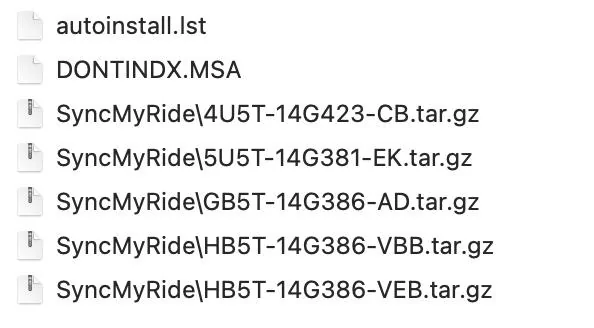
Just be sure the SyncMyRide folder on the USB has all six files.
I downloaded from Ford and it only came with 5 files. What's the 6th?
SYNC Update FIle List.webp
 

Big Blue

Well-Known Member
First Name
Lee
Joined
May 5, 2020
Threads
16
Messages
3,932
Reaction score
9,376
Location
Wisconsin
Vehicle(s)
2019 Ford Ranger XLT FX4 Supercrew lighting blue
Occupation
Retired mechanical designer
I downloaded from Ford and it only came with 5 files. What's the 6th?
SYNC Update FIle List.jpg
Missing the 5U5T-14G391-BM file that's the new language file. It's big, like 1.5GB.

Yours is non-NAV correct?
 

Ugly_Betty

Well-Known Member
Joined
Jan 17, 2021
Threads
5
Messages
145
Reaction score
626
Location
PNW
Vehicle(s)
2019 Ford Ranger Lariat FX4
Missing the 5U5T-14G391-BM file that's the new language file. It's big, like 1.5GB.

Yours is non-NAV correct?
I have NAV. I keep looking for a post saying there' a VIN to use to get all 6 files?
 

Big Blue

Well-Known Member
First Name
Lee
Joined
May 5, 2020
Threads
16
Messages
3,932
Reaction score
9,376
Location
Wisconsin
Vehicle(s)
2019 Ford Ranger XLT FX4 Supercrew lighting blue
Occupation
Retired mechanical designer
I have NAV. I keep looking for a post saying there' a VIN to use to get all 6 files?
Hear is a post from another SYNC 3.4 thread that has a NAV VIN you can try.
1FMCU9J90LUB09229 is one example for NA NAV. Basically, if you're missing a file or files, you can look up some used vehicle VINs for MY19/20 with the same system and pull a full package that way. Annoying, but it works.

FYI - A quick way to check if you got the new Voice file is just press the VR button. If all you get is short silence, then the beep to talk you're OK. If it still chimes, or worse, chimes and says "please say a command", you're using an old Voice pack. Gracenotes you can check from the About SYNC screen.
 

tmcolegr

Well-Known Member
First Name
Todd
Joined
Dec 26, 2019
Threads
11
Messages
240
Reaction score
226
Location
Central FL
Vehicle(s)
2019 F150 Platinum 4x4 & 2019 Ranger XLT 4x4

Tiggger1531

Well-Known Member
First Name
Stacey
Joined
Jul 27, 2020
Threads
11
Messages
56
Reaction score
174
Location
Tennessee
Vehicle(s)
2019 Ranger
Occupation
retired USAF
how long have you left it in? mine can sometimes take a few minutes before it seems to notice and do something. unlike some, I suggest just taking a nice long drive in the country with updating happening as a side project rather than sitting and staring at it and driving yourself nuts--even if the update doesn't happen, at least you had a nice drive!
I left my USB plugged in for about 30 minutes. Just walked away and let do its thing. Came back and my screen said to remove the USB and that everything was updated.
 

OneHighFocus

Member
Joined
Jul 20, 2020
Threads
1
Messages
17
Reaction score
16
Location
Bay Area, Ca.
Vehicle(s)
2017 Q60
Tried searching through the thread but didn’t see anything about Apple CarPlay not showing up after updating to 3.4 from 3.3
The Update seems to be successful and I see the CarPlay options in the settings menu however when I plug in my phone the CarPlay icon does not appear at the bottom of the screen. I still have all USB accessible functions, iTunes music access and such just no CarPlay.

Any ideas?
 

SafetyDan

Well-Known Member
First Name
Dan
Joined
Apr 28, 2019
Threads
36
Messages
388
Reaction score
473
Location
Oxnard, CA
Vehicle(s)
2019 V2 - Ranger Lariat, FX4, 501A, Trailer Tow (Lightning Blue), V1- Lariat, FX4, 500A, Trailer Tow (Ingot Silver) <Epic Fail - Lemon>
Vehicle Showcase
1
Tried searching through the thread but didn’t see anything about Apple CarPlay not showing up after updating to 3.4 from 3.3
The Update seems to be successful and I see the CarPlay options in the settings menu however when I plug in my phone the CarPlay icon does not appear at the bottom of the screen. I still have all USB accessible functions, iTunes music access and such just no CarPlay.

Any ideas?
Did you turn on or allow car play in settings.
 

deeve

Well-Known Member
Joined
Nov 18, 2019
Threads
16
Messages
198
Reaction score
72
Location
USA
Vehicle(s)
Ford Ranger
Tried searching through the thread but didn’t see anything about Apple CarPlay not showing up after updating to 3.4 from 3.3
The Update seems to be successful and I see the CarPlay options in the settings menu however when I plug in my phone the CarPlay icon does not appear at the bottom of the screen. I still have all USB accessible functions, iTunes music access and such just no CarPlay.

Any ideas?
Mine does that sometimes where it glitches out. I have to unplug the phone or reset the head unit. Seems for me the update is more buggy than the previous version. I also sometimes get music playing with a black screen. Touch functions still work, it's just that the screen is not on.
Sponsored


Top