Colo_Ranger
Well-Known Member
if you can post the exact error you’re getting, that will help. Without it, I don’t know what we’re working against.Currently on 2 month trial license.
Sponsored

if you can post the exact error you’re getting, that will help. Without it, I don’t know what we’re working against.Currently on 2 month trial license.
if you can post the exact error you’re getting, that will help. Without it, I don’t know what we’re working against.
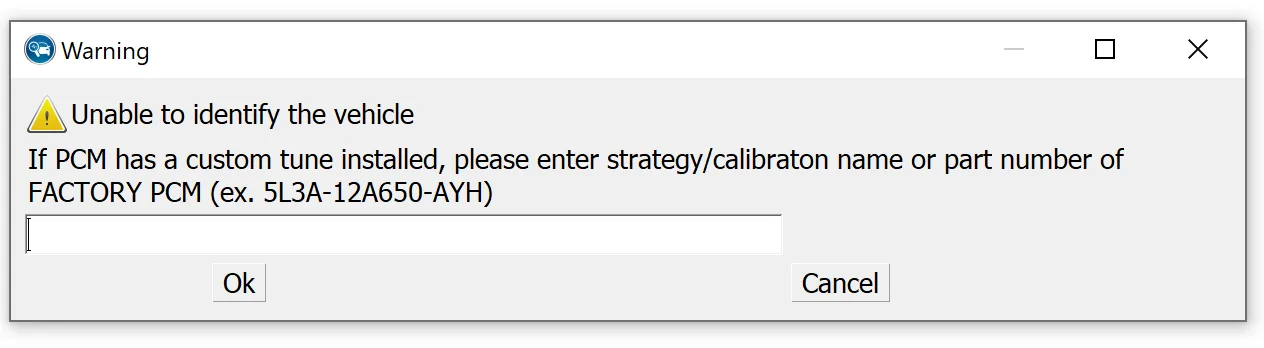

Yeah, I removed and reinstalled 3.5 yesterday a few times... Each time going back and clearing all the leftover files hoping there was something left behind from a previous install. Log files, database, reg entries...In the past, it required a new version of FORScan to pick up new years. First thing I'd do is make sure you have the absolute most recent version installed. If you do and it still doesn't work, then email the FORScan folks.
They used to have "beta builds" that had the newer models sometimes but I didn't see that. I remember way back in the "dark ages", when the 2019 was new that we had to get beta builds for a while so it would work. Every year the app lags the MY release a bit, but they eventually catch up.Yeah, I removed and reinstalled 3.5 yesterday a few times... Each time going back and clearing all the leftover files hoping there was something left behind from a previous install. Log files, database, reg entries...
Intriguingly it says the 3.5 version has 22 & 23 my vehicles...

I will try and update the firmware on the adapter . . .I am not a Forscan Guru, and it is still new to me and still learning how to use it.
But I don't remember having to input PCM Part Number, it should read it automatically when it scans the system and loads the trucks profile, now being a MY 23, might be the factor IDK.
I am assuming you are using OBD-Link EX, by your statement.
1. Try updating the Firmware on the adapter: OBD-Link EX
2. I know that when the truck is connected for the first time, it takes a few minutes to load the trucks profile, and I never fully understood if it automatically finds the as-built files I downloaded from the Ford Motorcraft Services or does Forscan download the file itself after it performs the initial scan of the truck, I just remember it did take some time to finally get into being ready to read and tweak.
3. So, on initial first-time scan, it may need WI-FI, I just do not remember for sure.
4. Try, having the truck running with the initial hook-up vs (KOEO) Key On Engine Off, this might help in getting Forscan to read the VIN# and or PCM part number.
5. Although you mention clearing files, did you clear out the old profile and start a new profile?
Just some thoughts to throw out from a novice user.
If I recall correctly, in order for the Off-Road Screen to display, you also have to enable selectable drive mode (Terrain Managment), check the WIKI, I remember some confusion on that setting, as there are different screens, and the wording on the WIKI page is a little confusing.I just did a bunch of Forscan mods 20 minutes ago. Awesome. Some might not work however. I enabled the off road gages but they don't show up? I change the splash screen to the Ford Performance! Turned off the fake engine sound and a bunch of other things. Maybe with the Lariat some don't work? I will try it tomorrow to see if all I did really work.
Ok I will check that out. I do have the TM which I added a few months after getting my Ranger. I did want the off road gauge to show the truck and tilt axis. I did enable in Forscan the off road gauges and two other ones associated with the off road gauges? They never did materialize on the main gauge in front of the steering wheel. I will see if I can find the power distribution display also. I don't recall seeing that.If I recall correctly, in order for the Off-Road Screen to display, you also have to enable selectable drive mode (Terrain Managment), check the WIKI, I remember some confusion on that setting, as there are different screens, and the wording on the WIKI page is a little confusing.
I added the TM switch, so I did all 3 together and found the Power Dist useless, so I restored that one to factory, since I do not have (Trail Managment)
If you did it correctly, the off-road gauge can be found by scrolling down using the Left Steering Wheel switch.
1. Off Road Gauge - Displays the truck and (Tilt Axis)
2. Selectable Drive Mode - Displays Options for Driving Conitions, and is displayed when you press the TM switch on the (2-Wheel dr / 4 Wheel Dr) selector. (Rock, Snow , Mud etc)
3. Power Distribution - Display - This will display individual power to the wheels and is worthless unless you have (Trail Managment), as it just shows a truck and no indication of wheel power.
the splash screen is in APIM module. There is about 10 different choices. I do like the Ford Performance one as it also has a big cobra on the screen along with Ford Performance lettering.What module do you go into to change the splash screen? How many choices are there?
Ok Lang, I did get the off road gauge to work. You do have to enable it in Forscan. There are 4 things to enable it. The gauge is in the driver menu on the left side of my dash on the Lariat.I was going to turn on the off road gauge an I thought you had to turn it on with the driver menu with the left arrow keys.


