
Sponsored
Loading


DanaBovender
Well-Known Member
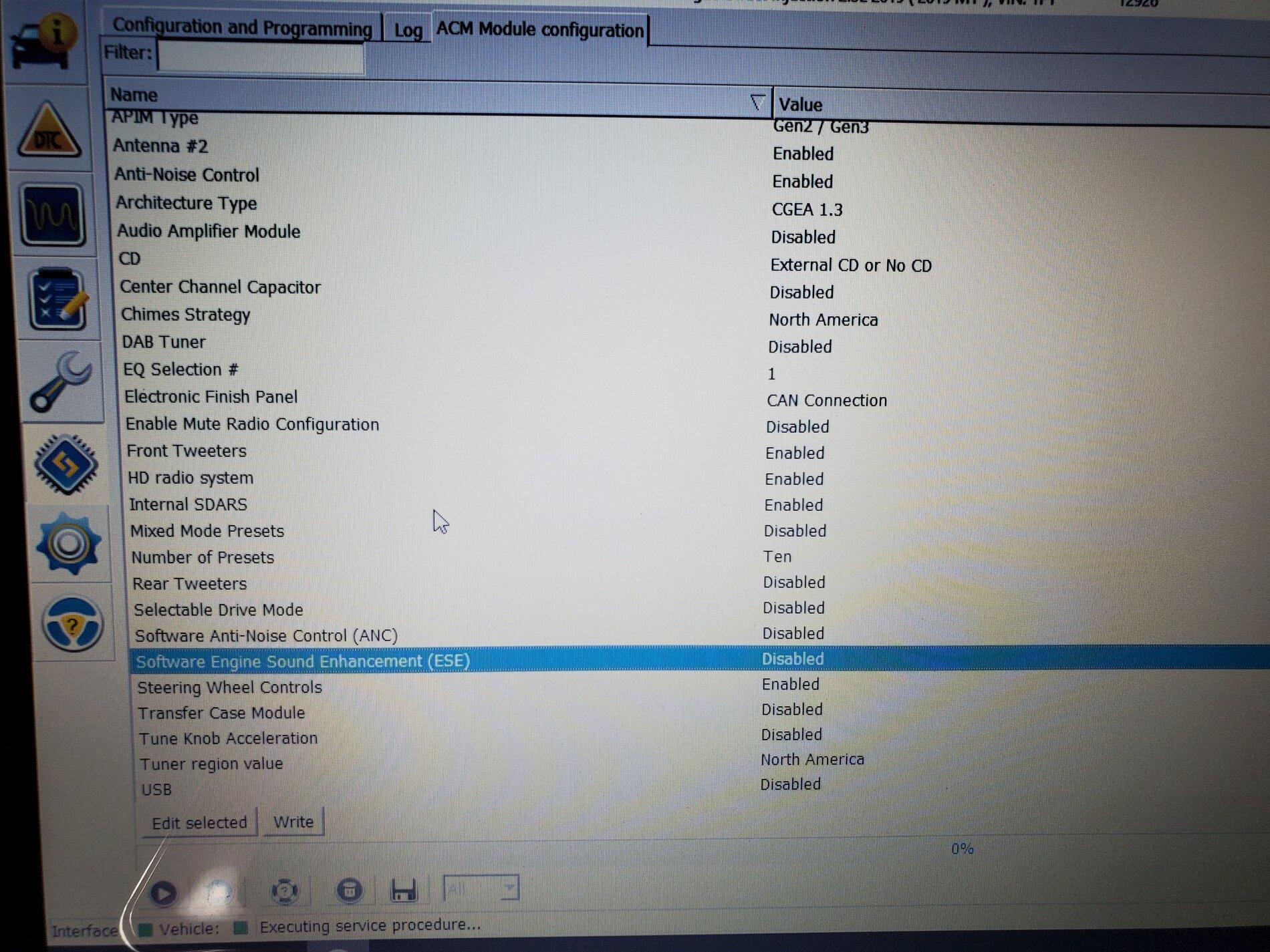
how did you get there? What module is this in?I used Forscan for the 1st time this weekend... among all the little things I changed, the most important one by a long way was this:

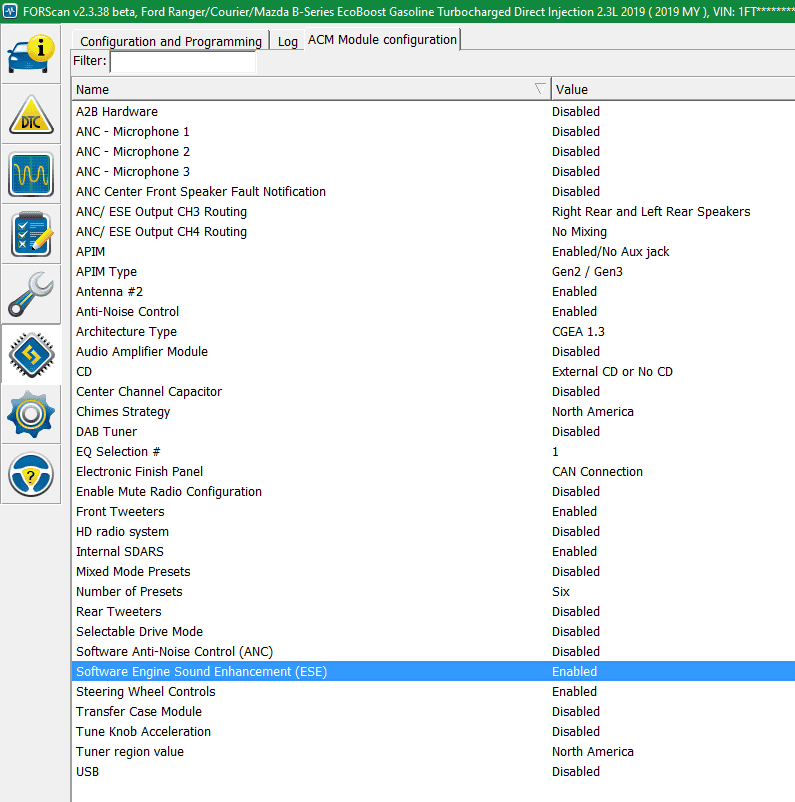
I don't know if this is new to this release, but it definitely works and my subwoofer now sounds like it's supposed to.

Gizmokid2005
Well-Known Member
- Joined
- Dec 1, 2019
- Threads
- 13
- Messages
- 1,279
- Reaction score
- 1,875
- Location
- GA
- Website
- gizmokid2005.com
- Vehicle(s)
- 2019 Ford Ranger XLT 4X4 SCrew
- Occupation
- SQL Developer
- Vehicle Showcase
- 1
It says in the tab at the top, ACM module.how did you get there? What module is this in?
DanaBovender
Well-Known Member
yeah my ACM module tab when opened looks nothing like that....It says in the tab at the top, ACM module.
Gizmokid2005
Well-Known Member
- Joined
- Dec 1, 2019
- Threads
- 13
- Messages
- 1,279
- Reaction score
- 1,875
- Location
- GA
- Website
- gizmokid2005.com
- Vehicle(s)
- 2019 Ford Ranger XLT 4X4 SCrew
- Occupation
- SQL Developer
- Vehicle Showcase
- 1
Make sure you're not using the "ASBUILT" tab - that only provides you access to the HEX codes, and not the FORScan GUI options.yeah my ACM module tab when opened looks nothing like that....
DanaBovender
Well-Known Member
I probably was, it was long ago so I will have to check it out
Stevo56
Well-Known Member
- First Name
- Steve
- Joined
- Sep 24, 2020
- Threads
- 0
- Messages
- 129
- Reaction score
- 356
- Location
- Duluth, MN
- Vehicle(s)
- 2020 Ford Ranger XLT, 2023 Ford Edge SEL AWD, 2012 Ford Mustang
- Occupation
- Retired
I am using the latest Forscan beta 2.3.38. I only have the ACM asbuilt tab. I don't have the tab you show.I used Forscan for the 1st time this weekend... among all the little things I changed, the most important one by a long way was this:
I don't know if this is new to this release, but it definitely works and my subwoofer now sounds like it's supposed to.
Ryan Plain
Well-Known Member
When connecting Forscan, do not load from a previously saved profile. When it loads, the ACM (non asbulit) will be there.
Gizmokid2005
Well-Known Member
- Joined
- Dec 1, 2019
- Threads
- 13
- Messages
- 1,279
- Reaction score
- 1,875
- Location
- GA
- Website
- gizmokid2005.com
- Vehicle(s)
- 2019 Ford Ranger XLT 4X4 SCrew
- Occupation
- SQL Developer
- Vehicle Showcase
- 1
I am using the latest Forscan beta 2.3.38. I only have the ACM asbuilt tab. I don't have the tab you show.
Can confirm this from @Ryan Plain - The ACM non-asbuilt is new to FORScan, so you need to setup a new profile with this module built into it.When connecting Forscan, do not load from a previously saved profile. When it loads, the ACM (non asbulit) will be there.
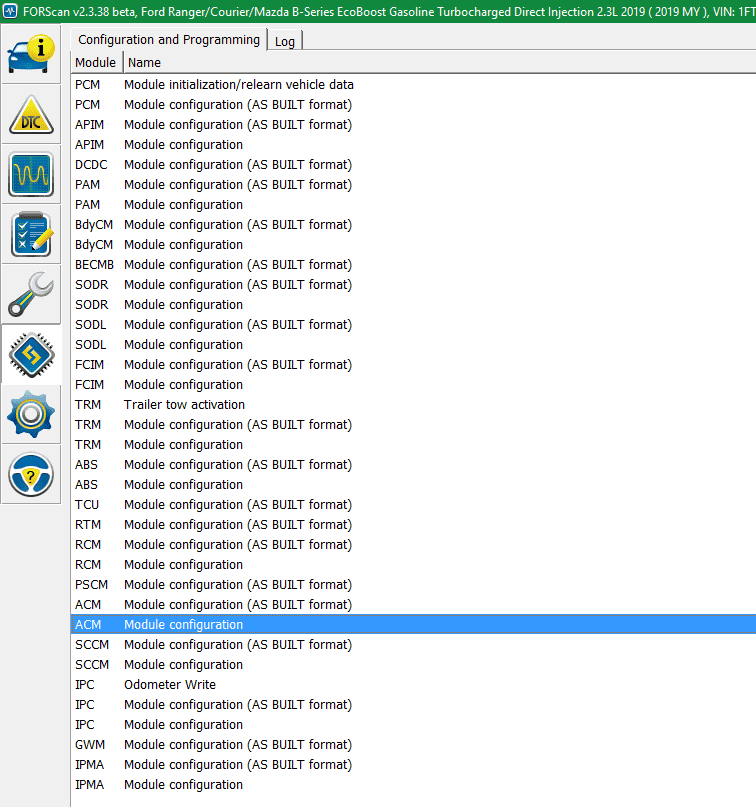
Which gives you access to it:
Stevo56
Well-Known Member
- First Name
- Steve
- Joined
- Sep 24, 2020
- Threads
- 0
- Messages
- 129
- Reaction score
- 356
- Location
- Duluth, MN
- Vehicle(s)
- 2020 Ford Ranger XLT, 2023 Ford Edge SEL AWD, 2012 Ford Mustang
- Occupation
- Retired
I will give this a try. Thanks.When connecting Forscan, do not load from a previously saved profile. When it loads, the ACM (non asbulit) will be there.
gasmanjohn
Well-Known Member
- First Name
- John
- Joined
- May 7, 2020
- Threads
- 4
- Messages
- 62
- Reaction score
- 110
- Location
- Itasca, IL
- Vehicle(s)
- '19 XLT FX4, '19 Beetle Final Edition
- Occupation
- Gas leak inspector
There's also an option near the top to select which speakers the ESE sound comes from.
The on/off difference is amazing... with my little Kicker Hideaway at half volume, it sounded like a Subaru was in the back seat. I had gotten used to it in nearly a year of ownership but I'm so glad to have it gone.
The on/off difference is amazing... with my little Kicker Hideaway at half volume, it sounded like a Subaru was in the back seat. I had gotten used to it in nearly a year of ownership but I'm so glad to have it gone.
Last edited:
Stevo56
Well-Known Member
- First Name
- Steve
- Joined
- Sep 24, 2020
- Threads
- 0
- Messages
- 129
- Reaction score
- 356
- Location
- Duluth, MN
- Vehicle(s)
- 2020 Ford Ranger XLT, 2023 Ford Edge SEL AWD, 2012 Ford Mustang
- Occupation
- Retired
Deleted my old profile and created a new one and the tab was there. Disabled the engine noise and, to me, there is a noise reduction in the cab. With my hearing (wear hearing aids), any excess background noise is undesirable.Can confirm this from @Ryan Plain - The ACM non-asbuilt is new to FORScan, so you need to setup a new profile with this module built into it.

Which gives you access to it:

I also enabled the traffic sign display. It works fine and I get the NA versions of the sign in my 2020 XLT.
micl9
Well-Known Member
Well I guess I will be firing up FORScan this weekend! Thanks for the tip on this guys.Deleted my old profile and created a new one and the tab was there. Disabled the engine noise and, to me, there is a noise reduction in the cab. With my hearing (wear hearing aids), any excess background noise is undesirable.
I also enabled the traffic sign display. It works fine and I get the NA versions of the sign in my 2020 XLT.
I alsi enabled the traffic sign display, but have Euro signs. Started trying to compare files from those with NA and those with Euro, but got busy. But one common thread seems to be that 2019s have Euro and 2020s have NA signs. Anyone who has seen a conflict to this please comment!
Gizmokid2005
Well-Known Member
- Joined
- Dec 1, 2019
- Threads
- 13
- Messages
- 1,279
- Reaction score
- 1,875
- Location
- GA
- Website
- gizmokid2005.com
- Vehicle(s)
- 2019 Ford Ranger XLT 4X4 SCrew
- Occupation
- SQL Developer
- Vehicle Showcase
- 1
Deleted my old profile and created a new one and the tab was there. Disabled the engine noise and, to me, there is a noise reduction in the cab. With my hearing (wear hearing aids), any excess background noise is undesirable.
I also enabled the traffic sign display. It works fine and I get the NA versions of the sign in my 2020 XLT.
I also changed SESE to disable it yesterday and went for a short drive to pick up food and it was actually really incredible the difference in sound. It's so much quieter and "tamer" in the truck than it used to be. 100% recommended.Well I guess I will be firing up FORScan this weekend! Thanks for the tip on this guys.
I alsi enabled the traffic sign display, but have Euro signs. Started trying to compare files from those with NA and those with Euro, but got busy. But one common thread seems to be that 2019s have Euro and 2020s have NA signs. Anyone who has seen a conflict to this please comment!
I haven't tried the traffic signs though, I've seen it a few times but never had a desire for it.
treimche
Well-Known Member
- First Name
- Troy
- Joined
- Apr 8, 2019
- Threads
- 39
- Messages
- 723
- Reaction score
- 889
- Location
- FORT MYERS, FL
- Vehicle(s)
- 2019 Ranger SOLD. 2005 S2000
- Occupation
- Accountant
Also just went in and disabled the ESE but haven't gone for a drive yet.
Where can we find good descriptions of what all of these options are?
Where can we find good descriptions of what all of these options are?
Sponsored


