Sponsored

FORScan Crowdsourced Wiki

twk

Well-Known Member
First Name
Tom
Joined
Mar 9, 2023
Threads
0
Messages
267
Reaction score
1,274
Location
Minnesota
Vehicle(s)
'17 Mustang GT drop top, '22 Ranger Lariat Fx4 SCABbie.
Occupation
Flight Simulator Engineer, retired, unemployed, burden on society.
OK so now I have the cable, installed Forscan, and I can't make any changes. Any change I try to write causes error "service procedure has been interrupted."

Forscan 2.3.65 with trial extended license (is that the problem? is the trial restricted to read-only?)

Tried with several different changes including panic activation, auto stop, and hyper blink, in both GUI and as-built mode.

Godiag GD101 with latest drivers installed from their website. Bought this cable because it does both J2534 and EDM327. Same error in either mode.

Any thoughts?
What are you trying to change?

When I enabled "Parking Lights with Driving Lights" on my Ranger there was no problem. I liked it enough that I tried that on my '17 Mustang, and it came back with (I'm pretty sure) that same message.

(edit - fixed a format goof)
Sponsored

 

mr_camera_man

Member
Joined
Jun 27, 2022
Threads
0
Messages
9
Reaction score
2
Location
Indiana
Vehicle(s)
2021 Ranger STX 4WD Crew
At first I tried doing disable auto stop, disable hyper blink front and rear, panic mode 2x, courtesy wipe all at once. When that failed, I tried only panic 2x since that seemed innocent enough, and that failed both in GUI and as-built.
 

twk

Well-Known Member
First Name
Tom
Joined
Mar 9, 2023
Threads
0
Messages
267
Reaction score
1,274
Location
Minnesota
Vehicle(s)
'17 Mustang GT drop top, '22 Ranger Lariat Fx4 SCABbie.
Occupation
Flight Simulator Engineer, retired, unemployed, burden on society.
At first I tried doing disable auto stop, disable hyper blink front and rear, panic mode 2x, courtesy wipe all at once. When that failed, I tried only panic 2x since that seemed innocent enough, and that failed both in GUI and as-built.
Hum, worth mentioning I thought.
I've never been gutsy enough to do more than one change at a time, but it shouldn't make a bit of difference. And I never did get my Mustang to have parking lights with driving lights. I had to give up. ?
 

airline tech

Well-Known Member
Joined
Aug 24, 2022
Threads
28
Messages
4,458
Reaction score
8,520
Location
Midwest - KS
Vehicle(s)
2022 Ranger Lariat-Super Crew, Cactus Gray
Occupation
Aircraft Tech
OK so now I have the cable, installed Forscan, and I can't make any changes. Any change I try to write causes error "service procedure has been interrupted."

Forscan 2.3.65 with trial extended license (is that the problem? is the trial restricted to read-only?)

Tried with several different changes including panic activation, auto stop, and hyper blink, in both GUI and as-built mode.

Godiag GD101 with latest drivers installed from their website. Bought this cable because it does both J2534 and EDM327. Same error in either mode.

Any thoughts?
First off - What cable did you buy? for the J2534 to isolate if that is the issue

Post specifically how you are - Writing the change.
I think I know what you are doing - ONLY CHANGE the (Code) as instructed with the (x1xx) do NOT change or write anything else (especially the last 2) of the line - these will change automatically when you write the code - The Last 2 are the (Checksum) of the data string, if you are writing the full line and keeping the check sum same (manually inputting) then it will error and fail to write.

So for example:
Panic Activation

#1 most of the feature changes can be done automatically via the (Module Configuration) or easy mode (GUI) within the module such as BCM
but
when you enter the other (Link) - BCM (As-Built) then you are entering the manual method of the changes and must know the (Line & Code) you want to change
This is my preferred method as I am comfortable using it and i have full control on what is being changed and can visually see it, unlike the (easy) mode where it's all done behind the curtain - automatically.

So here is how a manual method of changing the Panic (FOB) button feature

BCM: 726-37-01
0000-0002-0067 (Factory-Setting) (Single Press-Trigger)
xxxx-xxx2-xxxx- Enabled Single Press - Trigger
xxxx-xxx1-xxxx - Enabled (Double Press - Trigger)
xxxx-xxx0-xxxx - Disabled (No Panic Button - Trigger)

So, when you manually write the line - ONLY CHANGE the hex noted.
DO NOT WRITE the line - 0000-0001-0067, this will fail the write.
The last (2) hex codes will auto populate to something different (Checksum) of the data string and if valid (all previous code on the string) it will do a successful write and then you will see the last (2) have changed to match the current (Checksum) as you have set.
 

mr_camera_man

Member
Joined
Jun 27, 2022
Threads
0
Messages
9
Reaction score
2
Location
Indiana
Vehicle(s)
2021 Ranger STX 4WD Crew
The cable is a Godiag GD101. I've installed the latest drivers from their site, used their utility to confirm J2534 connectivity, and Forscan connects fine with J2534 and EDM327.

I read in Forscan's fine print that the free trial extended license can't write changes, so I bought the full license and I'm still getting the same error. I tried changing panic double-click and auto-stop one at a time, same error with both. Using the GUI so no checksum.

At least now I have access to their support as well.


Big Blue

Well-Known Member
First Name
Lee
Joined
May 5, 2020
Threads
16
Messages
3,927
Reaction score
9,352
Location
Wisconsin
Vehicle(s)
2019 Ford Ranger XLT FX4 Supercrew lighting blue
Occupation
Retired mechanical designer
The cable is a Godiag GD101. I've installed the latest drivers from their site, used their utility to confirm J2534 connectivity, and Forscan connects fine with J2534 and EDM327.

I read in Forscan's fine print that the free trial extended license can't write changes, so I bought the full license and I'm still getting the same error. I tried changing panic double-click and auto-stop one at a time, same error with both. Using the GUI so no checksum.

At least now I have access to their support as well.
I've used the free 2 month license to make changes many times with my laptop.

The key word here is "Write". Did you "write" the changes, or did you save the changes? Two different things. Writing the changes actually writes the changes to the module in the truck. Saving is used to save a copy of the asbuilt file for the module, as a backup to the harddrive on the labtop laptop you are using.

By the way it is a good idea to save a backup of the asbuilt files for all the modules BEFORE you make changes in case you want to return to original settings. I also make incremental backups in case I just want to undo the latest changes.
 

airline tech

Well-Known Member
Joined
Aug 24, 2022
Threads
28
Messages
4,458
Reaction score
8,520
Location
Midwest - KS
Vehicle(s)
2022 Ranger Lariat-Super Crew, Cactus Gray
Occupation
Aircraft Tech
It's the cable

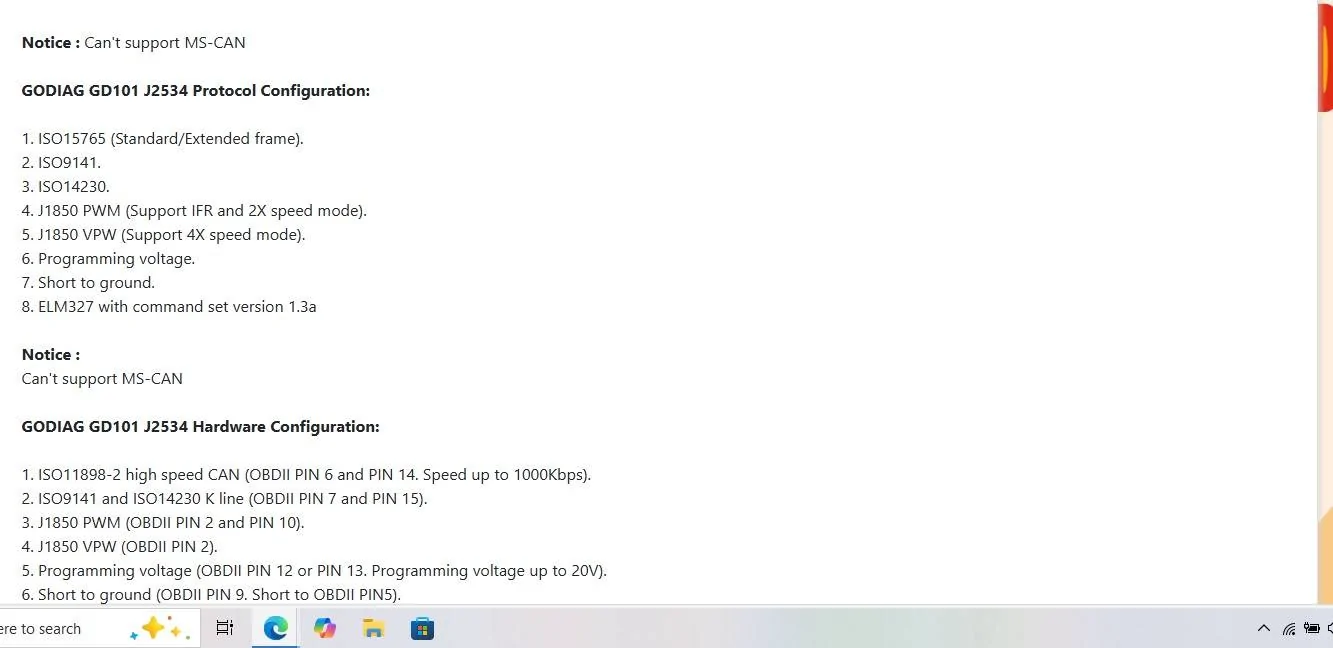
See the NOTE - Can't Support MS-CAN
Plus, I highly doubt a cheap cable will ever support J-2534 Passthrough

If you want J-2534 Pass Through and need it to communicate with a Ford Product no cheap cable available will ever let you do it.
It MUST be on a set of approved cables listed by Ford and the cheapest available that will work is the Mongoose Plus


Screenshot Cable Specs.webp


Mongoose Plus - Ford

OPUS IVS | J2534 Mongoose-Plus

or a High End Scan Tool such as Topdon Phoenix Smart - This is what I have and the cable for the tool is a J-2534 Pass Through cable, I can use the cable along with Forscan if needed.

So, you understand - to simply make Forscan Changes to the (As-Built) data you do not REQUIRE a J-2534 Pass-Through compliant cable.
but
You MUST use a cable recommended for Forscan Use
and that is the OBD-Link EX for (Cable Connection) or OBD-Link MX (Bluetooth Connection) and using a Windows Laptop

So bottom line is - you REQUIRE a different cable that can (Auto) Switch between MS-Can and HS-Can data bus communication.
 

mr_camera_man

Member
Joined
Jun 27, 2022
Threads
0
Messages
9
Reaction score
2
Location
Indiana
Vehicle(s)
2021 Ranger STX 4WD Crew
Yes I'm aware of the difference between writing and saving. These errors were when writing. I did back up the as-built via Forscan as well as downloading it from Ford before I touched anything. I guess I misread their site, but I was going to buy it anyways and at least I have support.

Re: the cable - That's the only other thing I can think of. I thought I was doing the right thing in "well this does either J2534 or EDM327 so at least one should work", but I guess not.

I've also tried various data rate settings and making sure a battery charger was hooked up to keep voltage up during the process, no joy.

I'll send logs to Forscan support and see what the recommend, and I'll also reach out to the cable manufacturer in case they've seen this before.

Edit: After digging some more, the cable manufacturer's website asks Forscan users to contact them on their Whatsapp. Which seems... interesting. I don't use Whatsapp so I filled out the support contact form on their website, we'll see what happens.
 
Last edited:

airline tech

Well-Known Member
Joined
Aug 24, 2022
Threads
28
Messages
4,458
Reaction score
8,520
Location
Midwest - KS
Vehicle(s)
2022 Ranger Lariat-Super Crew, Cactus Gray
Occupation
Aircraft Tech
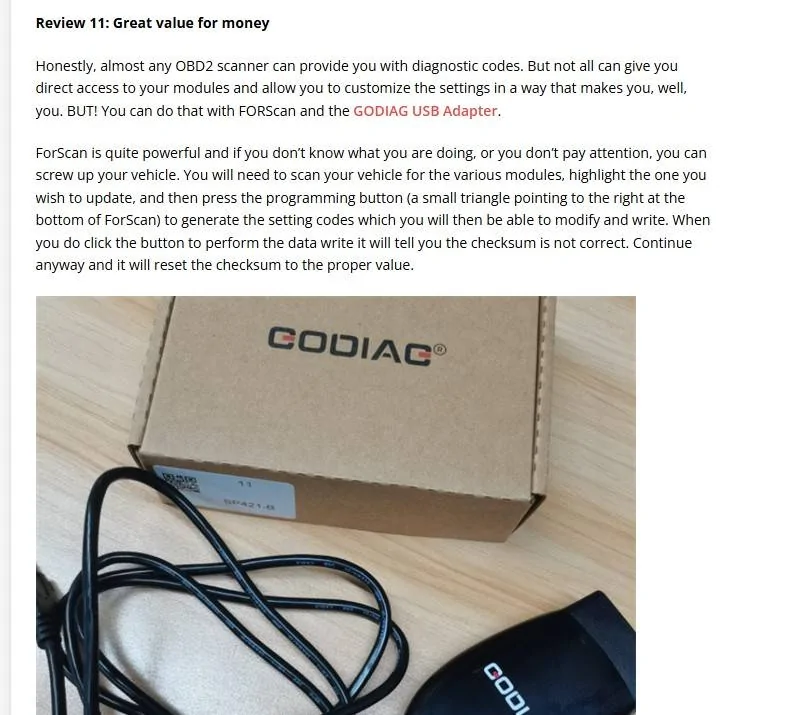
Have you tried this: From a Review of the Cable

Diag Review.webp
 

mr_camera_man

Member
Joined
Jun 27, 2022
Threads
0
Messages
9
Reaction score
2
Location
Indiana
Vehicle(s)
2021 Ranger STX 4WD Crew
Tried that, as well as updating from GUI mode, neither helped. Forscan just requested debug info, haven't heard back from the cable manufacturer yet. I'll update again once I have more info. Thanks everyone!
 

TJC

Well-Known Member
First Name
Tony
Joined
Aug 28, 2020
Threads
45
Messages
3,940
Reaction score
9,894
Location
North Carolina
Vehicle(s)
93 Miata, 05 Ranger 4x4, 20 Ranger 4x4, 23 CX-5
Have you tried this: From a Review of the Cable

Diag Review.webp
Does this have functions that the vLinker FS does not?

I've been using this for several years on Win 7 without issues. The Forscan team used to recommend this unit. It appears to no longer be on their list.
 
Last edited:

airline tech

Well-Known Member
Joined
Aug 24, 2022
Threads
28
Messages
4,458
Reaction score
8,520
Location
Midwest - KS
Vehicle(s)
2022 Ranger Lariat-Super Crew, Cactus Gray
Occupation
Aircraft Tech
Does this have functions that the vLinker FS does not?

I've been using this for several years on Win 7 without issues. The Forscan team used to recommend this unit. It appears to no longer be on their on the list.
No - In fact it will not support MS-CAN, that's the issue, it is marketed as a J2534 Pass Through (Cheaply) but I believe if this cable is truly used on a Ford Product as J5234 Programming (Actual Programming) the Ford Servers (Software Authorization) Handshake, it will not allow the connection.
Even if you get the connection, it will be slow & buggy and risk bricking the module.
There is not a cheap (option) option available that Ford Will allow unless you spend the $575 for the Mongoose Cable.
 
  • Like
Reactions: TJC

mr_camera_man

Member
Joined
Jun 27, 2022
Threads
0
Messages
9
Reaction score
2
Location
Indiana
Vehicle(s)
2021 Ranger STX 4WD Crew
Update - And I'm going to try to make it keyword-rich so anyone else searching about this cable can learn from my pain. ?

I was able to get Forscan to connect with my Godiag GD101 cable and resolve my "service procedure was interrupted" error, and I was able to write changes to the vehicle successfully. I was initially able to read OK but got the error when attempting to write. I was further confused because I had downloaded Godiag's utility and it showed no errors or connectivity issues.

I had emailed Forscan, and they said the cable was incompatible due to poor implementation of ELM327. Godiag has not yet responded to me, but it's less than 24 hours at this point so I can't ding them.

Turns out that the cable needed a firmware update, which was done through Godiag's utility. Please note that this had to be downloaded from their website and was not included in the package. After running the firmware update, the cable connected successfully via J2534 and was able to write changes. I did not make another attempt at connecting via ELM327 since there's no need to deal with the slowness.

So now I'm a happy camper. Although this was a little more of a PITA than it was worth and you're still better off sticking with one of the recommended cables. Please note that I'm only using J2534 for changing settings listed in this thread, I'm not trying to do anything more advanced that may brick the vehicle and don't recommend that.

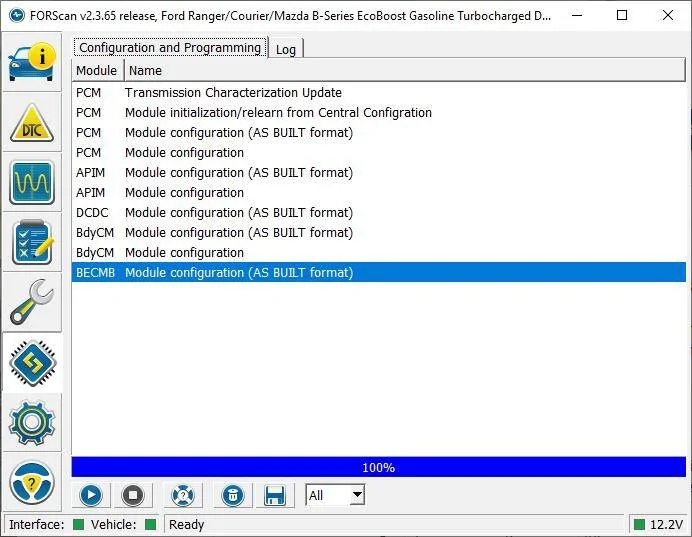
Now on to the next step... I'm trying to disable the seat belt reminder chimes, which the first post in this thread says is in the IPC. See the screenshot below, I don't have an IPC? Mine is an XL with STX, so I have the cheapie cluster. I don't see anything pertaining to belts in the BCM, anywhere else I should look?

Thanks everyone for your help!

godiag firmware update.webp


forscan ranger modules.webp
 

Big Blue

Well-Known Member
First Name
Lee
Joined
May 5, 2020
Threads
16
Messages
3,927
Reaction score
9,352
Location
Wisconsin
Vehicle(s)
2019 Ford Ranger XLT FX4 Supercrew lighting blue
Occupation
Retired mechanical designer
Update - And I'm going to try to make it keyword-rich so anyone else searching about this cable can learn from my pain. ?

I was able to get Forscan to connect with my Godiag GD101 cable and resolve my "service procedure was interrupted" error, and I was able to write changes to the vehicle successfully. I was initially able to read OK but got the error when attempting to write. I was further confused because I had downloaded Godiag's utility and it showed no errors or connectivity issues.

I had emailed Forscan, and they said the cable was incompatible due to poor implementation of ELM327. Godiag has not yet responded to me, but it's less than 24 hours at this point so I can't ding them.

Turns out that the cable needed a firmware update, which was done through Godiag's utility. Please note that this had to be downloaded from their website and was not included in the package. After running the firmware update, the cable connected successfully via J2534 and was able to write changes. I did not make another attempt at connecting via ELM327 since there's no need to deal with the slowness.

So now I'm a happy camper. Although this was a little more of a PITA than it was worth and you're still better off sticking with one of the recommended cables. Please note that I'm only using J2534 for changing settings listed in this thread, I'm not trying to do anything more advanced that may brick the vehicle and don't recommend that.

Now on to the next step... I'm trying to disable the seat belt reminder chimes, which the first post in this thread says is in the IPC. See the screenshot below, I don't have an IPC? Mine is an XL with STX, so I have the cheapie cluster. I don't see anything pertaining to belts in the BCM, anywhere else I should look?

Thanks everyone for your help!

godiag firmware update.jpg


forscan ranger modules.jpg
The IPC is the module you need to edit with Forscan. It is under the chimes section.
 

airline tech

Well-Known Member
Joined
Aug 24, 2022
Threads
28
Messages
4,458
Reaction score
8,520
Location
Midwest - KS
Vehicle(s)
2022 Ranger Lariat-Super Crew, Cactus Gray
Occupation
Aircraft Tech
Update - And I'm going to try to make it keyword-rich so anyone else searching about this cable can learn from my pain. ?

I was able to get Forscan to connect with my Godiag GD101 cable and resolve my "service procedure was interrupted" error, and I was able to write changes to the vehicle successfully. I was initially able to read OK but got the error when attempting to write. I was further confused because I had downloaded Godiag's utility and it showed no errors or connectivity issues.

I had emailed Forscan, and they said the cable was incompatible due to poor implementation of ELM327. Godiag has not yet responded to me, but it's less than 24 hours at this point so I can't ding them.

Turns out that the cable needed a firmware update, which was done through Godiag's utility. Please note that this had to be downloaded from their website and was not included in the package. After running the firmware update, the cable connected successfully via J2534 and was able to write changes. I did not make another attempt at connecting via ELM327 since there's no need to deal with the slowness.

So now I'm a happy camper. Although this was a little more of a PITA than it was worth and you're still better off sticking with one of the recommended cables. Please note that I'm only using J2534 for changing settings listed in this thread, I'm not trying to do anything more advanced that may brick the vehicle and don't recommend that.

Now on to the next step... I'm trying to disable the seat belt reminder chimes, which the first post in this thread says is in the IPC. See the screenshot below, I don't have an IPC? Mine is an XL with STX, so I have the cheapie cluster. I don't see anything pertaining to belts in the BCM, anywhere else I should look?

Thanks everyone for your help!

godiag firmware update.webp


forscan ranger modules.webp
You are still not getting (MS-CAN) network modules to load and also missing most of the modules on the (HS-CAN) network
You can try - Creating a (NEW) profile, this will force a new scan for modules on the network, if it still comes up with the same list of modules then as I stated - You need the proper cable
as the description of the cable states - DOES NOT SUPPORT (MS-CAN)
I think you are fighting a losing battle with this cable

Here is the list of the modules you should be seeing when Forscan Loads (all of them)

HS CAN
-PCM
-OBD II
-APIM
-DCDC
-PAM
-BCM
-BEMB

MS CAN
-SODR
-SODL
-FCIM
-TRM
-RTM

HS CAN 2
-ATCM
-OCS
-CCM
-ABS
-TCU
-RCM
-PSCM
-SCCM
-GWM
-IPMA

HS CAN 3
-DSP
-ACM
-IPC
Sponsored


Top